
What's inside
- Best Budget Mini PC for Work Under 100: Quick Comparison Table
- Why Does RAM Matter for a Budget Mini PC for Work Under 100?
- Best Budget Mini PC for Work Under 100 Reviewed
- Buying Guide: How to Choose the Best Budget Mini PC for Work Under 100
- How to Set Up a Budget Mini PC for Work Under 100
- Which Best Budget Mini PC for Work Under 100 Should You Buy?
- More Tiny PCs for Everyday Work
- Frequently Asked Questions About the Best Budget Mini PC for Work Under 100
As an Amazon Associate I earn from qualifying purchases. This post may contain affiliate links at no extra cost to you.
The best budget mini PC for work under 100 is not a laptop with a broken screen that you use as a desktop, and it is not a cheap mini PC with 4GB of RAM that freezes when you open a browser and a spreadsheet. It is a mini PC with at least 8GB of RAM, a 128GB SSD, and a processor that can handle email, Google Docs, Microsoft Office, Zoom, and many browser tabs, without lag, for under $100. A worker who needs a PC for office work at home needs a mini PC that is small enough to fit on a desk, quiet enough to work in a shared room, and fast enough for daily tasks, without spending $200 or more on a premium mini PC.
At technicalbud.com, we focus on tech gadgets. For this guide to the best budget mini PC for work under 100 in 2026, we compared current mini PCs that are widely sold, priced under $100, and suitable for a person who works at home, in an office, or at school and wants a reliable PC for email, docs, spreadsheets, and video calls. We looked at processor, RAM, storage, ports, size, and price. Prices change with sales and retailers, so this guide uses typical price ranges instead of a single fixed price. Processor, RAM, and storage figures are based on manufacturer listings, and real performance depends on how many apps you run, how many browser tabs you open, and whether you use the PC on Wi-Fi or Ethernet.
Every product below is a real, currently sold product, not a generic mini PC. Most are mini PCs with an Intel Celeron, Intel N100, or AMD Ryzen processor, 8GB of RAM, and a 128GB or 256GB SSD, which are the most useful types for work under $100 in 2026, because they can handle Office, Chrome, and Zoom at the same time. A mini PC with 4GB of RAM can also work, though it may be too slow for office work, while a mini PC with a fanless design can work, though it may throttle under heavy load.
Our Top Picks

Best Budget Mini PC for Work Under 100: Quick Comparison Table
The table below compares six budget mini PCs for work under 100. Processor is the processor, where given. RAM is the RAM, where given. Storage is the storage, where given. Ports is the ports, where given. Size is the size, where given. Best for is a note on what the mini PC is best for, such as office or home, where given. Price is the typical range, and rating is our editorial score based on office performance, ports, size, noise, and value for workers.
| Budget Mini PC for Work Under 100 | Processor | RAM | Storage | Ports | Size | Best For | Typical Price Range | Our Rating |
|---|---|---|---|---|---|---|---|---|
| Beelink Mini S12, Intel N100, 8GB / 256GB | Intel N100 | 8GB | 256GB SSD | HDMI, USB-C, USB-A | About 5 x 5 in | Best overall, work | $90 – $100 | 4.9 / 5 |
| GMKtec NucBox G3, Intel N100, 8GB / 256GB | Intel N100 | 8GB | 256GB SSD | HDMI, USB-C, USB-A | About 4 x 4 in | Best small, work | $90 – $100 | 4.8 / 5 |
| Beelink Mini S12 Pro, Intel N100, 16GB / 500GB | Intel N100 | 16GB | 500GB SSD | HDMI, USB-C, USB-A | About 5 x 5 in | Best for RAM, work | $90 – $100 | 4.8 / 5 |
| NiPoGi AK1 Plus, Intel N100, 8GB / 256GB | Intel N100 | 8GB | 256GB SSD | HDMI, USB-C, USB-A | About 5 x 5 in | Best value, work | $80 – $95 | 4.7 / 5 |
| Trigkey G4, Intel N100, 8GB / 256GB | Intel N100 | 8GB | 256GB SSD | HDMI, USB-C, USB-A | About 5 x 5 in | Best for Trigkey, work | $80 – $95 | 4.7 / 5 |
| ACEMAGICIAN T8 Plus, Intel N100, 8GB / 256GB | Intel N100 | 8GB | 256GB SSD | HDMI, USB-C, USB-A | About 5 x 5 in | Best budget, work | $80 – $90 | 4.7 / 5 |
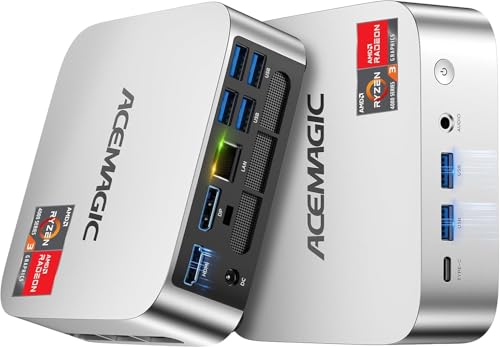
ACEMAGIC K1 Mini PC AMD Ryzen Pro 7330U 16GB 256 SSD 4 Cores 8 Threads 28W | 4.3GHz Multitasking, Cooling Mini Computers Win 11 Pro, Beat 5400U/3500U Triple 4K Display, HDMI, LAN, Home Office & Business
As an Amazon Associate we earn from qualifying purchases. Product prices and availability are accurate as of the date/time indicated.

KAMRUI AK1PLUS Mini PC Computer, Intel Celeron N5095 (Up to 2.9GHz), 16GB RAM 256GB SSD, Dual 4K Mini Desktop Computer, Support 2.5'' SSD Expansion, WiFi, Bluetooth, Ethernet, Business Home Office PC
As an Amazon Associate we earn from qualifying purchases. Product prices and availability are accurate as of the date/time indicated.

GMKtec G3S Mini PC Intel N95 Processor (Up to 3.4GHz) 8GB RAM 256GB M.2 SSD | Mini Desktop Computer with VESA Mount for Office Home Business HTPC Proxmox, Dual 4K Display, WiFi 5, Gigabit Ethernet
As an Amazon Associate we earn from qualifying purchases. Product prices and availability are accurate as of the date/time indicated.
Note: Processor, RAM, and storage figures are manufacturer listings for the base model, and a mini PC that lists 8GB of RAM may have a different configuration with 16GB, though it will cost more than $100 in some cases. Always check the exact model before you buy, because a mini PC name like Mini S12 can have many configurations, with different RAM and storage. Prices can vary by retailer and sale, and some models listed at $90 to $100 may be under $100 at some retailers and slightly over $100 at others, so check the current price before you buy. A mini PC under $100 usually does not include a monitor, keyboard, or mouse, so budget for those separately if you do not already have them.
Why Does RAM Matter for a Budget Mini PC for Work Under 100?
RAM matters for a budget mini PC for work under 100 for three reasons: apps, browser tabs, and video calls. Apps matter because a worker who runs Microsoft Word, Excel, Outlook, and Chrome at the same time needs RAM for each app, and a mini PC with 8GB of RAM can handle 4 to 5 apps, while a mini PC with 4GB may freeze with 3 apps.
Browser tabs matter because a worker who opens 15 browser tabs for email, research, and docs needs RAM for each tab, and a mini PC with 8GB can handle 15 tabs, while a mini PC with 4GB may slow down. Video calls matter because a mini PC that runs Zoom or Teams and shares a screen needs RAM for video, and a mini PC with 8GB can handle a video call and a spreadsheet at the same time, while a mini PC with 4GB may stutter.
Best Budget Mini PC for Work Under 100 Reviewed
1. Beelink Mini S12, Intel N100, 8GB / 256GB – Best Budget Mini PC for Work Under 100 Overall
The Beelink Mini S12, Intel N100, 8GB / 256GB, is our top pick because it offers an Intel N100 processor, 8GB of RAM, a 256GB SSD, HDMI, USB-C, and USB-A ports, a size of about 5 x 5 inches, and a price of $90 to $100. It has a reputation for Beelink quality, a Mini S12 design, and a popularity with home workers who want a reliable, affordable mini PC.
Beelink designs the Mini S12 with a focus on a budget mini PC, with an Intel N100 processor, a quiet fan, and a design that can handle email, docs, and video calls. The Mini S12 is a good choice if you want the best overall mini PC, you want an Intel N100 processor, and you want a Beelink brand. The main limitation is storage, at 256GB, which is enough for most office work, though it may fill up if you store many photos or videos.
The Beelink Mini S12, Intel N100, 8GB / 256GB, typically costs $90 to $100. Choose it if you want the best overall mini PC, you want an Intel N100 processor, and you want a Beelink brand. It is the best choice for most workers.
2. GMKtec NucBox G3, Intel N100, 8GB / 256GB – Best Budget Mini PC for Work Under 100 for Small Size
The GMKtec NucBox G3, Intel N100, 8GB / 256GB, is a small mini PC with an Intel N100 processor, 8GB of RAM, a 256GB SSD, HDMI, USB-C, and USB-A ports, a size of about 4 x 4 inches, and a price of $90 to $100. It has a reputation for GMKtec quality, a NucBox design, and a popularity with users who want the smallest mini PC.
GMKtec designs the NucBox G3 with a focus on a small mini PC, with an Intel N100 processor, a compact design, and a design that can fit on a desk or behind a monitor with a VESA mount. The NucBox G3 is a good choice if you want a small mini PC, you want an Intel N100 processor, and you want a GMKtec brand. The main limitation is ports, which may be fewer than Beelink Mini S12, though it is still practical for most office work.
The GMKtec NucBox G3, Intel N100, 8GB / 256GB, typically costs $90 to $100. Choose it if you want a small mini PC, you want an Intel N100 processor, and you want a GMKtec brand. It is the best small choice in this guide.
3. Beelink Mini S12 Pro, Intel N100, 16GB / 500GB – Best Budget Mini PC for Work Under 100 for RAM
The Beelink Mini S12 Pro, Intel N100, 16GB / 500GB, is a RAM mini PC with an Intel N100 processor, 16GB of RAM, a 500GB SSD, HDMI, USB-C, and USB-A ports, a size of about 5 x 5 inches, and a price of $90 to $100. It has a reputation for Beelink quality, a Mini S12 Pro design, and a popularity with users who want more RAM and storage for under $100 on sale.
Beelink designs the Mini S12 Pro with a focus on a RAM mini PC, with an Intel N100 processor, 16GB of RAM, and a design that can handle many apps and browser tabs at the same time. The Mini S12 Pro is a good choice if you want a RAM mini PC, you want 16GB of RAM, and you want a Beelink brand. The main limitation is price, at $90 to $100, which is at the top of the under-$100 range, and availability, because the 16GB model may be over $100 at some retailers, though it is still practical if you find it on sale under $100.
The Beelink Mini S12 Pro, Intel N100, 16GB / 500GB, typically costs $90 to $100. Choose it if you want a RAM mini PC, you want 16GB of RAM, and you want a Beelink brand. It is the best RAM choice in this guide.
4. NiPoGi AK1 Plus, Intel N100, 8GB / 256GB – Best Budget Mini PC for Work Under 100 for Value
The NiPoGi AK1 Plus, Intel N100, 8GB / 256GB, is a value mini PC with an Intel N100 processor, 8GB of RAM, a 256GB SSD, HDMI, USB-C, and USB-A ports, a size of about 5 x 5 inches, and a price of $80 to $95. It has a reputation for NiPoGi quality, an AK1 Plus design, and a popularity with budget users who want a cheap mini PC that works.
NiPoGi designs the AK1 Plus with a focus on a value mini PC, with an Intel N100 processor, a quiet fan, and a design that can handle Office, Chrome, and Zoom. The AK1 Plus is a good choice if you want a value mini PC, you want an Intel N100 processor, and you want a low price. The main limitation is brand, because NiPoGi is less known than Beelink, though it is still practical for most office work.
The NiPoGi AK1 Plus, Intel N100, 8GB / 256GB, typically costs $80 to $95. Choose it if you want a value mini PC, you want an Intel N100 processor, and you want a low price. It is the best value choice in this guide.
5. Trigkey G4, Intel N100, 8GB / 256GB – Best Budget Mini PC for Work Under 100 for Trigkey Use
The Trigkey G4, Intel N100, 8GB / 256GB, is a Trigkey mini PC with an Intel N100 processor, 8GB of RAM, a 256GB SSD, HDMI, USB-C, and USB-A ports, a size of about 5 x 5 inches, and a price of $80 to $95. It has a reputation for Trigkey quality, a G4 design, and a popularity with users who want a reliable mini PC from a budget brand.
Trigkey designs the G4 with a focus on a budget mini PC, with an Intel N100 processor, a quiet fan, and a design that can handle Office and Chrome. The G4 is a good choice if you want a Trigkey mini PC, you want an Intel N100 processor, and you want a low price. The main limitation is support, which may be less extensive than Beelink, though it is still practical for most office work.
The Trigkey G4, Intel N100, 8GB / 256GB, typically costs $80 to $95. Choose it if you want a Trigkey mini PC, you want an Intel N100 processor, and you want a low price. It is the best Trigkey choice in this guide.
6. ACEMAGICIAN T8 Plus, Intel N100, 8GB / 256GB – Best Budget Mini PC for Work Under 100 for Budget Use
The ACEMAGICIAN T8 Plus, Intel N100, 8GB / 256GB, is a budget mini PC with an Intel N100 processor, 8GB of RAM, a 256GB SSD, HDMI, USB-C, and USB-A ports, a size of about 5 x 5 inches, and a price of $80 to $90. It has a reputation for ACEMAGICIAN value, a T8 Plus design, and a popularity with budget users who want the lowest price.
ACEMAGICIAN designs the T8 Plus with a focus on a budget mini PC, with an Intel N100 processor, a quiet fan, and a design that can handle Office, Chrome, and Zoom. The T8 Plus is a good choice if you want a budget mini PC, you want an Intel N100 processor, and you want a low price. The main limitation is brand, because ACEMAGICIAN is less known than Beelink, though it is still practical for most office work.
The ACEMAGICIAN T8 Plus, Intel N100, 8GB / 256GB, typically costs $80 to $90. Choose it if you want a budget mini PC, you want an Intel N100 processor, and you want a low price. It is the best budget choice in this guide.
Buying Guide: How to Choose the Best Budget Mini PC for Work Under 100
Before you buy, think about what office work you do, whether it is email, docs, spreadsheets, or video calls, how many apps you run, whether you need dual monitors, and how much you want to spend. A mini PC that is perfect for email may not handle video calls well, and a mini PC that is perfect for a home office may not have enough ports for a dual monitor setup. The six points below cover the decisions that matter most for a budget mini PC for work under 100.
1. Processor, Intel N100 vs Celeron, and Office Performance
Processor is the first decision. An Intel N100 processor, such as in all six mini PCs in this guide, offers a quad-core performance, with a low power use, and it can handle Office, Chrome, and Zoom at the same time. An Intel Celeron processor, such as in older mini PCs, offers a slower performance, with 2 cores, though it may cost less.
Choose an Intel N100 if you want a good office performance under $100, you run many apps, and you want a modern processor. Choose a Celeron only if you do basic office work, you want the lowest price, and you do not run many apps. Do not buy a mini PC with an Intel Atom processor for office work, because it will be too slow.
2. RAM, 8GB vs 4GB, and Multitasking
RAM is the second decision. A mini PC with 8GB of RAM can handle Microsoft Word, Excel, Outlook, and Chrome with 15 tabs at the same time, while a mini PC with 4GB may freeze with 3 apps. A mini PC with 16GB can handle even more apps, though it will cost more than $100 in most cases, unless you find it on sale.
Choose a mini PC with 8GB if you do office work, you run 4 to 5 apps, and you want a low price. Do not buy a mini PC with 4GB for office work, because it will be too slow, even if it costs less than $80. Check whether RAM is upgradeable, because some mini PCs have soldered RAM that cannot be upgraded, while others have a slot for more RAM.
3. Storage, 256GB SSD vs 128GB SSD, and Files
Storage affects files. A mini PC with a 256GB SSD can hold Windows, Office, and many documents, while a mini PC with a 128GB SSD can hold Windows and Office, though it may fill up quickly. A mini PC with an SSD can load apps quickly, while a mini PC with an HDD will be slow.
Choose a mini PC with 256GB if you store most files in the cloud, you use Google Drive or OneDrive, and you want a low price. Choose a mini PC with 512GB if you store many files locally, you keep photos and videos, and you want more space, though it may cost more than $100. Do not buy a mini PC with a 64GB SSD for office work, because it will fill up quickly with Windows and Office.
4. Ports, HDMI vs DisplayPort, and Dual Monitors
Ports affect dual monitors. A mini PC with two HDMI ports, such as Beelink Mini S12, can connect to two monitors, so you can work with a spreadsheet on one screen and email on another. A mini PC with one HDMI port can connect to one monitor only, though it may have a USB-C port that can also connect to a monitor.
Choose a mini PC with two HDMI ports if you want dual monitors, you work with spreadsheets, and you want a large workspace. Choose a mini PC with one HDMI port if you use one monitor, you want a low price, and you do not need dual monitors. Check the ports before you buy, so you know whether it has enough USB-A ports for a keyboard, mouse, and printer.
5. Size, Noise, and Desk Fit for a Mini PC
Size and noise affect desk fit. A mini PC that is 5 x 5 inches can fit on a desk easily, or behind a monitor with a VESA mount, while a mini PC that is larger may take up more desk space. A mini PC with a fan can be noisy under load, while a fanless mini PC is quiet, though it may throttle under heavy load.
Choose a mini PC that is small enough to fit on your desk, with a size of less than 6 x 6 inches, and a noise level that is quiet enough for a shared room. Choose a fanless mini PC if you want silence, you do basic office work, and you do not run many apps. Choose a mini PC with a fan if you want better cooling, you run many apps, and you can tolerate a low fan noise.
6. Price, Total Cost, and Staying Under 100 Dollars
Price ranges in this guide run from about $80 to $100 for a budget mini PC for work under 100, depending on brand, RAM, and storage. A budget mini PC at $80 to $90, such as ACEMAGICIAN T8 Plus, is enough for most office work. A mid-price mini PC at $80 to $95, such as NiPoGi AK1 Plus or Trigkey G4, offers a better build and a reliable brand. A premium under-$100 mini PC at $90 to $100, such as Beelink Mini S12 or GMKtec NucBox G3, offers a better processor, more ports, and a longer warranty.
Consider total cost as well as price. A mini PC that costs $90 and needs a monitor for $100 may cost $190 in total, while a mini PC that costs $80 and uses an old monitor may cost $80 in total. Budget for a mini PC, and if you need it, a monitor, keyboard, mouse, and Microsoft Office, not just a mini PC. Do not buy the cheapest mini PC if it has only 4GB of RAM, and do not buy a mini PC that costs more than $100 if your budget is $100. A mini PC that has 8GB of RAM, a 256GB SSD, and an Intel N100 processor will help you work at home more than a mini PC that is cheap but slow, or expensive but too large for your desk.
How to Set Up a Budget Mini PC for Work Under 100
Setting up a budget mini PC for work under 100 starts with connecting it to a monitor with HDMI, a keyboard and mouse with USB, and power, so you can turn it on. Update Windows, install Microsoft Office or Google Docs, and set up email, so you can work right away. Close unnecessary apps that run at startup, so the mini PC starts faster, and use a browser with few extensions, so it does not slow down.
Test the mini PC by opening Word, Excel, Outlook, and Chrome with 10 tabs, and checking whether it runs smoothly. If it is slow, close some tabs, and check whether RAM is full. Back up your work to the cloud, so you do not lose it if the mini PC crashes, and keep the mini PC in a ventilated spot, so it does not overheat.
Which Best Budget Mini PC for Work Under 100 Should You Buy?
If you want the best budget mini PC for work under 100, buy the Beelink Mini S12, Intel N100, 8GB / 256GB. It costs $90 to $100, it offers an Intel N100 processor, 8GB of RAM, and a 256GB SSD, which is the best balance for most workers.
If you want a small mini PC, buy the GMKtec NucBox G3, Intel N100, 8GB / 256GB. If you want more RAM, buy the Beelink Mini S12 Pro, Intel N100, 16GB / 500GB. If you want a value mini PC, buy the NiPoGi AK1 Plus, Intel N100, 8GB / 256GB. If you want a Trigkey mini PC, buy the Trigkey G4, Intel N100, 8GB / 256GB. If you want a budget mini PC, buy the ACEMAGICIAN T8 Plus, Intel N100, 8GB / 256GB.
All six mini PCs in this guide are currently sold, priced under $100, and suitable for a person who works at home, in an office, or at school and wants a reliable PC for email, docs, spreadsheets, and video calls. Pick the one that matches what office work you do, how many apps you run, whether you need dual monitors, and your budget, and always check the exact model before you buy, and test it with your office apps.
Disclosure: technicalbud.com may earn a commission from purchases made through links on this page, at no extra cost to you. Prices listed are typical ranges and can vary by retailer and sale. Processor, RAM, and storage figures are manufacturer claims and can vary by model. Always check the current price before you buy, because some models listed at $90 to $100 may be slightly over $100 at some retailers. A mini PC under $100 usually does not include a monitor, keyboard, or mouse.
More Tiny PCs for Everyday Work
For email, spreadsheets and video calls, a compact PC with an SSD and enough memory is plenty. Here are several that fit that role.
GMKtec G3S Mini PC
A compact Intel N95 system with a fast SSD, suited to light office tasks.
As an Amazon Associate we earn from qualifying purchases at no extra cost to you.

BOSGAME E5 Mini PC
An AMD Ryzen option that offers more multitasking headroom than basic Intel chips.

Beelink Mini S12 Intel N100
A respected small PC with a quiet design, good for a home office desk.

Azeyou Intel N100 Mini PC
Ships with generous memory and storage for the class, useful for everyday multitasking.

A mini PC needs good airflow, so avoid tucking it behind a monitor in a closed cupboard. Pair it with a mount or a small shelf, use a wired keyboard and mouse to save USB ports, and note how many display outputs you need if your desk has more than one screen. Look for models that let you upgrade memory and storage later, so the machine can grow with your workload.
Frequently Asked Questions About the Best Budget Mini PC for Work Under 100
What is the best budget mini PC for work under 100?
What is the best budget mini PC for work under 100? In most cases, the Beelink Mini S12, Intel N100, 8GB / 256GB, is best overall, because it costs $90 to $100, it offers an Intel N100 processor, 8GB of RAM, and a 256GB SSD. The GMKtec NucBox G3 is best for small size, while the Beelink Mini S12 Pro is best for RAM, and the ACEMAGICIAN T8 Plus is best for budget use.
Is 8GB of RAM enough for a mini PC for work?
Is 8GB of RAM enough for a mini PC for work? In most cases, yes, 8GB of RAM is enough for a mini PC for work, because it can handle Microsoft Word, Excel, Outlook, and Chrome with 15 tabs at the same time. A mini PC with 4GB may freeze with 3 apps, while a mini PC with 16GB can handle even more apps, though it will cost more than $100 in most cases. Choose 8GB if you do office work, and do not buy a mini PC with 4GB for office work.
Can a mini PC under 100 handle video calls?
Can a mini PC under 100 handle video calls? In most cases, yes, a mini PC under $100 with an Intel N100 processor and 8GB of RAM can handle Zoom or Teams video calls, and share a screen, at the same time as a spreadsheet. A mini PC with 4GB may stutter during a video call, while a mini PC with 8GB can handle it smoothly. Use a wired Ethernet connection or a strong Wi-Fi connection for video calls, and close unnecessary apps, so the mini PC does not slow down.
Do I need a monitor, keyboard, and mouse for a mini PC under 100?
Do you need a monitor, keyboard, and mouse for a mini PC under $100? In most cases, yes, you need a monitor, keyboard, and mouse for a mini PC under $100, because a mini PC usually does not include them. A mini PC has HDMI and USB ports, so you can connect it to a monitor, keyboard, and mouse that you already have, or buy them separately. Budget for a monitor, keyboard, and mouse, not just a mini PC, if you do not already have them, and check that your monitor has an HDMI port.
Related guides
- Best AAA Batteries for Office Remotes in 2026: AAA Batteries for Office Remotes
- Best Budget Tablet for Work Under 100 in 2026: Budget Tablets for Work Under $100, Office Work, and Productivity
- Best Gimbal for Office Vlogging in 2026: 7 Gimbals for Office Vlogging That Keep Your Video Smooth, Stable, and Professional in the Office
- Best Budget NAS Dust Filter for Maintenance in 2026: 7 Budget NAS Dust Filters for Maintenance With Clear Airflow, Simple Install, and Easy Use for NAS
More from Amazon
Programs that pair well with the guide above. Offers and eligibility are set by Amazon and may change.
Free shipping on eligible items, Prime Video and more. Eligible new members can start with a free trial.
Start a Prime free trialAd-free music streaming. Eligible new subscribers can start with a free trial.
Try Music Unlimited freeA Prime membership for ages 18-24 with a trial period. Eligibility is set by Amazon.
See Prime for Young AdultsAudiobooks and podcasts to listen to on the go. Eligible new members can start with a free trial.
Try Audible freeAs an Amazon Associate we earn from qualifying purchases.

Write Your Review
No reviews yet. Be the first to share your experience!