
What's inside
- How to Choose Mini PC RAM by Buyer and Machine
- Quick Comparison: How to Choose Mini PC RAM Models and Machines
- Detailed Reviews: How to Choose Mini PC RAM Picks
- Buying Guide: How to Choose Mini PC RAM, Step by Step
- Memory Kits Worth Checking Before Upgrading a Mini PC
- Frequently Asked Questions About How to Choose Mini PC RAM
As an Amazon Associate I earn from qualifying purchases. This post may contain affiliate links at no extra cost to you.
Learning how to choose mini PC RAM is learning that a mini PC is not a small desktop in the one place its buyers most wish it were. Inside a mini PC, memory lives under rules a tower never teaches: it may be a pair of laptop-sized SO-DIMM slots that can be opened, upgraded, and rescued, or it may be soldered to the board at the factory, in a parish where the RAM you buy on the first day is the RAM you will own on the last. It may be DDR4 or DDR5, at speeds the processor actually supports or at speeds a listing prefers, shared, in almost every mini PC in this article, with the integrated graphics that give the little machine its screen, so that its capacity is not only the programs’ parish but the display’s as well. And it is bought, in the mini PC market’s particular custom, either as part of a configured machine from Beelink, Minisforum, Geekom, ASUS NUC, and their peers, or as a barebones kit whose buyer must supply RAM and storage themselves, correctly, the first time, because a barebones machine with the wrong memory is not a bargain. It is a paperweight with a processor. This article teaches the whole decision — type, capacity, speed, channels, and the soldered question that outranks them all — for the real mini PCs and the real memory lines, Crucial, Kingston, Samsung, and G.Skill in their SO-DIMM parish, that are actually sold for them, and it compares configured mini PCs in the table below by their memory parish as much as by their processors, because two machines with the same chip and different memory arrangements are, in every working sense that matters, two different computers. Buy RAM by this article’s order — upgradability first, capacity second, type and speed third — and a mini PC will serve for years at its full parish. Reverse the order, as listings invite, and a fast, small, wrong memory will be the most elegant mistake on a desk.
The soldered question comes first because it cannot be undone. A growing parish of mini PCs, following the laptop world’s thinnest machines, solders its memory to the board: the arrangement is compact, can be fast in its LPDDR parish in a maker’s terms, and is absolutely final. A buyer of a soldered machine must therefore buy their future at the checkout, in the manufacturer’s configuration, at the manufacturer’s price for the larger parish, because there is no later. A buyer of a slotted machine, in the SO-DIMM pattern that Beelink, Minisforum, Geekom, and the NUC parish largely keep, owns an option: to buy a modest configuration today, to add or replace memory when a workload argues, and to rescue a machine whose memory fails or whose owner grows. Neither arrangement is a defect, and this article refuses to pretend otherwise, but they are different purchases wearing the same photograph, and the single most important sentence in any mini PC listing is the one that says which parish its memory lives in. Confirm it, from the maker’s current specification for the exact model, before any other figure is read, and let a soldered machine’s price be compared, honestly, in the configuration you will actually need in its third year, because its cheaper configuration is not a saving. It is a smaller computer, permanently, at a discount that expires on the day your workload grows. A slotted machine’s specification must be read with the same severity in the other direction: how many slots, what maximum capacity in the maker’s stated terms, what memory type and speed it accepts, and whether both slots are accessible in its design’s parish, because a machine with one slot, or with a slot occupied by a parish its owner cannot match, is a machine whose upgrade is a negotiation rather than a promise.
Type and speed come second, and they are governed by a rule a memory listing will never print: a mini PC uses the memory its processor and board support, at the speed they support, and faster memory than that parish is not faster. It is merely dearer, running at the supported speed if it runs at all. DDR4 and DDR5 are different physical parishes — a SO-DIMM of one will not fit a slot of the other, by a notch’s deliberate design — and a buyer must match the generation exactly, from the mini PC maker’s specification, along with the form: SO-DIMM, the short laptop module that is this category’s standard, and not the full-length DIMM of a desktop, which will not enter a mini PC’s world however persuasive its price. Speed, stated in megatransfers in a maker’s terms, should be bought at the machine’s supported parish and not above it, capacity being a far better parish for any spare money, because in a mini PC’s integrated-graphics world the difference a capacity makes — a second program’s parish, a graphics allocation’s room — is felt daily, while a speed step above a processor’s support is felt never. Channels are speed’s honest half: two matched modules, in a slotted machine’s two slots, give a memory system its dual-channel parish, in the architecture’s terms, which integrated graphics in particular use with gratitude, because a graphics system that shares memory also shares its bandwidth. A single large module in one slot is therefore, for most mini PCs, a lesser purchase than two matched modules of the same total, and an upgrade that fills an empty second slot with a module matched in type, speed, and ideally capacity and maker to the first is the single best value transaction in this entire article. Matched means matched in the specification that matters — generation, form, speed, and voltage in its stated parish — and a buyer mixing a parish at random will sometimes be rewarded with a machine that declines to start, in a silence that teaches the lesson at a tuition of one returned parcel.
Capacity is the third decision, and it should be bought by a workload counted honestly rather than by a decade’s fear. For a mini PC whose parish is a browser, an office, media, and the ordinary government of a household or a small desk, 16GB in a dual-channel parish is this article’s settled recommendation: it is the capacity at which a modern operating system and its programs stop negotiating and start working, and in a soldered machine it is the smallest configuration this guide will sign. For a working parish — many tabs and programs together, photo editing, development work, virtual machines in their stated appetites, light video work, and any machine whose integrated graphics will be asked for a game or a second high-resolution screen’s parish — 32GB is the professional answer, and in a soldered machine it is the configuration its buyer will thank themselves for in every year of its life. Above that parish, in the 64GB classes slotted machines may accept in their makers’ stated maxima, live the named appetites: multiple virtual machines, large data and media projects, a homelab’s parish in the mini PC world’s thriving dialect, and a buyer in that parish knows its name and does not need this article’s permission. Below the settled parish, an 8GB machine exists and has its honest uses — a single-purpose parish of signage, a thin client, a media box, a Linux desk of deliberate modesty — and should be bought only for a named single purpose, in a slotted machine where its parish can grow, because an 8GB general computer in this decade is a machine that will spend its life explaining itself. This guide compares six real, currently sold memory configurations and the mini PCs that carry them: Beelink SER and EQ classes, Minisforum UM and Venus parish, Geekom A and Mini IT classes, ASUS NUC Pro parish, and the Crucial and Kingston SO-DIMM lines that serve the slotted world, each judged on the soldered question answered clearly, a capacity parish honestly sized, and an upgrade path a buyer can verify before money moves.
Our Top Picks
How to Choose Mini PC RAM by Buyer and Machine
The configured-machine buyer: buy the third year’s RAM today, in a soldered parish without exception
For a buyer choosing a finished mini PC from a maker’s page, the correct method is to decide the machine’s memory parish before its processor is even compared: filter, first, by whether its RAM is slotted or soldered in the maker’s specification, and let that answer set the budget’s shape. In a soldered machine, buy 32GB where any working parish is intended and 16GB only where the desk’s duties are known, light, and stable, because the configuration is the machine, forever. In a slotted machine, a 16GB dual-channel configuration is an honest start with a documented road upward, and such a buyer should record, in the machine’s own keeping, its slots, its accepted type and speed, and its stated maximum, on the day of purchase, because that information, written down while it is on a screen, is worth an hour of searching in the year it is needed. Let the configured buyer distrust, as this article distrusts everywhere, a listing that advertises a processor at a headline and whispers its memory in a footnote, because in a mini PC the footnote is the computer.
The barebones buyer: match generation, form, and speed, in a matched pair, from a maker’s list
A buyer of a barebones mini PC — the parish where Beelink, Minisforum, and the NUC world sell a machine without memory and storage — carries the whole responsibility this article teaches, and should discharge it in its exact order. Confirm the machine’s accepted generation, DDR4 or DDR5, its form, SO-DIMM, its supported speed, its slot count and its stated maximum capacity, from the maker’s current specification and, where a maker publishes one, its tested or compatible memory parish. Buy two matched modules of the chosen total from an established memory maker in the Crucial, Kingston, Samsung, or G.Skill parish, install them by the machine maker’s direction with the ordinary care a board deserves — power removed, hands grounded in the usual parish, modules seated until their clips speak — and let the machine’s first start, and its settings’ own report of the memory’s size and channel parish, be the purchase’s examination, sat before storage is fitted and an operating system complicates the evidence. A barebones buyer who follows that order will save, honestly, the difference a configuration charges. One who reverses it will own a small, fast lesson in a notch’s geography.
The upgrader: fill the empty slot first, match the module you keep, verify in the machine’s own words
An owner whose slotted mini PC has grown slow in its parish should upgrade in this article’s order of value. First, read the machine’s current memory as it reports itself — its total, its slot occupation, its type and speed — in the system’s own information, and read its maker’s stated maximum before any parcel is ordered. Where an empty slot exists, fill it with a module matched to the resident one in generation, form, speed, and as nearly as can be managed in capacity and maker, because the dual-channel parish that addition buys is worth more, to an integrated-graphics machine, than any other single transaction in this guide. Where both slots are filled, replace both with a matched pair at the new total rather than mixing a new parish with an old one, keep the retired modules, labelled, as the machine’s spare and its diagnostic parish, and verify the result in the machine’s own report and in a day’s real work before the upgrade is called finished, because memory that is recognised is not always memory that is stable, and a day’s work is the only examiner whose certificate a workload accepts.
Quick Comparison: How to Choose Mini PC RAM Models and Machines
| Model | Key Specs | Best For | Typical Price Range | Rating |
|---|---|---|---|---|
| Beelink SER and EQ Classes (configured parish) | Mini PC classes by line as maker states, RAM type and slot or soldered classes, stated maximum and speed classes in maker terms | Best mini PC RAM choice overall | $350 – $700 by model and configuration | 4.5 / 5 |
| Minisforum UM and Venus Classes | Mini PC classes by line as maker states, DDR4 and DDR5 classes by model, slot and maximum classes in maker terms | Best barebones and upgrade choice | $300 – $750 by model and configuration | 4.5 / 5 |
| Crucial DDR5 and DDR4 SO-DIMM Kits (2x8GB to 2x32GB) | SO-DIMM kit classes by generation as maker states, speed and capacity classes, compatibility parish classes in maker terms | Best RAM kit for slotted machines | $45 – $220 by generation and capacity | 4.6 / 5 |
| Kingston Fury Impact SO-DIMM Classes | SO-DIMM classes by generation as maker states, speed and capacity classes in maker terms, kit classes | Best performance SO-DIMM | $55 – $240 by generation and capacity | 4.4 / 5 |
| Geekom A and Mini IT Classes (configured parish) | Mini PC classes by line as maker states, RAM and soldered or slot classes by model, configuration classes in maker terms | Best configured for offices | $400 – $800 by model and configuration | 4.3 / 5 |
| ASUS NUC Pro Parish (barebones and configured) | NUC classes by model as maker states, SO-DIMM slot and maximum classes, DDR generation classes in maker terms | Best documented upgrade path | $350 – $900 by model and configuration | 4.4 / 5 |

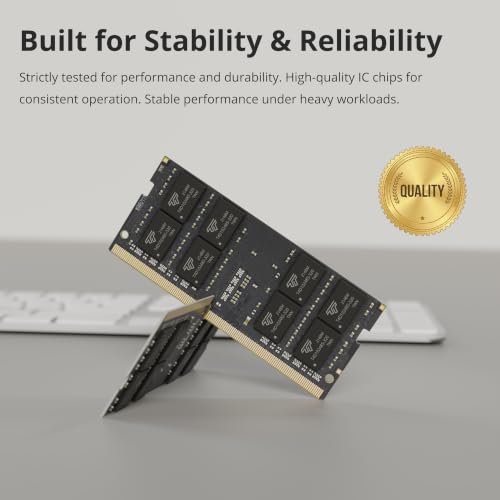
Timetec 32GB KIT (2x16GB) DDR4 2666MHz (PC4-2666V) PC4-21300 SODIMM Laptop RAM – 260-Pin 1.2V CL19 Non-ECC Unbuffered Memory Module for Laptop, Notebook, Mini PC, All-in-One




As an Amazon Associate we earn from qualifying purchases. Product prices and availability are accurate as of the date/time indicated.

GMKtec M6 Ultra Gaming Mini PC Ryzen 7640HS 32GB RAM DDR5 1TB SSD | Desktop Mini Computers Office Home, Dual NIC LAN 2.5GbE, Triple 4K Display, WiFi 6, USB4, BT5.2, DP, HDMI 2.0
As an Amazon Associate we earn from qualifying purchases. Product prices and availability are accurate as of the date/time indicated.

KAMRUI AK1PLUS Mini PC Computer, Intel Celeron N5095 (Up to 2.9GHz), 16GB RAM 256GB SSD, Dual 4K Mini Desktop Computer, Support 2.5'' SSD Expansion, WiFi, Bluetooth, Ethernet, Business Home Office PC
As an Amazon Associate we earn from qualifying purchases. Product prices and availability are accurate as of the date/time indicated.
Memory generation and form, slot count or soldered arrangement, stated maximum capacity, supported speed in the maker’s terms, configuration as sold, and for kits the module count, capacity, speed, and voltage parish are each maker’s specification for the current exact model, and must be confirmed for your exact mini PC before purchase, because a wrong generation or form will not fit at all. Prices are typical street ranges, for configured machines in their stated memory configuration and for kits as described, and vary strongly with capacity and generation. Ratings reflect memory suitability: the soldered question stated clearly, a dual-channel parish as sold or achievable, a capacity honestly sized for a stated workload, a documented upgrade path in a slotted machine, and value across a machine’s whole life rather than its first configuration.
Detailed Reviews: How to Choose Mini PC RAM Picks
1. Crucial SO-DIMM Kits – Best RAM for Slotted Machines
Crucial’s SO-DIMM kits lead the memory side because a memory maker’s own parish — kits in both generations, in matched pairs, with a compatibility discipline in its maker’s pattern that a barebones buyer can actually use — is the safest pair of modules in this table. For a slotted machine, it is the first kit to specify.
Match its generation and speed to your machine’s specification, in writing, before its price is admired. A Crucial pair so matched will be recognised, run in its channel parish, and forgotten, and a memory that is forgotten by its machine’s owner has achieved the highest state this category recognises.
2. Beelink Classes – Best Configured Choice
Beelink’s SER and EQ classes compete on a configured parish whose memory arrangements, across its lines, are stated with a clarity a buyer can plan by, in slotted designs in much of its parish that keep an upgrade’s road open. For a buyer who wants a finished machine and a future, it is the balanced row.
Record its slots and its maximum in the machine’s keeping on its first day. A Beelink so documented will be upgraded, in its third year, in ten minutes of shopping rather than in an evening of archaeology, and its owner will have learned that in a mini PC, documentation is a hardware feature.
3. Minisforum Classes – Best Barebones Choice
Minisforum’s UM and Venus parish serves the barebones and the enthusiast buyer with machines in its lines whose memory parish — generation, slots, maxima in its makers’ terms — spans both DDR generations and the capacities a homelab and a workstation argue for. For a buyer building their own configuration, it is the widest parish here.
Let its exact model’s specification, and not its line’s reputation, name the memory it is fed. A Minisforum so built will start on its first parish and grow on its owner’s evidence, and a machine built correctly by its owner has a biography no configured box can offer, which in the mini PC world is a real and counted pleasure.
4. Kingston Fury Impact Classes – Best Performance SO-DIMM
Kingston’s Fury Impact classes give a slotted machine a performance parish in its maker’s terms, for the owner whose processor’s supported speed and whose integrated graphics can actually use a finer module’s manners. For a gaming and workstation mini PC, it is the kit whose premium can be real.
Confirm that your machine’s supported parish reaches the kit’s, because above that line its premium buys a number and not a speed. A Fury kit so matched will give a little machine its memory’s whole argument, and its owner will feel it where this article promised: in a graphics parish that shares, and shares gratefully.
5. ASUS NUC Parish – Best Documented Path
ASUS’s NUC parish, heir to the line that defined the category, serves a buyer who values a specification’s completeness: slots, maxima, and generations stated in its maker’s pattern with an office’s clarity. For a business and a homelab buyer, that documentation is a working asset.
Buy its barebones parish only with its memory list open in the next tab, as this article’s barebones counsel directs. A NUC so fed will be the machine in a household or an office whose next decade is already written in its manual, and a documented machine, in a small parish, is a machine that can be maintained by whoever inherits it.
6. Geekom Classes – Best Configured for Offices
Geekom’s A and Mini IT classes close the table with configured machines in its lines whose office parish — a finished desk, a stated configuration, a support conversation in its maker’s pattern — suits a buyer who wants the soldered question answered by a configuration rather than by a kit. For an office’s small desks, it is the calm row.
Let its configuration be bought, where its parish is soldered in a given model, at the third year’s size and not the first’s. A Geekom so configured will serve an office without ever asking it a memory question, and an office machine that asks no questions has understood, as completely as this category allows, the assignment it was bought for.
Buying Guide: How to Choose Mini PC RAM, Step by Step
Answer the soldered question, match the generation, buy capacity in a matched pair
Confirm, from the maker’s current specification for the exact model, whether its memory is slotted or soldered, and let that answer govern everything: a soldered machine bought at its third year’s capacity, a slotted machine bought or built with a documented road upward. Match, without exception, the memory’s generation, DDR4 or DDR5, its SO-DIMM form, and its supported speed to the machine’s stated parish, because a wrong generation will not fit, a wrong form will not enter, and a speed above support will not run at its number. Buy capacity by a workload’s honest count — 16GB dual-channel for a general desk, 32GB for a working parish and for any soldered machine with ambitions, above that for named appetites — in two matched modules wherever two slots exist, and price the whole transaction, machine and memory together in a barebones parish, because a mini PC’s true price is the price of the computer that starts.
Install, verify, and record, in the machine’s own keeping
Install memory, where a machine’s parish allows it, by its maker’s direction, with power removed and the ordinary care a board is owed, seat each module until its clips confirm it, and verify the result in the system’s own report — total capacity, the memory’s speed, and its channel parish where a system states it — before the machine is closed and returned to its desk. Run a day’s real work as the upgrade’s examination, because recognised memory and stable memory are cousins and not twins, and keep the retired modules, labelled with the machine’s name and their own parish, as its spare and its diagnostic. Record the machine’s memory facts in its keeping: generation, form, slots, maximum, the modules fitted and their date, because a mini PC will outlive its purchaser’s memory of its own, and the next pair of hands — an owner’s in three years, a colleague’s, a family’s — will bless the note or curse its absence in proportion to their hurry.
Upgrade on a workload’s evidence, and let the soldered lesson govern the next machine
Upgrade a slotted machine when a workload can name its ceiling — a program’s parish refused, a system’s own report of a memory spent, a graphics parish starved by a single channel — and upgrade it by this article’s order: fill an empty slot with a matched module, or replace a pair with a matched pair, never by mixing a parish and hoping a board will arbitrate. Replace, rather than upgrade, a soldered machine whose memory has become its limit, pass it, honestly described, to the lighter parish it can still serve for years, and let its lesson be spent exactly once: the next machine’s configuration, soldered or not, bought at the size of the work it will be doing when it is no longer new. How to choose mini PC RAM ends where it began, in a footnote that is actually the headline: slotted or soldered, matched and dual, sized for the third year — and any memory in this table, bought by that order, fitted by that care, and recorded in that keeping, will let a small machine do a large machine’s work for years, which is the whole and sufficient miracle a mini PC was invented to perform.
Memory Kits Worth Checking Before Upgrading a Mini PC
Match the memory generation and form factor to your mini PC first, as DDR4 and DDR5 SODIMM modules are not interchangeable. These examples cover both.
Crucial 16GB DDR4-3200 SODIMM
A trusted single-module DDR4 stick that suits most DDR4 mini PCs. It is a straightforward upgrade for smoother multitasking.
As an Amazon Associate we earn from qualifying purchases at no extra cost to you.
Samsung 16GB DDR4-3200 SODIMM
A reliable module from a major memory maker, well suited to office-type mini PCs that need extra headroom.

Timetec 16GB DDR4-3200 SODIMM
A lower-cost alternative with standard timings that works for basic upgrades on common platforms.
Crucial 32GB DDR5-5600 SODIMM Kit
A dual-channel DDR5 kit for newer mini PCs, helpful for virtual machines and heavy multitasking.

DATO 32GB DDR5-5600 SODIMM Kit
Another DDR5 dual-channel option for users who want a different vendor and capacity for demanding workloads.
Mini PCs often have only one or two memory slots, so a single larger module can leave room for a later upgrade, while a matched kit gives dual-channel bandwidth that helps integrated graphics. Always compare the speed rating supported by your processor so you do not pay for performance the machine cannot use. Confirm the maximum supported memory and slot count in your mini PC’s specifications before buying.
Frequently Asked Questions About How to Choose Mini PC RAM
How do I choose RAM for a mini PC?
Answer three questions in this order. First, is the machine’s memory slotted or soldered, from its maker’s specification for the exact model, because a soldered machine must be bought, at the checkout, at the capacity its third year needs, while a slotted machine can grow. Second, what generation, form, and speed does it accept — DDR4 or DDR5, in SO-DIMM form, at its supported speed — matched exactly, because a wrong generation will not fit and a speed above support will not run at its number. Third, how much does your workload need, bought in two matched modules for a dual-channel parish wherever two slots exist: 16GB for a general desk, 32GB for a working parish, more for named appetites like virtual machines and a homelab. Crucial’s kits lead this table for slotted machines, and Beelink’s and Minisforum’s classes lead its machines, each chosen by those three answers in that order.
How much RAM does a mini PC need, 16GB or 32GB?
16GB, in a dual-channel parish of two matched modules, is the settled answer for a general mini PC: browsing, office work, media, and a household’s or a small desk’s whole government, with room for a modern operating system to work rather than negotiate. 32GB is the answer for a working machine — many programs and tabs together, photo and light video work, development, virtual machines, and any parish where integrated graphics are asked for games or demanding screens — and it is the configuration this article directs for any soldered machine with a working ambition, because that purchase cannot be revisited. 8GB serves only a named single purpose, in a slotted machine that can grow, and 64GB serves named appetites their owners can list. Count your own open programs on your busiest day, add the graphics parish a mini PC always carries, and buy the capacity that count names, with the soldered premium paid, once, in advance.
Can I upgrade the RAM in any mini PC?
No, and the difference is the most important specification in this category. A slotted mini PC, in the SO-DIMM parish that Beelink, Minisforum, Geekom, and the NUC lines largely keep, can be upgraded: its slots, its accepted generation and speed, and its stated maximum capacity are published in its maker’s specification, and an owner can add a matched module to an empty slot or replace a pair with a larger matched pair. A soldered mini PC cannot be upgraded at all, because its memory is fixed to its board at the factory, and its buyer is choosing, at the checkout, the memory of its entire life. Confirm which parish a model lives in, from the maker’s current information for the exact model, before its processor, its ports, or its price are allowed to argue, because a soldered machine bought a size too small is not a bargain with a limitation. It is a different, smaller computer, bought at a discount that expires on the day the work grows.
Does RAM speed matter in a mini PC, and should I buy one module or two?
Speed matters inside the parish a machine supports, and not at all above it, so buy at the speed your mini PC’s specification states and spend any remaining money on capacity, where a working machine will feel it daily. A faster module than a board supports will run at the supported speed if it runs, and a listing that sells a mini PC buyer a speed their processor cannot use has sold them a number. Two modules matter more than a speed step for most owners, because two matched modules give a memory system its dual-channel parish, which integrated graphics — the display parish of almost every mini PC in this guide — use with particular gratitude, sharing both the memory and its bandwidth. Buy and upgrade in matched pairs, matched in generation, form, speed, and as nearly as possible in capacity and maker, and verify the result in the system’s own report, because in a mini PC the second slot is not a spare. It is half the memory system, waiting to be bought.
Related guides
- Best AAA Batteries for Office Remotes in 2026: AAA Batteries for Office Remotes
- Best Budget Tablet for Work Under 100 in 2026: Budget Tablets for Work Under $100, Office Work, and Productivity
- Best Gimbal for Office Vlogging in 2026: 7 Gimbals for Office Vlogging That Keep Your Video Smooth, Stable, and Professional in the Office
- Best Budget NAS Dust Filter for Maintenance in 2026: 7 Budget NAS Dust Filters for Maintenance With Clear Airflow, Simple Install, and Easy Use for NAS
More from Amazon
Programs that pair well with the guide above. Offers and eligibility are set by Amazon and may change.
Free shipping on eligible items, Prime Video and more. Eligible new members can start with a free trial.
Start a Prime free trialAd-free music streaming. Eligible new subscribers can start with a free trial.
Try Music Unlimited freeA Prime membership for ages 18-24 with a trial period. Eligibility is set by Amazon.
See Prime for Young AdultsAudiobooks and podcasts to listen to on the go. Eligible new members can start with a free trial.
Try Audible freeAs an Amazon Associate we earn from qualifying purchases.

Write Your Review
No reviews yet. Be the first to share your experience!