
What's inside
- Why Kids Need a High End Laptop That Is Durable
- Best High End Laptop for Kids: Processor, RAM and Battery Matter Most
- Best High End Laptop for Kids Comparison Table
- Top High End Laptops for Kids Reviewed
- Buying Guide: How to Choose the Best High End Laptop for Kids
- How to Set Up a High End Laptop for Kids Safely
- Frequently Asked Questions
As an Amazon Associate I earn from qualifying purchases. This post may contain affiliate links at no extra cost to you.
Finding the best high end laptop for kids is about choosing a laptop that is fast enough for schoolwork, for coding, and for creative projects, with a design that is durable enough to survive a backpack, with a laptop that is safe with parental controls, and with a design that is light enough for a child to carry. A high end laptop for kids should have a fast processor, with at least 16GB of RAM, a bright display, and a battery that lasts all school day, with a laptop that is premium, but also practical for a child.
This guide explains what to look for in a high end laptop for kids, how to compare processor, RAM, durability, and parental controls, and which models work well in 2026. We focus on practical use for parents who want a premium laptop for their child, with a laptop that is used for school, for homework, and for learning to code, and with a design that is suitable for a child aged 8 to 16. Whether your child is in primary school or in high school, the same principles apply: choose a laptop that is durable, with a design that is safe, and with a laptop that is fast enough to last for years.
Our Top Picks
Why Kids Need a High End Laptop That Is Durable
Kids need a high end laptop that is durable because a laptop for a child will be dropped, bumped, and carried in a backpack, with a design that is rough, and with a laptop that needs to survive, with a design that is strong. A laptop such as the Apple MacBook Air M3, with an aluminium body, is more durable than a laptop made from plastic, with a design that is fragile, and with a laptop that can crack if dropped. A laptop with a military-grade test, with a design that is MIL-STD-810H, such as a Lenovo Yoga, is even better, because it is tested to survive drops, with a design that is robust, and with a laptop that is ideal for a child.
A high end laptop for kids also needs to be fast, because a slow laptop, with a design that is laggy, will frustrate a child, with a design that is bad for learning, and with a laptop that cannot run educational software, with a design that is demanding. A laptop with an Apple M3 or M4 chip, or an Intel Core Ultra, with a design that is fast, will run school apps, with a design that is smooth, and with a laptop that can handle video editing, coding, and creative projects, with a design that is future-proof for several years.
Best High End Laptop for Kids: Processor, RAM and Battery Matter Most
Processor matters most for a high end laptop for kids, because a fast processor, such as an Apple M4, an Intel Core Ultra 7, or a Qualcomm Snapdragon X Elite, will run schoolwork quickly, with a design that is efficient, and with a laptop that is responsive. A laptop with an Apple M3 chip, with 8 cores, is a good choice, because it is fast, with a design that is efficient, and with a laptop that has a long battery life. A laptop with an Intel Core i5, with a design that is older, is slower, with a design that is less future-proof, and with a laptop that may struggle with newer software in a few years.
RAM and battery also matter, because a laptop with 16GB of RAM is a good minimum for a high end laptop for kids, with a design that can handle many tabs, with a laptop that is smooth, while a laptop with 8GB of RAM is too little, with a design that will slow down, and with a laptop that is not recommended for a premium purchase. A laptop with a battery life of at least 12 hours, such as a MacBook Air, is also important, because it will last all school day, with a design that is reliable, and with a laptop that does not need to be charged at school. A laptop with a bright display, with a design that is at least 400 nits, is also better, because it is easy to see in a classroom, with a design that is clear.
Best High End Laptop for Kids Comparison Table
| Model | Processor | RAM / Storage | Display | Weight / Battery | Typical Price Range | Rating |
|---|---|---|---|---|---|---|
| Apple MacBook Air M4 13 in | Apple M4, 10-core | 16GB / 256GB | 13.6 in Liquid Retina | About 2.7 lbs / 18 hours | $950-$1100 | 4.9/5 |
| Apple MacBook Air M3 13 in | Apple M3, 8-core | 16GB / 256GB | 13.6 in Liquid Retina | About 2.7 lbs / 18 hours | $850-$1000 | 4.8/5 |
| Dell XPS 13 9340 | Intel Core Ultra 7 | 16GB / 512GB | 13.4 in, 120Hz | About 2.6 lbs / 18 hours | $1100-$1300 | 4.7/5 |
| Microsoft Surface Laptop 7th Ed 13.8 in | Snapdragon X Elite | 16GB / 512GB | 13.8 in PixelSense | About 2.9 lbs / 20 hours | $1000-$1200 | 4.7/5 |
| Lenovo Yoga Slim 7x | Snapdragon X Elite | 16GB / 512GB | 14.5 in OLED 3K | About 2.8 lbs / 18 hours | $1000-$1200 | 4.7/5 |
| HP Spectre x360 14 | Intel Core Ultra 7 | 16GB / 512GB | 14 in OLED 2.8K, touch | About 3.2 lbs / 16 hours | $1200-$1400 | 4.7/5 |

HBESTORE 10.1 Inch Mini Laptop, Android 12 Netbook, Quad Core Processor | kids computer for students, WIFI+BT, expandable storage, camera, gift bundle

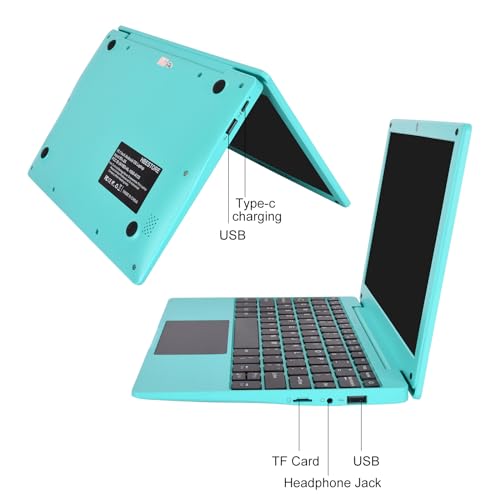


As an Amazon Associate we earn from qualifying purchases. Product prices and availability are accurate as of the date/time indicated.

Fwmntu 10.1 Inch Mini Laptop Netbook, Android 12.0 Operating System, IPS 800 * 1280 HD Screen, Built-in WiFi and Webcam, Portable Small Notebook Computer for Kids Students Home Learning (Black)


As an Amazon Associate we earn from qualifying purchases. Product prices and availability are accurate as of the date/time indicated.

VTech Genio Bilingual JuniorBook Learning Laptop for Kids
As an Amazon Associate we earn from qualifying purchases. Product prices and availability are accurate as of the date/time indicated.
Top High End Laptops for Kids Reviewed
Apple MacBook Air M4 13 in
The Apple MacBook Air M4 13-inch is a laptop with an Apple M4 10-core processor, 16GB of RAM and 256GB of storage, a 13.6-inch Liquid Retina display, a weight of about 2.7 pounds, a battery life of up to 18 hours, and a price of $950 to $1100. It has a design that is known for Apple quality, with a laptop that is fast, light, and durable, with an aluminium body. It is a good choice if you want the best high end laptop for kids, with a design that is premium, and with a laptop that is ideal for school, for coding, and for creative work, although it runs macOS, not Windows, so check if your child’s school uses Windows apps.
Apple MacBook Air M3 13 in
The Apple MacBook Air M3 13-inch is a laptop with an Apple M3 8-core processor, 16GB of RAM and 256GB of storage, a 13.6-inch Liquid Retina display, a weight of about 2.7 pounds, a battery life of up to 18 hours, and a price of $850 to $1000. It has a design that is similar to the M4, with a laptop that is slightly older, but still fast, and with a design that is a good value. It is a good choice if you want a high end laptop for kids that is affordable for a MacBook, with a design that is premium, and with a laptop that is good for a child who uses Apple devices.
Dell XPS 13 9340
The Dell XPS 13 9340 is a laptop with an Intel Core Ultra 7 processor, 16GB of RAM and 512GB of storage, a 13.4-inch display with 120Hz, a weight of about 2.6 pounds, a battery life of up to 18 hours, and a price of $1100 to $1300. It has a design that is known for Dell quality, with a laptop that is premium, and with a design that is ideal for Windows. It is a good choice if you want a high end laptop for kids that runs Windows, with a design that is fast, and with a laptop that is good for school apps that need Windows.
Microsoft Surface Laptop 7th Ed 13.8 in
The Microsoft Surface Laptop 7th Edition 13.8-inch is a laptop with a Snapdragon X Elite processor, 16GB of RAM and 512GB of storage, a 13.8-inch PixelSense display, a weight of about 2.9 pounds, a battery life of up to 20 hours, and a price of $1000 to $1200. It has a design that is known for Microsoft quality, with a laptop that is fast, and with a design that is ideal for Windows 11 with Copilot+. It is a good choice if you want a high end laptop for kids with a long battery life, with a design that is premium, and with a laptop that is good for school.
Lenovo Yoga Slim 7x
The Lenovo Yoga Slim 7x is a laptop with a Snapdragon X Elite processor, 16GB of RAM and 512GB of storage, a 14.5-inch OLED 3K display, a weight of about 2.8 pounds, a battery life of up to 18 hours, and a price of $1000 to $1200. It has a design that is known for Lenovo quality, with a laptop that has a beautiful OLED display, and with a design that is ideal for creative work. It is a good choice if you want a high end laptop for kids with a stunning display, with a design that is premium, and with a laptop that is good for art and video.
HP Spectre x360 14
The HP Spectre x360 14 is a laptop with an Intel Core Ultra 7 processor, 16GB of RAM and 512GB of storage, a 14-inch OLED 2.8K touch display, a weight of about 3.2 pounds, a battery life of up to 16 hours, and a price of $1200 to $1400. It has a 2-in-1 design, with a design that can be used as a laptop or as a tablet, and with a laptop that is ideal for a child who likes to draw. It is a good choice if you want a high end laptop for kids that is versatile, with a design that is premium, and with a laptop that is good for school and for creativity, although it is heavier than a MacBook Air.
Buying Guide: How to Choose the Best High End Laptop for Kids
Start with operating system, school requirements, and your child’s age. Look for a laptop that matches your child’s school: if your child’s school uses Google Classroom and Chrome, a MacBook Air is a good choice, with a design that works well, while if your child’s school uses Windows apps, such as Microsoft Office, choose a Windows laptop, such as a Dell XPS 13 or Surface Laptop, with a design that is compatible. A laptop for a younger child, aged 8 to 11, should be simple, with a design that is durable, and with a laptop that is easy to use, while a laptop for an older child, aged 12 to 16, should be faster, with a design that can handle coding, video editing, and creative projects, with a laptop that is future-proof.
Next, check durability, weight, and battery. Look for a laptop with an aluminium body, because it is more durable than plastic, with a design that can survive a drop, and with a laptop that is ideal for a child. A laptop that weighs less than 3 pounds, such as a MacBook Air at 2.7 pounds, is better than a laptop that weighs more than 4 pounds, because it is easier for a child to carry in a backpack, with a design that is light. A laptop with a battery life of at least 12 hours is also important, because it will last all school day, with a design that is reliable, and with a laptop that does not need to be charged at school. A laptop with a spill-resistant keyboard, with a design that is useful, is also a good feature, because kids can spill drinks, with a design that is common.
Check parental controls, safety, and screen time. Look for a laptop with parental controls, such as Apple Screen Time on a MacBook, or Microsoft Family Safety on Windows, because it lets you set limits, with a design that is safe, and with a laptop that you can monitor. A laptop with a webcam shutter, with a design that is physical, is also useful, because it protects your child’s privacy, with a design that is secure. A laptop with a blue light filter, with a design that is built-in, is also good, because it reduces eye strain, with a design that is healthy. Talk to your child about online safety, with a design that is important, and set rules for screen time, with a design that is clear, before you give them a laptop.
Consider your child’s interests, your budget, and your future. If your child likes coding, choose a laptop with a fast processor, such as an Apple M4, with a design that can run Python, and with a laptop that is good for learning to code. If your child likes art, choose a laptop with a touch display and a stylus, such as the HP Spectre x360, with a design that is creative, and with a laptop that is ideal for drawing. If your child likes gaming, choose a laptop with a good GPU, although a high end laptop for kids in this list is not a gaming laptop, with a design that is for school, and with a laptop that is not designed for heavy gaming. A laptop that will last for 4 to 5 years, with a design that is future-proof, is a better investment than a cheap laptop that will need to be replaced in 2 years.
Finally, set a realistic budget. High end laptops for kids typically cost $850 to $1400, depending on brand and specs. A budget high end laptop from $850 to $1000, such as a MacBook Air M3, offers a premium laptop at a lower price, with a design that is good. A mid-range laptop from $1000 to $1200, such as a MacBook Air M4, Surface Laptop, or Lenovo Yoga Slim 7x, offers a good balance of performance and price, and it is worth it if you want a laptop that lasts. A premium laptop from $1200 to $1400, such as a Dell XPS 13 or HP Spectre x360, offers a premium Windows laptop, with a design that is high end, and with a laptop that is worth it if your child needs Windows. Do not buy a laptop based only on price. Choose one that is durable, with a fast processor, and with a design that is safe, so your child can learn well, with a laptop that is reliable.
How to Set Up a High End Laptop for Kids Safely
To set up a high end laptop for kids safely, first create a child account, with a design that is separate from your account, and enable parental controls, such as Apple Screen Time or Microsoft Family Safety, with a design that is easy to set up. Set a screen time limit, with a design that is reasonable, and block inappropriate websites, with a design that is safe, using your laptop’s built-in controls. Install educational apps, with a design that is useful, and remove games that are not appropriate, with a design that is careful. Teach your child to use a strong password, with a design that is unique, and to not share personal information online, with a design that is safe. Buy a protective case, with a design that is durable, and a screen protector, with a design that is useful, to protect your laptop from drops. A laptop that is set up safely, with parental controls, will help your child learn, with a design that is secure.
Frequently Asked Questions
What age is a high end laptop suitable for kids?
A high end laptop is suitable for kids aged 8 and older, with a design that is appropriate, and with a laptop that is used for schoolwork, although a younger child, aged 8 to 11, may need a simpler laptop, with a design that is durable, and with a laptop that is easy to use, while an older child, aged 12 to 16, can use a high end laptop, with a design that is fast, and with a laptop that can handle coding, video editing, and creative projects. A high end laptop, such as a MacBook Air, is a good investment for a child who is in middle school or high school, with a design that will last for 4 to 5 years, and with a laptop that is future-proof. For a younger child, a cheaper laptop, with a design that is more rugged, may be a better choice, with a laptop that is less expensive if it is dropped.
Is a MacBook Air good for kids?
Yes, a MacBook Air is good for kids, because it is fast, with an Apple M3 or M4 chip, light, with a weight of about 2.7 pounds, durable, with an aluminium body, and with a battery life of up to 18 hours, with a design that is ideal for school. A MacBook Air also has parental controls, with Apple Screen Time, with a design that is easy to set up, and with a laptop that is secure. A MacBook Air runs macOS, not Windows, with a design that is different, so check if your child’s school uses Windows apps, with a design that is specific, before you buy. For most kids, a MacBook Air is an excellent choice, with a design that is premium and with a laptop that is reliable.
How much RAM does a kid need on a laptop?
How much RAM a kid needs on a laptop depends on their use, with 8GB being enough for basic schoolwork, such as browsing and documents, with a design that is simple, although 16GB is better for a high end laptop, with a design that can handle many tabs, video editing, and coding, with a laptop that is smooth. A laptop with 16GB of RAM, such as a MacBook Air M4, is a good minimum for a premium laptop, with a design that is future-proof, and with a laptop that will last for several years, without slowing down. A laptop with 8GB of RAM may be cheaper, with a design that is affordable, although it may struggle in a few years, with a design that is less future-proof. For a high end laptop for kids, choose 16GB of RAM, with a design that is best.
Should I buy a laptop with a touchscreen for my kid?
You should buy a laptop with a touchscreen for your kid if they like to draw, with a design that is creative, or if they are younger, with a design that is intuitive, because a touchscreen lets them interact directly, with a design that is natural, and with a laptop that is fun to use. A laptop such as the HP Spectre x360, with a touch display and a stylus, is a good choice, with a design that is versatile, and with a laptop that can be used as a tablet. A laptop without a touchscreen, such as a MacBook Air, is also good, with a design that is simple, and with a laptop that is lighter, and with a design that is better for typing. For most kids, a touchscreen is not essential, with a design that is optional, although it can be useful for art and for younger children.
Related guides
- Best Phone Gimbal for Skateboarding Videos in 2026: 6 Top Phone Gimbals for Skateboarding Videos, Skateboard Gimbals, and Easy Use
- Color Printer vs Black White Printer for Home in 2026: Color vs Mono Printers for Home, Documents, Photos, and Everyday Printing
- Best 8 Port Switch for Office Workers in 2026: Netgear, TP-Link, D-Link, Zyxel, and Ubiquiti Switches Compared on Gigabit, PoE, Managed Features, and Silent Desks
- Best Budget Mini PC for Media Under 100: 6 Mini PCs for Media Under $100 in 2026
More from Amazon
Programs that pair well with the guide above. Offers and eligibility are set by Amazon and may change.
Free shipping on eligible items, Prime Video and more. Eligible new members can start with a free trial.
Start a Prime free trialAd-free music streaming. Eligible new subscribers can start with a free trial.
Try Music Unlimited freeA Prime membership for ages 18-24 with a trial period. Eligibility is set by Amazon.
See Prime for Young AdultsAudiobooks and podcasts to listen to on the go. Eligible new members can start with a free trial.
Try Audible freeAs an Amazon Associate we earn from qualifying purchases.

Write Your Review
No reviews yet. Be the first to share your experience!