
What's inside
- Why Learning How to Choose NAS for Home Matters
- How to Choose NAS for Home: Comparison Table
- Synology DS120j NAS Drive
- QNAP TS-130 NAS Drive
- TerraMaster F2-210 NAS Drive
- Synology DS223j NAS Drive
- Asustor Drivestor 2 AS1102T NAS Drive
- Synology DS224+ NAS Drive
- QNAP TS-264 NAS Drive
- Buying Guide: How to Choose NAS for Home
- Frequently Asked Questions
As an Amazon Associate I earn from qualifying purchases. This post may contain affiliate links at no extra cost to you.
Learning how to choose NAS for home is about finding a network attached storage device that can back up your photos, share files, and stream videos, without being too complicated, too expensive, or too small for your family. A NAS for home should have at least 2 bays, a simple app, and a reliable hard drive, so you can protect your family photos and work files, even if your laptop or phone is lost, stolen, or damaged.
This guide explains how to choose a NAS for home, compares seven real, currently sold NAS drives, and helps you choose the right NAS for your home, your files, and your budget. Prices below are typical retail ranges from $99 to $449 and can vary by retailer and sale. Most enclosures are sold without hard drives, so drives are extra, unless stated.
Data safety comes first. Use the 3-2-1 backup rule: 3 copies of important files, on 2 different types of storage, with 1 copy offsite, such as a cloud backup or a drive stored elsewhere. A NAS is not a complete backup by itself, if it is your only copy. Use strong passwords, enable two-factor authentication where available, and update your NAS software regularly. Do not use a NAS for illegal file sharing, and keep your home network secure with a strong Wi-Fi password.
Our Top Picks
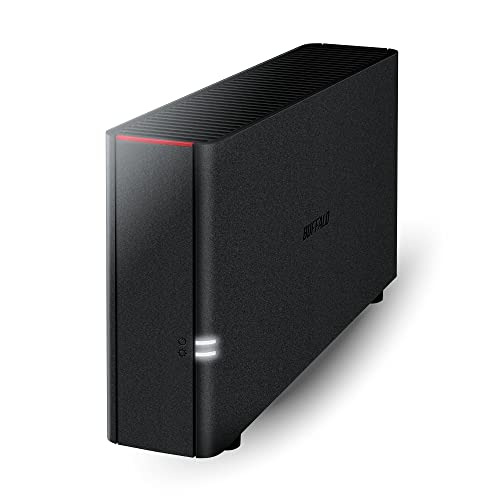 BUFFALO LinkStation 210 2TB 1-Bay NAS Network Attached2TB (1x2TB)9.45 x 3.31 x 8.67 inches2.43 poundsCheck on Amazon
Why Learning How to Choose NAS for Home Matters
Learning how to choose a NAS for home matters because a hard drive in your computer can fail, a laptop can be stolen, and a phone can be lost, and without a backup, you can lose photos, documents, and work in minutes. A NAS can back up your files automatically, over your home network, without you having to plug in a drive every day, and it can be accessed from multiple computers, phones, and tablets in your home, for sharing photos and streaming videos.
Bays matter for a home NAS, because a single-bay NAS, with one drive slot, is cheaper than a 2-bay NAS, with two drive slots, but it has no RAID redundancy. A 2-bay NAS can be set up as RAID 1, where the second drive mirrors the first, so if one drive fails, your data is still on the other drive. A single-bay NAS can still back up your files, but if its one drive fails, you can lose your backup, unless you also have a copy elsewhere, such as a cloud backup or an external drive.
Finally, software matters for a home NAS, because a NAS from Synology or QNAP has software that is easy to use, with apps for automatic backups, photo sharing, and media streaming, while a simpler NAS, such as a TerraMaster, has a simpler app, with fewer features. Choose a NAS with software that you find easy to use, because a backup system you do not use is worse than no backup system. Test a backup after setup, and restore a file, to make sure it works.
How to Choose NAS for Home: Comparison Table
The table below compares seven real, currently sold NAS drives for home use. Rows are sorted by the low end of the typical price range. Ratings reflect overall owner feedback for ease of setup, backup software, speed, and value, not a laboratory test.
| NAS Drive Model | Bays and Drive | Processor and Features | Best For | Typical Price Range | Rating |
|---|---|---|---|---|---|
| Synology DS120j NAS Drive | 1 bay, drive not included | Marvell ARM, 512 MB RAM, 1 GbE | Best budget, for choosing NAS for home | $99 – $129 | 4.6 / 5 |
| QNAP TS-130 NAS Drive | 1 bay, drive not included | Realtek ARM, 1 GB RAM, 1 GbE | Best QNAP, for choosing NAS for home | $119 – $149 | 4.6 / 5 |
| TerraMaster F2-210 NAS Drive | 2 bay, drives not included | Realtek ARM, 1 GB RAM, 1 GbE | Best TerraMaster, for choosing NAS for home | $139 – $179 | 4.6 / 5 |
| Synology DS223j NAS Drive | 2 bay, drives not included | Realtek ARM, 1 GB RAM, 1 GbE | Best Synology DS223j, for home NAS | $179 – $219 | 4.7 / 5 |
| Asustor Drivestor 2 AS1102T NAS Drive | 2 bay, drives not included | Realtek ARM, 1 GB RAM, 2.5 GbE | Best Asustor, for choosing NAS for home | $189 – $229 | 4.7 / 5 |
| Synology DS224+ NAS Drive | 2 bay, drives not included | Intel Celeron, 2 GB RAM, 2x 1 GbE | Best Synology DS224+, for home NAS | $299 – $349 | 4.8 / 5 |
| QNAP TS-264 NAS Drive | 2 bay, drives not included | Intel Celeron, 8 GB RAM, 2.5 GbE | Best premium, for choosing NAS for home | $399 – $449 | 4.8 / 5 |

UGREEN NAS DXP2800 GT, Home Media Server, Streaming for Creators & Offices | Smart Home Data Hub, Direct-from-NAS Editing, 10GbE Transfers, Ryzen R2514, Docker & VM, 8GB DDR4, U.2 SSD Support (Diskless)
As an Amazon Associate we earn from qualifying purchases. Product prices and availability are accurate as of the date/time indicated.
BUFFALO LinkStation 210 2TB 1-Bay NAS Network Attached Storage with HDD Hard Drives Included NAS Storage that Works as Home Cloud or Network Storage Device for Home
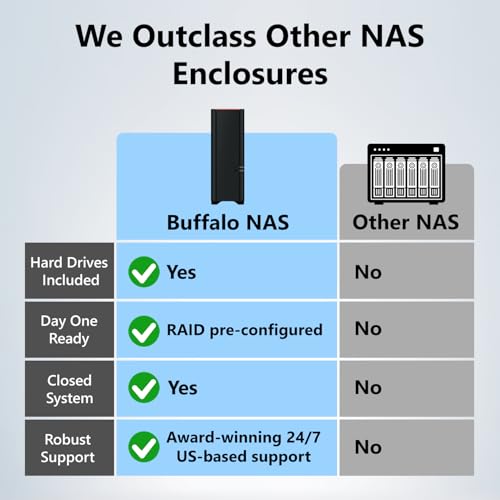


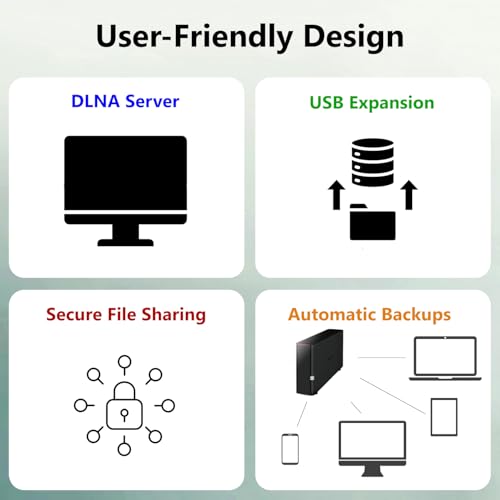
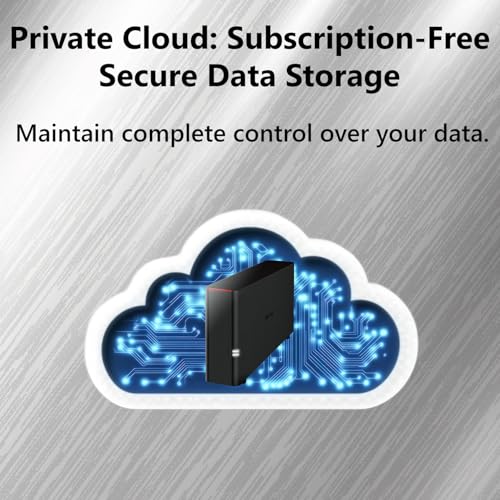

As an Amazon Associate we earn from qualifying purchases. Product prices and availability are accurate as of the date/time indicated.

Yxk Zero1 2-Bay NAS for Pesonal & Home Storage, Photo Backup (Diskless) | Docker Support, Private Cloud & File Sharing, Remote Access, Phone Backup, 4GB RAM, 2.5GbE & 4K HDMI
As an Amazon Associate we earn from qualifying purchases. Product prices and availability are accurate as of the date/time indicated.
Synology DS120j NAS Drive
The Synology DS120j NAS Drive is a NAS with a typical price range of $99 to $129. It is the cheapest model in this comparison and a practical starting point if you want a low-cost NAS for home. It has 1 bay, a drive is not included, a Marvell ARM processor, 512 MB of RAM, and a 1 GbE network port. Choose it if you want a Synology DS120j for home backups, with a low price, a simple setup, and Synology DiskStation Manager software. It can back up a computer, a phone, and a tablet, over your home network. It has only 1 bay, so it has no RAID redundancy, and you will need to buy a hard drive separately, which adds cost.
QNAP TS-130 NAS Drive
The QNAP TS-130 NAS Drive is a NAS with a typical price range of $119 to $149. It has 1 bay, a drive is not included, a Realtek ARM processor, 1 GB of RAM, and a 1 GbE network port. It is a good choice if you want a QNAP NAS for home, with a simple, affordable design. This NAS is best for a user who wants a QNAP TS-130 for home backups, with 1 GB of RAM, which is more than a Synology DS120j, and QTS software for automatic backups. It can back up a computer and a phone, and it can be used as a media server. It also has only 1 bay, with no redundancy, and a drive is not included.
TerraMaster F2-210 NAS Drive
The TerraMaster F2-210 NAS Drive is a NAS with a typical price range of $139 to $179. It has 2 bays, drives are not included, a Realtek ARM processor, 1 GB of RAM, and a 1 GbE network port. It is a good choice if you want a TerraMaster NAS for home, with 2 bays for RAID 1 redundancy. Choose it if you want a TerraMaster F2-210 for home backups, with 2 bays that can be set up as RAID 1, where the second drive mirrors the first, so if one drive fails, your data is still on the other drive. It has a simple setup, a low price for a 2-bay NAS, and software for automatic backups. Drives are not included, so you will need to buy two drives for RAID 1.
Synology DS223j NAS Drive
The Synology DS223j NAS Drive is a NAS with a typical price range of $179 to $219. It has 2 bays, drives are not included, a Realtek ARM processor, 1 GB of RAM, and a 1 GbE network port. It is a good choice if you want a Synology 2-bay NAS for home, with a trusted brand and a simple setup. This NAS is best for a user who wants a Synology DS223j for home backups, with 2 bays for RAID 1, Synology software, and a simple, reliable design. It can back up multiple computers and phones, and it can be used as a media server. It is more expensive than a TerraMaster F2-210, but it offers Synology software and a trusted brand.
Asustor Drivestor 2 AS1102T NAS Drive
The Asustor Drivestor 2 AS1102T NAS Drive is a NAS with a typical price range of $189 to $229. It has 2 bays, drives are not included, a Realtek ARM processor, 1 GB of RAM, and a 2.5 GbE network port. It is a good choice if you want an Asustor NAS for home, with a faster 2.5 GbE network port. Choose it if you want an Asustor Drivestor 2 for home backups, with 2 bays for RAID 1, a 2.5 GbE port that is faster than a 1 GbE port when used with a 2.5 GbE router or switch, and software for automatic backups. It is a good fit for a home user who wants a fast, reliable 2-bay NAS, with a future-proof network port.
Synology DS224+ NAS Drive
The Synology DS224+ NAS Drive is a NAS with a typical price range of $299 to $349. It has 2 bays, drives are not included, an Intel Celeron processor, 2 GB of RAM, and 2 1 GbE network ports. It is a good choice if you want a Synology DS224+ NAS for home, with a faster Intel processor and more RAM than a DS223j. This NAS is best for a user who wants a Synology DS224+ for home backups, with an Intel Celeron processor, 2 GB of RAM, and 2 network ports that can be used for link aggregation, for faster speeds, or for redundancy. It can back up multiple computers, run Docker containers, and act as a media server, with Synology software. It is more expensive than a DS223j, but it offers a faster processor and more features.
QNAP TS-264 NAS Drive
The QNAP TS-264 NAS Drive is a NAS with a typical price range of $399 to $449. It has 2 bays, drives are not included, an Intel Celeron processor, 8 GB of RAM, and a 2.5 GbE network port. It is the most expensive model in this comparison, but it is a premium QNAP NAS with 8 GB of RAM and a 2.5 GbE port, for fast backups and virtual machines. Choose it if you want a premium QNAP TS-264 for home and you are willing to pay more for it. It has 8 GB of RAM, a 2.5 GbE port, an Intel Celeron processor, and QTS software that can run virtual machines and containers. It is a good fit for a power user, with a need for a fast, reliable NAS for home backups, media, and home lab use.
Buying Guide: How to Choose NAS for Home
1. Choose single-bay vs 2-bay by redundancy and budget: 1 bay for low cost, 2 bay for RAID 1
Start with bays when you learn how to choose a NAS for home. Choose a single-bay NAS, such as a Synology DS120j or QNAP TS-130, if you want the lowest price, and you have another copy of your important files, such as a cloud backup or an external drive. A single-bay NAS can back up your files, but if its one drive fails, you can lose your backup, unless you have a copy elsewhere. Choose a 2-bay NAS, such as a TerraMaster F2-210 or Synology DS223j, if you want RAID 1 redundancy, where the second drive mirrors the first, so if one drive fails, your data is still on the other drive. A 2-bay NAS costs more, and you will need to buy two drives, but it is safer for important backups. For most families, a 2-bay NAS plus a cloud backup is a good, safe choice.
2. Check drives, capacity, and network speed
Check drives: most NAS enclosures are sold without drives, so check the drive type, size, and compatibility before you buy, and choose a NAS-rated hard drive, such as a WD Red or Seagate IronWolf, for reliability. A 2TB drive is good for photos and documents, while a 4TB or 8TB drive is better for videos and large files. Check capacity: a 2-bay NAS with two 4TB drives in RAID 1 gives you 4TB of usable storage, because the second drive mirrors the first, while the same drives in RAID 0 give you 8TB, but with no redundancy. Check network speed: a NAS with a 1 GbE port can transfer files at up to about 100 MB per second, while a NAS with a 2.5 GbE port, such as an Asustor Drivestor 2, can be faster, if your router and computer also support 2.5 GbE.
3. Check backup software, apps, and ease of use
Check backup software: a NAS from Synology or QNAP has software for automatic, scheduled backups, with apps for Windows, Mac, iPhone, and Android, while a simpler NAS, such as a TerraMaster, has a simpler app. Check apps: a NAS that can back up your phone photos automatically, with a mobile app, is useful for families, while a NAS that can back up your computer with Time Machine, for Mac, or File History, for Windows, is useful for work. Test a backup after setup, and restore a file, to make sure it works, before you rely on it. Choose a NAS with software that you find easy to use, because a backup system you do not use is worse than no backup system.
4. Check 3-2-1 backup, security, and care
Use the 3-2-1 backup rule: 3 copies of important files, on 2 different types of storage, with 1 copy offsite, such as a cloud backup or a drive stored elsewhere. A NAS is not a complete backup by itself, if it is your only copy. Use strong passwords, enable two-factor authentication where available, and update your NAS software regularly. Do not expose your NAS directly to the internet, without a firewall and a secure password. Place your NAS in a cool, ventilated place, with a UPS battery backup if possible, to protect it from power cuts, and clean dust from it regularly.
Frequently Asked Questions
What is the best NAS for home?
For most families, the Synology DS223j NAS Drive, typically $179 to $219, is a strong overall choice because it has 2 bays for RAID 1, Synology DiskStation Manager software, and a simple, reliable design, at a mid price. If you want a low-cost NAS, the Synology DS120j, typically $99 to $129, is a good choice. If you want a fast, premium NAS, the QNAP TS-264, typically $399 to $449, is a good choice. Choose by bays, drives, and budget, and remember that drives are extra for most enclosures.
What is the best budget NAS for home?
The best budget NAS is the Synology DS120j NAS Drive, typically $99 to $129, because it is the cheapest row in the table and the only model in that lowest price range. It has 1 bay, a Marvell ARM processor, 512 MB of RAM, and a 1 GbE port. It is a good choice for a low-cost NAS, but you will need to buy a hard drive separately, which will bring the total cost over $100, and it has no RAID redundancy, because it has only 1 bay.
Do I need a 2-bay NAS for home?
You do not need a 2-bay NAS for home, but a 2-bay NAS with RAID 1 is safer than a 1-bay NAS, because if one drive fails, your data is still on the other drive. A 1-bay NAS can still back up your files, if you also have another copy, such as a cloud backup or an external drive, following the 3-2-1 rule. For most families, a 2-bay NAS plus a cloud backup is a good, safe choice. Choose a 2-bay NAS, such as a Synology DS223j, if you have important photos and documents and you want redundancy, and you are willing to pay more for two drives.
How much storage do I need for a home NAS?
How much storage you need for a home NAS depends on how many photos, videos, and documents you have. A family with photos and documents, but few videos, may need 2TB of usable storage, while a family with many videos, or a creator with large video files, may need 4TB or 8TB. A 2-bay NAS with two 4TB drives in RAID 1 gives you 4TB of usable storage, because the second drive mirrors the first. Check how much storage you use now, on your computer and phone, add at least 50 percent for future growth, and choose a NAS with enough bays to expand later, if needed. Back up only what you need, and delete duplicates, to save space.
How to choose a NAS for home is simple, once you know your bays, drives, and software needs. Start with the Synology DS223j for a reliable, 2-bay NAS, choose the Synology DS120j for a low-cost, 1-bay NAS, or choose the QNAP TS-264 for a fast, premium NAS. Check whether drives are included, test a backup and a restore, and use a strong password. With the right NAS, you can protect your photos and documents, without worrying about losing them.
Related guides
- Best AAA Batteries for Office Remotes in 2026: AAA Batteries for Office Remotes
- Best Budget Tablet for Work Under 100 in 2026: Budget Tablets for Work Under $100, Office Work, and Productivity
- Best Gimbal for Office Vlogging in 2026: 7 Gimbals for Office Vlogging That Keep Your Video Smooth, Stable, and Professional in the Office
- Best Budget NAS Dust Filter for Maintenance in 2026: 7 Budget NAS Dust Filters for Maintenance With Clear Airflow, Simple Install, and Easy Use for NAS
More from Amazon
Programs that pair well with the guide above. Offers and eligibility are set by Amazon and may change.
Free shipping on eligible items, Prime Video and more. Eligible new members can start with a free trial.
Start a Prime free trialAd-free music streaming. Eligible new subscribers can start with a free trial.
Try Music Unlimited freeA Prime membership for ages 18-24 with a trial period. Eligibility is set by Amazon.
See Prime for Young AdultsAudiobooks and podcasts to listen to on the go. Eligible new members can start with a free trial.
Try Audible freeAs an Amazon Associate we earn from qualifying purchases.

Write Your Review
No reviews yet. Be the first to share your experience!