
What's inside
- Best Cheap Cable Management Kit for Desk by Problem
- Quick Comparison: Best Cheap Cable Management Kit for Desk Models
- Detailed Reviews: Best Cheap Cable Management Kit for Desk Picks
- Buying Guide: Choosing the Best Cheap Cable Management Kit for Desk
- Frequently Asked Questions About the Best Cheap Cable Management Kit for Desk
As an Amazon Associate I earn from qualifying purchases. This post may contain affiliate links at no extra cost to you.
The best cheap cable management kit for desk use is not the one with the most pieces in the photograph. It is the one that matches the mess you actually have: a power strip that needs a safe home, three charger bricks fighting for the same corner, a monitor cable two feet too long, and a USB hub that migrates across the desk every time you plug something in. Cheap kits fail in a predictable way — they are bought as a bundle, used as a bundle, and judged as a bundle, when a desk is really four separate problems wearing one tangle. Separate the problems first and a modest kit, chosen well, will produce a desk that looks professionally managed. Buy the bundle first and you will own forty pieces, use nine of them, and still have a power brick dangling off the back edge in a loop of its own cable.
The four problems are these. Power: a strip and its bricks, which need a tray or box with room, ventilation, and honest respect for the strip’s own limits. Routing: the runs from the desk’s edge to the strip, which need a channel, raceway, or clips that hold cables without crushing them. Length: the slack in every cable that is longer than its run, which needs ties, wraps, or sleeving that can be opened again without scissors and regret. Access: the cables you plug and unplug daily, which should never be managed at all in the permanent sense — they need a deliberate, visible parking place, not a zip tie. This guide compares six real, currently sold products that cover those jobs at cheap-to-modest prices: IKEA’s SIGNUM under-desk rack, BlueLounge’s CableBox, D-Line’s cable management box and raceway classes, J Channel raceway kits, VELCRO Brand tie and wrap sets, and Alex Tech split sleeving. Prices are typical ranges rather than exact figures because kit contents and prices vary by retailer and by the size selected.
Safety comes before tidiness, in this guide and on your desk. Never overload a power strip or outlet, never daisy-chain strips, and follow the strip maker’s stated limits in its documents. A cable box or under-desk tray is a cover, not a cooling system: use only a strip that fits with room around it, keep vents and the box’s openings unobstructed as the box maker directs, do not bury hot power bricks in sleeving, insulation, or a sealed bundle, and stop using any cable, brick, or strip that is damaged, hot, discoloured, or loose in its socket. Keep liquids above a desk away from managed power below it, route cords so they cannot be pinched by a standing desk’s moving frame or a chair’s castors, and if your setup needs more outlets than a single quality strip on a single outlet can safely provide, that is an electrician conversation, not a cable management purchase.
Our Top Picks
Best Cheap Cable Management Kit for Desk by Problem
The power strip problem: an under-desk rack or a ventilated box
If your main eyesore and tripping hazard is the strip itself, start with the IKEA SIGNUM rack or a BlueLounge or D-Line box. An under-desk rack lifts the strip and its bricks off the floor entirely, which is the single largest visual improvement most desks can make, and it keeps the floor clear for feet, castors, and cleaning. A box suits a desk whose power must live on the floor or on the desktop — beside a wall, at a media unit, or in a rented room where screwing a rack underneath is not an option. Measure your strip and its largest brick before choosing either, in the makers’ stated dimensions, because a box a strip almost fits is a box you will leave open forever.
The routing problem: J Channel raceway along the back edge
For cables that run horizontally — monitor, laptop dock, speakers, a lamp — a J Channel raceway kit along the underside or back edge of the desk is the cheap professional answer. Cables drop in from the open top of the J, can leave at any point along the run, and can be added or removed without cutting anything, which is why this format, used in offices for decades, beats adhesive clips for a desk that changes. Cut sections to length as the maker directs, fix them as the kit instructs, and leave a gentle service loop at each end rather than pulling every cable drum-tight.
The slack problem: reusable ties and split sleeving, used sparingly
VELCRO Brand wraps and Alex Tech split sleeving solve length, and they should be the last things you apply, not the first. Coil or fold each cable’s excess once, at its natural bend, and secure it loosely; a cable tied into a tight, hot bundle with its power brick is worse managed than a cable left alone. Split sleeving earns its place on a visible run of two or three cables travelling together — down a desk leg, across to a PC tower — where it turns a braid of individual cords into one calm line that can still be opened to add or remove a cable.
Quick Comparison: Best Cheap Cable Management Kit for Desk Models
| Model | Key Specs | Best For | Typical Price Range | Rating |
|---|---|---|---|---|
| IKEA SIGNUM Cable Management Rack | Under-desk horizontal rack class, stated length and load per maker, screw-fit mounting class | Best cheap cable management kit for desk overall | $15 – $30 | 4.6 / 5 |
| BlueLounge CableBox | Desktop and floor cable box class, flame-retardant material positioning per maker, stated internal dimensions per maker | Best cable box | $25 – $40 by size class | 4.5 / 5 |
| D-Line Cable Management Box | Cable box class in size options, cable entry and exit design per maker, matching raceway system classes | Best box and raceway system | $20 – $35 by size class | 4.4 / 5 |
| J Channel Cable Raceway Kit | Open-top J channel sections class, cut-to-length and adhesive or screw fixing classes per maker, multi-section kits | Best routing kit | $20 – $35 by kit class | 4.4 / 5 |
| VELCRO Brand ONE-WRAP Ties and Rolls | Reusable hook-and-loop tie and cut-to-length roll classes, stated widths and lengths per maker | Best ties and wraps | $8 – $18 by pack class | 4.5 / 5 |
| Alex Tech Split Sleeving | Self-closing split braided sleeving class, diameter and length options per maker, cut-to-length format | Best sleeving | $10 – $20 by size class | 4.3 / 5 |
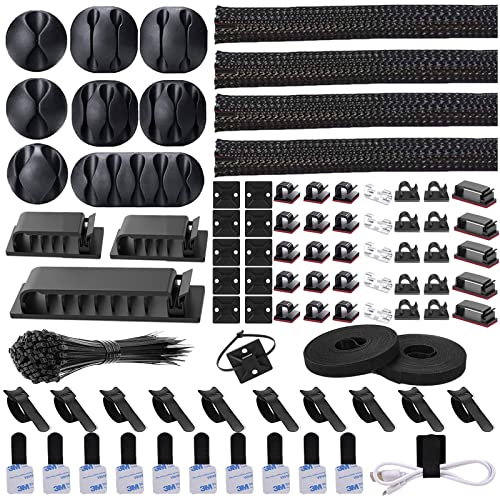
N NOROCME 192 PCS Cable Management Kit 4 Wire Organizer Sleeve | 11 Cable Holder,35Cord Clips 10+2 Roll Cable Organizer Straps,100 Fastening Cable Ties,for Computer TV Under Desk
As an Amazon Associate we earn from qualifying purchases. Product prices and availability are accurate as of the date/time indicated.

[261Pcs] Cable Management Kit, Cord Organizer, Complete Desk Cable Management Solution to Keep Desk Clean, Cable Organizer Accessories for Home Office Essentials, Black


As an Amazon Associate we earn from qualifying purchases. Product prices and availability are accurate as of the date/time indicated.

314 Piece Cord Organizer & Cable Management Set, All in One Desk and TV Cable Management Kit with Clips, Sleeves, Ties, Mounts for Home Office Perfect Tech Organizer Scissors & Travel Case Included


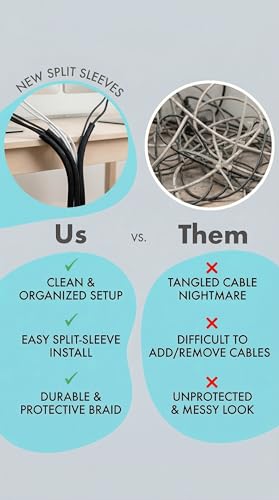


As an Amazon Associate we earn from qualifying purchases. Product prices and availability are accurate as of the date/time indicated.
Dimensions, load limits, fixing methods, and material specifications are each maker’s specification for the current exact product and should be confirmed in that maker’s current documents before purchase. Prices are typical street ranges by size or kit class as described. A power strip, its cables, and any desk grommets or monitor arms are separate parts of a desk system; no kit in this table raises the safe capacity of a strip or outlet, and every strip should be used within its maker’s stated limits.
Detailed Reviews: Best Cheap Cable Management Kit for Desk Picks
1. IKEA SIGNUM – Best Overall
The SIGNUM leads because it performs the biggest single transformation in this guide for the least money: it takes the power strip, its bricks, and the worst of the slack off the floor and parks them in a rack under the desk, out of sight and out of the way of feet and vacuum cleaners. Desks that do only this one thing look managed; desks that do everything except this still look like a nest with accessories.
It needs a desk underside that accepts its screws, so renters and glass or thin-top desk owners should check the fit in IKEA’s documents and choose a box instead where fixing is not possible. Load it within its stated limit, keep bricks ventilated rather than wedged, and route one clean run from the rack to the wall outlet.
2. BlueLounge CableBox – Best Cable Box
BlueLounge’s CableBox is the original tidy-the-strip product done properly: a clean, sturdy box, in size classes, made from a flame-retardant material in the maker’s stated specification, that sits on a floor or desktop and turns a strip and its bricks into a single calm object. For a desk against a wall, a TV unit, or a home office corner, it is often the whole answer.
Measure before you buy, in the maker’s stated internal dimensions, with your largest brick plugged in — bricks change a strip’s effective size completely. Keep the lid seated and its openings as designed, and if a brick runs hot in any enclosure, give that setup more air or move the strip to a rack instead.
3. D-Line Cable Management Box – Best System
D-Line offers its boxes as part of a wider cable management system, with matching trunking and raceway classes that share a clean, paintable, office-grade look. For a desk that is part of a larger room problem — cables continuing along a skirting board to a router, printer, or TV — that system continuity is worth more than a small price difference.
Choose the box size by the same plugged-in measurement as any other row, and plan the whole route on paper first. A system bought in one plan, in one finish, looks intentional in a way that three unrelated fixes, however cheap, never quite achieve.
4. J Channel Raceway Kit – Best Routing
A J Channel kit is the least glamorous and most professional product in this table: lengths of open-top channel that fix under or behind the desk and carry every horizontal run in one hidden highway, with exits wherever a cable needs to drop to the strip or rise to a monitor. Adding a cable takes seconds and removing one takes less, which is exactly how a working desk behaves.
Fix it as the maker directs for your desk material, cut sections cleanly to length, and resist overfilling it — a channel stuffed to springing point will shed cables at the worst moment. Run power and delicate signal cables in the same channel only as your equipment makers’ guidance permits, and keep loops gentle at every exit.
5. VELCRO Brand ONE-WRAP – Best Ties and Wraps
Reusable hook-and-loop ties are the correct default for desk cables because a desk is not finished: devices change, cables move, and a tie you can open with one hand will be adjusted, while a single-use zip tie will be cut, replaced, and eventually left as sharp plastic litter in the very tangle it was meant to cure. ONE-WRAP rolls, cut to length, handle everything from a single coiled charger lead to a bundled run to a PC tower.
Use them loosely. A wrap should hold a coil’s shape, not strangle it, and no wrap should pull a connector sideways in its port or bind a hot brick into a bundle. Two wraps per run is usually plenty; a cable wrapped at six points is a cable you will never adjust, which means, in practice, a cable you will cut free and leave loose.
6. Alex Tech Split Sleeving – Best Sleeving
Alex Tech’s split, self-closing braided sleeving solves the one job ties do badly: a visible run of several cables travelling together, typically down a desk leg or from a desk to a tower on the floor. The split design opens to admit cables anywhere along its length, closes around them, and can be cut to the exact run, in the diameter classes the maker offers.
Size it honestly — a sleeve packed tight looks worse than the cables did — and keep it for signal and low-power runs, not as a wrapper for power bricks or a strip. Used on one or two considered runs, it gives a cheap desk the finished line that visitors actually notice.
Buying Guide: Choosing the Best Cheap Cable Management Kit for Desk
Plan the desk on paper: power, routing, length, access
Sit at your desk and list every cable, where it starts, where it ends, and how often you unplug it. Group the list into the four jobs from this guide’s opening: the strip and bricks, the fixed horizontal runs, the cables with excess length, and the daily-access cables that need a parking spot rather than a tie. Measure the strip with its bricks plugged in, the length of the back edge where a channel would run, and the distance from the desk to the wall outlet. Buy for those measurements, in the makers’ stated dimensions, and buy the fewest products that cover all four jobs — for most desks that is a rack or a box, a channel kit, and a roll of reusable ties, with sleeving added only where a visible multi-cable run exists. That combination, bought in one plan, is cheaper and far more effective than the largest bundle kit on the page.
Install in order, and leave the system adjustable
Work in the order the problems stack. First, power off and unplug the strip, and inspect every cable and brick as you handle it; replace anything damaged rather than managing it into a hiding place. Mount the rack or position the box, seat the strip within its maker’s limits, and run one route to the wall outlet that cannot be kicked, pinched, or rolled over. Fit the channel next and lay the fixed runs into it with gentle loops. Only then deal with length, coiling each excess once and securing it loosely with a reusable wrap, and give daily cables a deliberate home — a hook, a clip at the desk’s edge, or a small tray — where they rest visibly and can be taken and returned with one hand. For a standing desk, test the full range of motion slowly after managing, watching every run for pulling or pinching at the frame’s extremes, and add slack wherever the desk’s travel asks for it. Photograph the finished underside; that picture is your map when you add a device in six months.
Maintain it like a system, not a one-time clean-up
A managed desk decays one new device at a time, so give the system a light rhythm: when a device arrives, route its cable through the channel and rack on the day it is installed, not next month; when a device leaves, remove its cable the same day rather than leaving a labelled ghost in the bundle. Every few months, power down, open the box or inspect the rack, remove dust as the equipment makers direct, check that bricks are ventilated and nothing runs hot, and confirm no cable has been pinched by a chair, a drawer, or a standing desk’s frame. Keep spare wraps and one spare channel section in the desk drawer, keep the power strip’s documents with your household papers, and never let tidiness talk you into exceeding a strip’s stated capacity or covering a hot brick. The best cheap cable management kit for desk use is finally a habit with hardware attached: four jobs, honestly separated, installed in order, and adjusted in minutes whenever the desk changes — and any combination in this table, bought by that plan, will keep a desk looking governed long after a bigger, cheaper bundle has been abandoned in a drawer.
Frequently Asked Questions About the Best Cheap Cable Management Kit for Desk
What is the best cheap cable management kit for a desk?
There is no single kit that does every job best, which is why this table is organised by problem. The IKEA SIGNUM rack is the best first purchase for most desks because it lifts the power strip and bricks off the floor. The BlueLounge CableBox and D-Line box are the best choices where power must stay in a box on the floor or desktop. A J Channel raceway kit is the best routing solution along a desk’s back edge, VELCRO Brand ONE-WRAP ties are the best way to handle excess length, and Alex Tech split sleeving is the best finish for a visible multi-cable run. For most readers, the best cheap setup is a rack or box plus a channel kit plus a roll of reusable ties, bought to measurements taken at your own desk.
Is it safe to put a power strip in a cable management box?
It can be, when the box, the strip, and the load are all treated within their makers’ stated limits. Use a box sized for your strip with its largest bricks plugged in, with room around the strip rather than a wedged fit, keep the box’s designed openings unobstructed, and never exceed the strip’s or the outlet’s rated capacity, daisy-chain strips, or enclose a brick that runs hot. Check the setup by hand after its first hour of normal use and again whenever you add a device: warmth that concerns you is information, and the correct response is more air, a smaller load, or an under-desk rack instead of a box. Keep liquids away from managed power, route the box’s outlet cable so it cannot be pinched or rolled over, and replace any damaged cable, brick, or strip rather than hiding it. If your desk needs more power than one quality strip on one outlet can safely supply, consult an electrician.
How do I manage cables on a standing desk?
Manage for movement, not for a photograph. The strip should travel with the desk, in an under-desk rack such as the SIGNUM class, so that only one cable — the strip’s own — runs from the desk to the wall, with enough slack, loosely coiled or in a purpose-made management spine or tray as its maker directs, to cover the desk’s full travel without pulling or hanging in a tight loop. Route every device cable inside the desk’s own system, in a channel and the rack, with a gentle service loop at each end. After installing, raise and lower the desk slowly through its full range while watching every run, and fix any pulling, pinching at the frame, or cable that becomes a climbing rope at full height. Test again with the desk loaded as you actually use it, because a monitor arm and a dock change the geometry a bare desk promised.
Zip ties or reusable wraps: which should I use on desk cables?
Reusable wraps, for almost every desk cable, almost every time. A desk changes constantly, and a hook-and-loop wrap such as the VELCRO Brand ONE-WRAP class opens in seconds, adjusts without tools, leaves no sharp cut end, and cannot be overtightened into a cable the way a zip tie can by an enthusiastic hand. Reserve single-use zip ties for genuinely permanent installations away from the desk, if at all, and never use either product to pull a connector into alignment, bind a power brick into a hot bundle, or force a cable into a bend tighter than it naturally takes. Wrap loosely, at one or two points per run, and leave every cable you touch weekly completely free, parked in a hook or clip at the desk’s edge. A system you can adjust in a minute is a system that stays managed; a system that needs scissors is a system with a closing date.
Related guides
- Best AAA Batteries for Office Remotes in 2026: AAA Batteries for Office Remotes
- Best Budget Tablet for Work Under 100 in 2026: Budget Tablets for Work Under $100, Office Work, and Productivity
- Best Gimbal for Office Vlogging in 2026: 7 Gimbals for Office Vlogging That Keep Your Video Smooth, Stable, and Professional in the Office
- Best Budget NAS Dust Filter for Maintenance in 2026: 7 Budget NAS Dust Filters for Maintenance With Clear Airflow, Simple Install, and Easy Use for NAS
More from Amazon
Programs that pair well with the guide above. Offers and eligibility are set by Amazon and may change.
Free shipping on eligible items, Prime Video and more. Eligible new members can start with a free trial.
Start a Prime free trialAd-free music streaming. Eligible new subscribers can start with a free trial.
Try Music Unlimited freeA Prime membership for ages 18-24 with a trial period. Eligibility is set by Amazon.
See Prime for Young AdultsAudiobooks and podcasts to listen to on the go. Eligible new members can start with a free trial.
Try Audible freeAs an Amazon Associate we earn from qualifying purchases.

Write Your Review
No reviews yet. Be the first to share your experience!