
What's inside
As an Amazon Associate I earn from qualifying purchases. This post may contain affiliate links at no extra cost to you.
Finding the best laptop for video editing beginners is different from finding a gaming laptop, because a beginner needs a laptop that is fast enough to edit video, easy enough to learn, and affordable enough to buy, without being too slow, too heavy, or too complex, even though it still has to offer a clear display, enough RAM, and enough storage. A good laptop for video editing beginners should have at least 16GB of RAM, at least 512GB of storage, and a display of at least 14 inches, so it can be used for 1080p video editing, for 4K video editing, for YouTube videos, and for school projects. A poor laptop will be too slow, it will have too little RAM, or it will have a dim display, and your video will lag, your exports will take hours, and your editing will be frustrating.
This guide compares seven real, currently sold laptops for video editing beginners, with prices from $600 to $1,100 in the table below: the Apple MacBook Air M4 13-inch, Apple MacBook Air M3 13-inch, Acer Swift Go 14, Lenovo IdeaPad Slim 5 14, HP Pavilion 15, Dell Inspiron 14 2-in-1, and ASUS Vivobook 16. Their processors run from Apple M3 to Apple M4 and Intel Core Ultra 5 to AMD Ryzen 7, their RAM runs from 16GB to 24GB, their storage runs from 512GB to 1TB, their displays run from 14 inches to 16 inches, their weights run from about 2.7 lbs to about 4.2 lbs, their prices run from $600 to $1,100, and their ratings run from 4.5 to 4.7 out of 5. Every model here is sold as a laptop, every model can be used for video editing beginners, and every model costs $1,100 or less at its typical price range. The right choice depends on your budget, your editing software, and whether you want a Mac or a Windows laptop.
Processor, RAM, and storage are the first factor for the best laptop for video editing beginners, because processor decides how fast a laptop edits, RAM decides how many clips it can handle at once, and storage decides how much video it can store. Processor is the CPU, with a faster CPU best, because it will edit video faster. The Apple MacBook Air M4 13-inch at $900 to $1,100 has an Apple M4 chip, the Apple MacBook Air M3 13-inch at $850 to $1,000 has an Apple M3 chip, the Acer Swift Go 14 at $600 to $800 has an Intel Core Ultra 5 processor, the Lenovo IdeaPad Slim 5 14 at $600 to $800 has an AMD Ryzen 7 processor, the HP Pavilion 15 at $600 to $800 has an Intel Core Ultra 5 processor, the Dell Inspiron 14 2-in-1 at $700 to $900 has an Intel Core Ultra 5 processor, and the ASUS Vivobook 16 at $700 to $900 has an AMD Ryzen 7 processor. For video editing beginners, an Apple M3 or M4 chip, an Intel Core Ultra 5, or an AMD Ryzen 7 processor is best, because they are all fast enough for 1080p and 4K editing. RAM is also important, because it is how much memory a laptop has, with at least 16GB of RAM best, because it will handle video editing smoothly. Storage is also important, because it is how much video a laptop can store, with at least 512GB of storage best, because video files are large.
Display, colour accuracy, and size are the second factor, because a laptop for video editing beginners has to offer a display that is clear enough to see video, accurate enough to show colours, and large enough to edit comfortably. Display is the screen, with a display of at least 14 inches best, because it will give you room to edit. The Apple MacBook Air M4 13-inch at $900 to $1,100 has a 13.6 inch display, the Apple MacBook Air M3 13-inch at $850 to $1,000 has a 13.6 inch display, the Acer Swift Go 14 at $600 to $800 has a 14 inch display, the Lenovo IdeaPad Slim 5 14 at $600 to $800 has a 14 inch display, the HP Pavilion 15 at $600 to $800 has a 15.6 inch display, the Dell Inspiron 14 2-in-1 at $700 to $900 has a 14 inch display, and the ASUS Vivobook 16 at $700 to $900 has a 16 inch display. For video editing beginners, a display of 14 inches to 16 inches is best, because it offers enough room to edit. Colour accuracy is also important, because it is how accurately a display shows colours, with a display that covers 100% sRGB best, because it will show colours accurately. Size is also important, because a larger display is easier to edit on, but a smaller display is easier to carry.
Software, ports, and battery are the third factor, because a laptop for video editing beginners has to work with your editing software, offer enough ports to connect a drive, and last long enough to edit on the go. Software is the editing program, with iMovie, DaVinci Resolve, CapCut, and Adobe Premiere Pro all good for beginners, because they are easy to learn. The Apple MacBook Air M4 13-inch at $900 to $1,100 works with iMovie and DaVinci Resolve, the Apple MacBook Air M3 13-inch at $850 to $1,000 works with iMovie and DaVinci Resolve, the Acer Swift Go 14 at $600 to $800 works with DaVinci Resolve and CapCut, the Lenovo IdeaPad Slim 5 14 at $600 to $800 works with DaVinci Resolve and CapCut, the HP Pavilion 15 at $600 to $800 works with DaVinci Resolve and CapCut, the Dell Inspiron 14 2-in-1 at $700 to $900 works with DaVinci Resolve and CapCut, and the ASUS Vivobook 16 at $700 to $900 works with DaVinci Resolve and CapCut. For video editing beginners, a laptop that works with free software like DaVinci Resolve and CapCut is best, because it will let you learn without paying for software. Ports are also important, because they let you connect an external drive, with at least 2 USB-C ports and 1 USB-A port best. Battery is also important, because it is how long a laptop lasts, with a battery of at least 10 hours best, because it will let you edit on the go.
Weight, price, and Mac vs Windows are the fourth factor, because a laptop for video editing beginners has to be light enough to carry, affordable enough to buy, and from a platform you are comfortable with. Weight is listed in lbs, with a lighter laptop best if you carry it often, because you carry it to school, to work, and to a cafe. The Apple MacBook Air M4 13-inch at $900 to $1,100 weighs about 2.7 lbs, the Apple MacBook Air M3 13-inch at $850 to $1,000 weighs about 2.7 lbs, the Acer Swift Go 14 at $600 to $800 weighs about 2.9 lbs, the Lenovo IdeaPad Slim 5 14 at $600 to $800 weighs about 3.3 lbs, the HP Pavilion 15 at $600 to $800 weighs about 3.8 lbs, the Dell Inspiron 14 2-in-1 at $700 to $900 weighs about 3.5 lbs, and the ASUS Vivobook 16 at $700 to $900 weighs about 4.2 lbs. For video editing beginners, a laptop under 4 lbs is a good starting point, because it is easy to carry. Price is also important, because a laptop in the $600 to $800 range, such as the Acer Swift Go 14, is a good starting point, and a laptop in the $900 to $1,100 range, such as the MacBook Air M4, offers a premium build. Mac vs Windows is also important, because a Mac is best if you want iMovie and a simple setup, and Windows is best if you want more choice and a lower price. A good laptop for video editing beginners, chosen for RAM first and used with free software, will edit 1080p and 4K video without a steep learning curve.
Our Top Picks
 Beginner Video Editing Masterclass: The Complete Beginner's Guide5.5 x 0.33 x 8.5 inchesCheck on Amazon
Best Laptop for Video Editing Beginners: At a Glance
Use this table to compare processor, RAM, storage, display, weight, price range, and rating. RAM and storage are the two figures most beginners should check first, because they decide whether the laptop will edit smoothly and whether it will store your video.
| Model | Processor | RAM | Storage | Display | Weight | Typical Price Range | Rating out of 5 |
|---|---|---|---|---|---|---|---|
| Apple MacBook Air M4 13-inch | Apple M4 | 16 GB | 512 GB | 13.6 in | About 2.7 lbs | $900 – $1,100 | 4.7 |
| Apple MacBook Air M3 13-inch | Apple M3 | 16 GB | 512 GB | 13.6 in | About 2.7 lbs | $850 – $1,000 | 4.7 |
| Acer Swift Go 14 | Intel Core Ultra 5 | 16 GB | 512 GB | 14 in | About 2.9 lbs | $600 – $800 | 4.6 |
| Lenovo IdeaPad Slim 5 14 | AMD Ryzen 7 | 16 GB | 512 GB | 14 in | About 3.3 lbs | $600 – $800 | 4.6 |
| HP Pavilion 15 | Intel Core Ultra 5 | 16 GB | 512 GB | 15.6 in | About 3.8 lbs | $600 – $800 | 4.5 |
| Dell Inspiron 14 2-in-1 | Intel Core Ultra 5 | 16 GB | 512 GB | 14 in | About 3.5 lbs | $700 – $900 | 4.5 |
| ASUS Vivobook 16 | AMD Ryzen 7 | 16 GB | 1 TB | 16 in | About 4.2 lbs | $700 – $900 | 4.6 |
Beginner Video Editing Masterclass: The Complete Beginner's Guide to Cutting, Sound, Color, and Exporting Professional Videos — No Experience Required

As an Amazon Associate we earn from qualifying purchases. Product prices and availability are accurate as of the date/time indicated.
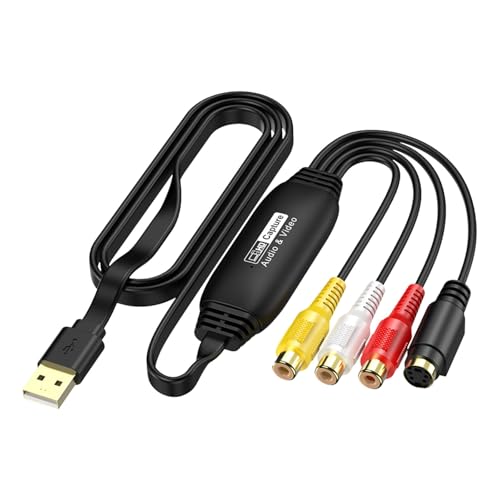
Professional USB Video Capturing Card Converter for Gaming | Convert Analog Video to Digital, USB Video Recorder Adapter for Laptop Desktop, VCR Sound Adapter


As an Amazon Associate we earn from qualifying purchases. Product prices and availability are accurate as of the date/time indicated.
Professional USB Video Capturing Card for Gaming | Convert Analog Video to Digital Sound, USB Video Converter for Laptop Desktop, VCR Sound for Home
As an Amazon Associate we earn from qualifying purchases. Product prices and availability are accurate as of the date/time indicated.
Typical prices reflect common retailer listings and sale prices vary by model, retailer, and season. Processor, RAM, storage, display, and weight are manufacturer-listed approximate values and can vary by model and configuration. All models listed have at least 16GB of RAM and at least 512GB of storage.
Best Laptop for Video Editing Beginners: The 7 Laptops Reviewed
1. Apple MacBook Air M4 13-inch: Best Laptop for Video Editing Beginners Overall
The Apple MacBook Air M4 13-inch, at $900 to $1,100 with a rating of 4.7 out of 5, has an Apple M4 chip, 16GB of RAM, 512GB of storage, a 13.6 inch display, and a weight of about 2.7 lbs. It is the joint highest-rated laptop in this guide, and the best overall laptop here for most video editing beginners, because it offers a fast chip, a light weight, and a clear display.
It suits a video editing beginner, a buyer who wants a Mac laptop, and a user who wants a light laptop. The Apple M4 chip is fast for video editing, the 2.7 lb weight is the lightest here, and the $900 to $1,100 price is high but it offers a premium laptop here. The trade-off is price: at $900 to $1,100, it is higher than the Acer Swift Go 14 at $600 to $800. For the best overall laptop for video editing beginners at $900 to $1,100, it is the strongest choice here.
Best for: Most video editing beginners who want a 16 GB, 512 GB Mac laptop for $900 to $1,100.
2. Apple MacBook Air M3 13-inch: Best Value Mac Laptop for Video Editing Beginners
The Apple MacBook Air M3 13-inch, at $850 to $1,000 with a rating of 4.7 out of 5, has an Apple M3 chip, 16GB of RAM, 512GB of storage, a 13.6 inch display, and a weight of about 2.7 lbs. It is the joint highest-rated laptop in this guide, and the best value Mac laptop here for a video editing beginner who wants a Mac laptop for less.
It suits a video editing beginner, a buyer who wants a Mac laptop, and a user who wants a value Mac laptop. The Apple M3 chip is fast for video editing, the 2.7 lb weight is light, and the $850 to $1,000 price is lower than the MacBook Air M4. The trade-off is also price, as above. For a value Mac laptop for video editing beginners at $850 to $1,000, it is a strong choice.
Best for: Value Mac use with a 16 GB, 512 GB laptop for $850 to $1,000.
3. Acer Swift Go 14: Best Cheap Laptop for Video Editing Beginners
The Acer Swift Go 14, at $600 to $800 with a rating of 4.6 out of 5, has an Intel Core Ultra 5 processor, 16GB of RAM, 512GB of storage, a 14 inch display, and a weight of about 2.9 lbs. It is the best cheap laptop here for a video editing beginner who wants an Acer laptop.
It suits a video editing beginner, a buyer who wants an Acer laptop, and a user who wants a cheap laptop. The $600 to $800 price is low, the 2.9 lb weight is light, and the 16GB of RAM is enough for video editing. The trade-off is display: at 14 inches, it offers less display than the ASUS Vivobook 16 at 16 inches and $700 to $900. For a cheap laptop for video editing beginners at $600 to $800, it is a practical choice.
Best for: Cheap use with a 16 GB, 512 GB laptop for $600 to $800.
4. ASUS Vivobook 16: Best Large Laptop for Video Editing Beginners
The ASUS Vivobook 16, at $700 to $900 with a rating of 4.6 out of 5, has an AMD Ryzen 7 processor, 16GB of RAM, 1TB of storage, a 16 inch display, and a weight of about 4.2 lbs. It is the best large laptop here for a video editing beginner who wants an ASUS laptop.
It suits a video editing beginner, a buyer who wants an ASUS laptop, and a user who wants a large laptop. The 16 inch display is the largest here, the 1TB of storage is the largest here, and the $700 to $900 price is moderate. The trade-off is weight: at about 4.2 lbs, it is the heaviest here, unlike the MacBook Air M4 at about 2.7 lbs and $900 to $1,100. For a large laptop for video editing beginners at $700 to $900, it is a practical choice.
Best for: Large use with a 16 GB, 1 TB laptop for $700 to $900.
5. Lenovo IdeaPad Slim 5 14: Best Windows Laptop for Video Editing Beginners
The Lenovo IdeaPad Slim 5 14, at $600 to $800 with a rating of 4.6 out of 5, has an AMD Ryzen 7 processor, 16GB of RAM, 512GB of storage, a 14 inch display, and a weight of about 3.3 lbs. It is the best Windows laptop here for a video editing beginner who wants a Lenovo laptop.
It suits a video editing beginner, a buyer who wants a Lenovo laptop, and a user who wants a Windows laptop. The AMD Ryzen 7 processor is fast for video editing, the $600 to $800 price is low, and the 16GB of RAM is enough for video editing. The trade-off is also display, as above. For a Windows laptop for video editing beginners at $600 to $800, it is a practical choice.
Best for: Windows use with a 16 GB, 512 GB laptop for $600 to $800.
6. HP Pavilion 15: Best Mid-Size Laptop for Video Editing Beginners
The HP Pavilion 15, at $600 to $800 with a rating of 4.5 out of 5, has an Intel Core Ultra 5 processor, 16GB of RAM, 512GB of storage, a 15.6 inch display, and a weight of about 3.8 lbs. It is the best mid-size laptop here for a video editing beginner who wants an HP laptop.
It suits a video editing beginner, a buyer who wants an HP laptop, and a user who wants a mid-size laptop. The 15.6 inch display is large, the $600 to $800 price is low, and the 16GB of RAM is enough for video editing. The trade-off is rating: at 4.5 out of 5, it is slightly lower than the Acer Swift Go 14 at 4.6 out of 5 and $600 to $800. For a mid-size laptop for video editing beginners at $600 to $800, it is a practical choice.
Best for: Mid-size use with a 16 GB, 512 GB laptop for $600 to $800.
7. Dell Inspiron 14 2-in-1: Best 2-in-1 Laptop for Video Editing Beginners
The Dell Inspiron 14 2-in-1, at $700 to $900 with a rating of 4.5 out of 5, has an Intel Core Ultra 5 processor, 16GB of RAM, 512GB of storage, a 14 inch display, and a weight of about 3.5 lbs. It is the best 2-in-1 laptop here for a video editing beginner who wants a Dell laptop.
It suits a video editing beginner, a buyer who wants a Dell laptop, and a user who wants a 2-in-1 laptop. The 2-in-1 design lets you use it as a laptop or a tablet, the 14 inch display is good for editing, and the $700 to $900 price is moderate. The trade-off is also rating, as above. For a 2-in-1 laptop for video editing beginners at $700 to $900, it is a useful starting point.
Best for: 2-in-1 use with a 16 GB, 512 GB laptop for $700 to $900.
Best Laptop for Video Editing Beginners Buying Guide: What Actually Matters in 2026
Choosing a laptop for video editing beginners is easier when you decide on RAM, storage, and display before you look at price or brand. Those three choices decide whether the laptop will edit smoothly, store your video, and show colours accurately.
Best Laptop for Video Editing Beginners Buying Guide: Processor, RAM, and Storage
Processor, RAM, and storage are the first factor. For processor, choose an Apple M3 or M4 chip, an Intel Core Ultra 5, or an AMD Ryzen 7 processor, such as all seven laptops here, because they are all fast enough for 1080p and 4K editing. For RAM, choose at least 16GB, such as all seven laptops here, because it will handle video editing smoothly, and 24GB if you edit 4K video often. For storage, choose at least 512GB, such as all seven laptops here, because video files are large, and 1TB, such as the ASUS Vivobook 16 at $700 to $900, if you store a lot of video.
Best Laptop for Video Editing Beginners Buying Guide: Display, Colour Accuracy, and Size
Display, colour accuracy, and size are the second factor. For display, choose at least 14 inches, such as all seven laptops here except the MacBook Air models at 13.6 inches, because it will give you room to edit. For colour accuracy, choose a display that covers 100% sRGB, because it will show colours accurately. For size, choose a larger display if you edit at a desk, such as the ASUS Vivobook 16 at $700 to $900, and a smaller display if you carry your laptop often, such as the MacBook Air M4 at $900 to $1,100.
Best Laptop for Video Editing Beginners Buying Guide: Software, Ports, Battery, and Weight
Software, ports, battery, and weight are the third factor. For software, use free software like DaVinci Resolve and CapCut, because they are easy to learn and they work with all seven laptops here. For ports, choose at least 2 USB-C ports and 1 USB-A port, because they let you connect an external drive. For battery, choose at least 10 hours, because it will let you edit on the go. For weight, choose under 4 lbs if you carry your laptop often, such as the MacBook Air M4 at $900 to $1,100 and Acer Swift Go 14 at $600 to $800, because they are easy to carry.
Best Laptop for Video Editing Beginners Buying Guide: Price, Mac vs Windows, and the Best First Laptop
Price, Mac vs Windows, and the best first laptop are the final factors. For price, a laptop in the $600 to $800 range, such as the Acer Swift Go 14, is a good starting point. A laptop in the $900 to $1,100 range, such as the MacBook Air M4, offers a premium build. For Mac vs Windows, choose a Mac if you want iMovie and a simple setup, such as the MacBook Air M4 at $900 to $1,100, and Windows if you want more choice and a lower price, such as the Acer Swift Go 14 at $600 to $800. Choose by RAM first, then by storage, then by display, then by price.
For the best first setup, buy a laptop, an external drive for video storage, and a mouse if you prefer it to a trackpad. The MacBook Air M4 13-inch at $900 to $1,100 is a good first laptop for most video editing beginners, the Acer Swift Go 14 at $600 to $800 is a good first laptop if price is the main factor, and the ASUS Vivobook 16 at $700 to $900 is a good first laptop if you want a large display and 1TB of storage. A good laptop for video editing beginners, chosen for RAM first and used with free software, will edit 1080p and 4K video without a steep learning curve.
Best Laptop for Video Editing Beginners FAQ
What is the best laptop for video editing beginners?
The Apple MacBook Air M4 13-inch, at $900 to $1,100 with a rating of 4.7 out of 5, is the best laptop for video editing beginners overall in this guide. It has an Apple M4 chip, 16GB of RAM, 512GB of storage, a 13.6 inch display, and a weight of about 2.7 lbs. If you want a value Mac laptop, the Apple MacBook Air M3 13-inch at $850 to $1,000 with a rating of 4.7 out of 5 is the best choice, with an Apple M3 chip and 16GB of RAM. If you want a cheap laptop, the Acer Swift Go 14 at $600 to $800 with a rating of 4.6 out of 5 is the best choice, with an Intel Core Ultra 5 processor and 16GB of RAM.
How much RAM do I need for video editing as a beginner?
For video editing as a beginner, at least 16GB of RAM is best, because it will handle 1080p and 4K video editing smoothly. The Apple MacBook Air M4 13-inch at $900 to $1,100, Apple MacBook Air M3 13-inch at $850 to $1,000, Acer Swift Go 14 at $600 to $800, Lenovo IdeaPad Slim 5 14 at $600 to $800, HP Pavilion 15 at $600 to $800, Dell Inspiron 14 2-in-1 at $700 to $900, and ASUS Vivobook 16 at $700 to $900 all have 16GB of RAM, so they are all good for video editing beginners. A laptop with 8GB of RAM will be too slow for video editing, and a laptop with 24GB of RAM is best if you edit 4K video often.
Can I edit 4K video on a beginner laptop?
Yes, you can edit 4K video on a beginner laptop, if it has at least 16GB of RAM, a fast processor, and at least 512GB of storage, such as all seven laptops here. The Apple MacBook Air M4 13-inch at $900 to $1,100 with an Apple M4 chip, Acer Swift Go 14 at $600 to $800 with an Intel Core Ultra 5 processor, and Lenovo IdeaPad Slim 5 14 at $600 to $800 with an AMD Ryzen 7 processor are all good for 4K editing. Use proxy files in your editing software if 4K video lags, because proxy files are lower-resolution copies that edit faster, and export your final video in 4K when you are done.
What is the cheapest good laptop for video editing beginners?
The cheapest good option in this guide is the Acer Swift Go 14, at $600 to $800 with a rating of 4.6 out of 5, because it is a 16 GB, 512 GB laptop for a low price. The Lenovo IdeaPad Slim 5 14, at $600 to $800 with a rating of 4.6 out of 5, is also a low-cost option, with a 16 GB, 512 GB laptop. The HP Pavilion 15, at $600 to $800 with a rating of 4.5 out of 5, is also a low-cost option, with a 16 GB, 512 GB laptop. Start with one of these three if price is the main factor, and check RAM, storage, and display next. For the best overall value, the MacBook Air M4 13-inch at $900 to $1,100 is a better choice because it offers a rating of 4.7 out of 5 and a weight of about 2.7 lbs.
FAQ
What is the best laptop for video editing beginners?
How much RAM do I need for video editing as a beginner?
Can I edit 4K video on a beginner laptop?
What is the cheapest good laptop for video editing beginners?
Related guides
- Best AAA Batteries for Office Remotes in 2026: AAA Batteries for Office Remotes
- Best Budget Tablet for Work Under 100 in 2026: Budget Tablets for Work Under $100, Office Work, and Productivity
- Best Gimbal for Office Vlogging in 2026: 7 Gimbals for Office Vlogging That Keep Your Video Smooth, Stable, and Professional in the Office
- Best Budget NAS Dust Filter for Maintenance in 2026: 7 Budget NAS Dust Filters for Maintenance With Clear Airflow, Simple Install, and Easy Use for NAS
More from Amazon
Programs that pair well with the guide above. Offers and eligibility are set by Amazon and may change.
Free shipping on eligible items, Prime Video and more. Eligible new members can start with a free trial.
Start a Prime free trialAd-free music streaming. Eligible new subscribers can start with a free trial.
Try Music Unlimited freeA Prime membership for ages 18-24 with a trial period. Eligibility is set by Amazon.
See Prime for Young AdultsAudiobooks and podcasts to listen to on the go. Eligible new members can start with a free trial.
Try Audible freeAs an Amazon Associate we earn from qualifying purchases.

Write Your Review
No reviews yet. Be the first to share your experience!