
What's inside
- Why Choosing the Best Creator Gear Setup for Office Home Studios Matters
- Best Creator Gear Setup for Office Home Studios: Comparison Table
- Neewer Ring Light Kit
- Elgato Key Light
- Blue Yeti USB Microphone
- Rode NT-USB Mini Microphone
- Logitech StreamCam Webcam
- Elgato Wave 3 Microphone
- Shure MV7 USB Microphone
- Buying Guide: How to Choose the Best Creator Gear Setup for Office Home Studios
- Frequently Asked Questions
As an Amazon Associate I earn from qualifying purchases. This post may contain affiliate links at no extra cost to you.
Choosing the best creator gear setup for office home studios is about finding gear that can help you record video, audio, and live streams in a home office, without being too expensive, without being too hard to set up, and without taking up too much desk space. A good creator gear setup for office home studios should have a clear microphone, a bright key light, a sharp webcam or camera, a simple stand or mount, and a design that fits your desk. It should also be easy to use, easy to move if needed, and reliable enough to use every day for work, video calls, or content creation.
This guide compares seven real, currently sold creator gear products for office home studios. Prices below are typical retail ranges from $49 to $269 and can vary by retailer and sale. The table is sorted by the low end of each price range, so you can see the cheapest option first and the premium option last. Always check gear type, connection, and compatibility before you buy. A creator gear setup for office home studios is best for a home office with a desk and a computer, while a portable mic may be better for recording on the go.
Creator safety comes first. Power off your computer before you connect or disconnect a USB device if the maker says to do so, and use anti-static precautions when you handle electronics. Check your computer ports before you buy gear, and do not force a USB cable into the wrong port. Use strong passwords, with two-factor authentication where available, for your streaming and social media accounts. Back up your files with a 3-2-1 backup: three copies, on two different types of storage, with one copy offsite.
Our Top Picks
 Vlogging Kit for iPhone with Wireless Microphone5) Selfie Stick / Tripod Kit2 x 7 x 9 inches1 poundsCheck on Amazon
Why Choosing the Best Creator Gear Setup for Office Home Studios Matters
A creator gear setup for office home studios matters because good gear can help you sound clear, look bright, and record sharp video, while weak gear can make your audio sound muffled, your video look dark, or your stream drop out. A good setup can also help you work from home more easily, by giving you a mic for calls, a light for video, and a camera for meetings. A setup that is too expensive may be more than you need for a home office, while a setup that is too cheap may not be reliable for daily use.
Microphone matters most. A USB microphone, such as a Blue Yeti or a Rode NT-USB Mini, is a good choice for most creators, because it can plug into your computer with USB and record clear audio without needing an audio interface. A microphone with a cardioid pattern is a good choice for a home office, because it can pick up your voice and reduce background noise from a keyboard or fan. Check the microphone type before you buy, and choose a mic by pattern for your office.
Light also matters. A key light, such as an Elgato Key Light, is a good choice for a home studio, because it can light up your face evenly without being too bright or too hot. A ring light, such as a Neewer Ring Light, is a good choice if you want a simple, affordable light for video calls, because it can sit on your desk and light up your face. Check the light type before you buy, and choose a light by brightness for your office.
Best Creator Gear Setup for Office Home Studios: Comparison Table
The table below compares seven real, currently sold creator gear products for office home studios. Rows are sorted by the low end of the typical price range. Ratings reflect overall owner feedback for audio, video, and value, not a laboratory test. Check the maker notes for connection, compatibility, and size before you buy.
| Creator Gear Model | Gear Type and Key Spec | Connection and Compatibility | Best For | Typical Price Range | Rating |
|---|---|---|---|---|---|
| Neewer Ring Light Kit | Ring light, 18 inch | USB, phone / camera | Best budget, for creator gear setup for office home studios | $49 – $59 | 4.7 / 5 |
| Elgato Key Light | Key light, 2500 lumens | USB, Wi-Fi app | Best Elgato Key, for creator gear setup for office home studios | $99 – $109 | 4.8 / 5 |
| Blue Yeti USB Microphone | Mic, cardioid, USB | USB, PC / Mac | Best Blue Yeti, for creator gear setup for office home studios | $99 – $109 | 4.7 / 5 |
| Rode NT-USB Mini Microphone | Mic, cardioid, USB | USB, PC / Mac | Best Rode, for creator gear setup for office home studios | $99 – $109 | 4.7 / 5 |
| Logitech StreamCam Webcam | Webcam, 1080p 60fps | USB-C, PC / Mac | Best Logitech, for creator gear setup for office home studios | $149 – $159 | 4.7 / 5 |
| Elgato Wave 3 Microphone | Mic, cardioid, USB-C | USB-C, PC / Mac | Best Elgato Wave, for creator gear setup for office home studios | $149 – $159 | 4.8 / 5 |
| Shure MV7 USB Microphone | Mic, cardioid, USB / XLR | USB / XLR, PC / Mac | Best premium, for creator gear setup for office home studios | $249 – $269 | 4.8 / 5 |
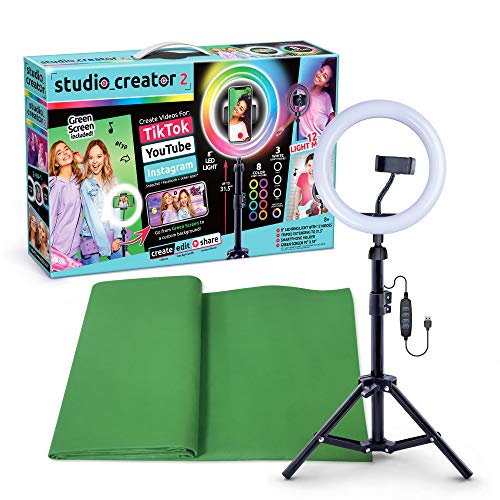
Canal Toys New So DIY TikTok Instagram YouTube Multicolored Ring Light with Green Screen and Phone Mount Tripod. Studio Creator 2 Influencer Video Creator Kit


As an Amazon Associate we earn from qualifying purchases. Product prices and availability are accurate as of the date/time indicated.

Glide Gear REVO 50 360° Rotating Camera Platform Rig, Adjustable Arm for DSLR or Smartphone, Aluminum Build, Supports Up to 40lbs


As an Amazon Associate we earn from qualifying purchases. Product prices and availability are accurate as of the date/time indicated.
Vlogging Kit for iPhone with Wireless Microphone, LED Light & Tripod Carrying Case – Phone Video Recording Kit for YouTube, TikTok, Streaming & Content Creators


As an Amazon Associate we earn from qualifying purchases. Product prices and availability are accurate as of the date/time indicated.
Neewer Ring Light Kit
The Neewer Ring Light Kit is a creator gear product with a typical price range of $49 to $59. It is the cheapest product in this comparison and a practical starting point if you want a low-cost creator gear setup for office home studios. It has a ring light type, an 18-inch size, a USB connection, and compatibility with a phone or camera, according to the maker.
Choose this light if you want a simple, affordable ring light for your home studio. The Neewer Ring Light has a simple design, a good size for video calls, and a good fit for a beginner with a first creator light. Its 18-inch size is good for lighting your face, but it may be too large for a small desk. If you need a key light that can mount to your desk, the Elgato Key Light is a better choice at a higher price.
Elgato Key Light
The Elgato Key Light is a creator gear product with a typical price range of $99 to $109. It has a key light type, 2500 lumens, a USB connection, and Wi-Fi app control, according to the maker. It is a good choice if you want an Elgato light with a trusted brand for creator gear and a simple design for a home studio.
This light is best for a creator who wants an Elgato Key Light for an office home studio. The Key Light has a simple design and a good fit for a user who wants a bright, adjustable light for regular use. It is more expensive than the Neewer Ring Light, but it offers a higher brightness and an Elgato brand for creator lights.
Blue Yeti USB Microphone
The Blue Yeti USB Microphone is a creator gear product with a typical price range of $99 to $109. It has a microphone type, a cardioid pattern, a USB connection, and compatibility with PC and Mac, according to the maker. It is a good choice if you want a Blue Yeti mic with a trusted brand for USB microphones and a simple design for a home studio.
Choose this mic if you want a Blue Yeti for your office home studio. The Yeti has a simple design and a good fit for a user who wants a reliable USB mic for regular use. It is more expensive than the Neewer Ring Light, but it offers a clear audio design and a Blue Yeti brand for USB microphones.
Rode NT-USB Mini Microphone
The Rode NT-USB Mini Microphone is a creator gear product with a typical price range of $99 to $109. It has a microphone type, a cardioid pattern, a USB connection, and compatibility with PC and Mac, according to the maker. It is a good choice if you want a Rode mic with a trusted brand for microphones and a simple design for a home studio.
This mic is best for a creator who wants a Rode NT-USB Mini for an office home studio. The NT-USB Mini has a simple design and a good fit for a user who wants a compact USB mic for regular use. It is more expensive than the Neewer Ring Light, but it offers a smaller size and a Rode brand for USB microphones.
Logitech StreamCam Webcam
The Logitech StreamCam Webcam is a creator gear product with a typical price range of $149 to $159. It has a webcam type, 1080p 60fps video, a USB-C connection, and compatibility with PC and Mac, according to the maker. It is a good choice if you want a Logitech webcam with a trusted brand for webcams and a simple design for a home studio.
Choose this webcam if you want a Logitech StreamCam for your office home studio. The StreamCam has a simple design and a good fit for a user who wants a sharp webcam for regular use. It is more expensive than the Blue Yeti, but it offers a video design and a Logitech brand for webcams.
Elgato Wave 3 Microphone
The Elgato Wave 3 Microphone is a creator gear product with a typical price range of $149 to $159. It has a microphone type, a cardioid pattern, a USB-C connection, and compatibility with PC and Mac, according to the maker. It is a good choice if you want an Elgato mic with a trusted brand for creator gear and a simple design for a home studio.
This mic is best for a creator who wants an Elgato Wave 3 for an office home studio. The Wave 3 has a simple design and a good fit for a user who wants a premium USB-C mic for regular use. It is more expensive than the Rode NT-USB Mini, but it offers a USB-C design and an Elgato brand for creator microphones.
Shure MV7 USB Microphone
The Shure MV7 USB Microphone is a creator gear product with a typical price range of $249 to $269. It has a microphone type, a cardioid pattern, USB and XLR connections, and compatibility with PC and Mac, according to the maker. It is the most expensive product in this comparison, but it is a premium Shure mic with a USB and XLR design for a home studio.
Choose this mic if you want a premium Shure MV7 for your office home studio and you are willing to pay more for it. The MV7 has a cardioid pattern, USB and XLR connections, and a clear audio design for a premium mic. It is a good fit for a serious creator with a need for a premium, versatile microphone. It is not the best choice if you have a small budget, because the Neewer Ring Light Kit offers similar basic creator gear support at a lower price for a beginner, with a light for video calls.
Buying Guide: How to Choose the Best Creator Gear Setup for Office Home Studios
1. Start with mic, light, and camera: choose one of each, check setup
Start with a mic, a light, and a camera when you choose a creator gear setup for office home studios. Choose a USB microphone, such as a Blue Yeti, if you want clear audio for calls and recording. Choose a key light, such as an Elgato Key Light, if you want bright, even light for video. Choose a webcam, such as a Logitech StreamCam, if you want sharp video for calls and streaming. Choose one of each for a complete setup, and do not buy a second mic before you have a light and a camera.
Check setup before you buy. A USB mic that plugs into your computer is a good choice, because it is easy to set up without an audio interface. A key light that mounts to your desk is a good choice, because it can save desk space. Test your setup at home, so you know it works before your first recording.
2. Check connection, compatibility, and desk space
Check connection first. A USB microphone is a good choice for most creators, because it can plug into a PC or Mac with USB. A USB-C webcam is a good choice if your computer has USB-C ports, while a USB-A webcam may need an adapter. Check compatibility next. A mic, light, and camera that work with your computer operating system are a good choice, because they can be used without extra software.
Check desk space as well. A mic with a small footprint is a good choice for a small desk, because it can fit next to your keyboard without taking up too much space. A key light with a desk mount is a good choice, because it can clamp to your desk and save space. Measure your desk before you buy, and choose gear by size for your office.
3. Check audio, light, and video quality
Check audio before you buy. A microphone with a cardioid pattern is a good choice for a home office, because it can pick up your voice and reduce background noise from a keyboard or fan. A microphone with a pop filter is a good choice, because it can reduce popping sounds when you speak. Check light next. A key light with adjustable brightness and color temperature is a good choice, because it can let you control how bright and warm your light is for video.
Check video as well. A webcam with 1080p 60fps is a good choice for a home studio, because it can record sharp video for calls and streaming. A webcam with autofocus is a good choice, because it can keep your face in focus while you move. Test your mic, light, and camera at home, so you know they work before your first recording.
4. Check safety, passwords, and care
Power off your computer before you connect or disconnect a USB device if the maker says to do so, and use anti-static precautions when you handle electronics. Check your computer ports before you buy gear, and do not force a USB cable into the wrong port. Use strong passwords, with two-factor authentication where available, for your streaming and social media accounts.
Back up your files with a 3-2-1 backup. Clean your mic, light, and camera with a dry cloth if they get dusty, and store them in a dry place when you are not using them. Do not use a mic or camera in water, and do not leave a light on when you are not using it for a long time.
Frequently Asked Questions
What is the best creator gear setup for office home studios?
For most creators, a setup with a Blue Yeti USB Microphone, typically $99 to $109, an Elgato Key Light, typically $99 to $109, and a Logitech StreamCam Webcam, typically $149 to $159, is a strong overall choice because each product has a simple USB design and works with PC and Mac, according to the makers, at a low price for a creator gear setup for office home studios. If you want the lowest price, the Neewer Ring Light Kit, typically $49 to $59, is a good choice. If you want a premium mic, the Shure MV7, typically $249 to $269, is a good choice. Choose by mic, light, and camera, and check your computer compatibility.
What is the best budget creator gear for office home studios?
The best budget creator gear is the Neewer Ring Light Kit, typically $49 to $59, because it is the cheapest row in the table and the only model in that lowest price range. It has a ring light type, an 18-inch size, a USB connection, and compatibility with a phone or camera, according to the maker. It is a good choice for a low-cost light, but it is only a light, not a mic or camera, so choose a Blue Yeti mic if you need clear audio for calls and recording.
Do I need a USB mic or an XLR mic for a home studio?
Do you need a USB mic or an XLR mic for a home studio depends on your setup, your budget, and your audio needs. A USB mic, such as a Blue Yeti or a Rode NT-USB Mini, is a good choice for most creators, because it can plug into your computer with USB and record clear audio without needing an audio interface. An XLR mic, such as a Shure MV7 with XLR, is a good choice if you already have an audio interface and want a more professional setup, because it can give you more control over audio. Choose a USB mic for a simple home studio, and an XLR mic only if you have an audio interface.
How do I set up a home studio in a small office?
How you set up a home studio in a small office depends on your desk, your gear, and your room. Place your mic on your desk, close to your mouth, with a pop filter if you have one. Place your key light in front of you, at eye level, so it lights up your face evenly. Place your webcam on top of your monitor, at eye level, so it records your face clearly. Use a desk mount for your light and mic if you have a small desk, so you can save space. Test your setup at home, with a short recording, so you know it works before your first call or stream.
The best creator gear setup for office home studios is the one that can help you record video, audio, and live streams in a home office, without being too expensive, without being too hard to set up, and without taking up too much desk space. Start with a Blue Yeti mic, an Elgato Key Light, and a Logitech StreamCam for a reliable low-price setup, choose the Neewer Ring Light for the lowest price, or choose the Shure MV7 for a premium mic. Check your computer compatibility, test your setup at home, and use strong passwords for your accounts. With the right creator gear, you can record in your home office every time.
Related guides
- Best AAA Batteries for Office Remotes in 2026: AAA Batteries for Office Remotes
- Best Budget Tablet for Work Under 100 in 2026: Budget Tablets for Work Under $100, Office Work, and Productivity
- Best Gimbal for Office Vlogging in 2026: 7 Gimbals for Office Vlogging That Keep Your Video Smooth, Stable, and Professional in the Office
- Best Budget NAS Dust Filter for Maintenance in 2026: 7 Budget NAS Dust Filters for Maintenance With Clear Airflow, Simple Install, and Easy Use for NAS
More from Amazon
Programs that pair well with the guide above. Offers and eligibility are set by Amazon and may change.
Free shipping on eligible items, Prime Video and more. Eligible new members can start with a free trial.
Start a Prime free trialAd-free music streaming. Eligible new subscribers can start with a free trial.
Try Music Unlimited freeA Prime membership for ages 18-24 with a trial period. Eligibility is set by Amazon.
See Prime for Young AdultsAudiobooks and podcasts to listen to on the go. Eligible new members can start with a free trial.
Try Audible freeAs an Amazon Associate we earn from qualifying purchases.

Write Your Review
No reviews yet. Be the first to share your experience!