
What's inside
- Why the Best Budget Mesh WiFi for Students Needs to Be Under $150
- Best Budget Mesh WiFi for Students: Coverage, Speed and Price
- Best Budget Mesh WiFi for Students Comparison Table
- Top Budget Mesh WiFi Systems for Students Reviewed
- Buying Guide: How to Choose the Best Budget Mesh WiFi for Students
- How to Set Up a Budget Mesh WiFi System for Students
- Frequently Asked Questions
As an Amazon Associate I earn from qualifying purchases. This post may contain affiliate links at no extra cost to you.
Finding the best budget mesh WiFi for students is about choosing a mesh system that covers your dorm or apartment, with a fast speed for online classes, a reliable connection, and a price that fits a student budget, without spending too much or choosing a system that is too large. A good budget mesh WiFi for students should cost under $150, have a coverage of at least 3,000 square feet, and have at least 2 nodes. It should also be easy to set up, with a simple app, and priced for a student who wants reliable Wi-Fi without a large, expensive mesh system.
This guide explains what to look for in a budget mesh WiFi for students, how to compare coverage, speed, nodes, and price, and which models work well in 2026. We focus on practical use for students who study online, with a mesh system that is used for video calls, online classes, and streaming, and with a design that is suitable for a beginner. Whether you live in a dorm, an apartment, or a shared house, the same principles apply: choose a mesh system that covers your space, with a fast speed, and with a price that fits your budget.
Our Top Picks
Why the Best Budget Mesh WiFi for Students Needs to Be Under $150
A budget mesh WiFi for students needs to be under $150 because a student budget is limited, while a mesh system that costs $300 is too expensive for most students. A system with a price of $100 to $120, such as the TP-Link Deco S4, is a good choice for most students, because it is affordable and covers a large apartment. A system with a price of $150 to $170, such as the ASUS ZenWiFi AX Mini, is also good, because it has Wi-Fi 6.
A budget mesh WiFi for students also needs at least 2 nodes. A system with 2 nodes, such as the TP-Link Deco X20, can cover 3,000 square feet, while a system with 1 node may not cover a large apartment. A system with Wi-Fi 6 is better than a system with Wi-Fi 5, because it is faster and handles more devices. A system with a simple app is also important, because it lets you set up your mesh in minutes.
Best Budget Mesh WiFi for Students: Coverage, Speed and Price
Coverage matters most for a budget mesh system, because it determines whether you have Wi-Fi in every room. A system with a coverage of 3,000 square feet is a good choice for most students, while a system with a coverage of 5,000 square feet is better for a larger house. A system with a coverage of 1,500 square feet is too small for most apartments. A system with 2 nodes is a good choice for most students, while a system with 3 nodes is better for a house.
Speed also matters. A system with a speed of AX1800 is a good choice for online classes and streaming, while a system with a speed of AX3000 is even faster. A system with Wi-Fi 6 is better than a system with Wi-Fi 5, because it is faster and more reliable. A system with a Gigabit Ethernet port is also useful, because it lets you connect a laptop with a wired connection for a stable video call.
Best Budget Mesh WiFi for Students Comparison Table
| Model | Coverage | Speed | Nodes | Wi-Fi Version | Typical Price Range | Rating |
|---|---|---|---|---|---|---|
| TP-Link Deco S4 Mesh WiFi System, 3-Pack | Up to 5,500 sq ft | AC1900 | 3 nodes | Wi-Fi 5 | $100-$120 | 4.7/5 |
| TP-Link Deco X20 Mesh WiFi System, 3-Pack | Up to 5,800 sq ft | AX1800 | 3 nodes | Wi-Fi 6 | $130-$150 | 4.8/5 |
| Amazon eero 6 Mesh WiFi System, 3-Pack | Up to 5,000 sq ft | AX1800 | 3 nodes | Wi-Fi 6 | $150-$170 | 4.8/5 |
| Google Nest Wifi Mesh System, 2-Pack | Up to 3,800 sq ft | AC2200 | 2 nodes | Wi-Fi 5 | $150-$170 | 4.8/5 |
| ASUS ZenWiFi AX Mini XD4 Mesh System, 3-Pack | Up to 4,800 sq ft | AX1800 | 3 nodes | Wi-Fi 6 | $150-$170 | 4.7/5 |
| TP-Link Deco M5 Mesh WiFi System, 3-Pack | Up to 5,500 sq ft | AC1300 | 3 nodes | Wi-Fi 5 | $90-$110 | 4.7/5 |
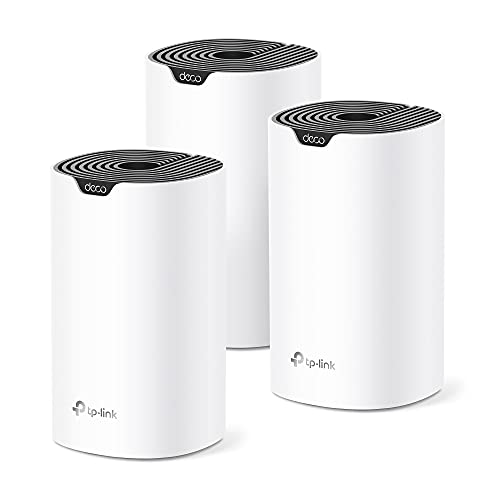
TP-Link Deco S4 Mesh AC1900 WiFi System, Deco S4(3-Pack) | Up to 5,500 Sq.ft. Coverage, Replaces WiFi Router and Extender, Gigabit Ports, Works with Alexa
As an Amazon Associate we earn from qualifying purchases. Product prices and availability are accurate as of the date/time indicated.

NETGEAR Orbi 370 Series WiFi 7 Mesh System, Up to 6,000 sq ft., 3 Pack | Up to 5 Gbps, 70 Devices, Easy Set Up, Dual-Band, Security Features, 2.5 Gig Port, Router + 2 Satellite Extenders, RBE373
As an Amazon Associate we earn from qualifying purchases. Product prices and availability are accurate as of the date/time indicated.

Google Nest Wifi - Home Wi-Fi System - Wi-Fi Extender - Mesh Router for Wireless Internet - 2 Pack


As an Amazon Associate we earn from qualifying purchases. Product prices and availability are accurate as of the date/time indicated.
Top Budget Mesh WiFi Systems for Students Reviewed
TP-Link Deco S4 Mesh WiFi System, 3-Pack
The TP-Link Deco S4 Mesh WiFi System, 3-Pack is a system with a coverage up to 5,500 square feet, a speed of AC1900, 3 nodes, Wi-Fi 5, and a price of $100 to $120. It has a large coverage, a low price, and a good value. It is a good choice if you want the best budget mesh WiFi for students with a proven TP-Link design.
TP-Link Deco X20 Mesh WiFi System, 3-Pack
The TP-Link Deco X20 Mesh WiFi System, 3-Pack is a system with a coverage up to 5,800 square feet, a speed of AX1800, 3 nodes, Wi-Fi 6, and a price of $130 to $150. It has a large coverage, a fast speed, and a good value. It is a good choice if you want a TP-Link mesh system with Wi-Fi 6.
Amazon eero 6 Mesh WiFi System, 3-Pack
The Amazon eero 6 Mesh WiFi System, 3-Pack is a system with a coverage up to 5,000 square feet, a speed of AX1800, 3 nodes, Wi-Fi 6, and a price of $150 to $170. It has a good coverage, a fast speed, and a good value. It is a good choice if you want an eero mesh system with Wi-Fi 6.
Google Nest Wifi Mesh System, 2-Pack
The Google Nest Wifi Mesh System, 2-Pack is a system with a coverage up to 3,800 square feet, a speed of AC2200, 2 nodes, Wi-Fi 5, and a price of $150 to $170. It has a good coverage, a simple setup, and a good value. It is a good choice if you want a Google mesh system with a simple setup.
ASUS ZenWiFi AX Mini XD4 Mesh System, 3-Pack
The ASUS ZenWiFi AX Mini XD4 Mesh System, 3-Pack is a system with a coverage up to 4,800 square feet, a speed of AX1800, 3 nodes, Wi-Fi 6, and a price of $150 to $170. It has a good coverage, a compact design, and a good value. It is a good choice if you want an ASUS mesh system with a compact design.
TP-Link Deco M5 Mesh WiFi System, 3-Pack
The TP-Link Deco M5 Mesh WiFi System, 3-Pack is a system with a coverage up to 5,500 square feet, a speed of AC1300, 3 nodes, Wi-Fi 5, and a price of $90 to $110. It has a low price, a large coverage, and a good value. It is a good choice if you want an affordable TP-Link mesh system.
Buying Guide: How to Choose the Best Budget Mesh WiFi for Students
Start with your space, your devices, and your budget. If you live in a dorm, a system with 2 nodes is enough, while if you live in a 2-bedroom apartment, a system with 3 nodes is better. If you have 10 devices, a system with Wi-Fi 6, such as the TP-Link Deco X20, is better than a system with Wi-Fi 5, because it handles more devices. If you have a budget under $150, a system with a price of $100 to $120, such as the Deco S4, is a good choice.
Next, check coverage, speed, and app. A system with a coverage of 3,000 square feet is a good choice for most students, while a system with a coverage of 5,000 square feet is better for a larger house. A system with a speed of AX1800 is a good choice for online classes and streaming, while a system with a speed of AC1900 is also good. A system with a simple app, such as the Deco app, lets you set up your mesh in minutes, with parental controls if needed.
Check your budget, your use, and your future. Budget mesh WiFi for students typically costs $90 to $170. A system from $90 to $110, such as the TP-Link Deco M5, offers a good way to start. A system from $100 to $150, such as the Deco S4 or Deco X20, offers a better speed and coverage. A system from $150 to $170, such as the eero 6, Google Nest Wifi, or ASUS ZenWiFi, offers a premium design and Wi-Fi 6.
Finally, do not buy a mesh system based only on price or coverage. A system with a large coverage but a slow speed will be frustrating for video calls, while a system with a small coverage but a fast speed will not cover your apartment. Choose a system that fits your space, with a speed that fits your internet, and with nodes that fit your rooms. Test your Wi-Fi speed after setup, with a speed test app, and place your nodes in open areas, not behind furniture.
How to Set Up a Budget Mesh WiFi System for Students
To set up a budget mesh WiFi system for students, first plug your main node into your modem, with an Ethernet cable, and download the mesh app, such as Deco or eero, on your phone. Open the app, follow the instructions to create a Wi-Fi network, with a name and password, and place your second node in a central room, halfway between your main node and your bedroom. Plug in your second node, wait for it to connect, and test your Wi-Fi speed in each room, with a speed test app. If your speed is slow in a room, move your node closer to your main node, and test again. After setup, connect your laptop, phone, and tablet to your new Wi-Fi network.
Frequently Asked Questions
What is the best budget mesh WiFi for students?
What is the best budget mesh WiFi for students depends on your space and budget. A system with a coverage of 5,800 square feet, a speed of AX1800, and 3 nodes, such as the TP-Link Deco X20 at $130 to $150, is a good choice for most students, because it is fast, covers a large apartment, and has Wi-Fi 6. A system with a lower price, such as the TP-Link Deco S4 at $100 to $120, is also good, especially if you want a more affordable system. Choose a system that fits your space, with a speed that fits your internet.
Do I need mesh WiFi in a dorm?
Do you need mesh WiFi in a dorm, it depends on your dorm’s Wi-Fi and your room’s layout. A dorm with a single router may not cover every room, while a dorm with a mesh system can give you a strong signal in your room. A mesh system with 2 nodes is a good choice for a dorm, because it covers a large area. Check your dorm’s rules for using your own router, because some dorms do not allow it. If your dorm allows it, a mesh system with 2 nodes is a good choice for a dorm.
Is Wi-Fi 6 better than Wi-Fi 5 for students?
Is Wi-Fi 6 better than Wi-Fi 5 for students, yes, Wi-Fi 6 is better than Wi-Fi 5 for students, because Wi-Fi 6 is faster, more reliable, and handles more devices at the same time. A system with Wi-Fi 6, such as the TP-Link Deco X20, can handle video calls, online classes, and streaming at the same time, while a system with Wi-Fi 5 may slow down with many devices. A system with Wi-Fi 6 is a good choice for students who have many devices, such as a laptop, phone, and tablet.
How many mesh nodes do I need for an apartment?
How many mesh nodes you need for an apartment depends on its size. A system with 2 nodes is enough for a 1-bedroom apartment, with a coverage of 3,000 square feet, while a system with 3 nodes is better for a 2-bedroom apartment, with a coverage of 5,000 square feet. A system with 1 node is enough for a studio apartment, while a system with 3 nodes is better for a house with multiple floors. Check your system’s coverage before you buy, and place your nodes in open areas, not behind furniture, for the best signal.
Related guides
- Best AAA Batteries for Office Remotes in 2026: AAA Batteries for Office Remotes
- Best Budget Tablet for Work Under 100 in 2026: Budget Tablets for Work Under $100, Office Work, and Productivity
- Best Gimbal for Office Vlogging in 2026: 7 Gimbals for Office Vlogging That Keep Your Video Smooth, Stable, and Professional in the Office
- Best Budget NAS Dust Filter for Maintenance in 2026: 7 Budget NAS Dust Filters for Maintenance With Clear Airflow, Simple Install, and Easy Use for NAS
More from Amazon
Programs that pair well with the guide above. Offers and eligibility are set by Amazon and may change.
Free shipping on eligible items, Prime Video and more. Eligible new members can start with a free trial.
Start a Prime free trialAd-free music streaming. Eligible new subscribers can start with a free trial.
Try Music Unlimited freeA Prime membership for ages 18-24 with a trial period. Eligibility is set by Amazon.
See Prime for Young AdultsAudiobooks and podcasts to listen to on the go. Eligible new members can start with a free trial.
Try Audible freeAs an Amazon Associate we earn from qualifying purchases.

Write Your Review
No reviews yet. Be the first to share your experience!