
What's inside
- What Makes the Best Braided Cable for Home Offices Different
- Quick Comparison: Best Braided Cable for Home Offices Models
- Detailed Reviews: Best Braided Cable for Home Offices Picks
- Buying Guide: Choosing the Best Braided Cable for Home Offices
- Frequently Asked Questions About Best Braided Cable for Home Offices
As an Amazon Associate I earn from qualifying purchases. This post may contain affiliate links at no extra cost to you.
The best braided cable for home offices is not bought for its looks, although a good braid does look tidy on a desk. It is bought because the home office is where cables go to die: run over by chair castors, pinched in drawers, bent at the same sharp angle behind a laptop ten thousand times, coiled and thrown in a bag every Friday. A braided jacket in the makers’ terms, nylon woven over the cable in Anker, Belkin, UGREEN, and Native Union patterns, resists the abrasion, kinking, and fraying that split a plain rubber cable at its strain relief within a year of that life. This guide compares real, currently sold braided cables for the jobs a home office actually has, charging and connecting a laptop by USB-C, fast-charging a phone, linking a monitor by HDMI or USB-C, and wiring a desk’s peripherals, explains the specifications hidden inside the braid, wattage, data speed, and certification in the makers’ stated terms, and gives the routing and care method that makes any cable, braided or not, last.
Separate the braid from the cable, because the first is armour and the second is the specification. A braided USB-C cable may carry, in its maker’s stated terms, anything from basic charging wattage and slow data speeds suited to a phone, to the high wattage a laptop’s charger delivers and the fast data and video a docking setup needs, and two cables identical on a desk can differ completely inside. The home office buyer therefore shops in the opposite order to the shop display: first the job and its numbers, the laptop’s stated charging wattage, the monitor’s connection, the phone’s fast-charge standard in its maker’s terms, then the length the desk actually needs, and only then the braid, its strain relief design, and its colour. This guide’s table is organised by job for that reason, and its buying guide gives the label-reading that prevents the classic home office disappointment, the beautiful braided cable that charges the laptop at a crawl because nobody read its wattage line.
Prices are typical retail ranges, and specifications, wattage and data ratings, lengths, certifications, and bend-lifetime claims, are each maker’s stated details for the current version, so confirm them before you buy, particularly wattage and data speed, which vary between models under near-identical braided appearances in every maker’s line.
Our Top Picks
What Makes the Best Braided Cable for Home Offices Different
The Braid Itself: Abrasion, Kinks, and the Strain Relief That Matters More
A nylon braid earns its place in three encounters. Against abrasion, a chair castor, a desk edge, a drawer slide, the woven jacket in the makers’ designs scuffs where a rubber jacket cuts, and a braided cable run across a home office floor survives a season of crossings that would open a plain cable. Against kinking and tangling, the braid’s stiffness in its pattern holds a gentle coil, resists the tight knots a soft cable ties itself into in a bag, and straightens onto a desk without the permanent corkscrew of a mistreated rubber lead. Against fraying at the ends, the braid anchors into the connector housing and resists the split that starts every plain cable’s death. But the honest engineering point of this guide is that more braided cables die at the strain relief, the short section where cable meets connector, than anywhere else, braid included, because that is where every bend concentrates. The makers who address it, Anker’s and Belkin’s reinforced relief patterns in their designs and the bend-lifetime figures in their stated terms, are selling the part of the cable that actually decides its life, and a buyer comparing two braided cables should compare reliefs and stated bend ratings first and the braid’s colour last.
Inside the Braid: Wattage, Data, and Video Are Separate Promises
Read a USB-C cable as three promises that are sold separately. Charging wattage in the maker’s stated terms runs from levels suited to phones and accessories up to the high figures, in the current market’s patterns, that a large laptop’s charger in its maker’s terms can deliver, and a cable below your laptop’s figure will charge it slowly or, under load, not at all while it runs. Data speed in the stated terms divides just as sharply, from the basic USB 2 speeds in many charging cables, entirely adequate for a phone and a backup drive’s overnight work, to the fast USB and Thunderbolt class speeds in the Belkin and Anker data lines’ terms that a dock, a fast SSD, and a creator’s workflow require. Video is the third: a USB-C cable carries a monitor’s signal only where its stated terms include the display capability in the DisplayPort alt mode pattern, which the docking cables in this table state and the pure charging cables do not. HDMI braided cables in the UGREEN and Anker patterns simplify that job into its own standard, with the version and its stated resolution and refresh support in the maker’s terms to match against your monitor’s. None of this is visible in the braid, all of it is printed in the listing, and the home office that labels its cables by capability, as the buying guide directs, never plays the three-cable lottery at the back of a dock again.
Length and Desk Discipline: The Right Cable Is the Short One That Reaches
Home offices buy cables too long out of a reasonable fear and then live with the consequence, a coil of surplus on the desk that tangles every other cable, catches the chair, and turns the workspace into the tangle the braid was bought to civilise. Measure the run as it will actually be routed, along the desk’s back edge, down the leg in the cable management patterns, to the socket or the dock, and buy the length that covers it with a hand’s breadth of working slack at each end, because a cable under tension at its connectors is a cable failing at its strain reliefs on an instalment plan. The standard lengths in the makers’ lines, short desk lengths in their terms for a dock to laptop hop, mid lengths for charger to desk, and long runs for the socket across the room, exist to make that measurement shoppable. A braided cable’s stiffness helps here in a small, real way: it holds a routed shape along a desk edge and inside a tray in a way a limp cable will not, so the measured, right-length braided run is the one cable arrangement in a home office that tends to stay as tidy as the day it was installed.
Quick Comparison: Best Braided Cable for Home Offices Models
| Model | Type and Key Specs in Maker’s Terms | Best For | Typical Price Range | Rating |
|---|---|---|---|---|
| Anker 765 and 643 braided USB-C class | USB-C to USB-C, high wattage classes in maker’s line terms, braided patterns by model | Best laptop charging cable for the desk | $18 – $30 by model and length | 4.7 / 5 |
| Belkin BoostCharge Pro braided USB-C class | USB-C, wattage and certification in maker’s terms, reinforced strain relief stated | Best premium charging cable, tidy desk standard | $20 – $35 by length | 4.6 / 5 |
| UGREEN braided USB-C 100W class | USB-C to USB-C, wattage class in maker’s terms, data speed stated, lengths in line | Best value braided charging cable | $10 – $20 by length | 4.5 / 5 |
| Anker and Belkin braided Thunderbolt and USB4 class | Short desk cables, data and video in makers’ stated standards, wattage stated | Best dock to laptop cable, data and monitor in one | $25 – $40 | 4.6 / 5 |
| UGREEN braided HDMI class | HDMI, version and stated resolution and refresh support in maker’s terms, lengths in line | Best braided monitor cable | $12 – $25 by length | 4.5 / 5 |
| Native Union braided charging class | USB-C and Lightning patterns in maker’s line, long lengths stated, weighted knot design by model | Best long cable for sofa and bedside office overflow | $25 – $40 by model | 4.4 / 5 |

Acer USB C to HDMI Cable for Home Office 6.6FT (4K@60Hz) for Laptop | Thunderbolt 4/3 Support, High-Speed Type C to HDMI 2.0 Braided Cord Compatible for Acer, MacBook Neo, iPhone 17 Pro/Max, iPad
As an Amazon Associate we earn from qualifying purchases. Product prices and availability are accurate as of the date/time indicated.
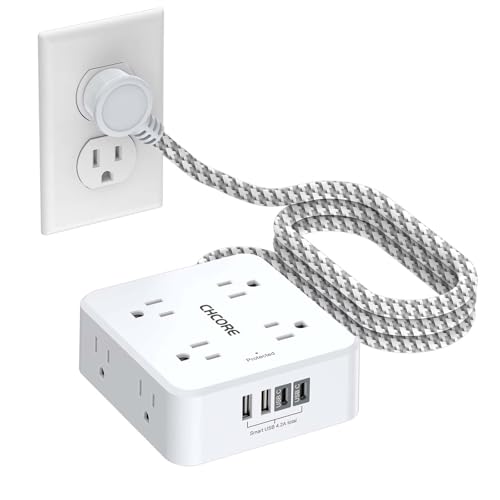
Surge Protector Power Strip - CHCORE 5Ft Braided Extension Cord with 8 Outlets with 4 USB (2 USB C) Charging Ports, Flat Plug Multi Plug Outlet Extender Charging Station for Home Office, ETL, White
As an Amazon Associate we earn from qualifying purchases. Product prices and availability are accurate as of the date/time indicated.

MORELECS Cat 7 Ethernet Cable 25ft - Nylon Braided Flat High Speed Internet Cable LAN Cable Shielded Fast and Stable Ethernet Cord for Home and Office


As an Amazon Associate we earn from qualifying purchases. Product prices and availability are accurate as of the date/time indicated.
Cable types, wattage and data ratings, lengths, certifications, and bend claims are each maker’s stated details for the current version and model; check the exact model’s figures, because braided cables of near-identical appearance in the same line differ in wattage and data speed. Price ranges are typical retail ranges and vary by length, retailer, and promotion. Ratings are editorial ratings for home office use: survival under desk life, strain relief design, honesty and completeness of stated specifications, connector quality, and value.
Detailed Reviews: Best Braided Cable for Home Offices Picks
1. Anker Braided USB-C Class – Best Braided Cable for Home Offices Overall
Anker’s braided USB-C lines lead on the combination this category is actually judged by: stated wattage classes in its maker’s terms that cover the laptop chargers a home office runs, from its high-wattage models for the big machines to its softer, flexible braided patterns in its line for the desk’s daily coil, strain reliefs in its designs that address the failure point this guide identified, and specifications printed completely enough to shop by. A home office standardising on one maker’s cables for its charging runs, labelled by length as the buying guide directs, will most defensibly standardise here, keeping a data-class cable from the fourth row for the dock where data is the job.
2. Belkin BoostCharge Pro Braided Class – Best Premium Braided Cable for Home Offices
Belkin’s braided charging cables are the retail standard’s polished form: certification and wattage in its maker’s stated terms presented without ambiguity, reinforced strain relief in its design, and a finish that suits the client-facing desk and the video call’s background. Its prices sit above the value rows for that polish and for a support and retail presence in the market’s pattern that offices value when a cable must be replaced today. For the professional whose desk is seen, and whose employer’s laptop charges through the cable all day, it is the safe, handsome default.
3. UGREEN Braided USB-C Class – Best Value Braided Cable for Home Offices
UGREEN’s braided USB-C cables deliver the category’s essentials at its friendliest prices: a wattage class in its maker’s terms, commonly the level that covers most laptops in its stated figure, a braid and relief in its pattern that survive ordinary desk life, and lengths across its line for every run in the office. Its data speeds in its stated terms are the charging class’s, which this guide has taught the reader to expect and to route around with a data cable at the dock. Bought in the small multiples a home office actually consumes, a desk spare, a bag spare, a meeting room loaner, it is the value row the other rows are compared against.
4. Braided Thunderbolt and USB4 Class – Best Braided Cable for a Home Office Dock
The short braided data cables in the Anker and Belkin patterns are the dock’s specialist: data, video, and charging in their makers’ stated standards in a single short length in their lines designed for the laptop-to-dock hop, where a long charging cable’s coil would live behind the monitor forever. Their shortness is their specification, forcing the tidy geometry a dock desk wants, and their price per length is the table’s highest, which their triple job justifies in the one position that needs all three. Verify the exact standard and its stated figures against your dock’s and laptop’s terms, because this class’s near-identical plugs span several standards’ real capabilities.
5. UGREEN Braided HDMI Class – Best Braided Cable for a Home Office Monitor
For the monitor that takes HDMI, UGREEN’s braided HDMI line is the straightforward answer: the version and its stated resolution and refresh support in its maker’s terms to match against the display’s, a braid that survives the monitor arm’s movement and the desk’s rearrangements, and lengths in its line for the under-desk run. Anker’s braided HDMI patterns in its line stand as the alternative in the same class. Match the stated support to the monitor you own rather than the one in the advertisement, route it with slack for the arm’s travel, and this is a purchase the office makes once per monitor generation.
6. Native Union Braided Class – Best Long Braided Cable for Home Offices
Native Union’s braided cables serve the home office’s overflow geography: the long charging run in its maker’s stated lengths to the reading chair where the laptop finishes the day, the bedside where the phone charges, with designs in its line, including its weighted pattern in its terms, that keep a long cable where it was put instead of on the floor. Its prices are the lifestyle tier’s and its specifications in its stated terms should be checked for wattage as this guide directs for every row. For the one long cable every home office discovers it needs, it is the version that will still look intentional in a year.
Buying Guide: Choosing the Best Braided Cable for Home Offices
Shop by Job: Write the Cable List Before Opening a Store
List the office’s cable jobs on paper first, because each has its own non-negotiable figure. Laptop charging: a USB-C cable whose stated wattage meets or exceeds the laptop charger’s own figure in its maker’s terms, at the measured desk length. Dock connection: a data-class cable, Thunderbolt or USB4 pattern, whose stated data, video, and wattage all meet the dock’s terms, in the short length its position wants. Phone charging: a cable in the phone maker’s fast-charge pattern, USB-C or Lightning in its terms for the models that use it, where the braid’s job is pure survival in bags and drawers. Monitor by HDMI: the version whose stated support covers your display’s resolution and refresh. Peripherals and drives: the data speed in the cable’s stated terms matched to the drive’s, because a fast SSD on a charging-class cable is the home office’s most common self-inflicted slowdown. Buy one spare of the charging class, label every cable at both ends with its job and wattage in the label maker’s pattern, and the desk’s cable drawer becomes an inventory instead of an archaeology.
Route and Protect: Castors, Drawers, and the Chair’s Territory
Install the braided advantage where it is needed and protect it where it is not enough. Keep every cable out of the chair castors’ patrol area entirely, routed along the desk’s back edge and down a leg in a tray, sleeve, or clips in the cable management patterns, because a braid resists a castor’s crossing and loses to a castor’s parked weight on the same spot for a month. Give each connector its slack, a gentle curve out of the laptop and the dock rather than a right angle under tension, and support a heavy run so its weight hangs on the desk and not on a port. In drawers and bags, coil in the loose over-under pattern in the common cable practice that preserves a cable’s natural lay, never wound tight around a hand or a charger, and keep braided cables from the company of keys and tools that test any jacket. A cable that fails despite all this, frayed at the relief, intermittent at a bend, warm at a connector, is retired and replaced, because a damaged charging cable is an electrical fault with a fabric coat, and no desk accessory is worth its risk.
Standardise, Label, and Keep the Spares Honest
Close the system with the office discipline that makes cables boring. Standardise the charging fleet on one or two models in this table whose stated figures cover the household’s laptops and phones, so any cable found anywhere is known safe for any device, and keep the data-class and HDMI cables visually distinct by colour or label, because their jobs are not interchangeable with the charging fleet’s despite the shared plugs in the USB-C case. Keep the spare in the drawer new and labelled rather than as the survivor of three previous desks, and buy replacements in the small batches the office’s rhythm consumes rather than in a panic single at a corner shop’s plain rubber standard, which will be back in the bin by the season’s end. Reviewed once a year, cables retired on condition, lengths re-measured after every desk rearrangement, the home office’s braided cables become what they should be: invisible infrastructure, strong, tidy, and forgotten, carrying the power and the pictures while the work gets the attention, which is the highest rating this guide gives any cable.
Frequently Asked Questions About Best Braided Cable for Home Offices
What is the best braided cable for a home office?
For laptop charging, the Anker braided USB-C class is the best all-round choice, with Belkin’s BoostCharge Pro braided class the premium alternative and UGREEN’s braided class the value pick, each chosen at a stated wattage that meets your laptop charger’s figure. For a dock, a short braided Thunderbolt or USB4 class cable whose stated data, video, and wattage match the dock is best; for a monitor, a braided HDMI cable whose stated support covers your display, UGREEN’s class; and for a long run, Native Union’s braided class. The braid is the armour; the stated wattage, data, and video figures are the cable, so shop by those first.
Are braided cables actually more durable than regular cables?
Yes, against the failures that kill home office cables most often: abrasion from desk edges, drawers, and occasional castor crossings, fraying at the jacket’s ends, and kinking and tangling in bags and coils, all of which a nylon braided jacket in the makers’ designs resists better than a plain rubber jacket. The braid does not repeal the commonest failure of all, the bend at the strain relief where cable meets connector, so compare that design and any stated bend rating in the maker’s terms when choosing, route cables out of the chair’s territory, and give connectors their slack, as the buying guide sets out.
Why does my braided USB-C cable charge my laptop slowly?
Almost always because its stated wattage is below your laptop charger’s. USB-C cables carry different wattage ratings in their makers’ terms under identical-looking braids and plugs, and a phone-class cable on a large laptop will charge it slowly or merely slow its discharge under load. Check the cable’s stated wattage against the charger’s figure printed on its maker’s label and replace it with a cable rated at or above that figure, Anker, Belkin, or UGREEN high-wattage classes in this guide. Slow data to a drive has the same cause in another figure: a charging-class cable’s stated data speed is basic, and a dock or fast SSD needs a data-class cable.
What length braided cable should I buy for my desk?
The shortest that covers the run as you will actually route it, along the desk’s back edge and down to the socket or dock, with a hand’s breadth of slack at each end. Measure the route with a tape or a piece of string before ordering, because the standard lengths in the makers’ lines exist to match real runs: short lengths for a dock-to-laptop hop, mid lengths for a charger on the desk, long lengths for a socket across the room or a charging chair. Surplus length is not future-proofing; it is the coil that tangles the desk, catches the chair, and stresses the connectors it was bought to protect.
Related guides
- Best AAA Batteries for Office Remotes in 2026: AAA Batteries for Office Remotes
- Best Budget Tablet for Work Under 100 in 2026: Budget Tablets for Work Under $100, Office Work, and Productivity
- Best Gimbal for Office Vlogging in 2026: 7 Gimbals for Office Vlogging That Keep Your Video Smooth, Stable, and Professional in the Office
- Best Budget NAS Dust Filter for Maintenance in 2026: 7 Budget NAS Dust Filters for Maintenance With Clear Airflow, Simple Install, and Easy Use for NAS
More from Amazon
Programs that pair well with the guide above. Offers and eligibility are set by Amazon and may change.
Free shipping on eligible items, Prime Video and more. Eligible new members can start with a free trial.
Start a Prime free trialAd-free music streaming. Eligible new subscribers can start with a free trial.
Try Music Unlimited freeA Prime membership for ages 18-24 with a trial period. Eligibility is set by Amazon.
See Prime for Young AdultsAudiobooks and podcasts to listen to on the go. Eligible new members can start with a free trial.
Try Audible freeAs an Amazon Associate we earn from qualifying purchases.

Write Your Review
No reviews yet. Be the first to share your experience!