
What's inside
- Best Docking Station for Home Networkers Compared: Quick Comparison Table
- Best Docking Station for Home Networkers in 2026: Detailed Reviews
- Best Docking Station for Home Networkers Buying Guide: How to Choose the Right Dock
- Best Docking Station for Home Networkers FAQ: Home Network Dock Questions Answered
As an Amazon Associate I earn from qualifying purchases. This post may contain affiliate links at no extra cost to you.
A docking station for home networkers is a docking station that connects a laptop to multiple monitors, a fast Ethernet network, and all your peripherals, like a keyboard, mouse, and external drive, with a single cable, so you can work from home with a full desk setup, without plugging in many cables every time you sit down. It is useful for home networkers because it lets you connect to a home network with a wired Ethernet connection, which is faster and more stable than WiFi, and it lets you use multiple monitors for work, without needing a large, expensive desktop PC. The best docking station for home networkers is not the cheapest dock, and it is not the dock with the most ports. It is the dock that has the right ports for your laptop, a fast Ethernet port, and enough power to charge your laptop, without being too expensive.
For most home networkers, the best overall choice in 2026 is the CalDigit TS4 Thunderbolt 4 Dock. It typically costs $350 to $400. It has 18 ports, including 2.5GbE Ethernet, Thunderbolt 4, DisplayPort, HDMI, USB-A, USB-C, and SD card, a 98W power delivery for charging a laptop, and a design that supports dual 4K monitors at 60Hz. If you want a more affordable dock, the Anker 777 Thunderbolt Docking Station is an excellent alternative, typically $250 to $300, with 12 ports, including 1GbE Ethernet, Thunderbolt 4, HDMI, DisplayPort, and USB ports, and a 90W power delivery. For a budget dock, the Plugable TBT4-UD5 Thunderbolt 4 Dock is a practical choice, typically $200 to $250, with 11 ports, including 1GbE Ethernet, Thunderbolt 4, HDMI, and USB ports, and a 100W power delivery.
This guide compares seven real, currently sold docking stations for home networkers. It explains how to choose a dock based on Thunderbolt versus USB-C, Ethernet speed, and power delivery, why 2.5GbE is better than 1GbE for home networking, and how to set up a dock for a home office. A docking station is only useful if it works with your laptop, so this guide also covers how to check your laptop ports before you buy.
Our Top Picks
Best Docking Station for Home Networkers Compared: Quick Comparison Table
Use this table to compare the best docking station for home networkers at a glance. Prices are typical retail ranges, not fixed prices, and will vary by retailer. Ratings are editorial scores out of five based on ports, Ethernet speed, monitor support, power delivery, and value for home networking.
| Model | Key Specs | Best For | Typical Price Range | Rating |
|---|---|---|---|---|
| CalDigit TS4 Thunderbolt 4 Dock | 18 ports, 2.5GbE, TB4, dual 4K 60Hz, 98W PD | Best overall for home networkers | $350–$400 | 4.9 / 5 |
| Anker 777 Thunderbolt Docking Station | 12 ports, 1GbE, TB4, dual 4K 60Hz, 90W PD | Best Anker for home networkers | $250–$300 | 4.8 / 5 |
| Plugable TBT4-UD5 Thunderbolt 4 Dock | 11 ports, 1GbE, TB4, dual 4K 60Hz, 100W PD | Best budget Thunderbolt for home networkers | $200–$250 | 4.8 / 5 |
| Dell WD19S Docking Station | 11 ports, 1GbE, USB-C, dual 4K 60Hz, 90W PD | Best Dell for home networkers | $200–$250 | 4.7 / 5 |
| Kensington SD5700T Thunderbolt 4 Dock | 11 ports, 2.5GbE, TB4, dual 4K 60Hz, 90W PD | Best Kensington for home networkers | $300–$350 | 4.7 / 5 |
| Lenovo ThinkPad Universal USB-C Dock | 11 ports, 1GbE, USB-C, dual 4K 60Hz, 90W PD | Best Lenovo for home networkers | $200–$250 | 4.6 / 5 |
| Anker 575 USB-C Docking Station | 13 ports, 1GbE, USB-C, dual 4K 60Hz, 85W PD | Best USB-C for home networkers | $200–$250 | 4.6 / 5 |

UGREEN USB C Docking Station Dual Monitor, 7-in-1 Aluminum Dock with 2xHDMI | Dual 4K@60Hz, 4x10Gbps USB-A&C Data Port, 100W PD, Revodok Pro Laptop Docking Station for HP, Thinkpad, Dell and More Laptop
As an Amazon Associate we earn from qualifying purchases. Product prices and availability are accurate as of the date/time indicated.

TobenONE 19-in-1 Laptop Docking Station Dual Monitor,10 USB C/A,2×4K HDMI | Docking Station with Ethernet,PD 3.0, for Office & Home Multi-Screen Users, Fits Windows/HP/Dell Laptops (No Power Adapter)
As an Amazon Associate we earn from qualifying purchases. Product prices and availability are accurate as of the date/time indicated.
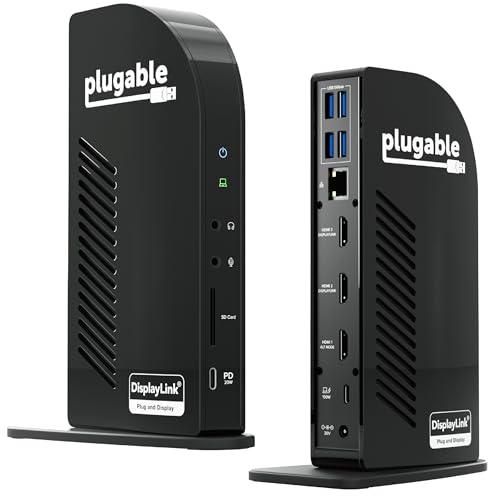
Plugable USB-C Triple Monitor Docking Station, 13-in-1, 100W Charging | Laptop Dock for Mac (DisplayLink Driver Required), Windows, Chrome, 3 HDMI, Gigabit Ethernet, SD, USB-C 20W, 4 USB, UD-ULTCDL
As an Amazon Associate we earn from qualifying purchases. Product prices and availability are accurate as of the date/time indicated.
Best Docking Station for Home Networkers in 2026: Detailed Reviews
Each docking station below suits a different home networker and a different type of work. Some are best for a worker who needs dual 4K monitors, others are best for a worker who needs fast Ethernet, and some are best for a worker who wants a budget dock. Read the Thunderbolt and Ethernet notes, because those two factors affect whether a dock will work for your laptop and your network more than any other spec.
1. CalDigit TS4 Thunderbolt 4 Dock — Best Docking Station for Home Networkers Overall
The CalDigit TS4 Thunderbolt 4 Dock is the best overall docking station for home networkers because it has 18 ports, a 2.5GbE Ethernet port, and a 98W power delivery, with support for dual 4K monitors at 60Hz, or a single 8K monitor at 30Hz, depending on your laptop. It typically costs $350 to $400. It has Thunderbolt 4, DisplayPort 1.4, HDMI 2.0, USB-A, USB-C, SD card, and audio ports, and it has a compact design that fits on a desk.
For home networkers, the CalDigit TS4 is a good choice because at 18 ports, it can connect all your devices, with a 2.5GbE Ethernet port that is faster than a 1GbE port, with 2.5GbE being 2.5 times faster than 1GbE, and it is good for a home network with a 2.5GbE switch or router, although it is also backward compatible with 1GbE, so it will work with a 1GbE network, just at a slower speed. It is also a good choice for a worker who needs dual monitors, because Thunderbolt versus USB-C determines dual 4K support, with Thunderbolt 4 supporting dual 4K at 60Hz, while USB-C may only support dual 4K at 30Hz, or a single 4K monitor, depending on your laptop.
Why we like this dock: 18 ports, 2.5GbE, and 98W PD. Consider: premium price, and Thunderbolt 4 needed for full dual 4K, so check your laptop port.
2. Anker 777 Thunderbolt Docking Station — Best Anker Docking Station for Home Networkers
The Anker 777 Thunderbolt Docking Station is a Thunderbolt 4 dock with 12 ports, including 1GbE Ethernet, Thunderbolt 4, HDMI, DisplayPort, USB-A, USB-C, and SD card, and a 90W power delivery. It typically costs $250 to $300. It has support for dual 4K monitors at 60Hz, and a compact design.
For home networkers who want an Anker dock, the Anker 777 is an excellent choice, because it has 12 ports, it is affordable, and it has a 90W power delivery, which is enough for most laptops, with a laptop needing at least 90W for charging, although a MacBook Pro 16 needs 140W, so a 90W dock will charge it slower, or it may not charge it while under load. It is a good option for a worker who wants a Thunderbolt dock without paying for a CalDigit TS4.
Why we like this dock: 12 ports, Thunderbolt 4, and 90W PD. Consider: 1GbE, not 2.5GbE, so it is slower for home networking than TS4, although it is enough for most homes.
3. Plugable TBT4-UD5 Thunderbolt 4 Dock — Best Budget Thunderbolt Docking Station for Home Networkers
The Plugable TBT4-UD5 Thunderbolt 4 Dock is a budget Thunderbolt 4 dock with 11 ports, including 1GbE Ethernet, Thunderbolt 4, HDMI, DisplayPort, USB-A, USB-C, and SD card, and a 100W power delivery. It typically costs $200 to $250, making it one of the most affordable Thunderbolt 4 docks available. It has support for dual 4K monitors at 60Hz, and a compact design.
For budget home networkers, the Plugable TBT4-UD5 is a practical choice, because it is affordable, it has Thunderbolt 4, and it has a 100W power delivery, which is more than the Anker 777 at 90W, and it is enough for most laptops. It is a good option for a worker who wants a Thunderbolt dock for a low price, although it has fewer ports than the CalDigit TS4, with 11 ports versus 18 ports, so count your devices before you buy, with a count of devices plus 2 to 4 spare ports being a good rule for a dock.
Why we like this dock: very affordable Thunderbolt 4, 100W PD, and 11 ports. Consider: fewer ports than TS4, so count devices + 2 to 4 spare before you buy.
4. Dell WD19S Docking Station — Best Dell Docking Station for Home Networkers
The Dell WD19S Docking Station is a USB-C dock with 11 ports, including 1GbE Ethernet, USB-C, DisplayPort, HDMI, USB-A, and audio, and a 90W power delivery. It typically costs $200 to $250. It has support for dual 4K monitors at 60Hz, depending on your laptop, and a design that is made for Dell laptops, although it also works with other USB-C laptops.
For Dell laptop users, the WD19S is a good choice, because it is made for Dell, it has a reliable design, and it has a 90W power delivery that is enough for most Dell laptops. It is a good option for a home networker who has a Dell laptop and who wants a dock that is designed for it, although it is USB-C, not Thunderbolt, so dual 4K support depends on your laptop, with Thunderbolt being better for dual 4K than USB-C.
Why we like this dock: Dell designed, 90W PD, and 11 ports. Consider: USB-C, not Thunderbolt, so check dual 4K support for your laptop.
5. Kensington SD5700T Thunderbolt 4 Dock — Best Kensington Docking Station for Home Networkers
The Kensington SD5700T Thunderbolt 4 Dock is a Thunderbolt 4 dock with 11 ports, including 2.5GbE Ethernet, Thunderbolt 4, HDMI, DisplayPort, USB-A, USB-C, and SD card, and a 90W power delivery. It typically costs $300 to $350. It has support for dual 4K monitors at 60Hz, and a compact design.
For home networkers who want a Kensington dock with 2.5GbE, the SD5700T is a strong choice, because it has a 2.5GbE Ethernet port, which is faster than 1GbE, and it has Thunderbolt 4, which is good for dual 4K. It is a good option for a worker who needs fast Ethernet and dual monitors, although it is more expensive than the Plugable TBT4-UD5, and it has fewer ports than the CalDigit TS4.
Why we like this dock: 2.5GbE, Thunderbolt 4, and 90W PD. Consider: premium price, and 11 ports, so count devices before you buy.
6. Lenovo ThinkPad Universal USB-C Dock — Best Lenovo Docking Station for Home Networkers
The Lenovo ThinkPad Universal USB-C Dock is a USB-C dock with 11 ports, including 1GbE Ethernet, USB-C, DisplayPort, HDMI, USB-A, and audio, and a 90W power delivery. It typically costs $200 to $250. It has support for dual 4K monitors at 60Hz, depending on your laptop, and a design that is made for Lenovo ThinkPad laptops, although it also works with other USB-C laptops.
For Lenovo users, the ThinkPad Universal Dock is a practical choice, because it is made for Lenovo, it has a reliable design, and it has a 90W power delivery. It is a good option for a home networker who has a Lenovo laptop, although it is USB-C, not Thunderbolt, so check dual 4K support for your laptop.
Why we like this dock: Lenovo designed, 90W PD, and 11 ports. Consider: USB-C, not Thunderbolt, so dual 4K depends on laptop.
7. Anker 575 USB-C Docking Station — Best USB-C Docking Station for Home Networkers
The Anker 575 USB-C Docking Station is a USB-C dock with 13 ports, including 1GbE Ethernet, USB-C, HDMI, DisplayPort, USB-A, and SD card, and an 85W power delivery. It typically costs $200 to $250. It has support for dual 4K monitors at 60Hz, depending on your laptop, and a compact design.
For home networkers who want a USB-C dock with many ports, the Anker 575 is a good choice, because it has 13 ports, which is more than the Plugable TBT4-UD5, and it is affordable. It is a good option for a worker who has a USB-C laptop without Thunderbolt, and who wants a dock with many ports, although at 85W, it is slightly less than 90W, so it may charge a laptop slower, although it is still enough for most laptops.
Why we like this dock: 13 ports, USB-C, and affordable. Consider: 85W PD is less than 90W, and USB-C, not Thunderbolt, so check dual 4K.
Best Docking Station for Home Networkers Buying Guide: How to Choose the Right Dock
Choosing a docking station for home networkers is not just about picking the cheapest dock. It is about matching Thunderbolt versus USB-C, Ethernet speed, and power delivery to your laptop, your network, and your monitors. A dock that is perfect for a Thunderbolt laptop can be wrong for a USB-C laptop, and a dock that is perfect for a single monitor can be wrong for dual monitors. Use the three questions below to narrow your choice before you look at price.
Thunderbolt vs USB-C, Dual 4K, and Power Delivery: Choosing a Dock That Works With Your Laptop
Thunderbolt versus USB-C is the first filter, and it determines dual 4K support. Thunderbolt 4 supports dual 4K monitors at 60Hz, or a single 8K monitor, while USB-C may only support dual 4K at 30Hz, or a single 4K monitor, depending on your laptop, because USB-C has less bandwidth than Thunderbolt. Check your laptop port before you buy a dock, because a Thunderbolt dock will not work at full speed on a USB-C port that does not support Thunderbolt, and a USB-C dock will work on a Thunderbolt port, although it will be slower for monitors.
For power delivery, a dock should have at least 90W for a laptop, with a laptop needing at least 90W for charging, and a MacBook Pro 16 needing 140W, so a 90W dock will charge a MacBook Pro 16 slower, or it may not charge it while under load, while a 100W dock is better for a larger laptop, although it is still less than 140W. For a dock with multiple ports, total wattage is shared across ports, so you cannot use all ports at maximum wattage at the same time, because the total is limited to the dock power, and a powered USB hub total wattage is shared, so do not daisy-chain powered hubs, because it can cause power issues.
Ethernet, 2.5GbE vs 1GbE, and Home Network: Choosing a Dock for Fast Wired Networking
Ethernet is the second filter. For home networkers, a dock should have an Ethernet port, with a 2.5GbE port being better than a 1GbE port, because 2.5GbE is 2.5 times faster than 1GbE, and it is good for a home network with a 2.5GbE switch or router, although it is also backward compatible with 1GbE, so it will work with a 1GbE network, just at a slower speed. For a home network, use Cat6 cable, not Cat5e, because Cat6 supports 2.5GbE and 10GbE, while Cat5e only supports 1GbE reliably, and use a gigabit switch only, with a count of devices plus 2 to 4 spare ports, because a switch with too few ports will need to be replaced soon.
For home networking, a wired Ethernet connection is faster and more stable than WiFi, with WiFi 6 being faster than WiFi 5, although wired is still more stable for video calls and large file transfers. For a dock, place your dock in the centre of your desk, not in a corner, and use a wired connection for your laptop, with a WiFi connection as a backup, because a wired connection is less likely to drop during a call. For a home network, change your default password for your router and your dock, if it has a password, because a weak password can allow someone to access your network.
Ports, USB Speed, and Desk Setup: Choosing a Dock With Enough Ports
Ports are the third filter. For a home networker, a dock should have at least 11 ports, with a count of devices plus 2 to 4 spare ports being a good rule, because you need ports for a keyboard, mouse, monitor, external drive, and Ethernet, plus spare ports for a phone or a USB drive. A dock with 18 ports, like the CalDigit TS4, is best for a worker with many devices, while a dock with 11 ports, like the Plugable TBT4-UD5, is enough for a worker with a few devices.
For USB speed, USB 3.0 is 5 Gbps, USB 3.2 Gen 2 is 10 Gbps, and USB 3.2 Gen 2×2 is 20 Gbps, with a higher speed being better for an external SSD, because a USB 10 Gbps drive can reach about 1000 MB/s, while a hard drive is only 100 to 150 MB/s. For a dock, check that your USB ports are fast enough for your external drive, and do not daisy-chain powered hubs, because it can cause power issues. For a desk setup, your desk should be at least 48 inches wide and 24 inches deep, with a height of about 28 to 48 inches for a standing desk, and your monitors should be at eye level, 12 to 18 inches above your desk, with a monitor arm that supports at least 15 pounds and a VESA 75 or 100 mount, because a good monitor position reduces neck strain.
Best Docking Station for Home Networkers FAQ: Home Network Dock Questions Answered
What is the best docking station for home networkers?
The best docking station for home networkers is the CalDigit TS4 Thunderbolt 4 Dock for most home networkers, because it has 18 ports, a 2.5GbE Ethernet port, Thunderbolt 4, dual 4K at 60Hz, and a 98W power delivery, typically $350 to $400. The Anker 777 is the best Anker alternative, while the Plugable TBT4-UD5 is the best budget Thunderbolt alternative.
Is Thunderbolt or USB-C better for a docking station?
For a docking station, Thunderbolt is better than USB-C for dual 4K monitors, because Thunderbolt 4 supports dual 4K at 60Hz, while USB-C may only support dual 4K at 30Hz, or a single 4K monitor, depending on your laptop. Thunderbolt has more bandwidth than USB-C, so it is better for multiple monitors and fast data transfer, although USB-C is cheaper and it is enough for a single monitor or for a laptop without Thunderbolt.
Do I need 2.5GbE Ethernet for a home network dock?
For a home network dock, 2.5GbE Ethernet is better than 1GbE, because it is 2.5 times faster, and it is good for a home network with a 2.5GbE switch or router, although it is also backward compatible with 1GbE, so it will work with a 1GbE network, just at a slower speed. For most homes, 1GbE is enough, because most home internet is less than 1Gbps, although 2.5GbE is better for large file transfers within your home network.
How much power delivery do I need for a laptop dock?
For a laptop dock, you need at least 90W power delivery for most laptops, with a laptop needing at least 90W for charging, and a MacBook Pro 16 needing 140W and PD 3.1, so a 90W dock will charge it slower, or it may not charge it while under load. A 100W dock is better for a larger laptop, although it is still less than 140W. Check your original charger wattage before you buy a dock, because a dock with less wattage will charge slower.
FAQ
What is the best docking station for home networkers?
Is Thunderbolt or USB-C better for a docking station?
Do I need 2.5GbE Ethernet for a home network dock?
How much power delivery do I need for a laptop dock?
Related guides
- Best AAA Batteries for Office Remotes in 2026: AAA Batteries for Office Remotes
- Best Budget Tablet for Work Under 100 in 2026: Budget Tablets for Work Under $100, Office Work, and Productivity
- Best Gimbal for Office Vlogging in 2026: 7 Gimbals for Office Vlogging That Keep Your Video Smooth, Stable, and Professional in the Office
- Best Budget NAS Dust Filter for Maintenance in 2026: 7 Budget NAS Dust Filters for Maintenance With Clear Airflow, Simple Install, and Easy Use for NAS
More from Amazon
Programs that pair well with the guide above. Offers and eligibility are set by Amazon and may change.
Free shipping on eligible items, Prime Video and more. Eligible new members can start with a free trial.
Start a Prime free trialAd-free music streaming. Eligible new subscribers can start with a free trial.
Try Music Unlimited freeA Prime membership for ages 18-24 with a trial period. Eligibility is set by Amazon.
See Prime for Young AdultsAudiobooks and podcasts to listen to on the go. Eligible new members can start with a free trial.
Try Audible freeAs an Amazon Associate we earn from qualifying purchases.

Write Your Review
No reviews yet. Be the first to share your experience!