
What's inside
- Why the Best Home Network Setup for Network Engineers Needs Managed Devices
- Best Home Network Setup for Network Engineers: Router, Switch and Access Point
- Best Home Network Setup for Network Engineers Comparison Table
- Top Home Network Devices for Network Engineers Reviewed
- Buying Guide: How to Choose the Best Home Network Setup for Network Engineers
- How to Set Up a Home Network Lab
- Frequently Asked Questions
As an Amazon Associate I earn from qualifying purchases. This post may contain affiliate links at no extra cost to you.
Finding the best home network setup for network engineers is about choosing a router, switch, and access point that let you test VLANs, VPNs, and routing, with a managed design, a fast speed, and a price that fits a network engineer who wants a home lab without a large, expensive enterprise setup. A good home network setup for network engineers should have a managed router or firewall, a managed switch with VLAN support, and a WiFi access point with a fast speed. It should also be easy to use, with a simple controller, and with a design that is suitable for a beginner in home networking.
This guide explains what to look for in a home network setup for network engineers, how to compare router, switch, access point, and VLAN, and which devices work well in 2026. We focus on practical use for network engineers who test networks at home, with a setup that is used for a home lab, and with a design that is suitable for a beginner. Whether you use Ubiquiti, TP-Link Omada, or another system, the same principles apply: choose devices with managed features, with a fast speed, and with a design that fits your home.
Our Top Picks
Why the Best Home Network Setup for Network Engineers Needs Managed Devices
A home network setup for network engineers needs managed devices because a managed router, such as the Ubiquiti UniFi Dream Machine, lets you create VLANs, firewall rules, and VPNs, while an unmanaged router does not. A managed switch, such as the TP-Link Omada SG2210P, lets you tag VLANs on ports, while an unmanaged switch does not. A managed access point lets you create multiple SSIDs for different VLANs, while an unmanaged access point does not.
A home network setup for network engineers also needs a fast speed. A router with a gigabit WAN port is a good choice for most homes, while a router with a 2.5 gigabit WAN port is better for fast internet. A switch with gigabit ports is a good choice for most devices, while a switch with 2.5 gigabit ports is better for a NAS or server. A WiFi 6 access point is better than a WiFi 5 access point, because it is faster and handles more devices.
Best Home Network Setup for Network Engineers: Router, Switch and Access Point
Router matters most for a home lab, because it determines your routing and firewall. A router with a firewall, VPN, and VLAN support, such as the Ubiquiti UniFi Dream Machine, is a good choice for most network engineers. A router with a simple interface is better than a router with a complex interface for a beginner, because it is easier to learn. A router with a built-in controller is better than a router without, because it manages your switch and access point from one place.
Switch also matters. A managed switch with 8 ports is a good choice for most home labs, while a switch with 24 ports is better for a larger lab. A switch with PoE is better than a switch without, because it powers your access point without a separate power supply. A switch with VLAN support is essential, because it lets you segment your network.
Best Home Network Setup for Network Engineers Comparison Table
| Model | Type | Ports | Speed | Managed | Typical Price Range | Rating |
|---|---|---|---|---|---|---|
| Ubiquiti UniFi Dream Machine, UDM | Router and controller | 4 x LAN, 1 x WAN | Gigabit | Yes, UniFi | $300-$350 | 4.8/5 |
| TP-Link Omada SG2210P Managed Switch, 8-Port | Managed switch | 8 x Gigabit, PoE+ | Gigabit | Yes, Omada | $100-$120 | 4.8/5 |
| Ubiquiti UniFi 6 Lite Access Point, U6 Lite | Access point | 1 x Gigabit | WiFi 6, up to 1500 Mbps | Yes, UniFi | $90-$100 | 4.8/5 |
| TP-Link Omada EAP610 Access Point, WiFi 6 | Access point | 1 x Gigabit | WiFi 6, up to 1800 Mbps | Yes, Omada | $80-$100 | 4.7/5 |
| Netgear GS308E Managed Switch, 8-Port | Managed switch | 8 x Gigabit | Gigabit | Yes, web managed | $40-$50 | 4.7/5 |
| Firewalla Gold Plus Firewall Router | Firewall router | 4 x 2.5G | 2.5 Gigabit | Yes, app managed | $400-$450 | 4.7/5 |

Home Network Setup Made Simple

As an Amazon Associate we earn from qualifying purchases. Product prices and availability are accurate as of the date/time indicated.
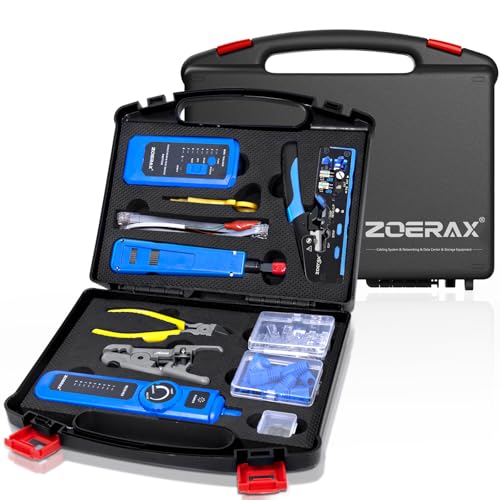
Professional Network Tool Kit, ZOERAX 14 in 1 - RJ45 Crimp Tool, Cat6 Pass Through Connectors and Boots, Cable Tester, Wire Stripper, Ethernet Punch Down Tool
As an Amazon Associate we earn from qualifying purchases. Product prices and availability are accurate as of the date/time indicated.

The Practical Network Engineer's Guide: Master routing, network diagnostics, and troubleshooting
As an Amazon Associate we earn from qualifying purchases. Product prices and availability are accurate as of the date/time indicated.
Top Home Network Devices for Network Engineers Reviewed
Ubiquiti UniFi Dream Machine, UDM
The Ubiquiti UniFi Dream Machine, UDM is a router with a router and controller type, 4 LAN and 1 WAN ports, gigabit speed, UniFi managed, and a price of $300 to $350. It has a built-in controller, a good firewall, and a good value. It is a good choice if you want the best home network setup for network engineers with a proven UniFi design.
TP-Link Omada SG2210P Managed Switch, 8-Port
The TP-Link Omada SG2210P Managed Switch, 8-Port is a switch with a managed switch type, 8 gigabit PoE+ ports, gigabit speed, Omada managed, and a price of $100 to $120. It has PoE+, a good design, and a good value. It is a good choice if you want a TP-Link switch with PoE+.
Ubiquiti UniFi 6 Lite Access Point, U6 Lite
The Ubiquiti UniFi 6 Lite Access Point, U6 Lite is an access point with a WiFi 6 type, 1 gigabit port, WiFi 6 up to 1500 Mbps, UniFi managed, and a price of $90 to $100. It has a low price, a fast WiFi, and a good value. It is a good choice if you want a UniFi access point with a low price.
TP-Link Omada EAP610 Access Point, WiFi 6
The TP-Link Omada EAP610 Access Point, WiFi 6 is an access point with a WiFi 6 type, 1 gigabit port, WiFi 6 up to 1800 Mbps, Omada managed, and a price of $80 to $100. It has a low price, a fast WiFi, and a good value. It is a good choice if you want a TP-Link access point with a low price.
Netgear GS308E Managed Switch, 8-Port
The Netgear GS308E Managed Switch, 8-Port is a switch with a managed switch type, 8 gigabit ports, gigabit speed, web managed, and a price of $40 to $50. It has a low price, a simple design, and a good value. It is a good choice if you want a Netgear switch with a low price.
Firewalla Gold Plus Firewall Router
The Firewalla Gold Plus Firewall Router is a router with a firewall router type, 4 x 2.5 gigabit ports, 2.5 gigabit speed, app managed, and a price of $400 to $450. It has a fast speed, a good firewall, and a good value. It is a good choice if you want a Firewalla router with a fast speed.
Buying Guide: How to Choose the Best Home Network Setup for Network Engineers
Start with your internet, your devices, and your budget. If you have gigabit internet, a router with a gigabit WAN port, such as the Ubiquiti UniFi Dream Machine, is a good choice, because it can handle your internet speed. If you have a NAS or server, a switch with 2.5 gigabit ports is a good choice, but a gigabit switch is enough for most homes. If you have a budget under $500, a setup with a UniFi Dream Machine, a TP-Link switch, and a UniFi access point is a good choice.
Next, check managed features, VLAN, and PoE. A managed router and switch are essential for a network engineer, because they let you test VLANs, firewall rules, and VPNs. A switch with PoE is better than a switch without, because it powers your access point. A WiFi 6 access point is better than a WiFi 5 access point, because it is faster.
Check your budget, your use, and your future. Home network setups for network engineers typically cost $40 to $450 per device, with a full setup costing $500 to $800. A switch from $40 to $120, such as the Netgear GS308E or TP-Link SG2210P, offers a good way to start. A router from $300 to $450, such as the Ubiquiti UDM or Firewalla Gold Plus, offers a better firewall and controller. An access point from $80 to $100, such as the TP-Link EAP610 or UniFi U6 Lite, offers a fast WiFi 6 design.
Finally, do not buy a network setup based only on price or speed. A router that does not support VLANs will not let you test segmentation, even if it is cheap, while a switch without PoE will need a separate power supply for your access point, even if it is fast. Choose devices from one system, such as UniFi or Omada, with managed features, and with a controller that manages them from one place. Test your setup at home, with VLANs and firewall rules, and document your network before you change it.
How to Set Up a Home Network Lab
To set up a home network lab, first connect your modem to your router’s WAN port, with an Ethernet cable, and connect your router to your switch, with an Ethernet cable. Connect your access point to your switch’s PoE port, and power on your devices. Log in to your controller, with your router’s app or web interface, and create VLANs for your main network, IoT, and guest, with different subnets. Create firewall rules to block IoT from your main network, and test your VLANs with a laptop on each network. Set up a VPN for remote access, and back up your configuration before you make changes. Keep your firmware updated, and use strong passwords for your controller and WiFi.
Frequently Asked Questions
What is the best home network setup for network engineers?
What is the best home network setup for network engineers depends on your internet and budget. A setup with a managed router, a managed PoE switch, and a WiFi 6 access point, such as the Ubiquiti UniFi Dream Machine at $300 to $350, the TP-Link SG2210P at $100 to $120, and the UniFi U6 Lite at $90 to $100, is a good choice for most network engineers, because it lets you test VLANs, firewall rules, and VPNs from one controller. A setup with a lower price, such as the Netgear GS308E at $40 to $50, is also good, especially if you want a simple managed switch. Choose managed devices from one system.
Do I need a managed switch for a home lab?
Do you need a managed switch for a home lab, yes, you need a managed switch for a home lab if you want to test VLANs, because an unmanaged switch cannot tag VLANs on ports. A managed switch, such as the TP-Link SG2210P, lets you create VLANs, tag ports, and test segmentation. An unmanaged switch is enough for a simple home network, but it is not enough for a network engineer who wants to test VLANs. Choose a managed switch with at least 8 ports.
Should I choose UniFi or Omada for my home network?
Should you choose UniFi or Omada for your home network, it depends on your budget and preference. UniFi, such as the Dream Machine and U6 Lite, is a good choice if you want a polished controller and a large community. Omada, such as the TP-Link SG2210P and EAP610, is a good choice if you want a lower price and similar managed features. Both systems let you test VLANs, firewall rules, and WiFi. Choose one system and stick with it, so your devices work together.
How much should I spend on a home network lab?
How much you should spend on a home network lab depends on your devices and internet. A basic home lab with a managed switch and access point costs $150 to $250, while a full setup with a router, switch, and access point costs $500 to $800. A router from $300 to $450, a switch from $40 to $120, and an access point from $80 to $100 is a good starting setup. Add a NAS or server later if you want to test more, and do not buy enterprise hardware for a home lab unless you need it.
Related guides
- Best AAA Batteries for Office Remotes in 2026: AAA Batteries for Office Remotes
- Best Budget Tablet for Work Under 100 in 2026: Budget Tablets for Work Under $100, Office Work, and Productivity
- Best Gimbal for Office Vlogging in 2026: 7 Gimbals for Office Vlogging That Keep Your Video Smooth, Stable, and Professional in the Office
- Best Budget NAS Dust Filter for Maintenance in 2026: 7 Budget NAS Dust Filters for Maintenance With Clear Airflow, Simple Install, and Easy Use for NAS
More from Amazon
Programs that pair well with the guide above. Offers and eligibility are set by Amazon and may change.
Free shipping on eligible items, Prime Video and more. Eligible new members can start with a free trial.
Start a Prime free trialAd-free music streaming. Eligible new subscribers can start with a free trial.
Try Music Unlimited freeA Prime membership for ages 18-24 with a trial period. Eligibility is set by Amazon.
See Prime for Young AdultsAudiobooks and podcasts to listen to on the go. Eligible new members can start with a free trial.
Try Audible freeAs an Amazon Associate we earn from qualifying purchases.

Write Your Review
No reviews yet. Be the first to share your experience!