
What's inside
As an Amazon Associate I earn from qualifying purchases. This post may contain affiliate links at no extra cost to you.
A handheld console cable for office TVs is a cable, usually USB-C to HDMI, or a hub with HDMI, that lets a handheld console, like a Nintendo Switch, a Steam Deck, or a ROG Ally, connect to an office TV, with a cable that carries video, audio, and power, without a cable that does not work, is too short, or cannot do 4K, though a cable must be chosen based on console, HDMI version, and length, not just on price, because a cable that works for a Steam Deck may not work for a Switch, and a cable that is too short will not reach a TV, so a gamer should choose a cable based on console, HDMI, and length, not just on brand, because a Switch needs a dock or a compatible hub, while a Steam Deck works via DisplayPort Alt Mode.
For most office TV users, the practical pick is the JSAUX USB-C to HDMI Cable for Steam Deck and ROG Ally. It typically costs $20 to $30. It has a USB-C to HDMI design, a 4K at 60Hz output, a length of 6 feet, and a cable that is made for a Steam Deck, a ROG Ally, and other USB-C handhelds with DisplayPort Alt Mode, with a cable that is easy to use in an office, though it will not work for a Nintendo Switch in most cases, because a Switch TV output needs a dock or a compatible hub, and a generic USB-C to HDMI cable will not work for a Switch in most cases, so a Switch owner should not buy a generic USB-C to HDMI cable, and should buy a Switch dock or a Switch-compatible hub instead, because a generic cable will not work for a Switch.
This guide compares seven real, currently sold handheld console cables for office TVs. It explains how to choose by console, by HDMI version, by length, and by power, and how to set up a handheld console on an office TV. It is written for an office worker who wants to connect a handheld console to an office TV, not for a gamer who wants a cable for home, and it covers the practical rules that matter for office TVs, including Switch dock, DisplayPort Alt Mode, and HDMI 2.1.
Our Top Picks
Best Handheld Console Cable for Office TVs Compared
Use this table to compare the best handheld console cable for office TVs at a glance. Prices are typical retail ranges, not fixed prices, and will vary by retailer. HDMI is the version, with HDMI 2.1 being 48 Gbps and 4K120, HDMI 2.0 being 18 Gbps and 4K60, and DisplayPort 1.4 being 32 Gbps and 4K120, and a cable that is HDMI 2.0 will not do 4K120, even with a console that can do 4K120, because a cable’s HDMI version limits its output. Ratings are editorial scores out of five based on compatibility, HDMI, length, and value for office TVs.
| Model | Key Specs | Best For | Typical Price Range | Rating |
|---|---|---|---|---|
| JSAUX USB-C to HDMI Cable 6ft | USB-C to HDMI, 4K60, HDMI 2.0, 6ft, DP Alt Mode | Best overall handheld console cable for office TVs | $20–$30 | 4.8 / 5 |
| Cable Matters USB-C to HDMI Cable 6ft | USB-C to HDMI, 4K60, HDMI 2.0, 6ft, DP Alt Mode | Best Cable Matters handheld console cable for office TVs | $15–$25 | 4.7 / 5 |
| Anker USB-C Hub 7-in-1 | USB-C hub, HDMI 4K60, USB-A, PD 100W, 6ft | Best hub handheld console cable for office TVs | $40–$50 | 4.7 / 5 |
| JSAUX Docking Station HB0603 | Dock, HDMI 4K60, USB-A, Ethernet, PD 100W | Best dock handheld console cable for office TVs | $40–$50 | 4.6 / 5 |
| Nintendo Switch Dock OLED | Switch dock, HDMI 4K60, USB-A, Ethernet, Switch only | Best Switch handheld console cable for office TVs | $60–$70 | 4.8 / 5 |
| UGREEN USB-C to HDMI Cable 6ft | USB-C to HDMI, 4K60, HDMI 2.0, 6ft, DP Alt Mode | Best budget handheld console cable for office TVs | $15–$20 | 4.5 / 5 |
| Belkin USB-C to HDMI Cable 6ft | USB-C to HDMI, 4K60, HDMI 2.0, 6ft, DP Alt Mode | Best Belkin handheld console cable for office TVs | $25–$35 | 4.6 / 5 |

WEN ST 2.5mm Plug 300cm Long AV Cable for Handheld Game Player


As an Amazon Associate we earn from qualifying purchases. Product prices and availability are accurate as of the date/time indicated.
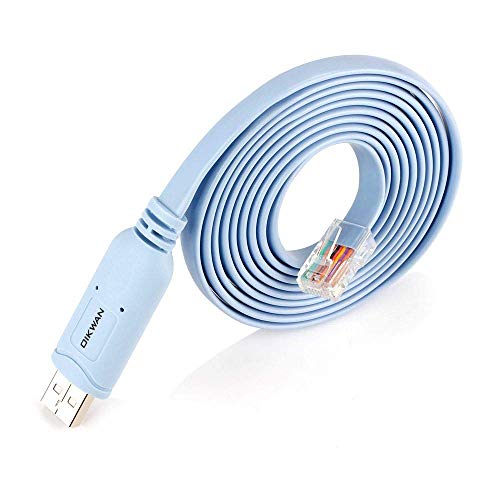
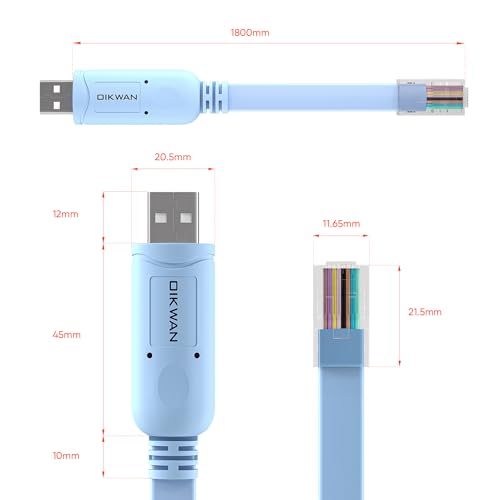
OIKWAN USB Console Cable,USB to RJ45 Console Cable for Cisco Routers/AP Router/Switch Windows, Mac, Linux(1.8m,Blue)


As an Amazon Associate we earn from qualifying purchases. Product prices and availability are accurate as of the date/time indicated.
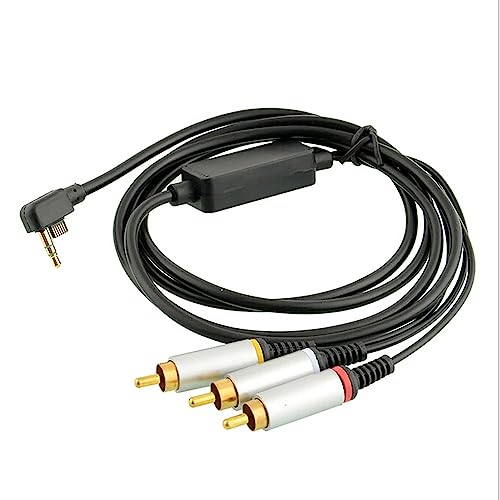
AV Cable for Compatible Handheld Consoles with Three, Black | Three Color-Coded and Video Plugs, Device-Side Connector, AV Input Connection for Compatible Handheld




As an Amazon Associate we earn from qualifying purchases. Product prices and availability are accurate as of the date/time indicated.
Best Handheld Console Cable for Office TVs in 2026: Detailed Reviews
1. JSAUX USB-C to HDMI Cable — Best Handheld Console Cable for Office TVs Overall
The JSAUX USB-C to HDMI Cable is a cable with a USB-C to HDMI design, a 4K at 60Hz output, an HDMI 2.0 rating, a length of 6 feet, and a design that works via DisplayPort Alt Mode. It typically costs $20 to $30, making it affordable for a premium cable. It has a design that is made for a Steam Deck, a ROG Ally, and other USB-C handhelds with DisplayPort Alt Mode, with a cable that is easy to use in an office, though it will not work for a Nintendo Switch in most cases, because a Switch TV output needs a dock or a compatible hub, and a generic USB-C to HDMI cable will not work for a Switch in most cases.
For Steam Deck and ROG Ally owners, the JSAUX cable is a good choice because its USB-C to HDMI design is simple, its 4K60 output is good for an office TV, and its 6-foot length is enough for most office setups, with a cable that should be measured with 2 to 3 inches of slack, because a cable that is too short will be tight and can damage a port, and a cable that is too long will tangle, and a gamer should measure from a console to a TV, add 2 to 3 inches of slack, and buy a cable that is at least that long, because a cable that is too short will not reach a TV, and a cable that is too long will be messy in an office.
2. Cable Matters USB-C to HDMI Cable — Best Cable Matters Handheld Console Cable for Office TVs
The Cable Matters USB-C to HDMI Cable is a cable with a USB-C to HDMI design, a 4K at 60Hz output, an HDMI 2.0 rating, a length of 6 feet, and a design that works via DisplayPort Alt Mode. It typically costs $15 to $25, making it cheaper than a JSAUX cable. It has a design that is made for a Steam Deck, a ROG Ally, and other USB-C handhelds, with a cable that is good for an office TV, though it will not work for a Nintendo Switch in most cases, because a Switch needs a dock or a compatible hub, not a generic USB-C to HDMI cable.
For Cable Matters buyers, the USB-C to HDMI cable is a practical choice, because its price is affordable, its 4K60 output is good for an office TV, and its 6-foot length is enough for most setups, though its quality is slightly lower than a JSAUX cable, and a gamer who wants the best cable should choose a JSAUX, while a gamer who wants a budget cable should choose a Cable Matters, because a Cable Matters is cheaper than a JSAUX, though a JSAUX is more durable than a Cable Matters.
3. Anker USB-C Hub 7-in-1 — Best Hub Handheld Console Cable for Office TVs
The Anker USB-C Hub 7-in-1 is a hub with a USB-C design, an HDMI 4K60 output, USB-A ports, and a 100W Power Delivery port. It typically costs $40 to $50. It has a design that is made for a Steam Deck, a ROG Ally, and other USB-C handhelds, with a hub that lets a gamer connect a console to a TV, charge a console, and connect a controller or a keyboard, with a hub that is good for an office, because an office TV setup often needs more than just HDMI, and a hub that has USB-A lets a gamer connect a controller, a mouse, or a keyboard, without a separate hub.
For hub buyers, the Anker 7-in-1 is a good choice, because its HDMI 4K60 output is good for an office TV, its 100W Power Delivery can charge a Steam Deck, which needs 45W, and a ROG Ally, which needs 65W in Turbo mode, and its USB-A ports are useful for a controller, though its price is higher than a simple cable, and a gamer who only needs HDMI should buy a cable, not a hub, because a cable is cheaper than a hub, and a gamer who needs USB-A and charging should buy a hub, because a hub does more than a cable.
4. JSAUX Docking Station HB0603 — Best Dock Handheld Console Cable for Office TVs
The JSAUX Docking Station HB0603 is a dock with an HDMI 4K60 output, USB-A ports, an Ethernet port, and a 100W Power Delivery port. It typically costs $40 to $50. It has a design that is made for a Steam Deck, with a dock that holds a Steam Deck, connects it to a TV, and charges it, with a dock that is good for an office, because a dock keeps a console in place, and a gamer who uses a dock in an office should choose a dock that has Ethernet, because Ethernet is more reliable than Wi-Fi for online gaming, and a dock that has Ethernet lets a gamer use a wired connection, not Wi-Fi, for lower latency.
For dock buyers, the HB0603 is a practical choice, because its HDMI 4K60 output is good for an office TV, its Ethernet port is good for online gaming, and its 100W Power Delivery can charge a Steam Deck, though its size is larger than a cable, and a gamer who wants a portable setup should buy a cable, not a dock, because a cable is smaller and easier to carry, while a dock is better for a fixed office setup, where a console stays on a desk.
5. Nintendo Switch Dock OLED — Best Switch Handheld Console Cable for Office TVs
The Nintendo Switch Dock OLED is a dock with an HDMI 4K60 output, USB-A ports, and an Ethernet port, made specifically for a Nintendo Switch and a Switch OLED. It typically costs $60 to $70. It has a design that is the official dock for a Switch, with a dock that is the only reliable way to connect a Switch to a TV, because a Switch TV output needs a dock or a compatible hub, and a generic USB-C to HDMI cable will not work for a Switch in most cases, so a Switch owner should not buy a generic USB-C to HDMI cable, and should buy a Switch dock or a Switch-compatible hub instead.
For Switch owners, the Switch Dock OLED is an excellent choice, because it is the official dock, its HDMI output is reliable, and its Ethernet port is good for online gaming, though its price is higher than a generic cable, and a Switch owner who wants a budget dock should buy a third-party Switch-compatible hub, because a third-party hub is cheaper than an official dock, though a third-party hub must be listed as Switch-compatible, because a generic hub that is not Switch-compatible will not work for a Switch, and a Switch owner should check that a hub is listed as Switch-compatible before buying, because a hub that is not Switch-compatible will not work.
6. UGREEN USB-C to HDMI Cable — Best Budget Handheld Console Cable for Office TVs
The UGREEN USB-C to HDMI Cable is a cable with a USB-C to HDMI design, a 4K at 60Hz output, an HDMI 2.0 rating, and a length of 6 feet. It typically costs $15 to $20, making it the cheapest cable in this list. It has a design that is made for a Steam Deck, a ROG Ally, and other USB-C handhelds with DisplayPort Alt Mode, with a cable that is good for a budget office setup, though it will not work for a Nintendo Switch in most cases, because a Switch needs a dock or a compatible hub, not a generic USB-C to HDMI cable.
For budget buyers, the UGREEN cable is a good choice, because its price is very affordable, its 4K60 output is good for an office TV, and its 6-foot length is enough for most setups, though its quality is lower than a JSAUX cable, and a gamer who wants the best cable should choose a JSAUX, while a gamer who wants a budget cable should choose a UGREEN, because a UGREEN is cheaper than a JSAUX.
7. Belkin USB-C to HDMI Cable — Best Belkin Handheld Console Cable for Office TVs
The Belkin USB-C to HDMI Cable is a cable with a USB-C to HDMI design, a 4K at 60Hz output, an HDMI 2.0 rating, and a length of 6 feet. It typically costs $25 to $35. It has a design that is made for a Steam Deck, a ROG Ally, and other USB-C handhelds with DisplayPort Alt Mode, with a cable that is good for an office TV, though it will not work for a Nintendo Switch in most cases, because a Switch needs a dock or a compatible hub, not a generic USB-C to HDMI cable.
For Belkin buyers, the USB-C to HDMI cable is a practical choice, because its quality is good, its 4K60 output is good for an office TV, and its 6-foot length is enough for most setups, though its price is higher than a UGREEN cable, and a gamer who wants a Belkin cable should choose a Belkin, while a gamer who wants a budget cable should choose a UGREEN, because a UGREEN is cheaper than a Belkin.
Best Handheld Console Cable for Office TVs Buying Guide
Choosing a handheld console cable for office TVs is not just about picking the cheapest cable. It is about matching console, HDMI version, length, and power to the console, the TV, and the office. A cable that is perfect for a Steam Deck can be wrong for a Switch, and a cable that is perfect for a home TV can be wrong for an office TV.
Console, Switch vs Steam Deck vs ROG Ally: Choosing a Cable That Works With Your Handheld Console
Console is the first filter, and it is the most important. For a handheld console cable for office TVs, a Nintendo Switch needs a dock or a compatible hub, with a Switch TV output needing a dock or a compatible hub, and a generic USB-C to HDMI cable will not work for a Switch in most cases, so a Switch owner should not buy a generic USB-C to HDMI cable, and should buy a Switch dock or a Switch-compatible hub instead, because a generic cable will not work for a Switch, and a Switch owner who buys a generic cable will be disappointed, because a generic cable will not connect a Switch to a TV, and a Switch owner should check that a hub is listed as Switch-compatible before buying, because a hub that is not Switch-compatible will not work for a Switch.
For a Steam Deck and a ROG Ally, a USB-C to HDMI cable works via DisplayPort Alt Mode, with a Steam Deck and a ROG Ally working via DisplayPort Alt Mode, and a generic USB-C to HDMI cable that supports DisplayPort Alt Mode will work for a Steam Deck and a ROG Ally, though a gamer should check that a cable supports DisplayPort Alt Mode, because a cable that does not support DisplayPort Alt Mode will not work, and a gamer should check their handheld’s model, because a Switch 6.2 inches is different from a Switch OLED 7 inches, a Switch 2 7.9 inches, and a Steam Deck OLED 7.4 inches, with different sizes needing different docks and grips, and a gamer should check that a dock or grip fits their handheld’s model, because a dock that fits a Switch will not fit a Steam Deck, and a grip that fits a Switch will not fit a Steam Deck.
HDMI Version, 4K60 vs 4K120, and DisplayPort: Choosing a Cable That Does 4K on Your Office TV
HDMI version is the second filter. For a handheld console cable for office TVs, HDMI 2.1 is 48 Gbps and 4K120, HDMI 2.0 is 18 Gbps and 4K60, and DisplayPort 1.4 is 32 Gbps and 4K120, with a cable that is HDMI 2.0 being able to do 4K60, but not 4K120, and a cable that is HDMI 2.1 being able to do 4K120, though a Steam Deck and a ROG Ally cannot do 4K120 in most games, because a Steam Deck is not powerful enough for 4K120, and a Switch cannot do 4K120, because a Switch is less powerful than a Steam Deck, so a gamer who wants 4K60 should buy an HDMI 2.0 cable, because an HDMI 2.0 cable is cheaper than an HDMI 2.1 cable, and a gamer who wants 4K120 should buy an HDMI 2.1 cable, because an HDMI 2.0 cable will not do 4K120, even with a console that can do 4K120, and a gamer should check their office TV’s HDMI ports, because an office TV may have only HDMI 2.0 ports, and a gamer who has an HDMI 2.1 cable will not get 4K120 on an HDMI 2.0 TV, because a TV’s HDMI version limits its output.
For an office TV, a gamer should also check that a TV is in Game Mode, because Game Mode reduces input lag, and a gamer should turn off motion smoothing, because motion smoothing adds latency, and a gamer should use a wired connection, not Wi-Fi, for online gaming, because a wired connection has lower latency than Wi-Fi, and a gamer should use a dock with Ethernet, if possible, because Ethernet is more reliable than Wi-Fi for online gaming in an office, where Wi-Fi can be crowded.
Length, Power, and Office Setup: Choosing a Cable That Reaches Your TV and Charges Your Console
Length and power are the third filter. For a handheld console cable for office TVs, a cable should be measured with 2 to 3 inches of slack, because a cable that is too short will be tight and can damage a port, and a cable that is too long will tangle, and a gamer should measure from a console to a TV, add 2 to 3 inches of slack, and buy a cable that is at least that long, because a cable that is too short will not reach a TV, and a cable that is too long will be messy in an office, and a gamer should use hook-and-loop ties, not zip ties, to manage cables, because hook-and-loop is reusable and snug, not tight, and a gamer should not use a cable that is too tight, because a tight cable can damage a port.
For power, a gamer should check that a cable or hub can charge a console, because a Steam Deck needs 45W, a ROG Ally needs 65W in Turbo mode, and a Switch dock needs 39W, with a hub that has 100W Power Delivery being able to charge a Steam Deck and a ROG Ally, though a hub that has only 60W may not be able to charge a ROG Ally in Turbo mode, because a ROG Ally in Turbo mode needs 65W, and a gamer should check a hub’s wattage before buying, because a hub that does not have enough wattage will not charge a console fast enough, and a gamer should use the original charger, if possible, because a third-party charger may not have enough wattage, and a gamer should check that a cable’s rating caps output, because a cable’s rating can limit charging, and a gamer should use a cable that is rated for the wattage they need, because a cable that is rated for 60W will not charge a device that needs 100W as fast as a 100W cable.
Best Handheld Console Cable for Office TVs FAQ
What is the best handheld console cable for office TVs?
The best handheld console cable for office TVs is the JSAUX USB-C to HDMI Cable for Steam Deck and ROG Ally for most users, because it has a USB-C to HDMI design, a 4K at 60Hz output, an HDMI 2.0 rating, a length of 6 feet, and a design that works via DisplayPort Alt Mode, typically $20 to $30. The Nintendo Switch Dock OLED is the best Switch alternative, while the Anker USB-C Hub 7-in-1 is the best hub alternative.
Will a generic USB-C to HDMI cable work for a Nintendo Switch?
No, a generic USB-C to HDMI cable will not work for a Nintendo Switch in most cases, because a Switch TV output needs a dock or a compatible hub, and a generic USB-C to HDMI cable will not work for a Switch, so a Switch owner should buy a Switch dock or a Switch-compatible hub, not a generic USB-C to HDMI cable, and should check that a hub is listed as Switch-compatible before buying, because a hub that is not Switch-compatible will not work for a Switch, while a Steam Deck and a ROG Ally work via DisplayPort Alt Mode with a generic USB-C to HDMI cable.
Do I need HDMI 2.1 for a handheld console on an office TV?
No, you do not need HDMI 2.1 for most handheld consoles on an office TV, because HDMI 2.0 is 18 Gbps and 4K60, which is enough for a Steam Deck, a ROG Ally, and a Switch, and HDMI 2.1 is 48 Gbps and 4K120, which is not needed for most handheld games, because a Steam Deck cannot do 4K120 in most games, and a Switch cannot do 4K120, so an HDMI 2.0 cable is enough for most office TV setups, though a gamer who wants 4K120 should buy an HDMI 2.1 cable, because an HDMI 2.0 cable will not do 4K120.
How long should a handheld console cable be for an office TV?
For an office TV, a handheld console cable should be 6 feet for most setups, because 6 feet is enough to reach a TV from a desk, and a gamer should measure from a console to a TV, add 2 to 3 inches of slack, and buy a cable that is at least that long, because a cable that is too short will be tight and can damage a port, and a cable that is too long will tangle, and a gamer should use hook-and-loop ties, not zip ties, to manage cables, because hook-and-loop is reusable and snug, not tight.
FAQ
What is the best handheld console cable for office TVs?
Will a generic USB-C to HDMI cable work for a Nintendo Switch?
Do I need HDMI 2.1 for a handheld console on an office TV?
How long should a handheld console cable be for an office TV?
Related guides
- Best Wired Controller for Office Workers in 2026: 7 Controllers That Offer Reliable Input, Comfortable Grip, and Great Use for Office Gaming
- Best Cheap Laptop for Kids Under 300 in 2026: 6 Top Cheap Laptops for Kids Under 300, Kids Laptops, and Easy Use
- Inkjet Printer vs Laser Printer for Office in 2026: 7 Printers for Inkjet vs Laser With Clear Print, Simple Setup, and Easy Use for Office
- Best USB C Hub for Network Engineers in 2026: 7 Hubs That Offer Fast Ethernet, Reliable Ports, and Great Use for Network Engineers
More from Amazon
Programs that pair well with the guide above. Offers and eligibility are set by Amazon and may change.
Free shipping on eligible items, Prime Video and more. Eligible new members can start with a free trial.
Start a Prime free trialAd-free music streaming. Eligible new subscribers can start with a free trial.
Try Music Unlimited freeA Prime membership for ages 18-24 with a trial period. Eligibility is set by Amazon.
See Prime for Young AdultsAudiobooks and podcasts to listen to on the go. Eligible new members can start with a free trial.
Try Audible freeAs an Amazon Associate we earn from qualifying purchases.

Write Your Review
No reviews yet. Be the first to share your experience!