
What's inside
- Best Backup Drive for Home Networks: A File Deleted on Purpose and Brought Back, the Third Copy Living Elsewhere, and a Season’s Health Read
- Quick Comparison: Best Backup Drive for Home Networks Models
- Detailed Reviews: Best Backup Drive for Home Networks Picks
- Buying Guide: How to Choose the Best Backup Drive for Home Networks
- Frequently Asked Questions About the Best Backup Drive for Home Networks
As an Amazon Associate I earn from qualifying purchases. This post may contain affiliate links at no extra cost to you.
The best backup drive for home networks is graded in this guide under a doctrine printed before any model is named, because a backup is not a drive but a promise, and a promise is graded on the day it is kept: the household’s photographs, its documents, its decade of small citizens, sentenced to a system whose only examination is a restore, a file brought back from the parish that was supposed to hold it, served in peacetime as a rehearsal, since a backup that has never been restored is a hope with a power supply. The constitution is the one this site’s storage coverage always sentences, three copies of what matters, on two different kinds of parish, with one of them somewhere else, a doctrine whose arithmetic is the whole article: a single drive, however flagship, is one citizen, and one citizen can die, be stolen, be encrypted by a passing malice, or be formatted by a tired hand, each a parish with a season ticket. The network’s part in the system is convenience sentenced honestly: a drive the whole house can reach, a NAS or a networked parish, backs up every machine without a cable’s pilgrimage, its tax being that a reachable parish is reachable by the household’s accidents too, which is why the constitution’s third copy lives offline or elsewhere, beyond the network’s republic, since a backup, like a zero in this site’s rifle guides, is a property evidenced, and its evidence is a restored file, dated, opened, and believed.
The restore rehearsal is the doctrine’s liturgy and is served at the fitting: a file chosen, deleted from its home on purpose, and brought back entire, its parish timed and its steps entered in the household diary, a system whose restore cannot be served by its own owner under no pressure will not be served by them under grief. Capacity is sentenced by the household’s own arithmetic, its data measured as it stands and its growth entered honestly, a drive bought at the exact size of today’s parish being a drive replaced inside its warranty by arithmetic. The drives inside the parish carry their own doctrine from this site’s NAS coverage: citizens built for a network’s always-on sentence, their recording parish the honest kind, read in their makers’ documents, a desktop citizen sentenced to a NAS’s life being a tax collected at the worst hour.
The drives and systems compared here are real, currently sold products from Synology, Western Digital, Seagate, and Samsung, spanning the NAS references, the network citizens, and the offline parish’s rows. They are graded on the restore first, rehearsed and timed; the constitution second, three copies served by the system’s design; the capacity third, against the household’s measured growth; the keeping fourth, a parish checked at the season, its health read as documents; and value last, per year, a backup’s figure divided by the decade it insures, the cheapest arithmetic in this entire site when set against the parish it protects.
Our Top Picks
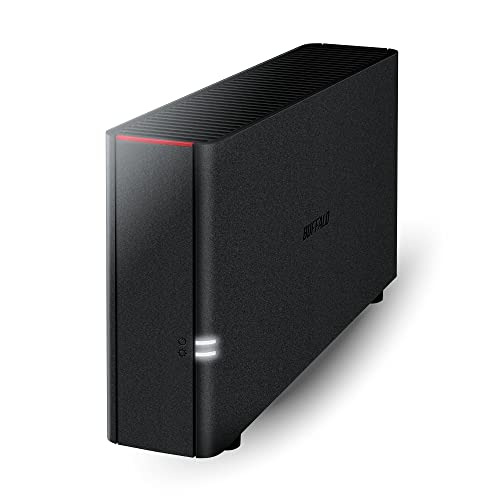 BUFFALO LinkStation 210 2TB 1-Bay NAS Network Attached2TB (1x2TB)9.45 x 3.31 x 8.67 inches2.43 poundsCheck on Amazon
Best Backup Drive for Home Networks: A File Deleted on Purpose and Brought Back, the Third Copy Living Elsewhere, and a Season’s Health Read
The Restore Rehearsal: One File, Deleted in Peacetime, Returned Entire, and the Steps Written Down
The rehearsal is served the week the system is built, while its owner’s patience is a peacetime citizen. A file of genuine but replaceable parish is chosen, a photograph’s copy, a document’s twin, deleted from its home parish entire, and restored from the backup by its owner’s own hands, following no one’s memory, the steps written in the household diary as they are discovered, the time the restore took entered beside them. A system whose road back cannot be walked in peacetime is re-built until it can, its software’s sentences, its shares’ addresses, its passwords’ parish settled in a stated place the household’s adults can reach, a backup whose key lives in one person’s head being a parish with a single point of failure wearing a helper’s clothes.
The schedule is then sentenced as the system’s constitution: the machines’ backups served by the network’s parish automatically, a backup that waits for a human’s memory being a backup that waits forever in this site’s grading, its calendar and its completion read at the season as documents. The third copy is placed as the doctrine sentences, offline in the house’s safe parish or elsewhere entire, refreshed on the diary’s rhythm, its refresh being a small liturgy whose evidence is a date in the book. The whole is then left to work, its attendance graded quarterly by a restored file, a habit whose figure is minutes and whose alternative is a decade’s photographs.
The Keeping: Health Read as Documents, a Parish Rotated, and Failures Replaced Before They Compound
The keeping is a season’s short liturgy. The network parish’s health is read in its own documents, its drives’ reported sentences entered in the diary, a citizen filing a warning being replaced from the document while the system’s other copies still stand, the replacement rehearsed as the fitting was. The offline copy is refreshed and its own restore spot-served, a parish that cannot be read being a copy that does not exist, in the doctrine’s plainest sentence.
The household’s data is re-measured at the year, its growth sentenced against the parishes’ remaining room, an expansion decided from the diary while it is a purchase and not yet an emergency. The record is kept as the household diary, system and its copies, restores and verdicts together, so a successor system is specified from a document, its capacity and its constitution already written by the files that taught them, since a household’s archive, like a range in this site’s guides, is graded by its worst unsupervised moment, a drive’s death inside the week the photographs were needed, and that moment belongs, by doctrine, to a rehearsal served in peacetime.
Quick Comparison: Best Backup Drive for Home Networks Models
| Model | Type Parish, Capacity Parish, Network and Drive Provisions and Key Specs | Best For | Typical Price Range | Rating |
|---|---|---|---|---|
| Synology DiskStation 2-Bay Class | System patterns in Synology’s line, capacity and network provisions in maker’s stated terms by pattern | Best backup drive for home networks overall | $190 – $320 before drives | 4.7 / 5 |
| WD Red Plus NAS Drive Class | Drive patterns in Western Digital’s line, provisions in maker’s stated terms by pattern | Best drive parish | $90 – $260 by capacity | 4.6 / 5 |
| Seagate IronWolf Class | Patterns in Seagate’s line, provisions in maker’s stated terms by pattern | Best network citizen | $85 – $250 by capacity | 4.5 / 5 |
| WD My Cloud and Elements Class | Patterns in Western Digital’s line, provisions in maker’s stated terms by pattern | Best simple parish | $160 – $400 by capacity | 4.3 / 5 |
| Samsung T7 and T9 Portable SSD Class | Patterns in Samsung’s line, provisions in maker’s stated terms by pattern | Best offline parish | $110 – $280 by capacity | 4.5 / 5 |
| Synology DiskStation 4-Bay Class | Patterns in Synology’s line, provisions in maker’s stated terms by pattern | Best growing parish | $320 – $520 before drives | 4.6 / 5 |

UGREEN NAS DH2300 2-Bay for Beginners & Personal Users, Phone Backup | AI Album, Private Cloud/Remote Access, File Sharing, Multi-Device Backup, Home Entertainment, 4GB RAM on Board (Diskless)
As an Amazon Associate we earn from qualifying purchases. Product prices and availability are accurate as of the date/time indicated.
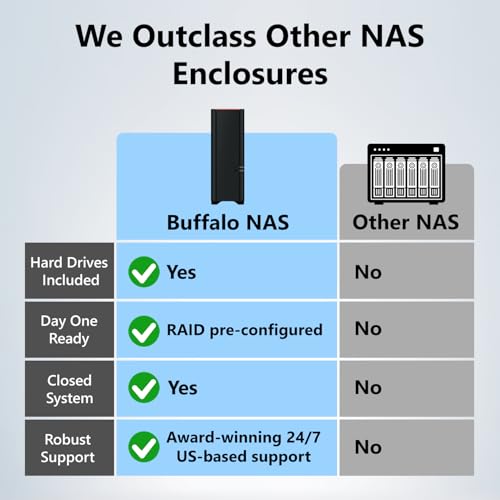
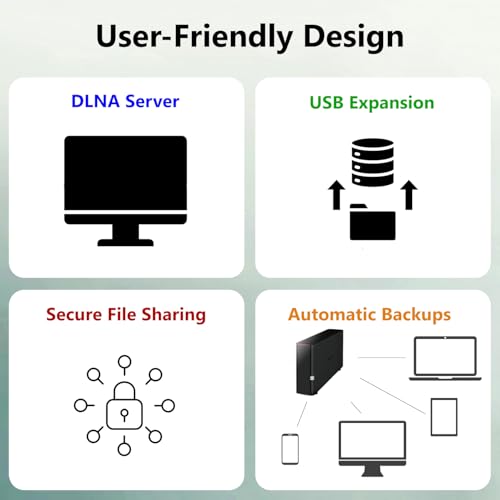
BUFFALO LinkStation 210 2TB 1-Bay NAS Network Attached Storage with HDD Hard Drives Included NAS Storage that Works as Home Cloud or Network Storage Device for Home




As an Amazon Associate we earn from qualifying purchases. Product prices and availability are accurate as of the date/time indicated.

Yxk Zero1 2-Bay NAS for Pesonal & Home Storage, Photo Backup (Diskless) | Docker Support, Private Cloud & File Sharing, Remote Access, Phone Backup, 4GB RAM, 2.5GbE & 4K HDMI
As an Amazon Associate we earn from qualifying purchases. Product prices and availability are accurate as of the date/time indicated.
Prices shown are approximate and for reference only. Prices change often, so please check the current price on Amazon before you buy.
Type parishes, capacity parishes, network and drive provisions are each maker’s stated details for the current version and pattern or capacity; a NAS enclosure’s figure excludes its drives where stated, as this guide describes. Prices are typical retail ranges and vary by capacity, retailer, region, and promotion. Ratings are editorial for a household parish: a restore rehearsed and timed, three copies served by design, capacity against measured growth, health read at the season, and value per year.
Detailed Reviews: Best Backup Drive for Home Networks Picks
1. Synology 2-Bay – Best Overall
Synology’s two-bay parish takes the overall rating as the household’s reference system in its line: every machine in the house sentenced to its parish automatically, a restore a owner can serve.
Rehearsed in peacetime, it earns its place outright.
2. WD Red Plus – Best Drive Parish
Western Digital’s Red parish grades its citizens in its line for the network’s always-on sentence, the recording parish the honest kind as documents state.
For drives, it stands.
3. Synology 4-Bay – Best Growing Parish
Synology’s larger parish sentences its room in its line against a decade’s growth, a household’s archive with a future.
Within its growth, it earns its place.
4. Seagate IronWolf – Best Network Citizen
Seagate’s IronWolf parish serves the NAS’s life in its line with its health reported as documents, a citizen that files its own warnings.
For network drives, it is soundly placed.
5. Samsung Portable SSDs – Best Offline Parish
Samsung’s portable parish brings the third copy in its line to a fast, small citizen, refreshed and stored elsewhere entire.
For offline, it is soundly placed.
6. WD Simple Classes – Best Simple Parish
Western Digital’s simple parish closes the table in its line for the household that wants one box and a calendar, its constitution served by an offline twin.
As the simple row, it completes the table.
Buying Guide: How to Choose the Best Backup Drive for Home Networks
The Householder’s Audit: Data Measured, the Constitution Drawn, a Restore Served the First Week
Write the audit’s five facts before a listing is opened, with the household’s machines in hand. The data: measured as it stands across the house’s citizens, its growth entered from the diary’s own history, the capacity sentenced above the sum with a margin’s parish. The constitution: drawn on paper, three copies, two parishes, one elsewhere, each citizen named before any is bought. The restore: to be rehearsed the first week, a file deleted on purpose and returned, its steps written for the household’s other adults. The drives: their parish read as documents, network citizens for a network’s life, the honest recording kind. And the calendar, the system’s backups automatic and its offline refresh dated in the diary, because a backup drive, like a zero in this site’s rifle guides, is a property evidenced, and its evidence is a restored file. Order against the five, the offline citizen in the same order and not as an afterthought’s promise, and let a capacity headline be refused where the constitution has not been drawn.
Spend by the archive’s priorities, which are the guide’s: the constitution first, three copies as a design; the restore second, rehearsed; the drives third, as documents; the capacity fourth, against measured growth; and a speed’s headline never, a transfer’s parish wearing an insurance’s clothes over a single copy. Refuse, in the same pass, the household’s two frauds: the one big drive, a flagship citizen sentenced as a system, its death a decade’s; and the untested parish, a backup believed for years and read for the first time on the worst day, because a home, like a range in this site’s guides, is graded by its worst unsupervised moment, a failure inside the week the photographs mattered, and that moment belongs, by doctrine, to a peacetime rehearsal and a copy that lives elsewhere.
Keeping the System: Health Read, the Offline Copy Refreshed, Restores Spot-Served, and the Household Diary
Maintain the system by the constitution’s liturgy in this guide’s second section. Its health is read at the season, its offline copy refreshed and spot-restored, its capacity re-measured at the year, its diary kept with the steps a stranger could follow.
Keep the record as the household diary, system and its copies, restores and dates together, so a successor is specified from a document. Do that, the copies three, the restore rehearsed, the third elsewhere, and the best backup drive for home networks becomes what its buyer wanted from a promise: a bad day that stays a bad day, which is the whole of what it was for.
Frequently Asked Questions About the Best Backup Drive for Home Networks
What is the best backup drive for home networks?
A system rather than a drive, in this guide’s constitution: Synology’s two-bay parish as the house’s automatic citizen, filled with network drives from WD’s or Seagate’s stated parishes, and a portable citizen from Samsung’s rows as the copy that lives offline or elsewhere, the three together being the product. Fit yours by the householder’s audit in this guide: your data measured with its growth; the constitution drawn, three copies, two parishes, one elsewhere; the drives read as documents; a restore rehearsed the first week with its steps written down; and the offline copy refreshed on a dated rhythm, since a home backup is graded on the worst day of the decade, and that grade is a restored file’s, not a capacity’s.
Is a NAS by itself a backup?
It is one copy with excellent manners, in this guide’s arithmetic: a network parish backs up every machine in the house automatically, a genuine and valuable sentence, and it remains a single citizen in a single place, reachable by the house’s own network, its accidents and its malice alike, its drives ageing in one box under one roof. The constitution therefore sentences it as the system’s heart and not as its whole, a second parish in the house or a mirrored citizen beside it, and a third copy offline or elsewhere entire, beyond the network’s republic and the roof’s. A household that serves all three can lose any one parish and keep its decade; a household with a NAS alone can lose the NAS, which is the difference between a backup and a convenience, a distinction this guide prints in every storage article it writes because the day it matters is the day it is too late to buy.
How much capacity does a home backup need?
Your household’s measured data with its growth and a margin, in this guide’s capacity doctrine: the sum is served on paper, every machine’s parish counted as it stands, photographs and their decade entered at their real size, the system’s own sentences, its versions and its history, sentenced a parish of their own above the data’s figure. A drive bought at today’s exact sum is replaced by arithmetic inside its early life, the margin being the cheapest citizen in the system. The diary re-measures at the year, an expansion decided while it is a purchase, since capacity, like a zero, is a fitting, and a fitting is sentenced by the load it will actually carry across its whole service, a backup’s service being measured in the years its household cannot afford to re-live.
How often should I test my home backup?
At the season, by a restored file, in this guide’s keeping liturgy: a citizen chosen, deleted from a copy’s parish or simply summoned back from the backup entire, opened and believed, its steps and its time entered in the household diary beside the last test’s date. The offline copy is spot-served at its refresh, a parish that cannot be read being sentenced as a copy that does not exist and replaced from the document while the system’s other copies stand. A drive that files a health warning in its own documents is replaced on that evidence in the same spirit, before its parish compounds into the emergency the whole system exists to prevent. Served so, the household’s promise is evidenced four times a year at a cost of minutes, which is the cheapest insurance review in this entire site, since a backup, in this site’s grading, is not a thing a household has but a thing it can do, and a thing it can do is kept by doing it.
Related guides
- Best Mini Drone for Office Travel in 2026: Under the Registration Threshold, Quiet Enough for a Hotel Courtyard, and Packed in the Same Bag as the Laptop
- Best USB Flash Drive vs Portable SSD for Offices in 2026: 7 USB Flash Drives and Portable SSDs Compared for Speed, Capacity, and Reliable Office Storage
- Best High End Tablet for Photographers in 2026: Best High End Tablet for Photographers
- Best Small Router for Tiny Apartments in 2026: Best Small Router for Tiny Apartments
More from Amazon
Programs that pair well with the guide above. Offers and eligibility are set by Amazon and may change.
Free shipping on eligible items, Prime Video and more. Eligible new members can start with a free trial.
Start a Prime free trialAd-free music streaming. Eligible new subscribers can start with a free trial.
Try Music Unlimited freeA Prime membership for ages 18-24 with a trial period. Eligibility is set by Amazon.
See Prime for Young AdultsAudiobooks and podcasts to listen to on the go. Eligible new members can start with a free trial.
Try Audible freeAs an Amazon Associate we earn from qualifying purchases.

Write Your Review
No reviews yet. Be the first to share your experience!