
What's inside
- How to Choose WiFi Extender for Office Dead Zones: The Diagnosis Comes First
- How to Choose WiFi Extender for Office Dead Zones: Models Compared
- The Six Extenders Reviewed
- Buying Guide: How to Choose and Deploy a WiFi Extender for Office Dead Zones
- Frequently Asked Questions About WiFi Extenders for Office Dead Zones
As an Amazon Associate I earn from qualifying purchases. This post may contain affiliate links at no extra cost to you.
Learning how to choose wifi extender for office dead zones begins with understanding what a dead zone actually is, because offices kill Wi-Fi in specific, diagnosable ways: concrete cores and elevator shafts that swallow signal whole, metal shelving and filing rooms that reflect it into confusion, glass-walled meeting rooms at the corridor’s end, and the simple arithmetic of distance from a router placed where the internet line entered the building rather than where the people work. An extender can cure some of those deaths and merely embalms others, and this guide’s first service is to teach the difference. A Wi-Fi extender receives your router’s signal and rebroadcasts it under the same or a related network name, extending coverage into the zone the router cannot reach. Placed correctly, where the router’s signal is still strong, it hands that strength onward. Placed in the dead zone itself, the beginner’s instinct and the category’s commonest failure, it rebroadcasts a whisper at full volume and the office gains full signal bars attached to an unusable connection. This guide compares six real, currently sold extenders, teaches placement as the science it is, and states plainly the point at which an office should stop extending and buy the mesh system or wired access points that are the professional answer, because an honest guide sells the right tool, not the searched one.
Know the extender’s built-in tax before the table. A conventional single-radio extender listens and talks on the same channel, so every packet makes the journey twice and the extended network’s maximum throughput is, at best, roughly half of what the extender receives, usually less in a busy office. Dual-band extenders soften the tax by dedicating one band to the link back to the router, the backhaul, and serving clients on the other, and the best models make that dedication explicit and configurable. For email, documents, browsing, and calls at the modest end, the tax is invisible. For a design studio moving large files or a meeting room running three video calls, it is the difference between a cure and a complaint with better signal bars, and it is why the table below grades backhaul architecture as a first-class specification.
Our Top Picks
How to Choose WiFi Extender for Office Dead Zones: The Diagnosis Comes First
Map the Dead Zone Before You Shop for Its Cure
Walk the office with a phone or laptop and a free Wi-Fi analyzer application, and record, in the dead zone and on the path back to the router, two numbers: signal strength in dBm and the throughput of a real task, a file copy or a speed test run against a local or known reference. Signal in the range of -50 to -60 dBm is strong, -60 to -67 is workable for calls and data, and below -70 the connection is a rumor. Your map will show the gradient, and somewhere along it, commonly at the corridor’s midpoint or the open-plan desk nearest the dead meeting room, sits the place where the router’s signal is still healthy, which is the only place an extender earns its keep. Note also the causes your map reveals: a dead zone behind a metal-clad fire door wants a different cure, an access point on the other side of that door, wired, from a dead zone that is merely far, which an extender serves well. Diagnosis is ten minutes of walking. It decides whether this article’s products are your answer or your detour, and no honest guide lets you skip it.
Backhaul: The Specification That Decides the Office’s Experience
The backhaul is the extender’s link home, and in an office it should be treated as the product itself. Rank the options as an engineer does. Best is a wire: an extender that can run in access point mode on an Ethernet cable, or a true access point, removes the wireless tax entirely, and offices with ceiling or wall cabling, or a cable run that a weekend can accomplish, should take it without a second thought. Next is a dedicated wireless backhaul, a band reserved for the router link, which the tri-band and better dual-band extenders in this table offer, preserving the client bands’ throughput. Last is the shared single link of the cheapest extenders, acceptable for a printer’s corner and a light-use office, unacceptable for the meeting room. When you read a product’s speeds, remember they describe the radios’ theoretical maxima under laboratory conditions; your office will see a fraction, and the fraction’s size is decided by backhaul and placement, which is why this guide spends its authority there rather than on the box’s largest number.
Standards, Roaming, and the Office’s Existing Router
Match the extender to the router’s generation and ecosystem. A Wi-Fi 6 extender behind a Wi-Fi 6 router preserves the standard’s efficiencies, OFDMA and its scheduling, for the extended clients; a Wi-Fi 5 extender in the chain lowers that segment to its own level. Where the router’s maker offers a mesh ecosystem, OneMesh, EasyMesh, AiMesh, and their peers, an extender from the same family can join it, giving the office one network name and assisted roaming, so a laptop carried from desk to meeting room hands over between radios by design rather than clinging to a dying signal until it drops, which is the classic extender complaint and largely a solved problem inside an ecosystem. Check your router’s maker and model against the extender’s compatibility from the manufacturers’ own pages before ordering, because the same-brand pairing is not a marketing preference in this category. It is the difference between one network and two networks wearing similar names.
How to Choose WiFi Extender for Office Dead Zones: Models Compared
| WiFi Extender Model | Key Specs | Best For | Typical Price Range | Rating |
|---|---|---|---|---|
| TP-Link RE715X (AX3000) | Wi-Fi 6 dual-band, dedicated backhaul configuration in this line class, OneMesh compatible, Ethernet port for AP mode | Best extender overall for offices | $80 – $110 | 4.6 / 5 |
| ASUS RP-AX58 (AX3000) | Wi-Fi 6 dual-band, AiMesh compatible, Ethernet port, roaming assistance within ASUS ecosystem | Best for ASUS router offices | $90 – $120 | 4.5 / 5 |
| NETGEAR WiFi 6 Mesh Extender EAX15 (AX1800) | Wi-Fi 6 dual-band, mesh features with same SSID in this line class, Ethernet port, works with any router | Best brand-agnostic mesh extender | $90 – $130 | 4.4 / 5 |
| TP-Link RE605X (AX1800) | Wi-Fi 6 dual-band, OneMesh compatible, Ethernet port, high-gain antennas in this line class | Best mid-price OneMesh extender | $55 – $80 | 4.4 / 5 |
| Linksys RE7310 (Max-Stream) | Wi-Fi 5 dual-band class in this line, Spot Finder placement assistance in this line class, Ethernet port | Best placement help for beginners | $60 – $90 | 4.1 / 5 |
| D-Link AX1500 Mesh Extender E30 | Wi-Fi 6 dual-band, EasyMesh compatible in this line class, smart roaming features, Ethernet port | Best budget Wi-Fi 6 extender | $45 – $70 | 4.1 / 5 |
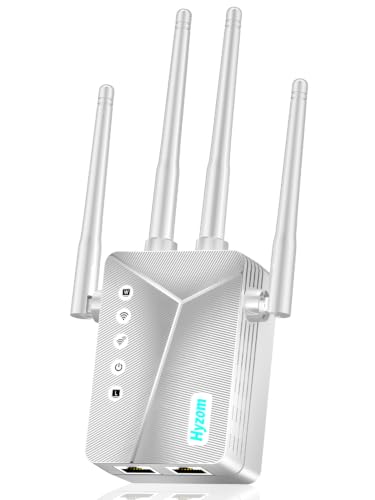
WiFi Extender Signal Booster for Home, Long Range Wireless Internet Repeater with Ethernet Port, WiFi Booster for Dead Zones, Reduces Buffering, Supports 65+ Devices, 1-Tap Setup
As an Amazon Associate we earn from qualifying purchases. Product prices and availability are accurate as of the date/time indicated.

WiFi Extender Signal Booster: 2026 Internet Extender with Ethernet Port | Upgraded WiFi Amplifier for Home/Office, 2.4GHz Longest Range up to 9995 Sq.ft and 45+ Devices
As an Amazon Associate we earn from qualifying purchases. Product prices and availability are accurate as of the date/time indicated.
Prices shown are approximate and for reference only. Prices change often, so please check the current price on Amazon before you buy.
Specifications summarize manufacturers’ published information for current models; ecosystem compatibility depends on the router’s model and firmware, verified as this guide directs. Ratings are editorial, weighing backhaul design, roaming behavior, placement tooling, and value for office use.
The Six Extenders Reviewed
1. TP-Link RE715X: Best Extender Overall for Offices
The RE715X is the extender this guide deploys first in a TP-Link office and recommends first in a mixed one: Wi-Fi 6 at a serious AX3000 class, a backhaul arrangement that can be dedicated rather than shared, OneMesh membership where the router supports it, and an Ethernet port that lets the same unit graduate to wired access point mode the day the office runs a cable, which is the finest future-proofing a product in this category can offer. Its setup application reports the link quality to the router in plain language, which operationalizes this guide’s placement doctrine for a beginner. It will not repeal the extender tax where the backhaul is shared, and it will not fix a dead zone whose cause is a metal wall. Within the extender’s honest jurisdiction, it is the complete article.
2. ASUS RP-AX58: Best Inside an ASUS Office
ASUS’s extender is an ecosystem play executed well: inside an AiMesh network it stops being an extender in the old sense and becomes a mesh node, with the roaming, single-name, centrally managed behavior an office actually wants, on Wi-Fi 6 hardware with an Ethernet option behind it. Outside an ASUS router’s orbit it remains a competent extender and a less compelling one, which is this guide’s ecosystem lesson wearing a product. ASUS offices should buy it without a contest. Other offices should buy the lesson instead: your router’s family is your first shortlist.
3. NETGEAR EAX15: Best Brand-Agnostic Mesh Extender
NETGEAR’s EAX line exists for the office whose router is whatever the internet provider or history supplied: it builds a same-name, mesh-style extension with any brand’s router, on Wi-Fi 6, with the setup and signal tooling a non-specialist office manager can run. Its throughput class is a step below the leaders’, and in a shared-backhaul configuration it pays the category tax like everything else. Its virtue is universality without chaos, one network name, assisted roaming, no router replacement required, which for the small office renting its router and its premises alike may be the entire requirement, met in an afternoon.
4. TP-Link RE605X: Best Mid-Price Value
The RE605X delivers the RE715X’s essential design, Wi-Fi 6, OneMesh, Ethernet for AP mode, at a lower throughput class and a friendlier price, and for the majority of office dead zones, a meeting room’s calls, a back office’s documents and cloud tools, its AX1800 class is not the limiting factor; the placement and backhaul are, and those it gets right. It is the value summit of this table and the unit a multi-dead-zone office buys in pairs, one per zone, each placed by the map this guide taught, rather than one heroic extender asked to bend signal around two corners, which no radio at any price has learned to do.
5. Linksys RE7310: Best Placement Assistance
Linksys’s contribution to the category is pedagogical: its Spot Finder setup walks the installer to the placement this guide’s diagnosis prescribes, judging the router link’s quality and saying, in effect, closer, farther, here. For the office without an IT person, that guidance built into the setup may be worth more than a band of throughput, because placement is where extenders live and die. The unit behind the guidance is a Wi-Fi 5 class extender of honest competence, which dates it against the table’s Wi-Fi 6 field and caps its rating accordingly. Buy it for a small, light-use office and a guided afternoon; buy up the table for a growing one.
6. D-Link E30: Best Budget Wi-Fi 6
The E30 puts Wi-Fi 6 and EasyMesh manners at the table’s lowest price, serving the single dead zone of a small office, the accounts desk, the stockroom terminal, the waiting room, with modern standards and without a committee. Its throughput class and radio refinement are its price’s, and a demanding meeting room should look up the table. As the cure for the modest dead zone it was designed for, it is complete, and its presence here closes the table’s argument: at every budget there is an extender that does the job honestly, provided the job was diagnosed before the box was opened.
Buying Guide: How to Choose and Deploy a WiFi Extender for Office Dead Zones
Step One: Decide Extender, Mesh, or Wire, by the Evidence
Use your dead-zone map to make the category decision with a clear head. One dead zone, a healthy signal at its threshold, light-to-moderate use: an extender from this table is the proportionate cure. Several dead zones, roaming complaints across the floor, video-call density, or a dead zone behind construction that blocks signal entirely: price the mesh system, two or three nodes of your router’s ecosystem or a fresh one, or a wired access point on a cable run, because those are the tools whose physics matches the problem, and an extender bought against that evidence will be replaced by them within the year at twice the total cost. This step is the guide’s most valuable, and it is deliberately placed before any product loyalty: the best extender is the one whose problem is real.
Step Two: Place It Where the Signal Is Strong, Then Prove It
Install the extender at the mapped midpoint, at desk-to-chest height, in the open, not in a cabinet, not behind the metal filing system that made the dead zone, and not inside the dead zone itself. Use the setup application’s link-quality report as your referee, moving the unit a meter at a time until the backhaul reports strong, then test from the dead zone’s farthest desk with the office’s real work: join the call, copy the file, print to the printer that lives there. If the result fails, the correction order is placement first, a different band or channel second, a second extender or the Step One alternatives third, and never a prayer offered to the box’s maximum speed, which was measured in a laboratory your office does not resemble.
Step Three: Configure for the Office, Secure It, and Document It
Finish the deployment as an administrator rather than a consumer: one network name where the ecosystem allows, the extender’s firmware updated on the day of installation and on the office’s patch rhythm thereafter, its administration password changed from any default, and its management kept off the guest network it may also extend. Set the channels with the analyzer’s evidence, avoiding the neighbors’ strongest frequencies where the office’s density makes spectrum a shared resource. Then write the deployment down, extender model, location, the outlet it occupies, labeled so no cleaner or contractor unplugs the meeting room’s network on a Friday, and the before-and-after measurements from your map, because the next dead zone, and offices grow them like houseplants, will be diagnosed against this one’s file. An extender deployed this way disappears into the office’s infrastructure, which is the highest state any product in this category can achieve.
Frequently Asked Questions About WiFi Extenders for Office Dead Zones
Where is the best place to put a WiFi extender in an office?
At the point, roughly halfway between the router and the dead zone, where the router’s signal is still strong, in practice a signal around -50 to -60 dBm on your analyzer, in the open at working height, clear of metal furniture, appliances, and the construction that created the dead zone. The instinct to place it in the dead zone, at the desk that suffers, is the category’s classic error, because the extender can only rebroadcast what it receives, and in the dead zone it receives the same failing signal as every other device there, amplified into strong bars and weak service. Use the extender’s own link-quality indicator during setup as the final judge, adjust by meters rather than by rooms, and verify from the dead zone with a real call or file transfer, because the only placement that matters is the one the work confirms.
Will a WiFi extender slow down my office network?
On the extended segment, expect a real cost, and design around it rather than discovering it. A conventional extender that shares one radio link for receiving and rebroadcasting can halve the available throughput on its segment and adds latency at each hop, which light office work never notices and dense video calling or large-file work always does. The mitigations are this guide’s recurring themes: a dual-band extender with a dedicated backhaul band, which confines the tax; an Ethernet-fed access point mode, which abolishes it; correct placement, which maximizes the rate the backhaul can sustain; and honesty about scale, because an office whose extended segment carries its core work has outgrown extenders and should buy the mesh or wired design its traffic is describing. The main, unextended network is not slowed by an extender’s presence in any way a modern office will measure, so the experiment, properly placed, is safe to run.
What is the difference between a WiFi extender and a mesh system?
An extender is a single device that rebroadcasts an existing router’s network, cheaply and incrementally, with the throughput tax and, outside a shared ecosystem, the roaming clumsiness this guide describes. A mesh system is a designed set of cooperating nodes, router and satellites under one management, one network name, and one roaming intelligence, typically with dedicated or intelligently shared backhaul, placed as a system and priced as one. For one dead zone, the extender is the proportionate tool and the mesh is a renovation. For a floor of dead zones, roaming staff, and call-dense work, the mesh is the tool and the extender is the detour, and the diagnostic map in this guide’s first section is what tells you which office you have. Many offices live the sequence honestly, extender first, mesh when the map grows, and lose nothing by it provided each purchase was made on evidence.
Can one extender fix multiple dead zones in an office?
Rarely, and only when the zones are adjacent and share a single cause, one far wing beyond one corridor, because an extender radiates from one placed point and serves the area its rebroadcast can reach with the backhaul it can sustain. Two separated dead zones are two problems, and they want either two extenders, each placed by its own map at its own zone’s threshold, or the systemic answer, mesh nodes or wired access points, placed as a design. The failure to refuse is the heroic single extender installed centrally to serve everywhere, which serves, in practice, a ring around itself and leaves both original zones improved on the signal meter and unimproved in the meeting. Offices are not short of corners; they are short of diagnosis, and the map that takes ten minutes will tell you, in numbers, whether your dead zones are one problem wearing two names or two problems asking, politely, for the larger cure.
Related guides
- Best Printer for Windows Compatibility Guide in 2026: 7 Steps to Choose a Printer That Works With Windows 11, With a WHQL Driver, USB, and WiFi, for a PC, Without a Printer That Needs a Driver That Does Not Exist, or a Printer That Drops WiFi
- Wired Backhaul vs Wireless Backhaul for Mesh in 2026: Wired Backhaul vs Wireless Backhaul for Mesh
- Best NAS for Home Video Streaming: 6 Best NAS for Home Video Streaming Picks in 2026
- Best SD Card vs USB Drive for Printer Transfers: 6 Best SD Card vs USB Drive for Printer Transfers Picks in 2026
More from Amazon
Programs that pair well with the guide above. Offers and eligibility are set by Amazon and may change.
Free shipping on eligible items, Prime Video and more. Eligible new members can start with a free trial.
Start a Prime free trialAd-free music streaming. Eligible new subscribers can start with a free trial.
Try Music Unlimited freeA Prime membership for ages 18-24 with a trial period. Eligibility is set by Amazon.
See Prime for Young AdultsAudiobooks and podcasts to listen to on the go. Eligible new members can start with a free trial.
Try Audible freeAs an Amazon Associate we earn from qualifying purchases.








Write Your Review
No reviews yet. Be the first to share your experience!