
What's inside
- Best Portable SSD for Office Laptops by Worker and Fleet
- Quick Comparison: Best Portable SSD for Office Laptops Models
- Detailed Reviews: Best Portable SSD for Office Laptops Picks
- Buying Guide: Choosing the Best Portable SSD for Office Laptops
- Frequently Asked Questions About the Best Portable SSD for Office Laptops
As an Amazon Associate I earn from qualifying purchases. This post may contain affiliate links at no extra cost to you.
The best portable SSD for office laptops is a working tool with a paradox at its centre, and this article will state the paradox in its first paragraph so that no reader buys the wrong lesson with the right drive. A portable SSD is the fastest, toughest, most convenient way ever made to carry office work — a drive the size of a credit card’s thicker cousin, with no moving parts, that can move a project’s folders, a presentation’s media, a data set, and a machine’s backup between laptops, offices, and home at speeds that make a network share feel like weather. It is also, by the same portability, the easiest copy of that work to lose, to leave in a meeting room, to put through a wash in a jacket, or to have stolen with a bag. So a portable SSD for office use must be bought as one member of a system and never as the system: a drive whose speed matches your laptop’s ports, whose capacity holds your working set with room to breathe, whose build survives a bag’s life, and whose contents exist somewhere else as well, under the backup discipline your employer requires and your own prudence should demand if you work for yourself. This guide compares the drives. Its buying guide will keep returning, unapologetically, to the copies, because a fast drive that is a single point of failure is not an upgrade to an office. It is a risk with a transfer speed.
Speed must be matched to the port it will actually meet, because a portable SSD’s headline figure is a ceiling and your laptop holds the ladder. The mainstream of this table speaks USB at its successive speeds, in the makers’ stated classes — the roughly one gigabyte per second parish of the Samsung T7 and T9, SanDisk Extreme, Crucial X9 and X10, and WD My Passport SSD lines, in their successive generations — and the higher parish speaks USB4 or Thunderbolt, in the SanDisk Pro-G40 and its peers’ pattern, at figures a compatible laptop can use and an ordinary office laptop cannot. Read your laptop’s port specification from its maker’s page for your exact model: a USB-C port may be a modest USB speed, a fast one, or a Thunderbolt port that unlocks the higher parish, and the same shape of socket covers all three, which is the single most common cause of a fast drive performing at half its promise in an office that blames the drive. Match the drive’s class to the fastest port your fleet actually has, across the machines it will visit — a drive that tours a hot-desking office should be chosen for the common port, not for the one flagship in the corner — and use the cable the maker supplies or specifies for its full speed, because a charging cable in a drawer is shaped like a data cable and performs like a rumour. Test the result on your own work, in the first week, with the transfer you actually perform — a folder of thousands of small office files behaves very differently from one large video, and both are honest tests of different things — and judge the drive by your work’s figure and not by a benchmark’s.
Capacity should be bought for the working set plus its near future, and no further, because an office SSD that is nearly full is a drive whose owner is deleting in a hurry, and a drive bought at twice the need is money parked in a bag. Add up the folders the drive must carry — the current projects, the reference library, the media, the local backup or the machine image where your IT policy assigns that role to you — and buy the capacity that holds that sum at no more than about two thirds full on its busiest day, because a drive needs room for the next project’s arrival before the last one’s archive has been made. For most office laptops that arithmetic lands in the one and two terabyte classes of this table, with the smaller classes serving a single project’s shuttle and the larger ones a media or data worker’s whole parish. Speed within a line can vary by capacity, in some makers’ stated terms, so confirm the figure for the exact capacity you are buying and not for the line’s flagship. And keep the drive’s role written, even if only in a note in its case: shuttle, working drive, or backup member — because a drive whose role is unclear will be formatted by a helpful colleague, borrowed for a personal project, or wiped for a conference’s files, and an office SSD’s worst failures are administrative long before they are electronic.
Build, security, and the office’s own rules finish the specification, and the rules come first in authority. If your work is an employer’s, their policies on external drives, encryption, and data leaving a building govern over this article in every particular: many offices require an encrypted drive, a managed device, or no portable copy at all, and a reader in that parish should ask their IT department before buying, because the right answer may be a specific approved model, bought through a specific channel, and a personally bought drive may be prohibited however excellent it is. For a self-employed and a permitted user, encryption is the portable drive’s essential habit: use the drive’s hardware encryption where its maker provides it, in models in this table’s Samsung and SanDisk pattern, or your operating system’s drive encryption, set it before the first real file is copied, and keep its password in a proper password manager rather than on a note in the same bag. A fingerprint provision, in the Samsung T7 Touch pattern’s surviving classes and their peers, suits a user whose password discipline would otherwise be the system’s weakest part. Build should be judged by a bag’s life: a metal or armoured shell in the makers’ classes, a stated drop provision in their terms and no further, a connector that is protected or recessed, and a cable arrangement — short, captive where a model offers it, or carried in the drive’s case — that cannot be left in a meeting room, because a drive without its cable is a paperweight with data on it. This guide compares six real, currently sold portable SSDs for office laptops: Samsung T7 and T9 classes, SanDisk Extreme and Extreme Pro classes, Crucial X9 and X10 Pro classes, WD My Passport SSD classes, Kingston XS1000 and XS2000 classes, and SanDisk Pro-G40 classes as the fast parish’s reference, each judged on sustained transfers of office work, a bag’s build, and a password’s manners.
Our Top Picks
Best Portable SSD for Office Laptops by Worker and Fleet
The hot-desking professional: one drive, every desk, a password that travels
For a worker whose office is whichever desk is free, the correct purchase is a mid-speed, encrypted drive in the Samsung T7 or SanDisk Extreme pattern, at the capacity of their whole working set, with a short cable in its case and its encryption set before its first file. Such a worker should choose for the fleet’s common port rather than for their own laptop’s fastest, because their drive’s working life is spent on other people’s machines, in meeting rooms and clients’ offices, where a Thunderbolt flagship is a USB drive with an expensive past. Their discipline is the drive’s other half: it is ejected properly at every departure, it is never the only copy of anything on it, and it is carried on their person or in a bag that does not leave their side in a public place, because a hot-desker’s drive is, by definition, the office’s most travelled copy of its work, and it should be guarded with the seriousness that title deserves.
The media, data, and field worker: sustained speed and a capacity with headroom
A worker whose files are large — video, imagery, data sets, virtual machines in their lawful parish — should buy into this table’s sustained parish, in the T9, Extreme Pro, X10 Pro, and Pro-G40 classes, matched to a laptop port that can feed them, because their transfers are measured in tens of minutes saved daily and a drive’s behaviour across a full, hot, sustained write is their real specification, in each maker’s stated terms for the exact model. Such a worker should test a finalist with their own largest routine transfer, timed, inside a returns window, because a benchmark’s peak and a project’s sustained figure are different numbers and only one of them is a working day. Their capacity should be bought with the headroom this article prescribes and their backup should be the most rigorous in this table’s readership, because a field worker’s drive is exposed to every risk in the first paragraph at once, and its contents are, usually, the least replaceable in the building.
The small business and the self-employed: a system of two drives and a cloud
A small business without an IT department should buy a system rather than a drive: two portable SSDs from this table, in the Crucial and WD value classes where a budget argues, one as the working and shuttle drive and one as the backup member, rotated under a simple written routine, with a cloud or office copy as the third leg where the work’s sensitivity and the services’ terms allow. That arrangement, which this site’s backup guidance calls by its classic shape of multiple copies on different media with one elsewhere, costs less than one premium flagship and protects against the failures that actually close small businesses’ weeks: a lost bag, a dead drive, a ransomed laptop. Let the routine be kept by a calendar and a note in each drive’s case rather than by memory, because a backup system that depends on remembering is a backup system in its first, untested draft, and a small business’s data deserves a published edition.
Quick Comparison: Best Portable SSD for Office Laptops Models
| Model | Key Specs | Best For | Typical Price Range | Rating |
|---|---|---|---|---|
| Samsung T7 and T9 Classes | Capacity and speed classes as maker states by model, encryption classes, build classes | Best portable SSD for office laptops overall | $90 – $250 by capacity and model | 4.6 / 5 |
| SanDisk Extreme and Extreme Pro Classes | Capacity and speed classes as maker states by model, encryption and water resistance classes in maker terms | Best rugged office drive | $90 – $280 by capacity and model | 4.5 / 5 |
| Crucial X9 and X10 Pro Classes | Capacity and speed classes as maker states by model, build classes | Best value | $70 – $200 by capacity and model | 4.4 / 5 |
| WD My Passport SSD Classes | Capacity and speed classes as maker states, encryption classes, build classes | Best simple office choice | $80 – $220 by capacity and model | 4.4 / 5 |
| Kingston XS1000 and XS2000 Classes | Capacity and speed classes as maker states by model, size classes | Best tiny shuttle drive | $70 – $190 by capacity and model | 4.3 / 5 |
| SanDisk Pro-G40 Classes | Speed classes as maker states, Thunderbolt and USB classes in maker terms, build classes | Best fast parish | $180 – $350 by capacity | 4.5 / 5 |

THEYETI 14.1 Inch Laptop 8GB RAM 128GB SSD | Portable Laptop Computer Stable Notebook Computer for Student, School, Home Office Work and Business (Aurora Silver)


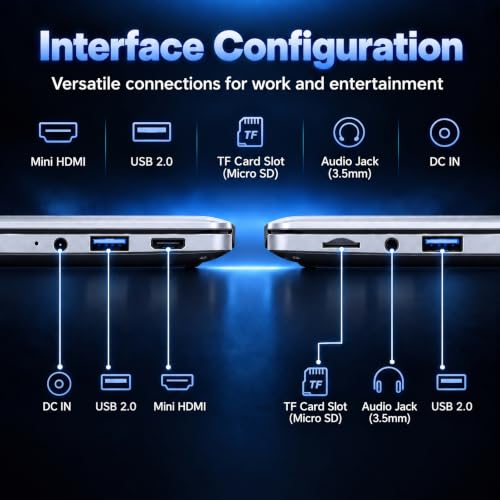

As an Amazon Associate we earn from qualifying purchases. Product prices and availability are accurate as of the date/time indicated.

2026 15.6" FHD Windows 11 Pro Traditional Laptop Computer, Intel N4100 4C4T, 8GB RAM 256GB SSD for Business Office Student School College, Notebook, Laptop Lightweight Portable
As an Amazon Associate we earn from qualifying purchases. Product prices and availability are accurate as of the date/time indicated.

2026 Flagship 15.6" Business Laptop Computer, 16GB RAM 512GB SSD, Core i5-7Y54(Up to 3.2GHz), Windows 11 Pro, Office 365, Fan Cooling, 2-Year Warranty, Portable Traditional Lap Top for Students & Work
As an Amazon Associate we earn from qualifying purchases. Product prices and availability are accurate as of the date/time indicated.
Interface and stated read and write speeds in the maker’s terms and test conditions, capacity, encryption provision, drop and water or dust provisions in the maker’s stated terms, dimensions and weight, included cable, and warranty are each maker’s specification for the current exact model and capacity, and achieved speeds depend on a host laptop’s port, its cable, and the files transferred. Prices are typical street ranges and vary strongly with capacity and with the market’s seasons. Ratings reflect office laptop suitability: sustained transfer of real office work on a common port, encryption and security manners, build and cable discipline for a bag’s life, capacity value, and reliability of the maker behind the drive.
Detailed Reviews: Best Portable SSD for Office Laptops Picks
1. Samsung T7 and T9 – Best Overall
Samsung’s T7 and T9 classes lead because they combine the office parish’s three virtues in one small object: a sustained speed in their classes that a common fast port can use, hardware encryption in their pattern that a permitted worker can set in minutes, and a build and a size that live in a bag without complaint. For most office laptops, the T7 class is the answer and the T9 is its faster sibling for a port that can feed it.
Set its encryption before its first file and keep its cable in its case. A Samsung so kept will move a working week in minutes for years, and its owner will think about it only when a colleague, watching a transfer finish, asks what it is — which is the whole of a working tool’s fame.
2. SanDisk Extreme and Extreme Pro – Best Rugged
SanDisk’s Extreme classes compete on a bag’s and a site’s life: a build and stated provisions in their makers’ terms for the knocks, dust, and weather of a worker whose office is sometimes a site, a car, or a conference’s floor, with speeds in their classes that match the common fast port and a Pro parish above them. For a field-going professional, that tolerance is the specification.
Let its stated provisions be read as its maker states them and no further, because a rugged drive is still a drive and not a football. An Extreme kept in its case will survive the travel that retires prettier drives, and its owner will learn to carry it the way a tradesman carries a good tool, without thought and without loss.
3. Crucial X9 and X10 Pro – Best Value
Crucial’s X9 and X10 Pro classes give an office the table’s most persuasive arithmetic: a real, fast, well-made drive at prices that let a small business buy the two-drive system this article prescribes instead of one flagship and a hope. For a fleet, a team, and a backup rotation, that arithmetic is the product.
Add encryption by your operating system’s provision where the exact model asks it, and set it as part of the drive’s first hour. A Crucial pair kept in rotation will protect a small office better than any single drive in this table, at a total this article can recommend to a budget without a blush.
4. WD My Passport SSD – Best Simple Choice
WD’s My Passport SSD classes serve the office that wants the decision finished: a compact drive in its maker’s pattern, with encryption provisions in its classes and a name a purchasing department already knows from a decade of portable drives. For a standard-issue laptop fleet, that familiarity is an administrative feature with a real value.
Confirm its exact model’s speed class against your fleet’s ports, because a familiar name covers a range. Confirmed, a My Passport will be issued, used, and forgotten by a whole office, which in an administrator’s vocabulary is the highest praise any peripheral can earn.
5. Kingston XS Classes – Best Tiny Shuttle
Kingston’s XS1000 and XS2000 classes compete on size: drives in their patterns so small they live in a laptop sleeve’s pocket, with speeds in their classes that shame the spinning drives they replace. For a presenter, a trainer, and a worker whose drive is a shuttle between two desks, that size is a daily convenience.
Give a tiny drive a case and a fixed home in your bag, because its virtue is also its risk. A Kingston with an address will be present for every meeting; a Kingston without one will be, in a month, a rumour in a jacket that has been washed, and its data, however well backed up, will have had an adventure its owner did not schedule.
6. SanDisk Pro-G40 – Best Fast Parish
SanDisk’s Pro-G40 classes close the table as the reference for the fast parish: a drive in its maker’s pattern whose interface classes serve a Thunderbolt or USB4 laptop at figures the common parish cannot reach, in a build for a professional’s bag. For a media or data worker whose laptop can feed it, its premium is measured in minutes returned daily.
Buy it only against a port audit that names a compatible machine, as this article directs. A G40 on the right laptop is a revelation; a G40 on the wrong one is an Extreme with a larger receipt, and its owner will have paid the difference to learn this article’s first lesson, which was available free in its second paragraph.
Buying Guide: Choosing the Best Portable SSD for Office Laptops
Audit the port, size the working set, set the encryption first
Read your laptop’s port specification from its maker’s page for your exact model, and the ports of the other machines your drive must serve, and choose a drive class the common fastest port can actually feed. Add up your working set and buy the capacity that holds it at two thirds on its busiest day, confirming the speed figure for that exact capacity. Before the first real file is copied, set the drive’s encryption — its maker’s hardware provision where provided, or your operating system’s — record its password in a proper manager, write the drive’s role in its case, and confirm, if the work is an employer’s, that a portable copy is permitted and approved at all, because their policy outranks this article and a drive bought against it is a problem with a transfer speed. Use the maker’s cable, test the drive on your own routine transfer, and register or record its warranty as your office’s habits direct.
Never the only copy: run a backup routine a calendar keeps
Build the system the drive belongs to: its contents copied, on a schedule, to a second place — an office store, a second drive in rotation, a cloud service whose terms suit your work — with one copy, in the classic discipline, kept away from the building the laptop lives in, because a fire and a theft take a desk’s copies together. Eject the drive properly at every departure, close its files before you unplug it, and let no transfer be interrupted by a bag being zipped around a working drive. Verify a backup by opening files from it, on a rhythm, because a backup that has never been read is a hope with a progress bar. At home and in transit, keep the drive on your person or in a bag that stays with you, treat it with the seriousness of the work it carries, and report a loss, if the work is an employer’s, by their procedure and at once, because a lost encrypted drive reported promptly is an incident, while the same drive reported late is a story.
Retire on evidence, wipe before disposal, upgrade the port’s class last
Retire a drive when its health, in its maker’s tools where provided, or its behaviour — errors, disconnects, a transfer that no longer completes — gives evidence against it, and replace it inside the system so no day’s work ever lives on the failing drive alone. Before any drive leaves your service, wipe it by its maker’s or your operating system’s secure method, under your employer’s policy where the work is theirs, because a portable drive’s afterlife is the chapter of its security story most often forgotten. Upgrade a drive’s speed class when your laptop’s port, and not merely your wishes, has moved into a faster parish, and pass the old drive down to a shuttle or a backup role where its class is a palace. The best portable SSD for office laptops is finally a fast member of a careful system: a port matched, a capacity with headroom, a password set on its first day, and a copy of everything somewhere else — and any drive in this table, bought by that audit and kept inside that discipline, will carry an office’s work for years at speeds its owner will stop noticing, which is what working tools are for.
Frequently Asked Questions About the Best Portable SSD for Office Laptops
What is the best portable SSD for office laptops?
Samsung’s T7 and T9 classes lead this table overall, with SanDisk’s Extreme classes for a rugged life, Crucial’s X9 and X10 Pro classes for value and a two-drive system, WD’s My Passport SSD classes as the simple fleet choice, Kingston’s XS classes as a tiny shuttle, and SanDisk’s Pro-G40 classes for a Thunderbolt or USB4 laptop. The best drive for you must match your laptop’s fastest common port, in its maker’s stated class, hold your working set at about two thirds full, and carry encryption you will actually set. It must also be permitted: if the work is an employer’s, their policy on portable drives governs, and it should be checked before a purchase. A drive matched, encrypted, and backed up as this article directs will serve an office for years, at any row of this table.
Why is my portable SSD slower than its advertised speed?
Usually because one of the three partners in its speed is slower than the headline: the laptop’s port, the cable, or the files. A drive’s stated figure is achieved on a port of its own class, so a fast USB or Thunderbolt drive on an older USB port will run at the port’s speed, and the same socket shape covers several speeds, which is why this article makes a port audit its first step. A charging cable, or a long cable not specified for the drive’s full speed, can halve a transfer while looking identical to the right one, so test with the maker’s supplied cable. And a folder of thousands of small files will always move more slowly than one large file of the same total size, on any drive, because each file is its own small negotiation. Test your drive with your own routine transfer, on your fastest port, with its own cable, and judge it by that figure — it is the only one your working day will ever see.
How big a portable SSD does an office laptop need?
As big as your working set, plus the next project’s arrival, at about two thirds full — which for most office users lands in the one to two terabyte classes of this table. Add up the projects, reference material, and media the drive must carry, include any local backup role your IT policy assigns to it, and buy the capacity that holds that sum without a weekly deletion ritual, because a drive kept nearly full makes its owner careless at exactly the moments a project is being archived or handed over. A single project’s shuttle can live in a smaller class, and a media or data worker’s whole parish may need the largest. Resist buying far beyond the arithmetic as insurance, because capacity in a bag is money that could have bought the second drive of a backup system, and in an office’s real risk ledger, a copy is worth more than a cavern.
Can a portable SSD replace a backup for my office laptop?
It can be a member of a backup, and it must never be the whole of one, because a backup’s purpose is to survive the events that take the original — and a portable drive shares most of those events with the laptop it backs up, travelling in the same bag, sitting in the same office, and being lost, stolen, or damaged in the same afternoon. Keep at least one other copy of everything that matters, in a different place: an office or cloud store, a second drive kept elsewhere, in the classic discipline of multiple copies on different media with one off site, and verify it by opening its files on a rhythm. If your work is an employer’s, their backup and retention systems govern and should be used as directed, with a portable drive serving only the role they assign it. A drive that shuttles and works, inside a system that copies, is an office’s best friend. A drive that is the system is an incident that has not yet chosen its date.
Related guides
- Best AAA Batteries for Office Remotes in 2026: AAA Batteries for Office Remotes
- Best Budget Tablet for Work Under 100 in 2026: Budget Tablets for Work Under $100, Office Work, and Productivity
- Best Gimbal for Office Vlogging in 2026: 7 Gimbals for Office Vlogging That Keep Your Video Smooth, Stable, and Professional in the Office
- Best Budget NAS Dust Filter for Maintenance in 2026: 7 Budget NAS Dust Filters for Maintenance With Clear Airflow, Simple Install, and Easy Use for NAS
More from Amazon
Programs that pair well with the guide above. Offers and eligibility are set by Amazon and may change.
Free shipping on eligible items, Prime Video and more. Eligible new members can start with a free trial.
Start a Prime free trialAd-free music streaming. Eligible new subscribers can start with a free trial.
Try Music Unlimited freeA Prime membership for ages 18-24 with a trial period. Eligibility is set by Amazon.
See Prime for Young AdultsAudiobooks and podcasts to listen to on the go. Eligible new members can start with a free trial.
Try Audible freeAs an Amazon Associate we earn from qualifying purchases.

Write Your Review
No reviews yet. Be the first to share your experience!