
What's inside
- What Makes the Best Premium WiFi 7 Router for Home
- Quick Comparison: Best Premium WiFi 7 Routers for Home Compared
- Best Premium WiFi 7 Routers for Home: The Six Reviewed
- Buying Guide: How to Choose the Best Premium WiFi 7 Router for Your Home
- How We Selected the Best Premium WiFi 7 Routers for Home
- Frequently Asked Questions About Premium WiFi 7 Routers
As an Amazon Associate I earn from qualifying purchases. This post may contain affiliate links at no extra cost to you.
The best premium WiFi 7 router for home use deserves an honest first paragraph, because this category’s marketing will not give you one. WiFi 7 is a real advance — wider channels and multi-link operation on the 6GHz band, better handling of crowded airwaves, lower latency under load — and almost nothing you own can use most of it yet. Your current phones, laptops, and televisions are WiFi 6 or 6E devices, and they will connect to a WiFi 7 router at their own speeds, improved somewhat by the router’s better radios and processing, but not transformed. So the premium case for WiFi 7 today rests on three honest pillars: the wired side, where these flagships carry multi-gig and 10G ports that remove real bottlenecks now; the 6GHz band, clean and wide, which your 6E devices can already use; and time, because a premium router is a five-to-eight-year appliance and the WiFi 7 devices will arrive in your home one upgrade at a time, each finding the network already ready. Buy it on those pillars and it is a sound purchase. Buy it for a number on the box and it is an expensive ornament.
That box number deserves its own sentence, because it is the category’s original sin. The enormous figures in WiFi 7 marketing — five-digit megabit claims — are the sum of every band’s theoretical maximum under laboratory conditions no home reproduces, added together although no single device can use more than its own connection. Your real ceilings are set elsewhere: by your internet service, which no router outruns; by each device’s own WiFi generation and antenna count; and by your walls, which tax the 6GHz band’s shorter range hardest of all. This guide therefore grades the flagships on what a home can actually spend: port speeds and counts, the quality and configurability of the 6GHz and 5GHz service, mesh expandability for larger houses, processing headroom for dozens of devices and a busy smart home, and the maker’s firmware support, which is the premium feature that decides how the router ages.
Decide the architecture before the model. A single flagship router serves an apartment or a compact house superbly and a sprawling or multi-storey house badly, whatever its price, because physics outranks processing. Larger homes should start from the mesh question — a WiFi 7 mesh system, or a flagship router with mesh expansion — and from the wired question behind it: whether Ethernet exists, or can be run, to the places a mesh node or access point would live, because a wired backhaul is worth more than any radio specification in this article. The models below include both schools, labelled, and the buying guide returns to the floor plan with a tape measure, which is where premium WiFi is actually decided.
Our Top Picks
What Makes the Best Premium WiFi 7 Router for Home
Ports: The Premium You Can Use on Day One
Count and grade the wired ports as a first-class specification. The pattern to seek is a multi-gig WAN port that can accept a faster-than-gigabit internet service when it arrives, at least one multi-gig or 10G LAN port for a NAS or a switch — pairing naturally with a premium multi-gig switch of the kind this site’s networking guides cover — and enough gigabit LAN for the desk cluster. Some flagships offer dual WAN or link aggregation; most homes need neither, and should not pay for theatre. What every premium home does need is the port map to stop being the bottleneck between a fast NAS, a wired PC, and a 6GHz access point’s worth of wireless clients. Read the published port list model by variant, because in this class the difference between two near-identical names is often exactly a 10G port.
The Radios: 6GHz Done Well, 5GHz Done Properly
WiFi 7’s gifts live mostly on 6GHz: the widest channels, multi-link operation for WiFi 7 clients, and airwaves still empty enough to feel like a private motorway. Judge a flagship by how it treats that band — its antenna design, its channel support within your country’s rules, which vary and can limit 6GHz features by region — and by whether the 5GHz band, where most of your devices will live for years, is a full citizen rather than a legacy afterthought. Smart home reality intrudes here too: a house of 2.4GHz IoT devices needs a router whose IoT handling — a dedicated network or SSID, sensible security defaults, guest isolation — is designed rather than improvised. Premium money should buy a network that is easier to run safely, and the interface and app are where that promise is kept or broken, so weight them as heavily as the radios.
Processing, Firmware, and the Long Middle of a Router’s Life
A premium router is a small computer asked to route, firewall, prioritise, and increasingly to secure a household of fifty-plus devices for years without a reboot becoming a lifestyle. Processing headroom and memory are published by the serious makers and worth comparing; the practical signs are a router that holds its speeds with security features enabled and a household at full evening load. Firmware is the long game: update cadence, security patch history, and the maker’s stated support horizon decide whether year five’s router is an asset or a liability, and the flagship lines of the makers in this table are where that support concentrates. Set updates to automatic where offered, change the default credentials on day one, and the premium you paid includes the years — which is the only way premium arithmetic ever works.
Quick Comparison: Best Premium WiFi 7 Routers for Home Compared
| Premium WiFi 7 Router Model | Best For | Key Specs | Typical Price Range | Rating |
|---|---|---|---|---|
| ASUS ROG Rapture GT-BE98 Pro | Best premium WiFi 7 router for home overall | Quad-band WiFi 7 flagship, multiple 10G and 2.5G ports, gaming and QoS features, mesh expandable as published | $700 – $900 | 4.8 / 5 |
| NETGEAR Nighthawk RS700S | Best streamlined flagship | Tri-band WiFi 7, 10G internet port and multi-gig LAN, tall antenna design, security subscription options as published | $600 – $750 | 4.6 / 5 |
| TP-Link Archer BE800 | Best ports and value in class | Tri-band WiFi 7, dual 10G ports and multiple 2.5G ports, display and HomeShield features as published | $500 – $650 | 4.6 / 5 |
| ASUS RT-BE96U | Best for ASUS ecosystem homes | Tri-band WiFi 7, dual 10G ports, AiMesh expandability, AiProtection features as published | $550 – $700 | 4.6 / 5 |
| NETGEAR Orbi 970 Series | Best WiFi 7 mesh for large homes | Quad-band WiFi 7 mesh system, 10G ports, dedicated backhaul design, multi-unit pricing as published | $1,000 – $1,600 | 4.7 / 5 |
| TP-Link Deco BE85 | Best simpler WiFi 7 mesh | Tri-band WiFi 7 mesh, multi-gig ports including 10G on main unit class, app-led setup as published | $700 – $1,100 | 4.5 / 5 |

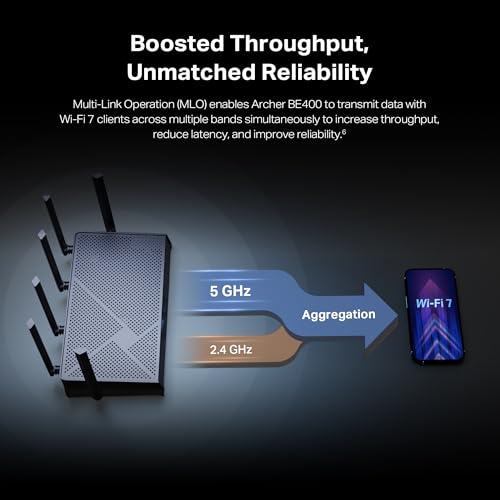
TP-Link BE6500 Dual-Band WiFi 7 Router (BE400) | Dual 2.5Gbps Ports, USB 3.0, Covers up to 2,400 sq. ft., 90 Devices, Quad-Core CPU, HomeShield, Private IoT



As an Amazon Associate we earn from qualifying purchases. Product prices and availability are accurate as of the date/time indicated.

NETGEAR Nighthawk WiFi 7 Router , Up to 2,500 sq ft, 9.3 Gbps | 2.5Gb Router, Reliable Performance, Easy Set Up, 100 devices, 2× 2.5G + 2× Gigabit Ports, Tri Band, BE9300
As an Amazon Associate we earn from qualifying purchases. Product prices and availability are accurate as of the date/time indicated.
Ratings are editorial assessments for premium home use, based on the makers’ published port maps, band configurations, and feature sets, and value at typical prices. Prices are typical retail ranges; mesh prices vary by the number of units in the pack. Headline wireless speed figures are not used in these ratings, for the reasons this guide’s introduction sets out; ports, band quality, expandability, and support carry the grade.
Best Premium WiFi 7 Routers for Home: The Six Reviewed
1. ASUS ROG Rapture GT-BE98 Pro – Best Overall
The GT-BE98 Pro is the flagship as maximalist statement: quad-band WiFi 7 with a second 6GHz-class capability in its design, a port map with real 10G depth, processing to run its gaming and security features without breaking stride, and ASUS’s AiMesh as the growth path when the house outgrows one unit. Its gaming branding understates its best quality, which is headroom — for the household of many devices, a fast NAS, a gigabit-plus internet future, and a decade of client upgrades arriving one by one. It is large, expensive, and entirely unjustifiable for a small flat with five devices, and this guide says so in its review rather than its footnotes. For the house it fits, nothing in the table fits better.
2. NETGEAR Nighthawk RS700S – Best Streamlined Flagship
The RS700S is the flagship for the buyer who wants the standard without the theatre: tri-band WiFi 7, a 10G internet port with multi-gig LAN behind it, a tall, serious antenna design, and NETGEAR’s interface and optional security services. It lacks the ASUS’s quad-band extravagance and some of its configurability, and repays the difference in simplicity and price. In a medium house with a premium internet service and a NAS to feed, it is arguably the most rational flagship here — the one whose specification sheet contains nothing its owner will never use.
3. TP-Link Archer BE800 – Best Ports and Value
The BE800’s argument is written on its back panel: dual 10G and a rank of 2.5G ports that shame flagships costing more, behind tri-band WiFi 7 radios of full flagship standard. For the wired-heavy premium home — NAS, switch, PCs, and access points all asking for multi-gig — it removes more real bottlenecks per pound or dollar than any model here. Its software ecosystem and long-term support should be weighed against ASUS’s with open eyes, and its design will divide the room it sits in. Judged as infrastructure, which is how this guide judges routers, it is a formidable value.
4. ASUS RT-BE96U – Best for ASUS Homes
The RT-BE96U brings the flagship formula into ASUS’s mainstream line: tri-band WiFi 7, dual 10G ports, AiMesh growth, and the AiProtection security suite that many households value as the reason to stay in the family. For the home already running ASUS networking, it is the natural summit — one interface, one mesh language, one support relationship. Against its ROG sibling it trades the fourth band and some gaming apparatus for a friendlier price and a calmer appearance, a trade most homes should take without a backward glance.
5. NETGEAR Orbi 970 – Best Mesh for Large Homes
Orbi’s flagship mesh is the answer when the house itself is the problem: a quad-band design with a dedicated character to its backhaul, 10G connectivity, and coverage sold by the multi-unit pack for homes where one router, however mighty, is a rumour in the far bedrooms. Its price is the table’s summit and should be compared against the wired alternative honestly — running Ethernet and fitting access points can beat it on performance per cost where the house allows the work. Where it does not, Orbi is the premium that actually arrives in every room, which is the only premium a large house can spend.
6. TP-Link Deco BE85 – Best Simpler Mesh
The Deco BE85 brings WiFi 7 mesh to the household that wants it app-led and appliance-simple: multi-gig ports where they matter, a clean tri-band design, and setup measured in minutes per unit. It offers the enthusiast less to configure than the standalone flagships, which its buyers count as the feature. Against the Orbi it trades the dedicated backhaul’s muscle for price and simplicity. In the medium-to-large home without Ethernet, choosing between these two meshes is choosing a philosophy — maximum performance or maximum calm — and both are respectable answers to the same floor plan.
Buying Guide: How to Choose the Best Premium WiFi 7 Router for Your Home
Start With the Floor Plan and the Internet Contract
Two documents decide this purchase. The first is your internet service: its speed today and the fastest tier your provider plausibly sells during this router’s life, because a router’s WAN port should meet that future without exceeding your realism — gigabit households do not need 10G internet ports, and multi-gig households cannot live without them. The second is the floor plan: the home’s size, floors, and wall construction, the router’s possible positions, and every place Ethernet already runs or could be run. Compact and wired homes buy standalone flagships; large and wireless homes buy mesh or wired access points; and no specification in this article outranks the wall between the router and the bedroom, because the wall always wins.
Count the Ports and the Devices, Then Buy the Decade
List the wired citizens — NAS, PCs, the switch, the television, the consoles — and match them to the port map with the multi-gig citizens on the multi-gig ports. Count the wireless citizens honestly, including the smart home’s quiet dozens, and favour the flagships whose processing and IoT handling are designed for that census. Then make the premium decision with clear eyes: you are buying the network’s next five to eight years — the WiFi 7 phones and laptops arriving upgrade by upgrade, the faster internet tier, the second NAS. If that horizon is genuinely yours, the flagship is the economical purchase. If you move yearly or your household’s devices are few and old, a good WiFi 6E router at half the price is the honest buy, and this guide would rather tell you so than sell you a summit you will not climb.
Install It Like Infrastructure
Place the router centrally and high, in the open, away from metal, water, and the floor’s corner behind the television where flagships go to underperform. Change every default credential, enable automatic firmware updates, set the security to the current WPA standard your devices support, and give the IoT menagerie its own network or SSID with the isolation your model offers. Name the bands sensibly, test the far rooms at the evening peak, and adjust the one thing that is actually adjustable — position — before blaming the radios. Label the cables, photograph the setup, and keep the one-page network note with the house’s documents. A premium router installed this way disappears into the home’s infrastructure, which is the precise sensation the premium was buying.
How We Selected the Best Premium WiFi 7 Routers for Home
We included only real, named, currently sold WiFi 7 flagships and mesh systems from established networking makers, with published port maps and band configurations. Ratings deliberately ignore summed headline speed claims and weight ports, band quality, mesh expandability, processing, and firmware support. Standalone and mesh schools are labelled and rated for their own promises, and the case for buying a class below — stated in the buying guide — is part of this guide’s advice, not a concession beneath it.
Frequently Asked Questions About Premium WiFi 7 Routers
Will a WiFi 7 router make my current devices faster?
Somewhat, sometimes — and never by the number on the box. Your WiFi 6 and 6E devices connect at their own standards; they may gain from the flagship’s better radios, processing, and airtime management, and 6E devices gain the clean 6GHz band in full. The transformative speeds belong to WiFi 7 clients, which most households will acquire gradually. The immediate, guaranteed gains of a flagship are wired: multi-gig ports for the NAS and the switch, a WAN port ready for a faster service, and headroom under a full household’s load. Buy it for those and for the decade, as this guide argues, and you will not be disappointed by the arithmetic of the present.
Do I need WiFi 7 if my internet is only gigabit?
Not for the internet’s sake — a fine WiFi 6E router saturates a gigabit service wirelessly in good conditions. The WiFi 7 case at gigabit is internal and temporal: faster traffic inside the home between a multi-gig NAS and modern devices, the 6GHz band’s cleanliness, and readiness for the faster tier and the WiFi 7 devices arriving across the router’s long life. If your horizon is two years and your internal traffic is light, save the premium without a qualm. If you are equipping a house for the decade, the flagship’s price divides by its years into a defensible annual figure.
Single router or mesh — which is better for a large home?
For a large or multi-storey home, distribution beats power: two or three well-placed mesh units or wired access points will outperform any single flagship, because WiFi range is governed by physics and by the client’s own weak transmitter trying to answer, not by the router’s price. Best of all is wired backhaul — mesh units or access points connected by Ethernet — which reserves all the radio for the devices. Choose the standalone flagship where one central position genuinely covers the home; choose mesh where it does not, and let a tape measure and an honest walk around the far bedrooms, phone in hand at the evening peak, cast the deciding vote.
What speed ports should a premium router have in 2026?
At minimum, a multi-gig WAN port ready for faster-than-gigabit service and one multi-gig LAN port for a NAS or a premium switch; ideally, 10G appears on at least one of those positions in a true flagship, with 2.5G serving the rest of the wired citizens. Gigabit-only ports on a premium WiFi 7 router are the specification to reject, because they strand the wireless side’s whole purpose behind a wired ceiling. Match the map to your census as this guide directs — the fastest ports to the NAS and the uplink, the rest by need — and check the exact variant, because port maps are where near-identical model names quietly differ.
Related guides
- Best AAA Batteries for Office Remotes in 2026: AAA Batteries for Office Remotes
- Best Budget Tablet for Work Under 100 in 2026: Budget Tablets for Work Under $100, Office Work, and Productivity
- Best Gimbal for Office Vlogging in 2026: 7 Gimbals for Office Vlogging That Keep Your Video Smooth, Stable, and Professional in the Office
- Best Budget NAS Dust Filter for Maintenance in 2026: 7 Budget NAS Dust Filters for Maintenance With Clear Airflow, Simple Install, and Easy Use for NAS
More from Amazon
Programs that pair well with the guide above. Offers and eligibility are set by Amazon and may change.
Free shipping on eligible items, Prime Video and more. Eligible new members can start with a free trial.
Start a Prime free trialAd-free music streaming. Eligible new subscribers can start with a free trial.
Try Music Unlimited freeA Prime membership for ages 18-24 with a trial period. Eligibility is set by Amazon.
See Prime for Young AdultsAudiobooks and podcasts to listen to on the go. Eligible new members can start with a free trial.
Try Audible freeAs an Amazon Associate we earn from qualifying purchases.

Write Your Review
No reviews yet. Be the first to share your experience!