
What's inside
As an Amazon Associate I earn from qualifying purchases. This post may contain affiliate links at no extra cost to you.
The best scanner for office slides begins with a clarification that decides the entire purchase, because the word slides carries two meanings into an office and they need different machines. If your office’s slides are presentation slides — pages, in effect — they belong to a document scanner or a good office multifunction, and no product in this guide is for them. This guide is for the other slides: the 35mm transparencies in their cardboard and plastic mounts, the carousels and filing cabinets of them that universities, practices, agencies, museums, and long-lived businesses accumulated for forty years — product shots, site records, training material, case photographs, the visual memory of an organisation — and that now sit in the dark, fading, while the last projector in the building loses its bulb. Digitising them is an archival act with a deadline set by chemistry, and the scanner is the instrument of it: a machine that shines light through the film rather than off a page, at resolutions a document scanner cannot approach, because a 35mm slide is a postage stamp that must become a poster.
The comparison fields the real, currently sold machines across the honest range of the job. Dedicated film scanners — Plustek’s OpticFilm 8200i class above all — scan mounted slides and film strips one frame at a time at high stated optical resolutions, with infrared dust and scratch handling in their makers’ stated designs, and they are the quality reference for a small frame. Flatbed scanners with transparency units — Epson’s Perfection V600 and V850 Pro classes — scan several mounted slides at once in their holders, at somewhat lower effective performance on a small frame but with a versatility and batch rhythm an office archive project lives on. And the standalone rapid digitisers — Kodak’s Slide N Scan class and Wolverine’s Titan class — photograph slides at speed into files with minimal ceremony, for the archive whose need is access and identification rather than exhibition. Prices are typical ranges rather than exact figures. Optical resolution, dynamic range as stated by the maker, batch capacity in holders, infrared cleaning, software, and file formats are each maker’s specification for the current exact model and should be confirmed in that maker’s current documents before purchase, because in film scanning the gap between a headline resolution and the resolution a small frame actually yields is the oldest story in the category, and the makers’ full documents are where it is honestly told.
An office archive also has duties a home project does not, and they belong in the guide’s first page. The slides are records: handle them by their mounts and edges, with clean hands or the gloves your archivist practice prefers, keep the originals in order until their scans are verified, and do not discard them on a project’s enthusiasm — your organisation’s retention rules and any legal or historical obligations govern what may be destroyed, and for many collections the correct outcome is a digitised access copy with the originals re-housed and kept. Confidential and personal material — medical, legal, personnel, client images — is scanned under the same access discipline as any other record, on machines and drives the organisation controls. Name and file the scans as records, with the collection’s own numbering preserved in the filenames, because a thousand images named by a scanner’s counter are a second archive problem created inside the first one’s solution. With that discipline written down, the choice below is a simple match between the collection’s size, its quality bar, and its deadline.
Our Top Picks
Best Scanner for Office Slides by Archive
The small, precious collection: a dedicated film scanner and a slow afternoon
For a few hundred slides that matter individually — the founder’s product photographs, the case series, the images destined for a publication, a wall, or a courtroom screen — the Plustek OpticFilm class is the answer: one slide at a time through a dedicated transport, the highest stated optical performance in this table on a 35mm frame, infrared-assisted cleaning in its maker’s stated design that removes the dust and hair a small frame magnifies into ropes, and software that treats each frame as a photograph rather than a page. Its pace is its price: this is a scanner for a collection counted in hundreds and valued per frame, and an office that assigns it a cabinet of carousels has misunderstood it as completely as one that assigns a flatbed a wedding album’s single masterpiece.
The working archive: a transparency flatbed and a batch rhythm
For the thousands — the training library, the site records, the department’s visual memory — the Epson Perfection classes are the working tools: holders that take mounted slides in batches in Epson’s stated arrangements, a transparency light in the lid, software with dust removal in its stated classes, and a rhythm an assigned staff member can run beside their other work for a season. The V600 is the value workhorse; the V850 Pro class is the step for the archive that also holds medium format, fragile film, and a quality bar set by republication. Judge them by the project’s arithmetic: slides per holder load, minutes per load at your chosen settings, loads per week — because an archive project is a rate, and the scanner that doubles the rate halves the project’s cost in the only currency it really spends, which is staff time.
The access project: rapid digitisers and the virtue of good enough, identified
Some collections do not need exhibition files; they need to be seen — identified, catalogued, searched, and made available at screen quality so that knowledge stops depending on a projector and a dark room. For those, the Kodak Slide N Scan and Wolverine Titan classes photograph slides rapidly to card or computer in their makers’ stated designs, with a speed per frame no true scanner approaches, at a quality their documents describe and an office should verify against its actual use: projected in a meeting, printed at report size, archived as the record of what the collection holds. Bought for access, they are excellent. Bought for republication, they are a disappointment scheduled in advance, and the difference is not the machine’s honesty but the project’s brief — which is why this guide insists the brief be written before the machine is chosen.
Quick Comparison: Best Scanner for Office Slides Models
| Model | Key Specs | Best For | Typical Price Range | Rating |
|---|---|---|---|---|
| Plustek OpticFilm 8200i Class | Dedicated 35mm film and slide scanner, stated optical resolution, infrared cleaning and software classes per Plustek documents | Best scanner for office slides overall quality | $400 – $550 by configuration | 4.6 / 5 |
| Epson Perfection V850 Pro | Flatbed with transparency unit, holder capacities, resolution and film format classes per Epson documents | Best flatbed for serious archives | $1,100 – $1,400 | 4.5 / 5 |
| Epson Perfection V600 Photo | Flatbed with transparency unit, mounted slide holder class, resolution classes per Epson documents | Best value archive flatbed | $280 – $380 | 4.5 / 5 |
| Kodak Slide N Scan Class | Standalone slide digitiser, capture resolution and storage classes per Kodak documents for the exact model | Best rapid access digitising | $170 – $230 | 4.2 / 5 |
| Wolverine Titan 8-in-1 Class | Standalone film digitiser, format classes, capture and storage classes per Wolverine documents | Best rapid alternative | $150 – $210 | 4.0 / 5 |
| Plustek OpticFilm 8300i Class | Dedicated 35mm scanner, resolution and infrared classes, software classes per Plustek documents | Best dedicated alternative | $450 – $600 by configuration | 4.4 / 5 |
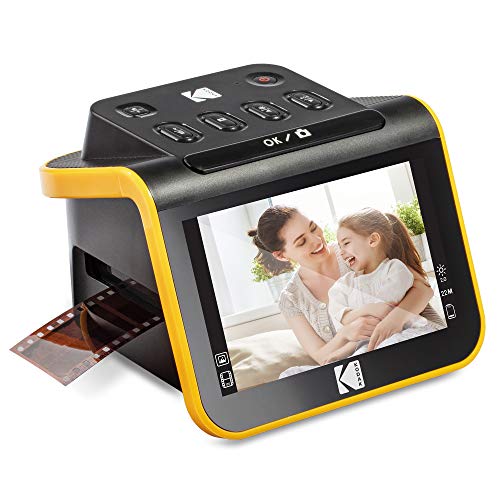
KODAK Slide N Scan Film & Slide Scanner, 22MP, 5" LCD Screen, 135/110/126mm | Converts color and B&W negatives to JPEG digital photos; saves to SD or SDHC card (not included); connects to PC, Mac, or TV
As an Amazon Associate we earn from qualifying purchases. Product prices and availability are accurate as of the date/time indicated.

DigitPro Photo, Slide & Negative Scanner with 5” Large Screen | Convert 35mm/110 Negatives, Slides & Physical Photos to 22MP Digital Image, Includes 8GB SD Card, No Computer Required
As an Amazon Associate we earn from qualifying purchases. Product prices and availability are accurate as of the date/time indicated.

HP Film & Slide Scanner, Photo Scanner, 7" Touch LCD, 13MP Slide Digitizer | Negative Scanner, Film to Digital Converter, Quick-Feed & 50mm Adapter, USB & HDMI, Preview & Edit, Gallery Slide Viewer
As an Amazon Associate we earn from qualifying purchases. Product prices and availability are accurate as of the date/time indicated.
Optical resolution as stated by the maker, supported film and slide formats, mounted slide batch capacity in holders, infrared dust and scratch capability, dynamic range figures as stated, software and file formats, and connectivity are each maker’s specification for the current exact model and must be confirmed in that maker’s current documents before purchase. Prices are typical street ranges as described. Interpolated or digital resolution figures, where a maker lists them, are not optical performance and should not be compared as if they were.
Detailed Reviews: Best Scanner for Office Slides Picks
1. Plustek OpticFilm 8200i Class – Best Quality Overall
The OpticFilm class leads on the small frame’s own terms: a dedicated transport that holds a mounted slide flat and in register, the table’s highest stated optical resolution for 35mm, and infrared-channel cleaning in Plustek’s stated design, which detects the dust and surface marks that a transmitted-light scan otherwise engraves and offers their removal in software — a feature whose value is measured in hours of retouching not done, across a collection. For the archive’s important frames, this is the instrument.
Its method is one frame at a time, with the operator as part of the mechanism, so staff it as such: a trained person, a clean workspace, the collection’s order preserved, and a session rhythm that favours care over count. Assigned the right collection — hundreds of frames that matter — it produces files an office can publish from, which no faster row here can promise across the board.
2. Epson Perfection V850 Pro – Best Flatbed for Serious Archives
The V850 Pro class is the flatbed at its most serious: a high-resolution transparency system in Epson’s stated design, holders for mounted slides and film in several formats in its documented arrangements, and the optical and software provisions for an institution whose collection spans formats and whose quality bar is set by future uses it cannot yet name. Its dual-lens and holder engineering in Epson’s documents are aimed at exactly the flatness and focus a small frame on a big platen demands.
Its price places it in a department, a library, or a practice rather than on a desk, and it should be bought with its project plan written — formats, volumes, settings, staffing — because at its level the scanner is a small department of its own. Run with that plan, it is the archive’s safest pair of hands: versatile enough for the whole cabinet, good enough for almost every frame in it.
3. Epson Perfection V600 Photo – Best Value Archive Flatbed
The V600 is the working archive’s default for a reason that has compounded over years: a transparency unit and mounted-slide holders in Epson’s stated classes, software dust handling in its documents, and a price that lets a project begin this quarter instead of in a future budget. Its per-frame quality on 35mm sits below the dedicated row’s, as physics and price both predict, and for the great middle of an office collection — records, training, reference — it sits exactly at the level the uses require.
Its discipline is cleanliness and settings: a platen and holders kept dust-free as Epson directs, because a flatbed photographs its own dirt into every batch, and scan settings chosen once, deliberately, for the collection’s purpose and then held constant, so the archive is one archive and not a diary of a slider’s journey. Set up with that discipline, it will digitise a department’s memory in a season of steady sessions.
4. Kodak Slide N Scan Class – Best Rapid Access Digitising
Kodak’s digitiser class photographs a slide and moves on, in its stated design, at a pace that turns a carousel from an afternoon into a coffee break — and for the identification and access project, that pace is the product. A collection that can be browsed on a screen by lunchtime is a collection that will be catalogued, used, and argued for; a collection waiting on a slow scanner’s schedule is a rumour in a cabinet.
Verify its output against your use before committing the collection: view its files at the size your meetings and reports actually present, in Kodak’s stated capture classes, and let that honest test, not a specification, assign it its project. Assigned to access, it is the fastest kindness an archive can receive; the important frames can always travel afterward to a row above, now that the digitiser has told you which ones they are.
5. Wolverine Titan 8-in-1 Class – Best Rapid Alternative
Wolverine’s Titan class offers the rapid pattern across a family of film formats in its stated design, which suits the office cabinet that holds slides beside negatives, strips, and the occasional odd format from a long institutional life. Its standalone operation — no computer required at the point of capture, in its documents’ arrangement — suits a store room, a records office, or a volunteer’s kitchen table better than a tethered workflow would.
Judge it by the same access test as the Kodak and keep its files’ naming under your project’s discipline from the first card, because a standalone digitiser’s counter names are where archives go to become anonymous. As the survey instrument of a mixed collection, it earns its row; the collection’s treasures still graduate to a true scanner, identified now, thanks to it.
6. Plustek OpticFilm 8300i Class – Best Dedicated Alternative
The 8300i class is Plustek’s newer dedicated answer, with its stated resolution and infrared provisions and a software bundle in its documents aimed at a faster quality workflow than its sibling’s. Between the two Plusteks, the office’s decision is made on the current documents — software, speed at your chosen settings, and the infrared system’s behaviour on your film types — including one technical caution the makers themselves note in this category: infrared cleaning does not work the same way on traditional black-and-white film and some older film stocks, whose images the infrared channel can mistake for damage, so test your collection’s stocks before a project leans on it.
That caution is this row’s real review: at the dedicated level, the details of your film — its stocks, its mounts, its condition — are specifications too, and the scanner that handles your actual collection best is the best scanner, whatever the table’s order says. Test with your slides, in your holders, before the project commits.
Buying Guide: Choosing the Best Scanner for Office Slides
Write the project brief first: volume, quality bar, deadline, and the originals’ fate
Count the collection, even roughly — carousels and boxes convert to frames with a few minutes’ arithmetic — and set the quality bar by the files’ real destinations: screen and report, publication and print, or preservation master from which all future uses descend. Those two numbers, volume and bar, choose the machine class from this table without further debate: hundreds at a high bar to the dedicated scanners, thousands at a working bar to the transparency flatbeds, any number at an access bar to the rapid digitisers, with the standing option of a two-pass project — rapid survey first, dedicated rescans of the frames that earn it — which is how most real archives are actually saved. Add the deadline and the staffing, and calculate the project’s rate from the makers’ stated batch arrangements and your own timed test batch, because a project whose arithmetic does not close on paper will not close in the store room either. Decide the originals’ fate in the same document, under your organisation’s retention rules: re-housed and kept, returned to their owners, or destroyed only where a rule clearly permits and a verified scan clearly exists — and record that decision where the collection’s future keeper will find it.
Set the workflow: handling, settings, naming, and verification
Prepare the slides as the scanner’s maker and ordinary archival practice direct: work in a clean, dust-minimised space, handle film by mounts and edges, blow dust away with a blower rather than wiping, and keep the collection’s order physically intact with a place for every slide from holder to return. Choose the scan settings once, from the makers’ guidance and your brief — resolution sufficient for your largest intended use without drowning the project in files it cannot store or move, the file format your archive standard requires, colour settings held constant — and run a test batch through the entire pipeline, scan to filed and verified, before the collection’s first box is opened. Name files from the collection’s own identifiers, with a scheme a successor can decode, store them in the project’s structure with the backups your organisation’s records practice requires — in more than one place, because a digitisation project that loses its files has manufactured a worse loss than the fading it was preventing — and verify as you go: every batch opened, counted, and spot-checked for focus, orientation, and completeness while the originals are still in their order beside you. Keep a project log of settings, dates, and decisions; it is the archive’s birth certificate, and the future’s only way to know what it is holding.
Maintain the machine and the collection’s second life
Keep the scanner as its maker directs — platen, holders, and transport clean on the stated schedule, software and drivers current from the maker’s official sources, the machine covered in a dusty room — because a film scanner’s cleanliness is visible in every file it makes. When the project ends, let the collection’s second life be designed rather than accidental: an index a colleague can search, access copies where the staff actually work, preservation files where the organisation keeps its records, and the originals re-housed in archival sleeves or boxes as your practice directs, labelled with the digital collection’s location, so that the two halves of the archive point at each other forever. Assign an owner. Archives do not stay findable by themselves, and the modest annual attention of a named keeper — a backup checked, a format still readable, an index still accurate — is what separates a digitisation project from a digitisation event. The best scanner for office slides is finally the one inside a finished, verified, kept project: the right class for the collection’s size and bar, run with clean hands and constant settings, filed under names that mean something — and any scanner in this table, bought against a written brief and run inside that discipline, will bring an organisation’s forty years of small, bright windows back into the light, which is what they were taken for in the first place.
Frequently Asked Questions About the Best Scanner for Office Slides
What is the best scanner for office slides?
It depends on the collection’s size and the files’ purpose, which is why this table is organised by archive rather than by price. For a few hundred important slides, a dedicated film scanner — the Plustek OpticFilm 8200i or 8300i classes — gives the highest stated optical quality per frame and infrared dust handling. For thousands of slides in a working archive, a transparency flatbed — Epson’s Perfection V600 for value, the V850 Pro for a serious multi-format collection — scans mounted slides in batches and sets the project’s pace. For identification and access, the Kodak Slide N Scan and Wolverine Titan classes digitise at a speed no true scanner matches, at a quality to verify against your screens and reports. Write the brief first — volume, quality bar, deadline, and what happens to the originals — and the right row chooses itself; then test that row on your own slides before the project commits.
What resolution do I need to scan 35mm slides for office use?
Enough for your largest intended use, chosen from the maker’s stated optical resolution rather than any interpolated figure — and for a small frame, that number matters more than in any other scanning, because a 35mm slide must be enlarged many times to fill a screen or a page. As a working shape: files destined for screens, presentations, and ordinary reports are well served by the middle of these machines’ optical ranges, while slides destined for print, exhibition, or a preservation master justify scanning at or near the dedicated scanners’ full stated optical capability, accepting the larger files and slower pace as the archive’s deliberate cost. Beyond the number, two settings decide more real quality than resolution arguments do: the infrared or software dust handling, used where your film stocks support it, because a small frame’s dust is a large file’s boulders; and a constant, correct exposure and colour setup, tested on your collection’s typical slides, because a well-exposed scan at a sensible resolution serves an office better than a maximum-resolution scan of a badly set frame. Test, view at final size, and let the use, not the slider’s end, set the number.
Should our office discard the original slides after scanning?
Not on the scanning project’s own authority. The originals are records, and their fate is governed by your organisation’s retention schedule and any legal, historical, or ownership obligations that attach to them — some collections must be kept, some belong to clients or donors whose terms govern them, and some may be destroyed only after a verified digitisation under a documented rule. The safe professional pattern is: scan, verify every batch while the originals are still in order, file and back up the scans under the project’s naming discipline, and then let the retention decision be made by whoever owns it in your organisation, with the scans’ existence and location recorded either way. Where originals are kept, re-house them properly — clean, sleeved or boxed as archival practice directs, in a stable, dry place — and label them with the digital collection’s location, because film kept well remains the preservation master of last resort, and more than one institution has been grateful, decades later, that a tidy project resisted a tidy destruction. When in doubt, keep them; storage is cheap, and un-destroying is not a service anyone offers.
Can a normal office scanner or multifunction scan slides?
Not properly, and the reason is geometry rather than quality: a slide is a transparency, made to be viewed with light shining through it, and a document scanner works by light reflected off an opaque page — so a slide on an ordinary flatbed produces a dim, muddy image of a stamp, at a resolution chosen for A4 paper rather than for a frame the size of a thumbnail. The machines that scan slides provide the two things the job requires: a light source in the lid or transport that shines through the film, as the transparency flatbeds and dedicated scanners in this table are built to do, and an optical resolution, in their makers’ stated figures, high enough to enlarge a 35mm frame to a useful file. A multifunction that specifically includes a transparency unit and slide holders in its maker’s documents is the exception that proves the rule — it has, in effect, a film scanner built into its lid. For the occasional single slide, a lightbox and a careful camera photograph can serve an internal need; for a collection, buy the light path the film was made for, and the archive will look like the slides always did — which is the entire point of rescuing them.
Related guides
- Best AAA Batteries for Office Remotes in 2026: AAA Batteries for Office Remotes
- Best Budget Tablet for Work Under 100 in 2026: Budget Tablets for Work Under $100, Office Work, and Productivity
- Best Gimbal for Office Vlogging in 2026: 7 Gimbals for Office Vlogging That Keep Your Video Smooth, Stable, and Professional in the Office
- Best Budget NAS Dust Filter for Maintenance in 2026: 7 Budget NAS Dust Filters for Maintenance With Clear Airflow, Simple Install, and Easy Use for NAS
More from Amazon
Programs that pair well with the guide above. Offers and eligibility are set by Amazon and may change.
Free shipping on eligible items, Prime Video and more. Eligible new members can start with a free trial.
Start a Prime free trialAd-free music streaming. Eligible new subscribers can start with a free trial.
Try Music Unlimited freeA Prime membership for ages 18-24 with a trial period. Eligibility is set by Amazon.
See Prime for Young AdultsAudiobooks and podcasts to listen to on the go. Eligible new members can start with a free trial.
Try Audible freeAs an Amazon Associate we earn from qualifying purchases.

Write Your Review
No reviews yet. Be the first to share your experience!