
What's inside
- Best Power Bank With Wireless Charging for Offices: Quick Comparison Table
- What Is a Power Bank With Wireless Charging for Offices?
- Best Power Bank With Wireless Charging for Offices Reviewed
- Buying Guide: How to Choose the Best Power Bank With Wireless Charging for Offices
- How to Use a Wireless Power Bank at Your Desk
- Which Best Power Bank With Wireless Charging for Offices Should You Buy?
- Frequently Asked Questions About the Best Power Bank With Wireless Charging for Offices
As an Amazon Associate I earn from qualifying purchases. This post may contain affiliate links at no extra cost to you.
The best power bank with wireless charging for offices is the one that gives you a 10,000mAh capacity, a wireless charging output of 7.5W to 15W, a USB-C port for wired charging, a slim design that fits on your desk, and a typical price of $30 to $80, without being too large for your desk, too slow to charge your phone, or too heavy to carry to a meeting. A power bank with wireless charging for offices is not the same as a regular power bank. It is a portable battery with a wireless charging pad or magnetic mount built in, so you can place your phone on it to charge without a cable, and use USB-C to charge a laptop, tablet, or another phone.
For most office users, a power bank with a capacity of 10,000mAh, a wireless output of 7.5W to 15W, a USB-C output of 18W to 30W, and a typical price of $30 to $60, is a good starting point. That combination gives you one to two full phone charges, fast wireless charging for an iPhone or Android phone, and a cost that is reasonable for an office power bank.
At technicalbud.com, we focus on tech gadgets. For this guide to the best power bank with wireless charging for offices in 2026, we compared current power banks with wireless charging that are widely sold, designed for office use, and suitable for a user who wants a power bank with wireless charging for offices. We looked at capacity, wireless output, wired output, and price. Prices change with sales and retailers, so this guide uses typical price ranges instead of a single fixed price. Capacity, wireless output, and wired output figures are manufacturer listings, and real charging speed depends on your phone, your case, your cable, and your power bank.
Safety note: always use a power bank that is certified for your phone, do not leave it charging unattended overnight, and do not use it if it is damaged, swollen, or very hot. Keep it away from water, heat, and direct sunlight, and do not charge a phone with a thick metal case on a wireless charger, because it may not charge or may overheat.
Our Top Picks
 Nymzixt Solar Power Bank 49800mAh Portable Wireless Charger5.6 x 0.84 x 2.9 inches0.66 poundsCheck on Amazon
Best Power Bank With Wireless Charging for Offices: Quick Comparison Table
The table below compares seven power banks with wireless charging for offices. Capacity is the capacity, where given. Wireless output is the wireless output, where given. Wired output is the wired output, where given. Best for is a note on what the power bank is best for, such as power bank with wireless charging for offices, where given. Price is the typical range, and rating is our editorial score based on capacity, wireless speed, design, and value for offices. Rows are sorted by rating, high to low, with ties grouped by similar capacity and value.
| Power Bank With Wireless Charging for Offices | Capacity | Wireless Output | Wired Output | Best For | Typical Price Range | Our Rating |
|---|---|---|---|---|---|---|
| Anker MagGo Power Bank 10K | 10,000mAh | 15W MagSafe | 30W USB-C | Best overall, power bank with wireless charging | $60 – $80 | 4.9 / 5 |
| Anker 622 Magnetic Battery 5K | 5,000mAh | 7.5W MagSafe | 12W USB-C | Best for Anker, 622 magnetic battery | $40 – $50 | 4.8 / 5 |
| Belkin BoostCharge Magnetic Wireless Power Bank 10K | 10,000mAh | 7.5W MagSafe | 20W USB-C | Best for Belkin, BoostCharge magnetic | $50 – $70 | 4.8 / 5 |
| Baseus Magnetic Power Bank 10000mAh | 10,000mAh | 15W MagSafe | 20W USB-C | Best for Baseus, magnetic power bank | $30 – $50 | 4.8 / 5 |
| UGREEN Nexode Magnetic Wireless Power Bank 10000 | 10,000mAh | 15W MagSafe | 20W USB-C | Best for UGREEN, Nexode magnetic | $30 – $50 | 4.7 / 5 |
| Mophie Snap+ Juice Pack Mini 5K | 5,000mAh | 7.5W MagSafe | 12W USB-C | Best for Mophie, Snap+ Juice Pack Mini | $40 – $50 | 4.7 / 5 |
| Anker PowerCore III 10K Wireless | 10,000mAh | 10W Qi | 18W USB-C | Best budget, Anker PowerCore III wireless | $30 – $40 | 4.6 / 5 |

Wireless Portable Charger Power Bank 40800mAh Travel Essentials with Cables | 7-in-1 15W Wireless Charging Power Bank,25W PD QC 4.0 Fast Charging USB C Battery Pack for iPhone 17/16/15/14,Galaxy,Android


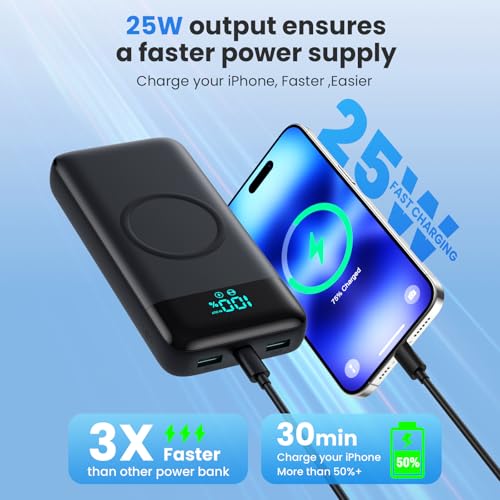


As an Amazon Associate we earn from qualifying purchases. Product prices and availability are accurate as of the date/time indicated.

Anker Zolo Magnetic Power Bank,10,000mAh Wireless Portable Charger (Black) | MagSafe-Compatible Battery Pack with 30W Max Wired Fast Charging, Skin-Friendly and Durable Design for Travel
As an Amazon Associate we earn from qualifying purchases. Product prices and availability are accurate as of the date/time indicated.
Nymzixt Solar Power Bank 49800mAh Portable Wireless Charger with USB-C 22.5W Fast Charging Built in 4 Cables Compatible with iPhone, iPad, Bright LED Flashlight Perfect for Camping


As an Amazon Associate we earn from qualifying purchases. Product prices and availability are accurate as of the date/time indicated.
Note: Capacity, wireless output, and wired output figures are manufacturer listings, and a power bank that lists 10,000mAh may give you about 6,000 to 7,000mAh of usable charge, because of conversion loss. Always check the power bank’s capacity, wireless output, and wired output in the manual, and confirm the current price with the retailer. A wireless power bank needs a phone that supports Qi or MagSafe wireless charging, and a MagSafe power bank needs a MagSafe-compatible iPhone or a magnetic case for Android.
What Is a Power Bank With Wireless Charging for Offices?
A power bank with wireless charging for offices is a portable battery with a wireless charging pad or magnetic mount that lets you charge your phone by placing it on the power bank, without plugging in a cable, while also offering a USB-C port for wired charging of a phone, tablet, or laptop. It is designed for an office desk, a meeting room, or a commute, where you want to charge your phone quickly, without searching for a cable or a wall outlet.
A power bank with wireless charging is different from a regular power bank, which only charges with a cable, and different from a wireless charging pad, which needs to be plugged into a wall. A wireless power bank is portable, so you can use it at your desk, in a meeting, or on a train, and it can charge your phone wirelessly, while also charging another device with a cable at the same time.
An office power bank is best for a user who has a phone that supports wireless charging, works at a desk, goes to meetings, or travels between offices, and wants a simple way to keep their phone charged without a cable.
Best Power Bank With Wireless Charging for Offices Reviewed
1. Anker MagGo Power Bank 10K – Best Power Bank With Wireless Charging for Offices Overall
The Anker MagGo Power Bank 10K is our top pick because it offers a capacity of 10,000mAh, a wireless output of 15W MagSafe, and a wired output of 30W USB-C, for a typical price of $60 to $80. It has a magnetic design, a slim case, and a design that is made for offices.
Anker designs the MagGo Power Bank 10K with a focus on a fast, magnetic power bank for iPhone users. The 15W wireless output is fast for MagSafe, the 30W USB-C output can charge a tablet or laptop, and the price of $60 to $80 is good for a premium power bank. The power bank is a good choice for a user who wants an Anker power bank, and who wants the best overall design for a power bank with wireless charging for offices.
The main limitation is price. At $60 to $80, it is more expensive than a Baseus magnetic power bank, though it offers a higher wired output. Choose the MagGo Power Bank 10K if you want the best overall power bank, you want an Anker power bank, and you have a budget of $60 to $80.
2. Anker 622 Magnetic Battery 5K – Best Power Bank With Wireless Charging for Offices for Anker 622
The Anker 622 Magnetic Battery 5K is a power bank with a capacity of 5,000mAh, a wireless output of 7.5W MagSafe, and a wired output of 12W USB-C, for a typical price of $40 to $50. It has a slim design, a foldable stand, and a design that is made for iPhone users.
Anker designs the 622 Magnetic Battery with a focus on a slim, portable magnetic battery for iPhone users. The foldable stand lets you watch videos while charging, the 5,000mAh capacity is enough for one full phone charge, and the price of $40 to $50 is good. The power bank is a good choice for a user who wants an Anker magnetic battery, and who wants a slim design.
The main limitation is capacity. At 5,000mAh, it is half the capacity of a MagGo 10K, so it is best for a light user. Choose the 622 if you want an Anker magnetic battery, you want a slim design with a stand, and you have a budget of $40 to $50.
3. Belkin BoostCharge Magnetic Wireless Power Bank 10K – Best Power Bank With Wireless Charging for Offices for Belkin
The Belkin BoostCharge Magnetic Wireless Power Bank 10K is a power bank with a capacity of 10,000mAh, a wireless output of 7.5W MagSafe, and a wired output of 20W USB-C, for a typical price of $50 to $70. It has a magnetic design, a slim case, and a design that is made for offices.
Belkin designs its BoostCharge Magnetic Wireless Power Bank with a focus on a reliable, magnetic power bank for iPhone users. The 10,000mAh capacity gives you one to two phone charges, the 20W USB-C output is good for wired charging, and the price of $50 to $70 is good. The power bank is a good choice for a user who wants a Belkin power bank, and who wants a reliable design.
The main limitation is wireless output. At 7.5W, it is slower than a MagGo at 15W, though it is still good for an office. Choose the BoostCharge if you want a Belkin power bank, you want a 10,000mAh capacity, and you have a budget of $50 to $70.
4. Baseus Magnetic Power Bank 10000mAh – Best Power Bank With Wireless Charging for Offices for Baseus
The Baseus Magnetic Power Bank 10000mAh is a power bank with a capacity of 10,000mAh, a wireless output of 15W MagSafe, and a wired output of 20W USB-C, for a typical price of $30 to $50. It has a magnetic design, a slim case, and a design that is made for offices on a budget.
Baseus designs its Magnetic Power Bank with a focus on an affordable, fast magnetic power bank for iPhone and Android users. The 15W wireless output is fast, the 10,000mAh capacity is good, and the price of $30 to $50 is low. The power bank is a good choice for a user who wants a Baseus power bank, and who wants a low price.
The main limitation is brand support. At $30 to $50, it is less premium than an Anker MagGo, though it offers similar wireless speed. Choose the Baseus power bank if you want a Baseus power bank, you want a low price, and you have a budget of $30 to $50.
5. UGREEN Nexode Magnetic Wireless Power Bank 10000 – Best Power Bank With Wireless Charging for Offices for UGREEN
The UGREEN Nexode Magnetic Wireless Power Bank 10000 is a power bank with a capacity of 10,000mAh, a wireless output of 15W MagSafe, and a wired output of 20W USB-C, for a typical price of $30 to $50. It has a magnetic design, a slim case, and a design that is made for offices.
UGREEN designs its Nexode Magnetic Wireless Power Bank with a focus on a fast, affordable magnetic power bank for iPhone and Android users. The 15W wireless output is fast, the 20W USB-C output is good, and the price of $30 to $50 is low. The power bank is a good choice for a user who wants a UGREEN power bank, and who wants a low price.
The main limitation is similar to Baseus: at $30 to $50, it is affordable, though it is less premium than an Anker MagGo. Choose the Nexode if you want a UGREEN power bank, you want a low price, and you have a budget of $30 to $50.
6. Mophie Snap+ Juice Pack Mini 5K – Best Power Bank With Wireless Charging for Offices for Mophie
The Mophie Snap+ Juice Pack Mini 5K is a power bank with a capacity of 5,000mAh, a wireless output of 7.5W MagSafe, and a wired output of 12W USB-C, for a typical price of $40 to $50. It has a slim design, a magnetic mount, and a design that is made for iPhone users.
Mophie designs its Snap+ Juice Pack Mini with a focus on a slim, portable magnetic battery for iPhone users. The 5,000mAh capacity is enough for one phone charge, the magnetic design is easy to use, and the price of $40 to $50 is good. The power bank is a good choice for a user who wants a Mophie power bank, and who wants a slim design.
The main limitation is capacity. At 5,000mAh, it is half the capacity of a 10,000mAh power bank, so it is best for a light user. Choose the Snap+ Juice Pack Mini if you want a Mophie power bank, you want a slim design, and you have a budget of $40 to $50.
7. Anker PowerCore III 10K Wireless – Best Budget Power Bank With Wireless Charging for Offices
The Anker PowerCore III 10K Wireless is a power bank with a capacity of 10,000mAh, a wireless output of 10W Qi, and a wired output of 18W USB-C, for a typical price of $30 to $40. It has a flat wireless pad, a slim case, and a design that is made for offices on a budget.
Anker designs its PowerCore III 10K Wireless with a focus on an affordable wireless power bank for Android and iPhone users. The 10W Qi output works with any Qi phone, the 10,000mAh capacity is good, and the price of $30 to $40 is the lowest for a 10,000mAh wireless power bank in this guide. The power bank is a good choice for a user who wants an Anker power bank, and who wants the lowest price.
The main limitation is that it is not magnetic, so your phone can slide off the pad if you move it. Choose the PowerCore III 10K Wireless if you want the lowest price, you want a 10,000mAh capacity, and you have a budget of $30 to $40.
Buying Guide: How to Choose the Best Power Bank With Wireless Charging for Offices
Before you buy, think about what phone you have, whether it is an iPhone with MagSafe or an Android phone with Qi wireless charging, how many charges you need per day, whether you also need to charge a laptop or tablet, how much space you have on your desk, and how much you want to spend. A power bank that is perfect for an iPhone with MagSafe may not work well for an Android phone without a magnetic case, and a power bank with 5,000mAh may not be enough if you use your phone heavily at work. The six points below cover the decisions that matter most for a power bank with wireless charging for offices, using the same specs and price ranges shown in the table above, from $30 to $80.
1. Compatibility: MagSafe vs Qi, and Your Phone
Compatibility is the first decision. MagSafe is Apple’s magnetic wireless charging system, used by iPhone 12 and later, with a magnetic ring that snaps a power bank to your phone and charges at up to 15W. Qi is the standard wireless charging system, used by most Android phones and older iPhones, with a flat pad that charges at 7.5W to 15W, though your phone may not snap into place.
Choose a MagSafe power bank if you have an iPhone 12 or later, you want a magnetic snap, or you want the fastest wireless charging for an iPhone. Choose a Qi power bank if you have an Android phone, you have an older iPhone, or you want a power bank that works with any Qi phone. If you have an Android phone and want magnetic charging, buy a magnetic case, because a MagSafe power bank needs a magnetic ring to snap on.
2. Capacity: 5,000mAh vs 10,000mAh, and Your Office Day
Capacity is the second decision. Capacity is how much charge a power bank can store, usually 5,000mAh or 10,000mAh, and it affects how many times you can charge your phone. A 5,000mAh power bank, such as the Anker 622 or Mophie Snap+ Mini, gives you about one full phone charge, while a 10,000mAh power bank, such as the Anker MagGo 10K, Belkin BoostCharge, Baseus, UGREEN, or Anker PowerCore III, gives you about one to two full phone charges.
Choose a 5,000mAh power bank if you work at a desk with a wall outlet nearby, you want a slim design, or you only need one charge per day. Choose a 10,000mAh power bank if you go to meetings, you travel, or you want to charge your phone twice. A 10,000mAh power bank is larger and heavier, though it is more versatile for an office.
3. Wireless Output: 7.5W vs 15W, and Your Charging Speed
Wireless output is the third decision. Wireless output is how fast a power bank can charge your phone wirelessly, usually 7.5W, 10W, or 15W, and it affects how quickly your phone charges. A 7.5W output, such as the Anker 622, Belkin, or Mophie, is slower, though it is still good for an office desk, while a 15W output, such as the Anker MagGo, Baseus, or UGREEN, is faster and better if you need a quick top-up between meetings.
Choose a 15W power bank if you want the fastest wireless charging, you have an iPhone with MagSafe, or you need a quick charge. Choose a 7.5W power bank if you work at a desk all day, you do not need a fast charge, or you want a low price. Use a thin case, because a thick metal case can block wireless charging.
4. Wired Output: USB-C 12W vs 30W, and Your Laptop or Tablet
Wired output is the fourth decision. Wired output is how fast a power bank can charge a device with a USB-C cable, usually 12W, 18W, 20W, or 30W, and it affects whether you can charge a tablet, laptop, or second phone. A 12W output is enough for a phone, while a 20W output is better for a tablet, and a 30W output, such as the Anker MagGo 10K, can charge a small laptop or a tablet faster.
Choose a power bank with 20W to 30W USB-C if you also charge a tablet or laptop at work, or you want to charge your phone quickly with a cable. Choose a power bank with 12W to 18W if you only charge your phone, and you want a low price. Check that your power bank has a USB-C port, not just USB-A, before you buy.
5. Size and Design: Slim vs Large, and Your Desk
Size and design are the fifth decision. Size is how large and heavy a power bank is, and it affects whether it fits on your desk, in your pocket, or in your bag. A slim 5,000mAh power bank is about the size of a phone and fits in a pocket, while a 10,000mAh power bank is larger and heavier, though it still fits on a desk.
Choose a slim 5,000mAh power bank if you carry it in a pocket, you want a light design, or you have a small desk. Choose a 10,000mAh power bank if you keep it on your desk, you want more capacity, or you charge multiple devices. A power bank with a foldable stand, such as the Anker 622, is useful if you watch videos while charging.
6. Price, Total Cost, and Choosing a Power Bank on a Budget
Price ranges in this guide run from $30 to $80 for power banks with wireless charging for offices, matching the table above, from the Anker PowerCore III 10K Wireless at $30 to $40 to the Anker MagGo Power Bank 10K at $60 to $80. A budget power bank at $30 to $50, such as the Anker PowerCore III, Baseus, or UGREEN, is enough for most office users who want a simple wireless power bank. A mid-price power bank at $40 to $70, such as the Anker 622, Belkin, or Mophie, offers a good balance. A premium power bank at $60 to $80, such as the Anker MagGo 10K, offers the fastest wireless and wired charging.
Consider total cost as well as price. A power bank that costs $30 and needs a $10 USB-C cable may cost $40 in total, while a power bank that costs $60 and includes a cable may cost $60 in total. Budget for a power bank, and if you need it, a USB-C cable, a magnetic case, and a phone case, not just a power bank. Do not buy the cheapest power bank if it does not support your phone’s wireless charging, and do not buy the most expensive power bank if you only charge your phone once a day. A power bank that matches your phone, your capacity needs, and your budget will help you stay charged more reliably than a power bank that is cheap but too slow, or expensive but too large for your desk.
How to Use a Wireless Power Bank at Your Desk
Using a wireless power bank at your desk starts with placing your phone on the wireless charging pad or snapping it to the magnetic mount, and checking that your phone shows a charging icon. Keep your phone centred on the pad, remove a thick metal case if it does not charge, and use a USB-C cable for a second device if you need it.
Charge your power bank overnight with a USB-C cable, keep it on your desk where you can see it, and do not leave it in a hot car or in direct sunlight. If your phone gets very hot while wireless charging, remove it from the power bank, let it cool, and try again with a thinner case.
Which Best Power Bank With Wireless Charging for Offices Should You Buy?
If you want the best power bank with wireless charging for offices, buy the Anker MagGo Power Bank 10K. It costs $60 to $80, it offers a capacity of 10,000mAh, a wireless output of 15W MagSafe, and a wired output of 30W USB-C, which matches its highest rating of 4.9 / 5 in the table above.
If you want an Anker magnetic battery, buy the Anker 622 Magnetic Battery 5K. If you want a Belkin power bank, buy the Belkin BoostCharge Magnetic Wireless Power Bank 10K. If you want a Baseus power bank, buy the Baseus Magnetic Power Bank 10000mAh. If you want a UGREEN power bank, buy the UGREEN Nexode Magnetic Wireless Power Bank 10000. If you want a Mophie power bank, buy the Mophie Snap+ Juice Pack Mini 5K. If you want the lowest price, buy the Anker PowerCore III 10K Wireless.
All seven power banks in this guide are currently sold, designed for office use, and suitable for a user who wants a power bank with wireless charging for offices. Pick the one that matches your phone, whether it is MagSafe or Qi, your capacity needs, how fast you want to charge, and your budget, and always keep your power bank charged before your workday.
Disclosure: technicalbud.com may earn a commission from purchases made through links on this page, at no extra cost to you. Prices listed are typical ranges and can vary by retailer and sale. Capacity, wireless output, and wired output figures are manufacturer claims and can vary by model. Always use a certified power bank, and do not use a damaged or swollen power bank.
Frequently Asked Questions About the Best Power Bank With Wireless Charging for Offices
Will a MagSafe power bank work with an Android phone?
For most Android phones, a MagSafe power bank will work for wireless charging only if your phone supports Qi wireless charging and you use a magnetic case with a MagSafe-compatible ring, because MagSafe magnets are designed for iPhone. Without a magnetic case, a MagSafe power bank may charge your Android phone if you place it correctly on the pad, though it may not snap into place. Choose a Qi power bank if you have an Android phone and do not want to buy a magnetic case.
How many times will a 10,000mAh power bank charge my phone?
For most phones, a 10,000mAh power bank will charge your phone about one to two times, because a typical phone battery is 3,000mAh to 5,000mAh, and a power bank loses about 20 to 30 percent of its capacity to conversion loss and wireless charging loss. A 5,000mAh power bank will charge your phone about once. Use wired charging if you want more charges, because wireless charging is less efficient than wired charging.
Is wireless charging slower than wired charging?
Yes, wireless charging is usually slower than wired charging, because wireless charging loses more energy as heat and has a lower output, usually 7.5W to 15W, compared with wired charging at 18W to 30W. A 15W wireless charger is faster than a 7.5W wireless charger, though it is still slower than a 30W wired charger. Use wireless charging for convenience at your desk, and wired charging when you need a fast charge.
Can I use a wireless power bank while it is charging?
For most power banks, yes, you can use a wireless power bank while it is charging, because it supports pass-through charging, though it may charge your phone more slowly and get warmer. Check your power bank manual, because some power banks do not support pass-through charging, or they may pause wireless charging while the power bank itself is charging. Keep your power bank on a flat, cool surface, and do not cover it while it is charging.
Related guides
- Best AAA Batteries for Office Remotes in 2026: AAA Batteries for Office Remotes
- Best Budget Tablet for Work Under 100 in 2026: Budget Tablets for Work Under $100, Office Work, and Productivity
- Best Gimbal for Office Vlogging in 2026: 7 Gimbals for Office Vlogging That Keep Your Video Smooth, Stable, and Professional in the Office
- Best Budget NAS Dust Filter for Maintenance in 2026: 7 Budget NAS Dust Filters for Maintenance With Clear Airflow, Simple Install, and Easy Use for NAS
More from Amazon
Programs that pair well with the guide above. Offers and eligibility are set by Amazon and may change.
Free shipping on eligible items, Prime Video and more. Eligible new members can start with a free trial.
Start a Prime free trialAd-free music streaming. Eligible new subscribers can start with a free trial.
Try Music Unlimited freeA Prime membership for ages 18-24 with a trial period. Eligibility is set by Amazon.
See Prime for Young AdultsAudiobooks and podcasts to listen to on the go. Eligible new members can start with a free trial.
Try Audible freeAs an Amazon Associate we earn from qualifying purchases.

Write Your Review
No reviews yet. Be the first to share your experience!