
What's inside
- Best Charging Setup for Office Desks: Quick Comparison Table
- Why Does a Clean Charging Setup Matter for Office Desks?
- Best Charging Setup for Office Desks Reviewed
- Buying Guide: How to Choose the Best Charging Setup for Office Desks
- How to Set Up a Charging Station for an Office Desk
- Which Best Charging Setup for Office Desks Should You Buy?
- Frequently Asked Questions About the Best Charging Setup for Office Desks
As an Amazon Associate I earn from qualifying purchases. This post may contain affiliate links at no extra cost to you.
The best charging setup for office desks is not a pile of chargers, cables, and power strips that clutter a desk, get tangled, and fall behind a desk, and it is not a single charger that can only charge a phone, while a laptop needs a separate brick. It is a charging setup with a multi-port GaN charger, a wireless charging pad, and a cable management tray, so a laptop, a phone, and earbuds can be charged from one desk, with cables routed neatly, and a design that fits a home office or a work office. An office worker who works at a desk needs a charging setup that can power all devices, keep a desk clean, and be ready to use every morning.
At technicalbud.com, we focus on tech gadgets. For this guide to the best charging setup for office desks in 2026, we compared current charging setups that are widely sold, designed for office desks, and suitable for a worker who wants a reliable setup for a laptop, a phone, a tablet, and earbuds. We looked at wattage, ports, wireless charging, cable management, and price. Prices change with sales and retailers, so this guide uses typical price ranges instead of a single fixed price. Wattage, port, and wireless figures are based on manufacturer listings, and real charging speed depends on your device, your cable, and your battery level.
Every product below is a real, currently sold product, not a generic charger. Most are multi-port GaN chargers with 100W or more, which are the most useful types for office desks in 2026, because they can charge a laptop and a phone at the same time, they are small, and they can be placed on a desk or under a desk. A wireless charging pad can also work, though it may charge slower, while a docking station can work, though it may cost more.
Our Top Picks
Best Charging Setup for Office Desks: Quick Comparison Table
The table below compares six charging setups for office desks. Wattage is the total wattage, where given. Ports is the number of ports, where given. Wireless is whether it includes wireless charging, where given. Cable management is whether it includes cable management, where given. Best for is a note on what the setup is best for, such as laptop or phone, where given. Price is the typical range, and rating is our editorial score based on power, versatility, desk cleanliness, ease of use, and value for office workers.
| Charging Setup for Office Desks | Wattage | Ports | Wireless | Cable Management | Best For | Typical Price Range | Our Rating |
|---|---|---|---|---|---|---|---|
| Anker Prime 100W GaN Charger, 3-Port | 100W | 3 ports, USB-C | No | No, charger only | Best overall, office desks | $50 – $70 | 4.9 / 5 |
| UGREEN Nexode 100W GaN Charger, 4-Port | 100W | 4 ports, USB-C and USB-A | No | No, charger only | Best for UGREEN, office desks | $40 – $60 | 4.8 / 5 |
| Anker MagGo 3-in-1 Wireless Charging Station | 15W wireless | 1 port, USB-C | Yes, MagSafe | Yes, stand | Best for Anker, wireless | $80 – $100 | 4.8 / 5 |
| Belkin BoostCharge Pro 3-in-1 Wireless Charger | 15W wireless | 1 port, USB-C | Yes, MagSafe | Yes, stand | Best for Belkin, wireless | $100 – $130 | 4.8 / 5 |
| Satechi 165W USB-C 4-Port GaN Charger | 165W | 4 ports, USB-C | No | No, charger only | Best for Satechi, laptop | $80 – $100 | 4.7 / 5 |
| Anker 3-in-1 Cube with MagSafe, 30W | 30W | 1 port, USB-C | Yes, MagSafe | Yes, cube | Best budget, office desks | $100 – $130 | 4.7 / 5 |

Jgstkcity Desk Clamp Power Strip USB C,Table Surge Protector | 1200J,Total 40W Charging Hub,5 Outlets & 6 USB,6FT Extension Cord,Fits 1.96" Desktop Edge,Office,Gaming,Dorm,White
As an Amazon Associate we earn from qualifying purchases. Product prices and availability are accurate as of the date/time indicated.
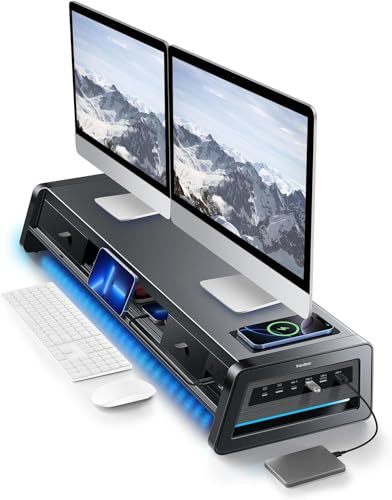
Vaydeer All-in-One Dual Monitor Stand, Metal Desk Organizer, Black | Monitor Riser with Storage, 2 Drawers, 8 USB Ports, 15W Wireless Charging Pad, LED Light Strip, Desktop Shelf for Home Office
As an Amazon Associate we earn from qualifying purchases. Product prices and availability are accurate as of the date/time indicated.

Anker Nano Power Strip, Desk Clamp, 70W Max, 1500J Surge Protector, 2 USB C | 6AC 5ft Extension Cord, Outlet Extender Desk Organizer Gaming Accessories Home Office Essentials, Fit 0.6~1.8'' Tabletop Edge
As an Amazon Associate we earn from qualifying purchases. Product prices and availability are accurate as of the date/time indicated.
Note: Wattage figures are manufacturer listings for total output, and a charger that lists 100W may deliver 100W to one device, or split power between several devices, so check the per-port output before you buy. Always use a cable that supports the wattage you need, because a 60W cable will not deliver 100W, and keep cables away from heat, so they do not wear out. Prices can vary by retailer and sale, and some models listed at $50 to $70 may be available for less on sale, so check the current price before you buy.
Why Does a Clean Charging Setup Matter for Office Desks?
A clean charging setup matters for office desks for three reasons: productivity, safety, and device health. Productivity matters because a desk with tangled cables can be distracting, while a desk with a clean charging setup can help you focus on work, with a laptop, a phone, and earbuds charged and ready. Safety matters because a pile of chargers and cables can be a trip hazard, while a setup with a cable tray can keep cables off the floor.
Device health matters because a charger that delivers the right wattage can charge a laptop and a phone safely, while a cheap charger that delivers too little power can charge slowly, and a charger that delivers too much power without protection can damage a device. A clean charging setup with a GaN charger, a wireless pad, and a cable tray is better than a messy pile of chargers, because it offers a tidy desk and a reliable charge.
Best Charging Setup for Office Desks Reviewed
1. Anker Prime 100W GaN Charger, 3-Port – Best Charging Setup for Office Desks Overall
The Anker Prime 100W GaN Charger, 3-Port, is our top pick because it offers a wattage of 100W, 3 ports with USB-C, no wireless charging, no cable management, and a price of $50 to $70. It has a reputation for Anker quality, a Prime design, and a popularity with office workers who want a compact, powerful charger for a laptop and a phone.
Anker designs the Prime 100W with a focus on a compact GaN charger, with 3 USB-C ports, a 100W total output, and a design that can charge a MacBook Air and an iPhone at the same time. The Prime 100W is a good choice if you want the best overall charger, you work at a desk, and you want an Anker brand. The main limitation is that it has no wireless charging, so you need a separate wireless pad for earbuds, though it offers a powerful wired charge.
The Anker Prime 100W GaN Charger, 3-Port, typically costs $50 to $70. Choose it if you want the best overall charger, you work at a desk, and you want an Anker brand. It is the best choice for most office workers.
2. UGREEN Nexode 100W GaN Charger, 4-Port – Best Charging Setup for Office Desks for UGREEN Use
The UGREEN Nexode 100W GaN Charger, 4-Port, is a UGREEN charger with a wattage of 100W, 4 ports with USB-C and USB-A, no wireless charging, no cable management, and a price of $40 to $60. It has a reputation for UGREEN quality, a Nexode design, and a popularity with office workers who want a 4-port charger at a low price.
UGREEN designs the Nexode 100W with a focus on a 4-port GaN charger, with 3 USB-C ports and 1 USB-A port, a 100W total output, and a design that can charge a laptop, a phone, a tablet, and earbuds. The Nexode 100W is a good choice if you want a UGREEN charger, you work at a desk, and you want a UGREEN brand. The main limitation is that it has no wireless charging, though it offers more ports than Anker Prime at a lower price.
The UGREEN Nexode 100W GaN Charger, 4-Port, typically costs $40 to $60. Choose it if you want a UGREEN charger, you work at a desk, and you want a UGREEN brand. It is the best UGREEN choice in this guide.
3. Anker MagGo 3-in-1 Wireless Charging Station – Best Charging Setup for Office Desks for Anker Wireless Use
The Anker MagGo 3-in-1 Wireless Charging Station is an Anker station with a wattage of 15W wireless, 1 port with USB-C, wireless charging with MagSafe, cable management with a stand, and a price of $80 to $100. It has a reputation for Anker quality, a MagGo design, and a popularity with iPhone users who want a 3-in-1 wireless charger for a phone, a watch, and earbuds.
Anker designs the MagGo 3-in-1 with a focus on a wireless charging station, with a MagSafe pad for an iPhone, a pad for an Apple Watch, and a pad for AirPods, and a design that can be placed on a desk. The MagGo 3-in-1 is a good choice if you want an Anker wireless station, you work at a desk, and you want an Anker brand. The main limitation is wattage, at 15W wireless, which is slower than a wired charger, though it offers a clean, cable-free charge for three devices.
The Anker MagGo 3-in-1 Wireless Charging Station typically costs $80 to $100. Choose it if you want an Anker wireless station, you work at a desk, and you want an Anker brand. It is the best Anker wireless choice in this guide.
4. Belkin BoostCharge Pro 3-in-1 Wireless Charger – Best Charging Setup for Office Desks for Belkin Use
The Belkin BoostCharge Pro 3-in-1 Wireless Charger is a Belkin charger with a wattage of 15W wireless, 1 port with USB-C, wireless charging with MagSafe, cable management with a stand, and a price of $100 to $130. It has a reputation for Belkin quality, a BoostCharge Pro design, and a popularity with iPhone users who want a premium 3-in-1 wireless charger.
Belkin designs the BoostCharge Pro with a focus on a premium wireless charger, with a MagSafe pad, a watch pad, and an earbuds pad, and a design that can be placed on a desk. The BoostCharge Pro is a good choice if you want a Belkin charger, you work at a desk, and you want a Belkin brand. The main limitation is price, at $100 to $130, which is higher than Anker MagGo, though it offers a similar 3-in-1 design.
The Belkin BoostCharge Pro 3-in-1 Wireless Charger typically costs $100 to $130. Choose it if you want a Belkin charger, you work at a desk, and you want a Belkin brand. It is the best Belkin choice in this guide.
5. Satechi 165W USB-C 4-Port GaN Charger – Best Charging Setup for Office Desks for Satechi Laptop Use
The Satechi 165W USB-C 4-Port GaN Charger is a Satechi charger with a wattage of 165W, 4 ports with USB-C, no wireless charging, no cable management, and a price of $80 to $100. It has a reputation for Satechi quality, a 165W design, and a popularity with office workers who want to charge a laptop and several devices at once.
Satechi designs the 165W charger with a focus on a high-power GaN charger, with 4 USB-C ports, a 165W total output, and a design that can charge a MacBook Pro and a phone at the same time. The Satechi charger is a good choice if you want a Satechi charger, you work at a desk, and you want a Satechi brand. The main limitation is that it has no wireless charging, though it offers a higher wattage than Anker Prime.
The Satechi 165W USB-C 4-Port GaN Charger typically costs $80 to $100. Choose it if you want a Satechi charger, you work at a desk, and you want a Satechi brand. It is the best Satechi choice in this guide.
6. Anker 3-in-1 Cube with MagSafe, 30W – Best Charging Setup for Office Desks for Budget Use
The Anker 3-in-1 Cube with MagSafe, 30W, is a budget cube with a wattage of 30W, 1 port with USB-C, wireless charging with MagSafe, cable management with a cube, and a price of $100 to $130. It has a reputation for Anker quality, a 3-in-1 Cube design, and a popularity with office workers who want a compact cube for a phone, a watch, and earbuds.
Anker designs the 3-in-1 Cube with a focus on a compact cube, with a MagSafe pad, a watch pad, and an earbuds pad, and a design that can fold for travel. The 3-in-1 Cube is a good choice if you want a budget cube, you work at a desk, and you want an Anker brand. The main limitation is wattage, at 30W, which is lower than a GaN charger, though it offers a compact, portable design.
The Anker 3-in-1 Cube with MagSafe, 30W, typically costs $100 to $130. Choose it if you want a budget cube, you work at a desk, and you want an Anker brand. It is the best budget choice in this guide.
Buying Guide: How to Choose the Best Charging Setup for Office Desks
Before you buy, think about what devices you have, whether it is a laptop, a phone, a tablet, and earbuds, how much power your laptop needs, whether it is 65W or 100W, whether you want wireless charging, and how much space you have on your desk. A setup that is perfect for a MacBook Air may not power a MacBook Pro, and a setup that is perfect for an iPhone may not work for an Android phone. The six points below cover the decisions that matter most for a charging setup for office desks.
1. Wattage, 30W vs 100W vs 165W, and Laptop Power
Wattage is the first decision. A charger with a wattage of 30W, such as Anker Cube, can charge a phone and earbuds, though it may not charge a laptop, while a charger with a wattage of 100W, such as Anker Prime, can charge a MacBook Air and a phone, and a charger with a wattage of 165W, such as Satechi, can charge a MacBook Pro and several devices. A higher wattage is better for a laptop, though it may cost more.
Choose a 100W charger if you have a MacBook Air or a similar laptop, you want to charge a laptop and a phone, and you want a good balance. Choose a 165W charger if you have a MacBook Pro, you want to charge a laptop and several devices, and you can accept a higher price. Choose a 30W charger only if you charge a phone and earbuds, you do not need to charge a laptop, and you want a compact cube. Check your laptop, so you know whether it needs 65W, 100W, or more.
2. Ports, 1 Port vs 3 Ports vs 4 Ports, and Multiple Devices
Ports are the second decision. A charger with 1 port, such as Anker MagGo, can charge one device at a time, while a charger with 3 ports, such as Anker Prime, can charge a laptop, a phone, and earbuds, and a charger with 4 ports, such as UGREEN Nexode, can charge four devices at once. More ports are better for an office worker who has several devices, though they may share power.
Choose a charger with at least 3 ports if you have a laptop, a phone, and earbuds, you want to charge them all at once, and you do not mind shared power. Choose a charger with 1 port only if you charge one device at a time, you want the smallest charger, and you do not need multiple ports. Check the per-port output, so you know whether each port can deliver enough power.
3. Wireless Charging, MagSafe vs Qi, and iPhone vs Android
Wireless charging is the third decision. A charger with MagSafe, such as Anker MagGo, can magnetically attach to an iPhone, so it stays in place, while a charger with Qi, such as a generic wireless pad, can charge an Android phone, though it may not magnetically attach. MagSafe is better for iPhone users, while Qi is better for Android users.
Choose a MagSafe charger if you have an iPhone, you want a magnetic attachment, and you want a clean desk. Choose a Qi charger if you have an Android phone, you want a universal wireless pad, and you do not need MagSafe. Test wireless charging by placing your phone on the pad, before you buy, if possible, so you know whether it aligns correctly.
4. Cable Management, Tray vs Stand vs Cube, and Desk Cleanliness
Cable management is the fourth decision. A cable tray under a desk can hide cables, while a stand, such as Anker MagGo, can hold a phone upright, and a cube, such as Anker Cube, can fold for travel. A clean desk is better for productivity, because it reduces clutter and helps you focus.
Choose a cable tray if you have many cables, you want to hide them under a desk, and you have a large desk. Choose a stand if you want to see your phone while it charges, you work at a desk, and you want a clean setup. Choose a cube if you travel, you want a portable charger, and you do not need a large tray. Route cables with a tray, so they do not fall behind a desk, and use cable ties, so they stay in place.
5. GaN vs Silicon, Size vs Heat, and Efficiency
GaN vs silicon is the fifth decision. A GaN charger, such as Anker Prime, uses gallium nitride, so it can be smaller, more efficient, and generate less heat than a silicon charger, while a silicon charger can be larger and hotter. GaN is better for most office workers, because it offers a compact, efficient charger.
Choose a GaN charger if you want a small charger, you want a efficient charger, and you do not want a hot brick. Choose a silicon charger only if you want a lower price, you do not mind a larger charger, and you have space on a desk. Check whether the charger is GaN before you buy, so you know whether it is compact.
6. Price, Total Cost, and Choosing a Charging Setup on a Budget
Price ranges in this guide run from about $40 to $130 for a charging setup for office desks, depending on brand, wattage, and wireless charging. A budget charger at $40 to $70, such as UGREEN Nexode or Anker Prime, is enough for most office workers. A mid-price charger at $80 to $100, such as Anker MagGo or Satechi, offers wireless charging or higher wattage. A premium charger at $100 to $130, such as Belkin BoostCharge Pro or Anker Cube, offers a premium design.
Consider total cost as well as price. A charger that costs $50 and needs a cable for $15 may cost $65 in total, while a charger that costs $80 and includes a cable may cost $80 in total. Budget for a charger, and if you need it, a cable, a wireless pad, and a cable tray, not just a charger. Do not buy the cheapest charger if it cannot power your laptop, and do not buy the most expensive charger if you only charge a phone. A setup that has a GaN charger with at least 100W, a wireless pad for earbuds, and a cable tray will help you keep a desk clean more than a setup that is cheap but messy, or expensive but only charges one device.
How to Set Up a Charging Station for an Office Desk
Setting up a charging station for an office desk starts with choosing a spot on your desk, near a power outlet, and placing a GaN charger on the desk or under the desk, with a cable tray to hide cables. Connect a USB-C cable to your laptop, a second cable to your phone, and place a wireless pad for earbuds, so all devices can be charged from one spot. Route cables through a tray, so they do not fall behind a desk, and label cables, so you know which cable is for which device.
Test the setup by charging all devices at once, so you know whether the charger can deliver enough power, and adjust the cables, so they are not tangled. Keep the charger in a ventilated area, so it does not overheat, and do not cover it with papers, because it can generate heat. Clean the desk each week, so cables do not build up dust.
Which Best Charging Setup for Office Desks Should You Buy?
If you want the best charging setup for office desks, buy the Anker Prime 100W GaN Charger, 3-Port. It costs $50 to $70, it offers a wattage of 100W, 3 ports with USB-C, and a compact GaN design, which is the best balance for most office workers.
If you want a UGREEN charger, buy the UGREEN Nexode 100W GaN Charger, 4-Port. If you want an Anker wireless station, buy the Anker MagGo 3-in-1 Wireless Charging Station. If you want a Belkin charger, buy the Belkin BoostCharge Pro 3-in-1 Wireless Charger. If you want a Satechi charger, buy the Satechi 165W USB-C 4-Port GaN Charger. If you want a budget cube, buy the Anker 3-in-1 Cube with MagSafe, 30W.
All six charging setups in this guide are currently sold, designed for office desks, and suitable for a worker who wants a reliable setup for a laptop, a phone, a tablet, and earbuds. Pick the one that matches what devices you have, how much power your laptop needs, whether you want wireless charging, and your budget, and always use a cable that supports the wattage you need.
Disclosure: technicalbud.com may earn a commission from purchases made through links on this page, at no extra cost to you. Prices listed are typical ranges and can vary by retailer and sale. Wattage, port, and wireless figures are manufacturer claims and can vary by model. Always use a cable that supports the wattage you need, because a 60W cable will not deliver 100W.
Frequently Asked Questions About the Best Charging Setup for Office Desks
What is the best charging setup for office desks?
What is the best charging setup for office desks? In most cases, the Anker Prime 100W GaN Charger, 3-Port, is best overall, because it costs $50 to $70, it offers a wattage of 100W, 3 ports with USB-C, and a compact GaN design. The UGREEN Nexode 100W is best for 4 ports, while the Anker MagGo 3-in-1 is best for wireless charging, and the Satechi 165W is best for a high-power laptop.
How many watts do I need to charge a laptop at my desk?
How many watts do you need to charge a laptop at your desk? In most cases, you need 65W to 100W to charge a laptop at your desk, because a MacBook Air usually needs 65W, while a MacBook Pro usually needs 96W or 140W, depending on the model. A charger with 100W can charge most laptops, though a 14-inch MacBook Pro may need 96W, and a 16-inch MacBook Pro may need 140W. Check your laptop, so you know whether it needs 65W, 100W, or more, and choose a charger that can deliver at least that wattage on one port.
Is wireless charging slower than wired charging?
Is wireless charging slower than wired charging? In most cases, yes, wireless charging is slower than wired charging, because a wireless charger usually delivers 15W, while a wired charger can deliver 30W, 65W, or 100W. A wireless charger is convenient for a phone and earbuds, because it does not need a cable, though it can take longer to charge a phone fully. Use wireless charging for earbuds and for overnight charging, and wired charging for a laptop and for fast charging a phone.
How do I hide cables on my office desk?
How do you hide cables on your office desk? In most cases, you hide cables on your office desk by using a cable tray under the desk, routing cables through the tray, and using cable ties, so they stay in place. Place a GaN charger under the desk, with a cable tray, so cables do not fall behind the desk, and use a wireless pad for earbuds, so you do not need a cable for them. Label cables, so you know which cable is for which device, and clean the desk each week, so cables do not build up dust.
Related guides
- Best AAA Batteries for Office Remotes in 2026: AAA Batteries for Office Remotes
- Best Budget Tablet for Work Under 100 in 2026: Budget Tablets for Work Under $100, Office Work, and Productivity
- Best Gimbal for Office Vlogging in 2026: 7 Gimbals for Office Vlogging That Keep Your Video Smooth, Stable, and Professional in the Office
- Best Budget NAS Dust Filter for Maintenance in 2026: 7 Budget NAS Dust Filters for Maintenance With Clear Airflow, Simple Install, and Easy Use for NAS
More from Amazon
Programs that pair well with the guide above. Offers and eligibility are set by Amazon and may change.
Free shipping on eligible items, Prime Video and more. Eligible new members can start with a free trial.
Start a Prime free trialAd-free music streaming. Eligible new subscribers can start with a free trial.
Try Music Unlimited freeA Prime membership for ages 18-24 with a trial period. Eligibility is set by Amazon.
See Prime for Young AdultsAudiobooks and podcasts to listen to on the go. Eligible new members can start with a free trial.
Try Audible freeAs an Amazon Associate we earn from qualifying purchases.

Write Your Review
No reviews yet. Be the first to share your experience!