
What's inside
As an Amazon Associate I earn from qualifying purchases. This post may contain affiliate links at no extra cost to you.
An SD card for office cameras is a memory card that stores photos and videos from an office camera, which can be a security camera that records continuously, or a photo camera that is used in an office for product photos, events, or video calls. It is useful for offices because it lets you store video from a security camera without needing a large hard drive, and it lets you store photos from a camera without needing to transfer them immediately. The best SD card for office cameras is not the cheapest card, and it is not the largest card. It is the card that has the right speed for your camera, enough capacity for your recording time, and a durable design that can handle continuous recording.
For most offices, the best overall choice in 2026 is the SanDisk Extreme Pro SDXC UHS-I 128GB. It typically costs $20 to $30. It has a capacity of 128GB, a speed of up to 200 MB/s read and 90 MB/s write, a V30 video speed class, a U3 speed class, and a design that is shockproof, waterproof, and temperature proof. If you want a card for a security camera that records continuously, the SanDisk High Endurance microSDXC 128GB is an excellent alternative, typically $20 to $30, with a capacity of 128GB, a speed of up to 100 MB/s, and a design that is made for continuous recording. For a faster card, the Samsung Pro Plus SDXC UHS-I 128GB is a practical choice, typically $20 to $30, with a capacity of 128GB, a speed of up to 200 MB/s read and 130 MB/s write, and a V30 rating.
This guide compares seven real, currently sold SD cards for office cameras. It explains how to choose a card based on speed class, capacity, and endurance, why V30 is enough for most office cameras, and how to choose a card that fits your security camera or photo camera. An SD card is only useful if it can keep up with your camera, so this guide also covers how to check your camera speed requirements before you buy.
Our Top Picks
Best SD Card for Office Cameras Compared: Quick Comparison Table
Use this table to compare the best SD card for office cameras at a glance. Prices are typical retail ranges, not fixed prices, and will vary by retailer. Ratings are editorial scores out of five based on speed, capacity, endurance, reliability, and value for office cameras.
| Model | Key Specs | Best For | Typical Price Range | Rating |
|---|---|---|---|---|
| SanDisk Extreme Pro SDXC 128GB UHS-I | 128GB, 200/90 MB/s, V30, U3, shock/water proof | Best overall for office cameras | $20–$30 | 4.9 / 5 |
| SanDisk High Endurance microSDXC 128GB | 128GB, 100 MB/s, for continuous recording, 20,000 hr | Best for office security cameras | $20–$30 | 4.8 / 5 |
| Samsung Pro Plus SDXC 128GB UHS-I | 128GB, 200/130 MB/s, V30, U3, water proof | Best Samsung for office cameras | $20–$30 | 4.8 / 5 |
| Lexar Professional 1066x SDXC 128GB | 128GB, 160/120 MB/s, V30, U3, UHS-II | Best Lexar for office cameras | $25–$35 | 4.7 / 5 |
| Kingston Canvas Go! Plus SDXC 128GB | 128GB, 170/90 MB/s, V30, U3, durable | Best Kingston for office cameras | $15–$25 | 4.7 / 5 |
| Samsung Pro Endurance microSDXC 128GB | 128GB, 100 MB/s, for continuous recording, 25,000 hr | Best endurance for office cameras | $20–$30 | 4.6 / 5 |
| SanDisk Extreme SDXC 256GB UHS-I | 256GB, 190/130 MB/s, V30, U3, shock/water proof | Best large capacity for office cameras | $30–$40 | 4.6 / 5 |

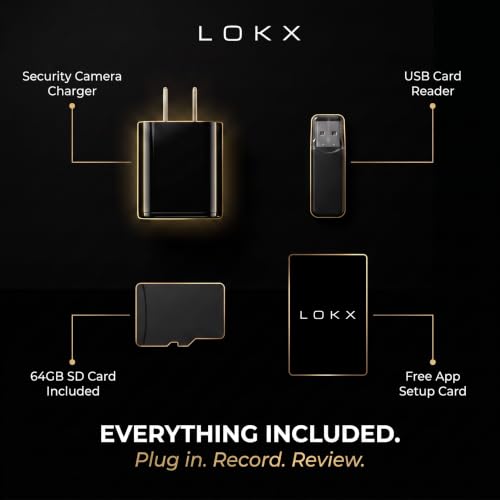
LOKX Security Camera USB Wall Charger, No WiFi Needed, 1080P HD Indoor Security Camera & Nanny Cam, 64GB SD Card Included, Motion Detection, AI Security App for Home & Office



As an Amazon Associate we earn from qualifying purchases. Product prices and availability are accurate as of the date/time indicated.

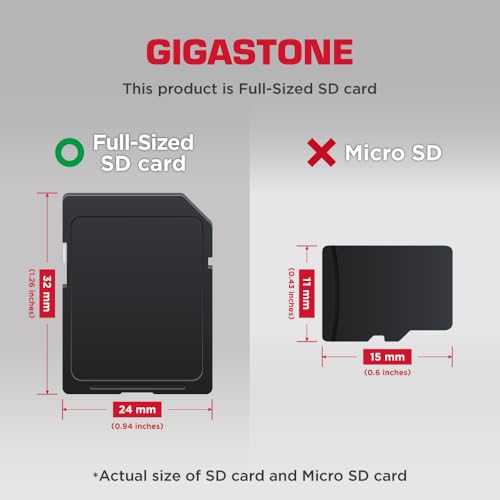
GIGASTONE 32GB SD Card 2-Pack, Camera Plus, UHS-I U1 Class 10 SDHC Memory Card Full HD Video for Digital Camera Speed up to 100MB/s, with 2 mini Cases


As an Amazon Associate we earn from qualifying purchases. Product prices and availability are accurate as of the date/time indicated.

SANDISK 32GB Extreme PRO SD Memory Card, Up to 100MB/s Read Speeds, UHS-I | V30, U3, C10, 4K UHD, Up to 90MB/s Write Speeds, Compatible with Cameras and Camcorders - SDSDXXO-032G-GN4IN
As an Amazon Associate we earn from qualifying purchases. Product prices and availability are accurate as of the date/time indicated.
Best SD Card for Office Cameras in 2026: Detailed Reviews
Each SD card below suits a different office camera and a different type of office use. Some are best for a security camera, others are best for a photo camera, and some are best for a video camera. Read the speed class and endurance notes, because those two factors affect whether a card will work for your camera more than any other spec.
1. SanDisk Extreme Pro SDXC UHS-I 128GB — Best SD Card for Office Cameras Overall
The SanDisk Extreme Pro SDXC UHS-I 128GB is the best overall SD card for office cameras because it is fast, reliable, and well designed, with a capacity of 128GB, a read speed of up to 200 MB/s, a write speed of up to 90 MB/s, a V30 video speed class, a U3 speed class, and a design that is shockproof, waterproof, temperature proof, and X-ray proof. It typically costs $20 to $30. It has a UHS-I interface, and it is good for 4K video and for photo bursts.
For offices, the SanDisk Extreme Pro is a good choice because at V30, it can record 4K video at 30 frames per second without dropping frames, with V30 meaning a minimum write speed of 30 MB/s, which is enough for most office cameras, and at 128GB, it can store about 4 hours of 4K video, or about 10,000 photos, depending on file size. It is also a good choice for a photo camera used in an office, because its fast write speed lets you take many photos in a burst without waiting for the card to catch up.
Why we like this card: fast V30, 128GB, and durable. Consider: UHS-I, not UHS-II, so it is slower than a UHS-II card, although V30 is enough for most office cameras.
2. SanDisk High Endurance microSDXC 128GB — Best SD Card for Office Security Cameras
The SanDisk High Endurance microSDXC 128GB is a microSD card that is made for continuous recording, with a capacity of 128GB, a speed of up to 100 MB/s, and a design that is rated for up to 20,000 hours of continuous recording in manufacturer testing. It typically costs $20 to $30. It has a microSD form factor, with an SD adapter included, so it can be used in a full-size SD slot or a microSD slot, depending on your camera.
For office security cameras, the SanDisk High Endurance is an excellent choice, because it is designed for a security camera that records 24 hours a day, 7 days a week, with a high endurance design that can handle many write cycles, unlike a regular SD card, which can wear out quickly when used for continuous recording. It is a good option for an office that has a security camera, a dash camera, or a body camera that records continuously, although it is slower than the Extreme Pro, at 100 MB/s versus 200 MB/s, so it is best for security video, not for fast photo bursts.
Why we like this card: high endurance, 20,000 hr, and continuous recording. Consider: slower than Extreme Pro, although it is better for continuous recording.
3. Samsung Pro Plus SDXC UHS-I 128GB — Best Samsung SD Card for Office Cameras
The Samsung Pro Plus SDXC UHS-I 128GB is a SD card with a capacity of 128GB, a read speed of up to 200 MB/s, a write speed of up to 130 MB/s, a V30 video speed class, a U3 speed class, and a design that is waterproof, temperature proof, shockproof, and X-ray proof. It typically costs $20 to $30. It has a UHS-I interface, and it is good for 4K video and for photo.
For offices that want a Samsung card, the Samsung Pro Plus is a practical choice, because it is fast, with a write speed of 130 MB/s, which is faster than the SanDisk Extreme Pro at 90 MB/s, so it can handle photo bursts better, and it is durable. It is a good option for a photo camera used in an office for product photos, because its fast write speed lets you take many photos quickly.
Why we like this card: fast 130 MB/s write, V30, and durable. Consider: similar price to SanDisk, so choose based on brand preference and availability.
4. Lexar Professional 1066x SDXC 128GB — Best Lexar SD Card for Office Cameras
The Lexar Professional 1066x SDXC 128GB is a SD card with a capacity of 128GB, a read speed of up to 160 MB/s, a write speed of up to 120 MB/s, a V30 video speed class, a U3 speed class, and a UHS-II interface. It typically costs $25 to $35, making it slightly more expensive than a UHS-I card. It has a UHS-II interface, which is faster than UHS-I, although it needs a UHS-II camera to reach its full speed, and a UHS-I camera will be slower, at UHS-I speeds.
For offices with a UHS-II camera, the Lexar Professional 1066x is a good choice, because its UHS-II interface lets it transfer files faster to a computer with a UHS-II reader, with a speed of up to 160 MB/s, although for a camera that only supports UHS-I, a UHS-I card is enough, and a UHS-II card will not be faster in the camera, only in a UHS-II reader. It is a good option for a photographer who wants fast transfer to a PC.
Why we like this card: UHS-II, fast transfer, and V30. Consider: needs UHS-II camera and reader for full speed, otherwise it is similar to UHS-I.
5. Kingston Canvas Go! Plus SDXC 128GB — Best Kingston SD Card for Office Cameras
The Kingston Canvas Go! Plus SDXC 128GB is a SD card with a capacity of 128GB, a read speed of up to 170 MB/s, a write speed of up to 90 MB/s, a V30 video speed class, a U3 speed class, and a durable design. It typically costs $15 to $25, making it one of the most affordable cards in this list. It has a UHS-I interface, and it is good for 4K video and photo.
For budget offices, the Kingston Canvas Go! Plus is a practical choice, because it is affordable, it is fast enough for 4K video, and it is durable. It is a good option for an office that needs many SD cards for many cameras, without paying a premium price for each card.
Why we like this card: very affordable, V30, and 170 MB/s read. Consider: less premium than SanDisk, although it is functional for office cameras.
6. Samsung Pro Endurance microSDXC 128GB — Best Endurance SD Card for Office Cameras
The Samsung Pro Endurance microSDXC 128GB is a microSD card that is made for continuous recording, with a capacity of 128GB, a speed of up to 100 MB/s, and a design that is rated for up to 25,000 hours of continuous recording in manufacturer testing. It typically costs $20 to $30. It has a microSD form factor, with an SD adapter, and it is good for security cameras.
For offices that need a long endurance card, the Samsung Pro Endurance is an excellent choice, because at 25,000 hours, it has a longer endurance rating than the SanDisk High Endurance at 20,000 hours, although both are good for continuous recording, and the difference is small in practice. It is a good option for a security camera that records 24/7, with a card that will last longer before it needs to be replaced.
Why we like this card: 25,000 hr endurance, continuous recording, and Samsung quality. Consider: slower than Extreme Pro, although it is better for continuous recording.
7. SanDisk Extreme SDXC 256GB UHS-I — Best Large Capacity SD Card for Office Cameras
The SanDisk Extreme SDXC 256GB UHS-I is a large capacity SD card with a capacity of 256GB, a read speed of up to 190 MB/s, a write speed of up to 130 MB/s, a V30 video speed class, a U3 speed class, and a durable design. It typically costs $30 to $40, making it the most expensive card in this list, although it has twice the capacity of a 128GB card. It has a UHS-I interface, and it is good for 4K video and photo.
For offices that need a large capacity, the SanDisk Extreme 256GB is a strong choice, because at 256GB, it can store about 8 hours of 4K video, or about 20,000 photos, depending on file size, so it is good for a security camera that records for a long time without overwriting, or for a photo camera that takes many photos in a day. It is a good option for an office that wants to record for a long time without changing cards.
Why we like this card: large 256GB, fast, and V30. Consider: more expensive than 128GB, although it has twice the capacity.
Best SD Card for Office Cameras Buying Guide: How to Choose the Right SD Card
Choosing an SD card for office cameras is not just about picking the cheapest card. It is about matching speed class, capacity, and endurance to your camera, your recording time, and your budget. A card that is perfect for a photo camera can be wrong for a security camera, and a card that is perfect for 1080p video can be wrong for 4K video. Use the three questions below to narrow your choice before you look at price.
Speed Class, V30 vs V90, and UHS-I vs UHS-II: Choosing a Card That Keeps Up With Your Camera
Speed class is the first filter. For office cameras, V30 is enough for most use, because V30 means a minimum write speed of 30 MB/s, which is enough for 4K video at 30 frames per second, and for most photo bursts. V90 means a minimum write speed of 90 MB/s, which is faster, and it is needed for 8K video or for high-bitrate 4K video, although for most office cameras, V30 is enough, and V90 is overkill, with V90 cards being more expensive, so choose V30 for most office cameras, and V90 only if your camera manual says it needs V90.
For UHS-I versus UHS-II, UHS-I is enough for most office cameras, with a speed of up to 104 MB/s in theory, although many UHS-I cards reach 200 MB/s read with a proprietary reader, while UHS-II is faster, with a speed of up to 312 MB/s in theory, although it needs a UHS-II camera and a UHS-II reader to reach its full speed. For a camera that only supports UHS-I, a UHS-II card will work, but it will only run at UHS-I speeds in the camera, so it is not worth paying extra for UHS-II unless your camera supports it. For a mirrorless camera for student travel, V30 is the most common speed class, with V30 being good for most student and video use, while V90 is faster and it is needed for high-end video, so check your camera manual for V30 or V90 before you buy.
Capacity, Recording Time, and Backup: Choosing a Card With Enough Storage
Capacity is the second filter. For office cameras, a 128GB card is enough for most use, with a 128GB card storing about 4 hours of 4K video, or about 10,000 photos, depending on file size, while a 256GB card stores about 8 hours of 4K video, or about 20,000 photos, so a 256GB card is better for a security camera that records for a long time, or for a photo camera that takes many photos. For backup, a card should be at least 2 times your data size, because backup should be at least 2 times your data size, with at least 2 copies, one offsite, because a single SD card can fail, and a backup is not a backup if it is your only copy, with the 3-2-1 rule meaning 3 copies, on 2 different media, with 1 copy offsite, because RAID is not a backup.
For a security camera, a 128GB card can record for about 4 to 7 days, depending on video quality and motion detection, with a security camera that records only on motion lasting longer than a camera that records continuously, so check your camera settings before you choose a capacity. For a photo camera, a 128GB card is enough for a day of shooting, with a 256GB card being better for a multi-day event, like a conference or a trade show, where you take many photos without transferring them.
Endurance, Security Cameras, and Durability: Choosing a Card That Lasts
Endurance is the third filter, and it is critical for a security camera. A regular SD card, like the SanDisk Extreme Pro, is good for a photo camera that writes occasionally, although it can wear out quickly when used for continuous recording in a security camera, because a security camera writes data 24 hours a day, 7 days a week, with many write cycles, so a high endurance card, like the SanDisk High Endurance or Samsung Pro Endurance, is better for a security camera, because it is designed for many write cycles, with a rating of 20,000 hours for SanDisk and 25,000 hours for Samsung, in manufacturer testing.
For durability, an SD card should be shockproof, waterproof, temperature proof, and X-ray proof, because an office camera can be used outdoors, in a warehouse, or in a hot office, and a card that is not durable can fail in extreme temperatures. For a security camera, use a high endurance microSD card, with an SD adapter if your camera needs a full-size SD card, and format your card in your camera, not in a computer, because formatting in your camera ensures the card is formatted correctly for your camera, and it can prevent errors. For a photo camera, use a full-size SD card, with a V30 rating, and back up your photos regularly to a computer or a cloud service, because an SD card can fail, and a backup will protect your office photos.
Best SD Card for Office Cameras FAQ: Office Camera SD Card Questions Answered
What is the best SD card for office cameras?
The best SD card for office cameras is the SanDisk Extreme Pro SDXC UHS-I 128GB for most office cameras, because it is fast, reliable, and durable, with a capacity of 128GB, a speed of up to 200 MB/s read, a V30 rating, and a design that is shockproof and waterproof, typically $20 to $30. The SanDisk High Endurance is the best alternative for security cameras, while the Samsung Pro Plus is the best Samsung alternative.
Do I need a high endurance SD card for a security camera?
Yes, you need a high endurance SD card for a security camera that records continuously, because a regular SD card can wear out quickly when used for 24/7 recording, with many write cycles, while a high endurance card, like the SanDisk High Endurance or Samsung Pro Endurance, is designed for continuous recording, with a rating of 20,000 to 25,000 hours in manufacturer testing. For a photo camera that writes occasionally, a regular SD card is enough.
Is V30 or V90 better for an office camera?
For an office camera, V30 is enough for most use, because V30 means a minimum write speed of 30 MB/s, which is enough for 4K video at 30 frames per second, and for most photo bursts. V90 means a minimum write speed of 90 MB/s, which is faster, and it is needed for 8K video or for high-bitrate 4K video, although for most office cameras, V30 is enough, and V90 is overkill and more expensive, so choose V30 unless your camera manual says it needs V90.
How much storage do I need for an office camera SD card?
For an office camera, a 128GB card is enough for most use, with a 128GB card storing about 4 hours of 4K video, or about 10,000 photos, depending on file size, while a 256GB card stores about 8 hours of 4K video, or about 20,000 photos. For a security camera, a 128GB card can record for about 4 to 7 days, depending on video quality and motion detection, so a 256GB card is better for a longer recording time, and a backup should be at least 2 times your data size, with the 3-2-1 rule for important office data.
FAQ
What is the best SD card for office cameras?
Do I need a high endurance SD card for a security camera?
Is V30 or V90 better for an office camera?
How much storage do I need for an office camera SD card?
Related guides
- Best AAA Batteries for Office Remotes in 2026: AAA Batteries for Office Remotes
- Best Budget Tablet for Work Under 100 in 2026: Budget Tablets for Work Under $100, Office Work, and Productivity
- Best Gimbal for Office Vlogging in 2026: 7 Gimbals for Office Vlogging That Keep Your Video Smooth, Stable, and Professional in the Office
- Best Budget NAS Dust Filter for Maintenance in 2026: 7 Budget NAS Dust Filters for Maintenance With Clear Airflow, Simple Install, and Easy Use for NAS
More from Amazon
Programs that pair well with the guide above. Offers and eligibility are set by Amazon and may change.
Free shipping on eligible items, Prime Video and more. Eligible new members can start with a free trial.
Start a Prime free trialAd-free music streaming. Eligible new subscribers can start with a free trial.
Try Music Unlimited freeA Prime membership for ages 18-24 with a trial period. Eligibility is set by Amazon.
See Prime for Young AdultsAudiobooks and podcasts to listen to on the go. Eligible new members can start with a free trial.
Try Audible freeAs an Amazon Associate we earn from qualifying purchases.

Write Your Review
No reviews yet. Be the first to share your experience!