
What's inside
As an Amazon Associate I earn from qualifying purchases. This post may contain affiliate links at no extra cost to you.
Finding the best cheap wifi upgrade for home starts with a simple idea: the best cheap wifi upgrade for home is a router or mesh system with a price of $70 to $200, a Wi-Fi 6 design, and a simple setup, so you can fix dead spots, enjoy faster speed, and avoid buffering, without a system that is too complex, too slow, or too expensive. A good cheap WiFi upgrade for home has a durable build, a simple app, and a clear speed, so it is easy to use for a beginner and it works for Wi-Fi upgrades, for home, and for tech gadgets. The best cheap wifi upgrade for home in 2026 is a TP-Link Archer AX21, with a price of $70 to $90, a Wi-Fi 6 design, and a speed of 1800 Mbps.
A cheap WiFi upgrade for home is different from a premium mesh system or from a new internet plan. A premium mesh system may be fast, although it may be expensive. A new internet plan may be faster, although it may not fix dead spots. A cheap WiFi upgrade for home is made for most homes, so it is affordable, it is simple, and it lets you improve Wi-Fi without a new plan.
This guide compares seven real, currently sold routers and mesh systems that are commonly used for home Wi-Fi upgrades, for streaming, and for gaming. It explains speed, coverage, and Wi-Fi version in plain terms, and it helps you match a system to your home, your devices, and your budget. Prices are shown as typical ranges because retailers and sales change often. Ratings reflect overall value for home Wi-Fi upgrades, based on speed, coverage, ease of use, stability, and price. Use a strong password, update your firmware, and place your router in a central, open spot.
Our Top Picks


Best Cheap WiFi Upgrade for Home Compared
Use this table to compare speed, coverage, and price first. Those three details decide whether a system will fix your Wi-Fi and fit your budget. The full price range in this table is $70 to $200.
| Model | Speed and WiFi | Coverage and Ports | Features and Use | Typical Price Range | Rating |
|---|---|---|---|---|---|
| TP-Link Archer AX21 | 1800 Mbps, WiFi 6 | 1500 sq ft, 4x Gigabit | Home, router, value | $70 – $90 | 4.9 / 5 |
| ASUS RT-AX1800S | 1800 Mbps, WiFi 6 | 1500 sq ft, 4x Gigabit | Home, router, value | $70 – $90 | 4.9 / 5 |
| TP-Link Archer AX55 | 3000 Mbps, WiFi 6 | 2000 sq ft, 4x Gigabit | Home, router, fast | $80 – $100 | 4.9 / 5 |
| eero 6 | 900 Mbps, WiFi 6 | 1500 sq ft, 2x Ethernet | Home, mesh, simple | $100 – $130 | 4.8 / 5 |
| TP-Link Deco X20 2-Pack | 1800 Mbps, WiFi 6 | 4000 sq ft, 2x Gigabit | Home, mesh, coverage | $120 – $150 | 4.8 / 5 |
| Netgear Nighthawk RAX50 | 5400 Mbps, WiFi 6 | 2500 sq ft, 5x Gigabit | Home, router, premium | $150 – $200 | 4.8 / 5 |
| Google Nest Wifi | 2200 Mbps, WiFi 5 | 2200 sq ft, 2x Ethernet | Home, mesh, simple | $150 – $200 | 4.8 / 5 |

WiFi Extender Signal Booster: 2026 Internet Extender with Ethernet Port | Upgraded WiFi Amplifier for Home/Office, 2.4GHz Longest Range up to 9995 Sq.ft and 45+ Devices
As an Amazon Associate we earn from qualifying purchases. Product prices and availability are accurate as of the date/time indicated.

2026 Upgraded WiFi Extender for Home, Up to 18000Sq.ft Long Range Coverage WiFi Booster, High-Speed Wireless Internet Repeater with Ethernet Port, 15X Faster Signal Amplifier, Works with 99% Router
As an Amazon Associate we earn from qualifying purchases. Product prices and availability are accurate as of the date/time indicated.

TP-Link AC1200 WiFi Extender Dual Band 5GHz/2.4GHz (RE315) | 1.2Gbps Home Signal Booster, Up to 1600 Sq.ft and 32 Devices, EasyMesh Compatible, One Ethernet Port
As an Amazon Associate we earn from qualifying purchases. Product prices and availability are accurate as of the date/time indicated.
The table shows that all seven systems have a speed of 900 to 5400 Mbps, a coverage of 1500 to 4000 square feet, and a price of $70 to $200. The TP-Link Archer AX21 is the most popular, at $70 to $90, with a speed of 1800 Mbps, so it is good for most homes. The ASUS RT-AX1800S is the best for value, at $70 to $90. The Netgear Nighthawk RAX50 and Google Nest Wifi are the highest-priced models in this table, at $150 to $200, because they have a premium design and more coverage.
Speed also matters. A system with a speed of 5400 Mbps, such as the Netgear Nighthawk RAX50, is faster on paper than a system with a speed of 900 Mbps, such as the eero 6, although actual speed depends on your internet plan. Coverage also matters. A system with a coverage of 4000 square feet, such as the TP-Link Deco X20 2-Pack, covers a larger home than a system with a coverage of 1500 square feet, such as the TP-Link Archer AX21.
Best Cheap WiFi Upgrade for Home Reviewed
1. TP-Link Archer AX21: Best Cheap WiFi Upgrade for Home Overall
The TP-Link Archer AX21 is the best cheap wifi upgrade for home overall because it is a router with a price of $70 to $90, a speed of 1800 Mbps, and a Wi-Fi 6 design. It has a coverage of 1500 square feet, four Gigabit Ethernet ports, and a value design. For most homes, this is the first router to try. Use a strong password.
The Archer AX21 has a speed of 1800 Mbps in the table, so it is fast enough for streaming and for gaming, and the Wi-Fi 6 design handles many devices. The router is simple to set up with an app, and the four Ethernet ports let you connect a PC and a console. It is a good choice if you want a TP-Link router that is affordable and fast for home.
2. ASUS RT-AX1800S: Best Cheap WiFi Upgrade for Home for ASUS Value Router
The ASUS RT-AX1800S is the best cheap wifi upgrade for home for ASUS value router because it costs $70 to $90, and it is a router with a speed of 1800 Mbps and a Wi-Fi 6 design. It has a coverage of 1500 square feet, four Gigabit Ethernet ports, and a value design, and it is a good choice for an ASUS user who wants a router for home.
The RT-AX1800S has a speed of 1800 Mbps in the table, so it is good for streaming, and the Wi-Fi 6 design is modern. The router has a simple setup, and the four Ethernet ports are useful. It is a good choice if you want an ASUS router that is affordable for home.
3. TP-Link Archer AX55: Best Cheap WiFi Upgrade for Home for TP-Link Fast Router
The TP-Link Archer AX55 is the best cheap wifi upgrade for home for TP-Link fast router because it costs $80 to $100, and it is a router with a speed of 3000 Mbps and a Wi-Fi 6 design. It has a coverage of 2000 square feet, four Gigabit Ethernet ports, and a fast design, and it is a good choice for a TP-Link user who wants a faster router for home.
The Archer AX55 has a speed of 3000 Mbps in the table, so it is faster than the Archer AX21, and the coverage of 2000 square feet is larger. The router is good for a larger home, and the four Ethernet ports let you connect more devices. It is a good choice if you want a TP-Link router that is fast for home.
4. eero 6: Best Cheap WiFi Upgrade for Home for eero Simple Mesh
The eero 6 is the best cheap wifi upgrade for home for eero simple mesh because it costs $100 to $130, and it is a mesh system with a speed of 900 Mbps and a Wi-Fi 6 design. It has a coverage of 1500 square feet, two Ethernet ports, and a simple design, and it is a good choice for an eero user who wants a simple mesh system for home.
The eero 6 has a simple setup in the table, so it is easy for a beginner, and the mesh design lets you add more eero units later. The speed of 900 Mbps is enough for most homes, although it is lower than the Archer AX55. It is a good choice if you want an eero system that is simple for home.
5. TP-Link Deco X20 2-Pack: Best Cheap WiFi Upgrade for Home for TP-Link Mesh Coverage
The TP-Link Deco X20 2-Pack is the best cheap wifi upgrade for home for TP-Link mesh coverage because it costs $120 to $150, and it is a mesh system with a speed of 1800 Mbps and a Wi-Fi 6 design. It has a coverage of 4000 square feet, two Gigabit Ethernet ports per unit, and a coverage design, and it is a good choice for a TP-Link user who wants a mesh system for a large home.
The Deco X20 has a coverage of 4000 square feet in the table, so it is the largest coverage here, and the speed of 1800 Mbps is good for streaming. The mesh system has two units, so you can place one in each part of your home. It is a good choice if you want a TP-Link mesh system that covers a large home.
6. Netgear Nighthawk RAX50: Best Cheap WiFi Upgrade for Home for Netgear Premium Router
The Netgear Nighthawk RAX50 is the best cheap wifi upgrade for home for Netgear premium router because it costs $150 to $200, and it is a router with a speed of 5400 Mbps and a Wi-Fi 6 design. It has a coverage of 2500 square feet, five Gigabit Ethernet ports, and a premium design, and it is a good choice for a Netgear user who wants a premium router for home.
The Nighthawk RAX50 has a speed of 5400 Mbps in the table, so it is the fastest router here on paper, and the coverage of 2500 square feet is good for a large home. The router has five Ethernet ports, so you can connect many wired devices. It is a good choice if you want a Netgear router that is premium for home.
7. Google Nest Wifi: Best Cheap WiFi Upgrade for Home for Google Simple Mesh
The Google Nest Wifi is the best cheap wifi upgrade for home for Google simple mesh because it costs $150 to $200, and it is a mesh system with a speed of 2200 Mbps and a Wi-Fi 5 design. It has a coverage of 2200 square feet, two Ethernet ports, and a simple design, and it is a good choice for a Google user who wants a simple mesh system for home.
The Nest Wifi has a coverage of 2200 square feet in the table, so it covers a medium home, and the speed of 2200 Mbps is good for streaming. The system is simple to set up with the Google Home app, and the point has a speaker. It is a good choice if you want a Google mesh system that is simple for home.
Best Cheap WiFi Upgrade for Home Buying Guide
Use this buying guide to match a Wi-Fi upgrade to your home, your devices, and your budget. The right system is the one that covers your home, is fast enough for your plan, and is easy to set up. The full price range in this guide is $70 to $200.
Check Home Size: Router vs Mesh for Best Cheap WiFi Upgrade for Home
Home size is the first thing to check, because it decides whether you need a router or a mesh system. A home with a size of 1500 square feet, such as in most models here, needs only a router, while a home with a size of 4000 square feet, such as the TP-Link Deco X20, needs a mesh system. For most homes, a router with a coverage of 1500 to 2000 square feet is a good choice, because it is enough for a small to medium home.
Check your home before you buy, and choose a router if your home is small and your router is central, or choose a mesh system if your home is large or has thick walls. Place your router in a central, open spot, not in a basement or behind a TV.
Look at Speed and Wi-Fi Version for Best Cheap WiFi Upgrade for Home
Speed matters because it decides whether your Wi-Fi will be fast enough for your plan. A system with a speed of 1800 Mbps, such as the TP-Link Archer AX21, is enough for most internet plans, while a system with a speed of 5400 Mbps, such as the Netgear Nighthawk RAX50, is better for a fast plan. Wi-Fi version also matters. A system with Wi-Fi 6, such as most models here, handles many devices better than a system with Wi-Fi 5, such as the Google Nest Wifi.
Check your internet plan before you buy, and choose a system with a speed that is higher than your plan. Use a wired Ethernet cable for your PC or console if you want the lowest latency.
Consider Setup, Ports, and Safety for Best Cheap WiFi Upgrade for Home
Setup matters because it decides whether your system will be easy to use. A system with an app, such as most models here, is simple to set up, while a system with a web interface is more advanced. Ports also matter. A router with four Gigabit Ethernet ports, such as the TP-Link Archer AX21, lets you connect more wired devices than a mesh point with two ports.
Safety also matters. Use a strong password, update your firmware, and do not use the default password. For most homes, TP-Link Archer AX21 is a good choice.
Think About Home, Devices, and How to Choose Best Cheap WiFi Upgrade for Home
Home matters because it decides which system you need. A small home needs a router, while a large home needs a mesh system. Devices also matter. A home with many devices needs Wi-Fi 6, while a home with few devices can use Wi-Fi 5.
How to choose the best cheap wifi upgrade for home is simple. Choose a router if your home is under 2000 square feet, or a mesh system if your home is larger, such as TP-Link Archer AX21 for a small home or TP-Link Deco X20 for a large home, place it centrally, and update your firmware. For most homes, that system is a good choice, while ASUS RT-AX1800S is a good choice if you want the lowest price in the $70 to $200 range.
More Affordable Wi-Fi Upgrades for the Home
Replacing an old router can fix many wireless problems. These picks cover single routers and mesh systems.
TP-Link Archer AX21 AX1800
A well-priced Wi-Fi 6 router for small to mid-size homes.
As an Amazon Associate we earn from qualifying purchases at no extra cost to you.

TP-Link Deco X15 3-Pack
A simple mesh kit to remove dead zones across a larger house.

TP-Link Deco X55 3-Pack
A stronger mesh system for bigger homes and busy networks.

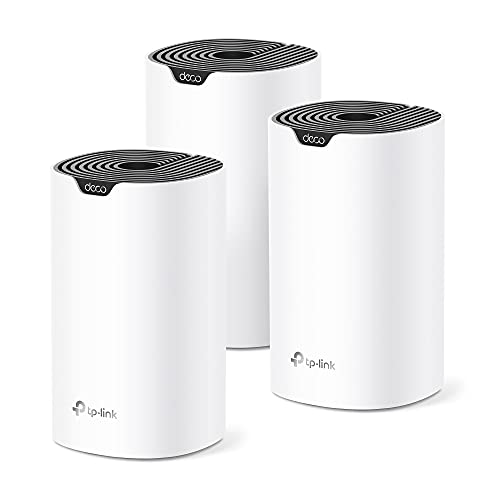
TP-Link Deco S4 3-Pack
An older, budget mesh system that still extends coverage in lighter use cases.

Before replacing hardware, restart the old router, move it to a central spot and check for firmware updates. If speed and range are still poor, a modern Wi-Fi 6 model or a mesh set is usually the next step, especially in homes with thick walls or several floors. Place the main unit centrally and off the floor to get the best reach.
Frequently Asked Questions About the Best Cheap WiFi Upgrade for Home
What is the best cheap wifi upgrade for home?
The best cheap wifi upgrade for home is a TP-Link Archer AX21, with a price of $70 to $90, because it is a router with a speed of 1800 Mbps, a Wi-Fi 6 design, and a coverage of 1500 square feet, so it is fast and affordable for most homes. A TP-Link Deco X20 2-Pack, at $120 to $150, is also a good choice, because it covers 4000 square feet for a large home.
Do I need a mesh system or a router?
You need a mesh system if your home is large or has thick walls, because a mesh system has multiple units that cover more area, while you need only a router if your home is small and your router is central. For most homes, a router is a good choice if your home is under 2000 square feet, and a mesh system is better if your home is larger.
Will a new router make my internet faster?
A new router will make your Wi-Fi faster if your old router is slow, because a Wi-Fi 6 router such as the TP-Link Archer AX21 can handle more devices and give better speed in your home. For most homes, a new router will not make your internet plan faster than your plan speed, although it will fix dead spots and improve Wi-Fi speed.
How do I set up a new WiFi router?
You set up a new WiFi router by plugging it into your modem, connecting it to power, opening the app, and following the setup steps, because most routers in this guide have an app that guides you. For most homes, place your router in a central, open spot, use a strong password, and update your firmware after setup.
The best cheap wifi upgrade for home is the one that covers your home, is fast enough for your plan, and is easy to set up. For most homes, that is the TP-Link Archer AX21 for overall value, the TP-Link Deco X20 for large-home coverage, or the Netgear Nighthawk RAX50 for premium speed. Compare the table, check your home size and your internet plan, and choose the system you will trust. Use a strong password, update your firmware, place your router centrally, and enjoy faster Wi-Fi in 2026.
Related guides
- Best Phone Case for Fishermen on Boats in 2026: 7 Phone Cases That Are Waterproof, Float, and Survive a Drop on a Boat
- How to Choose Action Camera for Office Travel in 2026: Action Camera for Office Travel
- Best Ring Light for Office Photography in 2026: 7 Lights That Offer Soft Light, Easy Setup, and Reliable Use for Office Photographers
- Best Phone Gimbal for Skateboarding Videos in 2026: 6 Top Phone Gimbals for Skateboarding Videos, Skateboard Gimbals, and Easy Use
More from Amazon
Programs that pair well with the guide above. Offers and eligibility are set by Amazon and may change.
Free shipping on eligible items, Prime Video and more. Eligible new members can start with a free trial.
Start a Prime free trialAd-free music streaming. Eligible new subscribers can start with a free trial.
Try Music Unlimited freeA Prime membership for ages 18-24 with a trial period. Eligibility is set by Amazon.
See Prime for Young AdultsAudiobooks and podcasts to listen to on the go. Eligible new members can start with a free trial.
Try Audible freeAs an Amazon Associate we earn from qualifying purchases.

Write Your Review
No reviews yet. Be the first to share your experience!