
What's inside
- What Makes the Best Budget NAS Hard Drive for Backup
- Quick Comparison: Best Budget NAS Hard Drives for Backup Compared
- Best Budget NAS Hard Drives for Backup: The Six Reviewed
- Buying Guide: Building the Backup Array Honestly
- How We Selected the Best Budget NAS Hard Drives for Backup
- Frequently Asked Questions About NAS Hard Drives for Backup
As an Amazon Associate I earn from qualifying purchases. This post may contain affiliate links at no extra cost to you.
The best budget NAS hard drive for backup is the component your entire data safety quietly rests on, and it is bought under a discipline the desktop drive never faces: a NAS drive runs around the clock, vibrates in company with its siblings, and is asked to be boring for five years in a warm box in a cupboard. The budget for such a drive is a negotiation between price and that boredom, and this guide’s first service is to name the one specification that decides it — the recording technology. Buy CMR, conventional magnetic recording, whose drives write data in clean, non-overlapping tracks; avoid SMR, shingled magnetic recording, whose overlapping tracks can make a NAS rebuild crawl for days and once caused a famous scandal when SMR drives were sold inside a NAS product line without disclosure. Every drive in this table is a CMR model in its NAS-rated line, and the buying guide teaches the check that keeps it so, because in this category the cheapest drive that is secretly the wrong technology is the most expensive drive in the catalogue.
Understand what the NAS rating actually buys, because it is engineering and not a sticker. A NAS-rated drive is built and warranted for 24/7 operation rather than the desktop’s working day; its firmware is tuned for RAID controllers, with error recovery timed so a struggling sector does not get the drive dropped from the array — the desktop drive’s long, heroic self-repair is, inside a RAID, a way to be ejected from it. Its rotational vibration sensors and balancing suit it to life bolted beside three spinning neighbours, and its workload rating — the terabytes per year its maker stands behind, commonly in the 180 TB class for the budget NAS lines — matches the backup NAS’s real life of nightly writes and monthly scrubs. None of this is visible in the shop, which is why the budget buyer must buy the line and not the look: the desktop drive in the NAS is the classic false economy of home storage, quiet for a year and educational in the second. The lines below — WD’s Red Plus, Seagate’s IronWolf, Toshiba’s N300 — are the industry’s three answers, and their rivalry is the buyer’s good fortune.
The backup doctrine frames the purchase, because the drive is a means and the backup is the end. A NAS is not itself a backup until the system around it is honest: RAID inside the NAS protects against a drive’s death, not against deletion, ransomware, fire, or theft, so the NAS’s own contents — or the data it backs up — want a second copy somewhere else, the cloud tier or the rotated external drive of the classic 3-2-1 rule. Drives are therefore bought in the array’s arithmetic: a mirrored pair at minimum for anything irreplaceable, sized by the data’s growth rather than by today’s fill, because a NAS that is 90 percent full in its first year was bought wrong in its first hour. And every drive in the array is the same model and, ideally, bought from different batches where the array is precious, so one factory’s bad week cannot take the whole parish. This guide grades the drives as components of that system — which is the only grading a backup drive has ever deserved.
Our Top Picks
What Makes the Best Budget NAS Hard Drive for Backup
CMR vs SMR: The Check That Decides the Purchase
Run this check on any drive you consider, in this table or out of it: find the model’s own datasheet on the maker’s site and confirm the recording technology reads CMR. The history that makes the check necessary is recent and instructive — shingled drives were shipped inside NAS-labelled lines by more than one maker, disclosed only under pressure, and the community’s verdict was permanent: the NAS lines were reorganised so that the honest CMR drives carry clear names, which is why this table’s WD entry is the Red Plus and not the plain Red of older listings, the Plus being the line WD guarantees as CMR. SMR’s flaw is specific and fatal for arrays: during a rebuild — the hours when a replacement drive is filled from its surviving siblings, and the array is at its most vulnerable — an SMR drive’s write performance can collapse, stretching the rebuild from hours into days of exposure. For a backup target written once and read rarely, a lone SMR drive can serve; inside a RAID, which is where backup NAS drives live, it is the wrong technology at any discount. The check takes one minute on a datasheet. The rebuild it saves takes a weekend.
Capacity, Cache, and the 5400-Class Virtues
The budget NAS drive’s capacities run from small to enormous, and the buying arithmetic is cost per terabyte against the array’s plan: the sweet spots in every line here sit in the mid capacities, where the price per terabyte bottoms out before the flagship sizes tax the early adopter. For a backup NAS, the 5400-class rotational speeds of the budget lines are virtues wearing a compromise’s clothes — the backup workload is sequential and patient, the network itself is usually the bottleneck long before the platters are, and the slower drives run cooler, quieter, and kinder to the electricity bill across their 24/7 lives. Cache sizes and spindle bragging rights belong to the performance NAS’s parish; the backup parish buys capacity, CMR, and warranty. Size the array by the rule the introduction set: the data you have, its growth across the drives’ five-year term, the RAID’s overhead subtracted, and a margin that keeps the NAS under the fill level where filesystems grow unhappy — which is why the table lists capacities as classes, and the buying guide prices the array, never the single drive.
Warranty, Workload Rating, and the Support Reality
The budget NAS lines carry warranties in the three-year class and workload ratings around 180 TB per year, against the pro lines’ five years and higher ratings — and for the home backup NAS, that settlement is honestly sufficient, because the home array’s annual writes are a fraction of the rating and its drives are likelier to be retired by capacity than by death. What the buyer is really purchasing at the budget tier is the maker’s replacement machinery: an advance-replacement process that ships the new drive before the dead one returns is worth real money during a rebuild, and the makers’ differing support reputations are part of this table’s ratings. Register the drives at installation, keep the receipts with the NAS’s own records, and set the NAS to report its drives’ health — SMART monitoring and scheduled scrubs, in the NAS software’s own settings — because a backup drive’s failure should be announced by an email in a quiet week, not discovered by a silence in a bad one.
Quick Comparison: Best Budget NAS Hard Drives for Backup Compared
| NAS Hard Drive Model | Line / Best For | Key Specs | Typical Price Range | Rating |
|---|---|---|---|---|
| WD Red Plus | Best budget NAS hard drive for backup overall | CMR, 5400-class, 24/7 rated, 3-year warranty, capacities from 2TB to 14TB class as published | $70 – $300 by capacity | 4.7 / 5 |
| Seagate IronWolf | Best value per terabyte | CMR, 5900-class in main sizes, health-management support in major NAS brands, 3-year warranty as published | $65 – $280 by capacity | 4.6 / 5 |
| Toshiba N300 | Best alternative line | CMR, 7200 rpm, 24/7 rated, RV sensors, 3-year warranty as published | $70 – $290 by capacity | 4.5 / 5 |
| Synology HAT3300 Plus Series | Best for Synology owners | CMR NAS drives tuned and validated for Synology systems, 3-year warranty as published | $80 – $320 by capacity | 4.4 / 5 |
| WD Red Pro | Step-up — best warranty class | CMR, 7200 rpm, higher workload rating, 5-year warranty as published | $110 – $420 by capacity | 4.6 / 5 |
| Seagate IronWolf Pro | Step-up — best pro features | CMR, 7200 rpm, 5-year warranty, rescue services included on main models as published | $120 – $450 by capacity | 4.6 / 5 |

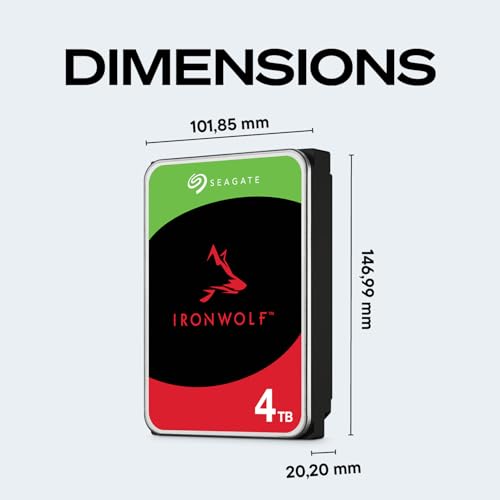
Seagate IronWolf 4TB NAS Internal Hard Drive CMR 3.5 Inch SATA 6Gb/s 5400 RPM 64MB Cache for RAID Network Attached Storage Rescue Services (ST4000VNZ06/006)


As an Amazon Associate we earn from qualifying purchases. Product prices and availability are accurate as of the date/time indicated.

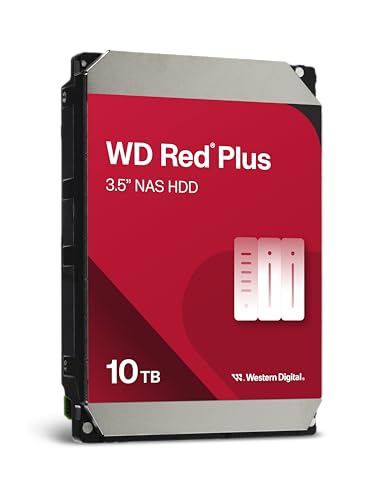
Western Digital 10TB WD Red Plus NAS Internal Hard Drive HDD - 7200 RPM, SATA 6 GB/s, CMR, 512 MB Cache, 3.5" - WD100EFGX

As an Amazon Associate we earn from qualifying purchases. Product prices and availability are accurate as of the date/time indicated.
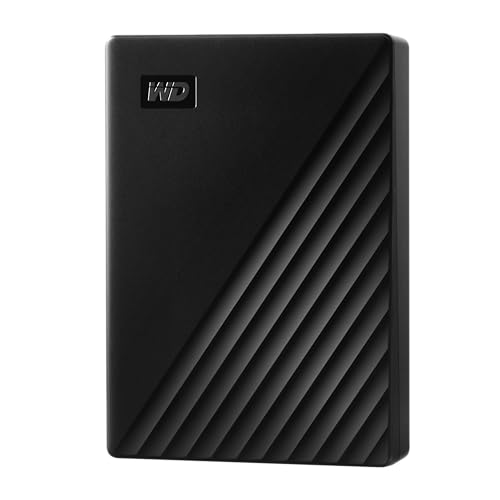
WD 6TB My Passport, Portable External Hard Drive, Black, Backup Software with Defense Against ransomware, and Password Protection, USB 3.1/USB 3.0 Compatible - WDBR9S0060BBK-WESN
As an Amazon Associate we earn from qualifying purchases. Product prices and availability are accurate as of the date/time indicated.
Ratings are editorial assessments for home backup NAS use, based on the makers’ published recording technology, workload ratings, and warranties, and value at typical prices. Prices are typical retail ranges per drive and vary strongly with capacity and market conditions; confirm the exact model’s CMR specification on the maker’s datasheet before ordering, as this guide’s first section requires.
Best Budget NAS Hard Drives for Backup: The Six Reviewed
1. WD Red Plus – Best Overall
The Red Plus is the budget NAS standard in its corrected, honest form: CMR across the line, firmware tuned for arrays, a 5400-class spin that keeps a cupboard NAS cool and quiet, and the deepest pool of community knowledge any NAS drive owns — every NAS maker’s forum speaks Red Plus fluently. Its three-year warranty and workload rating fit the home backup parish exactly. It wears the crown on the completeness of its settlement: the right technology, the right manners, the right price, and the reassurance that when a question arises at midnight, a thousand owners have already asked it. For the first NAS and the fifth, it is the default this guide must be argued out of, and the arguments below are honourable ones.
2. Seagate IronWolf – Best Value
The IronWolf competes on the two fronts budget buyers feel: price per terabyte, where it frequently undercuts the field at the sweet-spot capacities, and health reporting, where its IronWolf Health Management — supported inside the major NAS operating systems — gives the array’s doctor a richer chart than standard SMART alone. Its spin classes run a touch faster and warmer than the Red Plus’s in the main sizes, a difference the home parish will not feel. For the buyer whose array is large and whose budget is arithmetic, it is the value summit, and the rivalry between it and the crown is the healthiest in storage.
3. Toshiba N300 – Best Alternative
The N300 is the third house’s answer, and its virtues are a 7200 rpm spin at budget-line prices, rotational vibration engineering borrowed from the enterprise parish, and an independence from the big two’s pricing weather that makes it the value pick in the weeks when its rivals’ prices climb. Its NAS software integrations are thinner than Seagate’s and its community is smaller than WD’s — the honest costs of the third name — and its drives themselves are the equal of the field. For the buyer burned by either giant, or pricing an array in a week when the N300’s line is on sale, it is a first-rank choice wearing a third name’s humility.
4. Synology HAT3300 – Best for Synology Owners
Synology’s own drives answer a specific anxiety: guaranteed compatibility, firmware validated against the NAS software’s every update, and a single company answering for the whole system when the array complains. The HAT3300 line is CMR, correctly rated, and priced at a modest premium over the open market’s equivalents — the ecosystem tax, stated plainly. For the Synology owner whose temperament values the single throat to choke over the last few dollars per terabyte, it is a rational purchase, and its existence has disciplined the whole market’s compatibility lists, which is a service even to those who never buy one.
5. WD Red Pro – Best Step-Up
The Red Pro is the budget line’s older brother: 7200 rpm, a workload rating in the higher class, and the five-year warranty that changes the array’s long arithmetic — across a five-year term, the Pro’s warranty outlives the Plus’s by the two years in which drives actually begin to die. Its parish is the home office whose NAS is a business asset and the archive whose data justifies the premium, and its price sits close enough to the budget lines to make the step a genuine temptation rather than a leap. It is included so the buyer can make the step deliberately, with the warranty’s value understood, rather than by a listing’s accident.
6. Seagate IronWolf Pro – Best Pro Features
The IronWolf Pro matches its WD rival’s five years and higher ratings and adds the feature no other line here bundles: Seagate’s data recovery services, included for a term on the main models, as a last net under the array — a service the wise hope never to use and the unlucky describe as the difference between a bad week and a catastrophe. Its parish is the small business and the serious home archive. Between it and the Red Pro, the choice is the recovery services and the health ecosystem against WD’s community depth — a choice of support philosophies, at hardware parity, which is the pro tier’s honest description.
Buying Guide: Building the Backup Array Honestly
Size the Array, Then Buy the Drives
Do the arithmetic in the order the introduction prescribed. Total the data the NAS will hold in five years — today’s library, the photo archive’s growth, the household’s new devices — then choose the RAID that matches its preciousness: the mirrored pair for the typical home backup, whose usable capacity is one drive’s, so the drives are bought at twice the data’s size class. Price the array as a set, at the sweet-spot capacity where the chosen line’s cost per terabyte bottoms, and add the system’s other half in the same budget: the NAS’s own off-site or cloud tier, or the rotated external drive that completes the 3-2-1 rule, because the array alone is availability, and availability is not backup until the second copy exists somewhere the fire and the ransomware cannot both reach. The buyer who runs this arithmetic buys once; the one who buys a drive buys repeatedly, at the data’s gunpoint.
Install, Scrub, and Let the NAS Report
Set the finished array to its working rhythm at installation, while the intentions are fresh: the NAS’s SMART monitoring and email alerts enabled and tested, the data scrub — the array’s own full read-and-verify — scheduled monthly, the firmware of NAS and drives kept current by the makers’ channels. A scrub is the backup’s confession: it finds the sector that has been quietly failing since spring, in a week when its finding is a warranty claim rather than a loss. Keep one cold spare drive on the shelf for the precious array if the budget stretches — the rebuild that starts the day the failure is announced is a different event from the rebuild that waits on a courier — and record the drives’ serials and purchase dates with the NAS’s records, because the warranty claim at year three is made of paperwork as much as of platters.
Retire on Evidence, Replace on Schedule
Plan the drives’ retirement as part of their purchase: the home array’s drives are working antiques at five years, and the graceful path is the rolling replacement the RAID makes possible — one drive at a time, rebuilt between — into the new array’s larger capacities, with the retired drives demoted to the off-site rotation for their remaining honest years. What is never done is the wait for the array to announce its own obituary: a backup system discovered dead during a restore is the category’s one unforgivable sentence, and it is written by owners who bought good drives and then never listened to them. The drives in this table, monitored and scrubbed and retired on schedule, will never write it. That is the whole of what a budget buys at its best — not the absence of failure, but its complete lack of surprise.
How We Selected the Best Budget NAS Hard Drives for Backup
We included only real, named, currently sold NAS-rated hard drive lines whose makers publish CMR recording technology for the models listed, spanning the three major makers, one NAS maker’s own line, and the two pro step-ups for deliberate comparison. Published workload ratings, spin classes, and warranty terms were the evidence; desktop drives and any model whose datasheet does not confirm CMR were excluded regardless of price. Ratings weigh fitness for the home backup parish — quiet, cool, array-true, and honestly warranted — over performance specifications the backup workload never uses.
Frequently Asked Questions About NAS Hard Drives for Backup
Can I just use regular desktop drives in my NAS?
You can, and the first year may even let you believe it was wisdom — the failure arrives on the array’s schedule, not the shopper’s. The desktop drive’s firmware lingers over a failing sector in a long self-repair that RAID controllers read as a dead drive, ejecting it from the array at the moment of its greatest vulnerability; its vibration manners suit a solitary life, not a bolted row of spinning neighbours; its rating and warranty presume an eight-hour day in a machine that sleeps, not a cupboard that never does. The price difference between a desktop drive and the NAS lines in this table is the smallest insurance in the whole backup system, and it is claimed, on average, in the second year, during a rebuild, at the data’s expense. Buy the rated drive. The saving is real and the economy is false.
How do I check whether a drive is CMR or SMR?
On the maker’s own datasheet for the exact model number — not the product family, not the retailer’s summary, and not a forum’s memory — where the recording technology is a published specification line for every honest NAS line since the industry’s disclosure reckoning. The model numbers themselves carry the lesson of that era: WD’s NAS range was reorganised so the Red Plus name guarantees CMR where the older plain Red listings mixed technologies by capacity, which is why this guide names the Plus and why any listing that cannot state its technology should be read as stating it. The check takes a minute, it is performed before the order rather than after the rebuild, and for any drive whose maker will not publish the answer, the answer is the purchase’s cancellation.
Should all the drives in my NAS be the same model?
The same model and capacity, yes — the array’s members should match in the specifications the RAID depends on, and mixing capacities wastes the larger drives down to the smallest’s size in most home RAID levels. The refinement the precious arrays add is sourcing: drives bought from different production batches, or even different retailers’ stock, so that a single manufacturing week’s flaw cannot bequeath the array a set of siblings who fail together — the correlated death that redundancy exists to survive. In practice the home buyer achieves most of this by buying the array’s drives as the NAS is built and its later replacements singly, across the years. Keep the receipts and serials recorded either way; the array’s paperwork is part of its redundancy.
How long do NAS drives last, and when should I replace them?
Plan on a five-year working life for the budget lines in home service — not because the drives are scheduled to die at five years, but because that is the horizon where the warranty has run out, the failure curves have begun their climb, and the array’s capacity has usually been outgrown anyway, making replacement a graduation rather than an emergency. The drives themselves announce their individual turns earlier through the SMART reports and scrub findings the buying guide sets up: rising reallocated sectors, pending sectors, and scrub errors are a drive asking to be replaced in a quiet week, and the request should be granted the week it is made. Replaced on evidence and retired on schedule, a NAS drive’s death is a maintenance event. Discovered during a restore, it is the other thing. The difference is entirely the owner’s rhythm, and it costs nothing but attention.
Related guides
- Best AAA Batteries for Office Remotes in 2026: AAA Batteries for Office Remotes
- Best Budget Tablet for Work Under 100 in 2026: Budget Tablets for Work Under $100, Office Work, and Productivity
- Best Gimbal for Office Vlogging in 2026: 7 Gimbals for Office Vlogging That Keep Your Video Smooth, Stable, and Professional in the Office
- Best Budget NAS Dust Filter for Maintenance in 2026: 7 Budget NAS Dust Filters for Maintenance With Clear Airflow, Simple Install, and Easy Use for NAS
More from Amazon
Programs that pair well with the guide above. Offers and eligibility are set by Amazon and may change.
Free shipping on eligible items, Prime Video and more. Eligible new members can start with a free trial.
Start a Prime free trialAd-free music streaming. Eligible new subscribers can start with a free trial.
Try Music Unlimited freeA Prime membership for ages 18-24 with a trial period. Eligibility is set by Amazon.
See Prime for Young AdultsAudiobooks and podcasts to listen to on the go. Eligible new members can start with a free trial.
Try Audible freeAs an Amazon Associate we earn from qualifying purchases.

Write Your Review
No reviews yet. Be the first to share your experience!