
What's inside
- What Makes the Best Console Stand for Home Offices
- Quick Comparison: Console Stands for Home Offices Compared
- The Six Console Stands Reviewed
- Buying Guide: Standing Your Console in a Home Office
- How We Selected These Console Stands for Home Offices
- Frequently Asked Questions About Console Stands for Home Offices
As an Amazon Associate I earn from qualifying purchases. This post may contain affiliate links at no extra cost to you.
The best console stand for home offices solves a problem the living room never had: the console must share a room with a career. In the home office, the games console sits within sight of the video call’s camera, within earshot of the microphone, within reach of the working day’s discipline — and it must look like it belongs to the room’s serious half while remaining entirely itself after six o’clock. A good stand is the diplomat that negotiates that treaty: it lifts the console into a tidy vertical or a discreet wall mount, it keeps the controllers charged and the games shelved, it manages the cables that otherwise colonise the desk’s back edge, and — the clause the office forgets at its peril — it preserves the airflow the console’s cooling was designed around, because a console suffocated in a media cabinet or stood against its own exhaust will announce the error thermally, loudly, in the middle of a meeting. This guide ranks the real, currently sold stands and mounts for the office parish — the cooling docks, the minimalist verticals, the wall mounts that take the console off the desk entirely — graded on fit, airflow, noise, cable manners, and the office’s own aesthetic audit, with the compatibility discipline stated first and enforced throughout: a stand is a fitted part, bought for a named console in a named generation, and the universal promises of the anonymous listings are graded as they deserve.
The compatibility audit deserves the introduction’s emphasis because consoles are the least standardised furniture in tech. The PlayStation’s generations differ in their bases and their curves; the Xbox’s two current machines differ from each other in size, venting, and the orientation their makers bless; the Switch lives in its dock and asks only to be housed and charged. A stand moulded for one will hold another badly — loosely, or across a vent, or with the disc drive’s slot argued against — and the consequences run from the untidy to the thermal. Every stand in this table names its console in its maker’s own fit list, and the buyer’s worksheet begins with their console’s exact identity, generation and edition included, matched line by line before a price is compared. The second audit is orientation itself: the makers design their machines to stand or lie in the orientations their documents bless, with the vents disposed accordingly, and the stand that improvises a third orientation — or blocks the intake in the approved one — is excluded from this guide regardless of its photograph. With fit and orientation settled, the office’s own questions can be asked: how much desk does it return, how quiet is its fan if it has one, and does it look, on the call’s background shelf, like equipment or like a toy. The table answers in that order.
Airflow is the engineering heart of the subject and it is taught here once, properly. A modern console is a small computer that converts most of its electricity into heat and moves that heat out on a designed path: in through the intakes, across the board, out through the exhaust, with the path’s geometry assuming the clearances the maker specifies in the console’s own manual — distances from walls, from cabinet sides, from other heat — which the office must honour as specifications rather than suggestions. The stand’s part in the path is threefold: it must not cover an intake or an exhaust with its own structure, a failure the cheap fitted parish commits with depressing regularity and the shop test catches by comparing the stand’s mould against the console’s vent map; it must hold the clearances, lifting the machine off the carpet’s dust and the desk’s clutter alike; and where it adds a fan of its own, the fan must assist the path rather than argue with it, moving air the way the console is already moving it, at a noise the office can work beside — the cooling fan that whines through a call is a stand that has solved the wrong problem. The dust parish rides along: the office console’s intakes are vacuumed on the household’s rhythm, the stand’s filters where fitted are kept, because the thermal parish is patient and cumulative, and the console that overheats at three years was usually suffocated by inches over thirty-six months.
Our Top Picks
What Makes the Best Console Stand for Home Offices
Forms: Vertical Dock, Tower, and the Wall
The parish divides into three architectures, chosen by the office’s space and temperament. The vertical dock is the centre of gravity: the console stood tall in a fitted base, commonly with the controllers’ charging cradles and sometimes a fan in the same body — the whole console parish consolidated into one footprint the size of the machine’s own shadow, at the desk’s corner or the shelf’s end. Its audit is the base’s stability, since a tall console in a light base is a lever awaiting a cat. The tower and rack parish organises more than the console — the games, the second controller, the headset’s hook — into a small vertical city; its audit is the office’s taste, because it declares the gaming rather than disguising it, which some offices wear proudly and others are negotiating with a partner about. The wall mount is the office’s magic trick: the console floated behind the monitor, beside the desk, or inside the cupboard’s door line, its cables dropped in trunking, its desk footprint exactly zero — at the price of the drill, the stud or the proper fixing, and the commitment, since a mounted console is a furnishing decision and its removal is a decorating event. Each form is graded in the table inside its own doctrine, and the worksheet’s room — measured, photographed, its call-background considered — chooses among them more honestly than any preference stated in the abstract.
Charging, Storage, and the Cable Treaty
The stand’s second office is the parish around the console, and the office grades it as a treaty among small objects. Controller charging is the head of the parish: the dock that takes both controllers at the day’s end, charging them from the console’s own USB economy or its own adapter, ends the cable-on-the-desk era and the dead-controller discovery at the session’s start — with the charger’s manners audited, since the controllers’ batteries prefer the correct charge to the fastest, and the named makers’ docks are built to their consoles’ controllers in a way the anonymous parish’s are not always. Games and media storage follows, modest in the download era and still real for the disc parish and the cartridge’s small library. The headset’s hook keeps the office’s other parish off the desk’s working surface. And the cables — the console’s power and HDMI, the dock’s own lead — are routed by the stand’s channels where it offers them and by the office’s trunking where it does not, because the stand that organises everything except the cables has done the portrait and left the frame off. Total the treaty before purchase: the stand that wants its own wall adapter is a socket in the worksheet, the dock that charges from the console’s port is a port, and the office’s power parish, per this site’s standing doctrine, is a listed surge protector at the wall and never a daisy chain behind the desk.
The Office Audit: Looks, Light, and Noise
The home office grades what the games room never asks. Looks: the stand and console together are furniture in a room that hosts the wearer’s professional life on camera, and the parish divides honestly between the discreet — the black minimalist vertical, the console wall-mounted out of frame entirely — and the declared, the tower with its games shelved like books, which in many a creative office is not a concession but a credential. Lights: the gaming parish’s RGB is the stand’s most negotiable feature, and the office buyer should confirm it can be dimmed or killed outright, because the light show behind a client call is a communication the sender did not intend; the makers in this table mostly allow it, and the worksheet checks. Noise: any fan in the stand is auditioned against the microphone’s parish — the call, the recording, the quiet room’s floor — with the understanding that a fan’s figure in a specification is a laboratory’s and the office’s own evening is the test that counts, inside the returns window. And the cleaning parish closes the audit: the office console is dusted and its intakes vacuumed on the same rhythm as the desk’s other equipment, the stand’s surfaces wipeable, because the professional room’s standard is visible in the camera’s corner and the console, standing in it, is held to it.
Quick Comparison: Console Stands for Home Offices Compared
| Console Stand Model | Form / Best For | Key Specs | Typical Price Range | Rating |
|---|---|---|---|---|
| OIVO PS5 Stand with Cooling and Charging | Cooling dock — best console stand for home offices overall | PS5 fitted base, suction/cooling fan parish, dual controller charging, game storage slots as published | $35 – $55 | 4.6 / 5 |
| HIDEit Mounts (console-specific wall mounts) | Wall mount — best for a clear desk | Steel mounts cut per console model, mounts behind screens and desks as published | $30 – $60 | 4.7 / 5 |
| Kootek Vertical Stand (PS parish) | Vertical dock — best value all-in-one | Console base with controller charging and USB hub parish in model variants as published | $25 – $40 | 4.4 / 5 |
| Skywin All-in-One Stand (Xbox parish) | Tower dock — best Xbox office station | Xbox fitted stand with cooling fan, controller and battery charging parish as published | $40 – $60 | 4.4 / 5 |
| Monzlteck Wall Mount Series | Wall mount value — best budget mount | Metal wall mounts per console with controller holders in bundles as published | $20 – $40 | 4.3 / 5 |
| PowerA Twin Charging Station (console lines) | Charging only — best minimal footprint | Officially licensed dual controller docks for PlayStation and Xbox lines as published | $20 – $35 | 4.5 / 5 |

LINSY HOME Farmhouse TV Stand for 65 Inch TV, Wood Entertainment Center with Glass Door Storage Cabinet & Adjustable Shelves, Large Sturdy TV Console Table for Living Room Bedroom
As an Amazon Associate we earn from qualifying purchases. Product prices and availability are accurate as of the date/time indicated.

ECOLOVI Adjustable Wood Computer Monitor Stand Riser, Office Desk Organizer and Accessories for Monitor, Laptop, PC, Printer, Office Desk Accessories Workspace Organizer for Home Office Supplies, Black


As an Amazon Associate we earn from qualifying purchases. Product prices and availability are accurate as of the date/time indicated.
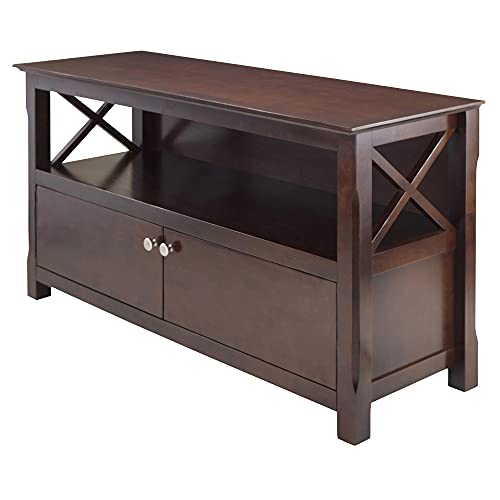
Winsome Xola 40643 Cappuccino TV Stand (40643) | Multi-Use Entertainment Center & TV Console for Living Room, Bedroom, Den, Practical Furniture for New Homes, Apartments


As an Amazon Associate we earn from qualifying purchases. Product prices and availability are accurate as of the date/time indicated.
Ratings are editorial assessments for home-office use, based on the makers’ published console fit lists, charging arrangements, fan and storage features, and construction, and value at typical prices. Prices are typical retail ranges for the stand or mount only. Fit must be confirmed for the exact console model and edition against the maker’s current list, and wall fixings must suit the wall’s construction, as the buying guide directs.
The Six Console Stands Reviewed
1. OIVO PS5 Cooling Stand – Best Overall Dock
OIVO’s PS5 station is the vertical dock at its most complete: the console secured in a fitted base, a cooling fan assisting the machine’s own path from below, both controllers on their charging cradles, the games shelved in the body’s slots, and the whole parish occupying the console’s own shadow on the desk. Its fan’s noise is the class’s honest middle — present in a silent room, beneath a call’s notice in most offices, and switchable for the recording parish. Its fit is generation-specific, per the doctrine, and the buyer confirms disc or digital edition as the maker’s list directs. For the PlayStation office that wants one object to organise the entire parish, it is the recommendation.
2. HIDEit Mounts – Best Wall Solution
HIDEit is the mount parish’s specialist: steel brackets cut for the individual console, designed to disappear — the machine floated behind the display or the desk’s flank, its weight on the wall’s structure, its desk footprint abolished. The installation is the form’s honest tax, measured and drilled once, with fixings chosen for the wall’s construction as the guide insists. Its office virtue is total: nothing on the desk, nothing in the call’s frame unless the frame is aimed at it, the clearances held by the mount’s own geometry. For the office whose desk is small or whose aesthetic is severe, it is the answer the docks cannot give, and its steel-and-simplicity build will outlast the console it holds, ready — in its model’s case — for the same machine’s whole career.
3. Kootek Vertical Stand – Best Value Dock
Kootek’s vertical parish serves the PlayStation generations at the value tier’s figure: a fitted base, controller charging, and in its variants a USB hub that returns the console’s occupied ports to the desk’s service. Its fan parish, where fitted, is the budget’s and its fit and finish likewise, stated plainly. As the first stand of a new office — the parish proven, the desk organised, the upgrade path to the table’s leaders left open — it is the rational purchase, and its years of parish service at its price are the value tier’s good report.
4. Skywin All-in-One – Best Xbox Station
Skywin’s tower serves the Xbox office as the OIVO serves the PlayStation’s: the console docked, a fan in the base, the controllers and their battery packs on charge, the parish consolidated in one station whose footprint the desk can spare. Its fit follows the Xbox generations’ own divisions, which the buyer observes with the doctrine’s usual care — the two current machines are different furniture and their stands are not interchangeable, whatever a listing’s enthusiasm suggests. Inside its parish it is the complete station, and its charging of the Xbox’s removable packs answers that console’s particular economy exactly.
5. Monzlteck Wall Mounts – Best Budget Mount
Monzlteck brings the wall form down the price ladder: metal mounts per console, commonly bundled with the controller holders that complete the floating parish, at figures that make the clear desk affordable to any office. Their steel is their price’s gauge and their fixings deserve the worksheet’s attention — the wall’s construction and the screw’s quality are the mount’s whole safety case, and the parish’s veterans upgrade the included hardware without a second thought where the wall is anything but honest stud or masonry. So installed, they hold their consoles for years, and their rating reflects a value tier doing its one job properly.
6. PowerA Twin Charging Station – Best Minimal Answer
PowerA’s licensed docks close the table with the minimalist’s argument: if the console already stands where its maker intended — on the media unit, in its own vertical base — then the office’s only true disorder is the controllers and their cables, and a small, officially licensed charging dock, one per console line, ends it for the price of a round of coffees. Its inclusion disciplines the category: the best stand is sometimes no stand, and the buyer whose console is housed and ventilated already should spend on the parish that is actually untidy. Graded as the specialist it is, it earns the table’s respect and the tidy desk’s gratitude.
Buying Guide: Standing Your Console in a Home Office
Step One: The Console, the Room, and the Call
Write the three audits before the shortlist. The console: its exact model, generation, and edition, from its own label, matched against the makers’ fit lists — with its manual’s clearance figures copied into the worksheet, because they are the installation’s law. The room: the desk’s dimensions and the shelf’s, the wall’s construction where a mount is contemplated — stud, masonry, or the plasterboard that demands its special fixings — the sockets’ positions, and the route the cables will honestly take. The call: the camera’s frame, mapped, so the console’s station is placed by the professional picture as well as by the player’s convenience, with the RGB’s kill switch confirmed for the stands that glow. Three audits, one page, and the form — dock, tower, or wall — has chosen itself in the room’s own handwriting.
Step Two: Install for Air First, Looks Second
Install by the introduction’s engineering, in its order. The console’s vents are mapped against the stand’s mould before the machine is committed — intake and exhaust clear by inspection, the maker’s clearances held from walls and cabinet sides, the whole station out of the radiator’s parish and the window’s direct sun, which are the office’s two thermal traps. The wall mount’s fixings go into structure or their rated anchors, the console’s weight tested by hand before the machine is trusted to it, the cables dropped with their service loops and their drip of slack. The dock’s fan, where fitted, is set to assist and auditioned in the room’s quiet and on a test call. Power is drawn from the listed surge protector the desk’s whole parish shares, the load totalled as this site’s power doctrine teaches, the stand’s own adapter counted. And the controllers take their cradles, the games their slots, the headset its hook — the treaty signed in full, the desk returned to the working day with the console standing in it like a colleague rather than squatting in it like a hobby.
Step Three: The Keeping — Dust, Noise, and the Next Generation
Keep the station by the office’s own rhythm. The intakes are vacuumed with the soft brush on the month’s turn, the stand’s fan and filters where fitted are cleaned on the same pass, and the console’s temperatures are audited by ear: the machine that grows louder across a season is reporting its suffocation or its dust, and the report is answered by cleaning and clearance before it is answered by a fan curve. The charging parish is checked — the controllers seated properly, their contacts bright — and the cables inspected where the chair’s castors commute. When the console’s generation turns, the stand is retired with it or passed to its next owner, because the fitted parish does not transfer, and the worksheet begins again from the new machine’s manual. So chosen, installed, and kept, the best console stand for the home office performs the diplomat’s whole mission invisibly: the console present and ready, the desk clear, the call unembarrassed, the machine breathing as its maker intended — work and play sharing a room like adults, which is what the home office, at its best, is for.
How We Selected These Console Stands for Home Offices
We included only real, named, currently sold stands, docks, and mounts whose makers publish console-specific fit lists, spanning the cooling dock, value dock, tower station, wall mount, and charging-only classes. No stand is credited with cooling beyond assisting the console’s own designed airflow, and orientation and clearance guidance follows the console makers’ own manuals, which govern each installation. Prices exclude wall fixings beyond those bundled, which the guide directs to be matched to the wall’s construction.
Frequently Asked Questions About Console Stands for Home Offices
Do cooling fans in console stands actually help?
Modestly, in the right installation — and harmfully in the wrong one, which is why this guide grades them as assistants rather than as systems. A console’s cooling is engineered as a path, and a stand’s fan that moves air along that path — drawing the exhaust away, feeding the intake’s parish — can lower the machine’s working temperatures by a degree that matters to its fan’s noise, which is the benefit the office actually hears. A fan that blows against the path, or a base that seals an intake while stirring the room, can do the opposite while advertising the reverse, which is why the vent-mapping step in the installation is not optional. The honest hierarchy is the guide’s: clearances and dust first, since suffocation and clogging are the real thermal parish; orientation as the maker blesses; and the stand’s fan third, as a refinement. The console that overheats in a clear, clean, correctly oriented installation has a fault, not a furniture problem, and it belongs to its maker’s warranty rather than to a bigger fan.
Is it better to stand a console vertically or lay it flat in an office?
Whichever orientation its maker designed and documents for it — both current great consoles are built to live in their approved orientations, and the office chooses between those by space and taste, not by thermal folklore. The vertical saves the desk’s footprint and suits the dock parish entire; the horizontal suits the media unit’s shelf and the household with a climbing cat, whose vote against tall furniture is absolute. What is not permitted by physics is the improvised third way: the console stood on an unapproved edge, laid across its own exhaust, or shelved in a cabinet whose door closes its clearances away — the cabinet parish being the office’s commonest thermal sin, answered by the open back, the generous gaps, or the door left off entirely. Read the manual’s placement page, hold its clearances, and let the room’s furniture argue the rest; the machine is indifferent to the approved choice and unforgiving of the unapproved one.
Can I wall-mount a console in a rented office or flat?
Yes, with the tenancy treated as part of the installation’s engineering. The mount itself is a few screw holes — the parish’s landlords divide, as ever, between those who accept filled holes at the lease’s end as ordinary making-good and those whose agreement forbids fixings entirely, and the renter reads their own agreement rather than this guide’s optimism. Where screws are forbidden, the heavy-duty adhesive and picture-hanging parish exists but is graded here with open caution for a load that is both heavy and warm: the console’s weight belongs on structure, and the renter whose wall cannot be drilled is directed to the dock parish with the guide’s blessing rather than to a gamble above a desk. Where screws are allowed, fix into the stud or the masonry with the mount’s rated hardware, keep the fixings’ receipt and the filler for the leaving day, and the clear desk is a tenant’s right as much as an owner’s. The wall, the lease, and the load: all three read before the drill, in that order.
How do I keep console cables tidy in a home office?
By treating the cables as part of the stand purchase rather than as its aftermath. The route is planned in the worksheet: console to display, stand to socket, each cable’s length bought to its run rather than coiled from a standard excess — the cable shop’s lengths exist for this — and the runs gathered in the desk’s trunking or the stick-on channel along the wall’s skirting, with the drops behind the desk in a single managed fall rather than a thicket. Velcro ties, never the zip tie’s permanence, gather the parish at intervals; the surge protector sits where the runs converge, its own cord the only one travelling to the wall; and every cable is labelled at both ends with the parish’s small tape flags, because the office’s next rearrangement is a certainty and its author will thank the labeller, who is also its author, in a future tense. The stand’s own channels and clips are used where offered. An hour’s work at the installation, repaid at every cleaning, every rearrangement, and every photograph of the room the owner ever takes — tidiness being, in the home office, a professional asset with a cable’s face.
Related guides
- Best AAA Batteries for Office Remotes in 2026: AAA Batteries for Office Remotes
- Best Budget Tablet for Work Under 100 in 2026: Budget Tablets for Work Under $100, Office Work, and Productivity
- Best Gimbal for Office Vlogging in 2026: 7 Gimbals for Office Vlogging That Keep Your Video Smooth, Stable, and Professional in the Office
- Best Budget NAS Dust Filter for Maintenance in 2026: 7 Budget NAS Dust Filters for Maintenance With Clear Airflow, Simple Install, and Easy Use for NAS
More from Amazon
Programs that pair well with the guide above. Offers and eligibility are set by Amazon and may change.
Free shipping on eligible items, Prime Video and more. Eligible new members can start with a free trial.
Start a Prime free trialAd-free music streaming. Eligible new subscribers can start with a free trial.
Try Music Unlimited freeA Prime membership for ages 18-24 with a trial period. Eligibility is set by Amazon.
See Prime for Young AdultsAudiobooks and podcasts to listen to on the go. Eligible new members can start with a free trial.
Try Audible freeAs an Amazon Associate we earn from qualifying purchases.

Write Your Review
No reviews yet. Be the first to share your experience!