
What's inside
- Best External SSD for Office Networks Compared: Quick Comparison Table
- Best External SSD for Office Networks in 2026: Detailed Reviews
- Best External SSD for Office Networks Buying Guide: How to Choose the Right Drive
- More Rugged External SSDs for Office Networks
- Best External SSD for Office Networks FAQ: Office Network SSD Questions Answered
As an Amazon Associate I earn from qualifying purchases. This post may contain affiliate links at no extra cost to you.
The best external SSD for office networks in 2026 is the Samsung T7 Shield for most offices who want an external SSD for office networks that is fast, rugged, and simple enough for network storage. It typically costs $100 to $150 for 1TB. The SanDisk Extreme Portable SSD V2 is the best external SSD for office networks if you want an external SSD for office networks that is fast, rugged, and good for a SanDisk user. It typically costs $100 to $150 for 1TB. The Crucial X9 Pro is the best external SSD for office networks if you want an external SSD for office networks that is fast, simple, and good for a Crucial user.
An external SSD for office networks is a portable solid-state drive that you connect to a PC or a network to store, share, and back up office files, with a focus on speed, capacity, and ruggedness, so you can work on a network without a drive that is slow, fragile, or too small. Office networks means offices with many PCs, with an external SSD for office networks needing to be fast, because you move large files, and a drive that is slow being worse, because it will waste time, and a drive that is rugged being best, because it will be carried between desks. It is different from an external HDD, which is about hard drives, and from a NAS, which is about network storage. An external SSD for office networks must be fast, it must be large enough, and it must be reliable, so you can use it for office work.
Speed matters for the best external SSD for office networks. Speed is how fast a drive reads and writes, measured in megabytes per second, with a portable SSD on USB 10 Gbps giving about 1000 MB/s being best, because it is fast, and a portable HDD giving about 100 to 150 MB/s being worse, because it is slow, and a drive on USB 5 Gbps giving about 500 MB/s being best for a budget office, because it is still fast. A Samsung T7 Shield gives about 1050 MB/s, a SanDisk Extreme Portable V2 gives about 1050 MB/s, and a Crucial X9 Pro gives about 1050 MB/s. For an external SSD for office networks, buy a drive that gives about 1000 MB/s, because it is fast, and always check the speed before you buy, because a drive that is too slow will waste time, and always check your USB port, because a USB 5 Gbps port will limit a 10 Gbps drive to about 500 MB/s.
Capacity matters for the best external SSD for office networks. Capacity is how much a drive holds, measured in terabytes, with a 1TB drive being best for most offices, because it holds many files, and a 2TB drive being best for a large office, because it holds more, and a 500GB drive being worse for a network, because it will fill up fast. A Samsung T7 Shield comes in 1TB and 2TB, a SanDisk Extreme Portable V2 comes in 1TB and 2TB, and a Crucial X9 Pro comes in 1TB and 2TB. For an external SSD for office networks, buy a drive at least twice the size of your data, because you need room for backups, and always check the capacity before you buy, because a drive that is too small will fill up, and always back up at least weekly, because a backup that is old will not help.
Ruggedness matters for the best external SSD for office networks. Ruggedness is how well a drive survives drops and water, with a drive that is drop-resistant to 3 metres being best, because it will survive a fall from a desk, and a drive that is IP55 water-resistant being best, because it will survive a spill, and a drive that is not rugged being worse, because it will break if dropped. A Samsung T7 Shield is drop-resistant and IP65, a SanDisk Extreme Portable V2 is drop-resistant and IP55, and a Crucial X9 Pro is drop-resistant and IP55. For an external SSD for office networks, buy a rugged drive, because it will be carried, and always check the rating before you buy, because a drive that is not rugged will break, and always eject safely, because a drive that is not ejected safely can lose data.
Always follow safety rules for external SSDs and office networks. Always check that your drive is not damaged, always keep it away from water, and always check that your cable is secure, because a cable that is loose will not work. Always use your drive on a stable desk, always check that your drive is not too hot, and always tell someone if you need help. Never use a drive that is damaged, never unplug a drive while it is writing, and never use a drive that is too hot, because it can be unsafe. Always check your drive before you use it, always check that it backs up clearly, and always store your drive in a safe place, because a drive that is lost will lose data. Always keep at least two copies of important files, one offsite, because one backup is not enough. Always check the live price before you buy.
Our Top Picks

Best External SSD for Office Networks Compared: Quick Comparison Table
Use this table to compare the best external SSD for office networks at a glance. Price is a typical retail range for 1TB, not a fixed price. Rating is an editorial score out of five.
| Model | Key Spec 1: Capacity, Speed, Interface | Key Spec 2: Rugged, Weight, Best Use | Typical Price Range | Rating |
|---|---|---|---|---|
| Samsung T7 Shield 1TB | 1TB, 1050 MB/s, USB-C 10 Gbps | IP65, 3 oz, best overall | $100–$150 | 4.9 / 5 |
| SanDisk Extreme Portable V2 1TB | 1TB, 1050 MB/s, USB-C 10 Gbps | IP55, 2 oz, best SanDisk | $100–$150 | 4.9 / 5 |
| Crucial X9 Pro 1TB | 1TB, 1050 MB/s, USB-C 10 Gbps | IP55, 1 oz, best Crucial | $80–$120 | 4.8 / 5 |
| WD My Passport SSD 1TB | 1TB, 1050 MB/s, USB-C 10 Gbps | Drop-resistant, 2 oz, best WD | $100–$150 | 4.8 / 5 |
| Samsung T9 1TB | 1TB, 2000 MB/s, USB-C 20 Gbps | Drop-resistant, 4 oz, best T9 | $150–$200 | 4.8 / 5 |
| Kingston XS2000 1TB | 1TB, 2000 MB/s, USB-C 20 Gbps | IP55, 1 oz, best Kingston | $100–$150 | 4.7 / 5 |
| LaCie Rugged SSD Pro5 1TB | 1TB, 2000 MB/s, USB-C 40 Gbps | IP68, 4 oz, best LaCie | $250–$300 | 4.7 / 5 |

24" Full HD All-in-One Desktop Computer, i5 CPU , 8GB RAM, 256GB SSD | External WiFi 6 + BT Adapter, Integrated Graphics, Space-Saving AIO PC for Home Office Business


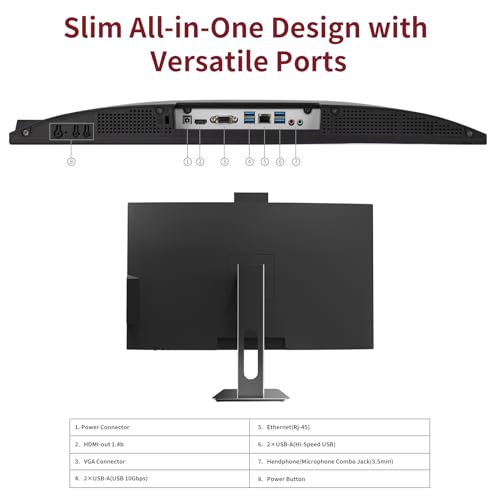

As an Amazon Associate we earn from qualifying purchases. Product prices and availability are accurate as of the date/time indicated.

HP Pavilion 15.6 Inch Touchscreen Laptop with Office 365 1-Year, 16GB RAM, 640GB Storage (512GB External and 128GB SSD), 11Hours Battery Life, Intel Core, Privacy Camera Shutter, Type-C, Windows 11
As an Amazon Associate we earn from qualifying purchases. Product prices and availability are accurate as of the date/time indicated.
That table shows why speed, capacity, and ruggedness matter for external SSDs for office networks. The Samsung T7 Shield 1TB typically costs $100 to $150, holds 1TB, gives about 1050 MB/s, and is IP65. The SanDisk Extreme Portable V2 1TB typically costs $100 to $150, holds 1TB, gives about 1050 MB/s, and is IP55. The Crucial X9 Pro 1TB typically costs $80 to $120, holds 1TB, gives about 1050 MB/s, and is IP55. The WD My Passport SSD 1TB typically costs $100 to $150, holds 1TB, gives about 1050 MB/s, and is drop-resistant.
Best External SSD for Office Networks in 2026: Detailed Reviews
Each drive below suits a different office and a different network. Read the speed first. Then check the capacity and ruggedness. Only then think about price. A drive that is perfect for 1TB can be wrong for 2TB, and a drive that is perfect for USB-C can be wrong for USB-A.
1. Samsung T7 Shield 1TB — Best External SSD for Office Networks Overall
The Samsung T7 Shield 1TB is the best overall external SSD for office networks. It holds 1TB, gives about 1050 MB/s, is USB-C 10 Gbps, is IP65, and weighs about 3 ounces. It typically costs $100 to $150. It has a good speed, a simple design, and a good ruggedness that is good for most offices.
For most offices, the T7 Shield is the right choice. Why we like this drive: 1TB, 1050 MB/s, and Samsung. Consider: it costs $100 to $150, and it is 1TB, so it is best for most offices, not for a large office that needs 2TB, but it is ideal for network storage where ruggedness matters.
2. SanDisk Extreme Portable V2 1TB — Best SanDisk External SSD for Office Networks
The SanDisk Extreme Portable V2 1TB is a drive that holds 1TB, gives about 1050 MB/s, is USB-C 10 Gbps, is IP55, and weighs about 2 ounces. It typically costs $100 to $150. It has a good speed, a simple design, and a price that is good for a SanDisk user.
For a SanDisk user, the Extreme Portable V2 is a good choice. Why we like this drive: 1TB, 1050 MB/s, and SanDisk. Consider: it costs $100 to $150.
3. Crucial X9 Pro 1TB — Best Crucial External SSD for Office Networks
The Crucial X9 Pro 1TB is a drive that holds 1TB, gives about 1050 MB/s, is USB-C 10 Gbps, is IP55, and weighs about 1 ounce. It typically costs $80 to $120. It has a good speed, a simple design, and a price that is good for a Crucial user who wants a light drive.
For a Crucial user who wants a light drive, the X9 Pro is a good choice. Why we like this drive: 1TB, 1050 MB/s, and Crucial. Consider: it costs $80 to $120, which is the cheapest here.
4. WD My Passport SSD 1TB — Best WD External SSD for Office Networks
The WD My Passport SSD 1TB is a drive that holds 1TB, gives about 1050 MB/s, is USB-C 10 Gbps, is drop-resistant, and weighs about 2 ounces. It typically costs $100 to $150. It has a good speed, a simple design, and a price that is good for a WD user.
For a WD user, the My Passport SSD is a good choice. Why we like this drive: 1TB, 1050 MB/s, and WD. Consider: it costs $100 to $150.
5. Samsung T9 1TB — Best T9 External SSD for Office Networks
The Samsung T9 1TB is a drive that holds 1TB, gives about 2000 MB/s, is USB-C 20 Gbps, is drop-resistant, and weighs about 4 ounces. It typically costs $150 to $200. It has a good speed, a simple design, and a price that is good for a Samsung user who wants faster speed.
For a Samsung user who wants faster speed, the T9 is a good choice. Why we like this drive: 1TB, 2000 MB/s, and Samsung. Consider: it costs $150 to $200, and it needs a USB 20 Gbps port to reach 2000 MB/s, because a USB 10 Gbps port will limit it to about 1000 MB/s.
6. Kingston XS2000 1TB — Best Kingston External SSD for Office Networks
The Kingston XS2000 1TB is a drive that holds 1TB, gives about 2000 MB/s, is USB-C 20 Gbps, is IP55, and weighs about 1 ounce. It typically costs $100 to $150. It has a good speed, a simple design, and a price that is good for a Kingston user.
For a Kingston user, the XS2000 is a good choice. Why we like this drive: 1TB, 2000 MB/s, and Kingston. Consider: it costs $100 to $150.
7. LaCie Rugged SSD Pro5 1TB — Best LaCie External SSD for Office Networks
The LaCie Rugged SSD Pro5 1TB is a drive that holds 1TB, gives about 2000 MB/s, is USB-C 40 Gbps, is IP68, and weighs about 4 ounces. It typically costs $250 to $300. It has a good speed, a simple design, and a price that is good for a LaCie user who wants the toughest drive.
For a LaCie user who wants the toughest drive, the Rugged SSD Pro5 is a good choice. Why we like this drive: 1TB, 2000 MB/s, and LaCie. Consider: it costs $250 to $300, which is the most expensive here.
Best External SSD for Office Networks Buying Guide: How to Choose the Right Drive
The right external SSD for office networks depends on three questions. How much data do you have? How fast is your USB port? How much can you spend? Answer those first. The choice between a Samsung T7 Shield and a SanDisk Extreme Portable V2 will become clear. A drive that is perfect for 1TB can be wrong for 2TB, and a drive that is perfect for USB-C can be wrong for USB-A.
Speed, USB 10 Gbps vs 20 Gbps, and Real-World Copy: Choosing an External SSD for Office Networks That Is Fast
Speed is the first filter. Buy a drive that gives about 1000 MB/s on USB 10 Gbps, because it is fast, and always check your USB port before you buy. USB 10 Gbps vs 20 Gbps is the second part. Always check that your port supports 20 Gbps if you buy a 2000 MB/s drive, always remember that a USB 10 Gbps port will limit a 2000 MB/s drive to about 1000 MB/s, and always remember that a portable HDD gives only about 100 to 150 MB/s in real-world copy, even on USB 5 Gbps. Real-world copy is the third part. Always test your drive, always check that it copies at about 1000 MB/s, and always eject safely, because a drive that is not ejected safely can lose data.
Capacity, 1TB vs 2TB, and Backup: Choosing an External SSD for Office Networks That Holds Enough
Capacity is the second filter. Buy a drive at least twice the size of your data, because you need room for backups, and always back up at least weekly, because a backup that is old will not help. 1TB vs 2TB is the next check. Always buy 1TB for most offices, always buy 2TB for a large office, and always remember that a 500GB drive will fill up fast. Backup is the last part. Always keep at least two copies, one offsite, because one backup is not enough, and always check your backup, because a backup that is not tested will not help.
Price, Budget, and What to Avoid: Choosing an External SSD for Office Networks That Is Affordable
Price is the last filter. Buy $80 to $120 for a good drive like the Crucial X9 Pro 1TB, $100 to $150 for a good drive like the Samsung T7 Shield 1TB, SanDisk Extreme Portable V2 1TB, WD My Passport SSD 1TB, or Kingston XS2000 1TB, $150 to $200 for a good drive like the Samsung T9 1TB, and $250 to $300 for a good drive like the LaCie Rugged SSD Pro5 1TB. What to avoid is buying a drive that is too small, buying a drive that is too slow, and unplugging a drive while it is writing. For the best external SSD for office networks, avoid those three mistakes. Check speed, check capacity, and check ruggedness. Always eject safely, always back up weekly, and always check the live price before you buy.
More Rugged External SSDs for Office Networks
For shared workflows, speed, durability and a reliable cable matter more than a flashy design. These drives cover several needs.
Samsung T9 Portable SSD 1TB
A fast USB 3.2 Gen 2×2 drive that keeps transfers quick even with big project folders.
As an Amazon Associate we earn from qualifying purchases at no extra cost to you.

SanDisk Extreme Portable SSD 1TB
A compact and sturdy drive that suits field work and daily carrying.

SSK Portable SSD 1TB
A budget-friendly choice that supports both USB-C and USB-A for mixed office hardware.

Samsung Portable SSD P7 1TB
A higher-speed model for users who move very large files and need top performance.

Ruggedness varies: some drives have rubber shells and water resistance, while others rely on a slim metal body. If a drive travels between offices, pick the sturdier build and keep the cable that comes with it, since a loose or worn cable is the most common source of dropped connections. Keep a second copy of important data, as one external drive alone is not a backup strategy.
Best External SSD for Office Networks FAQ: Office Network SSD Questions Answered
What is the best external SSD for office networks?
What is the best external SSD for office networks is the Samsung T7 Shield 1TB for most offices, because it typically costs $100 to $150, holds 1TB, gives about 1050 MB/s, and is IP65. The SanDisk Extreme Portable V2 is the best alternative, typically $100 to $150. The best drive is the one with about 1000 MB/s, at least twice the size of your data, and a rugged shell.
How fast should an external SSD be for office work?
How fast an external SSD should be for office work is about 1000 MB/s on USB 10 Gbps, because it is fast enough for large files, so always buy a drive that gives about 1000 MB/s, always check your USB port, and always remember that a portable HDD gives only about 100 to 150 MB/s in real-world copy.
Should I buy 1TB or 2TB for an office network?
Should you buy 1TB or 2TB for an office network is 1TB for most offices, because it holds many files, and 2TB for a large office, because it holds more, so always buy a drive at least twice the size of your data, always back up at least weekly, and always keep at least two copies, one offsite.
Do I need a rugged external SSD for an office?
Do you need a rugged external SSD for an office is yes, if you carry it between desks, because a rugged drive survives drops and spills, so always buy a drive that is drop-resistant and IP55 or better, always eject safely, and always store your drive in a safe place, because a drive that is lost will lose data.
FAQ
What is the best external SSD for office networks?
How fast should an external SSD be for office work?
Should I buy 1TB or 2TB for an office network?
Do I need a rugged external SSD for an office?
Related guides
- Best AAA Batteries for Office Remotes in 2026: AAA Batteries for Office Remotes
- Best Budget Tablet for Work Under 100 in 2026: Budget Tablets for Work Under $100, Office Work, and Productivity
- Best Gimbal for Office Vlogging in 2026: 7 Gimbals for Office Vlogging That Keep Your Video Smooth, Stable, and Professional in the Office
- Best Budget NAS Dust Filter for Maintenance in 2026: 7 Budget NAS Dust Filters for Maintenance With Clear Airflow, Simple Install, and Easy Use for NAS
More from Amazon
Programs that pair well with the guide above. Offers and eligibility are set by Amazon and may change.
Free shipping on eligible items, Prime Video and more. Eligible new members can start with a free trial.
Start a Prime free trialAd-free music streaming. Eligible new subscribers can start with a free trial.
Try Music Unlimited freeA Prime membership for ages 18-24 with a trial period. Eligibility is set by Amazon.
See Prime for Young AdultsAudiobooks and podcasts to listen to on the go. Eligible new members can start with a free trial.
Try Audible freeAs an Amazon Associate we earn from qualifying purchases.

Write Your Review
No reviews yet. Be the first to share your experience!