
What's inside
- Why Office Break Rooms Need a Different Gaming Setup
- Best Gaming Setup for Office Break Rooms: Console vs PC
- Best Gaming Setup for Office Break Rooms Comparison Table
- Top Gaming Setups for Office Break Rooms Reviewed
- Buying Guide: How to Choose the Best Gaming Setup for Office Break Rooms
- How to Set Up a Gaming Station in an Office Break Room
- Frequently Asked Questions
As an Amazon Associate I earn from qualifying purchases. This post may contain affiliate links at no extra cost to you.
Finding the best gaming setup for office break rooms is about choosing a setup that is fun for a short break, durable enough for shared use, easy to start, and easy to clean up, with a console or a PC, a large monitor or TV, comfortable seating, and accessories that can handle many different players. A gaming setup for an office break room should not be a high-end, complex PC that only one person knows how to use. It should be a simple, social setup that anyone can pick up in five minutes, play for 15 minutes, and leave ready for the next person.
This guide explains what to look for in a gaming setup for office break rooms, how to compare consoles, monitors, chairs, and accessories, and which models work well in 2026. We focus on practical use for offices, startups, and teams who want a break room that helps people relax, connect, and recharge, with a setup that is affordable for a company budget, with a design that is durable, and with games that are fun for beginners and for experienced gamers. Whether you have a small break room with one TV, or a larger room with two stations, the same principles apply: choose a setup that is social, simple, and safe for shared use.
Our Top Picks
Why Office Break Rooms Need a Different Gaming Setup
Office break rooms need a different gaming setup because they are shared spaces, with many people using the same equipment, with short play sessions, and with a need for games that are easy to learn and fun to watch. A gaming setup for a home, with a high-end PC, a mechanical keyboard, and a competitive shooter, is not a good choice for an office, because it is expensive, it is hard to learn, and it can be isolating. A gaming setup for an office break room should be social, with games like Mario Kart, Rocket League, FIFA, or Super Smash Bros, that are fun for two to four players, and that are easy to learn in one minute.
A break room setup also needs to be durable, because it will be used by many people, with different skill levels, and with controllers that may be dropped, chairs that may be moved, and a monitor that may be touched. A setup with a Nintendo Switch OLED, with its portable design and its Joy-Con controllers, is a good choice, because it is durable, it is easy to start, and it has many party games. A setup with a PlayStation 5 Slim, with its DualSense controller, is also good, because it has many popular games and it is easy to use, although it is more expensive and it needs a larger TV or monitor.
Best Gaming Setup for Office Break Rooms: Console vs PC
A console is usually better than a PC for an office break room, because a console is simpler, cheaper, and easier to maintain, with a design that starts in seconds, with no updates that take an hour, and with no settings that can be changed by accident. A Nintendo Switch OLED, with a price of $300 to $350, is the best console for a break room, because it has many party games, it can be played on a TV or as a handheld, and it is easy for anyone to pick up. A PlayStation 5 Slim, with a price of $450 to $500, is better if your team likes sports games, racing games, or action games, with a larger library and better graphics, although it needs a larger TV.
A PC is better if your team likes PC games, such as League of Legends, Valorant, or Minecraft, and if you have a dedicated gaming PC that is locked down, with a design that is easy to reset after each use. A PC gaming setup is more expensive, with a cost of $800 to $1500 for a good PC, plus a monitor, a keyboard, and a mouse, and it is harder to maintain, because it needs updates, drivers, and antivirus software. For most offices, a console setup is the best choice, with a simple, social, and affordable design that works for everyone, while a PC setup is better for a tech company with a dedicated gaming room and an IT team to maintain it.
Best Gaming Setup for Office Break Rooms Comparison Table
| Model | Type | Key Specs | Best For | Typical Price Range | Rating |
|---|---|---|---|---|---|
| Nintendo Switch OLED Model | Console, hybrid | 7 in OLED, 64GB, TV + handheld | Party games, quick breaks | $300-$350 | 4.8/5 |
| PlayStation 5 Slim Console | Console | 1TB SSD, 4K, DualSense | Sports, racing, action | $450-$500 | 4.8/5 |
| Xbox Series S Console | Console, digital | 512GB SSD, 1440p, Game Pass | Game Pass, budget setup | $280-$350 | 4.7/5 |
| LG UltraGear 27GP850-B 27 in Monitor | Monitor, 27 in | 165Hz, 1440p, Nano IPS | PC + console display | $300-$400 | 4.7/5 |
| Secretlab Titan Evo Gaming Chair | Gaming chair | Adjustable lumbar, 4D arms | Comfort for long breaks | $500-$550 | 4.7/5 |
| HyperX Cloud II Gaming Headset | Headset, wired | 7.1 surround, memory foam | Shared use, clear audio | $70-$100 | 4.7/5 |

AODK 66" L Shaped Gaming Desk with 2-Tier Display Shelves, 3 Drawers, Black | LED Lights, Power Outlets, PC Tower Display Shelf, Display Shelf, 2 Pegboards for Gaming and Home Office
As an Amazon Associate we earn from qualifying purchases. Product prices and availability are accurate as of the date/time indicated.

GTPLAYER Gaming Chair, Computer Chair with Footrest and Lumbar Support, Height Adjustable Game Chair with 360°-Swivel Seat and Headrest and for Office or Gaming (Pearl White)
As an Amazon Associate we earn from qualifying purchases. Product prices and availability are accurate as of the date/time indicated.

SEDETA Gaming Desk 75'' with LED Lights, Hutch and Storage Shelves, Black | Computer Desk with Monitor Stand, Large PC Gamer Workstation, Ergonomic Gaming Table for Bedroom, Living Room, Home Office


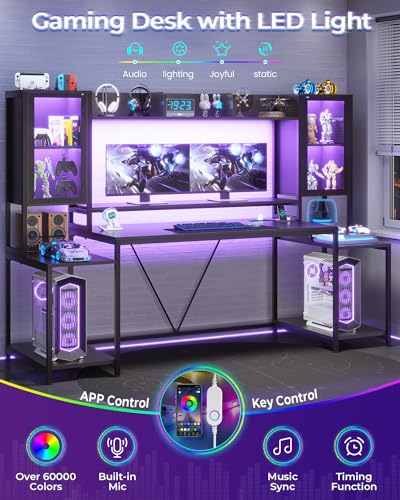


As an Amazon Associate we earn from qualifying purchases. Product prices and availability are accurate as of the date/time indicated.
Top Gaming Setups for Office Break Rooms Reviewed
Nintendo Switch OLED Model
The Nintendo Switch OLED Model is a console with a 7-inch OLED screen, 64GB of storage, and a price of $300 to $350. It can be played on a TV, as a handheld, or in tabletop mode, with Joy-Con controllers that can be shared for two-player games. It is a good choice if you want the best gaming setup for office break rooms, with a design that is fun, social, and easy to learn, and with games like Mario Kart 8 Deluxe, Super Smash Bros Ultimate, and Mario Party Superstars, that are perfect for a 15-minute break.
PlayStation 5 Slim Console
The PlayStation 5 Slim Console is a console with a 1TB SSD, 4K output, and a DualSense controller, with a price of $450 to $500. It has a large library of games, including FIFA, Gran Turismo, and Spider-Man, and it is a good choice if you want a premium gaming setup for office break rooms, with a design that is powerful and with a console that is popular with many gamers. It is a practical option for offices with a larger budget, and with a team that likes sports and action games.
Xbox Series S Console
The Xbox Series S Console is a digital console with a 512GB SSD, 1440p output, and a price of $280 to $350. It works with Xbox Game Pass, which gives you access to hundreds of games for a monthly fee, and it is a good choice if you want a budget gaming setup for office break rooms, with a design that is compact, affordable, and easy to use. It is a practical option for offices that want many games without buying each one separately, with a console that is small enough to fit on a shelf.
LG UltraGear 27GP850-B 27 in Monitor
The LG UltraGear 27GP850-B is a 27-inch monitor with a 165Hz refresh rate, a 1440p resolution, and a price of $300 to $400. It has a Nano IPS panel, with a clear, bright image, and it is a good choice if you want a monitor for an office break room gaming setup, with a design that works for both a console and a PC, and with a screen that is large enough for two players to see clearly, without being so large that it dominates the room.
Secretlab Titan Evo Gaming Chair
The Secretlab Titan Evo Gaming Chair is a gaming chair with adjustable lumbar support, 4D armrests, and a price of $500 to $550. It is made from durable materials, with a design that is comfortable for long sessions, and it is a good choice if you want a premium chair for an office break room, with a design that is known for comfort and durability. It is a practical option for offices that want a chair that will last for many years, although it is more expensive than a standard office chair, and it may be too large for a very small break room.
HyperX Cloud II Gaming Headset
The HyperX Cloud II Gaming Headset is a wired headset with 7.1 surround sound, memory foam ear cushions, and a price of $70 to $100. It has a detachable microphone, a design that is comfortable for shared use, and a sound that is clear for gaming and for video calls. It is a good choice if you want a headset for an office break room, with a design that is durable, easy to clean, and with a headset that can be shared between players, with replaceable ear cushions for hygiene.
Buying Guide: How to Choose the Best Gaming Setup for Office Break Rooms
Start with space, budget, and your team. Look at your break room size: a small room of 100 square feet is enough for one console, one TV or monitor, and two chairs, while a larger room of 300 square feet can fit two stations, with a console and a PC, and with a sofa for spectators. A gaming setup for a break room typically costs $600 to $1500, depending on whether you choose a Switch, a PlayStation, or a PC, with a Switch setup costing about $600 to $800, including a TV, and a PlayStation setup costing about $900 to $1200, including a TV and a chair. Ask your team what games they like, with a quick survey, before you buy, because a setup that no one uses is a waste of money.
Next, check console, display, and games. Look for a console that is easy to start, with a design that has no login required, or with a shared account that everyone can use, so anyone can pick up a controller and play in seconds. A Nintendo Switch is the easiest console for a break room, because it has no complex menus, and its games are easy to learn, while a PlayStation 5 is better if your team likes more complex games. A display with a size of 43 to 55 inches is best for a break room TV, with a 4K resolution and a low input lag, so games look clear and responsive, while a 27-inch monitor is better for a PC setup, with a 165Hz refresh rate for smooth gameplay. Choose games that are social, with two to four players, with a short match time of 5 to 15 minutes, and with a design that is fun to watch, such as Mario Kart, Rocket League, or FIFA.
Check seating, accessories, and hygiene. Look for seating that is comfortable, durable, and easy to clean, with a gaming chair, such as the Secretlab Titan Evo, or with a simple sofa that can fit two to three people, and with a design that is easy to move. A headset, such as the HyperX Cloud II, is useful if your break room is near a work area, because it lets players hear the game without disturbing others, although you should also have a speaker mode for social games. A second controller is essential, because most break room games are multiplayer, and a charging dock is useful, so your controllers are always charged. For hygiene, use replaceable ear cushions for headsets, wipe down controllers with a disinfectant wipe after each use, and provide hand sanitiser in your break room.
Consider noise, time limits, and office rules. A gaming setup in a break room can be noisy, with cheering, music, and game sounds, so place your setup away from quiet work areas, or use a headset, and set a volume limit that is comfortable for everyone. Set a time limit for play, such as 15 to 30 minutes per session, with a sign-up sheet or a timer, so everyone gets a turn and no one spends their whole break gaming. Set clear rules: no competitive games that cause arguments, no games with violent or adult content during work hours, and no food or drinks near your console or monitor. A gaming setup that is well-managed will help your team relax and connect, while a setup with no rules can cause distractions and conflicts.
Finally, set a realistic budget and a maintenance plan. A basic gaming setup for an office break room, with a Nintendo Switch OLED, a 43-inch TV, and two controllers, costs about $600 to $800, and it is enough for most offices. A mid-range setup, with a PlayStation 5 Slim, a 55-inch TV, a gaming chair, and a headset, costs about $1200 to $1500, and it is worth it if your team games regularly. A premium setup, with two stations, a PC, and a large TV, can cost $2500 or more, and it is best for a large office with a dedicated gaming room. Do not buy a setup based only on price. Choose one that is social, simple, and durable, with games that your team actually likes, and with a maintenance plan that includes cleaning, updating, and replacing controllers when they wear out.
How to Set Up a Gaming Station in an Office Break Room
To set up a gaming station in an office break room, place your TV or monitor on a stable stand, at eye level, with your console on a shelf below it, and with cables organised with a cable tray, so no one trips. Place two chairs in front of your TV, with enough space for players to move, and with a small table nearby for controllers and snacks. Connect your console to your TV with an HDMI cable, set up a shared account with no password, or with a password that everyone knows, and download your games, with updates set to automatic, so your setup is always ready. Put up a sign with your break room rules, with a time limit and a sign-up sheet, and provide wipes for controllers, so your setup stays clean and ready for the next player. A gaming setup that is set up correctly will be easy to use, with a design that is inviting and with a room that people want to spend time in.
Frequently Asked Questions
What is the best console for an office break room?
For an office break room, the best console is the Nintendo Switch OLED, with a price of $300 to $350, because it has many party games, it is easy to learn, it can be played on a TV or as a handheld, and it is durable enough for shared use. The PlayStation 5 Slim, with a price of $450 to $500, is also a good choice if your team likes sports, racing, or action games, with a larger library and better graphics, although it is more expensive. The Xbox Series S, with a price of $280 to $350, is a good budget option, with Xbox Game Pass giving you access to hundreds of games. Choose a console based on your team’s games: Switch for party games, PlayStation for sports and action, Xbox for Game Pass value.
How much should a company spend on a break room gaming setup?
A company should spend $600 to $1500 on a break room gaming setup, depending on size and quality. A basic setup, with a Nintendo Switch OLED, a 43-inch TV, and two controllers, costs about $600 to $800, and it is enough for most small offices. A mid-range setup, with a PlayStation 5 Slim, a 55-inch TV, a gaming chair, and a headset, costs about $1200 to $1500, and it is worth it if your team games regularly. A premium setup, with two stations, a PC, and a large TV, can cost $2500 or more, and it is best for a large office with a dedicated gaming room. A gaming setup is an investment in team morale, with a design that can help people relax, connect, and recharge, although it should not replace other break room amenities, such as coffee, snacks, and comfortable seating.
What games are best for office break rooms?
Games that are best for office break rooms are social, easy to learn, and fun for a short break, with a match time of 5 to 15 minutes, and with a design that is fun to watch. Good games include Mario Kart 8 Deluxe, Super Smash Bros Ultimate, Mario Party Superstars, Rocket League, FIFA, and Overcooked, because they support two to four players, they are easy to learn in one minute, and they are fun for beginners and for experienced gamers. Avoid games that are violent, that take a long time to learn, or that are single-player only, because they are not social and they can cause arguments. Choose games that are rated E for Everyone, or E10+, so they are appropriate for a workplace, and rotate your games every few months, so your setup stays fresh.
How do I keep a shared gaming setup clean and working?
To keep a shared gaming setup clean and working, wipe down controllers, headsets, and chairs with a disinfectant wipe after each use, or at least once a day, and provide hand sanitiser in your break room. Use replaceable ear cushions for headsets, so each player can use a clean cushion, and use silicone covers for controllers, which are easy to clean and which protect your controllers from drops. Set your console to update automatically, so your games are always ready, and assign one person to check your setup weekly, for loose cables, for low batteries, and for worn controllers. A gaming setup that is cleaned and maintained regularly will last longer, with a design that is hygienic and with a setup that people want to use.
Related guides
- Best AAA Batteries for Office Remotes in 2026: AAA Batteries for Office Remotes
- Best Budget Tablet for Work Under 100 in 2026: Budget Tablets for Work Under $100, Office Work, and Productivity
- Best Gimbal for Office Vlogging in 2026: 7 Gimbals for Office Vlogging That Keep Your Video Smooth, Stable, and Professional in the Office
- Best Budget NAS Dust Filter for Maintenance in 2026: 7 Budget NAS Dust Filters for Maintenance With Clear Airflow, Simple Install, and Easy Use for NAS
More from Amazon
Programs that pair well with the guide above. Offers and eligibility are set by Amazon and may change.
Free shipping on eligible items, Prime Video and more. Eligible new members can start with a free trial.
Start a Prime free trialAd-free music streaming. Eligible new subscribers can start with a free trial.
Try Music Unlimited freeA Prime membership for ages 18-24 with a trial period. Eligibility is set by Amazon.
See Prime for Young AdultsAudiobooks and podcasts to listen to on the go. Eligible new members can start with a free trial.
Try Audible freeAs an Amazon Associate we earn from qualifying purchases.

Write Your Review
No reviews yet. Be the first to share your experience!