
What's inside
- Best High End Ethernet Switch for Office by Size and System
- Quick Comparison: Best High End Ethernet Switch for Office Models
- Detailed Reviews: Best High End Ethernet Switch for Office Picks
- Buying Guide: Choosing the Best High End Ethernet Switch for Office
- Frequently Asked Questions About the Best High End Ethernet Switch for Office
As an Amazon Associate I earn from qualifying purchases. This post may contain affiliate links at no extra cost to you.
The best high end ethernet switch for office is the least visible purchase in a building and the one its whole network quietly depends on, because every desk’s call, every file’s journey to a server or a cloud, every access point’s clients, every phone, camera, and printer in a modern office passes through a switch, usually in a cupboard nobody visits, at speeds and under loads its buyer chose years earlier. A high end office switch is therefore not bought for its port count alone. It is bought for headroom: port speeds that serve today’s gigabit desks and tomorrow’s faster ones, uplinks that do not become the building’s bottleneck at nine in the morning, Power over Ethernet with a budget that runs the phones and access points and cameras the office will actually hang on it, management that lets an administrator see, segment, and secure a network rather than merely hope in it, and a build — fans or fanless design, rack ears, a power supply, a warranty and support parish — suited to the room it will live in for a decade. This article buys that headroom deliberately, from the established networking houses, and it begins with the discipline that governs the whole category: count the office as it will be in three years, not as it is on the day of the order, because a switch is infrastructure, and infrastructure bought at exactly today’s size is a purchase scheduled to be repeated under pressure, at a worse price, in a worse week.
Ports must be counted in three dimensions at once: how many, how fast, and how many of them powered. Count every wired thing in the office’s three-year plan — desks that will be wired rather than left to Wi-Fi, printers, phones, access points, cameras, a server or a NAS, a door system in its lawful parish, the spare ports a growing office consumes without asking — and then add a margin of empty ports, because a switch filled to its last socket on its first day is a switch that turns every new hire into a cabling project. Port speed for desks is, in this table’s mainstream, gigabit, which serves an office workload of calls, documents, and cloud applications without breathing hard, with multigigabit classes in the Netgear, Cisco, and Ubiquiti pattern serving the desks, docks, and access points whose work — large files, local servers, Wi-Fi generations whose backhaul exceeds a gigabit — can actually use it. Uplinks are where a high end switch earns its adjective: a 10 gigabit uplink, by SFP+ or copper in each maker’s pattern, between a floor switch and a core, a server, or a NAS, removes the ceiling that twenty-four gigabit desks would otherwise share, and a buyer should insist on it wherever a server, a storage system, or a second switch is part of the plan, because an uplink is the one figure in this article that an entire office feels at once. Power over Ethernet must be budgeted as a total, in watts, from the maker’s stated PoE budget for the exact model, against the sum of the devices it will power at their stated draws — phones are modest, access points are hungrier, cameras with heaters and movement are hungriest — with headroom for the devices next year’s plan adds, because a switch whose PoE budget is exhausted does not degrade gracefully. It simply declines to power the next phone, on the morning it is needed.
Management is the second half of the word high end, and it divides this table more honestly than speed does. A managed switch, in the Cisco Business, Netgear Smart and Fully Managed, TP-Link Omada, Ubiquiti UniFi, and Aruba Instant On pattern of this guide, lets a network be segmented into VLANs, so guests, staff, phones, and cameras travel in their own parishes; lets ports be configured, monitored, and, when a desk’s cable fails at midnight, diagnosed from a desk rather than from a cupboard with a torch; and lets an office’s switches be adopted into one management system, in the controller and cloud patterns these ecosystems offer, so a three-switch office is run as a network and not as three appliances. That capability is worth its premium wherever an office has anything to segment, anyone to support remotely, or any intention of growing, which is to say in nearly every office reading an article with high end in its title. Its cost is a competence: a managed network should be set up by someone who understands what they are segmenting and why, whether that is an in-house administrator, a managed service provider, or a careful owner following the maker’s own design guidance, because a VLAN drawn wrong is a meeting’s outage with a configuration file. Security follows the same law: keep switch firmware on its maker’s rhythm, change every default credential before a switch carries traffic, restrict its management to the network parish that should reach it, and treat a switch, in an office’s security story, as a door with a logbook rather than as a wire with ambition. A high end switch also lives somewhere, and its room belongs in the purchase: a fanless class for a switch that must live in an open office, where its silence is a working condition; a fanned, rack-mounted class for a comms cupboard, where its cooling and its ears are the right parish; and in both cases a power arrangement, with a UPS in the serious offices’ pattern, that keeps the network’s heart beating through the flickers that lesser equipment blames for a morning’s mysteries.
Support and longevity close the specification, because an office switch is a decade’s tenant. Prefer, at this end of the market, a maker whose warranty, firmware life, and support conversation are stated for the exact model and are measured in years, whose replacement, if a switch fails, can be obtained inside the office’s tolerance for a dark floor, and whose ecosystem the office is content to live in, because switches, access points, and their management grow together and a mixed parish is a tax on every future change. Keep a cold spare, in a serious office’s discipline, or at least a documented configuration that can be restored onto a replacement in an hour, because a switch’s failure is never scheduled and its configuration, exported and kept, is the difference between an incident and an anecdote. This guide compares six real, currently sold high end office switch lines: Netgear ProSAFE and Smart Managed classes including its multigigabit parish, Cisco Business 250 and 350 classes, Ubiquiti UniFi Switch Pro and Enterprise classes, TP-Link Omada JetStream classes, Aruba Instant On 1930 and 1960 classes, and HPE OfficeConnect and Aruba’s wider parish in its office lines, each judged on uplink headroom, PoE budget honesty, and management an office can grow into. Model numbers and feature sets in this category change with a networking maker’s seasons, so every figure in this article should be confirmed against the maker’s current datasheet for the exact model and hardware revision before an order is placed, a caution this guide states once and means everywhere.
Our Top Picks
 NETGEAR 5-Port Gigabit Ethernet Unmanaged Network Switch Plug5 Port6.2 x 4 x 1.1 inches0.22 poundsCheck on Amazon
Best High End Ethernet Switch for Office by Size and System
The small and growing office: 24 ports, a 10G uplink, PoE with headroom
For an office of a dozen to a few dozen people, the correct purchase is the table’s working centre: a 24 port managed switch in the Netgear Smart, Cisco Business 350, or Aruba Instant On pattern, with PoE on the ports its phones, access points, and cameras need, a total PoE budget summed with headroom, and at least one 10 gigabit uplink for the server, NAS, or future second switch that a growing office reliably acquires. Such an office should choose its ecosystem by its support arrangement — the provider who will run it, the access points it will hang, the management its administrator already knows — because at this size the ecosystem is the product, and a switch whose management nobody in the building’s orbit speaks is a managed switch in name only. Let the installation be finished properly: racked or shelved securely, labelled at both ends of every cable, its configuration exported and filed, its defaults changed, because a small office’s network is usually run by a person with another job, and labels and a filed configuration are that person’s future self, thanking them.
The multi-floor and multi-switch office: a core, a system, one management parish
An office across floors or buildings should buy a system in one maker’s ecosystem — UniFi, Omada, Cisco, or Aruba in this table’s pattern — with a core switch whose uplinks and capacity are sized for the whole, floor switches adopted into the same management, and VLANs drawn, with professional help where the design exceeds the in-house skill, for staff, guests, voice, and cameras. Such an office is buying an architecture, and its switch choice should be made with its access points, its phones, and its support provider in the same conversation, because the savings from a mixed parish are spent, with interest, at the first network-wide change. Redundancy belongs in this conversation at its honest level: a spare switch, a documented configuration, and a UPS are attainable at this size, while duplicated cores and stacked switches, in the classes that offer them, are for the office whose downtime is priced by the hour, and should be bought on that pricing and not on a feature list’s momentum.
The creative, data, and server-heavy office: multigigabit and a storage uplink
An office whose work is large files — a studio, an engineering practice, a data team, a media house — should spend this table’s premium where its day can feel it: multigigabit ports for the desks and the NAS that move the files, 10 gigabit as the floor rather than the ceiling of its uplinks, and a switch whose backplane and whose stated figures, read from its datasheet, carry the whole office’s nine o’clock surge without becoming its subject. Such an office should also separate its conversations: the switch that serves its storage and its servers is infrastructure of a different seriousness from a desk switch, and conflating them to save a line in a budget is how a render queue comes to share a parish with a reception phone. Let its network be designed, or at least reviewed, by someone who has built one like it, because at this level a switch is a component in a system whose bottlenecks move, and the money for one professional review is the cheapest performance in this entire article.
Quick Comparison: Best High End Ethernet Switch for Office Models
| Model | Key Specs | Best For | Typical Price Range | Rating |
|---|---|---|---|---|
| Netgear Smart and Pro Managed Classes (24-48 port patterns) | Port count and speed classes as maker states by model, PoE budget classes, SFP+ uplink and management classes | Best high end ethernet switch for office overall | $400 – $1,200 by ports and PoE | 4.6 / 5 |
| Cisco Business 250 and 350 Classes | Port and PoE classes as maker states by model, management and uplink classes, support classes | Best managed standard | $450 – $1,400 by ports and PoE | 4.6 / 5 |
| Ubiquiti UniFi Switch Pro and Enterprise Classes | Port and speed classes as maker states by model, PoE budget classes, UniFi management classes | Best ecosystem with UniFi Wi-Fi | $400 – $1,100 by model | 4.5 / 5 |
| Aruba Instant On 1930 and 1960 Classes | Port and PoE classes as maker states by model, management and uplink classes | Best simple high end | $350 – $1,000 by ports and PoE | 4.5 / 5 |
| TP-Link Omada JetStream Classes | Port and PoE classes as maker states by model, Omada management and uplink classes | Best value managed system | $300 – $900 by ports and PoE | 4.4 / 5 |
| HPE and Aruba Office Classes (wider parish) | Port and PoE classes as maker states by model, management, warranty and support classes | Best support and longevity | $500 – $1,600 by model | 4.5 / 5 |

TP-Link 8 Port Gigabit Ethernet Network Switch - Ethernet Splitter | Plug & Play | Fanless | Sturdy Metal w/ Shielded Traffic Optimization | Unmanaged | Lifetime Protection (TL-SG108)
As an Amazon Associate we earn from qualifying purchases. Product prices and availability are accurate as of the date/time indicated.
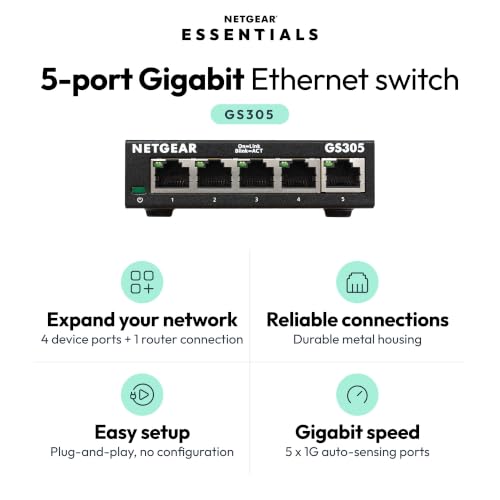
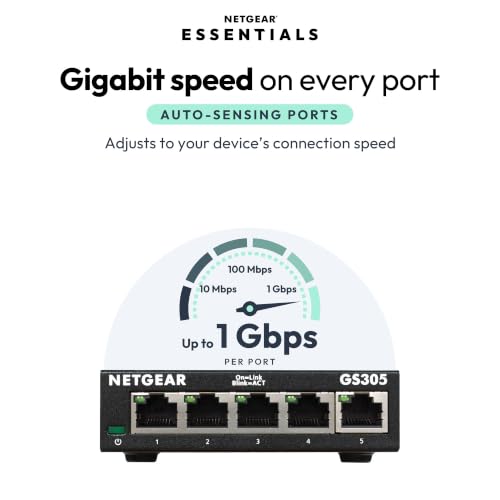
NETGEAR 5-Port Gigabit Ethernet Unmanaged Network Switch Plug & Play GS305 | Home & Office, 5 x 1G Ports, Reliable Wired Connection, Metal Case, Fanless & Silent, Compact, Desktop or Wall Mount




As an Amazon Associate we earn from qualifying purchases. Product prices and availability are accurate as of the date/time indicated.

UGREEN 24 Port Gigabit Switch, Rackmount 4 Mode Plug & Play Ethernet Switch | Unmanaged Network Splitter for Office & Business, Metal Fanless Desktop & Wall Mount Hub for NAS, PC, Printer, Router
As an Amazon Associate we earn from qualifying purchases. Product prices and availability are accurate as of the date/time indicated.
Port count and speed by port type, PoE standard and total PoE budget, uplink type and count, switching capacity and forwarding figures in the maker’s terms, management type, fan or fanless design, rack provision, and warranty are each maker’s specification for the current exact model and hardware revision, to be confirmed on its current datasheet before purchase. Prices are typical street ranges and vary strongly with port count, PoE budget, and port speed. Ratings reflect high end office suitability: uplink and backplane headroom for a whole office’s peak, a PoE budget that survives a three-year device plan, management and security provisions an administrator can actually run, acoustic and physical fit for its room, and support and firmware life across a decade’s tenancy.
Detailed Reviews: Best High End Ethernet Switch for Office Picks
1. Netgear Smart and Pro Classes – Best Overall
Netgear’s smart and pro managed classes lead because they cover the office parish’s whole span in one language — gigabit and multigigabit ports, PoE budgets sized for real device plans, SFP+ uplinks, and management from a careful smart tier to a fully managed one — behind a support and warranty parish a business can file. For most growing offices, the right Netgear class is the purchase with the fewest remaining decisions.
Sum its PoE budget against your three-year device list before you order, as this article directs for every row. A Netgear so sized will be forgotten in its cupboard for years, which for a switch is the summit of praise, and its administrator will think of it only when a report, cleanly produced, answers a question in a meeting.
2. Cisco Business Classes – Best Managed Standard
Cisco’s Business 250 and 350 classes compete on the managed network’s grammar: segmentation, quality provisions for voice in its patterns, and an administration language that the world’s support providers speak as a first tongue. For an office run by a provider, or intending to be, that fluency is a working asset and not a logo’s tax.
Let its configuration be drawn by a hand that knows the grammar, and filed when it is finished. A Cisco so installed will carry an office’s growth in its stride, and its owner will discover, at the first remote diagnosis that saves a site visit, what the premium over a lesser parish was actually buying.
3. Ubiquiti UniFi Switch Classes – Best Ecosystem
Ubiquiti’s UniFi switch classes serve the office whose Wi-Fi is, or will be, UniFi, with a single management parish for switches and access points that a small team can run with genuine pleasure, in port and PoE classes across the office sizes in this table. For a self-administered office, that unity is the most usable form of high end in this guide.
Keep its controller and its configurations backed up as the system’s crown jewels. A UniFi office so kept can be understood from one screen by one person, which is a resilience small offices rarely achieve by any other route, and its switches will be the least of its administrator’s worries.
4. Aruba Instant On Classes – Best Simple High End
Aruba’s Instant On classes bring an enterprise house’s build and manners to an office that wants high end hardware without a network engineer’s calendar: managed provisions in its pattern, presented for a small business’s hand, with PoE and uplink classes that respect a three-year plan. For an office buying seriousness without ceremony, it is the table’s most graceful row.
Confirm its management parish suits whoever will run it, in the cloud or locally as its models provide. An Instant On so matched will give a small office a grown-up network it can actually operate, which is a rarer achievement in this category than any speed figure in this article.
5. TP-Link Omada JetStream Classes – Best Value System
TP-Link’s Omada JetStream classes give a budget with ambitions the managed system’s whole shape — controller management in its pattern, PoE and uplink classes across the office sizes, access points in the same ecosystem — at prices that let a small office buy headroom instead of apology. For a growing business equipping a network whole, its arithmetic is the most persuasive in this table.
Spend the saving on the installation’s unglamorous half: cabling, labelling, a UPS, and a filed configuration. An Omada system so finished will be indistinguishable, to the office that uses it, from systems twice its price, and its owner will have learned where a network’s money truly lives.
6. HPE and Aruba Office Classes – Best Longevity
HPE’s and Aruba’s wider office classes close the table where an office buys a decade: support, firmware life, and warranty provisions in their makers’ terms that suit a business whose network cannot be a hobby, with port and PoE classes across the serious sizes. For a practice, a clinic’s office parish in its lawful arrangements, and any firm whose downtime is billed, that longevity is the specification.
Buy it through the channel its support expects, and record its configuration and its credentials in the office’s proper keeping. An HPE-class switch so owned will be a line in an asset register for years and a subject in no meeting ever, which is the precise biography an office switch should have.
Buying Guide: Choosing the Best High End Ethernet Switch for Office
Count three years of ports, watts, and uplinks, then choose an ecosystem
Count every wired device in a three-year plan, add a margin of empty ports, sum the PoE draw of every phone, access point, and camera at their stated figures against a switch’s total stated PoE budget with headroom, and insist on a 10 gigabit uplink wherever a server, a NAS, or a second switch is in the plan. Choose the ecosystem — Netgear, Cisco, UniFi, Omada, Aruba, HPE — by who will run it and what access points and phones will live on it, because management fluency is worth more than a marginal figure in a datasheet. Confirm every figure on the maker’s current datasheet for the exact model and revision, including its fan or fanless design against the room it will live in, and price the installation whole: the switch, its cabling and labelling, its UPS, and the professional time, where the design needs it, to configure it properly.
Install it like infrastructure, secure it like a door
Rack or shelf the switch securely with its cooling unobstructed, label every cable at both ends, and photograph the finished cupboard for the office’s records. Before it carries traffic, update its firmware to its maker’s current release, change every default credential, restrict its management to the parish that should reach it, and draw its segmentation — staff, guests, voice, cameras — with a hand that understands it, testing each parish’s access before the office depends on it. Export its configuration and file it with the network’s documentation and its credentials in their proper keeping, put its power on a UPS where the office’s seriousness argues for one, and agree, in writing inside the team, who may change the network and how a change is recorded, because most office network failures are a change’s biography rather than a component’s, and a logbook is cheaper than a diagnosis.
Keep its firmware, its spare, and its headroom, and replace it on a plan
Keep firmware on its maker’s rhythm, reviewed rather than automatic where the office’s change discipline prefers, keep the filed configuration current after every change, and hold a spare — a switch, or at least a documented path to one inside a day — proportioned to the cost of a dark floor in your building. Watch its headroom as the office grows: ports, PoE watts, and uplink load are a switch’s three fuel gauges, and a planned upgrade at a gauge’s three quarters is a project, while the same upgrade at its empty mark is an emergency. Replace a switch on a plan, at the end of its support life or its headroom, and pass the old one, wiped of its configuration and credentials, to a lesser parish or a proper disposal. The best high end ethernet switch for office is finally an invisible headroom: ports waiting, watts in reserve, an uplink with a ceiling nobody has met, and a configuration somebody filed — and any switch in this table, bought by that three-year count, installed as infrastructure, and kept on that rhythm, will carry an office’s work for a decade without once being the subject of its Monday, which is the whole and sufficient ambition of the category.
Frequently Asked Questions About the Best High End Ethernet Switch for Office
What is the best high end ethernet switch for office?
Netgear’s smart and pro managed classes lead this table overall, with Cisco’s Business classes as the managed standard, Ubiquiti’s UniFi classes for an office in that Wi-Fi ecosystem, Aruba’s Instant On classes for simple high end, TP-Link’s Omada classes for a value system, and HPE’s classes for support and longevity. The best switch for you must cover three years of ports with a margin, a total PoE budget, summed from its maker’s datasheet, that exceeds your three-year device plan, and a 10 gigabit uplink wherever a server, storage, or a second switch is planned. Choose its ecosystem by who will manage it, confirm every figure on the current datasheet for the exact model, and have it configured and filed by a competent hand. A switch so bought will be forgotten for years, which is its job.
How many ports and how much PoE does an office switch need?
More of both than the office has today, counted honestly. Count every wired desk, printer, phone, access point, camera, server, and system in a three-year plan, add the spares a growing office consumes, and buy the port count that leaves a clear margin empty on the day of installation — the common office answers land in the 24 and 48 port classes of this table. For PoE, add the stated draw of every powered device the switch will serve, now and in the plan, and choose a total PoE budget, from the maker’s datasheet for the exact model, that exceeds that sum with headroom, because a PoE budget is a single pool and its exhaustion arrives as a new phone that will not power on the morning it is needed. If the sum is anywhere near a model’s budget, buy the next class. In infrastructure, headroom is not waste. It is the difference between a purchase and a postponement.
Does an office need a managed switch, or is unmanaged enough?
An office with anything to segment, anyone to support, or any plan to grow needs a managed switch, which is why every row in this high end table is one. Management is what lets guests be kept off the staff network, phones be given their own parish and priority in the maker’s patterns, a failing port be diagnosed from a desk, and several switches be run as one network under a controller or a cloud parish. An unmanaged switch is a sound tool for a tiny, flat, single-room network with nothing to separate and no one to call, and it is bought, knowingly, at the price of having no answers when the network misbehaves. The managed premium also buys a duty: the network should be configured by someone who understands its segmentation and security, its defaults changed, its firmware kept, and its configuration filed. Bought with that competence arranged, a managed switch is an office’s quietest form of professionalism.
What is the difference between gigabit, multigigabit, and 10G on an office switch?
They are the speeds of its ports, and they should be assigned where the work can feel them. Gigabit ports serve the ordinary desk — calls, documents, cloud applications, printing — with room to spare, and they are the correct mainstream of an office purchase. Multigigabit ports, in the classes this table’s makers offer, serve the desks, docks, and access points whose work exceeds a gigabit: a workstation moving large files to local storage, a current Wi-Fi access point whose combined clients can offer more than a gigabit of backhaul. A 10 gigabit port belongs, in most offices, on the uplink and the storage parish — between switches, and to a server or a NAS — because it is the shared road the whole office’s traffic to its files travels, and its ceiling is the one every desk meets at once at nine in the morning. Buy gigabit for desks, multigigabit where a named workload argues, and 10G for the roads between, and confirm each port type’s count on the exact model’s datasheet, because a switch’s headline speed is usually the biography of a few of its ports and not of all of them.
Related guides
- Best AAA Batteries for Office Remotes in 2026: AAA Batteries for Office Remotes
- Best Budget Tablet for Work Under 100 in 2026: Budget Tablets for Work Under $100, Office Work, and Productivity
- Best Gimbal for Office Vlogging in 2026: 7 Gimbals for Office Vlogging That Keep Your Video Smooth, Stable, and Professional in the Office
- Best Budget NAS Dust Filter for Maintenance in 2026: 7 Budget NAS Dust Filters for Maintenance With Clear Airflow, Simple Install, and Easy Use for NAS
More from Amazon
Programs that pair well with the guide above. Offers and eligibility are set by Amazon and may change.
Free shipping on eligible items, Prime Video and more. Eligible new members can start with a free trial.
Start a Prime free trialAd-free music streaming. Eligible new subscribers can start with a free trial.
Try Music Unlimited freeA Prime membership for ages 18-24 with a trial period. Eligibility is set by Amazon.
See Prime for Young AdultsAudiobooks and podcasts to listen to on the go. Eligible new members can start with a free trial.
Try Audible freeAs an Amazon Associate we earn from qualifying purchases.

Write Your Review
No reviews yet. Be the first to share your experience!