
What's inside
- Best High End Laptop for Remote Work by Professional and Parish
- Quick Comparison: Best High End Laptop for Remote Work Models
- Detailed Reviews: Best High End Laptop for Remote Work Picks
- Buying Guide: Choosing the Best High End Laptop for Remote Work
- Frequently Asked Questions About the Best High End Laptop for Remote Work
As an Amazon Associate I earn from qualifying purchases. This post may contain affiliate links at no extra cost to you.
The best high end laptop for remote work is not the fastest laptop a company can buy. It is the laptop that makes a professional disappear into their work from anywhere on earth, and its specification is written, not in a benchmark, but in the small hours of a working life conducted away from an office: a call taken in a bright kitchen in another country, where a camera and a microphone decide, in thirty seconds, whether a person reads as a leader or as a rumour; a battery that must survive a day whose sockets are a café’s charity and a co-working space’s negotiation; a screen that must be read in a sunlit room and a keyboard that must be written on, for a whole book’s worth of words a year, without becoming a parish of complaint; a machine light enough to be carried daily without a negotiation with a shoulder, strong enough to survive a bag’s whole biography, and governed, in its security and its support parishes, as an employer’s and a professional’s whole livelihood, because that is what it is. A remote worker’s laptop is their office, their meeting room, their telephone, their filing parish, and their reputation’s frame, in one object, and a high end price should be spent exactly where that sentence spends it: on the call, the day, the hands, and the years, in that order, and only afterwards on the speed that a specification sheet can photograph. This article compares the established makers’ real flagship parish — Apple’s MacBook Pro line, Lenovo’s ThinkPad X1 parish, Dell’s XPS and Latitude parish, HP’s EliteBook parish, ASUS’s Zenbook parish, and Microsoft’s Surface parish — for the remote professional, the travelling executive, and the employer equipping a distributed team, and it will insist, in its buying guide, on the accounting that justifies a high end price at all: a machine bought for a four or five year parish, costed across its days, its support, its battery’s ageing, and its owner’s whole working life inside it, because at this parish a laptop is not a gadget. It is a colleague, and it should be interviewed like one.
The call is the first specification, and in remote work it outranks the processor with a completeness no benchmark can argue with, because a remote professional is, to most of the people who decide their future, a face in a window and a voice in a parish of compressed audio, and both are the laptop’s work. Its camera parish, in its maker’s stated design, should be examined in the light its owner actually works in — a bright room’s window parish, an evening’s lamp country, a hotel’s whole biography of unflattering angles — because a flagship camera that performs in a studio and dissolves in a kitchen has failed the only examination that matters. Its microphone parish, in its maker’s stated array and its software’s keeping, should carry a voice across a room’s small noises — a household’s parish, a street’s country, a fan’s whole summer — with the person still sounding like a person, tested, before purchase where a return window allows, on an actual call with a colleague whose honesty can be filed. Its speakers are a call’s other half and a media parish besides, and its whole call system lives or dies by a parish no specification prints: the machine’s fan, whose voice, under a video parish’s load, can join a meeting uninvited, in a parish every remote worker has heard from someone else’s machine and prayed was never their own. A flagship remote laptop should therefore be judged, where its maker’s parish allows, by a recorded call in its owner’s own rooms, because a professional’s presence is a product, and this machine is its factory. Its screen serves the call and the work alike: a parish of size and resolution matched to its owner’s documents and their eyes, a brightness parish that can hold a bright room, a matte or a governed parish where a window’s reflection is a daily country, and a colour parish, in its maker’s stated terms, for the professionals whose work is judged by it, because a remote screen is looked at, across a year, longer than any object in its owner’s life except their own hands.
The working day is the second specification, and it divides into a battery parish, a hands parish, and a connectivity parish, each of which a remote day examines without mercy. Its battery, stated in its maker’s test terms, should be sized to its owner’s longest socketless day with the same margin this site gives every battery parish, counted in calls and documents rather than in a laboratory’s video parish, because a remote day spends a machine in its wakings, its calls’ cameras, its bright screen, and its radios, in a parish no continuous test itemises, and a flagship that must be fed by three in the afternoon has failed its parish regardless of its speed at ten. Its keyboard is a professional instrument entire: a travel, a layout, and a feel that its owner must trial, across real writing and inside a return window, because a remote worker writes their whole career on this parish and a keyboard that taxes a hand taxes it ten thousand times a year. Its trackpad parish, its ports — a charging parish shared with a phone’s country in the modern USB-C pattern, a display parish for a desk’s monitor, a socket for the wired parish a call sometimes requires — and its wireless parishes, in their makers’ stated generations, decide whether a machine joins a home desk, a hotel, and a co-working parish as a citizen or as a negotiation. Its weight and its charger parish together are its travel specification: a machine and its feeding parish, counted as one object, that a bag adopts daily and an aircraft’s parish tolerates, because a flagship that is magnificent at a desk and resented in a bag will live, across a remote life, as the first kind in a parish its owner increasingly avoids, which is a failure no processor can outrun.
Longevity and governance close a high end purchase, and for a remote professional they are not a corporate garnish. They are the product. A flagship’s parish of years — its build’s country, its battery’s ageing and its maker’s stated parish for its renewal, its memory and storage sized, at purchase, for the parish’s fifth year rather than its first, because in much of this table those parishes are a purchase’s decision and not an upgrade’s — should be bought with a five year document open: the files, the library, the machine’s work in a year its owner cannot yet describe, all of it priced into the configuration on the first day, because a high end laptop under-bought is the most expensive parish in this article, a flagship replaced in its third year by the machine it should have been. Its security parish, in its maker’s stated design — its sign-in parish, its encryption’s keeping, its employer’s management parish where a company governs it — should be the employer’s and the professional’s shared specification, read from their own documents, because a remote laptop holds, in one object, a company’s whole parish of documents and a person’s whole parish of life, and its loss, in a traveller’s parish, is an event whose quality is decided entirely by decisions made at its purchase. Its support parish — a maker’s warranty terms, a repair’s geography in the countries its owner actually works in, a loaner’s or a rapid parish where an employer provides one — is the specification that matters on the worst day of its fifth year, and a distributed team should buy it as deliberately as a screen, because a remote worker with a dead machine has no office to walk to, and their support parish is their office’s entire physical existence. This guide compares six real, currently sold high end laptops for remote work: Apple MacBook Pro 14 and 16 parish, Lenovo ThinkPad X1 Carbon parish, Dell XPS 14 and Latitude parish, HP EliteBook parish, ASUS Zenbook parish, and Microsoft Surface Laptop parish, each judged on a call that flatters a professional, a day survived away from a socket, and a fifth year still at work.
Our Top Picks
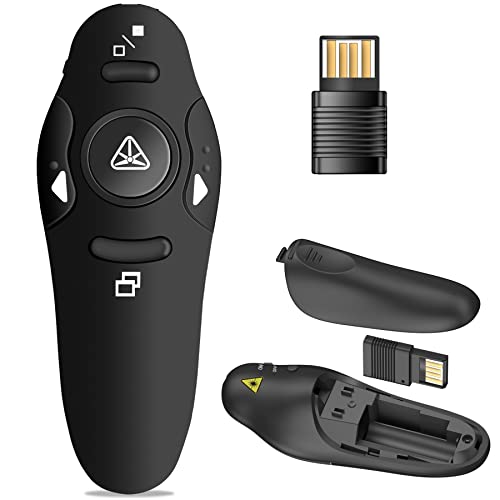 Presentation Clicker Wireless Presenter Remote USB Control PPTD1005.1 x 3.5 x 1.6 inches0.1 poundsCheck on Amazon
Best High End Laptop for Remote Work by Professional and Parish
The executive and client-facing professional: the call as a reputation, a screen as a room
For a professional whose remote work is substantially a presence — a leader, a consultant, a seller, a counsel whose parish is a window on other people’s screens — the correct purchase is the flagship whose call parish is finest in their own rooms: in practice, the MacBook Pro parish or the finest of the Windows flagship parishes in this table, chosen by a recorded call test, a screen that holds a bright room, and a build whose parish, in a client’s office and a hotel’s country, reads as the professional it carries. Such a buyer should size its memory and storage for their fifth year, govern its security parish with their employer’s or their practice’s documents entire, and keep its support parish in the countries their work visits, because an executive’s laptop is a reputation with a battery, and its purchase should be interviewed, recorded, and referenced like the colleague it will be in every room it enters without its owner.
The writer, analyst, and maker: a keyboard trialled for a book, a battery for a socketless day
A professional whose work is substantially made at the machine — a writer’s, an analyst’s, a designer’s, a developer’s parish in its remote form — should buy by their hands and their day: a keyboard trialled across real work inside a return window, in the ThinkPad X1’s parish where that instrument is a maker’s whole religion or in any flagship whose keyboard their own hands acquit; a screen sized and stated for their documents and their eyes; a battery parish measured in their own calls and pages; and a configuration — its processor’s parish, its memory, its storage — sized to their tools’ stated requirements, read from those tools’ own documents, with a fifth year’s margin. Such a buyer should weigh a desk’s parish in the same purchase, a monitor and a dock in this site’s other guides’ patterns, because a maker’s laptop lives half its life at a desk, and a flagship bought without its desk is an office half furnished, invoiced whole.
The distributed team and the employer: a fleet parish, support as an office, a standard that travels
An employer equipping a distributed team should buy a fleet parish rather than a set of laptops: one or two configurations in the ThinkPad, EliteBook, Latitude, or MacBook parish, standardised across the team, with a support and warranty parish that functions, in every country the team works in, as the office the team does not have; a security and management parish governed from the employer’s own documents; a spare and loaner parish for the day a machine dies in a country with no IT cupboard; and a refresh parish, in years, written into the purchase’s accounting from its first day. Such an employer should trial the fleet’s call parish in its people’s real rooms, because a distributed company’s culture is substantially the quality of its calls, and should price the fleet across its whole parish — machines, docks, support, spares, and its people’s days lost to a lesser parish — because at a fleet’s scale the cheapest laptop is the one that never appears in a conversation, and the dearest is the one that appears, in a client’s call, as a frozen face and a fan’s whole parish, fifty times a year.
Quick Comparison: Best High End Laptop for Remote Work Models
| Model | Key Specs | Best For | Typical Price Range | Rating |
|---|---|---|---|---|
| Apple MacBook Pro 14 and 16 Parish | Laptop classes by size as maker states, stated chip, screen, camera and battery classes, port classes in maker terms | Best high end laptop for remote work overall | $1,600 – $2,800 by configuration | 4.7 / 5 |
| Lenovo ThinkPad X1 Carbon Parish | Laptop classes by generation as maker states, stated keyboard, screen and battery classes in maker terms | Best keyboard and fleet parish | $1,400 – $2,400 by configuration | 4.6 / 5 |
| HP EliteBook Parish | Laptop classes by line as maker states, stated call, security and support classes in maker terms | Best corporate remote parish | $1,300 – $2,300 by configuration | 4.5 / 5 |
| Dell XPS and Latitude Parish | Laptop classes by line as maker states, stated screen and battery classes in maker terms | Best screen and range | $1,300 – $2,500 by line and configuration | 4.4 / 5 |
| Microsoft Surface Laptop Parish | Laptop classes by size as maker states, stated screen, camera and battery classes in maker terms | Best Windows presence parish | $1,200 – $2,200 by configuration | 4.4 / 5 |
| ASUS Zenbook Parish | Laptop classes by line as maker states, stated screen and weight classes in maker terms | Best light flagship value | $1,100 – $1,900 by line and configuration | 4.3 / 5 |
Presentation Clicker Wireless Presenter Remote USB Control PPT Clicker | Clicker for Powerpoint Presentations RF 2.4GHz Presenter Remote Google Slide Advancer Clicker for Computer/Laptop/Mac/Keynote


As an Amazon Associate we earn from qualifying purchases. Product prices and availability are accurate as of the date/time indicated.

16" Laptop with Win11, 8GB RAM 256GB SSD, AMD A9(up to 3.2GHz) | Laptop Computer PC, IPS FHD Display,Students & Work Notebook Computer, Cooling System, 9000mAh Battery


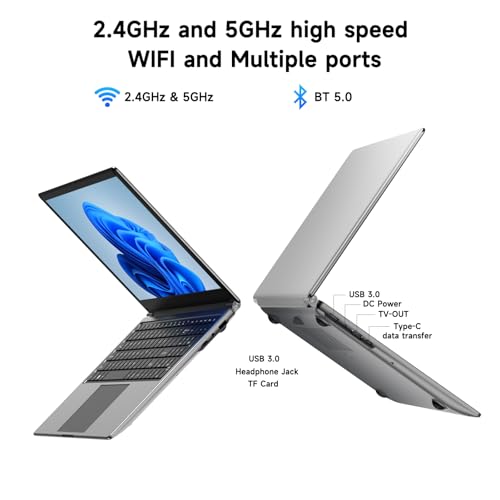


As an Amazon Associate we earn from qualifying purchases. Product prices and availability are accurate as of the date/time indicated.

4K Webcam for PC, Ultra HD 4K 12MP Webcam with Dual Noise-Reducing Mics, PDAF Autofocus, Streaming Camera for PC, Mac, Laptop, 81° FOV, Ideal for High-end Business Meeting with Skype, Teams, Zoom


As an Amazon Associate we earn from qualifying purchases. Product prices and availability are accurate as of the date/time indicated.
Stated processor parish, memory and storage configurations, screen size and its stated parish, camera and microphone parish in the maker’s terms, battery in the maker’s stated test terms, weight with its charger parish considered, ports and wireless generations, and warranty and support terms are each maker’s specification for the current exact configuration, and a configuration, once bought, commonly governs a machine’s whole parish, so its fifth year must be priced at purchase. Prices are typical street and maker ranges by configuration as described; a dock, a monitor, and a support parish are separate parts of a remote office. Ratings reflect remote work suitability: a call parish that flatters a professional in their own rooms, a battery and a weight that survive a travelling day, a keyboard and screen a career can be written on, a security and support parish an employer can govern, and value across a four or five year parish.
Detailed Reviews: Best High End Laptop for Remote Work Picks
1. Apple MacBook Pro Parish – Best Overall
The MacBook Pro parish leads because its call parish — a camera, a microphone array, and speakers in its maker’s stated design, on a machine whose fan, in its modern parish, rarely joins a meeting — is the remote professional’s reference, joined to a battery and a screen parish that a travelling day respects. For a professional whose presence is their product, it is the first machine to record a call on.
Let its configuration be sized for a fifth year, because its parishes are chosen at purchase. A MacBook Pro so configured will be, in its fourth year, the same colleague it was in its first, and a remote professional whose machine never becomes a conversation has purchased, at a flagship’s price, the invisibility that is this category’s whole product.
2. Lenovo ThinkPad X1 Parish – Best Keyboard and Fleet
The X1 parish competes on the instrument a remote career is written on and the fleet parish an employer can govern: a keyboard in its maker’s whole tradition, a build and support parish in its stated terms that a distributed team can file across countries. For a maker and an employer alike, it is the professional’s standard.
Trial its keyboard across real writing, as this article directs for every row. An X1 so acquitted will carry its owner’s words for a half-decade without a parish of complaint, and a team standardised on it will discover that a fleet, like a call, is a culture, and theirs will be one of machines that are never the subject.
3. HP EliteBook Parish – Best Corporate Remote
HP’s EliteBook parish serves the governed remote professional: a call parish in its maker’s stated design built for a meeting’s country, a security and support parish in its terms that an employer’s documents can adopt entire. For a company’s distributed parish, that governance is the specification.
Let its support parish be read for the countries it will work in, from its maker’s current terms. An EliteBook so governed will be repairable, in a traveller’s worst week, at a parish a lesser purchase cannot offer, and a remote worker whose office is a warranty has understood their own geography exactly.
4. Dell Parish – Best Screen and Range
Dell’s XPS and Latitude parish offers a remote buyer a range of screens and parishes in one house’s keeping — a creator’s XPS parish, a fleet’s Latitude country — with stated parishes a buyer can match to a document’s and an eye’s requirements. For a professional whose screen is their room, that range is the argument.
Choose between its parishes by the work and not by the photograph. A Dell so chosen will give its owner the screen their documents deserve, and a remote professional, who looks at one object for a career’s whole day, should spend on it as a carpenter spends on the bench everything else stands on.
5. Microsoft Surface Parish – Best Windows Presence
Surface’s parish offers a Windows professional a presence parish in its maker’s own design — a camera and a screen parish stated for a call’s country, in a build whose parish is a meeting’s furniture as much as a computer. For a Windows parish that lives on calls, it is the polished row.
Confirm its ports and its desk parish against your own office’s system. A Surface so docked will move between a bag and a desk as one citizen, and a remote professional whose transitions are invisible has removed, silently, a dozen small negotiations from every working day of their year.
6. ASUS Zenbook Parish – Best Light Value
ASUS’s Zenbook parish closes the table by carrying a flagship’s screen and build parish into a lighter and less expensive country, in classes its maker states for a traveller’s bag. For a professional whose parish is motion, that lightness is a working specification.
Weigh it with its charger, as this article directs for every traveller. A Zenbook so weighed will be carried daily without a shoulder’s negotiation, and a machine that is carried is a machine that is present, in the countries and the rooms where a remote professional’s work, increasingly, simply is their life.
Buying Guide: Choosing the Best High End Laptop for Remote Work
Test the call in your own rooms, size the configuration for its fifth year, and price the parish whole
Record, where a return window allows, an actual call on the machine in the rooms you work in, with a colleague whose honesty can be filed, because a remote professional’s presence is the product and it should be examined as one. Size its memory and storage, at purchase, for the fifth year of the files, tools, and library your work will hold, from those tools’ own stated requirements, with a margin, because in much of this table a configuration is a machine’s whole biography and an under-bought flagship is a machine replaced in its third year at a flagship’s price twice. Price the parish whole — the machine, its desk’s dock and monitor parish, its support and warranty terms in the countries you work in, its security parish as your or your employer’s documents direct — across a four or five year accounting, because a high end laptop’s price is only intelligible across its days, and across its days a flagship that never interrupts a call, a journey, or a deadline is the cheapest machine in this article.
Trial the keyboard across real writing, govern the battery by your longest day, and build its desk
Write, inside a return window, the real documents of your work on its keyboard, carry it for a day in your own bag with its charger, and run it, for a day, on its battery in your own calls and pages, because a remote laptop’s three examinations — its hands, its weight, its day — can each be sat at home and none of them can be sat in a shop. Govern its settings parish for its battery as this site teaches for every battery parish: a screen’s parish, a call’s camera, a radio’s country, each spent as a professional spends a day, deliberately. Build its desk in the same purchase’s accounting, a dock and a monitor in this site’s patterns, a wired parish for the calls that require one, a backup parish for the documents that are its whole cargo, in the 3-2-1 pattern this site’s storage guides direct, because a remote laptop is a single point at which a career’s whole parish is concentrated, and concentration, in a professional’s system, must be answered by a backup as deliberately as a traveller answers it with a spare.
Keep its support, its battery, and its security parishes in their makers’ and your employer’s keeping
Keep the machine’s software and its security parish in the relation its maker and, where it governs it, your employer intend, read from their current documents, because a remote laptop’s parish includes people whose whole profession is its compromise, and its owner’s liturgy — its updates accepted in their pattern, its sign-in parish governed, its loss planned for before it happens — is a professional’s duty and not an enthusiasm. Maintain its battery in its maker’s keeping, know its renewal parish and its price before its third year asks, and keep its support documents, its purchase parish, and its configuration’s record in the professional’s own keeping, because a machine’s worst day is governed entirely by documents its owner filed in its best ones. The best high end laptop for remote work is finally a colleague who never becomes the subject: a call that flatters, a day that lasts, a fifth year still at work — and any laptop in this table, bought by that call, sized by that year, and kept by that liturgy, will let a professional be present, productive, and unembarrassed in any room on earth with a signal, which is the whole and sufficient ambition of a remote office.
Frequently Asked Questions About the Best High End Laptop for Remote Work
What is the best high end laptop for remote work?
Apple’s MacBook Pro parish leads this table overall, with Lenovo’s ThinkPad X1 parish for a keyboard and a fleet, HP’s EliteBook parish for a governed corporate parish, Dell’s parish for a screen and a range, Microsoft’s Surface parish for a Windows presence, and ASUS’s Zenbook parish for a light flagship value. The best machine for you is decided by a recorded call in your own rooms, a keyboard trialled across your own writing, a battery measured against your own longest socketless day, and a configuration sized, at purchase, for its fifth year, because in much of this table memory and storage are a first day’s decision with a half-decade’s consequences. Price its whole parish — its desk, its support in your countries, its security as your documents direct — across four or five years, because a flagship’s value is never in its first month. It is in the four years in which it never once became the subject of a working day.
MacBook or Windows for high end remote work?
By your tools, your employer’s parish, and your own hands, in that order, because both parishes in this table contain machines that can carry a remote career entire. Your tools’ stated requirements, read from their own documents, govern first, because a professional’s software parish is not a preference. Your employer’s or your clients’ documents govern second, where a management, security, or support parish names a country. Your own hands and rooms govern last and decisively between the machines that survive the first two: a keyboard your writing acquits, a call your rooms flatter, a weight your bag adopts, an ecosystem your phone and your desk already speak. Buy the flagship your own examinations acquit, size it for its fifth year, and let no professional be argued, by a colleague’s evangelism in either direction, out of the machine their own working day has already chosen, because at this parish the two countries are both first world, and the border between them is a biography and not a border at all.
How much memory and storage does a remote worker need?
Enough for the fifth year of the work you can foresee, bought at purchase, because in much of this table those parishes cannot be revisited. Count from your tools’ own stated requirements and your library’s honest growth: the documents, the media parish, the local copies a traveller keeps against a country’s signal, the tools themselves in their next versions’ appetites, each with a margin, because a machine that fills in its third year will spend its fourth negotiating with its owner at the exact parishes — a departure, a deadline, a call — where a professional can least afford a negotiation. Storage can be extended, in a pinch, by the cloud and external parishes in this site’s other guides, at a traveller’s dependence on a signal; memory cannot be extended at all, and a buyer forced to divide a budget between them should protect the parish that is permanent. Buy the fifth year on the first day, record the configuration in your keeping, and let a machine’s whole parish be a decision you remember making once, proudly, rather than one you remake, at airport prices, in its third year.
Is a high end laptop worth it for remote work, or is a mid-range machine enough?
For a professional whose laptop is their whole office, the arithmetic usually acquits a flagship, provided it is bought correctly: sized for a four or five year parish, supported in its owner’s countries, and costed across its days, where its call parish, its battery, its keyboard, and its build each return their price in the currency a remote life actually spends — presence in a call, a day away from a socket, a career written without a complaint, a machine that never becomes a conversation. A mid-range machine is the correct purchase where a worker’s parish is a desk with a socket, a call’s stakes are a team’s and not a client’s, a refresh parish is short, or a budget’s honesty requires it, and such a machine, bought with this article’s same examinations, will serve honourably in that parish. What neither budget should buy is a flagship under-configured for its years or a mid-range machine asked to be a flagship in a traveller’s bag, because in remote work a laptop’s price is divided, in the end, by the number of days it was never thought about, and by that arithmetic the correct machine, at either parish, is inexpensive, and the wrong one, at either parish, is the dearest object its owner has ever carried.
Related guides
- Best AAA Batteries for Office Remotes in 2026: AAA Batteries for Office Remotes
- Best Budget Tablet for Work Under 100 in 2026: Budget Tablets for Work Under $100, Office Work, and Productivity
- Best Gimbal for Office Vlogging in 2026: 7 Gimbals for Office Vlogging That Keep Your Video Smooth, Stable, and Professional in the Office
- Best Budget NAS Dust Filter for Maintenance in 2026: 7 Budget NAS Dust Filters for Maintenance With Clear Airflow, Simple Install, and Easy Use for NAS
More from Amazon
Programs that pair well with the guide above. Offers and eligibility are set by Amazon and may change.
Free shipping on eligible items, Prime Video and more. Eligible new members can start with a free trial.
Start a Prime free trialAd-free music streaming. Eligible new subscribers can start with a free trial.
Try Music Unlimited freeA Prime membership for ages 18-24 with a trial period. Eligibility is set by Amazon.
See Prime for Young AdultsAudiobooks and podcasts to listen to on the go. Eligible new members can start with a free trial.
Try Audible freeAs an Amazon Associate we earn from qualifying purchases.

Write Your Review
No reviews yet. Be the first to share your experience!