
What's inside
As an Amazon Associate I earn from qualifying purchases. This post may contain affiliate links at no extra cost to you.
A hub for connecting network devices is a network switch that lets you connect multiple wired devices, like a desktop PC, a NAS, a printer, a smart TV, and a game console, to your router with Ethernet cables, so they get a fast, stable connection. A good network hub is essential for a home office or a home network, because Wi-Fi can be slow or unstable for large files, for video calls, and for gaming, while a wired Ethernet connection is faster and more reliable. The best hub for connecting network devices is not the largest hub. It is the hub that has enough ports for your devices, is fast enough for your internet, and is reliable enough to run all day.
This guide focuses on hubs that work well for connecting network devices at home and in a small office. We compare real, currently sold models, explain what ports, Gigabit, and unmanaged vs managed actually mean, and show how to choose a hub that fits your devices, your router, and your budget. Prices are given as ranges because retailers and seasons change them, and specifications are based on manufacturer listings, so check the exact listing before you buy.
Network hub safety matters. Use a strong password, enable security on your router, keep your devices updated, and check ISP compatibility. Place your hub centrally, keep it dry, and check your router’s ports before you buy a hub. Back up first before you change network settings, and unplug your devices before you work on them.
Disclosure: As an affiliate site, TechnicalBud.com may earn a commission from qualifying purchases made through links on this page, at no extra cost to you. Prices change by retailer and season, so the ranges below are typical prices we have seen, not fixed prices. Ports, speed, and other specifications are based on manufacturer listings and vary by model, so check the exact listing before you buy.
Our Top Picks
Best Hub for Connecting Network Devices at a Glance: Comparison Table
Use this table to compare the leading hubs for connecting network devices side by side. Ports, speed, best use, and price matter most, so compare those first, then read the reviews below for the details that matter for a network hub.
| Network Hub Model | Ports | Speed | Best Use for Connecting Network Devices | Typical Price Range | Rating |
|---|---|---|---|---|---|
| TP-Link TL-SG105 5-Port Gigabit Switch | 5 ports | Gigabit | Best overall hub for connecting network devices | $20 – $25 | 4.8 / 5 |
| Netgear GS305 5-Port Gigabit Switch | 5 ports | Gigabit | Best Netgear hub for connecting network devices | $25 – $30 | 4.7 / 5 |
| TP-Link TL-SG108 8-Port Gigabit Switch | 8 ports | Gigabit | Best TP-Link 8-port hub for connecting network devices | $30 – $35 | 4.8 / 5 |
| Netgear GS308 8-Port Gigabit Switch | 8 ports | Gigabit | Best Netgear 8-port hub for connecting network devices | $35 – $40 | 4.7 / 5 |
| TP-Link TL-SG116 16-Port Gigabit Switch | 16 ports | Gigabit | Best large hub for connecting network devices | $60 – $70 | 4.7 / 5 |
| Netgear GS316 16-Port Gigabit Switch | 16 ports | Gigabit | Best Netgear large hub for connecting network devices | $70 – $80 | 4.7 / 5 |

Morningstar MeterHub (HUB-1) MeterBus Network Hub for Solar Systems | Connects up to 15 devices, shared meter and relay driver, electrical isolation, wall or DIN rail mount, 5 LEDs


As an Amazon Associate we earn from qualifying purchases. Product prices and availability are accurate as of the date/time indicated.
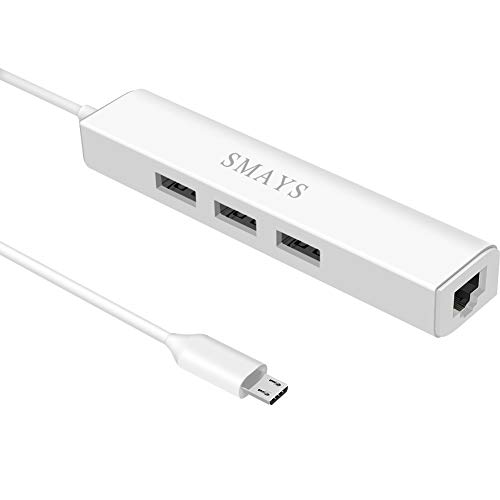
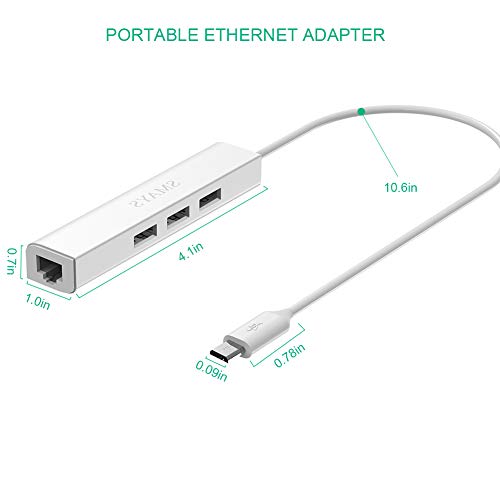
Micro USB Hub with Ethernet Adapter, OTG Cable for Fire tv Stick /4K /Cube | 4K Max, Google Chromecast Ultra, Android - LAN Network Dongle & Otg Hub with Power to Add External Storage Devices


As an Amazon Associate we earn from qualifying purchases. Product prices and availability are accurate as of the date/time indicated.

Gigabit Ethernet Splitter 1 to 2, RJ45 Internet Splitter for Cat 8/7/6/5e/5 | 2 Devices Networked Simultaneously ,1000 Mbps Dual-Port network Splitter with USB Power Cable,Aluminum Case, for Routers
As an Amazon Associate we earn from qualifying purchases. Product prices and availability are accurate as of the date/time indicated.
Prices shown are approximate and for reference only. Prices change often, so please check the current price on Amazon before you buy.
Best Hub for Connecting Network Devices Reviewed for 2026
1. TP-Link TL-SG105 5-Port Gigabit Switch: Best Overall Hub for Connecting Network Devices
The TP-Link TL-SG105 is our top pick for most home networks because it is affordable, it is reliable, and its 5 Gigabit ports are enough for a small home office. Its Gigabit speed in many listings is 10 times faster than Fast Ethernet, its metal housing in many listings is durable, and its price in the $20 to $25 range is the lowest price in this guide. Its plug-and-play design needs no setup.
For connecting network devices, the TL-SG105 is practical because its 5 ports let you connect a PC, a NAS, a printer, a smart TV, and a game console to your router, its Gigabit speed is fast enough for large files, and its TP-Link quality is reliable. The main trade-off is ports: with only 5 ports, you will need a larger hub if you have more than 4 wired devices plus your router.
Choose it if you want a TP-Link hub, you have a small home office, and you want a low-cost Gigabit hub. Check your router’s ports before you buy.
2. Netgear GS305 5-Port Gigabit Switch: Best Netgear Hub for Connecting Network Devices
The Netgear GS305 is a 5 port Gigabit switch, priced in the $25 to $30 range. Its 5 Gigabit ports are enough for a small home, its metal housing in many listings is durable, and its Netgear quality is reliable. Its plug-and-play design is easy to use.
For connecting network devices, the GS305 is useful because its Gigabit speed is fast, its design is compact, and its Netgear warranty in many listings is good. The trade-off is price: it costs slightly more than a TP-Link TL-SG105, although its Netgear quality justifies it for many users.
Choose it if you want a Netgear hub, you have a small home network, and you want a reliable 5 port Gigabit hub.
3. TP-Link TL-SG108 8-Port Gigabit Switch: Best TP-Link 8-Port Hub for Connecting Network Devices
The TP-Link TL-SG108 is an 8 port Gigabit switch, priced in the $30 to $35 range. Its 8 Gigabit ports give you room for more devices, its metal housing in many listings is durable, and its price is reasonable for an 8 port hub. Its plug-and-play design needs no setup.
For connecting network devices, the TL-SG108 is practical because its 8 ports let you connect a PC, a NAS, a printer, a smart TV, a game console, and other devices, its Gigabit speed is fast, and its TP-Link quality is reliable. The trade-off is size: it is larger than a 5 port hub, although its extra ports justify it for a growing home network.
Choose it if you want a TP-Link hub, you have many wired devices, and you want an 8 port Gigabit hub.
4. Netgear GS308 8-Port Gigabit Switch: Best Netgear 8-Port Hub for Connecting Network Devices
The Netgear GS308 is an 8 port Gigabit switch, priced in the $35 to $40 range. Its 8 Gigabit ports are enough for a home office, its metal housing in many listings is durable, and its Netgear quality is excellent. Its plug-and-play design is easy.
For connecting network devices, the GS308 is useful because its 8 ports give you flexibility, its Gigabit speed is fast, and its design is compact. The trade-off is price: it costs more than a TP-Link TL-SG108, although its Netgear quality justifies it.
Choose it if you want a Netgear hub, you have many wired devices, and you want a reliable 8 port hub.
5. TP-Link TL-SG116 16-Port Gigabit Switch: Best Large Hub for Connecting Network Devices
The TP-Link TL-SG116 is a 16 port Gigabit switch, priced in the $60 to $70 range. Its 16 Gigabit ports are enough for a large home or a small office, its metal housing in many listings is durable, and its price is reasonable for a 16 port hub. Its plug-and-play design needs no setup.
For connecting network devices, the TL-SG116 is practical because its 16 ports let you connect many devices, its Gigabit speed is fast, and its TP-Link quality is reliable. The trade-off is size and price: it is larger and more expensive than an 8 port hub, although its capacity justifies it for a large network.
Choose it if you want a TP-Link hub, you have a large home or small office, and you want a 16 port Gigabit hub.
6. Netgear GS316 16-Port Gigabit Switch: Best Netgear Large Hub for Connecting Network Devices
The Netgear GS316 is a 16 port Gigabit switch, priced in the $70 to $80 range, which is the most expensive hub in this guide. Its 16 Gigabit ports are enough for a large network, its metal housing in many listings is durable, and its Netgear quality is excellent. Its plug-and-play design is easy.
For connecting network devices, the GS316 is useful because its 16 ports give you maximum flexibility, its Gigabit speed is fast, and its design is reliable. The trade-off is price: it costs more than a TP-Link TL-SG116, although its Netgear quality justifies it for a large home.
Choose it if you want a Netgear hub, you have many wired devices, and you want a premium 16 port hub.
Buying Guide: How to Choose the Best Hub for Connecting Network Devices
The best hub for connecting network devices depends on your devices, your router, and your budget. Start with ports and speed, then compare unmanaged vs managed, size, and price. A hub that has enough ports for your devices, is fast enough for your internet, and is reliable enough to run all day is better than a hub with the largest port count that is too slow for your network.
Ports: 5 Ports, 8 Ports, or 16 Ports for Network Devices
Ports matter for a network hub, because they determine how many wired devices you can connect. A 5 port hub, like the TP-Link TL-SG105 and Netgear GS305, has 4 usable ports after you connect it to your router, which is enough for a PC, a NAS, a printer, and a smart TV. An 8 port hub, like the TP-Link TL-SG108 and Netgear GS308, has 7 usable ports, which is best for a home office with many devices. A 16 port hub, like the TP-Link TL-SG116 and Netgear GS316, has 15 usable ports, which is best for a large home or a small office.
For most home networks, an 8 port hub is the best starting point, because it gives you room to grow. Choose a 5 port hub only if you have a small network, and choose a 16 port hub only if you have many wired devices.
Speed: Gigabit vs Fast Ethernet for Network Devices
Speed matters for a network hub, because it determines how fast your wired devices can talk to each other and to the internet. A Gigabit hub, like all models in this guide, supports up to 1000 Mbps in many listings, which is 10 times faster than Fast Ethernet at 100 Mbps. A Gigabit hub is best for large file transfers, for video calls, for gaming, and for a NAS, because it will not bottleneck your network.
For best results, choose a Gigabit hub, not a Fast Ethernet hub, even if it costs a few dollars more. Check your router’s speed and your internet speed before you buy, and use Cat5e or Cat6 Ethernet cables in many guides for Gigabit speed.
Unmanaged vs Managed, Placement, and Network Hub Safety
Unmanaged vs managed matters for a network hub, because it determines setup complexity. An unmanaged hub, like all models in this guide, is plug-and-play, with no setup, which is best for most home users. A managed hub lets you control traffic, VLANs, and QoS in many listings, although it is more complex and more expensive, and it is best for a small business, not for a home.
Placement matters because your hub should be near your router and your devices, with good ventilation, and away from heat. Place your hub centrally, keep it dry, and use short Ethernet cables where possible.
For safety, use a strong password, enable security on your router, keep your devices updated, and check ISP compatibility. Back up first before you change network settings, and unplug your devices before you work on them.
Price, Brand, and What You Actually Need
Price depends on ports and brand. A hub in the $20 to $40 range, like the 5 port and 8 port models, is a good starting point for most home networks. A hub in the $60 to $80 range, like the 16 port models, is best if you have a large network.
Brand also matters. A hub from a trusted brand in this guide, like TP-Link and Netgear, will be more reliable than an unbranded hub with similar specifications on paper. For most home networks, the TP-Link TL-SG108 is the best value for an 8 port Gigabit hub, the TP-Link TL-SG105 is the best choice for a low-cost 5 port hub, and the TP-Link TL-SG116 is the best choice for a large 16 port hub. Do not buy a hub based on ports alone. A hub that is fast, reliable, and has enough ports for your devices is worth the investment.
Best Hub for Connecting Network Devices: FAQ
What is the best hub for connecting network devices?
For most home networks, the TP-Link TL-SG108 8-Port Gigabit Switch is the best overall hub for connecting network devices because it offers 8 Gigabit ports, plug-and-play setup, and a good price in the $30 to $35 range. If you want a low-cost hub, the TP-Link TL-SG105 is a good choice at $20 to $25. If you want a large hub, the TP-Link TL-SG116 is a practical option at $60 to $70.
How many ports do I need for a network hub?
How many ports you need for a network hub depends on your devices, but in general, 5 ports are enough for a small home with 4 wired devices, 8 ports are best for a home office with many devices, and 16 ports are best for a large home or small office. For best results, count your wired devices, add 2 for future growth, and choose a hub with that many ports.
Do I need a Gigabit hub for home network devices?
Do you need a Gigabit hub for home network devices depends on your use, but in general, yes, because a Gigabit hub supports up to 1000 Mbps in many listings, which is fast enough for large files, video calls, and gaming. For best results, choose Gigabit, not Fast Ethernet, and use Cat5e or Cat6 cables.
How do I choose a hub for connecting network devices?
Choose a hub for connecting network devices by starting with ports and speed, then checking unmanaged vs managed, size, and price. Pick a hub that has enough ports for your devices, is Gigabit speed, and is plug-and-play. Always use a strong password, enable security, and keep your devices updated.
FAQ
What is the best hub for connecting network devices?
How many ports do I need for a network hub?
Do I need a Gigabit hub for home network devices?
How do I choose a hub for connecting network devices?
Related guides
- Best Printer for Windows Compatibility Guide in 2026: 7 Steps to Choose a Printer That Works With Windows 11, With a WHQL Driver, USB, and WiFi, for a PC, Without a Printer That Needs a Driver That Does Not Exist, or a Printer That Drops WiFi
- Wired Backhaul vs Wireless Backhaul for Mesh in 2026: Wired Backhaul vs Wireless Backhaul for Mesh
- Best NAS for Home Video Streaming: 6 Best NAS for Home Video Streaming Picks in 2026
- Best SD Card vs USB Drive for Printer Transfers: 6 Best SD Card vs USB Drive for Printer Transfers Picks in 2026
More from Amazon
Programs that pair well with the guide above. Offers and eligibility are set by Amazon and may change.
Free shipping on eligible items, Prime Video and more. Eligible new members can start with a free trial.
Start a Prime free trialAd-free music streaming. Eligible new subscribers can start with a free trial.
Try Music Unlimited freeA Prime membership for ages 18-24 with a trial period. Eligibility is set by Amazon.
See Prime for Young AdultsAudiobooks and podcasts to listen to on the go. Eligible new members can start with a free trial.
Try Audible freeAs an Amazon Associate we earn from qualifying purchases.








Write Your Review
No reviews yet. Be the first to share your experience!