
What's inside
- Best Inkjet Printer for Office Workers by Office
- Quick Comparison: Best Inkjet Printer for Office Workers Models
- Detailed Reviews: Best Inkjet Printer for Office Workers Picks
- Buying Guide: Choosing the Best Inkjet Printer for Office Workers
- Frequently Asked Questions About the Best Inkjet Printer for Office Workers
As an Amazon Associate I earn from qualifying purchases. This post may contain affiliate links at no extra cost to you.
The best inkjet printer for office workers is judged by a calendar, not by a demo page. Any printer can produce one beautiful document on the day it is unboxed; the office worker’s question is what the machine is like in month nine — when the ink system has either become a background utility or a recurring errand, when the paper tray’s size has either matched the office’s rhythm or interrupted it daily, when the automatic document feeder has scanned a forty-page contract without a jam, or has not, in front of a deadline. Modern office inkjets divide, above all, by how they hold their ink: refillable tank printers, in their makers’ stated designs, carry thousands of pages of ink in bottles you pour, at a cost per page that changes the office’s behaviour — print the draft, print the copy for the file, print in colour without a meeting about it. Cartridge printers answer with speed, polish, and high-yield cartridge classes in their makers’ stated ranges. Both philosophies have honest champions in this table, and the office worker’s job is to choose by the office’s real monthly volume, which the buying guide will make you count, because every disappointment in this category is a volume estimate that was wrong.
The comparison fields the real, currently sold office inkjets an office worker can buy today: Epson’s EcoTank ET-4850 class, Canon’s PIXMA G7020 MegaTank class, HP’s OfficeJet Pro 9125e class and Smart Tank class, Brother’s INKvestment MFC-J4335DW class, and Epson’s WorkForce class as the cartridge-based speed answer. They are judged on the office’s evidence: stated monthly duty cycle and recommended volume in each maker’s documents, because those two numbers are the machine’s honest capacity; stated ink yields for the supplied and replacement ink, in each maker’s stated measurement terms; the paper path — tray capacity, automatic two-sided printing, and the document feeder’s stated capacity and two-sided behaviour; and the connection and security story, from Wi-Fi and Ethernet in the stated classes to the update and account arrangements each maker describes, which an office should read before the printer joins its network. Print speeds are each maker’s specification in its stated test terms for the current exact model and should be compared in those documents rather than across advertisements, because speed claims measured differently cannot be ranked honestly. Prices are typical ranges rather than exact figures, and the honest price is the printer plus a year of its ink at your volume, a sum this guide will teach you to build from the makers’ stated yields.
One placement truth precedes the table, because offices learn it the warm way. An inkjet is a machine with a print head that must stay healthy, and its makers’ guidance — in the manuals this guide keeps citing — is consistent: the printer wants regular use, clean power, and its own ink system fed as designed. An office inkjet that sits unplugged and idle for months can greet its return with clogged nozzles and a cleaning cycle’s appetite, while the same machine printing weekly lives for years; and a tank printer filled with anything other than its maker’s ink for that model is a warranty argument and a quality problem in a bottle. Buy the machine whose ink system you will actually feed, place it where it will actually be used weekly, connect it as its maker directs with its firmware kept current under your office’s update policy, and the category’s reliability stories — which are mostly placement and feeding stories — will be told about someone else’s office.
Our Top Picks
Best Inkjet Printer for Office Workers by Office
The paper-heavy small office: tank printers and the end of the ink errand
For the office printing hundreds to a few thousand pages a month — invoices, reports, contracts, the colour handouts — the refillable tank classes, Epson’s EcoTank and Canon’s MegaTank in their stated designs, are the rational centre of this table. Their stated yields run to thousands of pages from the ink in the box and from replacement bottles in their makers’ stated terms, their cost per page falls to the level where printing behaviour relaxes, and their office features in their stated classes — document feeders, two-sided printing, fax-era completeness where offered — match the work. The tank’s tax is a first price above the cartridge machines and a print pace that is brisk rather than blistering in their stated terms; an office that counts its ink bills will pay that tax once and collect on it monthly.
The professional’s desk: OfficeJet Pro and WorkForce speed with cartridge polish
For the office worker whose printing is lighter in volume and heavier in presentation — the client letter, the proposal, the board pack — HP’s OfficeJet Pro class and Epson’s WorkForce class answer with speed in their stated terms, deep office features, and the finish that flagship cartridge machines produce, fed by high-yield cartridge classes in their makers’ stated yields. Their economics want honesty: at low volume, the cartridge’s convenience wins and the tank’s savings never arrive; at high volume, the arithmetic reverses without appeal. The dividing line is your counted monthly pages, and this guide’s buying section exists to count them before the philosophy is chosen, because the most expensive printer in this table is the right printer bought for the wrong volume.
The value office: Brother INKvestment and HP Smart Tank
Brother’s INKvestment class is the cartridge philosophy re-engineered for economy — internal ink storage and cartridge classes in Brother’s stated design and yields that aim at the tank’s running costs from the cartridge’s convenience — and Brother’s office manners, from its stated paper handling to its unglamorous reliability, suit the office that wants printing to be plumbing. HP’s Smart Tank class is that house’s tank answer, in its stated design, for the office loyal to HP’s ecosystem and its software. Both rows serve the office that has counted a middle volume and wants the middle answer, and both should be priced over a year of their makers’ stated ink yields, where their value either proves itself or politely withdraws.
Quick Comparison: Best Inkjet Printer for Office Workers Models
| Model | Key Specs | Best For | Typical Price Range | Rating |
|---|---|---|---|---|
| Epson EcoTank ET-4850 Class | Refillable tank, stated duty cycle and ink yields, ADF and duplex classes, connectivity classes per Epson documents | Best inkjet printer for office workers overall | $300 – $380 | 4.6 / 5 |
| Canon PIXMA G7020 MegaTank Class | Refillable tank, stated ink yields, ADF and duplex classes, paper handling classes per Canon documents | Best MegaTank all-in-one | $280 – $350 | 4.5 / 5 |
| HP OfficeJet Pro 9125e Class | Cartridge system, stated speeds and duty cycle, feeder and duplex classes, connectivity classes per HP documents | Best professional speed | $230 – $300 | 4.5 / 5 |
| Brother MFC-J4335DW INKvestment Class | INKvestment cartridge classes, stated yields and duty cycle, paper handling classes per Brother documents | Best value office printer | $180 – $240 | 4.4 / 5 |
| HP Smart Tank 7301 Class | Refillable tank, stated ink yields, all-in-one and connectivity classes per HP documents for the exact model | Best HP tank option | $280 – $350 | 4.4 / 5 |
| Epson WorkForce Pro WF-4830 Class | Cartridge system, stated speeds and duty cycle, dual-tray and feeder classes per Epson documents for the exact model | Best cartridge speed alternative | $200 – $280 | 4.3 / 5 |

HP OfficeJet Pro 8125 Wireless All-in-One Color Inkjet Printer, Print, Scan, Copy, ADF, Duplex Printing Best-for-Home Office, 3 Month Trial of Instant Ink Included, AI-Capable (C2VJ4A)
As an Amazon Associate we earn from qualifying purchases. Product prices and availability are accurate as of the date/time indicated.

Canon MegaTank G3270 All-in-One Wireless Color Printer | Print, Copy, Scan, Refillable Tank System, Compact Desktop Design, Home & Office Use
As an Amazon Associate we earn from qualifying purchases. Product prices and availability are accurate as of the date/time indicated.
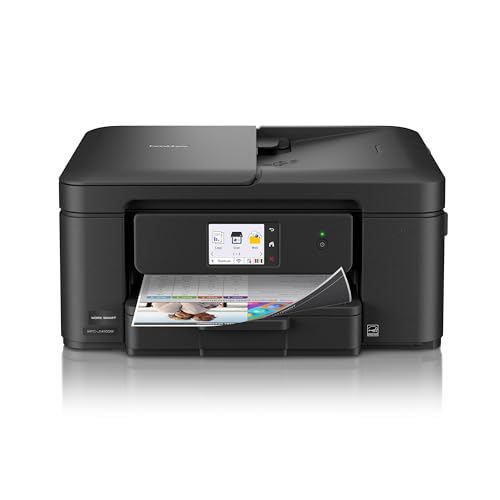
Brother Work Smart 1410 Wireless Color Inkjet All-in-One Printer with 2.7” Touchscreen and Automatic Duplex Printing | Includes Refresh Subscription Trial(1) (MFC-J1410DW)
As an Amazon Associate we earn from qualifying purchases. Product prices and availability are accurate as of the date/time indicated.
Print speeds, monthly duty cycle and recommended volume, ink yields for supplied and replacement ink, paper tray and document feeder capacities, duplex behaviour, and connectivity are each maker’s specification in its stated test terms for the current exact model and must be confirmed in that maker’s current documents before purchase. Prices are typical street ranges as described and exclude ink beyond the supplied set. Any subscription ink arrangement is governed by its maker’s current terms, which should be read before enrolment.
Detailed Reviews: Best Inkjet Printer for Office Workers Picks
1. Epson EcoTank ET-4850 Class – Best Overall
The ET-4850 class leads the office table because it assembles the whole office brief around the tank: refillable ink with stated yields in Epson’s documents that run to thousands of pages, a document feeder and two-sided printing in its stated classes, office connectivity in its stated terms, and a footprint that sits on a real desk in a real office without annexing it. Its running costs, built from Epson’s stated bottle yields, are the category’s argument in numbers: the office stops rationing colour, stops batching print jobs around a cartridge’s mood, and starts treating printing as the utility it should always have been.
Its disciplines are the tank’s disciplines, stated in its manual and repeated in this guide: feed it Epson’s ink for the model, keep it printing weekly, and let its maintenance routines run as it asks. Kept so, it is the printer an office forgets, and a forgotten printer — like a forgotten roof — is the highest praise infrastructure can earn.
2. Canon PIXMA G7020 MegaTank Class – Best MegaTank All-in-One
Canon’s MegaTank flagship class answers Epson with its own complete office assembly: stated yields in Canon’s documents in the same thousands-of-pages territory, the feeder and duplex classes the office brief requires, and Canon’s print quality tradition, which offices with an eye for colour documents will weigh in its favour. Between it and the EcoTank, the decision is made on the exact models’ stated paper handling, the offices’ existing brand habits, and the week’s prices — the healthiest kind of tie, broken by documents.
Its tank manners are the family’s: Canon’s ink for the model, regular use, firmware kept current as Canon directs. An office standardising on it across desks will find its bottles, its drivers, and its habits uniform, and uniformity across an office’s printers is an administrative virtue whose value only the person who manages printers fully understands.
3. HP OfficeJet Pro 9125e Class – Best Professional Speed
The OfficeJet Pro class is the cartridge philosophy at its most professional: speed in HP’s stated terms that leads this table’s urgency class, a deep feeder and paper story in its stated classes, security and network features in HP’s stated terms that suit a managed office, and output with the crispness client-facing work wants. For the office whose volume is moderate and whose documents represent it, it is the machine that makes the best impression per page in this guide.
Feed it honestly — HP’s high-yield cartridge classes in HP’s stated yields are its economy’s best case, and any ink subscription arrangement should be read in HP’s current terms, in full, before it is attached to an office’s card. At the right volume, its arithmetic is respectable; at the wrong one, the tank rows above are waiting, and this guide’s counting exercise will tell you which office you are.
4. Brother MFC-J4335DW INKvestment Class – Best Value Office Printer
Brother’s INKvestment class is engineered around a single insight, in Brother’s stated design: most cartridge pain is capacity, so the machine stores more ink internally and its cartridge classes state yields that move its running costs toward the tanks while keeping the cartridge’s clean, sealed convenience. Around that insight sits Brother’s office character — stated paper handling that respects envelopes and mixed stock, controls a small office can run without a manual in hand, and a price that leaves the budget’s dignity intact.
It is the value row in the honourable sense: not the cheapest machine, but the cheapest ownership for the middle-volume office, by Brother’s stated yields priced over a year. Offices that have run Brothers before will recognise the proposition and need no persuading; offices that have not should read its documents’ duty cycle against their counted volume, as with every row, and let the arithmetic introduce them.
5. HP Smart Tank 7301 Class – Best HP Tank Option
HP’s Smart Tank class brings that house’s tank to the office with its stated yields, its all-in-one completeness in HP’s stated classes, and the software ecosystem offices already standardised on HP will find familiar from the first driver. For such an office, the tank’s economics arrive without an ecosystem migration, and that continuity is a real feature in a workplace where the printer’s address book and scan workflows are institutional memory.
Confirm the exact model’s stated feeder, duplex, and connectivity classes in HP’s documents, because the Smart Tank family spans duties. Matched to the office’s counted volume, it is the tank conversion with the least organisational friction in this table, and friction, in an office, is a cost like any other.
6. Epson WorkForce Pro WF-4830 Class – Best Cartridge Speed Alternative
Epson’s WorkForce Pro class closes the table as the cartridge speed specialist: stated speeds and paper capacity classes in Epson’s documents — including dual-tray arrangements in its stated classes that suit the office juggling letterhead and plain stock — with Epson’s print engine polish for the documents that carry the office’s name. It is the answer for the office that prints in bursts of consequence rather than in rivers of routine.
Its economy should be built from Epson’s stated high-yield cartridge yields at your counted volume, without optimism, because its virtues are speed and capacity rather than the tank’s thrift. An office that counts honestly and still chooses it has bought the right machine; an office that skips the counting is referred, with respect, to the buying guide below, which is where this table’s regrets are prevented.
Buying Guide: Choosing the Best Inkjet Printer for Office Workers
Count a month of pages, then choose the ink philosophy by arithmetic
Before any model is compared, count: pull a month of the office’s real printing — from the current printer’s counter if it keeps one, from paper purchases, from a fortnight’s honest tally doubled — and separate it into black pages and colour pages, because the two economies differ. Then build each candidate’s year from its maker’s documents: the printer’s price, plus the replacement ink needed for your counted year at the maker’s stated yields for the exact cartridges or bottles, plus paper you would buy anyway excluded. The tank classes will usually win that arithmetic above a few hundred pages a month and lose it, on first price, below — with the INKvestment and high-yield cartridge classes contesting the middle — and the recommended monthly volume in each maker’s documents must contain your count with room, because a printer run at its ceiling is a printer being spent. Respect the duty cycle’s two numbers as the manual states them: the maximum is a cliff edge the machine can survive occasionally; the recommended volume is the road it can drive daily, and an office should buy for the road.
Specify the paper path and the connections like an office manager
Read the paper path as a workflow, in the makers’ documents. Tray capacity against your refill tolerance; a second tray or a rear feed in its stated class if the office runs letterhead, labels, or envelopes with any regularity, because stock juggling at a single tray is a daily tax; automatic two-sided printing in its stated terms if the office’s documents are duplex by default; and the document feeder’s stated capacity and whether its scanning and copying are single-pass two-sided or reversing, in the maker’s terms — a distinction that is invisible in a brochure and decisive across a forty-page contract. Read the connections the same way: Wi-Fi in its stated class for the flexible office, Ethernet in its stated terms where the network is wired and managed, the maker’s stated security and update arrangements read before the printer joins a network that holds client data, and the scan destinations the office actually uses — folder, email, the chosen cloud — confirmed in the maker’s current software documents rather than assumed from the category. Set the printer up under one administrator’s hand, record its settings and its admin credentials in the office’s own vault, and enrol it in the office’s update habits, because an unpatched printer is a network device with a paper tray, and it should be governed as the first of those.
Feed it, use it, and plan its whole life
Commit to the feeding discipline of the philosophy you chose: the maker’s ink for the exact model, in tanks poured carefully as the manual directs and in cartridges seated as designed, with a spare set in the cupboard before the current set is empty, because every ink system in this table announces its end at the worst available moment. Keep the machine in weekly use — an office printer usually is — and if a quiet season idles it, run the maker’s stated maintenance rather than discovering the nozzles’ opinion in the busy one. Keep its firmware current under your office’s policy, its queue and address book reviewed when staff change, and its eventual replacement planned from its page counter rather than from its failure, with the old machine’s data cleared as its maker directs and its disposal handled as the electronics it is. The best inkjet printer for office workers is finally a counted decision kept well: volume measured, philosophy priced over a year, paper path specified like a workflow, and the machine fed and used as its maker intends — and any printer in this table, chosen and kept that way, will print the office’s month, every month, without once becoming the subject of the office’s conversation, which is the complete definition of office equipment success.
Frequently Asked Questions About the Best Inkjet Printer for Office Workers
What is the best inkjet printer for office workers?
The Epson EcoTank ET-4850 class leads this table for most offices, with Canon’s PIXMA G7020 MegaTank as its tank rival, because their stated ink yields move the cost per page to utility levels while their feeders, duplex printing, and connectivity in their makers’ stated classes cover the office brief completely. HP’s OfficeJet Pro class is the pick for moderate volume with professional speed and finish; Brother’s INKvestment class is the value ownership answer for the middle volume; HP’s Smart Tank serves the HP-standardised office; and Epson’s WorkForce Pro is the cartridge speed alternative. The best one for your office is chosen by a counted month of pages — black and colour separately — priced over a year of each candidate’s stated ink yields, and checked against each maker’s recommended monthly volume, which must contain your count with room. Offices that count first are the ones whose printers are never discussed again.
Is a tank printer or a cartridge printer better for an office?
It is an arithmetic question wearing a philosophy’s clothes, and your monthly volume answers it. Refillable tank printers, in the EcoTank, MegaTank, and Smart Tank classes, carry a higher first price and a dramatically lower cost per page in their makers’ stated yields, so above a few hundred pages a month they usually own the year’s arithmetic outright — with the behavioural bonus that colour printing stops being a decision. Cartridge printers, in the OfficeJet Pro and WorkForce classes, answer with lower first prices, leading speed in their stated terms, and high-yield cartridge classes that narrow the running-cost gap at moderate volumes; Brother’s INKvestment deliberately contests the middle from the cartridge side. Below the tank’s break-even, the cartridge’s convenience is the honest winner; above it, the tank’s. The error to avoid is buying either on the other’s evidence — the tank for an office that prints fifty pages a month, whose savings never arrive, or the cartridge flagship for a three-thousand-page office, whose ink bill becomes a line item with its own opinions.
What do duty cycle and recommended volume actually mean?
They are the maker’s own statement of the machine’s capacity, in its documents, and they are the most under-read numbers in the category. The monthly duty cycle is the maximum the machine is built to survive in a month — an occasional cliff edge, not a cruising speed. The recommended monthly volume, stated alongside it, is the range the maker intends the machine to work in daily, and it is the number your office’s counted volume should sit inside, comfortably, with headroom for the busy season. A printer run month after month at its maximum will wear its rollers, its feeder, and its print head at the pace of a machine being consumed, and its failures will arrive as a pattern rather than as bad luck; a printer bought far above the office’s volume wastes money on capacity that also tends to come with a larger footprint and appetite. Match the counted month to the recommended range, confirm the match in the exact model’s documents rather than in the family’s advertising, and the machine’s reliability story will be the boring one, which in an office is the only good kind.
How do I stop an office inkjet from clogging or printing badly?
Most office inkjet grief is feeding and idleness, and both are governable. Feed the machine its maker’s ink for the exact model — in a tank, the correct bottles poured as the manual directs; in a cartridge machine, genuine or the office’s knowingly chosen cartridges in the stated classes — because ink is a chemical system matched to the print head, and improvisations present their bill as streaks, clogs, and a warranty conversation nobody wins. Keep the printer in regular use: an inkjet that prints weekly keeps its nozzles exercised, while one left idle and unplugged for a season should be returned to service with the maker’s stated cleaning and alignment routines run before the important job, not during it. Keep its paper dry and within its stated stock classes, its firmware current under the office’s policy, and its environment free of the dust and heat that offices generate around radiators and kitchenettes. When quality falters, run the maker’s diagnostic sequence in the manual’s order — nozzle check, cleaning, alignment — and stop at the step that cures it rather than repeating the deepest clean by habit, because cleaning consumes ink and head life. Governed so, the machines in this table print for years; ungoverned, any of them can be ruined, and the difference was never the badge on the front.
Related guides
- Best AAA Batteries for Office Remotes in 2026: AAA Batteries for Office Remotes
- Best Budget Tablet for Work Under 100 in 2026: Budget Tablets for Work Under $100, Office Work, and Productivity
- Best Gimbal for Office Vlogging in 2026: 7 Gimbals for Office Vlogging That Keep Your Video Smooth, Stable, and Professional in the Office
- Best Budget NAS Dust Filter for Maintenance in 2026: 7 Budget NAS Dust Filters for Maintenance With Clear Airflow, Simple Install, and Easy Use for NAS
More from Amazon
Programs that pair well with the guide above. Offers and eligibility are set by Amazon and may change.
Free shipping on eligible items, Prime Video and more. Eligible new members can start with a free trial.
Start a Prime free trialAd-free music streaming. Eligible new subscribers can start with a free trial.
Try Music Unlimited freeA Prime membership for ages 18-24 with a trial period. Eligibility is set by Amazon.
See Prime for Young AdultsAudiobooks and podcasts to listen to on the go. Eligible new members can start with a free trial.
Try Audible freeAs an Amazon Associate we earn from qualifying purchases.

Write Your Review
No reviews yet. Be the first to share your experience!