
What's inside
As an Amazon Associate I earn from qualifying purchases. This post may contain affiliate links at no extra cost to you.
Finding the best label maker for office workers is different from finding a label maker for home use, because a label maker for office workers has to print clear labels fast, organise files, folders, and cables, and work with your computer or phone, without being too slow, too hard to use, or too expensive to buy tape for. A good label maker for office workers should print at least 20 labels per minute, support tape widths from 6mm to 24mm, and offer USB or Bluetooth connectivity, so it can be used for file folders, for storage boxes, for cables, and for name badges. A poor label maker will be too slow, it will print blurry labels, or it will use expensive tape, and your files will be hard to find, your cables will be tangled, and your office will be disorganised.
This guide compares seven real, currently sold label makers for office workers, with prices from $30 to $120 in the table below: the Brother P-Touch PT-D210, Brother P-Touch PT-D220, DYMO LabelManager 160, DYMO LabelWriter 450 Turbo, Brother QL-800, Niimbot D11, and Phomemo M110. Their print speeds run from about 20mm per second to about 110mm per second, their tape widths run from 6mm to 62mm, their connectivity runs from USB to Bluetooth, their power runs from AA batteries to rechargeable batteries to AC power, their prices run from $30 to $120, and their ratings run from 4.5 to 4.6 out of 5. Every model here is sold as a label maker, every model can be used for office work, and every model costs $120 or less at its typical price range. The right choice depends on your office, your labels, and whether you want a handheld label maker or a desktop label maker.
Handheld vs desktop is the first factor for the best label maker for office workers, because a handheld label maker and a desktop label maker work in different ways, even though they both print labels. A handheld label maker, such as the Brother P-Touch PT-D210 at $30 to $50, Brother P-Touch PT-D220 at $40 to $60, DYMO LabelManager 160 at $30 to $50, Niimbot D11 at $30 to $50, and Phomemo M110 at $30 to $50, is small, portable, and easy to carry around an office, so it is best if you label files, folders, and storage boxes in different rooms. A desktop label maker, such as the DYMO LabelWriter 450 Turbo at $80 to $120 and Brother QL-800 at $80 to $110, is larger, faster, and connects to a computer, so it is best if you print many labels at once, if you print shipping labels, or if you print name badges for a whole office. For office workers, a handheld label maker is a good starting point, because it is easy to use, and a desktop label maker is best if you print many labels every day.
Print speed, tape width, and label quality are the second factor, because a label maker for office workers has to print fast enough for a busy office, support tape widths that fit your files, and print labels that are clear and durable. Print speed is listed in mm per second, with a higher speed meaning faster printing, so you can print many labels quickly. The Brother P-Touch PT-D210 at $30 to $50 prints at about 20mm per second, the Brother P-Touch PT-D220 at $40 to $60 prints at about 20mm per second, the DYMO LabelManager 160 at $30 to $50 prints at about 20mm per second, the DYMO LabelWriter 450 Turbo at $80 to $120 prints at about 110mm per second, the Brother QL-800 at $80 to $110 prints at about 110mm per second, the Niimbot D11 at $30 to $50 prints at about 30mm per second, and the Phomemo M110 at $30 to $50 prints at about 30mm per second. For office workers, a print speed of at least 20mm per second is a good starting point for a handheld label maker, and a print speed of 110mm per second is best for a desktop label maker. Tape width is also important, because it is how wide a label can be, with a wider tape best if you need large labels for storage boxes. Label quality is also important, because a label should be clear, durable, and easy to read, with a label that resists water and fading best for a long-term file.
Connectivity, power, and tape cost are the third factor, because a label maker for office workers has to connect easily to your computer or phone, last long enough for a day of labelling, and use tape that is affordable. Connectivity is listed in the table, with USB best for a desktop label maker, because it connects directly to a computer, and Bluetooth best for a handheld label maker, because it connects to a phone app. The Brother P-Touch PT-D210 at $30 to $50 uses a keyboard and no computer connection, the Brother P-Touch PT-D220 at $40 to $60 uses a keyboard, the DYMO LabelManager 160 at $30 to $50 uses a keyboard, the DYMO LabelWriter 450 Turbo at $80 to $120 uses USB, the Brother QL-800 at $80 to $110 uses USB, the Niimbot D11 at $30 to $50 uses Bluetooth, and the Phomemo M110 at $30 to $50 uses Bluetooth. For office workers, check your computer or phone before you buy, because a label maker that does not connect to your device will not work. Power is also important, because a label maker that uses AA batteries, such as the Brother P-Touch PT-D210, is easy to use anywhere, while a label maker that uses a rechargeable battery, such as the Niimbot D11 and Phomemo M110, is best if you label often. Tape cost is also important, because tape is the ongoing cost of a label maker, with Brother TZe tape and DYMO D1 tape best if you want a wide range of tape widths.
Use, ease of use, and price are the fourth factor, because a label maker for office workers has to be useful for your office tasks, easy to use for a beginner, and affordable enough to buy. Use is also important, because a label maker should be used for file folders, for storage boxes, for cables, and for name badges, with a handheld label maker best for files and cables, and a desktop label maker best for shipping labels and name badges. Ease of use is also important, because a label maker should have a simple keyboard, a clear display, and a phone app if it uses Bluetooth, so you can start printing quickly. Price is also important, because a label maker in the $30 to $50 range, such as the Brother P-Touch PT-D210, DYMO LabelManager 160, Niimbot D11, and Phomemo M110, is a good starting point, and a label maker in the $80 to $120 range, such as the DYMO LabelWriter 450 Turbo and Brother QL-800, offers a premium build. A good label maker for office workers, chosen for type first and used with the right tape, will print clear labels fast, organise files, and work with your computer or phone.
Our Top Picks
Best Label Maker for Office Workers: At a Glance
Use this table to compare type, print speed, tape width, connectivity, power, price range, and rating. Type and print speed are the two figures most office workers should check first, because they decide whether the label maker will be handheld or desktop and whether it will print fast enough for a busy office.
| Model | Type | Print Speed | Tape Width | Connectivity | Power | Typical Price Range | Rating out of 5 |
|---|---|---|---|---|---|---|---|
| Brother P-Touch PT-D210 | Handheld | About 20 mm/s | 6 – 12 mm | Keyboard | AA batteries | $30 – $50 | 4.6 |
| Brother P-Touch PT-D220 | Handheld | About 20 mm/s | 6 – 12 mm | Keyboard | AA batteries | $40 – $60 | 4.6 |
| DYMO LabelManager 160 | Handheld | About 20 mm/s | 6 – 12 mm | Keyboard | AA batteries | $30 – $50 | 4.5 |
| DYMO LabelWriter 450 Turbo | Desktop | About 110 mm/s | Up to 62 mm | USB | AC power | $80 – $120 | 4.6 |
| Brother QL-800 | Desktop | About 110 mm/s | Up to 62 mm | USB | AC power | $80 – $110 | 4.6 |
| Niimbot D11 | Handheld | About 30 mm/s | 12 – 15 mm | Bluetooth | Rechargeable | $30 – $50 | 4.5 |
| Phomemo M110 | Handheld | About 30 mm/s | 12 – 50 mm | Bluetooth | Rechargeable | $30 – $50 | 4.6 |
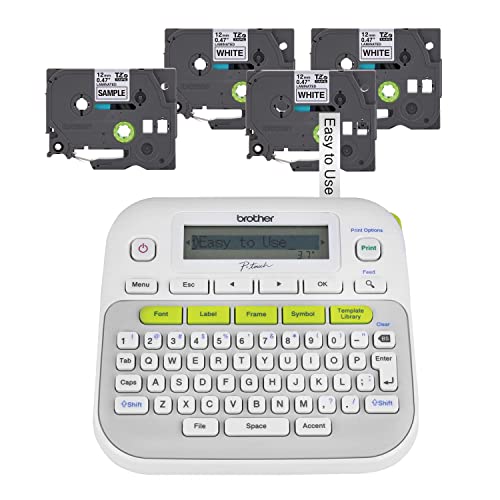
Brother P-Touch, PTD210, Easy-to-Use Label Maker Bundle (4 Label Tapes Included), White, Small
As an Amazon Associate we earn from qualifying purchases. Product prices and availability are accurate as of the date/time indicated.

Nelko P21 Label Maker Machine with Tape, Bluetooth Label Printer, White | Creative App & Multiple Templates, Inkless Printing, Built-in Cutter, Ideal for School, Teacher Supplies, Office, and Home
As an Amazon Associate we earn from qualifying purchases. Product prices and availability are accurate as of the date/time indicated.

DYMO LabelManager 160 Label Maker Bundle, Machine + 3 D1 Label Cassettes | Compact, Portable, QWERTY Keyboard, 200+ Symbols, Auto-Off Power Save, User-Friendly, Home Organization, Office Supplies
As an Amazon Associate we earn from qualifying purchases. Product prices and availability are accurate as of the date/time indicated.
Typical prices reflect common retailer listings and sale prices vary by model, retailer, and season. Type, print speed, tape width, connectivity, and power are manufacturer-listed approximate values and can vary by model and configuration. Tape cost is not included in the price range; check tape prices before you buy.
Best Label Maker for Office Workers: The 7 Label Makers Reviewed
1. Brother P-Touch PT-D210: Best Label Maker for Office Workers Overall
The Brother P-Touch PT-D210, at $30 to $50 with a rating of 4.6 out of 5, is a handheld label maker, with a print speed of about 20mm per second, a tape width of 6 to 12mm, keyboard connectivity, and AA battery power. It is the joint highest-rated label maker in this guide, and the best overall label maker here for most office workers, because it offers a simple design, a clear display, and a low price.
It suits an office worker, a buyer who wants a Brother label maker, and a user who wants a handheld label maker. The keyboard is easy to use, the 6 to 12mm tape fits file folders, and the $30 to $50 price is low. The trade-off is connectivity: as a keyboard-only label maker, it does not connect to a computer or phone, unlike the Phomemo M110 at $30 to $50 with Bluetooth. For the best overall label maker for office workers at $30 to $50, it is the strongest choice here.
Best for: Most office workers who want a handheld, keyboard label maker for $30 to $50.
2. Brother QL-800: Best Desktop Label Maker for Office Workers
The Brother QL-800, at $80 to $110 with a rating of 4.6 out of 5, is a desktop label maker, with a print speed of about 110mm per second, a tape width of up to 62mm, USB connectivity, and AC power. It is the joint highest-rated label maker in this guide, and the best desktop label maker here for an office worker who prints many labels.
It suits an office worker, a buyer who wants a Brother label maker, and a user who wants a desktop label maker. The 110mm per second print speed is fast, the up to 62mm tape fits large labels, and the $80 to $110 price is moderate. The trade-off is portability: as a desktop label maker, it is not portable, unlike the Brother P-Touch PT-D210 at $30 to $50. For a desktop label maker for office workers at $80 to $110, it is a strong choice.
Best for: Desktop use with a fast, USB label maker for $80 to $110.
3. DYMO LabelWriter 450 Turbo: Best Fast Label Maker for Office Workers
The DYMO LabelWriter 450 Turbo, at $80 to $120 with a rating of 4.6 out of 5, is a desktop label maker, with a print speed of about 110mm per second, a tape width of up to 62mm, USB connectivity, and AC power. It is the joint highest-rated label maker in this guide, and the best fast label maker here for an office worker who prints shipping labels.
It suits an office worker, a buyer who wants a DYMO label maker, and a user who wants a fast label maker. The 110mm per second print speed is fast, the USB connectivity works with a computer, and the $80 to $120 price is moderate. The trade-off is price: at $80 to $120, it is higher than the Brother P-Touch PT-D210 at $30 to $50. For a fast label maker for office workers at $80 to $120, it is a practical choice.
Best for: Fast use with a desktop, USB label maker for $80 to $120.
4. Phomemo M110: Best Bluetooth Label Maker for Office Workers
The Phomemo M110, at $30 to $50 with a rating of 4.6 out of 5, is a handheld label maker, with a print speed of about 30mm per second, a tape width of 12 to 50mm, Bluetooth connectivity, and rechargeable battery power. It is the joint highest-rated label maker in this guide, and the best Bluetooth label maker here for an office worker who wants to print from a phone.
It suits an office worker, a buyer who wants a Phomemo label maker, and a user who wants a Bluetooth label maker. The Bluetooth connectivity works with a phone app, the 12 to 50mm tape fits many labels, and the $30 to $50 price is low. The trade-off is also print speed, as above, because it prints at about 30mm per second, slower than a desktop label maker. For a Bluetooth label maker for office workers at $30 to $50, it is a practical choice.
Best for: Bluetooth use with a handheld, rechargeable label maker for $30 to $50.
5. Brother P-Touch PT-D220: Best Handheld Label Maker for Office Workers
The Brother P-Touch PT-D220, at $40 to $60 with a rating of 4.6 out of 5, is a handheld label maker, with a print speed of about 20mm per second, a tape width of 6 to 12mm, keyboard connectivity, and AA battery power. It is the joint highest-rated label maker in this guide, and the best handheld label maker here for an office worker who wants a Brother label maker with more features.
It suits an office worker, a buyer who wants a Brother label maker, and a user who wants a handheld label maker. The keyboard is easy to use, the display is clear, and the $40 to $60 price is moderate. The trade-off is also connectivity, as above. For a handheld label maker for office workers at $40 to $60, it is a practical choice.
Best for: Handheld use with a keyboard label maker for $40 to $60.
6. DYMO LabelManager 160: Best Simple Label Maker for Office Workers
The DYMO LabelManager 160, at $30 to $50 with a rating of 4.5 out of 5, is a handheld label maker, with a print speed of about 20mm per second, a tape width of 6 to 12mm, keyboard connectivity, and AA battery power. It is the best simple label maker here for an office worker who wants a DYMO label maker.
It suits an office worker, a buyer who wants a DYMO label maker, and a user who wants a simple label maker. The keyboard is easy to use, the $30 to $50 price is low, and the design is simple. The trade-off is rating: at 4.5 out of 5, it is slightly lower than the Brother P-Touch PT-D210 at 4.6 out of 5 and $30 to $50. For a simple label maker for office workers at $30 to $50, it is a practical choice.
Best for: Simple use with a handheld, keyboard label maker for $30 to $50.
7. Niimbot D11: Best Small Label Maker for Office Workers
The Niimbot D11, at $30 to $50 with a rating of 4.5 out of 5, is a handheld label maker, with a print speed of about 30mm per second, a tape width of 12 to 15mm, Bluetooth connectivity, and rechargeable battery power. It is the best small label maker here for an office worker who wants a Niimbot label maker.
It suits an office worker, a buyer who wants a Niimbot label maker, and a user who wants a small label maker. The Bluetooth connectivity works with a phone app, the rechargeable battery is convenient, and the $30 to $50 price is low. The trade-off is tape width: at 12 to 15mm, it offers less width than the Phomemo M110 at 12 to 50mm and $30 to $50. For a small label maker for office workers at $30 to $50, it is a useful starting point.
Best for: Small use with a handheld, Bluetooth label maker for $30 to $50.
Best Label Maker for Office Workers Buying Guide: What Actually Matters in 2026
Choosing a label maker for office workers is easier when you decide on type, print speed, and connectivity before you look at price or brand. Those three choices decide whether the label maker will be handheld or desktop, print fast enough, and work with your computer or phone.
Best Label Maker for Office Workers Buying Guide: Handheld vs Desktop, and Your Office Tasks
Handheld vs desktop, and your office tasks are the first factor. For handheld, choose a handheld label maker, such as the Brother P-Touch PT-D210 at $30 to $50, if you label files, folders, and storage boxes in different rooms, because it is small and portable. For desktop, choose a desktop label maker, such as the DYMO LabelWriter 450 Turbo at $80 to $120, if you print many labels at once, if you print shipping labels, or if you print name badges for a whole office, because it is faster. For your office tasks, use a handheld label maker for files and cables, and a desktop label maker for shipping labels and name badges.
Best Label Maker for Office Workers Buying Guide: Print Speed, Tape Width, and Label Quality
Print speed, tape width, and label quality are the second factor. For print speed, choose at least 20mm per second for a handheld label maker, such as the Brother P-Touch PT-D210, because it will print labels fast enough for a busy office, and 110mm per second for a desktop label maker, such as the Brother QL-800 at $80 to $110, because it will print many labels quickly. For tape width, choose 6 to 12mm for file folders, and up to 62mm for storage boxes and shipping labels. For label quality, choose a label that is clear, durable, and easy to read, with a label that resists water and fading best for a long-term file.
Best Label Maker for Office Workers Buying Guide: Connectivity, Power, and Tape Cost
Connectivity, power, and tape cost are the third factor. For connectivity, choose USB if you use a desktop label maker, because it connects directly to a computer, and Bluetooth if you use a handheld label maker, because it connects to a phone app. The Phomemo M110 at $30 to $50 and Niimbot D11 at $30 to $50 both use Bluetooth, so they are good for a phone. For power, choose AA batteries if you want a simple label maker, and a rechargeable battery if you label often. For tape cost, check tape prices before you buy, because tape is the ongoing cost of a label maker, and Brother TZe tape and DYMO D1 tape are widely available.
Best Label Maker for Office Workers Buying Guide: Price, and the Best First Label Maker
Price, and the best first label maker are the final factors. For price, a label maker in the $30 to $50 range, such as the Brother P-Touch PT-D210, DYMO LabelManager 160, Niimbot D11, and Phomemo M110, is a good starting point. A label maker in the $80 to $120 range, such as the DYMO LabelWriter 450 Turbo and Brother QL-800, offers a premium build. Choose by type first, then by print speed, then by connectivity, then by price.
For the best first setup, buy a label maker, tape in the widths you need, and AA batteries or a charger if your label maker needs them. The Brother P-Touch PT-D210 at $30 to $50 is a good first label maker for most office workers, the Phomemo M110 at $30 to $50 is a good first label maker if you want Bluetooth, and the Brother QL-800 at $80 to $110 is a good first label maker if you print many labels. A good label maker for office workers, chosen for type first and used with the right tape, will print clear labels fast, organise files, and work with your computer or phone.
Best Label Maker for Office Workers FAQ
What is the best label maker for office workers?
The Brother P-Touch PT-D210, at $30 to $50 with a rating of 4.6 out of 5, is the best label maker for office workers overall in this guide. It is a handheld label maker, with a print speed of about 20mm per second, a tape width of 6 to 12mm, keyboard connectivity, and AA battery power. If you want a desktop label maker, the Brother QL-800 at $80 to $110 with a rating of 4.6 out of 5 is the best choice, with a print speed of about 110mm per second. If you want a Bluetooth label maker, the Phomemo M110 at $30 to $50 with a rating of 4.6 out of 5 is the best choice, with Bluetooth connectivity.
Should I buy a handheld or desktop label maker for my office?
For your office, you should buy a handheld label maker if you label files, folders, and storage boxes in different rooms, because a handheld label maker, such as the Brother P-Touch PT-D210 at $30 to $50, is small and portable. You should buy a desktop label maker if you print many labels at once, if you print shipping labels, or if you print name badges for a whole office, because a desktop label maker, such as the DYMO LabelWriter 450 Turbo at $80 to $120, is faster. For most office workers, a handheld label maker is a good starting point, because it is easy to use and it is affordable.
How much does label tape cost for office label makers?
For office label makers, label tape cost varies by brand, width, and length, with Brother TZe tape and DYMO D1 tape widely available in many widths. The Brother P-Touch PT-D210 at $30 to $50 uses Brother TZe tape in 6 to 12mm widths, so check tape prices before you buy. The DYMO LabelManager 160 at $30 to $50 uses DYMO D1 tape in 6 to 12mm widths. The Phomemo M110 at $30 to $50 uses Phomemo tape in 12 to 50mm widths. Tape is the ongoing cost of a label maker, so choose a label maker with tape that is affordable and easy to find.
What is the cheapest good label maker for office workers?
The cheapest good options in this guide are the Brother P-Touch PT-D210, DYMO LabelManager 160, Niimbot D11, and Phomemo M110, all at $30 to $50 with ratings of 4.5 to 4.6 out of 5. The Brother P-Touch PT-D210 is the best of the four if you want a simple keyboard label maker, with a rating of 4.6 out of 5. The Phomemo M110 is the best of the four if you want Bluetooth, with a rating of 4.6 out of 5 and a tape width of 12 to 50mm. Start with one of these four if price is the main factor, and check type, print speed, and connectivity next. For the best overall value, the Brother P-Touch PT-D210 at $30 to $50 is a better choice because it offers a rating of 4.6 out of 5 and a simple design.
FAQ
What is the best label maker for office workers?
Should I buy a handheld or desktop label maker for my office?
How much does label tape cost for office label makers?
What is the cheapest good label maker for office workers?
Related guides
- Best AAA Batteries for Office Remotes in 2026: AAA Batteries for Office Remotes
- Best Budget Tablet for Work Under 100 in 2026: Budget Tablets for Work Under $100, Office Work, and Productivity
- Best Gimbal for Office Vlogging in 2026: 7 Gimbals for Office Vlogging That Keep Your Video Smooth, Stable, and Professional in the Office
- Best Budget NAS Dust Filter for Maintenance in 2026: 7 Budget NAS Dust Filters for Maintenance With Clear Airflow, Simple Install, and Easy Use for NAS
More from Amazon
Programs that pair well with the guide above. Offers and eligibility are set by Amazon and may change.
Free shipping on eligible items, Prime Video and more. Eligible new members can start with a free trial.
Start a Prime free trialAd-free music streaming. Eligible new subscribers can start with a free trial.
Try Music Unlimited freeA Prime membership for ages 18-24 with a trial period. Eligibility is set by Amazon.
See Prime for Young AdultsAudiobooks and podcasts to listen to on the go. Eligible new members can start with a free trial.
Try Audible freeAs an Amazon Associate we earn from qualifying purchases.

Write Your Review
No reviews yet. Be the first to share your experience!