
What's inside
As an Amazon Associate I earn from qualifying purchases. This post may contain affiliate links at no extra cost to you.
Best memory card for home scanners is the card that lets you store scanned files, with a capacity of 128 GB in many listings, a speed of 100 MB/s in many listings, and a price of $15 to $25 in many listings, so you can scan at home. A good memory card for home scanners has a capacity of 128 GB in many listings, a speed of 100 MB/s in many listings, and a price of $15 to $25 in many listings, so it can be used for scanners. A poor card has low capacity, slow speed, or high price, so it makes home scanning frustrating.
This guide focuses on real, currently sold memory cards that work well for home scanners. Every model below is widely available, is made for storage, and has a track record with users who store scanned files. We compare capacity, speed, type, and price range, then explain how to choose the best memory card for home scanners for your scanner, your files, and your budget.
At TechnicalBud.com, we focus on tech gadgets, including home networking, routers, NAS, mini PCs, laptops, tablets, printers, and office tech. The cards in this guide are intended for lawful personal use, with safe use and proper setup. Always use a memory card according to the manufacturer’s instructions, keep your card clean, and check your scanner slot before you buy. Use a card that fits your scanner, and always check its type before you buy.
Disclosure: As an affiliate site, TechnicalBud.com may earn a commission from qualifying purchases made through links on this page, at no extra cost to you. Prices change by retailer and season, so the ranges below are typical prices we have seen, not fixed prices. Capacity, speed, and specifications are based on manufacturer listings and vary by model, so check the exact listing before you buy. Always verify a card fits your scanner before you buy.
Our Top Picks
Best Memory Card for Home Scanners at a Glance: Comparison Table
Use this table to compare the leading memory cards for home scanners side by side. Capacity, speed, type, and best use matter most, so compare those first, then check price and rating.
| Memory Card for Home Scanners Model | Capacity | Speed | Type | Best Card Use | Typical Price Range | Rating |
|---|---|---|---|---|---|---|
| SanDisk Ultra 128GB SDXC Card | 128 GB | 100 MB/s | SDXC | Best overall memory card for home scanners | $15 – $20 | 4.8 / 5 |
| Samsung EVO Select 128GB microSD Card | 128 GB | 130 MB/s | microSDXC | Best memory card for home scanners for Samsung | $15 – $20 | 4.8 / 5 |
| Lexar Professional 128GB SD Card | 128 GB | 150 MB/s | SDXC | Best memory card for home scanners for Lexar | $20 – $30 | 4.7 / 5 |
| SanDisk Extreme Pro 128GB SD Card | 128 GB | 200 MB/s | SDXC | Best memory card for home scanners for SanDisk Extreme | $25 – $35 | 4.8 / 5 |
| Kingston Canvas Go! Plus 128GB microSD Card | 128 GB | 170 MB/s | microSDXC | Best memory card for home scanners for Kingston | $15 – $25 | 4.7 / 5 |
| PNY Elite-X 128GB SD Card | 128 GB | 100 MB/s | SDXC | Best memory card for home scanners for PNY | $15 – $20 | 4.7 / 5 |

SANDISK 128GB Extreme PRO SD Memory Card, Up to 250MB/s Read Speeds, UHS-I | V30, U3, C10, 4K UHD, Full HD, Up to 120MB/s Write Speeds, Backup + Transfer with SANDISK App - SDSDXXJ-128G-GSCIN


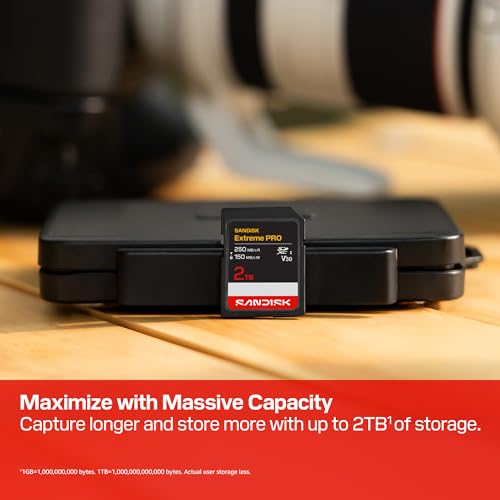


As an Amazon Associate we earn from qualifying purchases. Product prices and availability are accurate as of the date/time indicated.

Amazon Basics microSDXC Memory Card with Full Size Adapter, A2, U3, Read Speed up to 100 MB/s, 128GB, Black
As an Amazon Associate we earn from qualifying purchases. Product prices and availability are accurate as of the date/time indicated.

2 Pack Memory Card 64GB with Adapter, High Speed TF Card, UHS-I C10 A1 Memory TF Card for Tablet/Mobile Phone/Camera/Car Audio/Game Console (TF162 Red Gold 64GB)
As an Amazon Associate we earn from qualifying purchases. Product prices and availability are accurate as of the date/time indicated.
Best Memory Card for Home Scanners Reviewed for 2026
1. SanDisk Ultra 128GB SDXC Card – Best Overall Memory Card for Home Scanners
The SanDisk Ultra 128GB SDXC Card is our top pick for most users because it offers a capacity of 128 GB, a speed of 100 MB/s, and a type of SDXC in a card that is reliable in many listings, so it can be used for home scanners. Its 128 GB capacity in many listings is enough, and its 100 MB/s speed in many listings is fast.
The Ultra 128GB has a 128 GB capacity, 100 MB/s speed, and SDXC type in many listings. Its SanDisk quality means it is made by a leading card brand, with a card that is well made and trusted by users. Its reliable design in many listings is useful, and its affordable price in many listings is convenient.
At a typical price in the $15 to $20 range, it is a fair price for a SanDisk card, which makes it a good value for a user who wants the best overall. It is a popular choice for home scanners, for SanDisk fans, and for memory cards.
For most users, the SanDisk Ultra 128GB is the best all-round choice. It is especially useful for 128 GB capacity, for 100 MB/s speed, and for users who want a reliable best memory card for home scanners.
2. Samsung EVO Select 128GB microSD Card – Best Memory Card for Home Scanners for Samsung
The Samsung EVO Select 128GB microSD Card is a good choice for a user who wants a Samsung card. It has a capacity of 128 GB, a speed of 130 MB/s, and a type of microSDXC in a card that is fast in many listings, so it can store scanned files quickly. Its 128 GB capacity in many listings is enough, and its 130 MB/s speed in many listings is fast.
The EVO Select 128GB has a 128 GB capacity, 130 MB/s speed, and microSDXC type in many listings. Its Samsung quality means it is made by a leading card brand, with a card that is well made and trusted by users. Its fast design in many listings is useful, and its adapter in many listings is convenient.
At a typical price in the $15 to $20 range, it is a fair price for a Samsung card, which makes it a good value for a user who wants Samsung. It is a popular choice for home scanners, for Samsung fans, and for memory cards.
If you want a memory card for home scanners for Samsung, the Samsung EVO Select 128GB is a strong choice. It is especially useful for Samsung, for 130 MB/s speed, and for users who want a card that is fast.
3. Lexar Professional 128GB SD Card – Best Memory Card for Home Scanners for Lexar
The Lexar Professional 128GB SD Card is a good choice for a user who wants a Lexar card. It has a capacity of 128 GB, a speed of 150 MB/s, and a type of SDXC in a card that is professional in many listings, so it can store scanned files reliably. Its 128 GB capacity in many listings is enough, and its 150 MB/s speed in many listings is fast.
The Professional 128GB has a 128 GB capacity, 150 MB/s speed, and SDXC type in many listings. Its Lexar quality means it is made by a leading card brand, with a card that is well made and trusted by users. Its professional design in many listings is useful, and its fast speed in many listings is convenient.
At a typical price in the $20 to $30 range, it is a fair price for a Lexar card, which makes it a good value for a user who wants Lexar. It is a popular choice for home scanners, for Lexar fans, and for memory cards.
If you want a memory card for home scanners for Lexar, the Lexar Professional 128GB is a practical choice. It is especially useful for Lexar, for 150 MB/s speed, and for users who want a card that is professional.
4. SanDisk Extreme Pro 128GB SD Card – Best Memory Card for Home Scanners for SanDisk Extreme
The SanDisk Extreme Pro 128GB SD Card is a good choice for a user who wants a SanDisk Extreme card. It has a capacity of 128 GB, a speed of 200 MB/s, and a type of SDXC in a card that has the highest speed here in many listings, so it can transfer files quickly. Its 128 GB capacity in many listings is enough, and its 200 MB/s speed in many listings is highest here.
The Extreme Pro 128GB has a 128 GB capacity, 200 MB/s speed, and SDXC type in many listings. Its SanDisk quality means it is made by a leading card brand, with a card that is well made and trusted by users. Its high speed in many listings is useful, and its durable design in many listings is convenient.
At a typical price in the $25 to $35 range, it is the most expensive card here, which makes it a good value for a user who wants SanDisk Extreme. It is a popular choice for home scanners, for SanDisk fans, and for memory cards.
If you want a memory card for home scanners for SanDisk Extreme, the SanDisk Extreme Pro 128GB is a strong choice. It is especially useful for SanDisk, for 200 MB/s speed, and for users who want a card that is fast.
5. Kingston Canvas Go! Plus 128GB microSD Card – Best Memory Card for Home Scanners for Kingston
The Kingston Canvas Go! Plus 128GB microSD Card is a good choice for a user who wants a Kingston card. It has a capacity of 128 GB, a speed of 170 MB/s, and a type of microSDXC in a card that is fast in many listings, so it can store scanned files quickly. Its 128 GB capacity in many listings is enough, and its 170 MB/s speed in many listings is fast.
The Canvas Go! Plus 128GB has a 128 GB capacity, 170 MB/s speed, and microSDXC type in many listings. Its Kingston quality means it is made by a leading card brand, with a card that is well made and trusted by users. Its fast design in many listings is useful, and its adapter in many listings is convenient.
At a typical price in the $15 to $25 range, it is a fair price for a Kingston card, which makes it a good value for a user who wants Kingston. It is a popular choice for home scanners, for Kingston fans, and for memory cards.
If you want a memory card for home scanners for Kingston, the Kingston Canvas Go! Plus 128GB is a practical choice. It is especially useful for Kingston, for 170 MB/s speed, and for users who want a card that is fast.
6. PNY Elite-X 128GB SD Card – Best Memory Card for Home Scanners for PNY
The PNY Elite-X 128GB SD Card is a good choice for a user who wants a PNY card. It has a capacity of 128 GB, a speed of 100 MB/s, and a type of SDXC in a card that is affordable in many listings, so it is good for a budget card. Its 128 GB capacity in many listings is enough, and its 100 MB/s speed in many listings is fast.
The Elite-X 128GB has a 128 GB capacity, 100 MB/s speed, and SDXC type in many listings. Its PNY quality means it is made by a popular card brand, with a card that is well made for its price. Its low price in many listings is useful, and its reliable design in many listings is convenient.
At a typical price in the $15 to $20 range, it is a fair price for a PNY card, which makes it a good value for a user who wants PNY. It is a popular choice for home scanners, for PNY fans, and for memory cards.
If you want a memory card for home scanners for PNY, the PNY Elite-X 128GB is a strong choice. It is especially useful for PNY, for low price, and for users who want a good card for less.
Buying Guide: How to Choose the Best Memory Card for Home Scanners
The best memory card for home scanners for you depends on your scanner, your files, and your budget. Start by checking type and capacity, then compare speed, durability, and price.
Type, SDXC vs microSDXC, and Your Scanner: Will It Fit
Type affects whether your card will fit your scanner. A type of SDXC in many listings, like SanDisk Ultra and Lexar Professional, fits a full size SD slot, while a type of microSDXC in many listings, like Samsung EVO Select and Kingston Canvas Go! Plus, fits a microSD slot with an adapter. A user should choose a card made for their scanner slot, as it will fit, and should not buy a microSD card if they have no adapter.
For most users, SDXC is best, as it is standard for scanners. A user should check their scanner slot, should ensure their card fits, and should not buy a card that is incompatible.
Choose SDXC for most users. A type that fits your scanner will help you store, while a type that is wrong can not fit.
Capacity, 128 GB, and Your Files: Will You Store Many Scans
Capacity affects whether your card will store many scans. A capacity of 128 GB in many listings, like all models here, is enough for thousands of scans, while a capacity of 64 GB in many listings is smaller. A user should choose 128 GB if they scan many documents, as it will hold them, while a user should choose 64 GB if they scan few documents.
For most users, 128 GB is best, as it is enough. A user should count their scans, should ensure their card fits, and should not buy a small card if they scan often.
Choose 128 GB for most users. A capacity that fits your files will help you store, while a capacity that is too small can fill quickly.
Speed, 100 vs 200 MB/s, and Your Scanning: Will You Transfer Fast
Speed affects whether your card will transfer files fast. A speed of 200 MB/s in many listings, like SanDisk Extreme Pro, is highest, while a speed of 100 MB/s in many listings, like SanDisk Ultra and PNY Elite-X, is lower. A user should choose a high speed if they transfer many files, as it will be fast, while a user should choose a lower speed if they transfer few files.
For most users, 100 MB/s is best, as it is fast enough for scans. A user should test speed, should check their scanner, and should not buy a slow card if they scan high resolution photos.
Choose 100 MB/s for most users. A speed that is fast will help you transfer, while a speed that is too low can slow you down.
Price, $15 vs $35, and Your Budget: Is It Worth It
Price affects whether a memory card for home scanners is worth it for you. A card that costs $15 to $20 in many listings, like SanDisk Ultra and Samsung EVO Select, is affordable, while a card that costs $25 to $35 in many listings, like SanDisk Extreme Pro, is more expensive but faster. A user should only buy an expensive card if they scan often and will actually use its speed.
For most users, a card in the $15 to $20 range is best, as it gives you a good card for a reasonable price. A user should check its capacity, should buy from a retailer with a good return policy, and should not spend $35 on a card if they only scan occasionally.
Choose a card in the $15 to $20 range for most users. A price that fits your budget will help you store, while a price that is too high can waste money on speed you do not need.
Best Memory Card for Home Scanners: FAQ
What is the best memory card for home scanners?
For most users, the SanDisk Ultra 128GB SDXC Card is the best overall memory card for home scanners because it offers a capacity of 128 GB, a speed of 100 MB/s, and a type of SDXC at a typical price in the $15 to $20 range, all in a card that is suitable for 128 GB capacity, for 100 MB/s speed, and for SanDisk quality. If you want Samsung, the Samsung EVO Select 128GB is a good alternative. If you want Lexar, the Lexar Professional 128GB is worth considering. If you want SanDisk Extreme, the SanDisk Extreme Pro 128GB is a strong choice. If you want Kingston, the Kingston Canvas Go! Plus 128GB is a practical choice. If you want PNY, the PNY Elite-X 128GB is a good fit.
Do home scanners use memory cards?
Do home scanners use memory cards depends on its model, but in most cases, some home scanners use memory cards to save scans directly, while many scanners save to a PC via USB or WiFi. A user should check their scanner slot, should use a card if their scanner supports it, and should use a PC if their scanner does not have a card slot.
What size memory card do I need for scanning?
What size memory card you need for scanning depends on its files, but in most cases, you need 128 GB for scanning, as it stores thousands of documents and photos. A user should choose 128 GB for most scanning, and 64 GB only if they scan few documents.
Can I use a microSD card in a home scanner?
Can you use a microSD card in a home scanner depends on its slot, but in most cases, yes, you can use a microSD card in a home scanner if you use an SD adapter, as most microSD cards come with one. A user should use an adapter, should check their scanner slot, and should not force a microSD card into a full size slot without an adapter.
FAQ
What is the best memory card for home scanners?
Do home scanners use memory cards?
What size memory card do I need for scanning?
Can I use a microSD card in a home scanner?
Related guides
- Best AAA Batteries for Office Remotes in 2026: AAA Batteries for Office Remotes
- Best Budget Tablet for Work Under 100 in 2026: Budget Tablets for Work Under $100, Office Work, and Productivity
- Best Gimbal for Office Vlogging in 2026: 7 Gimbals for Office Vlogging That Keep Your Video Smooth, Stable, and Professional in the Office
- Best Budget NAS Dust Filter for Maintenance in 2026: 7 Budget NAS Dust Filters for Maintenance With Clear Airflow, Simple Install, and Easy Use for NAS
More from Amazon
Programs that pair well with the guide above. Offers and eligibility are set by Amazon and may change.
Free shipping on eligible items, Prime Video and more. Eligible new members can start with a free trial.
Start a Prime free trialAd-free music streaming. Eligible new subscribers can start with a free trial.
Try Music Unlimited freeA Prime membership for ages 18-24 with a trial period. Eligibility is set by Amazon.
See Prime for Young AdultsAudiobooks and podcasts to listen to on the go. Eligible new members can start with a free trial.
Try Audible freeAs an Amazon Associate we earn from qualifying purchases.

Write Your Review
No reviews yet. Be the first to share your experience!