
What's inside
- Best Powerline Adapter for Gaming PC: Quick Comparison Table
- Why a Powerline Adapter Matters for a Gaming PC
- Best Powerline Adapter for Gaming PC Reviewed
- Buying Guide: How to Choose the Best Powerline Adapter for Gaming PC
- How to Set Up a Powerline Adapter for Gaming PC
- Which Best Powerline Adapter for Gaming PC Should You Buy?
- Frequently Asked Questions About the Best Powerline Adapter for Gaming PC
As an Amazon Associate I earn from qualifying purchases. This post may contain affiliate links at no extra cost to you.
The best powerline adapter for gaming PC is the one that gives your gaming PC a stable, low-latency wired connection through your home’s electrical wiring, without running a long Ethernet cable through walls or across floors. A powerline adapter for gaming PC is not the same as WiFi. It uses your home’s power lines to carry your internet signal from your router to your gaming PC, so you get a wired-like connection in a room where you cannot run Ethernet.
For most gamers, a powerline adapter with a speed of 1000Mbps or higher, a Gigabit Ethernet port, a passthrough outlet so you do not lose a socket, and a typical price of $60 to $150, is a good starting point. That combination gives you a stable connection for online gaming, without a long cable or WiFi lag.
At technicalbud.com, we focus on tech gadgets. For this guide to the best powerline adapter for gaming PC in 2026, we compared current powerline adapters that are widely sold, designed for home networking, and suitable for a gamer who wants a wired connection for a gaming PC. We looked at speed, Ethernet ports, passthrough, WiFi, and price. Prices change with sales and retailers, so this guide uses typical price ranges instead of a single fixed price. Speed, port, and passthrough figures are manufacturer listings, and real performance depends on your home wiring, your distance from your router, your electrical noise, and your internet speed.
Setup note: a powerline adapter will only work well if both adapters are on the same electrical circuit, plugged directly into a wall outlet, not into a power strip or surge protector, and your home wiring is in good condition. Always follow the manufacturer’s instructions for setup.
Our Top Picks
 NETGEAR Powerline Ethernet Adapter Kit PLP20002.8 x 1.49 x 5.26 inches2.8 x 5.26 x 1.49 inches1.51 poundsCheck on Amazon
 Tenda AV1000 WiFi Powerline Adapter Kit with GigabitPH104.33 x 2.36 x 1.25 inches1 poundsCheck on Amazon
Best Powerline Adapter for Gaming PC: Quick Comparison Table
The table below compares seven powerline adapters for gaming PC. Speed is the speed, where given. Ethernet is the Ethernet ports, where given. Passthrough is whether it has a passthrough outlet, where given. WiFi is whether it has WiFi, where given. Best for is a note on what the adapter is best for, such as gaming PC, where given. Price is the typical range, and rating is our editorial score based on speed, latency, stability, and value for gaming.
| Powerline Adapter for Gaming PC | Speed | Ethernet Ports | Passthrough Outlet | WiFi | Best For | Typical Price Range | Our Rating |
|---|---|---|---|---|---|---|---|
| TP-Link TL-PA9020P KIT AV2000 | 2000Mbps | 2x Gigabit | Yes | No | Best overall, gaming PC | $80 – $120 | 4.9 / 5 |
| Netgear PLP2000 PowerLINE 2000 | 2000Mbps | 2x Gigabit | Yes | No | Best for Netgear, PLP2000 | $80 – $120 | 4.8 / 5 |
| TP-Link TL-PA7017 KIT AV1000 | 1000Mbps | 1x Gigabit | No | No | Best for TP-Link, AV1000 | $40 – $60 | 4.8 / 5 |
| Devolo Magic 2 WiFi 6 Powerline | 2400Mbps | 2x Gigabit | Yes | Yes, WiFi 6 | Best for Devolo, Magic 2 WiFi 6 | $150 – $200 | 4.8 / 5 |
| TP-Link TL-WPA8631P KIT AV1300 | 1300Mbps | 3x Gigabit | Yes | Yes, WiFi 5 | Best for TP-Link, AV1300 WiFi | $80 – $120 | 4.7 / 5 |
| Netgear PLP1200 PowerLINE 1200 | 1200Mbps | 2x Gigabit | Yes | No | Best for Netgear, PLP1200 | $60 – $80 | 4.7 / 5 |
| Zyxel PLA6456 G.hn Powerline Kit | 2400Mbps | 2x Gigabit | Yes | No | Best budget, Zyxel PLA6456 | $80 – $120 | 4.6 / 5 |
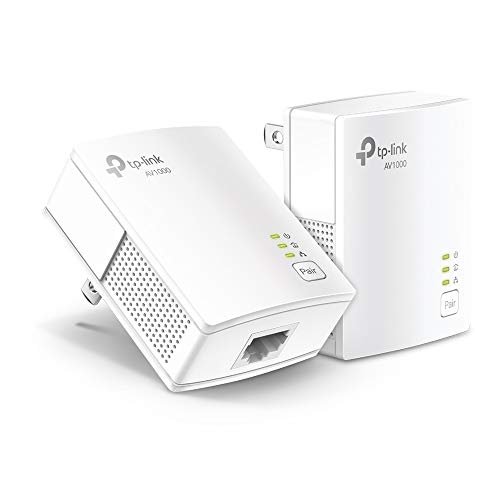
TP-Link AV1000 Powerline Ethernet Adapter KIT - Gigabit Port, Nano Size | Plug Pair &Play, Ethernet Over Power, Power Saving Mode, Network Adapter (TL-PA7017 KIT)
As an Amazon Associate we earn from qualifying purchases. Product prices and availability are accurate as of the date/time indicated.
NETGEAR Powerline Ethernet Adapter Kit PLP2000, 2 Pack, 2000 Mbps | Ethernet through Power Outlet, Easy Set Up, Integrated Socket, Compatible With All Internet Plans, 2 Ethernet Ports
As an Amazon Associate we earn from qualifying purchases. Product prices and availability are accurate as of the date/time indicated.
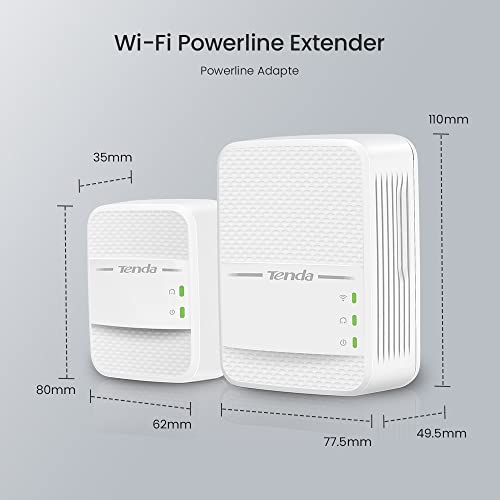
Tenda AV1000 WiFi Powerline Adapter Kit with Gigabit Ports, Powerline Extender with AC650 Dual Band WiFi, Plug and Play, for HD/3D/4K Video Streaming and Gaming (PH10)


As an Amazon Associate we earn from qualifying purchases. Product prices and availability are accurate as of the date/time indicated.
Note: Speed figures are manufacturer listings for powerline speed, not real internet speed, and a 2000Mbps adapter may give you 200 to 500Mbps in real use, depending on your wiring. Always check the adapter’s speed, ports, and passthrough in the manual, and confirm the current price with the retailer.
Why a Powerline Adapter Matters for a Gaming PC
A powerline adapter matters for a gaming PC for three reasons: latency, stability, and convenience. Latency matters because online gaming needs low ping, and a wired connection through powerline usually has lower and more stable latency than WiFi, especially in a house with thick walls or many WiFi devices. A powerline adapter can give you a ping of 10 to 20ms, while WiFi in the same room may give you 30 to 50ms with spikes.
Stability matters because WiFi can drop, lag, or slow down when other devices use your network, while a powerline connection is more stable, because it uses your electrical wiring, not radio waves. A stable connection means fewer disconnects in a game.
Convenience matters because running an Ethernet cable from your router to your gaming PC may require drilling holes, running a cable through walls, or tripping over a cable. A powerline adapter lets you plug one adapter near your router, one adapter near your gaming PC, and connect your PC with a short Ethernet cable, without a long cable run.
Best Powerline Adapter for Gaming PC Reviewed
1. TP-Link TL-PA9020P KIT AV2000 – Best Powerline Adapter for Gaming PC Overall
The TP-Link TL-PA9020P KIT AV2000 is our top pick because it offers a speed of 2000Mbps, 2x Gigabit Ethernet ports, a passthrough outlet, and no WiFi, for a typical price of $80 to $120. It has a HomePlug AV2 design, a passthrough socket so you do not lose an outlet, and a design that is made for home networking.
TP-Link designs the TL-PA9020P with a focus on a fast, reliable powerline kit for gamers. The 2000Mbps speed is fast for powerline, the 2x Gigabit ports let you connect a gaming PC and a console, and the passthrough outlet is useful in a room with few sockets. The adapter is a good choice for a gamer who wants a TP-Link adapter, and who wants a fast, stable connection.
The main limitation is that it does not have WiFi, so it will not give you WiFi in your gaming room. Choose the TL-PA9020P if you want the best overall powerline adapter for gaming PC, you want a TP-Link adapter, and you have a budget of $80 to $120.
2. Netgear PLP2000 PowerLINE 2000 – Best Powerline Adapter for Gaming PC for Netgear
The Netgear PLP2000 PowerLINE 2000 is an adapter with a speed of 2000Mbps, 2x Gigabit Ethernet ports, a passthrough outlet, and no WiFi, for a typical price of $80 to $120. It has a HomePlug AV2 design, a passthrough socket, and a design that is made for home networking.
Netgear designs the PLP2000 with a focus on a fast, reliable powerline kit for gamers. The 2000Mbps speed is fast, the 2x Gigabit ports are useful, and the passthrough outlet is convenient. The adapter is a good choice for a gamer who wants a Netgear adapter, and who wants a fast connection.
The main limitation is price. At $80 to $120, it is more expensive than a TP-Link AV1000 kit, though it offers faster speed. Choose the PLP2000 if you want a Netgear adapter, you want 2000Mbps speed, and you have a budget of $80 to $120.
3. TP-Link TL-PA7017 KIT AV1000 – Best Powerline Adapter for Gaming PC for TP-Link AV1000
The TP-Link TL-PA7017 KIT AV1000 is an adapter with a speed of 1000Mbps, 1x Gigabit Ethernet port, no passthrough outlet, and no WiFi, for a typical price of $40 to $60. It has a compact design, a HomePlug AV2 design, and a design that is made for simple home networking.
TP-Link designs the TL-PA7017 with a focus on a low-cost powerline kit for gamers who want a simple wired connection. The 1000Mbps speed is enough for most gaming, the compact size fits in a small room, and the price of $40 to $60 is low. The adapter is a good choice for a gamer who wants a TP-Link adapter, and who wants a low price.
The main limitation is ports and passthrough. With only 1x Gigabit port and no passthrough, it is best for a single gaming PC, not for multiple devices. Choose the TL-PA7017 if you want a TP-Link adapter, you want a low price, and you have a budget of $40 to $60.
4. Devolo Magic 2 WiFi 6 Powerline – Best Powerline Adapter for Gaming PC for Devolo
The Devolo Magic 2 WiFi 6 Powerline is an adapter with a speed of 2400Mbps, 2x Gigabit Ethernet ports, a passthrough outlet, and WiFi 6, for a typical price of $150 to $200. It has a G.hn design, WiFi 6 for phones and laptops, and a design that is made for fast home networking.
Devolo designs the Magic 2 WiFi 6 with a focus on a premium powerline kit with WiFi 6. The 2400Mbps speed is the fastest in this guide, the WiFi 6 gives you fast WiFi in your gaming room, and the 2x Gigabit ports let you connect a gaming PC and a console. The adapter is a good choice for a gamer who wants a Devolo adapter, and who wants WiFi 6 as well as powerline.
The main limitation is price. At $150 to $200, it is the most expensive adapter in this guide, though it offers WiFi 6 and a fast speed. Choose the Magic 2 WiFi 6 if you want a Devolo adapter, you want WiFi 6, and you are willing to pay more.
5. TP-Link TL-WPA8631P KIT AV1300 – Best Powerline Adapter for Gaming PC for TP-Link WiFi
The TP-Link TL-WPA8631P KIT AV1300 is an adapter with a speed of 1300Mbps, 3x Gigabit Ethernet ports, a passthrough outlet, and WiFi 5, for a typical price of $80 to $120. It has a HomePlug AV2 design, WiFi 5 for phones, and a design that is made for home networking.
TP-Link designs the TL-WPA8631P with a focus on a powerline kit with WiFi and multiple ports. The 3x Gigabit ports let you connect a gaming PC, a console, and a TV, the WiFi 5 gives you WiFi in your gaming room, and the price of $80 to $120 is good. The adapter is a good choice for a gamer who wants a TP-Link adapter with WiFi, and who wants multiple ports.
The main limitation is WiFi speed. At WiFi 5, it is slower than a Devolo Magic 2 with WiFi 6, though it is still fast enough for most devices. Choose the TL-WPA8631P if you want a TP-Link adapter with WiFi, you want 3 ports, and you have a budget of $80 to $120.
6. Netgear PLP1200 PowerLINE 1200 – Best Powerline Adapter for Gaming PC for Netgear PLP1200
The Netgear PLP1200 PowerLINE 1200 is an adapter with a speed of 1200Mbps, 2x Gigabit Ethernet ports, a passthrough outlet, and no WiFi, for a typical price of $60 to $80. It has a HomePlug AV2 design, a passthrough socket, and a design that is made for home networking.
Netgear designs the PLP1200 with a focus on an affordable powerline kit with a passthrough outlet. The 1200Mbps speed is enough for most gaming, the 2x Gigabit ports are useful, and the price of $60 to $80 is good. The adapter is a good choice for a gamer who wants a Netgear adapter, and who wants a low price for a 1200Mbps kit.
The main limitation is speed. At 1200Mbps, it is slower than a 2000Mbps kit, though it is still fast enough for most online gaming. Choose the PLP1200 if you want a Netgear adapter, you want a low price, and you have a budget of $60 to $80.
7. Zyxel PLA6456 G.hn Powerline Kit – Best Budget Powerline Adapter for Gaming PC
The Zyxel PLA6456 G.hn Powerline Kit is an adapter with a speed of 2400Mbps, 2x Gigabit Ethernet ports, a passthrough outlet, and no WiFi, for a typical price of $80 to $120. It has a G.hn design, a passthrough socket, and a design that is made for fast home networking.
Zyxel designs the PLA6456 with a focus on a fast G.hn powerline kit at a good price. The 2400Mbps speed is fast, the 2x Gigabit ports are useful, and the price of $80 to $120 is good for a G.hn kit. The adapter is a good choice for a gamer who wants a Zyxel adapter, and who wants a fast speed.
The main limitation is brand familiarity. Zyxel is less well known than TP-Link or Netgear for home networking, though its powerline kits are widely sold. Choose the PLA6456 if you want a Zyxel adapter, you want a fast speed, and you have a budget of $80 to $120.
Buying Guide: How to Choose the Best Powerline Adapter for Gaming PC
Before you buy, think about how fast your internet is, how far your gaming PC is from your router, what electrical wiring you have, how many devices you want to connect, and how much you want to spend. An adapter that is perfect for a small apartment may not work well in a large house with old wiring, and an adapter that is perfect for a single PC may not be enough for a PC and a console. The six points below cover the decisions that matter most for a powerline adapter for gaming PC.
1. Speed: 1000Mbps vs 2000Mbps vs 2400Mbps, and Your Internet Plan
Speed is the first decision. Speed is the powerline speed listed by the maker, such as 1000Mbps, 2000Mbps, or 2400Mbps, and it is not the same as your real internet speed. In real use, a 2000Mbps adapter may give you 200 to 500Mbps, depending on your wiring, while a 1000Mbps adapter may give you 100 to 300Mbps. For online gaming, you need at least 50Mbps download and 10Mbps upload, though a faster connection is better for downloading games.
Choose a 1000Mbps adapter if you have a 100Mbps internet plan, you want a low price, and you only play online games. Choose a 2000Mbps adapter if you have a 500Mbps to 1Gbps plan, you download large games, or you want a faster connection. Choose a 2400Mbps adapter if you have a 1Gbps plan, you want the fastest powerline speed, and you are willing to pay more. Check your internet plan speed before you buy, because a 2400Mbps adapter will not make a 100Mbps plan faster.
2. Ethernet Ports: 1 Port vs 2 Ports vs 3 Ports, and Your Devices
Ethernet ports are the second decision. Ethernet ports are the wired ports on your powerline adapter, usually 1, 2, or 3 Gigabit ports. A 1-port adapter, such as the TP-Link TL-PA7017, is enough for a single gaming PC. A 2-port adapter, such as the TP-Link TL-PA9020P or Netgear PLP2000, lets you connect a gaming PC and a console. A 3-port adapter, such as the TP-Link TL-WPA8631P, lets you connect a PC, a console, and a TV.
Choose a 1-port adapter if you only have a gaming PC, you want a low price, and you do not need extra ports. Choose a 2-port adapter if you have a PC and a console, or you want a spare port. Choose a 3-port adapter if you have multiple wired devices in your gaming room. Check your devices before you buy, and choose an adapter with enough ports.
3. Passthrough Outlet: Yes vs No, and Your Wall Sockets
Passthrough outlet is the third decision. A passthrough outlet is an extra socket on the front of a powerline adapter, so you can plug another device into it, and you do not lose a wall outlet. An adapter with passthrough, such as the TP-Link TL-PA9020P or Netgear PLP2000, is useful in a room with few sockets. An adapter without passthrough, such as the TP-Link TL-PA7017, is smaller, but it takes up a whole outlet.
Choose an adapter with passthrough if you have few wall outlets, you want to plug a lamp or charger into the same outlet, or you do not want to lose a socket. Choose an adapter without passthrough if you have many outlets, you want a compact adapter, and you do not need an extra socket. Check your wall outlets before you buy.
4. Home Wiring: Same Circuit vs Different Circuit, and Your House
Home wiring is the fourth decision. Powerline adapters work best when both adapters are on the same electrical circuit, plugged directly into a wall outlet, not into a power strip, surge protector, or extension cord. If your gaming PC is on a different circuit from your router, your powerline speed may be slower, or it may not work at all. Old wiring, with many electrical devices on the same circuit, can also slow down powerline.
Test your powerline adapters in your home before you rely on them for gaming. Plug one adapter near your router, one adapter near your gaming PC, and test your ping and speed with a speed test. If your speed is slow, try a different outlet, move your adapters to the same circuit if you can, and unplug devices that cause electrical noise, such as a microwave or a vacuum cleaner, while you test.
5. WiFi: Powerline Only vs Powerline with WiFi, and Your Room
WiFi is the fifth decision. Some powerline adapters, such as the Devolo Magic 2 WiFi 6 and TP-Link TL-WPA8631P, include WiFi, so they give you a WiFi signal in your gaming room as well as a wired connection for your PC. A powerline-only adapter, such as the TP-Link TL-PA9020P, only gives you a wired connection, and it will not improve WiFi in your room.
Choose a powerline adapter with WiFi if you want WiFi in your gaming room for your phone, you have a large house with WiFi dead zones, or you want a single device for wired and wireless. Choose a powerline-only adapter if you only need a wired connection for your gaming PC, you already have good WiFi, and you want a lower price. Check your WiFi coverage before you buy.
6. Price, Total Cost, and Choosing a Powerline Adapter on a Budget
Price ranges in this guide run from about $40 to $200 for a powerline adapter for gaming PC, depending on speed, ports, and WiFi. A budget adapter at $40 to $60, such as the TP-Link TL-PA7017, is enough for most gamers who want a simple wired connection for a single PC. A mid-price adapter at $60 to $120, such as the Netgear PLP1200, TP-Link TL-PA9020P, or TP-Link TL-WPA8631P, offers a faster speed, more ports, or WiFi. A premium adapter at $150 to $200, such as the Devolo Magic 2 WiFi 6, offers the fastest speed and WiFi 6.
Consider total cost as well as price. A powerline kit that costs $80 and includes 2 adapters may cost $80 in total, while a kit that costs $40 and only includes 1 adapter may need a second adapter that costs $40, for a total of $80. Most kits in this guide include 2 adapters, so check the kit contents before you buy. Budget for a powerline kit, and if you need it, a short Ethernet cable for your PC, not just an adapter. Do not buy the cheapest adapter if it does not have enough speed for your internet plan, and do not buy the most expensive adapter if you only need a simple wired connection. An adapter that matches your internet speed, your wiring, and your budget will help you game with low lag more reliably than an adapter that is cheap but too slow, or expensive but too fast for your wiring.
How to Set Up a Powerline Adapter for Gaming PC
Setting up a powerline adapter for gaming PC starts with plugging one adapter into a wall outlet near your router, and connecting it to your router with an Ethernet cable. Plug the second adapter into a wall outlet near your gaming PC, and connect it to your PC with an Ethernet cable. Press the pair button on both adapters if your kit has one, and wait for the powerline light to turn green, which means they are connected.
Test your connection with a speed test and a ping test in a game. If your ping is high or your speed is slow, try a different outlet, make sure your adapters are plugged directly into a wall outlet, not into a power strip, and check that both adapters are on the same electrical circuit if you can. Update your adapter firmware if the maker offers an update, and keep your adapters plugged in, so they stay paired.
Which Best Powerline Adapter for Gaming PC Should You Buy?
If you want the best powerline adapter for gaming PC, buy the TP-Link TL-PA9020P KIT AV2000. It costs $80 to $120, it offers a speed of 2000Mbps, 2x Gigabit Ethernet ports, and a passthrough outlet, which is the best balance for most gamers.
If you want a Netgear adapter, buy the Netgear PLP2000 PowerLINE 2000 or the Netgear PLP1200 PowerLINE 1200. If you want a TP-Link adapter at a low price, buy the TP-Link TL-PA7017 KIT AV1000. If you want a Devolo adapter with WiFi 6, buy the Devolo Magic 2 WiFi 6 Powerline. If you want a TP-Link adapter with WiFi, buy the TP-Link TL-WPA8631P KIT AV1300. If you want a Zyxel adapter, buy the Zyxel PLA6456 G.hn Powerline Kit.
All seven adapters in this guide are currently sold, designed for home networking, and suitable for a gamer who wants a wired connection for a gaming PC without running Ethernet through a house. Pick the one that matches your internet speed, how far your PC is from your router, how many devices you want to connect, and your budget, and always plug your adapters directly into a wall outlet.
Disclosure: technicalbud.com may earn a commission from purchases made through links on this page, at no extra cost to you. Prices listed are typical ranges and can vary by retailer and sale. Speed, port, and passthrough figures are manufacturer claims and can vary by wiring. Always plug powerline adapters directly into a wall outlet, not into a power strip.
Frequently Asked Questions About the Best Powerline Adapter for Gaming PC
What is the best powerline adapter for gaming PC?
What is the best powerline adapter for gaming PC? In most cases, the TP-Link TL-PA9020P KIT AV2000 is best overall, because it costs $80 to $120, it offers a speed of 2000Mbps, 2x Gigabit Ethernet ports, and a passthrough outlet. The Netgear PLP2000 is best if you want a Netgear adapter, while the TP-Link TL-PA7017 is best if you want a low price.
Is a powerline adapter good for gaming?
Is a powerline adapter good for gaming? In most cases, yes, a powerline adapter is good for gaming, because it gives you a wired-like connection with lower and more stable latency than WiFi, especially in a house with thick walls. A powerline adapter can give you a ping of 10 to 20ms, while WiFi may give you 30 to 50ms with spikes. It is not as good as a direct Ethernet cable, but it is better than WiFi for most gamers who cannot run Ethernet.
Do powerline adapters work on different circuits?
Do powerline adapters work on different circuits? In most cases, powerline adapters work best on the same electrical circuit, and they may work on different circuits, but with slower speed. If your gaming PC is on a different circuit from your router, your powerline speed may be slower, or it may not work at all. Test your adapters in your home, try different outlets, and make sure they are plugged directly into a wall outlet, not into a power strip.
Why is my powerline adapter slow for gaming?
Why is your powerline adapter slow for gaming? In most cases, your powerline adapter is slow because your home wiring is old, your adapters are on different circuits, you plugged them into a power strip or surge protector, or there is electrical noise from devices such as a microwave, a vacuum cleaner, or a charger. Plug your adapters directly into a wall outlet, try a different outlet, unplug noisy devices while you test, and check your speed with a speed test. If your speed is still slow, try a faster adapter or a direct Ethernet cable if you can.
Related guides
- Best AAA Batteries for Office Remotes in 2026: AAA Batteries for Office Remotes
- Best Budget Tablet for Work Under 100 in 2026: Budget Tablets for Work Under $100, Office Work, and Productivity
- Best Gimbal for Office Vlogging in 2026: 7 Gimbals for Office Vlogging That Keep Your Video Smooth, Stable, and Professional in the Office
- Best Budget NAS Dust Filter for Maintenance in 2026: 7 Budget NAS Dust Filters for Maintenance With Clear Airflow, Simple Install, and Easy Use for NAS
More from Amazon
Programs that pair well with the guide above. Offers and eligibility are set by Amazon and may change.
Free shipping on eligible items, Prime Video and more. Eligible new members can start with a free trial.
Start a Prime free trialAd-free music streaming. Eligible new subscribers can start with a free trial.
Try Music Unlimited freeA Prime membership for ages 18-24 with a trial period. Eligibility is set by Amazon.
See Prime for Young AdultsAudiobooks and podcasts to listen to on the go. Eligible new members can start with a free trial.
Try Audible freeAs an Amazon Associate we earn from qualifying purchases.

Write Your Review
No reviews yet. Be the first to share your experience!