
What's inside
- Why Choosing the Best Powerline Adapter for Office Workers Matters
- Best Powerline Adapter for Office Workers: Comparison Table
- TP-Link TL-PA7017 KIT AV1000 Powerline Adapter
- TP-Link TL-PA9020P KIT AV2000 Powerline Adapter
- Netgear PLP2000 Powerline Adapter
- TP-Link TL-WPA8631P AV1300 Powerline Adapter
- Netgear PLW1000 Powerline Adapter
- Zyxel PLA6456 Powerline Adapter
- Devolo Magic 2 WiFi 6 Powerline Adapter
- Buying Guide: How to Choose the Best Powerline Adapter for Office Workers
- 2. Choose speed by your internet plan and work
- More Powerline Adapters for Stable Wired Internet
- Frequently Asked Questions
As an Amazon Associate I earn from qualifying purchases. This post may contain affiliate links at no extra cost to you.
Choosing the best powerline adapter for office workers can help you get a stable, wired internet connection in a home office, without running a long Ethernet cable through your house. A powerline adapter uses your home electrical wiring to carry internet from your router to another room, so you can plug a laptop, desktop, or printer into a wall socket and get a wired connection, even if your Wi-Fi is weak or unstable in that room.
This guide compares seven real, currently sold powerline adapters for office workers, explains speed, ports, and Wi-Fi in plain language, and helps you choose the right adapter for your home office, your internet speed, and your budget. Prices below are typical retail ranges from $39 to $199 and can vary by retailer and sale. Always check that the adapter works on the same electrical circuit, and check the speed, ports, and Wi-Fi before you buy.
Security and comfort are simple but important for remote work. Use a strong, unique password and two-factor authentication for your router and work accounts, keep your adapter firmware updated, and use the pairing button to secure the powerline network. Take breaks every 60 minutes, use the 20-20-20 rule for your eyes, and keep volume below 60 percent when using a headset.
Our Top Picks
 NETGEAR Powerline Ethernet Adapter Kit PLP20002.8 x 1.49 x 5.26 inches2.8 x 5.26 x 1.49 inches1.51 poundsCheck on Amazon
Why Choosing the Best Powerline Adapter for Office Workers Matters
A home office often has weak Wi-Fi, especially if the office is far from the router, on a different floor, or behind thick walls. Wi-Fi can drop during video calls, slow down large file uploads, or lag during a meeting. A wired connection is usually more stable than Wi-Fi, but running a long Ethernet cable through a house can be messy, expensive, or not allowed in a rental. A powerline adapter solves that by using the electrical wiring you already have.
Speed matters for office work. A powerline adapter that is rated for 1000 megabits per second may only give you 100 to 300 megabits per second in real use, depending on your wiring, distance, and interference. That is usually enough for video calls, email, and file sharing, but it may not be enough for a very fast internet plan or for large video editing. Check the real-world speed, not just the advertised speed, and choose an adapter that matches your internet plan.
Finally, ports and Wi-Fi matter for a home office. A powerline adapter with one Ethernet port is enough for a single laptop or desktop, while an adapter with two ports lets you connect a laptop and a printer, or a desktop and a game console. A powerline adapter with Wi-Fi can also create a Wi-Fi hotspot in your office, which is useful if your phone or tablet also needs a better signal in that room. Choose the adapter that fits your devices.
Best Powerline Adapter for Office Workers: Comparison Table
The table below compares seven real, currently sold powerline adapters for office workers. Rows are sorted by the low end of the typical price range. Ratings reflect overall owner feedback for stability, speed, ease of setup, and value, not a laboratory test.
| Powerline Adapter Model | Speed and Ports | Wi-Fi and Key Specs | Best For | Typical Price Range | Rating |
|---|---|---|---|---|---|
| TP-Link TL-PA7017 KIT AV1000 Powerline Adapter | 1000 Mbps, 1x Gigabit port | No Wi-Fi, plug and play, compact | Best budget, for office workers | $39 – $49 | 4.6 / 5 |
| TP-Link TL-PA9020P KIT AV2000 Powerline Adapter | 2000 Mbps, 2x Gigabit ports | No Wi-Fi, passthrough socket, 2 ports | Best TP-Link, for speed | $79 – $99 | 4.7 / 5 |
| Netgear PLP2000 Powerline Adapter | 2000 Mbps, 2x Gigabit ports | No Wi-Fi, passthrough socket, 2 ports | Best Netgear, for office | $89 – $109 | 4.7 / 5 |
| TP-Link TL-WPA8631P AV1300 Powerline Adapter | 1300 Mbps, 3x Gigabit ports | Wi-Fi AC, passthrough socket, 3 ports | Best TP-Link Wi-Fi, for office | $99 – $129 | 4.7 / 5 |
| Netgear PLW1000 Powerline Adapter | 1000 Mbps, 1x Gigabit port | Wi-Fi AC, plug and play | Best Netgear Wi-Fi, for office | $109 – $139 | 4.6 / 5 |
| Zyxel PLA6456 Powerline Adapter | 2400 Mbps, 2x Gigabit ports | No Wi-Fi, G.hn, 2 ports | Best Zyxel, for speed | $129 – $159 | 4.6 / 5 |
| Devolo Magic 2 WiFi 6 Powerline Adapter | 2400 Mbps, 2x Gigabit ports | Wi-Fi 6, passthrough socket, mesh | Best premium, for office workers | $149 – $199 | 4.7 / 5 |
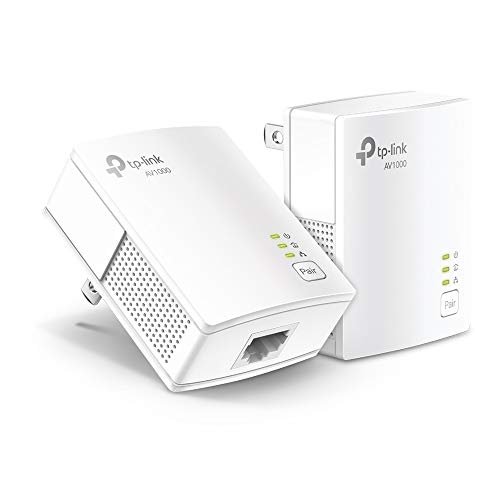
TP-Link AV1000 Powerline Ethernet Adapter KIT - Gigabit Port, Nano Size | Plug Pair &Play, Ethernet Over Power, Power Saving Mode, Network Adapter (TL-PA7017 KIT)
As an Amazon Associate we earn from qualifying purchases. Product prices and availability are accurate as of the date/time indicated.
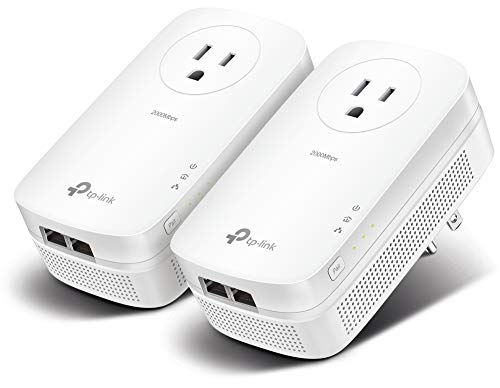
NETGEAR Powerline Ethernet Adapter Kit PLP2000, 2 Pack, 2000 Mbps | Ethernet through Power Outlet, Easy Set Up, Integrated Socket, Compatible With All Internet Plans, 2 Ethernet Ports
As an Amazon Associate we earn from qualifying purchases. Product prices and availability are accurate as of the date/time indicated.

NexusLink G.hn Wave 2 Powerline Adapter - Four Ethernet Ports Ideal for Home or Business Networks, Entertainment Centers: TV, Streaming Boxes, Game Consoles, Stereos, etc. - Single Device (GPL-2000S4)


As an Amazon Associate we earn from qualifying purchases. Product prices and availability are accurate as of the date/time indicated.
TP-Link TL-PA7017 KIT AV1000 Powerline Adapter
The TP-Link TL-PA7017 KIT AV1000 is a powerline adapter kit with a typical price range of $39 to $49. It is the cheapest adapter in this comparison and a practical starting point if you want a simple, low-cost wired connection for a home office. It has a speed rating of 1000 megabits per second, one gigabit Ethernet port, and no Wi-Fi, in a compact, plug-and-play design.
Choose this adapter if you need a wired connection for one laptop or desktop in a home office, and you do not need Wi-Fi or multiple ports. Plug one adapter near your router and connect it with an Ethernet cable, plug the other adapter in your office and connect your laptop, and press the pairing button to secure the connection. It is not the best choice if you need a fast connection for a very fast internet plan, or if you need Wi-Fi in your office.
TP-Link TL-PA9020P KIT AV2000 Powerline Adapter
The TP-Link TL-PA9020P KIT AV2000 is a powerline adapter kit with a typical price range of $79 to $99. It has a speed rating of 2000 megabits per second, two gigabit Ethernet ports, and a passthrough power socket, so you do not lose a wall outlet. It is a good choice if you want a faster adapter with two ports at a mid-range price.
This adapter is best for a home office with a laptop and a printer, or a desktop and a game console, because the two ports let you connect two wired devices at once. The passthrough socket lets you plug a power strip or a lamp into the same outlet, which is useful in a small office. Plug both adapters directly into a wall socket, not into a surge protector or power strip, because that can reduce speed.
Netgear PLP2000 Powerline Adapter
The Netgear PLP2000 is a powerline adapter kit with a typical price range of $89 to $109. It has a speed rating of 2000 megabits per second, two gigabit Ethernet ports, and a passthrough power socket. It is a good choice if you want a Netgear adapter with a fast speed and two ports for a home office.
Choose this adapter if you prefer Netgear and you need a stable, wired connection for two devices. The passthrough socket helps in a small office where outlets are limited, and the two ports let you connect a laptop and a printer without a switch. Test the speed with a speed test after setup, and try a different wall socket if the speed is low, because wiring and distance can affect performance.
TP-Link TL-WPA8631P AV1300 Powerline Adapter
The TP-Link TL-WPA8631P AV1300 is a powerline adapter kit with a typical price range of $99 to $129. It has a speed rating of 1300 megabits per second, three gigabit Ethernet ports, Wi-Fi AC, and a passthrough power socket. It is a good choice if you want both a wired connection and a Wi-Fi hotspot in your home office.
This adapter is best for a home office where you need a wired connection for a laptop and a Wi-Fi signal for a phone or tablet. The three ports let you connect a laptop, a desktop, and a printer, while the Wi-Fi creates a hotspot in the office. Set up the Wi-Fi with the same network name as your router or a different name, and use a strong password. Plug the adapter directly into a wall socket for best speed.
Netgear PLW1000 Powerline Adapter
The Netgear PLW1000 is a powerline adapter kit with a typical price range of $109 to $139. It has a speed rating of 1000 megabits per second, one gigabit Ethernet port, and Wi-Fi AC. It is a good choice if you want a Netgear adapter with Wi-Fi for a home office, at a mid-range price.
Choose this adapter if you need a Wi-Fi hotspot in your office and a single wired port for a laptop. The Wi-Fi can help a phone, tablet, or laptop that is far from the router, while the wired port gives you a stable connection for video calls. It is not the best choice if you need multiple wired ports, because it has only one port. Use a switch if you need more ports.
Zyxel PLA6456 Powerline Adapter
The Zyxel PLA6456 is a powerline adapter kit with a typical price range of $129 to $159. It has a speed rating of 2400 megabits per second, two gigabit Ethernet ports, and G.hn technology, which is a newer powerline standard. It is a good choice if you want a fast adapter with a newer technology for a home office.
This adapter is best for an office worker who wants a fast, reliable wired connection and is willing to try a newer powerline standard. The 2400 megabit rating is higher than many AV1000 or AV2000 adapters, but real-world speed will still depend on your wiring. Check that the adapter is compatible with your router and your other powerline adapters, because G.hn and HomePlug AV may not work together in the same network.
Devolo Magic 2 WiFi 6 Powerline Adapter
The Devolo Magic 2 WiFi 6 is a powerline adapter kit with a typical price range of $149 to $199. It has a speed rating of 2400 megabits per second, two gigabit Ethernet ports, Wi-Fi 6, a passthrough power socket, and mesh Wi-Fi support. It is the most expensive adapter in this comparison, but it offers Wi-Fi 6 and mesh support for a modern home office.
Choose this adapter if you want a premium powerline adapter with Wi-Fi 6 for a home office and you are willing to pay more for it. Wi-Fi 6 can help with many devices, faster Wi-Fi, and better performance in a busy network. The mesh support lets you add more Devolo adapters for a larger home. It is a good fit for a remote worker who needs both a wired connection and a strong Wi-Fi signal in an office far from the router.
Buying Guide: How to Choose the Best Powerline Adapter for Office Workers
1. Check your wiring, circuit, and distance first
Start with your home wiring. A powerline adapter works best when both adapters are on the same electrical circuit, plugged directly into a wall socket, not into a surge protector, power strip, or extension cord. A long distance, an old wiring system, or a different circuit can reduce speed. Test the adapters in different wall sockets, and use a speed test to check the real speed. If the speed is very low, try a different socket, or consider a mesh Wi-Fi system or a long Ethernet cable instead.
2. Choose speed by your internet plan and work
Choose an AV1000 adapter if your internet plan is up to 100 megabits per second and you mainly use email, video calls, and file sharing. Choose an AV2000 or 2400 adapter if your internet plan is faster, or if you upload large files, edit videos, or use a lot of cloud apps. Remember that the advertised speed is a maximum, not a real-world speed: a 1000 megabit adapter may only give you 100 to 300 megabits per second in real use, depending on wiring. Test the speed after setup, and do not pay for a fast adapter if your internet plan is slow.
3. Check ports, Wi-Fi, and passthrough socket
Check ports: one gigabit port is enough for a single laptop, while two or three ports let you connect a laptop, a printer, and a desktop without a switch. Check Wi-Fi: a powerline adapter with Wi-Fi can create a hotspot in your office, which is useful if your phone or tablet also needs a better signal. Check passthrough socket: a passthrough socket lets you plug another device into the same outlet, so you do not lose a wall socket in a small office. Choose the adapter that fits your devices and your office.
4. Check security, setup, and comfort
Use the pairing button to secure the powerline network, and change the default password for the adapter if it has a web interface. Keep the firmware updated, and use a strong password and two-factor authentication for your router and work accounts. Set up the adapters by plugging them in, connecting the Ethernet cables, and pressing the pairing button, which usually takes a few minutes. For comfort, take breaks every 60 minutes, use the 20-20-20 rule for your eyes, and keep cables tidy so they do not trip you.
More Powerline Adapters for Stable Wired Internet
Powerline kits depend on your home’s wiring, so results vary. These models offer different speed tiers and features.
TP-Link AV1000 Powerline Kit with Gigabit Port
A small, plug-and-play pair for adding a wired connection to a distant room.
As an Amazon Associate we earn from qualifying purchases at no extra cost to you.
TP-Link AV2000 Powerline Adapter with 2 Gigabit Ports
Two Ethernet ports let you connect a PC and a console from the same outlet.
NETGEAR PLP2000 Powerline Kit
A fast kit with strong noise handling, a good choice for demanding home offices.

TP-Link AV1000 Passthrough Kit
The passthrough outlet lets you keep using the wall socket for another device.
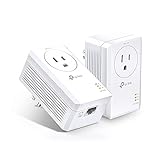
Results depend on the age and layout of your home wiring, and circuit breakers can block the signal between floors. Try the kit in the rooms you actually plan to use before mounting anything, and keep devices that create electrical noise, such as chargers and heaters, away from the adapter outlet. Plug adapters directly into wall sockets rather than power strips for the cleanest connection.
Frequently Asked Questions
What is the best powerline adapter for office workers?
For most office workers, the TP-Link TL-PA9020P KIT AV2000, typically $79 to $99, is a strong overall choice because it has a 2000 megabit rating, two gigabit ports, and a passthrough socket at a mid-range price. If you want Wi-Fi in your office, the TP-Link TL-WPA8631P, typically $99 to $129, is a good choice with three ports and Wi-Fi AC. If you want a premium adapter with Wi-Fi 6, the Devolo Magic 2 WiFi 6, typically $149 to $199, is a good choice. Choose by speed, ports, and Wi-Fi.
What is the best budget powerline adapter for office workers?
The best budget powerline adapter is the TP-Link TL-PA7017 KIT AV1000 Powerline Adapter, typically $39 to $49, because it is the cheapest row in the table and the only model in that lowest price range. It has a 1000 megabit rating, one gigabit port, and a compact, plug-and-play design. It is a good choice for a single wired connection in a home office, but it has no Wi-Fi and only one port.
Do powerline adapters work through walls and floors?
Yes, powerline adapters work through walls and floors, because they use your home electrical wiring, not Wi-Fi, to carry internet from one room to another. They work best when both adapters are on the same electrical circuit, plugged directly into a wall socket. They may work more slowly if they are on different circuits, if the wiring is old, or if the distance is long. Test the speed in your office, and try a different wall socket if the speed is low. Do not plug a powerline adapter into a surge protector or power strip, because that can reduce speed.
Is a powerline adapter better than Wi-Fi for a home office?
It depends on your home. A powerline adapter can be more stable than Wi-Fi for video calls and large file uploads, because a wired connection is less likely to drop or lag. Wi-Fi can be faster than powerline if your Wi-Fi router is close and your powerline wiring is poor. For a home office far from the router, a powerline adapter is often a good solution. For a home office close to the router, Wi-Fi or a direct Ethernet cable may be better. Test both, and choose the one that gives you a stable connection for video calls.
The best powerline adapter for office workers is the one that gives you a stable, wired connection in your home office, without a long cable or a weak Wi-Fi signal. Start with the TP-Link TL-PA9020P for a fast, two-port adapter, choose the TP-Link TL-PA7017 for a low-cost, single-port adapter, or choose the Devolo Magic 2 WiFi 6 for a premium adapter with Wi-Fi 6. Plug both adapters directly into a wall socket on the same circuit, test the speed, and use a strong password for your network. With the right adapter, your home office will have a stable connection for video calls, file sharing, and remote work.
Related guides
- Best AAA Batteries for Office Remotes in 2026: AAA Batteries for Office Remotes
- Best Budget Tablet for Work Under 100 in 2026: Budget Tablets for Work Under $100, Office Work, and Productivity
- Best Gimbal for Office Vlogging in 2026: 7 Gimbals for Office Vlogging That Keep Your Video Smooth, Stable, and Professional in the Office
- Best Budget NAS Dust Filter for Maintenance in 2026: 7 Budget NAS Dust Filters for Maintenance With Clear Airflow, Simple Install, and Easy Use for NAS
More from Amazon
Programs that pair well with the guide above. Offers and eligibility are set by Amazon and may change.
Free shipping on eligible items, Prime Video and more. Eligible new members can start with a free trial.
Start a Prime free trialAd-free music streaming. Eligible new subscribers can start with a free trial.
Try Music Unlimited freeA Prime membership for ages 18-24 with a trial period. Eligibility is set by Amazon.
See Prime for Young AdultsAudiobooks and podcasts to listen to on the go. Eligible new members can start with a free trial.
Try Audible freeAs an Amazon Associate we earn from qualifying purchases.

Write Your Review
No reviews yet. Be the first to share your experience!