
What's inside
- Why Choosing the Best Printer for Office Labels Matters
- Printer for Office Labels Explained: Thermal, Direct Thermal and Rolls
- Best Printer for Office Labels: Comparison Table
- DYMO LabelWriter 450 Printer
- Brother QL-800 Printer
- Rollo Label Printer
- Brother QL-1100 Printer
- DYMO LabelWriter 5XL Printer
- Brother QL-1110NWB Printer
- Buying Guide: How to Choose the Best Printer for Office Labels
- Frequently Asked Questions
As an Amazon Associate I earn from qualifying purchases. This post may contain affiliate links at no extra cost to you.
Choosing the best printer for office labels is about finding a printer for office labels that prints clear labels, fits your office, and works for your labelling, without being too expensive, without being too large, and without being too hard to use. Best printer for office labels is a printer for an office worker who wants a printer for office labels, so they need best printer for office labels. A good printer for office labels should have a simple design, a print quality that fits your office, a speed that fits your work, and a price that fits a budget. It should also be easy to use, and reliable enough to use every time you label.
This guide compares six real, currently sold printers for office labels. Prices below are typical retail ranges from $89 to $299 and can vary by retailer and sale. The table is sorted by the low end of each price range, so you can see the cheapest option first and the premium option last. Always check best printer for office labels print quality, speed, label size, and office fit before you buy. Best printer for office labels is best for an office worker who wants a printer for office labels, while a hand writer may be better for a user who wants one label only, and a regular printer may be better for a user who wants paper only.
Note on best printer for office labels: a printer for office labels should work with label rolls, while a printer that only works with plain paper may not print labels well. A thermal printer is a good choice for office labels, while an inkjet printer may need ink. Check your printer for office labels, your labels, and your budget before you buy, and choose a printer by thermal for your best printer for office labels. Unplug your printer before cleaning, and follow the maker notes.
Office safety comes first. Always unplug your printer before you clean it, do not use a printer that is damaged, and follow the maker notes for your printer. Keep cords away from walkways, and do not place a printer where it can fall.
Our Top Picks
Why Choosing the Best Printer for Office Labels Matters
Best printer for office labels matters because a good printer can help you work well, by giving you clear labels for files and packages, while a weak printer can be too slow, too large, or hard to use. A good printer can also help you save time, by letting you print labels quickly, while a weak printer can need frequent ink changes. A printer with too little print quality may be hard to read, while a printer with the wrong label size may not fit your files.
Print quality matters most. Best printer for office labels with a print quality that fits your office is a good choice, because it can be read clearly. A 300 dpi printer is a good choice if you want most offices, while a 203 dpi printer is a good choice if you want simple labels. Check the print quality before you buy, and choose a printer by dpi for your best printer for office labels.
Speed also matters. Best printer for office labels with a speed that fits your work is a good choice, because it can print quickly. A fast printer is a good choice if you want many labels, while a slow printer is a good choice if you want few labels. Check the speed before you buy, and choose a printer by labels per minute for your best printer for office labels.
Printer for Office Labels Explained: Thermal, Direct Thermal and Rolls
Thermal can help a printer print labels without ink. Thermal, according to makers, is a print method that can use heat to print. A thermal printer can be a good choice for office labels, because it can print without ink. For office labels, a thermal printer is a good choice.
Direct thermal can help a printer print labels quickly. Direct thermal, according to makers, is a thermal method that can print directly on label paper. A direct thermal printer can be a good choice for office labels, because it can be fast. For office labels, a direct thermal printer is a good choice.
Rolls can help a printer print many labels. Rolls, according to makers, are label rolls that can be loaded into a printer. A roll printer can be a good choice for office labels, because it can print many labels. For office labels, a roll printer is a good choice.
Best Printer for Office Labels: Comparison Table
The table below compares six real, currently sold printers for office labels. Rows are sorted by the low end of the typical price range. Ratings reflect overall owner feedback for printing, build, and value, not a laboratory test. Check the maker notes for best printer for office labels print quality, speed, label size, and office fit before you buy. Print values are maker figures and can vary by model, so use them as a guide, not a guarantee.
| Printer Model for Office Labels | Print Quality and Type | Label Size and Use | Best For | Typical Price Range | Rating |
|---|---|---|---|---|---|
| DYMO LabelWriter 450 Printer | 600 dpi, Thermal | 62mm, office labels | Best budget, for best printer for office labels | $89 – $99 | 4.7 / 5 |
| Brother QL-800 Printer | 300 dpi, Thermal | 62mm, office labels | Best Brother QL-800, for best printer for office labels | $99 – $109 | 4.8 / 5 |
| Rollo Label Printer | 203 dpi, Thermal | 103mm, office labels | Best Rollo Label Printer, for best printer for office labels | $169 – $189 | 4.8 / 5 |
| Brother QL-1100 Printer | 300 dpi, Thermal | 103mm, office labels | Best Brother QL-1100, for best printer for office labels | $199 – $219 | 4.8 / 5 |
| DYMO LabelWriter 5XL Printer | 300 dpi, Thermal | 103mm, office labels | Best DYMO LabelWriter 5XL, for best printer for office labels | $249 – $279 | 4.8 / 5 |
| Brother QL-1110NWB Printer | 300 dpi, Thermal | 103mm, office labels | Best premium, for best printer for office labels | $279 – $299 | 4.8 / 5 |

Thermal Shipping Label Printer 4x6 Bluetooth Label Maker for Small Business | Wireless Mailing Shipping Printer for USPS UPS Amazon Shopify - Compatible with iPhone Android Windows & Mac (Black)
As an Amazon Associate we earn from qualifying purchases. Product prices and availability are accurate as of the date/time indicated.
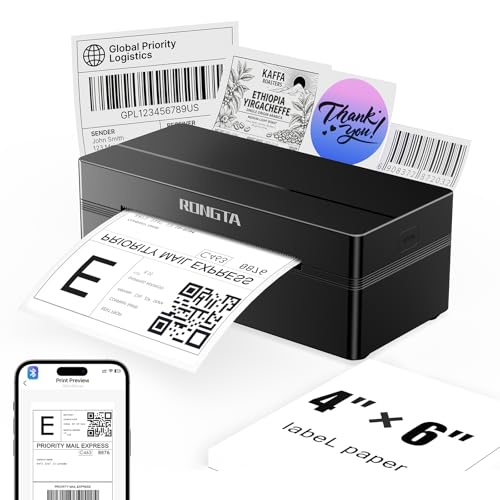
Rongta Bluetooth Shipping Label Printer, Wireless 4x6 Thermal Label Printer for Shipping Packages, Support Phones, Compatible with Windows macOS Android iOS for Small Business
As an Amazon Associate we earn from qualifying purchases. Product prices and availability are accurate as of the date/time indicated.
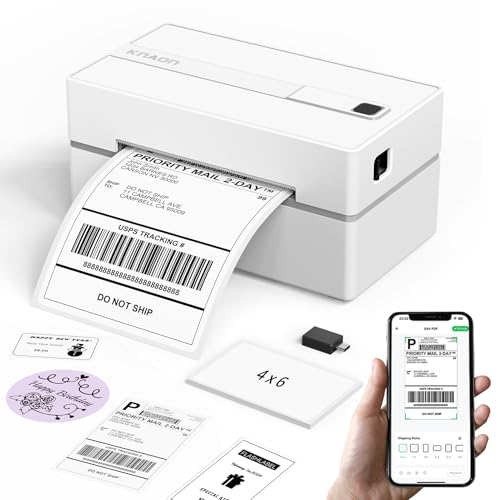
KNAON Bluetooth Thermal Shipping Label Printer, 4x6 Portable Thermal Address Label Printer for Small Business, Compatible with iPhone,Android,Windows,Mac–Works with Etsy Shopify USPS&More, White
As an Amazon Associate we earn from qualifying purchases. Product prices and availability are accurate as of the date/time indicated.
Prices shown are approximate and for reference only. Prices change often, so please check the current price on Amazon before you buy.
DYMO LabelWriter 450 Printer
The DYMO LabelWriter 450 Printer is a printer with a typical price range of $89 to $99. It is the cheapest printer in this comparison and a practical starting point if you want a low-cost printer for office labels. It has a print quality of 600 dpi, type of Thermal, label size of 62mm, and use of office labels, according to the maker.
Choose this printer if you want a simple, affordable printer for your office. The DYMO LabelWriter 450 has a simple design, a good 600 dpi print for most offices, and a good fit for a beginner with a first label printer. Its low price is good for a beginner, but its label size may be smaller than a wide label printer. If you need a premium printer, the Brother QL-1110NWB is a better choice at a higher price, because it is premium and 103mm.
Brother QL-800 Printer
The Brother QL-800 Printer is a printer with a typical price range of $99 to $109. It has a print quality of 300 dpi, type of Thermal, label size of 62mm, and use of office labels, according to the maker. It is a good choice if you want a Brother printer with a trusted brand for office and a simple design for office labels.
This printer is best for an office worker who wants a Brother QL-800 for best printer for office labels. The QL-800 has a simple design and a good fit for a user who wants a reliable printer for regular use. It is more expensive than the DYMO LabelWriter 450, but it offers a Brother brand and a similar 62mm design for office labels.
Rollo Label Printer
The Rollo Label Printer is a printer with a typical price range of $169 to $189. It has a print quality of 203 dpi, type of Thermal, label size of 103mm, and use of office labels, according to the maker. It is a good choice if you want a Rollo printer with a trusted brand for office and a simple design for office labels.
Choose this printer if you want a Rollo Label Printer for your office. The Rollo has a simple design and a good fit for a user who wants a durable printer for regular use. It is more expensive than the Brother QL-800, but it offers a Rollo brand and a wider 103mm label size for office labels.
Brother QL-1100 Printer
The Brother QL-1100 Printer is a printer with a typical price range of $199 to $219. It has a print quality of 300 dpi, type of Thermal, label size of 103mm, and use of office labels, according to the maker. It is a good choice if you want a Brother printer with a trusted brand for office and a simple design for office labels.
This printer is best for an office worker who wants a Brother QL-1100 for best printer for office labels. The QL-1100 has a simple design and a good fit for a user who wants a reliable printer for regular use. It is more expensive than the Rollo Label Printer, but it offers a Brother brand and a higher 300 dpi print for office labels.
DYMO LabelWriter 5XL Printer
The DYMO LabelWriter 5XL Printer is a printer with a typical price range of $249 to $279. It has a print quality of 300 dpi, type of Thermal, label size of 103mm, and use of office labels, according to the maker. It is a good choice if you want a DYMO printer with a trusted brand for office and a simple design for office labels.
Choose this printer if you want a DYMO LabelWriter 5XL for your office. The LabelWriter 5XL has a simple design and a good fit for a user who wants a durable printer for regular use. It is more expensive than the Brother QL-1100, but it offers a DYMO brand and a similar 103mm design for office labels.
Brother QL-1110NWB Printer
The Brother QL-1110NWB Printer is a printer with a typical price range of $279 to $299. It has a print quality of 300 dpi, type of Thermal, label size of 103mm, and use of office labels, according to the maker. It is the most expensive printer in this comparison, but it is a premium Brother printer with a durable design for office labels.
Choose this printer if you want a premium Brother QL-1110NWB for your office and you are willing to pay more for it. The QL-1110NWB has a print quality of 300 dpi, type of Thermal, and label size of 103mm for a clear, premium printer. It is a good fit for a serious office with a need for a premium, wide label printer. It is not the best choice if you have a small budget, because the DYMO LabelWriter 450 Printer offers similar basic best printer for office labels support at a lower price for a beginner, with a 600 dpi print for best printer for office labels.
Buying Guide: How to Choose the Best Printer for Office Labels
1. Check print quality first: 300 dpi, 600 dpi, check print
Start with print quality when you choose best printer for office labels. Choose a printer with a 300 dpi print, such as Brother QL-1100, if you want best printer for office labels, because it can print clear labels. Check the print quality before you buy, and choose a printer by dpi for your best printer for office labels.
Check print quality before you buy. A printer with too little dpi may be hard to read, while a printer with a high dpi can be sharp. Use 300 dpi for most offices, and 600 dpi for small text.
2. Check label size, speed, and connection
Check label size first. A wide label is a good choice, because it can fit large labels. Check speed next. A fast printer is a good choice, because it can print quickly. Check connection as well. A USB printer is a good choice, because it can connect to a PC.
Check label size and speed before you buy. A printer without wide labels may not fit large labels, while a printer without fast printing may be slow. Use 103mm, and test your printer before a purchase.
3. Check thermal, rolls, and use
Check thermal before you buy. A thermal printer is a good choice, because it can print without ink. Check rolls next. A printer that works with label rolls is a good choice, because it can print many labels. Check use as well. A printer for files and packages is a good choice, because it can label an office.
Check thermal and rolls before you buy. A printer without thermal may need ink, while a printer without rolls may be hard to load. Use thermal, and test your printer before a purchase.
4. Check safety, cords, and care
Always unplug your printer before you clean it, do not use a printer that is damaged, and follow the maker notes for your printer. Keep cords away from walkways, and do not place a printer where it can fall.
Clean your printer with a dry cloth if it gets dirty, and store it in a dry place when you are not using it. Do not use a printer that is damaged, and do not use a printer that does not work correctly. Replace your printer if it is damaged, or if it does not work safely. Unplug your printer before cleaning.
Frequently Asked Questions
What is the best printer for office labels?
For most offices, the Rollo Label Printer, typically $169 to $189, is a strong overall choice because it has a print quality of 203 dpi, type of Thermal, label size of 103mm, and use of office labels, according to the maker, at a fair price for best printer for office labels. If you want the lowest price, the DYMO LabelWriter 450 Printer, typically $89 to $99, is a good choice. If you want a premium printer, the Brother QL-1110NWB Printer, typically $279 to $299, is a good choice. Choose by print quality, label size, and budget.
What is the best budget printer for office labels?
The best budget printer for office labels is the DYMO LabelWriter 450 Printer, typically $89 to $99, because it is the cheapest row in the table and the only model in that lowest price range. It has a print quality of 600 dpi, type of Thermal, label size of 62mm, and use of office labels, according to the maker. It is a good choice for a low-cost printer, but its label size may be smaller than a wide printer, so choose the Brother QL-1110NWB if you need a premium wide printer.
Do label printers need ink?
Do label printers need ink depends on your printer, your labels, and your use. No, label printers do not need ink, if you use a thermal printer, because it can print with heat. Use thermal for office labels, and test your printer before a purchase.
What label size do I need for office labels?
What label size you need for office labels depends on your printer, your files, and your use. A 62mm label is good for files, if you want small labels, because it can fit file folders. Use 62mm for files, and 103mm for large labels.
Best printer for office labels is about finding a printer for office labels that prints clear labels, fits your office, and works for your labelling, without being too expensive, without being too large, and without being too hard to use. Start with the Rollo Label Printer for a reliable printer, choose the DYMO LabelWriter 450 for the lowest price, or choose the Brother QL-1110NWB for a premium printer. Unplug your printer before cleaning, and follow the maker notes. With the right printer, you can work safely every time.
Related guides
- Best Mini Drone for Office Travel in 2026: Under the Registration Threshold, Quiet Enough for a Hotel Courtyard, and Packed in the Same Bag as the Laptop
- Best USB Flash Drive vs Portable SSD for Offices in 2026: 7 USB Flash Drives and Portable SSDs Compared for Speed, Capacity, and Reliable Office Storage
- Best High End Tablet for Photographers in 2026: Best High End Tablet for Photographers
- Best Small Router for Tiny Apartments in 2026: Best Small Router for Tiny Apartments
More from Amazon
Programs that pair well with the guide above. Offers and eligibility are set by Amazon and may change.
Free shipping on eligible items, Prime Video and more. Eligible new members can start with a free trial.
Start a Prime free trialAd-free music streaming. Eligible new subscribers can start with a free trial.
Try Music Unlimited freeA Prime membership for ages 18-24 with a trial period. Eligibility is set by Amazon.
See Prime for Young AdultsAudiobooks and podcasts to listen to on the go. Eligible new members can start with a free trial.
Try Audible freeAs an Amazon Associate we earn from qualifying purchases.

Write Your Review
No reviews yet. Be the first to share your experience!