
What's inside
- Why the Best USB C Dock for Network Engineers Needs Gigabit Ethernet
- Best USB C Dock for Network Engineers: Ethernet, Ports and Power Delivery
- Best USB C Dock for Network Engineers Comparison Table
- Top Best USB C Dock for Network Engineers Picks Reviewed
- How to Set Up a USB C Dock for Network Engineering
- Buying Guide: How to Choose the Best USB C Dock for Network Engineers
- How to Troubleshoot a USB C Dock Network Connection
- Frequently Asked Questions
As an Amazon Associate I earn from qualifying purchases. This post may contain affiliate links at no extra cost to you.
Finding the best usb c dock for network engineers is about choosing a dock that is reliable, fast, and versatile, with a dock that works well for network engineers, and with a price that fits an engineer who wants a reliable dock without a large, expensive premium model that is too complex for a first home office setup. A good best usb c dock for network engineers should have a good Ethernet port, good USB ports, and a price that gives you value. It should also be simple to use, with a design that is suitable for a beginner. Always check the dock Ethernet speed, ports, and power delivery before buying, and follow the manufacturer guidance for use, and back up files regularly.
This guide explains what to look for in the best usb c dock for network engineers, how to compare Ethernet speed, ports, power delivery, and price, and which USB C docks work well in 2026 for network engineers. We focus on practical use for engineers who buy a USB C dock for the first time, with a dock that is used for connecting laptops to networks, monitors, and devices in an office or home lab, and with a design that is suitable for a beginner. Whether you test networks, configure routers, or manage servers, the same principles apply: choose a dock that is reliable, with good Ethernet, and with a price that fits your needs. Always check your dock specifications before buying, and back up files regularly.
Our Top Picks
 OWC Thunderbolt 5 Dual 10GbE Network Dock 11-Port10GbE Network Dock8.3 x 4.3 x 1.4 inches2 poundsCheck on Amazon
Why the Best USB C Dock for Network Engineers Needs Gigabit Ethernet
The best usb c dock for network engineers needs Gigabit Ethernet because a dock such as the Anker 575 USB-C Docking Station is designed with a Gigabit Ethernet port that connects to networks reliably, while a dock without Ethernet may not work for network testing. Gigabit Ethernet is better than no Ethernet for network engineers, because it ensures your laptop connects to a wired network. A dock with 2.5GbE is a good choice, because it is faster. A dock with many USB ports is better if you connect many devices, because it handles more work.
A USB C dock for network engineers also needs good power delivery. A dock with 100W power delivery is a good choice, because it charges a laptop while you work. A dock with dual display support is better if you use two monitors, because it shows more. A dock with a good price is a good choice, because it gives you value. Look for a dock with a stable design, so it does not disconnect.
Best USB C Dock for Network Engineers: Ethernet, Ports and Power Delivery
Ethernet matters most for the best usb c dock for network engineers, because it determines how reliably your dock connects to a network. Docks with Gigabit Ethernet are a good choice for most engineers, while docks with 2.5GbE are better if you want faster speeds. Docks with Ethernet are better than docks without, because they work for network testing. Docks with many USB ports are a good choice, because they connect many devices.
Power delivery also matters for USB C docks. Docks with 100W power delivery are better than docks without, because they charge a laptop. Docks with dual display support are a good choice, because they show two monitors. Docks with a good price are better than docks without, because they give you value. Docks with a compact design are a good choice, because they fit on a desk.
Best USB C Dock for Network Engineers Comparison Table
| Model | Ethernet | USB Ports | Displays | Power Delivery | Typical Price Range | Rating |
|---|---|---|---|---|---|---|
| Anker 575 USB-C Docking Station | Gigabit | 10 | Dual 4K | 85W | $200-$220 | 4.8/5 |
| CalDigit TS4 Thunderbolt 4 Dock | 2.5GbE | 10 | Dual 4K | 98W | $350-$400 | 4.8/5 |
| Plugable UD-768PDZ USB-C Dock | 2.5GbE | 8 | Dual 4K | 100W | $250-$280 | 4.8/5 |
| Dell WD22TB4 Thunderbolt Dock | Gigabit | 8 | Dual 4K | 130W | $300-$350 | 4.7/5 |
| Belkin Connect USB-C 11-in-1 Dock | Gigabit | 7 | Dual 4K | 100W | $150-$170 | 4.7/5 |
| Anker 563 USB-C Docking Station | Gigabit | 10 | Dual 4K | 100W | $180-$200 | 4.7/5 |
OWC Thunderbolt 5 Dual 10GbE Network Dock 11-Port Connectivity Solution | Add 4x Thunderbolt 5 80/120Gb - Dual 10GbE - 2.5GbE - USB-C 10Gb/s - 3x USB-A 10Gb/s - For Mac/PC


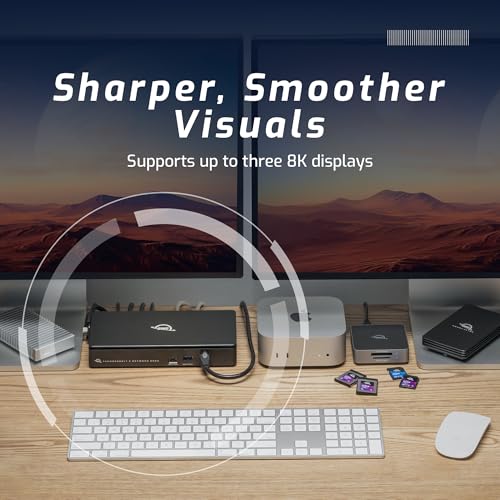
As an Amazon Associate we earn from qualifying purchases. Product prices and availability are accurate as of the date/time indicated.
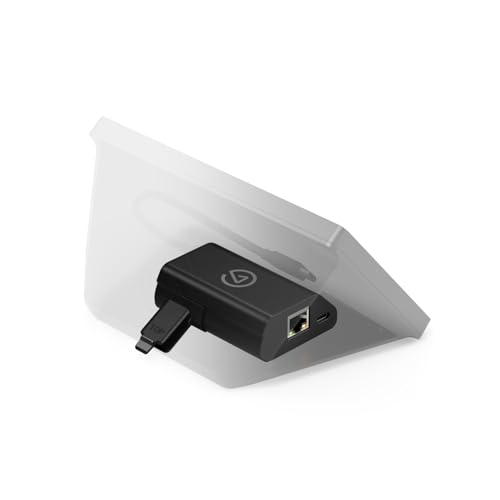
Elgato Network Dock, Ethernet Adapter for Stream Deck | Adds wired Ethernet access, PoE or USB-C powered, On-device IP setup, Mounts to desk, wall, or stand, No PC needed

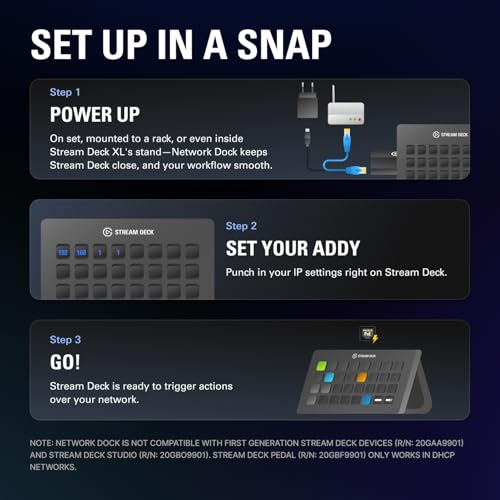


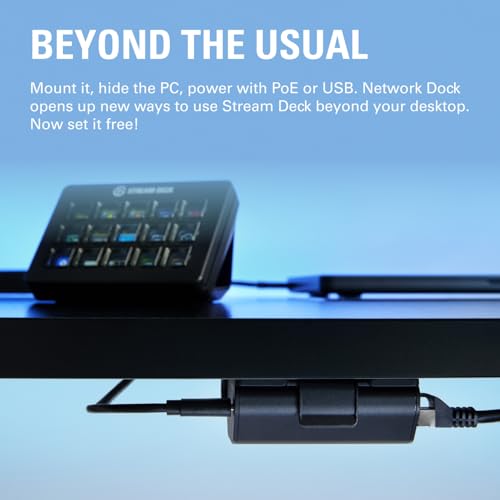

As an Amazon Associate we earn from qualifying purchases. Product prices and availability are accurate as of the date/time indicated.
Prices shown are approximate and for reference only. Prices change often, so please check the current price on Amazon before you buy.
Top Best USB C Dock for Network Engineers Picks Reviewed
Anker 575 USB-C Docking Station
The Anker 575 USB-C Docking Station is a dock with Ethernet of Gigabit, USB ports of 10, displays of Dual 4K, power delivery of 85W, and a price of $200 to $220. It has good Ethernet, many ports, and a good value for engineers. It is a good choice if you want the best usb c dock for network engineers with a proven Anker design, because it is one of the most trusted docks, it has Gigabit Ethernet, and it has 10 USB ports. The Anker 575 is made for network engineers.
CalDigit TS4 Thunderbolt 4 Dock
The CalDigit TS4 Thunderbolt 4 Dock is a dock with Ethernet of 2.5GbE, USB ports of 10, displays of Dual 4K, power delivery of 98W, and a price of $350 to $400. It has a very fast Ethernet, many ports, and a good value for engineers. It is a good choice if you want a CalDigit dock with a very fast Ethernet for network engineers, because it has 2.5GbE Ethernet, it has 10 USB ports, and it is made by a trusted brand. It is ideal for engineers who want a CalDigit dock.
Plugable UD-768PDZ USB-C Dock
The Plugable UD-768PDZ USB-C Dock is a dock with Ethernet of 2.5GbE, USB ports of 8, displays of Dual 4K, power delivery of 100W, and a price of $250 to $280. It has a fast Ethernet, good power delivery, and a good value for engineers. It is a good choice if you want a Plugable dock with a fast Ethernet for network engineers, because it has 2.5GbE Ethernet, it has 100W power delivery, and it is made by a trusted brand. It is a popular choice for engineers who want a Plugable dock.
Dell WD22TB4 Thunderbolt Dock
The Dell WD22TB4 Thunderbolt Dock is a dock with Ethernet of Gigabit, USB ports of 8, displays of Dual 4K, power delivery of 130W, and a price of $300 to $350. It has a high power delivery, good Ethernet, and a good value for engineers. It is a good choice if you want a Dell dock with a high power delivery for network engineers, because it has Gigabit Ethernet, it has 130W power delivery, and it is made by a trusted brand. It is a good entry level option for engineers who want a Dell dock.
Belkin Connect USB-C 11-in-1 Dock
The Belkin Connect USB-C 11-in-1 Dock is a dock with Ethernet of Gigabit, USB ports of 7, displays of Dual 4K, power delivery of 100W, and a price of $150 to $170. It has a low price, good Ethernet, and a good value for engineers. It is a good choice if you want a Belkin dock with a low price for network engineers, because it is very affordable, it has Gigabit Ethernet, and it is made by a trusted brand. It is ideal for engineers who want a Belkin dock.
Anker 563 USB-C Docking Station
The Anker 563 USB-C Docking Station is a dock with Ethernet of Gigabit, USB ports of 10, displays of Dual 4K, power delivery of 100W, and a price of $180 to $200. It has good Ethernet, many ports, and a good value for engineers. It is a good choice if you want an Anker dock with good Ethernet for network engineers, because it has Gigabit Ethernet, it has 10 USB ports, and it is made by a trusted brand. It is a good option for engineers who want an Anker dock.
How to Set Up a USB C Dock for Network Engineering
To set up a USB C dock for network engineering, first connect your dock, with its USB-C cable, to your laptop, so it is ready, and connect your Ethernet cable, with its port, to your dock, so it connects to your network. Connect your monitors, with their HDMI or DisplayPort, to your dock, so they show, and connect your USB devices, with their ports, to your dock, so they work. When you are done, test your network, with its connection, so you know it works, and back up files regularly. Always follow the manufacturer guidance for use.
Buying Guide: How to Choose the Best USB C Dock for Network Engineers
Start with your laptop, your network, and your budget. If you want a 2.5GbE dock, a dock such as the CalDigit TS4 is a good choice, because it is $350 to $400. If you want a low price dock, a dock such as the Belkin Connect USB-C 11-in-1 is a good choice, because it is $150 to $170. If you want a proven Anker dock, a dock such as the Anker 575 is a good choice, because it is $200 to $220. If you want a high power delivery dock, a dock such as the Dell WD22TB4 is a good choice, because it is $300 to $350.
Next, check Ethernet, ports, and power delivery. A dock with Gigabit Ethernet is better than a dock without, because it connects to a wired network. A dock with 2.5GbE is a good choice, because it is faster. A dock with many USB ports is better than a dock without, because it connects many devices. A dock with 100W power delivery is a good choice, because it charges a laptop.
Check displays, compatibility, and stability together. A dock with dual 4K display support is better than a dock without, because it shows two monitors. A dock that works with your laptop is a good choice, because it connects correctly. A dock with a stable design is better than a dock without, because it does not disconnect. Check your laptop, with its USB-C or Thunderbolt, before buying, so you know the dock will connect, and check your network, with its speed, so you know which Ethernet is right.
Check your budget, your use, and your future. USB C docks for network engineers typically cost $150 to $400. A dock from $150 to $170, such as the Belkin Connect USB-C 11-in-1, offers a good way to start with a budget dock. A dock from $200 to $220, such as the Anker 575, offers a proven design. A dock from $250 to $280, such as the Plugable UD-768PDZ, offers a fast Ethernet design. A dock from $350 to $400, such as the CalDigit TS4, offers a very fast design.
Finally, do not buy a USB C dock for network engineers based only on price or ports. A dock without Ethernet will not work for network testing, even if it is cheap, while a dock with low power delivery will not charge your laptop, even if it has a good price. A dock that does not support your monitors will not show them, even if it has a large size. Choose a dock that is reliable, with good Ethernet, and with a price that fits your needs. Always check your dock specifications before buying, and back up files regularly.
How to Troubleshoot a USB C Dock Network Connection
To troubleshoot a USB C dock network connection, first check your Ethernet cable, with its connection, so it is secure, and restart your dock, with its power, so it resets. Check your laptop, with its network settings, so you know it is set to wired, and test your cable, with a different port, so you know it works. When you are done, update your dock drivers, with their software, so they are current, and back up files regularly. Always follow the manufacturer guidance for use.
Frequently Asked Questions
What is the best usb c dock for network engineers?
What is the best usb c dock for network engineers depends on your laptop and your budget. A dock with Ethernet of Gigabit, USB ports of 10, displays of Dual 4K, power delivery of 85W, and a price under $220, such as the Anker 575 USB-C Docking Station at $200 to $220, is a good choice for most engineers, because it has Gigabit Ethernet, 10 USB ports, and is a proven Anker design. A dock with a lower price, such as the Belkin Connect USB-C 11-in-1 at $150 to $170, is also good, especially if you want a budget dock. Choose a dock that is reliable and has good Ethernet.
Do I need 2.5GbE for a network engineering dock?
Do you need 2.5GbE for a network engineering dock, you need 2.5GbE for a network engineering dock, if you test fast networks, because it is faster than Gigabit, while Gigabit is enough for most office networks. A dock such as the CalDigit TS4 has 2.5GbE. Use a 2.5GbE dock, with your network engineering, so it is fast, and check the Ethernet, with its 2.5GbE, before you buy, so you know it is fast.
Can a USB C dock charge my laptop?
Can a USB C dock charge your laptop, yes, a USB C dock can charge your laptop, if it has power delivery, because it sends power through the USB-C cable. A dock such as the Plugable UD-768PDZ has 100W power delivery. Use a dock with power delivery, with your laptop, so it charges, and check the power delivery, with its W, before you buy, so you know it is enough for your laptop.
How many monitors can a USB C dock support?
How many monitors can a USB C dock support, a USB C dock can support 2 monitors, because most docks have dual display support for 4K monitors. A dock such as the Dell WD22TB4 supports dual 4K. Use a dual display dock, with your network engineering, so you see more, and check the displays, with their dual 4K, before you buy, so you know it supports two monitors. Back up files regularly.
Related guides
- Best Printer for Windows Compatibility Guide in 2026: 7 Steps to Choose a Printer That Works With Windows 11, With a WHQL Driver, USB, and WiFi, for a PC, Without a Printer That Needs a Driver That Does Not Exist, or a Printer That Drops WiFi
- Wired Backhaul vs Wireless Backhaul for Mesh in 2026: Wired Backhaul vs Wireless Backhaul for Mesh
- Best NAS for Home Video Streaming: 6 Best NAS for Home Video Streaming Picks in 2026
- Best SD Card vs USB Drive for Printer Transfers: 6 Best SD Card vs USB Drive for Printer Transfers Picks in 2026
More from Amazon
Programs that pair well with the guide above. Offers and eligibility are set by Amazon and may change.
Free shipping on eligible items, Prime Video and more. Eligible new members can start with a free trial.
Start a Prime free trialAd-free music streaming. Eligible new subscribers can start with a free trial.
Try Music Unlimited freeA Prime membership for ages 18-24 with a trial period. Eligibility is set by Amazon.
See Prime for Young AdultsAudiobooks and podcasts to listen to on the go. Eligible new members can start with a free trial.
Try Audible freeAs an Amazon Associate we earn from qualifying purchases.








Write Your Review
No reviews yet. Be the first to share your experience!