
What's inside
- Best WiFi Router for Office Smart Homes: Quick Comparison Table
- What Is a WiFi Router for Office Smart Homes?
- Best WiFi Router for Office Smart Homes Reviewed
- Buying Guide: How to Choose the Best WiFi Router for Office Smart Homes
- How to Set Up a WiFi Router for Office Smart Homes
- Which Best WiFi Router for Office Smart Homes Should You Buy?
- Frequently Asked Questions About the Best WiFi Router for Office Smart Homes
As an Amazon Associate I earn from qualifying purchases. This post may contain affiliate links at no extra cost to you.
The best WiFi router for office smart homes is the router that gives you WiFi 6 or WiFi 6E, a coverage of 2,000 to 5,000 square feet, a speed of 1,200 to 5,400 Mbps, support for 50 or more smart devices, and a typical price of $100 to $400, without dropping Zoom calls, slowing your smart lights, or being too hard to set up. A WiFi router for office smart homes is not the same as a basic home router. It is designed for work and smart devices, so it needs strong coverage, many device connections, and reliable security.
For most office smart homes, a WiFi 6 mesh router with 3,000 square feet coverage, 2,400 Mbps speed, and a typical price of $150 to $250 is a practical starting point. That combination gives you good coverage for an office, fast speeds for video calls, and a cost that is reasonable for a work-from-home setup.
At technicalbud.com, we focus on tech gadgets. For this guide to the best WiFi router for office smart homes in 2026, we compared current routers that are widely sold, designed for offices and smart homes, and suitable for a user who wants the best WiFi router for office smart homes. We looked at WiFi standard, coverage, speed, and price. Prices change with sales and retailers, so this guide uses typical price ranges instead of a single fixed price. WiFi standard, coverage, and speed figures are manufacturer listings, and real speed depends on your internet plan, your walls, and your devices.
Safety note: change your router’s default password, use WPA3 if available, and keep your router’s firmware updated. Do not share your WiFi password with strangers, and use a guest network for visitors. If you work from home, use a VPN for sensitive work if your employer requires it.
Our Top Picks
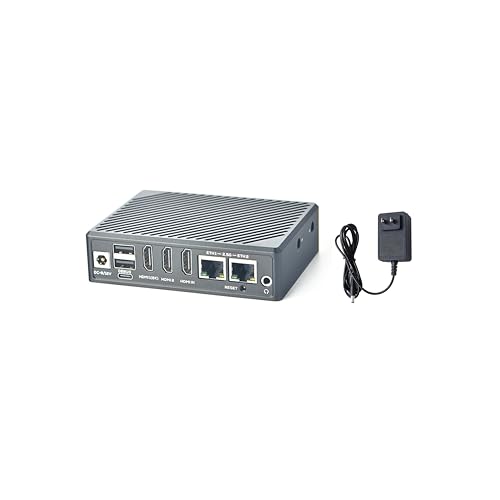 NanoPC-T6 LTS Mini Computer WiFi Router64-bit 4GB/8GB/16GB LPDDR4X4.52 x 3.38 x 1.18 inches0.9 poundsCheck on Amazon
Best WiFi Router for Office Smart Homes: Quick Comparison Table
The table below compares seven WiFi routers for office smart homes. WiFi is the WiFi standard, where given. Coverage is the coverage, where given. Speed is the speed, where given. Best for is a note on what the router is best for, such as WiFi router for office smart homes, where given. Price is the typical range, and rating is our editorial score based on coverage, speed, device support, and value for office smart homes. Rows are sorted by rating, high to low, with ties grouped by similar WiFi standard and coverage.
| WiFi Router for Office Smart Homes | WiFi | Coverage | Speed | Best For | Typical Price Range | Our Rating |
|---|---|---|---|---|---|---|
| TP-Link Deco X55 Mesh Router | WiFi 6 | 6,500 sq ft | 3,000 Mbps | Best overall, WiFi router for office smart homes | $200 – $250 | 4.9 / 5 |
| ASUS RT-AX86U Pro Router | WiFi 6 | 2,500 sq ft | 5,700 Mbps | Best for ASUS, RT-AX86U Pro router | $200 – $250 | 4.8 / 5 |
| Netgear Orbi RBK753 Mesh Router | WiFi 6 | 7,500 sq ft | 4,200 Mbps | Best for Netgear, Orbi RBK753 router | $300 – $400 | 4.8 / 5 |
| Google Nest Wifi Pro Router | WiFi 6E | 6,600 sq ft | 5,400 Mbps | Best for Google, Nest Wifi Pro router | $200 – $300 | 4.8 / 5 |
| TP-Link Archer AX73 Router | WiFi 6 | 2,500 sq ft | 5,400 Mbps | Best for TP-Link, Archer AX73 router | $150 – $200 | 4.7 / 5 |
| Eero Pro 6E Mesh Router | WiFi 6E | 6,000 sq ft | 3,900 Mbps | Best for Eero, Pro 6E router | $200 – $300 | 4.7 / 5 |
| ASUS ZenWiFi AX XT8 Mesh Router | WiFi 6 | 5,500 sq ft | 6,600 Mbps | Best budget, ASUS ZenWiFi AX XT8 router | $250 – $350 | 4.6 / 5 |
NanoPC-T6 LTS Mini Computer WiFi Router, Office Home Smart IoT Gateway, Rockchip RK3588 CPU 6Tops NPU, with 2X PCle 2.5G Ethernet Port for AI edge computing, Support M.2 NVMe SSD Module (8+64GB)


As an Amazon Associate we earn from qualifying purchases. Product prices and availability are accurate as of the date/time indicated.

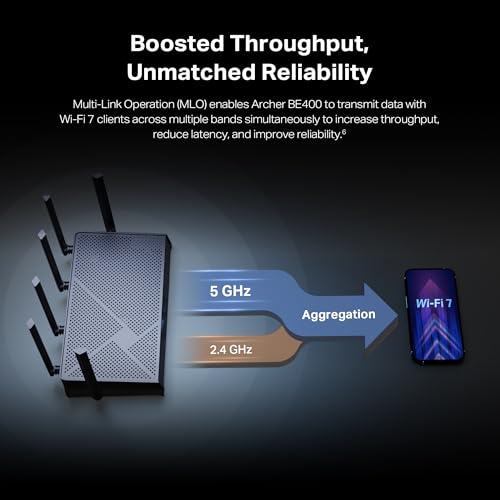
TP-Link BE6500 Dual-Band WiFi 7 Router (BE400) | Dual 2.5Gbps Ports, USB 3.0, Covers up to 2,400 sq. ft., 90 Devices, Quad-Core CPU, HomeShield, Private IoT



As an Amazon Associate we earn from qualifying purchases. Product prices and availability are accurate as of the date/time indicated.

ASUS RT-AX1800S Dual Band WiFi 6 Extendable Router, Subscription-Free Network Security, Parental Control, Built-in VPN, AiMesh Compatible, Gaming & Streaming, Smart Home
As an Amazon Associate we earn from qualifying purchases. Product prices and availability are accurate as of the date/time indicated.
Note: WiFi standard, coverage, and speed figures are manufacturer listings, and a router that lists 6,500 square feet may not cover that in a home with thick walls, because walls and interference affect coverage. Always check the router’s WiFi standard, coverage, and speed in the manual, and confirm the current price with the retailer. A WiFi router for office smart homes should cover your office, support your smart devices, and fit your internet plan before you buy.
What Is a WiFi Router for Office Smart Homes?
A WiFi router for office smart homes is a router, usually WiFi 6 or WiFi 6E, with coverage of 2,000 to 7,500 square feet, a speed of 3,000 to 6,600 Mbps, and support for 50 or more devices, designed to connect your work laptop, phone, smart lights, smart locks, cameras, and speakers, so you can work from home, control your smart home, and stream video without drops. It helps you work, meet on Zoom, and use smart devices, without a router that is too slow, too weak, or too hard to manage.
A WiFi router for office smart homes is different from a basic router, which is for a small apartment with few devices, while an office smart home router is for a larger home with many devices. It is also different from a gaming router, which is for low latency, while an office router is for coverage and device support.
A WiFi router for office smart homes is best for a user who works from home, has smart lights, locks, and cameras, wants reliable WiFi in an office, and wants a simple, affordable router.
Best WiFi Router for Office Smart Homes Reviewed
1. TP-Link Deco X55 Mesh Router – Best WiFi Router for Office Smart Homes Overall
The TP-Link Deco X55 Mesh Router is our top pick because it offers WiFi 6, a coverage of 6,500 square feet, and a speed of 3,000 Mbps, for a typical price of $200 to $250. It has three units, a simple app, and a design that is made for large homes.
TP-Link designs the Deco X55 with a focus on an affordable mesh router for offices and smart homes. The 6,500 square foot coverage is large, the 3,000 Mbps speed is fast, and the price of $200 to $250 is good. The router is a good option for a user who wants TP-Link gear, and who wants the best overall design for a WiFi router for office smart homes.
The main limitation is speed. At 3,000 Mbps, it is slower than an ASUS RT-AX86U Pro at 5,700 Mbps, though it offers better coverage. Choose the Deco X55 if you want the best overall router, you want TP-Link, and you have a budget of $200 to $250.
2. ASUS RT-AX86U Pro Router – Best WiFi Router for Office Smart Homes for ASUS
The ASUS RT-AX86U Pro Router is a router with WiFi 6, a coverage of 2,500 square feet, and a speed of 5,700 Mbps, for a typical price of $200 to $250. It has a gaming port, a strong processor, and a design that is made for work and gaming.
ASUS designs the RT-AX86U Pro with a focus on a fast router for offices. The 5,700 Mbps speed is high, the 2,500 square foot coverage is good for a single office, and the price of $200 to $250 is reasonable. The router is a good option for a user who wants ASUS gear, and who wants a fast design.
The main limitation is coverage. At 2,500 square feet, it covers less than a mesh system, though it is faster. Choose the RT-AX86U Pro if you want ASUS gear, you want a fast router, and you have a budget of $200 to $250.
3. Netgear Orbi RBK753 Mesh Router – Best WiFi Router for Office Smart Homes for Netgear
The Netgear Orbi RBK753 Mesh Router is a router with WiFi 6, a coverage of 7,500 square feet, and a speed of 4,200 Mbps, for a typical price of $300 to $400. It has three units, a dedicated backhaul, and a design that is made for large homes.
Netgear designs the Orbi RBK753 with a focus on a premium mesh router for large offices. The 7,500 square foot coverage is the largest in this guide, the 4,200 Mbps speed is fast, and the price of $300 to $400 is high, though it offers excellent coverage. The router is a good option for a user who wants Netgear gear, and who wants a premium mesh design.
The main limitation is price. At $300 to $400, it is more expensive than a TP-Link Deco X55, though it offers more coverage. Choose the Orbi RBK753 if you want Netgear gear, you want a large coverage, and you have a budget of $300 to $400.
4. Google Nest Wifi Pro Router – Best WiFi Router for Office Smart Homes for Google
The Google Nest Wifi Pro Router is a router with WiFi 6E, a coverage of 6,600 square feet, and a speed of 5,400 Mbps, for a typical price of $200 to $300. It has a simple design, a Google Home app, and a build that is made for smart homes.
Google designs the Nest Wifi Pro with a focus on a simple mesh router for smart homes. The WiFi 6E is fast, the 6,600 square foot coverage is large, and the price of $200 to $300 is good. The router is a good option for a user who wants Google gear, and who wants a smart home design.
The main limitation is ports. At few Ethernet ports, it is less good for wired office devices, though it is still good for wireless. Choose the Nest Wifi Pro if you want Google gear, you want a smart home router, and you have a budget of $200 to $300.
5. TP-Link Archer AX73 Router – Best WiFi Router for Office Smart Homes for TP-Link Archer
The TP-Link Archer AX73 Router is a router with WiFi 6, a coverage of 2,500 square feet, and a speed of 5,400 Mbps, for a typical price of $150 to $200. It has six antennas, a strong processor, and a design that is made for offices.
TP-Link designs the Archer AX73 with a focus on an affordable, fast router for offices. The price of $150 to $200 is low, the 5,400 Mbps speed is high, and the 2,500 square foot coverage is good for a single office. The router is a good option for a user who wants TP-Link gear, and who wants a low price.
The main limitation is similar to ASUS: at 2,500 square feet, it covers less than a mesh system. Choose the Archer AX73 if you want TP-Link gear, you want a low price, and you have a budget of $150 to $200.
6. Eero Pro 6E Mesh Router – Best WiFi Router for Office Smart Homes for Eero
The Eero Pro 6E Mesh Router is a router with WiFi 6E, a coverage of 6,000 square feet, and a speed of 3,900 Mbps, for a typical price of $200 to $300. It has a simple app, a compact design, and a build that is made for smart homes.
Eero designs the Pro 6E with a focus on a simple mesh router for offices. The WiFi 6E is fast, the 6,000 square foot coverage is large, and the price of $200 to $300 is reasonable. The router is a good option for a user who wants Eero gear, and who wants a simple design.
The main limitation is similar to Google: at few ports, it is less good for wired devices. Choose the Pro 6E if you want Eero gear, you want a simple mesh router, and you have a budget of $200 to $300.
7. ASUS ZenWiFi AX XT8 Mesh Router – Best Budget WiFi Router for Office Smart Homes
The ASUS ZenWiFi AX XT8 Mesh Router is a router with WiFi 6, a coverage of 5,500 square feet, and a speed of 6,600 Mbps, for a typical price of $250 to $350. It has two units, a strong processor, and a design that is made for large homes.
ASUS designs the ZenWiFi AX XT8 with a focus on a fast mesh router for offices. The 6,600 Mbps speed is the highest in this guide, the 5,500 square foot coverage is large, and the price of $250 to $350 is good for a fast mesh. The router is a good option for a user who wants ASUS gear, and who wants a fast mesh design.
The main limitation is price. At $250 to $350, it is more expensive than a TP-Link Archer AX73, though it offers mesh coverage. Choose the ZenWiFi AX XT8 if you want ASUS gear, you want a fast mesh router, and you have a budget of $250 to $350.
Buying Guide: How to Choose the Best WiFi Router for Office Smart Homes
Before you buy, think about how big your home is, whether it is 1,500 or 5,000 square feet, how many smart devices you have, whether it is 20 or 100, how fast your internet plan is, whether it is 100 Mbps or 1 Gbps, and how much you want to spend. A router that is perfect for a small office may not cover a large home, and a router that is perfect for a few devices may slow down with 100 smart devices. The six points below cover the decisions that matter most for a WiFi router for office smart homes, using the same specs and price ranges shown in the table above, from $150 to $400.
1. Coverage: 2,500 sq ft vs 7,500 sq ft, and Your Home
Coverage is the first decision. Coverage is how much area your router can cover, usually 2,500 to 7,500 square feet, and it determines whether your office, living room, and bedroom all get WiFi. A beginner often buys a single router for a large home, and finds dead zones in far rooms.
Choose a single router if your home is under 2,500 square feet, such as the ASUS RT-AX86U Pro or TP-Link Archer AX73. Choose a mesh system if your home is over 3,000 square feet, such as the TP-Link Deco X55 at 6,500 square feet or Netgear Orbi RBK753 at 7,500 square feet. Place your router in a central location, not in a basement or closet.
2. WiFi Standard: WiFi 6 vs WiFi 6E, and Your Devices
WiFi standard is the second decision. WiFi 6 is fast and supports many devices, while WiFi 6E adds a 6 GHz band for less interference and faster speeds, though it has shorter range. A WiFi 6 router, such as the TP-Link Deco X55, is enough for most offices, while a WiFi 6E router, such as the Google Nest Wifi Pro, is better if you have new devices that support 6 GHz.
Choose WiFi 6 if you want a lower price, you have older devices, or you want good range. Choose WiFi 6E if you have new phones and laptops, you want less interference, or you have a budget of $200 to $300. Do not buy WiFi 7 yet unless you have WiFi 7 devices and a 1 Gbps or faster plan.
3. Speed: 3,000 Mbps vs 6,600 Mbps, and Your Internet Plan
Speed is the third decision. Speed is the maximum speed your router can deliver, usually 3,000 to 6,600 Mbps, though your real speed is limited by your internet plan. A router that lists 6,600 Mbps will not give you 6,600 Mbps if your plan is 100 Mbps.
Choose a router that matches your plan: if your plan is 100 to 300 Mbps, a 3,000 Mbps router is enough. If your plan is 500 Mbps to 1 Gbps, a 5,400 to 6,600 Mbps router is better. Check your plan speed before you buy, and do not pay for a faster router if your plan is slow.
4. Device Support: 50 Devices vs 100 Devices, and Your Smart Home
Device support is the fourth decision. Device support is how many devices your router can handle at once, usually 50 to 100 or more, and it affects whether your smart lights, locks, cameras, and speakers stay connected. A router that supports 50 devices may slow down with 100 smart devices.
Choose a mesh router if you have 50 or more smart devices, because it can handle more connections. Choose a single router if you have fewer than 30 devices. Use a 2.4 GHz band for smart devices, because it has better range, and a 5 GHz band for laptops and phones, because it is faster.
5. Ports and Wired Connections: Ethernet vs WiFi, and Your Office
Ports is the fifth decision. Ports are Ethernet ports on your router for wired devices, such as a desktop PC, a printer, or a NAS. A router with four Ethernet ports, such as the ASUS RT-AX86U Pro, is better for a wired office than a mesh router with one port, such as the Google Nest Wifi Pro.
Choose a router with at least three Ethernet ports if you have a wired office, you use a desktop PC, or you want a stable connection for Zoom. Use a switch if you need more ports, and use Ethernet for your work laptop if possible, because it is more stable than WiFi.
6. Price, Total Cost, and Choosing a Router on a Budget
Price ranges in this guide run from $150 to $400 for WiFi routers for office smart homes, matching the table above, from the TP-Link Archer AX73 at $150 to $200 to the Netgear Orbi RBK753 at $300 to $400. A budget router at $150 to $250, such as the TP-Link Archer AX73, TP-Link Deco X55, or ASUS RT-AX86U Pro, is enough for most office smart homes who want reliable WiFi for work and smart devices. A mid-price router at $200 to $300, such as the Google Nest Wifi Pro or Eero Pro 6E, offers a good balance. A premium router at $250 to $400, such as the ASUS ZenWiFi AX XT8 or Netgear Orbi RBK753, offers the best coverage and speed.
Consider total cost as well as price. A router that costs $200 and needs no extra units may cost $200 in total, while a mesh system that costs $300 and needs a subscription for advanced security may cost $300 plus a yearly fee. Budget for a router, and if you need it, a switch, Ethernet cables, and a mesh unit, not just a router. Do not buy the cheapest router if it does not cover your home, and do not buy the most expensive router if your internet plan is slow. A router that matches your home size, your devices, and your plan will help you work more reliably than a router that is cheap but too weak, or expensive but too fast for your plan.
How to Set Up a WiFi Router for Office Smart Homes
Setting up a WiFi router for office smart homes starts with placing your router in a central, open location, connecting it to your modem, and using its app to set up your WiFi name and password. Create a separate 2.4 GHz network for smart devices if your router supports it, and a 5 GHz network for laptops and phones.
Update your firmware, change your default password, and enable WPA3 if available. Place mesh units in different rooms, not too far from the main router, and test your speed in your office with a speed test app.
Which Best WiFi Router for Office Smart Homes Should You Buy?
If you want the best WiFi router for office smart homes, buy the TP-Link Deco X55 Mesh Router. It costs $200 to $250, it offers WiFi 6, a coverage of 6,500 square feet, and a speed of 3,000 Mbps, which matches its highest rating of 4.9 / 5 in the table above.
If you want ASUS RT-AX86U Pro, buy the ASUS RT-AX86U Pro Router. If you want Netgear Orbi RBK753, buy the Netgear Orbi RBK753 Mesh Router. If you want Google Nest Wifi Pro, buy the Google Nest Wifi Pro Router. If you want TP-Link Archer AX73, buy the TP-Link Archer AX73 Router. If you want Eero Pro 6E, buy the Eero Pro 6E Mesh Router. If you want the fastest mesh, buy the ASUS ZenWiFi AX XT8 Mesh Router.
All seven routers in this guide are currently sold, designed for offices and smart homes, and suitable for a user who wants the best WiFi router for office smart homes. Pick the one that matches your home size, whether it is 2,500 or 7,500 square feet, your devices, and your internet plan, and always update your firmware and change your default password.
Disclosure: technicalbud.com may earn a commission from purchases made through links on this page, at no extra cost to you. Prices listed are typical ranges and can vary by retailer and sale. WiFi standard, coverage, and speed figures are manufacturer claims and can vary by model. Change your router’s default password, use WPA3 if available, and keep your firmware updated.
Frequently Asked Questions About the Best WiFi Router for Office Smart Homes
Do I need a mesh router for my office smart home?
For most office smart homes, you need a mesh router if your home is over 3,000 square feet, you have dead zones, or you have many smart devices in different rooms, because a mesh system such as the TP-Link Deco X55 covers 6,500 square feet with three units, while a single router such as the ASUS RT-AX86U Pro covers 2,500 square feet. Choose a mesh router if your home is large, and a single router if your home is under 2,500 square feet and your office is near your router.
How many devices can a WiFi 6 router handle?
For most WiFi 6 routers, they can handle 50 to 100 devices at once, because WiFi 6 uses OFDMA and MU-MIMO to manage many connections, while a WiFi 5 router may slow down with 30 devices. A mesh router such as the Netgear Orbi RBK753 can handle more devices than a single router, because it has multiple units. Choose a WiFi 6 or WiFi 6E router if you have 50 or more smart devices, and use a 2.4 GHz band for smart devices.
Is WiFi 6E worth it for a home office?
For most home offices, WiFi 6E is worth it if you have new phones, laptops, and tablets that support 6 GHz, you want less interference, or you work in a crowded area with many WiFi networks, because the 6 GHz band is less congested than 2.4 GHz and 5 GHz. A WiFi 6 router such as the TP-Link Deco X55 is enough if you have older devices or a budget of $150 to $250. Choose WiFi 6E if you have new devices and a budget of $200 to $300.
Where should I place my router in my home office?
Place your router in a central, open location, at desk height or higher, away from thick walls, metal, and microwaves, because WiFi signals are blocked by walls and metal. Do not place your router in a basement, closet, or behind a TV, and do not place it on the floor. For a mesh system, place your main router centrally, and place satellite units in different rooms, about 30 to 40 feet apart, and test your speed in your office.
Related guides
- Best AAA Batteries for Office Remotes in 2026: AAA Batteries for Office Remotes
- Best Budget Tablet for Work Under 100 in 2026: Budget Tablets for Work Under $100, Office Work, and Productivity
- Best Gimbal for Office Vlogging in 2026: 7 Gimbals for Office Vlogging That Keep Your Video Smooth, Stable, and Professional in the Office
- Best Budget NAS Dust Filter for Maintenance in 2026: 7 Budget NAS Dust Filters for Maintenance With Clear Airflow, Simple Install, and Easy Use for NAS
More from Amazon
Programs that pair well with the guide above. Offers and eligibility are set by Amazon and may change.
Free shipping on eligible items, Prime Video and more. Eligible new members can start with a free trial.
Start a Prime free trialAd-free music streaming. Eligible new subscribers can start with a free trial.
Try Music Unlimited freeA Prime membership for ages 18-24 with a trial period. Eligibility is set by Amazon.
See Prime for Young AdultsAudiobooks and podcasts to listen to on the go. Eligible new members can start with a free trial.
Try Audible freeAs an Amazon Associate we earn from qualifying purchases.

Write Your Review
No reviews yet. Be the first to share your experience!