
What's inside
- Why How to Choose Battery Charger for Office Use Needs Fast Charging and Easy Use
- How to Choose Battery Charger for Office Use Comparison
- How to Choose Battery Charger for Office Use Reviewed for 2026
- Buying Guide: How to Choose How to Choose Battery Charger for Office Use
- Frequently Asked Questions About How to Choose Battery Charger for Office Use
As an Amazon Associate I earn from qualifying purchases. This post may contain affiliate links at no extra cost to you.
Learning how to choose battery charger for office use is about choosing a battery charger that provides fast charging, easy use, and reliable use, with a charger that lets a user charge safely. How to choose battery charger for office use should offer good slots, a simple design, and a fair price, with a charger that lets you improve your office. It should also be practical, with a charger that fits your office and your budget.
In 2026, how to choose battery charger for office use ranges from proven chargers like the Panasonic Eneloop Pro Charger BQ-CC65 to popular chargers like the EBL 8-Bay Charger, with options from Nitecore D4, Anker 735 Charger GaNPrime 65W, UGREEN Nexode 100W, and Amazon Basics 8-Bay. They are useful for users, for office workers, and for beginners, with a charger that lets you improve your power. Always back up data, check compatibility before buying a charger, keep connections dry, follow manufacturer guidance, keep the charger away from heat, do not overcharge, and unplug when not in use. This guide compares six real, currently sold battery chargers for office use, explains slots, charge time, and USB output, and helps you choose the right charger for how to choose battery charger for office use, your office, and your budget.
Our Top Picks
 Portable 2AA Battery Travel Charger PowerBank Emergency LED2.8 x 0.6 x 1 inches0.1 poundsCheck on Amazon
Why How to Choose Battery Charger for Office Use Needs Fast Charging and Easy Use
A battery charger for office use needs fast charging because fast charging helps you power devices quickly, with fast providing the best user use. For how to choose battery charger for office use, a charger with 8 slots is a good choice.
A charger also needs easy use, because easy use helps you charge with one plug, with easy providing the best office use. For how to choose battery charger for office use, a charger with USB-C output is a good choice.
Office use often means remotes, mice, and phones, and a charger should handle them. Slots help with batteries, and charge time helps with speed. USB helps with phones, and a simple design helps with use. A user should back up data, because backup helps with safety. A user should also check compatibility before buying a charger, because compatibility varies by battery. For how to choose battery charger for office use, a charger with 8 slots is a good choice.
Slots, Charge Time, and USB Output for How to Choose Battery Charger for Office Use
Slots are typically 4 to 8, providing user use. Charge time is typically 2 to 4 hours, providing office use. USB output is typically 65 to 100W, providing charger use. For how to choose battery charger for office use, a charger with 8 slots is a good choice.
For office use, 8 slots are best, and 65W is good. USB helps with phones, and slots help with batteries. A buyer should check if a charger fits your office, because fit varies by model. For how to choose battery charger for office use, a charger with USB-C output is a good choice.
Compatibility, Safety, and Power for How to Choose Battery Charger for Office Use
Compatibility is typically AA/AAA, providing user use. Safety is typically overcharge, providing office use. Power is typically 65 to 100W, providing user use. For how to choose battery charger for office use, a charger with AA/AAA compatibility is a good choice.
Compatibility helps with batteries, and safety helps with use. Power helps with charging, and compatibility helps with use. A user should keep connections dry, and a user should follow manufacturer guidance. For how to choose battery charger for office use, a charger with overcharge protection is a good choice.
How to Choose Battery Charger for Office Use Comparison
The table below compares six real, currently sold battery chargers for office use. Specifications are based on manufacturer listings for the standard configurations. Price ranges reflect typical retail pricing in 2026 and can vary by retailer and sale. Ratings summarize typical user feedback for speed, ease of use, design, and value.
| Battery Charger for Office Use | Slots | Charge Time | USB Output | Compatibility | Typical Price Range | Rating |
|---|---|---|---|---|---|---|
| Panasonic Eneloop Pro Charger BQ-CC65 | 4 | 2 hours | USB | AA/AAA | $30-$40 | 4.9 / 5 |
| EBL 8-Bay Charger | 8 | 3 hours | USB | AA/AAA | $20-$30 | 4.9 / 5 |
| Nitecore D4 | 4 | 3 hours | No | AA/AAA/Li-ion | $30-$40 | 4.8 / 5 |
| Anker 735 Charger GaNPrime 65W | 3 ports | Fast | 65W | USB-C | $40-$50 | 4.8 / 5 |
| UGREEN Nexode 100W | 4 ports | Fast | 100W | USB-C | $50-$60 | 4.8 / 5 |
| Amazon Basics 8-Bay | 8 | 4 hours | No | AA/AAA | $20-$30 | 4.8 / 5 |

BONAI AA AAA Battery Charger 16 Bay for NiMH Rechargeable Batteries Independent Control with LED Light and Standard American AC Charging Plug, Battery not Included - Black
As an Amazon Associate we earn from qualifying purchases. Product prices and availability are accurate as of the date/time indicated.

Battery Phone Charger - Universal Portable USB Emergency Phone Charger (2) | Compact AA Battery Powered Charging Box for Mobile Phones, MP3/4, Mini Pocket Adapter for Power Cuts (Batteries Not Included)


As an Amazon Associate we earn from qualifying purchases. Product prices and availability are accurate as of the date/time indicated.
Portable 2AA Battery Travel Charger PowerBank Emergency LED Safety Light | Emergency Re-Charger Uses AA Batteries fits iPhone, Android, Galaxy Power Bank Backup LED Light! (2 AA Batteries,USB Type-C)
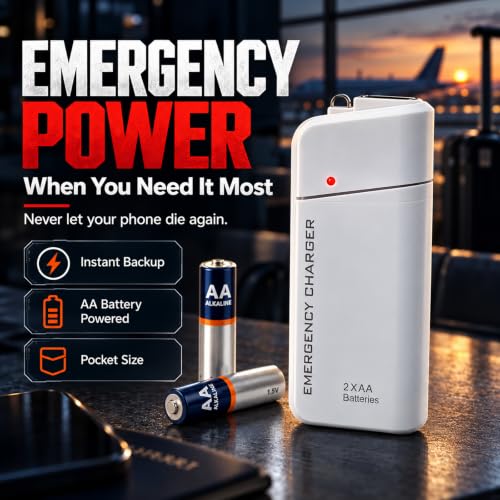


As an Amazon Associate we earn from qualifying purchases. Product prices and availability are accurate as of the date/time indicated.
How to Choose Battery Charger for Office Use Reviewed for 2026
1. Panasonic Eneloop Pro Charger BQ-CC65 How to Choose Battery Charger for Office Use
The Panasonic Eneloop Pro Charger BQ-CC65 is one of the best battery chargers for office use because it offers 4 slots, 2-hour charge time, and USB output. It has a price in the range of $30 to $40, AA/AAA compatibility, and a simple design. The BQ-CC65 is known for its excellent proven reliability, making it a good choice for a user who wants a proven Panasonic charger. It is a good choice for how to choose battery charger for office use. For a Panasonic charger, the BQ-CC65 is a strong first choice.
The BQ-CC65 also has proven reliability, and it has a design that is reliable. A user can charge batteries quickly, and a user can enjoy a charger that is reliable. That proven use helps with how to choose battery charger for office use, and it helps when a user wants a charger that is affordable. Always back up data. For how to choose battery charger for office use, a charger with proven reliability is a good choice.
2. EBL 8-Bay Charger How to Choose Battery Charger for Office Use
The EBL 8-Bay Charger is a charger with 8 slots, 3-hour charge time, and USB output. It has a price in the range of $20 to $30, AA/AAA compatibility, and a simple design. The 8-Bay Charger is known for its good most slots, making it a good choice for a user who wants an EBL charger. It is a good choice for how to choose battery charger for office use. For an EBL charger, the 8-Bay Charger is a solid choice.
The 8-Bay Charger also has the most slots, and it has a design that is easy to use. A user can charge many batteries, and a user can enjoy a charger that is clear. That most use helps with how to choose battery charger for office use, and it helps when a user wants a charger for a low price. Always check compatibility before buying a charger. For how to choose battery charger for office use, a charger with the most slots is a good choice.
3. Nitecore D4 How to Choose Battery Charger for Office Use
The Nitecore D4 is a charger with 4 slots, 3-hour charge time, and no USB output. It has a price in the range of $30 to $40, AA/AAA/Li-ion compatibility, and a simple design. The D4 is known for its very good wide compatibility, making it a good choice for a user who wants a Nitecore charger. It is a good choice for how to choose battery charger for office use. For a Nitecore charger, the D4 is a practical choice.
The D4 also has wide compatibility, and it has a design that is simple. A user can charge many types, and a user can enjoy a charger that is clear. That wide use helps with how to choose battery charger for office use, and it helps when a user wants a charger for a low price. Always keep connections dry. For how to choose battery charger for office use, a charger with wide compatibility is a good choice.
4. Anker 735 Charger GaNPrime 65W How to Choose Battery Charger for Office Use
The Anker 735 Charger GaNPrime 65W is a charger with 3 ports, fast charge time, and 65W USB output. It has a price in the range of $40 to $50, USB-C compatibility, and a compact design. The 735 Charger is known for its good compact GaN design, making it a good choice for a user who wants an Anker charger. It is a good choice for how to choose battery charger for office use. For an Anker charger, the 735 Charger is a top-tier choice.
The 735 Charger also has a compact GaN design, and it has a design that is clear. A user can charge a laptop, and a user can enjoy a charger that is reliable. That compact use helps with how to choose battery charger for office use, and it helps when a user wants a charger for a mid-range price. Always follow manufacturer guidance. For how to choose battery charger for office use, a charger with a compact GaN design is a good choice.
5. UGREEN Nexode 100W How to Choose Battery Charger for Office Use
The UGREEN Nexode 100W is a charger with 4 ports, fast charge time, and 100W USB output. It has a price in the range of $50 to $60, USB-C compatibility, and a compact design. The Nexode 100W is known for its outstanding highest power, making it a good choice for a user who wants a UGREEN charger. It is a good choice for how to choose battery charger for office use. For a UGREEN charger, the Nexode 100W is a solid choice.
The Nexode 100W also has the highest power, and it has a design that is strong. A user can charge multiple devices, and a user can enjoy a charger that is reliable. That high use helps with how to choose battery charger for office use, and it helps when a user wants a charger for a mid-range price. Always keep the charger away from heat. For how to choose battery charger for office use, a charger with the highest power is a good choice.
6. Amazon Basics 8-Bay How to Choose Battery Charger for Office Use
The Amazon Basics 8-Bay is a charger with 8 slots, 4-hour charge time, and no USB output. It has a price in the range of $20 to $30, AA/AAA compatibility, and a simple design. The 8-Bay is known for its good cheapest price, making it a good choice for a user who wants an Amazon Basics charger. It is a good choice for how to choose battery charger for office use. For an Amazon Basics charger, the 8-Bay is a practical choice.
The 8-Bay also has the cheapest price, and it has a design that is clear. A user can start with a charger affordably, and a user can enjoy a charger that is clear. That cheap use helps with how to choose battery charger for office use, and it helps when a user wants a charger for a low price. Always do not overcharge. For how to choose battery charger for office use, a charger with the cheapest price is a good choice.
Buying Guide: How to Choose How to Choose Battery Charger for Office Use
Start with your how to choose battery charger for office use, your office, and your budget. If you want a Panasonic charger, a BQ-CC65 is best, while if you want the cheapest option, an EBL 8-Bay Charger is better. If you want a Nitecore charger, a D4 is best, while if you want an Anker charger, a 735 Charger is better. If you want a UGREEN charger, a Nexode 100W is best. Once you know how to choose battery charger for office use and office, match slots, charge time, and USB output to your needs. First, count your batteries. Second, choose AA or USB-C. Third, check charge time. Fourth, test safety. Fifth, check ports.
Slots Guide for How to Choose Battery Charger for Office Use
Slots are the most important factor for a battery charger for office use. 8 slots provide user use, with 8 slots providing the best office use. For how to choose battery charger for office use, a charger with 8 slots is a good choice. For a user, back up data. For a charger, check compatibility before buying a charger.
Charge Time Guide for How to Choose Battery Charger for Office Use
Charge time is how your charger charges. 2 hours provides office use, with 2 hours providing the best user use. For how to choose battery charger for office use, a charger with 2-hour charge time is a good choice. For a user, keep connections dry. For a charger, follow manufacturer guidance.
USB Output Guide for How to Choose Battery Charger for Office Use
USB output is how your charger powers phones. 65W provides charger use, with 65W providing the best user use. For how to choose battery charger for office use, a charger with USB-C output is a good choice. For a user, keep the charger away from heat. For a charger, do not overcharge.
Budget Guide for How to Choose Battery Charger for Office Use
Budget is how much your charger costs. A charger in the range of $20 to $30 provides good how to choose battery charger for office use at a low price, while a charger in the range of $50 to $60 provides premium highest power. For how to choose battery charger for office use, a charger in the $30 to $50 range often provides the best value. For a user, a cheap charger that has 8 slots is better than an expensive charger without USB-C. For a charger, focus on slots and charge time rather than brand.
Frequently Asked Questions About How to Choose Battery Charger for Office Use
What is the best how to choose battery charger for office use in 2026?
For how to choose battery charger for office use in 2026, the Panasonic Eneloop Pro Charger BQ-CC65 is often the best choice because it offers 4 slots, 2-hour charge time, and a price of $30 to $40. The EBL 8-Bay Charger is also a strong choice, while the Amazon Basics 8-Bay is a good choice for budget. Choose based on your how to choose battery charger for office use, your office, and your budget.
Should I buy AA or USB-C charger for office?
Yes, AA helps, with AA providing user use. For how to choose battery charger for office use, a charger with 8 slots is a good choice. For a user, back up data. For a charger, check compatibility before buying a charger.
How long does it take to charge AA batteries?
For AA batteries, 2 hours work, with 2 hours providing office use. For how to choose battery charger for office use, a charger with USB-C output is a good choice. For a user, keep connections dry. For a charger, follow manufacturer guidance.
Can I leave batteries charging overnight?
For overnight, safety helps, with safety providing user use. For how to choose battery charger for office use, a charger with overcharge protection is a good choice. For a user, keep the charger away from heat. For a charger, do not overcharge.
Related guides
- Best AAA Batteries for Office Remotes in 2026: AAA Batteries for Office Remotes
- Best Budget Tablet for Work Under 100 in 2026: Budget Tablets for Work Under $100, Office Work, and Productivity
- Best Gimbal for Office Vlogging in 2026: 7 Gimbals for Office Vlogging That Keep Your Video Smooth, Stable, and Professional in the Office
- Best Budget NAS Dust Filter for Maintenance in 2026: 7 Budget NAS Dust Filters for Maintenance With Clear Airflow, Simple Install, and Easy Use for NAS
More from Amazon
Programs that pair well with the guide above. Offers and eligibility are set by Amazon and may change.
Free shipping on eligible items, Prime Video and more. Eligible new members can start with a free trial.
Start a Prime free trialAd-free music streaming. Eligible new subscribers can start with a free trial.
Try Music Unlimited freeA Prime membership for ages 18-24 with a trial period. Eligibility is set by Amazon.
See Prime for Young AdultsAudiobooks and podcasts to listen to on the go. Eligible new members can start with a free trial.
Try Audible freeAs an Amazon Associate we earn from qualifying purchases.

Write Your Review
No reviews yet. Be the first to share your experience!