
What's inside
As an Amazon Associate I earn from qualifying purchases. This post may contain affiliate links at no extra cost to you.
How to choose printer for ink problems is the question asked by everyone who has ever stood in front of a silent printer, on a deadline, reading the words “cartridge not recognised” in a tone of personal betrayal. Ink problems are not one problem, and the first step to never having them again is naming yours, because the printer that cures one kind manufactures another. There is the clog: the inkjet that sat idle for a season and now prints its photographs with a missing colour and a striped sky, its nozzles dried into a condition no cleaning cycle fully forgives. There is the thirst: the cartridge machine whose ink costs, across a year of honest printing, several times the printer’s own price, in cartridges whose stated yields the small print measures in a optimism the office never reproduces. There is the chip quarrel: the printer that refuses a cartridge it dislikes, locks its owner into arrangements they never read, or retires a cartridge the owner can feel is half full. And there is the drought: the household that prints twice a month and discovers that an inkjet is a pet, not an appliance — it must be fed small jobs regularly or it sulks expensively. This guide maps each problem to the printer architectures that actually solve it — the refillable tanks that abolish the cartridge economy, the high-capacity cartridge systems that soften it, and the laser, which solves every ink problem ever named by the simple expedient of containing no ink at all — and it teaches the choosing discipline: diagnose your problem first, count your pages second, and buy the machine whose failure modes are the ones your life will never trigger.
The comparison fields the real, currently sold answers across those architectures. Epson’s EcoTank class and Canon’s MegaTank class are the tank references in their makers’ stated designs — ink by the bottle, yields in their stated terms measured in thousands of pages, and no cartridge for a chip to quarrel with. HP’s Smart Tank class is that house’s tank answer in its stated design. Brother’s INKvestment class is the cartridge philosophy re-engineered against the thirst, in Brother’s stated design and yields. Brother’s monochrome laser class stands in the table as the escape route — toner, not ink, in its maker’s stated design, a machine that can sit idle for a year and print its first page perfectly, because powder does not dry out. And Epson’s EcoTank Photo class serves the photographer whose ink problem is the cost and gamut of photographic printing, in its stated multi-bottle design. Stated ink or toner yields, duty cycle and recommended volume, ink system type, and connectivity are each maker’s specification in its stated test terms for the current exact model and must be confirmed in that maker’s current documents before purchase — compared within those terms, because yield figures across makers are measured by standardised methods whose small print deserves the same respect as their headlines. Prices are typical ranges rather than exact figures, and the honest price is always the system price: the machine plus a year of its consumables at your counted volume, a sum this guide will make you build before it lets you fall in love with any row.
One truth about inkjets belongs in the first page because it decides more purchases than any specification: an inkjet print head stays healthy by printing. Ink is its coolant, its cleaner, and its proof of life, and every maker in this table designs on the assumption of regular use — weekly, in the parish’s usual guidance as their manuals describe. The household or office that prints in daily and weekly rhythms can own any architecture here happily. The household that prints in bursts separated by months of silence should hear the guide plainly: your ink problem is not a brand problem, it is a physics problem, and its complete solution in this table is the laser row, whose toner is a dry powder with no opinion about your schedule. Choose the machine for the printing life you actually live, rather than the one you intend to live, and the problems this guide is named for will belong to other people’s printers.
Our Top Picks
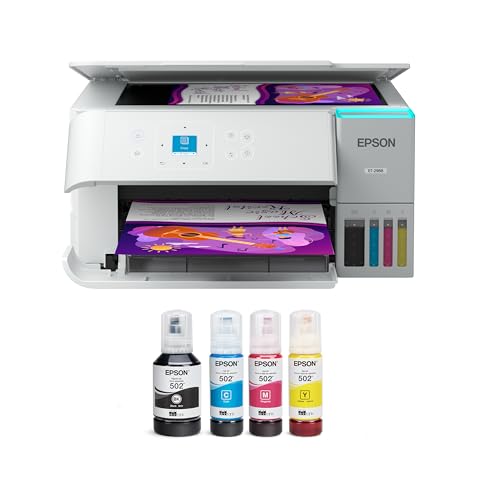 Epson EcoTank ET-2988 Wireless All-in-One Color Supertank Printer13.7 x 14.8 x 7.4 inches11.5 poundsCheck on Amazon
How to Choose Printer for Ink Problems by Problem
The thirst problem: tanks, and the end of the cartridge bill
If your ink problem is cost — the cartridge treadmill, the per-page arithmetic that makes colour printing feel like a decision — the tank classes are the structural cure: Epson’s EcoTank, Canon’s MegaTank, and HP’s Smart Tank, in their makers’ stated designs, hold ink by the bottle at yields in their stated terms that move the cost per page from a budget line to a rounding error, with the ink in the box, in the makers’ stated terms, typically covering a household’s or small office’s first long season outright. The cure’s conditions are the tank’s own: feed it the maker’s ink for the model, as the manuals direct, keep it printing regularly, and accept a first price above the cartridge machines that the year’s arithmetic, built in the buying guide, either justifies in ink savings or does not. For a counted volume above a few hundred pages a month, it almost always does, and the household stops rationing colour — a behavioural change worth more than the arithmetic, because the draft, the copy, and the child’s project all get printed without a meeting.
The clog and drought problems: lasers, and inkjets matched to rhythm
If your ink problem is reliability across silence — the holiday home, the term-time-only household, the office that prints in quarterly storms — the monochrome laser in Brother’s stated class is the complete answer for text work: toner that cannot dry, a first page after a year’s idleness as clean as the last, and stated yields in its maker’s terms that make its running costs a tank’s rival. Colour, if the bursts need it, is the honest compromise this guide will state without flinching: a colour laser in its makers’ classes carries the same drought immunity at a higher first price, while a tank inkjet kept on a weekly rhythm — a test page in the diary, the printer left powered so its own maintenance cycles, in the makers’ stated designs, can run — serves the rhythmic household entirely. What does not exist, at any price in this table, is an inkjet that thrives on neglect; choose the architecture that forgives your actual calendar.
The chip and lock-in problems: read the terms before the machine
If your ink problem is quarrels — cartridges refused, firmware that narrows your choices, subscriptions discovered rather than chosen — the cure is documentary rather than mechanical. Tank systems sidestep most of it by abolishing the cartridge, which is one of their least advertised virtues. Where a cartridge machine is otherwise right, read the maker’s current terms for the exact model before purchase: the cartridge policy as the maker states it, any subscription’s terms in full — what it includes, what it costs across your counted volume, what happens when it ends — and the update settings the machine offers, in its documents, so the printer’s behaviour is a choice you made rather than a surprise you were given. Brother’s INKvestment parish has built its reputation in its stated terms on a plainer relationship with its cartridges, and the guide notes the reputation because the parish’s buyers keep reporting it. An informed buyer has almost no chip problems; the problems belong, nearly always, to the terms nobody read, which is why this guide keeps sending you to documents instead of to opinions.
Quick Comparison: Printers That Solve Ink Problems Models
| Model | Key Specs | Best For | Typical Price Range | Rating |
|---|---|---|---|---|
| Epson EcoTank ET-3850 Class | Refillable tank, stated yields and duty classes, all-in-one classes per Epson documents for the exact model | Best overall cure for ink costs | $280 – $350 | 4.6 / 5 |
| Canon PIXMA G3270 MegaTank Class | Refillable tank, stated yields, all-in-one and connectivity classes per Canon documents for the exact model | Best home MegaTank | $200 – $270 | 4.5 / 5 |
| Brother DCP-L2640DW Laser Class | Monochrome laser, stated toner yields and duty classes, duplex and connectivity classes per Brother documents | Best cure for clogs and idleness | $180 – $250 | 4.6 / 5 |
| Brother MFC-J4335DW INKvestment Class | High-capacity cartridge classes, stated yields and duty classes per Brother documents for the exact model | Best cartridge compromise | $180 – $240 | 4.4 / 5 |
| HP Smart Tank 5101 Class | Refillable tank, stated yields, all-in-one classes per HP documents for the exact model | Best HP tank answer | $200 – $270 | 4.4 / 5 |
| Epson EcoTank Photo ET-8550 Class | Multi-bottle photo tank classes, stated yields, wide-format classes per Epson documents for the exact model | Best for photo ink costs | $650 – $780 | 4.5 / 5 |

HP DeskJet 2923 Color Inkjet Printer | Wireless | All-in-One | Easy Home Printing | Color Documents | Mobile Compatibility | Print, Scan & Copy | Ideal Home Use
As an Amazon Associate we earn from qualifying purchases. Product prices and availability are accurate as of the date/time indicated.
Epson EcoTank ET-2988 Wireless All-in-One Color Supertank Printer with up to 3 Years of Ink, Refillable Tanks, Perfect for Home, 15 PPM, 1.44" Color Screen, Auto 2-Sided Printing (Renewed)


As an Amazon Associate we earn from qualifying purchases. Product prices and availability are accurate as of the date/time indicated.

67XL 67 XL 2800e 2855e Ink Cartridges Black/Color Combo Pack for HP Printer | Compatible for HP DeskJet 2755e 6000 2700 4155e 4255e 4200e 4100 2700e 2734e 2800 2852e Envy 6055e 6455e 6400 Series (2-Pack)
As an Amazon Associate we earn from qualifying purchases. Product prices and availability are accurate as of the date/time indicated.
Ink system type, stated yields for supplied and replacement consumables in the maker’s stated test terms, monthly duty cycle and recommended volume, print technology, and connectivity are each maker’s specification for the current exact model and must be confirmed in that maker’s current documents before purchase. Prices are typical street ranges as described. Any subscription or cartridge programme is governed by its maker’s current terms, which should be read in full before enrolment or purchase.
Detailed Reviews: Printers That Solve Ink Problems Picks
1. Epson EcoTank ET-3850 Class – Best Overall Cure for Ink Costs
The ET-3850 class leads the ink-problem table because it abolishes the problem’s most common form: the cartridge, with its price, its chip, and its calendar of small betrayals, is replaced by bottles in Epson’s stated design whose stated yields run to thousands of pages and whose cost per page, built from Epson’s documents, changes the household’s behaviour from rationing to printing. Its all-in-one completeness in its stated classes — feeder, duplex, connectivity — covers the home office’s whole brief, so the cure does not cost the patient any other function.
Its conditions are the tank’s liturgy, stated in its manual and repeated here: the maker’s ink for the model, regular use, and the machine left to run its own maintenance as designed. Kept so, it is the printer its owners stop having opinions about, which in this category is the summit of praise — the ink problem is not managed, it is forgotten.
2. Canon PIXMA G3270 MegaTank Class – Best Home MegaTank
Canon’s home MegaTank class answers the same thirst with Canon’s stated yields in the same thousands-of-pages territory and a home-friendly completeness in its stated classes, at a price a step below the leader’s. For the household whose printing is documents, schoolwork, and the occasional photograph, it is the tank conversion with the least friction and the longest first season on the ink in the box, in Canon’s stated terms.
Between it and the EcoTank, the household chooses on the exact models’ stated paper handling and the week’s prices, in both makers’ documents. Either ends the cartridge era in that house permanently, and the era’s ending, once experienced, is never renegotiated.
3. Brother DCP-L2640DW Laser Class – Best Cure for Clogs and Idleness
The laser row is the table’s plot twist and its most complete cure: a monochrome laser in Brother’s stated design whose toner is a powder, immune by physics to drying, clogging, and the calendar — a machine that can sit through a sabbatical and print its first page back perfectly, at stated toner yields in Brother’s documents that rival the tanks’ economy for text. For the household or office whose printing is words — letters, forms, manuscripts, invoices — and whose rhythm is bursts and silences, it is not the alternative to the ink answer; it is the answer, and the inkjet’s charms are simply irrelevant to its parish.
Its surrender is colour and the photograph, stated without apology in its documents’ first line: monochrome means monochrome. The household that needs both worlds runs this row for the words and lets a tank serve the pictures, a two-machine peace this guide has recommended before and will again, because each machine is then doing the work its physics prefers.
4. Brother MFC-J4335DW INKvestment Class – Best Cartridge Compromise
The INKvestment class is the cartridge’s best defence: Brother’s stated design stores more ink in the machine and its cartridge classes state yields that move running costs toward the tanks while keeping the sealed cartridge’s cleanliness and the lower first price. For the buyer who wants an inkjet’s colour without a tank’s first price or its pouring ritual, it is the middle architecture, honestly built, and its stated duty classes cover the home office’s counted volume with the guide’s usual margin.
It remains a cartridge machine, with a cartridge’s terms to read in Brother’s current documents before purchase — and Brother’s parish reputation, as this guide noted, is for plainer terms than most. Read, counted, and matched to volume, it is the compromise that does not feel like one.
5. HP Smart Tank 5101 Class – Best HP Tank Answer
HP’s Smart Tank class brings the tank cure to the household standardised on HP — its stated yields in HP’s documents, its all-in-one classes in its stated design, and the software ecosystem the household already speaks. For that household, the conversion costs no relearning, and the cartridge era ends inside the family, which is how most households prefer their revolutions.
Confirm the exact model’s stated feeder, duplex, and yield classes in HP’s documents, because the family spans duties, and read any programme terms attached to the purchase in full, as this guide directs for every maker. Matched and read, it is the tank answer with the shortest distance between the old desk and the new one.
6. Epson EcoTank Photo ET-8550 Class – Best for Photo Ink Costs
The photographer’s ink problem is a special thirst: photographic printing drinks ink at a rate that makes cartridge photography a luxury tax, and Epson’s photo tank class, in its stated multi-bottle design as its documents describe, brings the tank’s economy to the photograph — more ink colours in its stated arrangement for the gamut the work wants, yields in its stated terms that let a photographer print the edit, the proof, and the final without a treasurer’s meeting, and a format in its stated classes that takes the work seriously.
Its price is a photographer’s price, and its parish is the household that prints photographs weekly. In that parish it does not merely cure an ink problem; it changes what the photographer attempts, because the proof that costs pennies gets printed and the one that cost pounds was always postponed. That behavioural change is the tank philosophy’s deepest effect, wearing its finest clothes.
Buying Guide: How to Choose a Printer That Ends Your Ink Problems
Diagnose first: name your problem, count your pages, know your rhythm
Before any model is compared, write three facts on paper. The problem, named from this guide’s four: thirst, clog, chip, or drought — because each has a different cure and the wrong cure is a new problem with a warranty. The count: a month of real pages, black and colour separately, from the old printer’s counter, the paper shelf’s turnover, or a fortnight’s honest tally — because the tank’s arithmetic, the cartridge’s defence, and the laser’s case are all volume arguments, and volume guessed is volume wrong. The rhythm: the pattern across the year — weekly and steady, or bursts and silences — because rhythm chooses between ink and toner more decisively than any specification in this table. With the three facts written, the table reads itself: thirst at volume goes to the tanks, drought goes to the laser, the chip quarrel goes to the tanks or to the maker whose terms you have actually read, and the clog — the rhythmic user’s clog, which is usually a feeding or a counterfeit-cartridge story — goes to genuine ink, in the maker’s stated classes, and the maintenance liturgy below.
Build the year’s true price, and read every term attached to the ink
Price each candidate as a system across a year of your counted volume: the machine, plus the replacement ink or toner your count consumes at the maker’s stated yields for the exact consumables, plus the paper you would buy anyway excluded. The tanks will usually win that arithmetic at volume and lose it, on first price, at low volume — with the laser’s toner yields contesting both — and the recommended monthly volume in each maker’s documents must contain your count with headroom, because a machine run at its ceiling is a machine being spent. Then read the ink’s terms as a contract, because in this category they are one: the maker’s stated cartridge or bottle policy for the exact model, any subscription’s full current terms — its inclusions, its cost at your count, its ending — and the machine’s update behaviour as its documents describe, so that what the printer accepts and refuses next year is a thing you chose. Buy the consumables’ supply line as deliberately as the machine: the maker’s ink for the model, from the maker or an authorised retailer, with a spare set in the cupboard before the current set ends, because the emergency cartridge bought at midnight prices is where the old economy re-enters through the side door.
Keep the cure cured: the maintenance liturgy for the machine you chose
Every architecture has a liturgy, and the problems return when it lapses. For any inkjet, tank or cartridge: print something small and colourful weekly, because the head’s health is use; leave the machine powered so its own maintenance, in its maker’s stated design, can keep its appointments; run the maker’s stated cleaning and alignment routines at the first sign of banding rather than the tenth, and stop at the step that cures it, because deep cleaning drinks the ink it protects; keep the paper dry and within its stated classes, and the ink genuine for the model, because most “defective printer” stories are feeding stories in disguise. For the laser: keep its toner genuine or knowingly chosen in its stated classes, its interior dusted as its manual directs, and its drum’s life, in its stated terms, budgeted like the consumable it is. For all of them: firmware kept current under your own reading of the maker’s notes, the printer’s settings recorded, and the machine replaced on its page counter’s evidence and its repair economics rather than in a deadline’s panic. How to choose printer for ink problems is finally a diagnosis with a liturgy attached: name the problem, count the pages, honour the rhythm, price the year, read the terms — and any printer in this table, so chosen and so kept, will print on the morning of the deadline with the dull reliability of a kettle, which is all anyone has ever asked an ink system to do.
Frequently Asked Questions About Choosing a Printer for Ink Problems
How do I choose a printer that will not give me ink problems?
By matching the architecture to your diagnosed problem, your counted volume, and your rhythm — the guide’s three facts. If your problem is cost at volume, a refillable tank in the Epson EcoTank, Canon MegaTank, or HP Smart Tank classes abolishes the cartridge economy at stated yields in the makers’ documents that run to thousands of pages. If your problem is clogging across idle months, a laser — Brother’s monochrome class for text — removes ink from the machine entirely, and toner cannot dry out. If your problem is cartridge quarrels and lock-in, the tanks sidestep it, or a cartridge machine whose current terms you have read in full before purchase, in the Brother INKvestment parish’s plainer tradition. If your problem is a clogged inkjet you otherwise love, the cure is usually genuine ink for the model and the weekly-use liturgy. Confirm every candidate’s stated yields and recommended volume in its maker’s current documents against your counted pages, price the full year, and the printer you buy will be the one whose failure modes your life never triggers.
Are tank printers really cheaper to run than cartridge printers?
At volume, yes, by the makers’ own stated yields — and the honest answer includes the volume at which the sentence starts. A tank’s replacement bottles, priced against their stated yields in the makers’ documents, deliver a cost per page that is a small fraction of a cartridge’s, and the ink supplied in the box, in the makers’ stated terms, typically covers a household’s first long season before any replacement is bought. Against that stands the tank’s higher first price, so the break-even is an arithmetic exercise in your counted pages: above a few hundred pages a month it usually arrives inside the first year, below it the cartridge machine’s lower first price — especially a high-yield design in the INKvestment class — may never be caught. The laser contests the same arithmetic for text, with toner yields in its maker’s stated terms that rival the tanks. Build the year’s true price for your count, from the documents, for the two or three architectures your diagnosis allows — the exercise takes twenty minutes and it, rather than any advertisement, is the answer to this question for your household.
Why does my inkjet clog, and can a new printer avoid it?
An inkjet clogs because its nozzles are microscopic passages of liquid ink exposed to air, and ink that sits dries — slowly in a machine that prints weekly and keeps its own maintenance appointments while powered, as the makers’ designs intend, and quickly in a machine left idle and unplugged through a season, fed doubtful cartridges, or stored in heat. A new inkjet of any architecture in this table reduces the risk exactly as far as its feeding and your rhythm allow: genuine ink for the model, regular small use, power left on for its maintenance cycles, and the maker’s cleaning routine run early and sparingly. It cannot repeal the physics. The complete avoidance exists, and it is the laser row: toner is a dry powder with nozzles nowhere in its design, and a laser’s first page after a year of silence is the demonstration. Households whose rhythm is silence punctuated by storms should stop asking inkjets to forgive them and buy the forgiveness in toner — while rhythmic households, whose inkjets clog anyway, should suspect the ink supply and the unplugged socket before they suspect the machine.
Should I use third-party ink to save money?
That is a decision to make with the terms in front of you rather than from a comment thread, and this guide’s counsel is procedural. Read your printer maker’s current stated position for your exact model — what it says about third-party consumables, what it says about warranty, and what its firmware does — because those documents, not folklore, describe your machine’s behaviour. Weigh the genuine article’s true cost inside your architecture: in a tank system fed by the maker’s bottles at their stated yields, the saving a third-party bottle offers is small against the risk to a print head whose replacement can exceed the printer’s price; in a thirsty cartridge machine, the saving is larger and so is the parish of users who accept the trade knowingly, with quality and clog stories that vary by supplier in ways no guide can certify. Never mix the two economies unknowingly — a subscription or programme’s terms, read in full, may themselves decide the question — and never let a midnight emergency make the decision for you, because the spare genuine set in the cupboard, bought at leisure, is cheaper than any decision made at a deadline. The households with the fewest ink problems in this guide’s experience are not the ones that found the cheapest ink; they are the ones whose ink supply was a policy rather than a series of improvisations.
Related guides
- Best AAA Batteries for Office Remotes in 2026: AAA Batteries for Office Remotes
- Best Budget Tablet for Work Under 100 in 2026: Budget Tablets for Work Under $100, Office Work, and Productivity
- Best Gimbal for Office Vlogging in 2026: 7 Gimbals for Office Vlogging That Keep Your Video Smooth, Stable, and Professional in the Office
- Best Budget NAS Dust Filter for Maintenance in 2026: 7 Budget NAS Dust Filters for Maintenance With Clear Airflow, Simple Install, and Easy Use for NAS
More from Amazon
Programs that pair well with the guide above. Offers and eligibility are set by Amazon and may change.
Free shipping on eligible items, Prime Video and more. Eligible new members can start with a free trial.
Start a Prime free trialAd-free music streaming. Eligible new subscribers can start with a free trial.
Try Music Unlimited freeA Prime membership for ages 18-24 with a trial period. Eligibility is set by Amazon.
See Prime for Young AdultsAudiobooks and podcasts to listen to on the go. Eligible new members can start with a free trial.
Try Audible freeAs an Amazon Associate we earn from qualifying purchases.

Write Your Review
No reviews yet. Be the first to share your experience!