
What's inside
- Best Cheap Replacement Battery for Laptop by Route
- Quick Comparison: Best Cheap Replacement Battery for Laptop Routes
- Detailed Reviews: Best Cheap Replacement Battery for Laptop Routes
- Buying Guide: Choosing the Best Cheap Replacement Battery for Laptop
- Frequently Asked Questions About the Best Cheap Replacement Battery for Laptop
As an Amazon Associate I earn from qualifying purchases. This post may contain affiliate links at no extra cost to you.
The best cheap replacement battery for laptop is a purchase where cheap must be defined before it is shopped for, because this is the one component in a laptop where the wrong kind of cheap is genuinely dangerous and the right kind is genuinely smart. A laptop battery is a sealed parcel of lithium cells, a management circuit, and a connector, asked to live against your legs and charge beside your bed for years. The genuine maker’s battery — Dell’s, Lenovo’s, HP’s, Apple’s own part for the exact machine — is the reference: its stated capacity in watt-hours is honest, its cells and its protection circuit are the ones the laptop was designed around, and its price is the premium this guide will teach you to discount intelligently rather than to flee. The reputable aftermarket — the established battery houses in this table, selling parts matched by the laptop’s own part numbers, with stated capacities and warranties in their documents — is where the smart cheap lives. And the anonymous marketplace battery, at a third of the genuine price with a capacity claim that violates arithmetic, is where the other kind lives: cells of unknown parentage, a protection circuit of unknown diligence, and a failure mode that is not a shorter afternoon but a swollen pack, a ruined laptop, or worse. This guide compares the real routes to a replacement — genuine parts bought shrewdly, and the aftermarket houses whose documents survive scrutiny — and it teaches the matching discipline that decides everything: the laptop’s exact model and its battery’s part number, the voltage that must match exactly, the watt-hours that state the true capacity, and the seller whose address will exist when the warranty is needed.
The comparison fields the routes rather than a single shelf, because a replacement battery is bought for one specific laptop and the route matters more than the brand in the abstract. Dell’s, Lenovo’s, and HP’s genuine parts channels, in their makers’ stated arrangements, are the reference rows — bought through the makers’ own stores, their authorised parts sellers, or the reputable refurbishers, at prices this table states as ranges because genuine parts pricing varies by model and by the channel’s promotions. Apple’s route is its own: the battery service through Apple and its authorised providers, in Apple’s stated terms, because the modern MacBook’s battery is a service part rather than a shelf part. NinjaBatt’s and BattDepot’s classes are the aftermarket’s established houses, in their stated arrangements — parts catalogued by the laptop makers’ own part numbers, capacities stated in their documents, warranties in their stated terms. And the guide’s final row is a warning given a seat at the table: the anonymous marketplace class, included so its tells can be described in the same print as its betters. Voltage, watt-hour capacity, part number compatibility, and cell arrangement are each seller’s specification for the exact part and must be confirmed against your laptop’s original battery label and its maker’s documents before purchase — the voltage identical, the part number matched, the watt-hours compared honestly. Prices are typical ranges rather than exact figures, per battery, and they spread by the laptop’s class because a workstation’s pack and a netbook’s are different animals wearing one name.
The safety frame is the guide’s foundation and it is not decoration. A swollen laptop battery — a trackpad lifting, a case seam opening, a battery cover bulging — is retired immediately and handled as its maker and your locality’s battery recycling direct: not punctured, not charged, not posted through the mail in defiance of the carriers’ rules, and the laptop is not used on it while a replacement is “being considered,” because a swollen pack is a chemical event in progress, not a capacity opinion. Replacement itself follows the laptop maker’s own service documentation where it exists — the machine powered down, the maker’s stated procedure for the removable or internal pack followed, and the internal batteries of sealed machines referred to a technician where the maker’s documents make that the route, because a punctured cell inside a laptop during an amateur excavation is the precise accident this whole guide exists to prevent. Within that frame, replacing a tired battery is one of the great bargains in computing: a machine written off as dying is usually a machine with a worn reservoir, and the reservoir, matched and bought well, costs a small fraction of the laptop it resurrects.
Our Top Picks
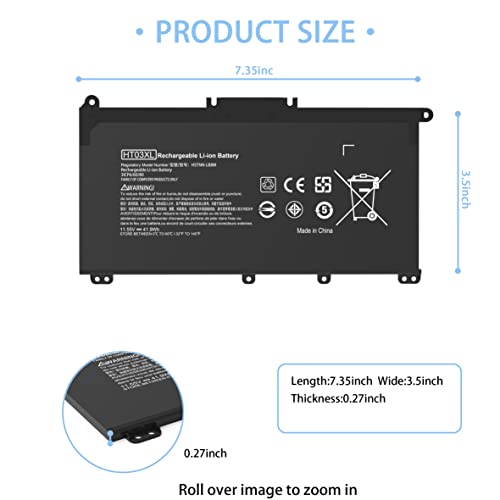
 VNYUNQWE HT03XL L11119-855 Laptop Battery Replacement for HP7.35*3.5*0.27inch HT03XL7.35 x 3.5 x 0.27 inches0 poundsCheck on Amazon
Best Cheap Replacement Battery for Laptop by Route
The genuine route, bought shrewdly: Dell, Lenovo, and HP parts
For the laptop that is worth real money — the workstation, the flagship, the machine under any remaining warranty — the genuine part is the correct cheap, because its stated watt-hours are the machine’s designed capacity, its fit and connector are the original’s, and its failure, if it ever fails, is the maker’s conversation to have. Bought shrewdly means bought through the channels where genuine parts are discounted without being doubtful: the maker’s own parts store during its promotions, the authorised parts houses in the makers’ stated networks, and the reputable refurbishers whose genuine stock is graded and warrantied in their documents. The part number on your old battery’s label is the key to every door here — it identifies the exact pack across all of those channels, and a genuine part bought by part number at a promotion’s price is the best value in this entire table, full stop.
The sealed route: Apple’s battery service
For the modern MacBook and the sealed ultrabook classes whose makers design the battery as a service part, the route is the service itself: Apple’s battery service through its own and authorised channels, in Apple’s stated terms and pricing classes, and the equivalent authorised services for the sealed Windows machines in their makers’ stated arrangements. It is not the cheapest row in this table and it is not pretending to be; it is the route whose workmanship, adhesive chemistry, and calibration are the maker’s own, for machines whose excavation by amateurs is how good laptops become cautionary tales. A sealed machine’s owner should price the service against the machine’s remaining value with a clear head — for a flagship with years in it, the service is the cheap option wearing a premium’s clothes, because the alternative is the whole laptop.
The reputable aftermarket: NinjaBatt and BattDepot’s documented houses
For the mainstream laptop out of warranty — the five-year-old Dell, Lenovo, or HP whose genuine part now costs a heroic fraction of the machine’s worth — the established aftermarket houses are the smart cheap in its legitimate form: NinjaBatt’s and BattDepot’s classes, in their stated arrangements, catalogue their parts by the laptop makers’ part numbers, state their watt-hours and their cell classes in their documents, and stand behind them with warranties in their stated terms from addresses that persist. Their discipline is the buyer’s: match by part number, never by laptop model alone; require the stated voltage to be identical to the original’s, because voltage is not a rounding opportunity; compare the stated watt-hours against the original’s label, and treat a claim far above it, in the same physical pack, as the fiction it is. Bought by those rules, an aftermarket pack from a documented house gives the old machine most of its youth back at the table’s friendliest prices, and that is a genuinely honourable transaction.
Quick Comparison: Best Cheap Replacement Battery for Laptop Routes
| Route | Key Specs | Best For | Typical Price Range | Rating |
|---|---|---|---|---|
| Dell / Lenovo / HP Genuine Part by Part Number | Maker’s stated watt-hours and voltage for the exact part number, maker’s warranty classes per the maker’s documents | Best cheap replacement battery for laptop overall | $50 – $110 by machine class | 4.6 / 5 |
| Apple Battery Service Class | Maker’s service arrangement and stated terms per Apple documents for the exact model | Best for MacBooks and sealed machines | $130 – $250 by model class | 4.5 / 5 |
| NinjaBatt Aftermarket Class | Stated watt-hours and voltage classes, part-number catalogue classes, warranty classes per NinjaBatt documents | Best reputable aftermarket | $30 – $60 by machine class | 4.3 / 5 |
| BattDepot Aftermarket Class | Stated capacity classes, part-number matching classes, warranty classes per BattDepot documents for the exact part | Best aftermarket catalogue depth | $30 – $65 by machine class | 4.2 / 5 |
| Authorised Refurbished Genuine Class | Graded genuine parts, stated condition and warranty classes per the refurbisher’s documents for the exact part | Best genuine value | $35 – $80 by machine class | 4.2 / 5 |
| Anonymous Marketplace Class | Unverifiable capacity claims, no persistent seller documents, no reliable warranty arrangement | Not recommended at any price | $15 – $35 | 1.5 / 5 |

807956-001 Laptop Battery for HP Spare 807957-001 807612-421 807611-421 807611-131 HS04 HS03 HSTNN-LB6U 15-AY039WM 15-AY041WM 15-AY009DX 15-AY052NR TPN-I119 TPN-I120 TPN-I124 240 245 246 250 256 G4/G5
As an Amazon Associate we earn from qualifying purchases. Product prices and availability are accurate as of the date/time indicated.

RJ40G 4-Cell 63Wh Laptop Battery Replacement for Dell Latitude 15 5520 Latitude 14 5420 Precision 15 3560 Series M033W 01K2CF 075X16 WY9DX P137G P137G001 P104F P104F001 0WK3F1 0M3KCN 15.2V 3941mAh




As an Amazon Associate we earn from qualifying purchases. Product prices and availability are accurate as of the date/time indicated.
VNYUNQWE HT03XL L11119-855 Laptop Battery Replacement for HP Pavilion 15-DA 15-DB 15-DW 15-CS 15-DY 17-BY 17-CA 14-CE 14-CF 14-DF 14-DQ 14-DK Series 15-CS0053CL 15-DA0014DX HSTNN-UB7J HT03041XL




As an Amazon Associate we earn from qualifying purchases. Product prices and availability are accurate as of the date/time indicated.
Voltage, watt-hour capacity, connector and form factor, and part-number compatibility are each seller’s specification for the exact part and must be confirmed against your original battery’s label and your laptop maker’s documents before purchase; the replacement’s voltage must match the original’s exactly. Prices are typical ranges per battery or service as described and vary by laptop model and channel. A swollen or damaged battery must be retired and recycled as its maker and your locality direct, and must not be charged or used.
Detailed Reviews: Best Cheap Replacement Battery for Laptop Routes
1. Genuine Part by Part Number – Best Overall
The genuine route leads the table because its arithmetic, done properly, is better than its reputation: the maker’s part, identified by the number on your old battery’s label, bought through the maker’s parts channel or an authorised seller at a promotion’s price, delivers the machine’s designed watt-hours in the maker’s stated terms, the original’s fit and connector, and a warranty conversation with the company whose name is on the lid. For any laptop with real value or real years left, that combination at the ranges in this table is not the expensive option; it is the option whose cost per restored hour is the lowest in the guide.
Its discipline is purely clerical: read the part number off the old pack — photograph the label before anything is unplugged — and buy that number, from a channel whose genuineness you can state in a sentence. Clerical discipline is unglamorous, and it is the entire difference between the genuine route and the genuine-looking route, which are separated by everything that matters.
2. Apple Battery Service Class – Best for Sealed Machines
Apple’s service route is the sealed machine’s honest answer: the battery replaced as the system it is — pack, adhesives, and calibration in Apple’s stated arrangement — by the maker or its authorised providers, at the pricing classes Apple’s documents state for the model. For a MacBook with years of work in it, it converts a dying machine back into a flagship for a fraction of the flagship’s price, with the workmanship warrantied in Apple’s stated terms.
Price it against the machine’s value without sentiment in either direction: for the old machine near its end, the service may exceed the wisdom; for the machine in its prime, declining it over its price is the false economy this guide was written to prosecute. The same logic, through their makers’ authorised services, governs the sealed Windows flagships, whose documents state their own routes.
3. NinjaBatt Aftermarket Class – Best Reputable Aftermarket
NinjaBatt’s class represents the aftermarket done as a business rather than as a lottery: parts catalogued by the laptop makers’ part numbers in its stated arrangement, watt-hours and cell classes stated in its documents, and a warranty in its stated terms from a house that expects to be found. For the out-of-warranty mainstream laptop, it is the smart cheap’s first address, and its stated capacities, read against the original label’s, are honest enough to plan a working day on.
Buy it by the guide’s three rules — part number, identical voltage, plausible watt-hours — and condition the new pack as its documents direct in its first cycles. Ruled so, the transaction’s risk is the small, priced kind, and the old laptop’s resurrection is the large, satisfying kind.
4. BattDepot Aftermarket Class – Best Catalogue Depth
BattDepot’s class earns its row on the catalogue’s depth in its stated arrangement: the long tail of laptop models — the older, the rarer, the discontinued — matched by part number where the bigger houses have moved on, with stated capacities and warranty classes in its documents. The owner of the seven-year-old machine that the genuine channel has forgotten will find this row is the difference between a resurrection and a replacement, which at a laptop’s prices is a difference with commas in it.
Apply the same three rules with the same rigour, because depth is not diligence and the documents must still agree with the label. Where they do, BattDepot’s parish is real and its service to the old-machine economy is, in this guide’s judgement, underpraised.
5. Authorised Refurbished Genuine Class – Best Genuine Value
The refurbished genuine route — the maker’s own part, graded and resold by a reputable refurbisher with its condition and warranty stated in its documents — splits the difference between the genuine and aftermarket rows: original cells’ design and fit, at a price discounted for a history the refurbisher’s grading describes. For the buyer who wants the genuine article’s certainty with the aftermarket’s arithmetic, it is the connoisseur’s row, provided the refurbisher is a house whose grading documents and warranty terms survive the same scrutiny this guide applies to every seller.
Read the grading as a contract: what was tested, what is warranted, for how long, in the refurbisher’s stated terms. A refurbisher who writes those down plainly is selling a battery; one who does not is selling a story, and the distinction is visible from the product page.
6. Anonymous Marketplace Class – Not Recommended
The final row is included as a specimen. Its tells are consistent enough to be a field guide: a capacity in watt-hours that exceeds the original pack’s stated figure by a margin physics does not permit in the same shell; a price at a third of the genuine part’s with no explanation of the miracle; a seller whose name is a consonant arrangement with no address, no documents, and reviews written by a choir of the recently registered; and a warranty denominated in weeks and honoured in silence. Its cells’ parentage and its protection circuit’s diligence are unknowable, and in a lithium pack those are not specifications among others — they are the product.
This guide’s verdict is absolute, which is rare for it: do not buy this row, at any price, for any laptop that sleeps in a building you value. The saving against the reputable aftermarket is the price of a modest lunch, and it is the worst bargain in this entire site’s catalogue of bargains.
Buying Guide: Choosing the Best Cheap Replacement Battery for Laptop
Match by part number, voltage, and watt-hours — in that order
Remove or photograph the original battery’s label before anything is ordered, following your laptop maker’s stated procedure for access, and copy its three governing facts. The part number first: it is the pack’s true name, identifying the exact form, connector, and electronics across every channel in this table, while the laptop’s model name alone can span several different batteries across its production life — a mismatch that arrives as a pack that almost fits, which is the most dangerous fit in the category. The voltage second, and it is absolute: the replacement’s stated voltage must be identical to the original’s, because the laptop’s charging system was built for that number and a near voltage is not a voltage. The watt-hours third, as the capacity’s honest measure: compare the replacement’s stated figure with the original label’s, expect parity from the genuine and the documented aftermarket, and treat any claim dramatically above the original’s, in the same shell, as disqualifying — capacity is chemistry and volume, and neither is negotiable at a discount. Add the seller’s tests before the money moves: documents that state the three facts plainly, a warranty in stated terms from a findable address, and a returns arrangement that survives a mismatch, because even a correctly ordered pack can meet a laptop whose production run changed the answer mid-year.
Fit it safely, condition it honestly, and read its first week
Fit the replacement by the laptop maker’s own documentation for your exact model where it exists — powered down, the stated procedure followed, no force anywhere near the cells — and where the machine is sealed and its maker routes the job to service, take the route, as this guide’s service row directs, because the adhesive-and-pry excavation of a sealed pack is a technician’s craft with a fire extinguisher’s respect for its subject. Treat any pack that arrives damaged, swollen, or ill-fitting as a return and a recycling, never as an installation. Condition the new battery as its maker’s or seller’s documents direct — commonly a full charge and a calibration cycle through the laptop’s own stated process — and then read its first week like a review you are writing: the runtime against the stated watt-hours’ promise, the charge behaviour, the heat in ordinary service, which should be none worth mentioning. A pack that underperforms its documents in week one is a warranty conversation held while the paperwork is young; the same conversation in month seven is an argument. Keep the old pack out of the household waste entirely: it goes to battery recycling through the locality’s or the retailer’s stated stream, as its maker directs, because a laptop battery’s materials are recoverable and its landfill biography is a small, preventable insult.
Decide the machine’s economics like an adult, and keep the new pack young
Price the resurrection against the replacement with the whole ledger open: the battery’s cost by the routes in this table, against the laptop’s remaining fitness — its memory and storage against your work’s appetite, its screen and keyboard’s condition, its software’s supported future as its makers state it. A sound machine with a tired battery is the best bargain in computing, and a tired machine with a sound battery is a sunk cost wearing a new part; the battery decision should be the honest audit of which machine you own. Where the audit says resurrect, keep the new pack young by the lithium liturgy its maker directs: heat is the enemy, so the laptop’s vents and the sunny desk matter; the deep discharge is a stranger to be avoided rather than a routine; and the machine that lives on its charger may follow its maker’s stated battery-care settings, where offered, because the makers build those modes for exactly that biography. Record the pack’s part number, seller, and date in the laptop’s own file, because in four years the label will be faded and the file will not. The best cheap replacement battery for laptop is finally a matched number, an identical voltage, and an honest watt-hour figure, bought from a seller whose documents survive daylight: any route in this table except the last, so chosen and so fitted, will give a good laptop its afternoons back for the price of a modest dinner out — and the machine, unplugged again at the café table, will feel less like a repair than like a reprieve.
Frequently Asked Questions About the Best Cheap Replacement Battery for Laptop
What is the best cheap replacement battery for a laptop?
Bought shrewdly, the genuine maker’s part — Dell’s, Lenovo’s, or HP’s exact pack, found by the part number on your old battery’s label and bought through the maker’s parts channel or an authorised seller — leads this table, with Apple’s battery service as the sealed machines’ route. For the out-of-warranty mainstream laptop, the reputable aftermarket houses in NinjaBatt’s and BattDepot’s classes are the smart cheap in its legitimate form, and graded genuine parts from a documented refurbisher split the difference. Whichever route, the matching rules decide the purchase: the part number matched exactly, the stated voltage identical to the original’s without exception, and the stated watt-hours at parity with the original label’s — any claim far above it, in the same shell, disqualifies the seller. Confirm all three against your original battery and your laptop maker’s documents before ordering, buy from a seller with a stated warranty at a findable address, and avoid the anonymous marketplace class at any price, for reasons this guide states without hedging.
Is it safe to use a third-party laptop battery?
It is safe to use a documented one, and it is not safe to use an anonymous one — and the difference is entirely visible before purchase. A reputable aftermarket house, in the classes this table names, states its pack’s voltage, watt-hours, and cell classes in its documents, matches it by the laptop maker’s part number, and warrants it from an address that persists; its protection electronics and its cells are a business’s reputation, staked in public. The anonymous marketplace pack stakes nothing: unverifiable capacity claims, no documents, no findable seller, and a protection circuit whose diligence no one will ever attest. The buyer’s safety procedure is therefore clerical rather than technical: the three matching rules — part number, identical voltage, plausible watt-hours — plus a seller whose warranty and returns are written down, plus the standing rules for any lithium pack: retire it swollen, damaged, or hot; charge it as its documents direct; recycle it at its end. Follow those, and the third-party question answers itself by category rather than by fear.
How do I know my laptop battery actually needs replacing?
By its evidence, read in the laptop’s own reports before any money moves. Every modern operating system keeps the battery’s biography — its designed capacity against its current full-charge capacity, in the battery health or report tools the system provides as its maker documents — and a pack whose full charge has faded to a small fraction of its design, whose runtime no longer matches its percentage’s promise, or whose machine dies at a reported third full, is a pack at its end. Distinguish the battery’s sins from the system’s: a laptop that runs hot and hungry on new software, or whose runtime collapsed with an update, may be a settings story rather than a cell story, and the report’s numbers arbitrate. The physical evidence outranks all software: a swollen pack — the lifting trackpad, the opening seam, the rocking base — is a replacement ordered today and a machine rested until it is fitted, handled and recycled as its maker directs. And the economic evidence completes the diagnosis: where the report says the pack is spent and the machine is otherwise fit, the replacement in this table’s routes is among the best-value repairs in all of computing.
How long should a replacement laptop battery last?
In service, a genuine or documented aftermarket pack should restore something close to the laptop’s original runtime when new — the stated watt-hours’ promise, against the machine’s actual appetite — and should hold that service across years of ordinary use, fading gradually as all lithium cells do, in their makers’ stated terms of hundreds of charge cycles before capacity declines to the fraction the makers describe. Its real lifespan is governed by the liturgy: heat avoided, because heat is lithium’s accelerant; deep discharges treated as exceptions; the maker’s battery-care settings used where the machine lives on its charger, as its documents describe; and the pack’s first week read carefully, because a replacement that underperforms its stated watt-hours early is a warranty claim in its youth or a disappointment in its age, and only one of those is recoverable. Keep the purchase documents — part number, seller, date — in the laptop’s file, expect the honest fade rather than the sudden death, and plan the next replacement from the battery report’s numbers the way this one was planned. A laptop kept so can outlive two batteries and a fashion cycle, which is the whole economic argument for buying the good pack cheaply rather than the cheap pack dearly.
Related guides
- Best AAA Batteries for Office Remotes in 2026: AAA Batteries for Office Remotes
- Best Budget Tablet for Work Under 100 in 2026: Budget Tablets for Work Under $100, Office Work, and Productivity
- Best Gimbal for Office Vlogging in 2026: 7 Gimbals for Office Vlogging That Keep Your Video Smooth, Stable, and Professional in the Office
- Best Budget NAS Dust Filter for Maintenance in 2026: 7 Budget NAS Dust Filters for Maintenance With Clear Airflow, Simple Install, and Easy Use for NAS
More from Amazon
Programs that pair well with the guide above. Offers and eligibility are set by Amazon and may change.
Free shipping on eligible items, Prime Video and more. Eligible new members can start with a free trial.
Start a Prime free trialAd-free music streaming. Eligible new subscribers can start with a free trial.
Try Music Unlimited freeA Prime membership for ages 18-24 with a trial period. Eligibility is set by Amazon.
See Prime for Young AdultsAudiobooks and podcasts to listen to on the go. Eligible new members can start with a free trial.
Try Audible freeAs an Amazon Associate we earn from qualifying purchases.

Write Your Review
No reviews yet. Be the first to share your experience!