
What's inside
- Best Lightweight Laptop for Travel Work by Traveller
- Quick Comparison: Best Lightweight Laptop for Travel Work Models
- Detailed Reviews: Best Lightweight Laptop for Travel Work Picks
- Buying Guide: Choosing the Best Lightweight Laptop for Travel Work
- Frequently Asked Questions About the Best Lightweight Laptop for Travel Work
As an Amazon Associate I earn from qualifying purchases. This post may contain affiliate links at no extra cost to you.
The best lightweight laptop for travel work is not the lightest laptop in the shop. It is the lightest complete working system — laptop, charger, and the dongles its ports force you to carry — that still does your whole job, on a battery that survives your longest travel day, with a keyboard and screen you can work on in a departure lounge, a train table, and a hotel desk at midnight. Travel exposes specifications that a home desk never tests. A claimed weight that excludes a heavy power brick, a battery figure measured at half brightness with the radios off, a glossy screen that mirrors every airport window, a chassis so thin it flexes in a stuffed cabin bag: each of these reads as a detail in a review and as a failure at a gate, in a queue, or in the third hour of a delayed connection when the only free outlet is across the room.
This guide compares six real, currently sold lightweight laptops that travelling workers actually buy: Apple’s MacBook Air in its current chip generation, Lenovo’s ThinkPad X1 Carbon line, Dell’s XPS 13 line, ASUS’s Zenbook S 13 class, LG’s gram 14 class, and HP’s Spectre x360 14 class. Prices are typical ranges rather than exact figures because these machines are sold in many configurations of processor, memory, and storage, and because business and consumer channels price the same chassis differently. Weight, battery capacity, ports, display, and memory and storage configurations are each maker’s specification for the current exact model and should be confirmed in that maker’s current documents before purchase — with the configuration you intend to buy, because in this category the difference between the base model and the right model is usually memory and storage chosen on the day of purchase and impossible to change later.
That last point deserves emphasis before any comparison. Most of these machines cannot be upgraded after purchase: the memory and storage in the configuration you order are the memory and storage the laptop retires with. A travelling worker’s honest specification is therefore written from the job, not the price list — the applications run at once, the size of the photo, video, data, or code libraries carried, the years the machine is expected to serve. Buy the configuration that covers the third year, not the first month, and let the model choice follow it. The other travel specification is support: a machine that fails in another country needs a warranty and service arrangement that works there, in the maker’s stated terms, and a backup of its files that does not live on its own drive. Those two documents — configuration and support — decide more travel outcomes than any benchmark in this guide.
Our Top Picks
Best Lightweight Laptop for Travel Work by Traveller
The all-round travelling professional: battery, screen, and silence in one bag
For most travel work — documents, calls, browsing with forty tabs, presentations, light creative work — the MacBook Air class is the reference in this table: a fanless, light design with a strong battery record in its maker’s stated classes, a good screen and keyboard, and a charger small enough to forget. Its conditions are Apple’s ecosystem and its port selection, which for many workers means a small hub in the bag, counted in this guide’s system weight from the start. If your work lives in macOS or in a browser, it is the first machine to beat.
The corporate and keyboard-first traveller: ThinkPad durability and service
Lenovo’s X1 Carbon line serves the traveller whose laptop is also an employer’s asset: a respected keyboard, a business service and warranty ecosystem in Lenovo’s stated terms, ports that reduce dongle dependence, and a chassis built for a life of bags, trays, and site visits. Dell’s XPS 13 is the close Windows alternative with a design-first appeal. Choose between them on keyboard feel, tested in person, on your employer’s or your own service arrangements, and on the exact ports your working day uses — because in travel work, the right port is a specification and the missing one is a daily tax.
The lightest bag and the biggest screen per gram: gram and Zenbook classes
LG’s gram line exists for the traveller who counts grams the way budget campers count them, offering a notably light chassis in its stated classes at a given screen size, while ASUS’s Zenbook S 13 class pairs a very light, thin design with a high-quality display in its maker’s positioning. Both ask the traveller to accept the trade that lightness always proposes — a chassis that should be packed with a little more care, in a padded sleeve, in the middle of the bag rather than at its crushed edge. For a frequent flyer whose bag is their office, that trade, knowingly made, is often the right one.
Quick Comparison: Best Lightweight Laptop for Travel Work Models
| Model | Key Specs | Best For | Typical Price Range | Rating |
|---|---|---|---|---|
| Apple MacBook Air 13 (current chip class) | Lightweight fanless class, weight, display, memory and storage configurations and battery specs per Apple documents | Best lightweight laptop for travel work overall | $1,000 – $1,600 by configuration class | 4.7 / 5 |
| Lenovo ThinkPad X1 Carbon (current generation) | Business lightweight class, keyboard and port classes, warranty options, configurations per Lenovo documents | Best for corporate travel | $1,300 – $2,200 by configuration class | 4.6 / 5 |
| Dell XPS 13 (current class) | Premium compact class, display options, configurations and ports per Dell documents | Best Windows design | $1,100 – $1,900 by configuration class | 4.5 / 5 |
| LG gram 14 (current class) | Very light chassis class per maker, display and battery classes, configurations per LG documents | Best for lightest bag | $1,100 – $1,700 by configuration class | 4.4 / 5 |
| ASUS Zenbook S 13 (current class) | Thin and light class, high-quality display class per maker, configurations and ports per ASUS documents | Best display for its weight | $1,100 – $1,600 by configuration class | 4.4 / 5 |
| HP Spectre x360 14 (current class) | Convertible lightweight class, touchscreen and pen classes, configurations per HP documents | Best convertible for travel | $1,200 – $1,900 by configuration class | 4.3 / 5 |
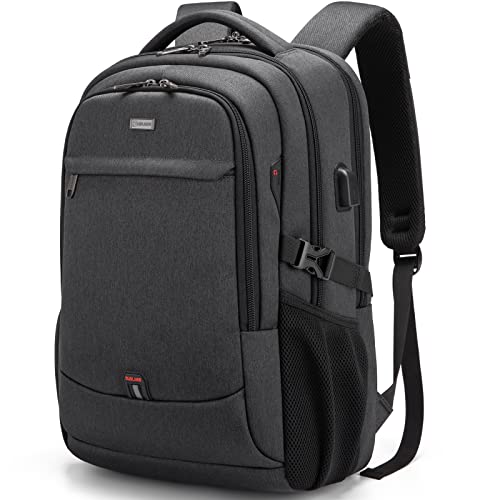
DUSLANG 17 inch Travel Laptop Backpack for Men/Women College Computer Bag | Water Resistant 17 inch laptop backpack with protective pad,Business Daypack, Anti Theft Bookbag,Casual Backpack for office
As an Amazon Associate we earn from qualifying purchases. Product prices and availability are accurate as of the date/time indicated.

MATEIN Business Laptop Backpack, 15.6 Inch Travel Work Bag for Men Women | Water Resistant Daypack, Personal Item Bag Size, Anti Theft Pocket, Luggage Strap, Computer Backpack for Work College, Black
As an Amazon Associate we earn from qualifying purchases. Product prices and availability are accurate as of the date/time indicated.

LOVEVOOK Laptop Backpack for Women with Pouch Pocket for Large Capacity Cup,15.6 Inch Laptop Computer Bag Travel Backpack Purse,Waterproof Work Business Backpack College Teacher Bags,Beige-Black-Brown
As an Amazon Associate we earn from qualifying purchases. Product prices and availability are accurate as of the date/time indicated.
Starting weight, battery capacity and stated battery life, display size and type, ports, processor, memory and storage configurations, and warranty terms are each maker’s specification for the current exact model and configuration. Stated battery life is measured under the maker’s stated test conditions and real travel use — video calls, high brightness, poor signal — will be shorter. Prices are typical street ranges by configuration as described; a protective sleeve, travel hub, and any extended warranty are separate parts of a travel system.
Detailed Reviews: Best Lightweight Laptop for Travel Work Picks
1. Apple MacBook Air – Best Overall
The MacBook Air leads because it has no weak travel specification: light, silent without a fan, quick to wake, strong on battery in its class, and built around a screen, keyboard, and trackpad that a full working day does not tire of. For the large class of travel work that lives in documents, calls, and a browser, it is simply the machine the others are compared against.
Its decisions are ecosystem and ports. Confirm your essential applications run on it, count the hub or adapters your accessories require in the travelling weight, and configure memory and storage for the machine’s whole life, because neither can be added later. Given those, it is the easiest recommendation in this guide.
2. Lenovo ThinkPad X1 Carbon – Best for Corporate Travel
The X1 Carbon’s case rests on the unglamorous virtues travel actually grades: a keyboard built for people who type for a living, a port selection that respects meeting rooms and older projectors more than most, business warranty and service options in Lenovo’s stated terms, and a design that has been refined for exactly this job over many generations.
Specify it as a business asset: the memory and storage the job needs, the warranty term and geographic coverage your travel requires, and the security features your employer’s policies ask for, all confirmed in Lenovo’s current documents. It is rarely the cheapest or the lightest row here, and for its traveller it does not need to be.
3. Dell XPS 13 – Best Windows Design
Dell’s XPS 13 pairs a compact, premium chassis with display options in its stated classes that suit a worker whose screen is their primary tool, in a Windows machine small enough for any tray table. It is the design-led Windows alternative to the ThinkPad’s service-led case, and many travellers will choose between them on keyboard and screen feel alone.
Test both if you can, with your own documents open, because at this level the specification sheets converge and the hand and the eye decide. Confirm the port arrangement of the exact current model in Dell’s documents and pack the adapter your meeting rooms require, rather than discovering its absence from a podium.
4. LG gram 14 – Best for Lightest Bag
The gram’s proposition is in its name and its maker’s stated weights: a full-size working laptop at a weight class that changes what a whole bag feels like across an airport, a conference centre, and a week of trains. For a traveller with a back, a shoulder, or a strict personal carry limit, that difference is not a luxury specification; it is the specification.
Pack it like the light structure it is — padded sleeve, protected screen, no hard objects pressing the lid in a stuffed bag — and confirm its durability and warranty terms in LG’s documents as you would for any machine. Treated as a precision instrument rather than a rugged one, it repays the care in every mile walked.
5. ASUS Zenbook S 13 – Best Display for Its Weight
The Zenbook S 13 class combines a thin, light chassis with a display quality in ASUS’s stated classes that suits photo, presentation, and media work on the move, at weights that keep it in this table’s lightest group. For a creative traveller whose screen must judge colour and detail in a hotel room, it is a compelling middle path between the gram’s lightness and the flagships’ ecosystems.
Check its port selection and configuration options in ASUS’s current documents against your accessories and your third-year needs, and confirm service arrangements for the countries you work in. Within those checks, it is one of the most complete travel packages here.
6. HP Spectre x360 14 – Best Convertible
HP’s Spectre x360 adds the convertible hinge to the travel formula: a laptop that folds into a tablet or a tent for presentations, reading, annotation, and media in a seat where a clamshell does not fit. For a traveller whose work includes presenting from the machine, marking documents with a pen in the maker’s system, or teaching and training on the move, that hinge is a working feature, not a novelty.
It pays for the hinge in a little weight and complexity against the pure clamshells here, so buy it when the convertible modes are in your weekly work, tested with your own applications. Bought for a named use, it replaces a laptop and a tablet in one bag, which is its own kind of lightness.
Buying Guide: Choosing the Best Lightweight Laptop for Travel Work
Weigh the system, configure for the third year, and test the keyboard and screen
Add up the travelling system before comparing models: the laptop’s stated weight in its maker’s documents for your configuration, its charger and cable, and every hub, adapter, and mouse you will actually carry. A machine that wins by a hundred grams and loses by a heavy brick and two dongles has lost. Then configure from the job’s third year: the applications you run together, the files you carry, the external displays you use, because memory and storage in most of these models are fixed at purchase. Test the finalists in person where you can — an hour of your own typing, your own documents on the screen in bright light, the machine on your lap and on a small table — because keyboard feel, screen reflections, and fan behaviour under a video call are specifications your hands and eyes must grade. Finally, check the display’s brightness and finish against your real rooms: a screen that is superb in a dark studio and unreadable by an airport window is the wrong screen for travel, whatever its other numbers say.
Plan battery, security, backup, and service for the road
Read stated battery figures as the maker’s test result, not your travel day, and plan around the real one: charge during stops, carry the charger in your hand luggage, keep a small power bank for your phone rather than draining the laptop backwards, and know which of your tasks — video calls, local video work, tethering in weak signal — eat the battery fastest, from a rehearsal day at home. Set the machine’s security up before the first trip, not after the first loss: full-disk encryption and a strong sign-in as your operating system and employer direct, location and remote-wipe services enabled where offered, automatic updates on, and a backup routine that keeps a current copy of your work somewhere that is not the laptop — cloud, an encrypted drive kept separately, or your organisation’s system — tested by restoring a file from it. Read the warranty’s geographic and accidental-damage terms in the maker’s documents for the countries you visit, keep purchase records accessible from your phone, and record serial numbers with your travel documents. A travelling laptop should be, by design, an inconvenience to lose rather than a catastrophe, and that is a setup decision, not a purchase one.
Build the travel kit around the laptop, and keep it packed
Assemble the kit once and keep it in the bag: the charger, one hub or the specific adapters your ports and meeting rooms require, a short and a long cable, earbuds or a headset that works for calls in a lounge, a padded sleeve, and any security cable or privacy screen your workplaces call for, each confirmed to fit and work with your exact machine at home. Rehearse the whole working day from the bag — set up in a chair, take a call, present to a television or monitor, work for two hours, pack away — and fix what the rehearsal exposes while the shops are open and the trip is not tomorrow. Keep the operating system and applications updated from their makers’ official sources on home WiFi rather than on a departure lounge connection, and keep a written note of your configuration, warranty, and support contacts with your travel documents. The best lightweight laptop for travel work is finally a packed and practised system: a machine configured for its whole life, a bag that weighs what you thought it weighed, and a working day that runs the same in a hotel as at home — and any laptop in this table, bought and prepared that way, will make travel feel less like working away and more like simply working, somewhere else.
Frequently Asked Questions About the Best Lightweight Laptop for Travel Work
What is the best lightweight laptop for travel work?
The MacBook Air class leads this table overall for its balance of weight, battery, screen, and keyboard for general travel work. The ThinkPad X1 Carbon is the corporate and service-led pick, the Dell XPS 13 is the design-led Windows alternative, the LG gram 14 class is the lightest bag, the ASUS Zenbook S 13 class pairs a fine display with a very light chassis, and the HP Spectre x360 14 class is the convertible option. The best machine for you is the one whose configuration — memory and storage, fixed at purchase on most of these models — covers your job’s third year, whose total travelling weight with charger and adapters you have actually added up, and whose keyboard and screen you have tested with your own work.
How much memory and storage does a travel work laptop need?
Enough for the way you will work in the machine’s third year, because on most lightweight models neither can be upgraded later. A documents, browser, and calls workload is served by the mid configurations each maker offers; large photo, video, data, virtual machine, or local AI workloads, and a habit of keeping whole project libraries on the machine, argue for stepping up in both memory and storage at purchase, in the maker’s stated configuration options. Count your current usage honestly, add the growth you can foresee, and remember that storage filled nearly to the top slows a machine and complicates updates, so a configuration with headroom is a performance feature, not a luxury. If your organisation manages your laptop, take its standard configuration and support arrangement over a personal preference, because its service is part of the specification.
Will a lightweight laptop’s battery really last a travel day?
It depends on the day, and you should rehearse yours before it matters. Makers’ stated battery figures come from defined tests, usually lighter than a real travel day of video calls at high brightness, tethering through weak signal, and background synchronisation in a new place. Most models in this table will cover a moderate working day away from a socket; few will cover a heavy one, and none should be trusted to without a charger in the hand luggage and a plan for the stops where it can be used. Learn your own machine’s appetite in a rehearsal day at home, note which tasks drain it fastest, adjust settings such as brightness and background activity for travel, and treat a seat-back or lounge outlet as a bonus rather than a plan. A traveller who knows their battery’s real number is never the one negotiating for an outlet across a departure lounge.
How do I protect a travel laptop and the work on it?
In layers, set up before the first trip. Physically: a padded sleeve, a bag that keeps the machine away from hard and heavy objects, hand luggage rather than checked baggage for the laptop and its charger, and the machine in your possession or properly secured at every stop. Digitally: encryption and strong sign-in enabled as your system directs, location and remote-wipe services on, updates current, and public WiFi treated with the caution your organisation’s guidance or a reputable security source recommends, including using your own phone connection or an approved VPN where appropriate. For the work itself: a backup that does not travel in the same bag as the laptop, tested by restoring a file, plus purchase, serial, and warranty records kept with your travel documents and accessible from your phone. If the machine is lost despite all of it, report it through your organisation’s or insurer’s process and change the passwords that matter from a safe device. Preparation turns a lost laptop from a lost business into a lost object, and that difference is the real product this section is selling.
Related guides
- Best AAA Batteries for Office Remotes in 2026: AAA Batteries for Office Remotes
- Best Budget Tablet for Work Under 100 in 2026: Budget Tablets for Work Under $100, Office Work, and Productivity
- Best Gimbal for Office Vlogging in 2026: 7 Gimbals for Office Vlogging That Keep Your Video Smooth, Stable, and Professional in the Office
- Best Budget NAS Dust Filter for Maintenance in 2026: 7 Budget NAS Dust Filters for Maintenance With Clear Airflow, Simple Install, and Easy Use for NAS
More from Amazon
Programs that pair well with the guide above. Offers and eligibility are set by Amazon and may change.
Free shipping on eligible items, Prime Video and more. Eligible new members can start with a free trial.
Start a Prime free trialAd-free music streaming. Eligible new subscribers can start with a free trial.
Try Music Unlimited freeA Prime membership for ages 18-24 with a trial period. Eligibility is set by Amazon.
See Prime for Young AdultsAudiobooks and podcasts to listen to on the go. Eligible new members can start with a free trial.
Try Audible freeAs an Amazon Associate we earn from qualifying purchases.

Write Your Review
No reviews yet. Be the first to share your experience!