
What's inside
- Why a Budget Keyboard Matters for Remote Workers
- Best Budget Keyboard for Remote Workers: Layout, Switches and Connection
- Best Budget Keyboard for Remote Workers Comparison Table
- Top Budget Keyboards for Remote Workers Reviewed
- Buying Guide: How to Choose the Best Budget Keyboard for Remote Workers
- How to Set Up a Budget Keyboard for Remote Work
- Frequently Asked Questions
As an Amazon Associate I earn from qualifying purchases. This post may contain affiliate links at no extra cost to you.
Finding the best budget keyboard for remote workers is about choosing a keyboard that is quiet, with a design that is comfortable for typing all day, and with a keyboard that connects to your laptop, tablet, and phone, with a design that is versatile, and with a keyboard that is affordable, with a design that is practical for a remote worker, and with a keyboard that is durable, with a design that is reliable. A good budget keyboard for remote workers should have a layout that is full-size or compact, with a design that is ergonomic, and with a keyboard that has low-profile keys, with a design that is quiet, and with a keyboard that is wireless, with a design that is clean.
This guide explains what to look for in a budget keyboard for remote workers, how to compare layout, switches, connection, and battery, and which models work well in 2026. We focus on practical use for remote workers who type emails, write documents, and join video calls, with a keyboard that is used for hours every day, and with a design that is suitable for a beginner and for an experienced worker. Whether you work from home, from a cafe, or from a co-working space, the same principles apply: choose a keyboard that is quiet, with a design that is comfortable, and with a keyboard that is affordable.
Our Top Picks
Why a Budget Keyboard Matters for Remote Workers
A budget keyboard matters for remote workers because a laptop keyboard, with a design that is flat, can be uncomfortable, with a design that is cramped, for typing all day, with a design that is tiring, while an external keyboard, such as the Logitech K380, lets you type comfortably, with a design that is ergonomic, and with a keyboard that is positioned correctly, with a design that is healthy for your wrists. A budget keyboard is a good choice, because it improves your comfort, with a design that is practical, without costing a lot, with a design that is affordable, for a remote worker who needs to type for hours.
A budget keyboard also matters because it is portable, with a design that is light, and with a keyboard that can be taken to a cafe, with a design that is compact, and with a keyboard that connects to multiple devices, with a design that is versatile. A keyboard such as the Keychron K2, with a design that is wireless, is a good choice, because it connects via Bluetooth, with a design that is easy, and with a keyboard that lets you switch between your laptop and your phone, with a design that is convenient, for a remote worker who uses multiple devices.
Best Budget Keyboard for Remote Workers: Layout, Switches and Connection
Layout matters most for a budget keyboard for remote workers, because it determines how comfortable you are, with a design that is important for typing. A full-size keyboard, with a number pad, is a good choice if you work with numbers, with a design that is useful, while a compact keyboard, with a design that is 75 percent, is a good choice if you want a smaller keyboard, with a design that is portable, and with a keyboard that saves desk space, with a design that is neat. A keyboard with a layout that is QWERTY, with a design that is standard, is a good choice, because it is familiar, with a design that is easy, and with a keyboard that is ideal for most workers.
Switches also matter, because a keyboard with a membrane switch, such as the Logitech K380, is quiet, with a design that is soft, and with a keyboard that is ideal for a shared space, while a keyboard with a mechanical switch, such as the Keychron K2, is tactile, with a design that is responsive, and with a keyboard that is satisfying to type on, although it is louder, with a design that is a trade-off. A keyboard with a low-profile switch, with a design that is quiet, is a good choice for a remote worker, because it is comfortable, with a design that is ergonomic, and with a keyboard that does not disturb others, with a design that is considerate, on a video call.
Best Budget Keyboard for Remote Workers Comparison Table
| Model | Layout | Switch Type | Connection | Battery Life | Typical Price Range | Rating |
|---|---|---|---|---|---|---|
| Logitech K380 Multi-Device | Compact, no numpad | Membrane, quiet | Bluetooth | About 2 years | $30-$40 | 4.8/5 |
| Keychron K2 | 75%, hot-swappable | Mechanical, Gateron | Bluetooth, USB-C | About 240 hours | $70-$90 | 4.8/5 |
| Logitech MX Keys Mini | Compact, no numpad | Membrane, low-profile | Bluetooth, USB-C | About 10 days backlit, 5 months no backlight | $90-$100 | 4.8/5 |
| Anne Pro 2 | 60%, compact | Mechanical, Gateron | Bluetooth, USB-C | About 8 hours backlit | $70-$80 | 4.7/5 |
| Royal Kludge RK61 | 60%, compact | Mechanical, hot-swappable | Bluetooth, USB-C | About 10 hours backlit | $40-$50 | 4.7/5 |
| Logitech K780 Multi-Device | Full-size, with numpad | Membrane, quiet | Bluetooth, Unifying | About 2 years | $60-$70 | 4.7/5 |

iPazzPort Air Mouse Remote Keyboard, 2.4G & Bluetooth, IR Learning | 7-Color Backlight • Rechargeable Type-C • Smart TV, Android TV Box, PC & HTPC
As an Amazon Associate we earn from qualifying purchases. Product prices and availability are accurate as of the date/time indicated.

Upvivi Backlit Mini Keyboard,2.4GHz Wireless Mini Keyboard with Touchpad Mouse Handheld Remote Control for PC, Raspberry Pi 2, Pad, Smart TV, Android TV Box
As an Amazon Associate we earn from qualifying purchases. Product prices and availability are accurate as of the date/time indicated.
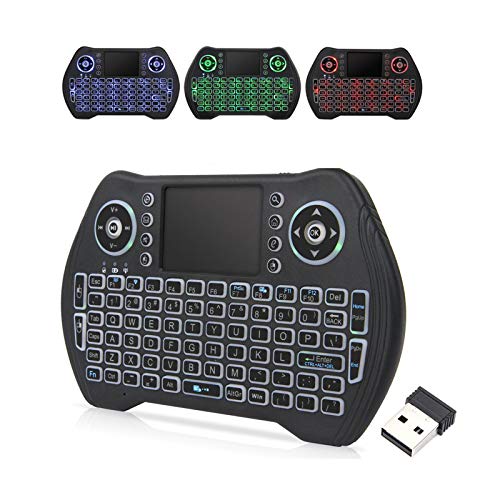
Easytone Backlit Mini Wireless Keyboard with Touchpad Mouse Combo Remote Control with Rechargeable Li-ion Battery and Multimedia Keys for Android TV Box HTPC PS3 Smart TV PC X-Box Linux Windows MacOS
As an Amazon Associate we earn from qualifying purchases. Product prices and availability are accurate as of the date/time indicated.
Top Budget Keyboards for Remote Workers Reviewed
Logitech K380 Multi-Device
The Logitech K380 Multi-Device is a keyboard with a compact layout with no numpad, a membrane quiet switch, a Bluetooth connection, a battery life of about 2 years, and a price of $30 to $40. It has a design that is known for Logitech quality, with a keyboard that is popular, and with a design that is portable. It is a good choice if you want the best budget keyboard for remote workers, with a design that is a good balance, and with a keyboard that is ideal for a remote worker who uses multiple devices.
Keychron K2
The Keychron K2 is a keyboard with a 75 percent layout that is hot-swappable, a mechanical Gateron switch, a Bluetooth and USB-C connection, a battery life of about 240 hours, and a price of $70 to $90. It has a design that is known for Keychron quality, with a keyboard that is tactile, and with a design that is customisable. It is a good choice if you want a budget keyboard for remote workers that is mechanical, with a design that is good and with a keyboard that is ideal for a typist who wants feedback.
Logitech MX Keys Mini
The Logitech MX Keys Mini is a keyboard with a compact layout with no numpad, a membrane low-profile switch, a Bluetooth and USB-C connection, a battery life of about 10 days with backlight and 5 months without, and a price of $90 to $100. It has a design that is known for Logitech quality, with a keyboard that is premium, and with a design that is quiet. It is a good choice if you want a budget keyboard for remote workers that is the most refined, with a design that is good and with a keyboard that is ideal for a professional.
Anne Pro 2
The Anne Pro 2 is a keyboard with a 60 percent compact layout, a mechanical Gateron switch, a Bluetooth and USB-C connection, a battery life of about 8 hours with backlight, and a price of $70 to $80. It has a design that is known for Anne Pro quality, with a keyboard that is small, and with a design that is portable. It is a good choice if you want a budget keyboard for remote workers that is tiny, with a design that is good and with a keyboard that is ideal for a minimalist desk.
Royal Kludge RK61
The Royal Kludge RK61 is a keyboard with a 60 percent compact layout, a mechanical hot-swappable switch, a Bluetooth and USB-C connection, a battery life of about 10 hours with backlight, and a price of $40 to $50. It has a design that is known for Royal Kludge quality, with a keyboard that is affordable, and with a design that is customisable. It is a good choice if you want a budget keyboard for remote workers that is cheap and mechanical, with a design that is good and with a keyboard that is ideal for a first mechanical keyboard.
Logitech K780 Multi-Device
The Logitech K780 Multi-Device is a keyboard with a full-size layout with numpad, a membrane quiet switch, a Bluetooth and Unifying connection, a battery life of about 2 years, and a price of $60 to $70. It has a design that is known for Logitech quality, with a keyboard that is full-size, and with a design that is comfortable. It is a good choice if you want a budget keyboard for remote workers that has a numpad, with a design that is good and with a keyboard that is ideal for a worker who uses numbers.
Buying Guide: How to Choose the Best Budget Keyboard for Remote Workers
Start with your layout, your typing, and your desk. Look for a compact keyboard, such as the Logitech K380, if you want a small keyboard, with a design that is portable, and with a keyboard that saves desk space, with a design that is neat, while a full-size keyboard, such as the Logitech K780, is a good choice if you need a numpad, with a design that is useful, for spreadsheets, with a design that is practical. A 75 percent keyboard, such as the Keychron K2, is a good balance, because it has function keys, with a design that is useful, and a compact size, with a design that is portable, and with a keyboard that is ideal for most remote workers. A 60 percent keyboard, such as the Anne Pro 2, is even smaller, with a design that is minimal, although it has no function keys, with a design that is a trade-off, for a worker who needs them.
Next, check switches, noise, and your environment. Look for a membrane keyboard, because it is quiet, with a design that is soft, and with a keyboard that is ideal for a video call, with a design that is considerate, while a mechanical keyboard, with a design that is tactile, is more satisfying, with a design that is responsive, although it is louder, with a design that is a trade-off. A keyboard with a low-profile switch, with a design that is quiet, is a good choice for a remote worker, because it is comfortable, with a design that is ergonomic, and with a keyboard that does not disturb others, with a design that is important, in a shared home. A keyboard with hot-swappable switches, such as the Keychron K2, is also good, because it lets you change switches, with a design that is custom, without soldering, with a design that is easy, for a worker who wants to try different feels.
Check connection, multi-device, and your setup. Look for a keyboard with Bluetooth, because it connects wirelessly, with a design that is clean, and with a keyboard that lets you switch between devices, with a design that is convenient, for a remote worker who uses a laptop, tablet, and phone. A keyboard with a multi-device switch, such as the Logitech K380, is a good choice, because it lets you pair 3 devices, with a design that is versatile, and switch with one key, with a design that is fast. A keyboard with USB-C, with a design that is modern, is also good, because it charges quickly, with a design that is convenient, and with a keyboard that is compatible, with a design that is standard, for a modern laptop. A keyboard with a long battery life, with a design that is 2 years, is better than a keyboard with a short battery, with a design that is 10 hours, because it needs less charging, with a design that is practical.
Consider ergonomics, backlight, and your comfort. If you type for hours, a keyboard with a slight tilt, with a design that is ergonomic, is a good choice, because it reduces wrist strain, with a design that is healthy, and with a keyboard that is comfortable, for a long day. A keyboard with backlight, with a design that is illuminated, is also useful, because it lets you type in low light, with a design that is convenient, at night, with a design that is dark, although it uses more battery, with a design that is a trade-off. A keyboard with a wrist rest, with a design that is padded, is also good, because it supports your wrists, with a design that is comfortable, for a remote worker who types all day. A keyboard that is comfortable, with a design that is ergonomic, will help you work longer, with a design that is productive, without pain.
Finally, set a realistic budget. Budget keyboards for remote workers typically cost $30 to $100, depending on type and brand. A keyboard from $30 to $50, such as the Logitech K380 or Royal Kludge RK61, offers a good way to start, with a design that is affordable. A keyboard from $60 to $80, such as the Logitech K780 or Anne Pro 2, offers a better keyboard, with a design that is comfortable, and with a keyboard that is worth it if you type regularly. A keyboard from $70 to $100, such as the Keychron K2 or Logitech MX Keys Mini, offers the best keyboard, with a design that is premium, and with a keyboard that is worth it if you want the best typing experience. Do not buy a keyboard based only on price. Choose one that is quiet, with a design that is comfortable, and with a keyboard that connects to your devices, so you can work remotely with ease.
How to Set Up a Budget Keyboard for Remote Work
To set up a budget keyboard for remote work, first charge your keyboard, with a design that is full, and pair it via Bluetooth, with a design that is in your PC settings, and test it, with a design that is in a document, to make sure it types correctly, with a design that is checked. Place your keyboard, with a design that is centred, in front of your monitor, with a design that is at eye level, and adjust your chair, with a design that is ergonomic, so your wrists are straight, with a design that is healthy, and your elbows are at 90 degrees, with a design that is comfortable. Use a wrist rest, with a design that is padded, if needed, with a design that is supportive, and take breaks, with a design that is every hour, to stretch, with a design that is important, for your health. A keyboard that is set up correctly, with a design that is ergonomic, will help you work comfortably, with a design that is productive, all day.
Frequently Asked Questions
What is the best keyboard for working from home?
What is the best keyboard for working from home is the Logitech K380 or Logitech MX Keys Mini, with a design that is quiet, and with a keyboard that is comfortable, and with a keyboard that connects via Bluetooth, with a design that is easy, and with a keyboard that is ideal for a remote worker who types all day, with a design that is practical. A keyboard such as the Keychron K2 is also good, with a design that is mechanical, and with a keyboard that is tactile, for a typist who wants feedback, with a design that is satisfying. For most remote workers, a quiet, compact, Bluetooth keyboard, with a design that is affordable, is the best choice, with a design that is versatile.
Is a mechanical keyboard good for remote work?
Yes, a mechanical keyboard is good for remote work, if you choose a quiet switch, with a design that is low-profile, and with a keyboard that is tactile, with a design that is responsive, and with a keyboard that is comfortable, with a design that is ergonomic, for typing all day, with a design that is productive. A mechanical keyboard, such as the Keychron K2, is a good choice, because it is customisable, with a design that is hot-swappable, and with a keyboard that lets you change switches, with a design that is flexible, although it can be louder, with a design that is a trade-off, than a membrane keyboard, with a design that is quiet. For most remote workers, a mechanical keyboard with quiet switches is a good choice, with a design that is satisfying, and with a keyboard that is ideal for a home office.
Can I use one keyboard for my laptop and phone?
Yes, you can use one keyboard for your laptop and phone, if you choose a multi-device keyboard, such as the Logitech K380, with a design that pairs 3 devices, and with a keyboard that lets you switch, with a design that is with one key, between your laptop, tablet, and phone, with a design that is convenient. A keyboard with Bluetooth, with a design that is wireless, is a good choice, because it connects to multiple devices, with a design that is versatile, and with a keyboard that is ideal for a remote worker who uses different devices, with a design that is practical. For most remote workers, a multi-device keyboard is a good investment, with a design that is useful, and with a keyboard that saves desk space, with a design that is neat.
How much should I spend on a keyboard for remote work?
How much you should spend on a keyboard for remote work depends on your needs, with a budget of $30 to $50 being enough for a good membrane keyboard, with a design that is quiet, and with a keyboard that is comfortable, such as the Logitech K380, while a budget of $70 to $100 is better if you want a mechanical or premium keyboard, with a design that is tactile, and with a keyboard that is durable, such as the Keychron K2 or Logitech MX Keys Mini. A keyboard that costs more, with a design that is premium, is not always better, with a design that is a trade-off, for a remote worker, so choose a keyboard that is comfortable, with a design that is quiet, and with a keyboard that fits your budget, with a design that is practical, for your work.
Related guides
- Best AAA Batteries for Office Remotes in 2026: AAA Batteries for Office Remotes
- Best Budget Tablet for Work Under 100 in 2026: Budget Tablets for Work Under $100, Office Work, and Productivity
- Best Gimbal for Office Vlogging in 2026: 7 Gimbals for Office Vlogging That Keep Your Video Smooth, Stable, and Professional in the Office
- Best Budget NAS Dust Filter for Maintenance in 2026: 7 Budget NAS Dust Filters for Maintenance With Clear Airflow, Simple Install, and Easy Use for NAS
More from Amazon
Programs that pair well with the guide above. Offers and eligibility are set by Amazon and may change.
Free shipping on eligible items, Prime Video and more. Eligible new members can start with a free trial.
Start a Prime free trialAd-free music streaming. Eligible new subscribers can start with a free trial.
Try Music Unlimited freeA Prime membership for ages 18-24 with a trial period. Eligibility is set by Amazon.
See Prime for Young AdultsAudiobooks and podcasts to listen to on the go. Eligible new members can start with a free trial.
Try Audible freeAs an Amazon Associate we earn from qualifying purchases.

Write Your Review
No reviews yet. Be the first to share your experience!