
What's inside
- Best Gimbal for Office Cameras: Quick Comparison Table
- Why a Gimbal Matters for Office Cameras
- Best Gimbal for Office Cameras Reviewed
- Buying Guide: How to Choose the Best Gimbal for Office Cameras
- How to Use a Gimbal for Office Cameras
- Which Best Gimbal for Office Cameras Should You Buy?
- Frequently Asked Questions About the Best Gimbal for Office Cameras
As an Amazon Associate I earn from qualifying purchases. This post may contain affiliate links at no extra cost to you.
The best gimbal for office cameras is the one that fits your camera or phone, keeps your video steady during a video call or a live stream, and is easy to set up on a desk in an office, without a complex setup or a high price. A gimbal for office cameras is not the same as a gimbal for a cinema camera. It is a small, 3-axis gimbal for a phone, webcam, or small mirrorless camera, that you use on a desk, on a tripod, or in your hand, to keep your office video smooth and professional.
For most office users, a gimbal with 3-axis stabilisation, a payload of 300g to 1kg, a battery life of 8 to 12 hours, and a typical price of $100 to $300, is a good starting point. That combination gives you steady video for Zoom, Teams, YouTube, and live streaming, without a large, heavy gimbal.
At technicalbud.com, we focus on tech gadgets. For this guide to the best gimbal for office cameras in 2026, we compared current gimbals that are widely sold, designed for phones, webcams, and small cameras, and suitable for a user who works in an office and wants steady video. We looked at payload, axes, battery life, weight, compatibility, and price. Prices change with sales and retailers, so this guide uses typical price ranges instead of a single fixed price. Payload, battery, and weight figures are manufacturer listings, and real performance depends on your camera, your phone, your use, and your office lighting.
Office note: a gimbal helps with camera movement, but it will not fix poor lighting or poor audio. Use a good light and a microphone for your office videos, and follow your workplace rules for video recording.
Our Top Picks
Best Gimbal for Office Cameras: Quick Comparison Table
The table below compares seven gimbals for office cameras. Payload is the payload, where given. Axes is the axes, where given. Battery is the battery life, where given. Weight is the weight, where given. Compatibility is the compatibility, where given. Best for is a note on what the gimbal is best for, such as office cameras, where given. Price is the typical range, and rating is our editorial score based on stabilisation, ease of use, battery, and value for office use.
| Gimbal for Office Cameras | Payload | Axes | Battery Life | Weight | Compatibility | Best For | Typical Price Range | Our Rating |
|---|---|---|---|---|---|---|---|---|
| DJI Osmo Mobile 7 | Up to 300g | 3-axis | Up to 10 hours | About 300g | Smartphones | Best overall, office cameras | $130 – $170 | 4.9 / 5 |
| Insta360 Flow 2 Pro | Up to 300g | 3-axis | Up to 10 hours | About 350g | Smartphones, iPhone | Best for Insta360, Flow 2 Pro | $150 – $180 | 4.8 / 5 |
| Zhiyun Smooth 5S | Up to 300g | 3-axis | Up to 12 hours | About 600g | Smartphones | Best for Zhiyun, Smooth 5S | $150 – $200 | 4.8 / 5 |
| DJI RS 4 Mini | Up to 2kg | 3-axis | Up to 13 hours | About 890g | Mirrorless cameras | Best for DJI, RS 4 Mini | $250 – $350 | 4.8 / 5 |
| OBSBOT Tiny 2 Webcam Gimbal | Built-in camera | 2-axis gimbal | USB powered | About 200g | PC, Mac, Zoom, Teams | Best for OBSBOT, Tiny 2 | $250 – $300 | 4.7 / 5 |
| DJI Osmo Pocket 3 | Built-in camera | 3-axis gimbal | Up to 2.5 hours | About 179g | Built-in 4K camera | Best for DJI, Osmo Pocket 3 | $450 – $550 | 4.7 / 5 |
| Hohem iSteady X3 SE | Up to 300g | 3-axis | Up to 11 hours | About 350g | Smartphones | Best budget, Hohem iSteady X3 | $70 – $100 | 4.6 / 5 |
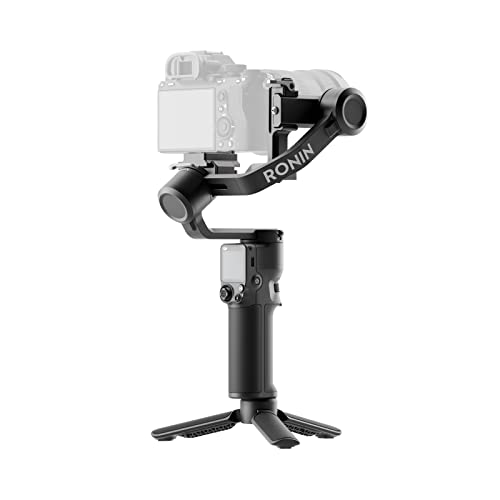
DJI RS 3 Mini, Camera Gimbal Stabilizer, Canon/Sony/Nikon/Fujifilm | 2 kg (4.4 lbs) Tested Payload, Native Vertical Shooting, Bluetooth Shutter Control, 3rd-Gen RS Stabilization, 795g
As an Amazon Associate we earn from qualifying purchases. Product prices and availability are accurate as of the date/time indicated.

isecumated 4K Pocket Vlogging Camera, WiFi Handheld Gimbal Blogging Cam | 330° Rotating Lens & Face Tracking, 4k Video & 75mp Photos, Wifi Sharing & Webcam Function, 1.72" Touch Screen for Beginner
As an Amazon Associate we earn from qualifying purchases. Product prices and availability are accurate as of the date/time indicated.

FeiyuTech SCORP-C2 Camera Gimbal Stabilizer with Built-in AI Tracking | 3-axis stabilizer with 7.72 lbs payload, native vertical shooting and intelligent tracking for DSLR & mirrorless cameras
As an Amazon Associate we earn from qualifying purchases. Product prices and availability are accurate as of the date/time indicated.
Note: Payload and battery figures are manufacturer listings, and a gimbal that lists 300g payload may not hold a phone with a large case. Always check the gimbal’s payload, axes, and compatibility in the manual, and confirm the current price with the retailer.
Why a Gimbal Matters for Office Cameras
A gimbal matters for office cameras for three reasons: stability, professionalism, and flexibility. Stability matters because a shaky video, even a small shake from holding a phone by hand, looks unprofessional in a video call or a live stream. A 3-axis gimbal keeps your camera level and smooth, even if you move your hand or walk around your office.
Professionalism matters because a steady, well-framed video makes you look more professional to clients, colleagues, and viewers. A gimbal with face tracking, such as the OBSBOT Tiny 2 or Insta360 Flow 2 Pro, can follow you as you move, so you stay in frame during a presentation.
Flexibility matters because a gimbal lets you move your camera around your office, from your desk to a whiteboard to a product demo, without setting up a tripod each time. A small phone gimbal fits in a bag, and you can use it for a video call, a YouTube video, or a live stream.
Best Gimbal for Office Cameras Reviewed
1. DJI Osmo Mobile 7 – Best Gimbal for Office Cameras Overall
The DJI Osmo Mobile 7 is our top pick because it offers a payload of up to 300g, 3-axis stabilisation, a battery life of up to 10 hours, a weight of about 300g, and compatibility with smartphones, for a typical price of $130 to $170. It has ActiveTrack, a built-in tripod, and a design that is made for phone video.
DJI designs the Osmo Mobile 7 with a focus on an easy-to-use phone gimbal for creators. The 3-axis stabilisation is smooth, the ActiveTrack follows your face, and the battery life of up to 10 hours is enough for a full workday. The gimbal is a good choice for a user who wants a DJI gimbal, and who wants a reliable phone gimbal for office video.
The main limitation is payload. At up to 300g, it is best for a phone, not for a mirrorless camera. Choose the Osmo Mobile 7 if you want the best overall gimbal for office cameras, you use a phone for video, and you have a budget of $130 to $170.
2. Insta360 Flow 2 Pro – Best Gimbal for Office Cameras for Insta360
The Insta360 Flow 2 Pro is a gimbal with a payload of up to 300g, 3-axis stabilisation, a battery life of up to 10 hours, a weight of about 350g, and compatibility with smartphones and iPhone, for a typical price of $150 to $180. It has Deep Track 4.0, Apple DockKit support, and a design that is made for iPhone users.
Insta360 designs the Flow 2 Pro with a focus on a smart phone gimbal with AI tracking. The Deep Track follows you even if you turn away, the DockKit support works with iPhone video calls, and the price of $150 to $180 is good for a Pro gimbal. The gimbal is a good choice for a user who has an iPhone, and who wants a smart tracking gimbal.
The main limitation is price. At $150 to $180, it is more expensive than a DJI Osmo Mobile 7, though it offers better iPhone tracking. Choose the Flow 2 Pro if you want an Insta360 gimbal, you have an iPhone, and you have a budget of $150 to $180.
3. Zhiyun Smooth 5S – Best Gimbal for Office Cameras for Zhiyun
The Zhiyun Smooth 5S is a gimbal with a payload of up to 300g, 3-axis stabilisation, a battery life of up to 12 hours, a weight of about 600g, and compatibility with smartphones, for a typical price of $150 to $200. It has a built-in fill light, a long battery life, and a design that is made for phone video creators.
Zhiyun designs the Smooth 5S with a focus on a professional phone gimbal with a fill light for office lighting. The battery life of up to 12 hours is the longest for a phone gimbal in this guide, the fill light helps in a dim office, and the controls are easy to use. The gimbal is a good choice for a user who wants a Zhiyun gimbal, and who wants a fill light.
The main limitation is weight. At about 600g, it is heavier than a DJI Osmo Mobile 7, though it is still portable. Choose the Smooth 5S if you want a Zhiyun gimbal, you want a fill light, and you have a budget of $150 to $200.
4. DJI RS 4 Mini – Best Gimbal for Office Cameras for Mirrorless Cameras
The DJI RS 4 Mini is a gimbal with a payload of up to 2kg, 3-axis stabilisation, a battery life of up to 13 hours, a weight of about 890g, and compatibility with mirrorless cameras, for a typical price of $250 to $350. It has a compact design, a long battery life, and a design that is made for small mirrorless cameras.
DJI designs the RS 4 Mini with a focus on a small, light gimbal for mirrorless cameras in an office. The payload of up to 2kg can hold a Sony or Canon mirrorless camera with a small lens, the battery life of up to 13 hours is long, and the design is compact for a desk. The gimbal is a good choice for a user who has a mirrorless camera, and who wants a DJI gimbal for office video.
The main limitation is size. At about 890g, it is heavier than a phone gimbal, and it needs a mirrorless camera, not just a phone. Choose the RS 4 Mini if you want a DJI gimbal for a mirrorless camera, you want a 2kg payload, and you have a budget of $250 to $350.
5. OBSBOT Tiny 2 Webcam Gimbal – Best Gimbal for Office Cameras for Video Calls
The OBSBOT Tiny 2 Webcam Gimbal is a webcam with a built-in camera, a 2-axis gimbal, USB power, a weight of about 200g, and compatibility with PC, Mac, Zoom, and Teams, for a typical price of $250 to $300. It has a 4K camera, AI face tracking, and a design that is made for video calls.
OBSBOT designs the Tiny 2 with a focus on a smart webcam that follows you during a video call. The 2-axis gimbal pans and tilts to keep you in frame, the 4K camera is sharp, and the AI tracking works with Zoom and Teams. The webcam is a good choice for a user who wants a webcam gimbal for office video calls, and who does not want to use a phone.
The main limitation is that it is a webcam, not a gimbal for a phone or mirrorless camera, so you cannot use it for outdoor video. Choose the Tiny 2 if you want an OBSBOT webcam, you want AI tracking for video calls, and you have a budget of $250 to $300.
6. DJI Osmo Pocket 3 – Best Gimbal for Office Cameras for All-in-One Video
The DJI Osmo Pocket 3 is a camera with a built-in 4K camera, a 3-axis gimbal, a battery life of up to 2.5 hours, and a weight of about 179g, for a typical price of $450 to $550. It has a 1 inch sensor, a 2 inch touchscreen, and a design that is made for all-in-one video creation.
DJI designs the Osmo Pocket 3 with a focus on a tiny, all-in-one camera with a gimbal for creators. The 1 inch sensor gives you good image quality in an office, the 3-axis gimbal keeps video steady, and the weight of about 179g is very light. The camera is a good choice for a user who wants a DJI all-in-one camera, and who wants a simple, portable video solution.
The main limitation is price and battery. At $450 to $550 and a battery life of up to 2.5 hours, it is more expensive and has a shorter battery than a phone gimbal, though it offers a better camera. Choose the Osmo Pocket 3 if you want a DJI all-in-one camera, you want 4K video, and you are willing to pay more.
7. Hohem iSteady X3 SE – Best Budget Gimbal for Office Cameras
The Hohem iSteady X3 SE is a gimbal with a payload of up to 300g, 3-axis stabilisation, a battery life of up to 11 hours, a weight of about 350g, and compatibility with smartphones, for a typical price of $70 to $100. It has a simple design, a long battery life, and a design that is made for beginners.
Hohem designs the iSteady X3 SE with a focus on a low-cost phone gimbal for beginners. The price of $70 to $100 is the lowest in this guide, the battery life of up to 11 hours is long, and the gimbal is easy to use. The gimbal is a good choice for a user who wants the lowest price, and who wants a simple phone gimbal.
The main limitation is features. It has fewer smart tracking features than a DJI or Insta360 gimbal, though it works well for basic stabilisation. Choose the iSteady X3 SE if you want the lowest price, you want a Hohem gimbal, and you have a budget of $70 to $100.
Buying Guide: How to Choose the Best Gimbal for Office Cameras
Before you buy, think about what camera you use, how you use it in your office, how long you need battery life, how much weight you can carry, and how much you want to spend. A gimbal that is perfect for a phone may not hold a mirrorless camera, and a gimbal that is perfect for video calls may not work for YouTube. The six points below cover the decisions that matter most for a gimbal for office cameras.
1. Camera Type: Phone vs Webcam vs Mirrorless, and Your Office Video
Camera type is the first decision. Camera type is what camera you use for office video, usually a smartphone, a webcam, or a mirrorless camera. A phone gimbal, such as the DJI Osmo Mobile 7 or Insta360 Flow 2 Pro, is best if you use your phone for video calls, YouTube, or live streaming, because it is light and easy to use. A webcam gimbal, such as the OBSBOT Tiny 2, is best if you use Zoom or Teams on your PC, and you want AI tracking. A mirrorless gimbal, such as the DJI RS 4 Mini, is best if you use a Sony or Canon camera for professional video.
Choose a phone gimbal if you use a phone, you want a light gimbal, and you want a low price. Choose a webcam gimbal if you use a PC for video calls, and you want AI tracking. Choose a mirrorless gimbal if you use a mirrorless camera, and you want the best image quality. Check your camera type before you buy a gimbal.
2. Payload: 300g vs 2kg, and Your Camera and Lens
Payload is the second decision. Payload is how much weight a gimbal can hold, usually up to 300g for a phone gimbal, or up to 2kg for a mirrorless gimbal. A phone with a case weighs about 200g to 300g, so a 300g payload is enough for most phones. A mirrorless camera with a lens weighs 800g to 1.5kg, so it needs a 2kg payload.
Choose a 300g gimbal if you use a phone, you do not add a large lens or light, and you want a light gimbal. Choose a 2kg gimbal if you use a mirrorless camera, you have a lens, or you want to add a light or microphone. Check your camera and phone weight, including case, before you buy a gimbal.
3. Stabilisation: 3-Axis vs 2-Axis, and Your Video Smoothness
Stabilisation is the third decision. Stabilisation is how many axes a gimbal stabilises, usually 3-axis for pan, tilt, and roll, or 2-axis for pan and tilt. A 3-axis gimbal, such as the DJI Osmo Mobile 7, keeps your video steady in all directions, even if you walk or move your hand. A 2-axis gimbal, such as the OBSBOT Tiny 2, keeps your video steady for pan and tilt, which is enough for a desk webcam that does not move much.
Choose a 3-axis gimbal if you move around your office, you walk while filming, or you want the smoothest video. Choose a 2-axis gimbal if you use a webcam on a desk, you do not move much, and you want AI tracking. Check the gimbal’s axes in the manual, and test it with your camera before you buy if you can.
4. Battery Life: 2.5 Hours vs 13 Hours, and Your Workday
Battery life is the fourth decision. Battery life is how long a gimbal will run before it needs charging, usually 2.5 hours for a DJI Osmo Pocket 3, or 10 to 13 hours for a phone or mirrorless gimbal. A phone gimbal with 10 hours of battery is enough for a full workday of video calls, while a Pocket 3 with 2.5 hours is enough for a short shoot, but not for a full day.
Choose a gimbal with 10 hours or more if you use it all day, you do video calls for hours, or you do not want to charge during work. Choose a gimbal with a shorter battery if you only use it for short videos, and you can charge it between shoots. Check the battery life in the manual, and keep a charger in your office.
5. Tracking: Face Tracking vs Manual, and Your Presentations
Tracking is the fifth decision. Tracking is whether a gimbal can follow your face automatically, so you stay in frame during a presentation. A gimbal with AI tracking, such as the OBSBOT Tiny 2, Insta360 Flow 2 Pro, or DJI Osmo Mobile 7, can follow you as you move around your office, which is useful for a presentation or a live stream. A gimbal without tracking, such as a basic Hohem gimbal, needs you to move it manually.
Choose a gimbal with face tracking if you present, you move around your office, or you want hands-free video. Choose a gimbal without tracking if you sit at a desk, you do not move much, and you want a lower price. Test tracking in your office lighting before you rely on it for a live stream.
6. Price, Total Cost, and Choosing a Gimbal on a Budget
Price ranges in this guide run from about $70 to $550 for a gimbal for office cameras, depending on camera type, payload, and features. A budget gimbal at $70 to $170, such as the Hohem iSteady X3 SE or DJI Osmo Mobile 7, is enough for most office users who want a phone gimbal for video calls and content. A mid-price gimbal at $150 to $350, such as the Insta360 Flow 2 Pro, Zhiyun Smooth 5S, OBSBOT Tiny 2, or DJI RS 4 Mini, offers better tracking, a fill light, or a mirrorless payload. A premium gimbal at $450 to $550, such as the DJI Osmo Pocket 3, offers an all-in-one camera with a 1 inch sensor.
Consider total cost as well as price. A gimbal that costs $130 and needs a $20 tripod may cost $150 in total, while a gimbal that costs $70 and includes a tripod may cost $70 in total. Budget for a gimbal, and if you need it, a tripod, a light, and a microphone, not just a gimbal. Do not buy the cheapest gimbal if it does not hold your phone, and do not buy the most expensive gimbal if you only need a simple phone gimbal for Zoom. A gimbal that fits your camera, has enough battery for your workday, and fits your budget will help you make steady office videos more reliably than a gimbal that is cheap but does not track, or expensive but too heavy for your desk.
How to Use a Gimbal for Office Cameras
Using a gimbal for office cameras starts with balancing your phone or camera on the gimbal, following the manufacturer’s instructions, and turning on the gimbal. Place your gimbal on a desk tripod for a video call, or hold it in your hand for a walkthrough video. Use face tracking if your gimbal has it, and keep your office lighting bright and even, so your face is clear.
Practice using your gimbal before a live stream or an important video call, so you know how to start tracking, how to switch modes, and how to charge it. Keep your gimbal firmware updated, and store it in a case when you are not using it.
Which Best Gimbal for Office Cameras Should You Buy?
If you want the best gimbal for office cameras, buy the DJI Osmo Mobile 7. It costs $130 to $170, it offers a payload of up to 300g, 3-axis stabilisation, and a battery life of up to 10 hours, which is the best balance for most office users.
If you want an Insta360 gimbal, buy the Insta360 Flow 2 Pro. If you want a Zhiyun gimbal, buy the Zhiyun Smooth 5S. If you want a DJI gimbal for a mirrorless camera, buy the DJI RS 4 Mini. If you want an OBSBOT webcam, buy the OBSBOT Tiny 2 Webcam Gimbal. If you want a DJI all-in-one camera, buy the DJI Osmo Pocket 3. If you want the lowest price, buy the Hohem iSteady X3 SE.
All seven gimbals in this guide are currently sold, designed for phones, webcams, and small cameras, and suitable for a user who works in an office and wants steady video. Pick the one that matches your camera, how you use it in your office, how long you need battery life, and your budget, and always use good lighting and audio for your office videos.
Disclosure: technicalbud.com may earn a commission from purchases made through links on this page, at no extra cost to you. Prices listed are typical ranges and can vary by retailer and sale. Payload, battery, and weight figures are manufacturer claims and can vary by model. Always follow your workplace rules for video recording.
Frequently Asked Questions About the Best Gimbal for Office Cameras
What is the best gimbal for office cameras?
What is the best gimbal for office cameras? In most cases, the DJI Osmo Mobile 7 is best overall, because it costs $130 to $170, it offers a payload of up to 300g, 3-axis stabilisation, and a battery life of up to 10 hours. The Insta360 Flow 2 Pro is best if you have an iPhone, while the OBSBOT Tiny 2 is best if you want a webcam for video calls.
Do I need a gimbal for Zoom calls?
Do you need a gimbal for Zoom calls? In most cases, you do not need a gimbal for a Zoom call if you sit at a desk and use a webcam on a tripod, because your camera does not move. You need a gimbal if you move around your office during a call, you use your phone for video, or you want your camera to follow you automatically. A webcam gimbal, such as the OBSBOT Tiny 2, is best for Zoom calls where you move, while a phone gimbal is best if you use your phone.
Can a phone gimbal hold a mirrorless camera?
Can a phone gimbal hold a mirrorless camera? In most cases, no, a phone gimbal with a payload of up to 300g cannot hold a mirrorless camera, because a mirrorless camera with a lens weighs 800g to 1.5kg, which is too heavy. Use a mirrorless gimbal, such as the DJI RS 4 Mini with a payload of up to 2kg, for a mirrorless camera. Check your camera weight, including lens, before you buy a gimbal.
How long does a gimbal battery last for office use?
How long does a gimbal battery last for office use? In most cases, a phone gimbal battery lasts 10 to 12 hours, a mirrorless gimbal battery lasts up to 13 hours, and an all-in-one camera like the DJI Osmo Pocket 3 lasts up to 2.5 hours. A 10-hour battery is enough for a full workday of video calls, while a 2.5-hour battery is enough for a short shoot. Charge your gimbal overnight, and keep a charger in your office if you use it all day.
Related guides
- Best AAA Batteries for Office Remotes in 2026: AAA Batteries for Office Remotes
- Best Budget Tablet for Work Under 100 in 2026: Budget Tablets for Work Under $100, Office Work, and Productivity
- Best Gimbal for Office Vlogging in 2026: 7 Gimbals for Office Vlogging That Keep Your Video Smooth, Stable, and Professional in the Office
- Best Budget NAS Dust Filter for Maintenance in 2026: 7 Budget NAS Dust Filters for Maintenance With Clear Airflow, Simple Install, and Easy Use for NAS
More from Amazon
Programs that pair well with the guide above. Offers and eligibility are set by Amazon and may change.
Free shipping on eligible items, Prime Video and more. Eligible new members can start with a free trial.
Start a Prime free trialAd-free music streaming. Eligible new subscribers can start with a free trial.
Try Music Unlimited freeA Prime membership for ages 18-24 with a trial period. Eligibility is set by Amazon.
See Prime for Young AdultsAudiobooks and podcasts to listen to on the go. Eligible new members can start with a free trial.
Try Audible freeAs an Amazon Associate we earn from qualifying purchases.

Write Your Review
No reviews yet. Be the first to share your experience!