
What's inside
As an Amazon Associate I earn from qualifying purchases. This post may contain affiliate links at no extra cost to you.
A 3D printer enclosure for a home office is different from an enclosure for a workshop. You need it to keep prints warm and stable, to reduce noise and smell, and to fit in a home office without taking over the room. The best 3D printer enclosure for home offices is an enclosure that fits your printer, keeps temperature stable, reduces noise, and is safe to use in a home with people and pets nearby.
This guide focuses on 3D printer enclosures that work well for home offices. We compare real, currently sold models, explain what size, material, and ventilation actually mean for home use, and show how to choose an enclosure that fits your printer, your desk, and your budget. Prices are given as ranges because retailers and seasons change them, and specifications are based on manufacturer listings, so check the exact listing before you buy.
3D printing in a home office needs care. Check printer compatibility before you buy an enclosure, use resin in a well-ventilated area, wear gloves, follow the manufacturer’s instructions, and supervise students. Keep the enclosure away from flammable materials, do not leave a printer running unattended for long periods without a smoke detector nearby, and ventilate the room well, especially when printing with ABS or resin.
Disclosure: As an affiliate site, TechnicalBud.com may earn a commission from qualifying purchases made through links on this page, at no extra cost to you. Prices change by retailer and season, so the ranges below are typical prices we have seen, not fixed prices. Size, material, and other specifications are based on manufacturer listings and vary by model, so check the exact listing before you buy.
Our Top Picks
 Clyrava 3D Printer Stand with Filament Storage Rack23.2 x 23.6 x 69.1 inches23.6 x 23.2 x 69.1 inches73 poundsCheck on Amazon
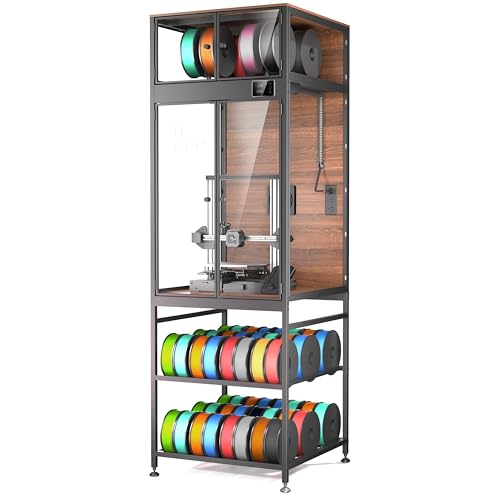 Crafit 3D Printer Cabinet with 48 Spools FilamentLarge-202623 x 23 x 70 inches66.1 poundsCheck on Amazon
Best 3D Printer Enclosure for Home Offices at a Glance: Comparison Table
Use this table to compare the leading 3D printer enclosures for home offices side by side. Size, best use, and price matter most, so compare those first, then read the reviews below for the details that matter for a home office.
| 3D Printer Enclosure Model | Size | Material | Best Use for Home Offices | Typical Price Range | Rating |
|---|---|---|---|---|---|
| Creality Ender Enclosure | 28.7 x 25.6 x 21.6 in | Fireproof fabric | Best overall 3D printer enclosure for home offices | $60 – $80 | 4.7 / 5 |
| Comgrow 3D Printer Enclosure | 29.5 x 25.6 x 21.6 in | Fireproof fabric | Best Comgrow enclosure for home offices | $70 – $90 | 4.7 / 5 |
| Wham Bam HotBox Mega Enclosure | 25 x 25 x 25 in | Fabric and frame | Best premium enclosure for home offices | $250 – $300 | 4.6 / 5 |
| YOOPAI 3D Printer Enclosure | 29.5 x 25.6 x 21.6 in | Fireproof fabric | Best YOOPAI enclosure for home offices | $80 – $100 | 4.6 / 5 |
| 3D UP Fitters Enclosure Kit | 24 x 24 x 30 in | Acrylic panels | Best hard enclosure for home offices | $150 – $200 | 4.6 / 5 |
| Sovol 3D Printer Enclosure | 28.7 x 25.6 x 21.6 in | Fireproof fabric | Best Sovol enclosure for home offices | $70 – $90 | 4.5 / 5 |

3D Printer Cabinet Enclosure, Double Layer 3D Printer Enclosed with Ventilation, Filament Storage Rack, Noise Reducing & Dust Proof Enclosure for Home, Studio and Office


As an Amazon Associate we earn from qualifying purchases. Product prices and availability are accurate as of the date/time indicated.
Clyrava 3D Printer Stand with Filament Storage Rack - 3D Printer Cabinet with Noise-Reducing & Dust-Proof Design, 3D Printer Filament Desk Organized for Workshop Studio Office (Black C)


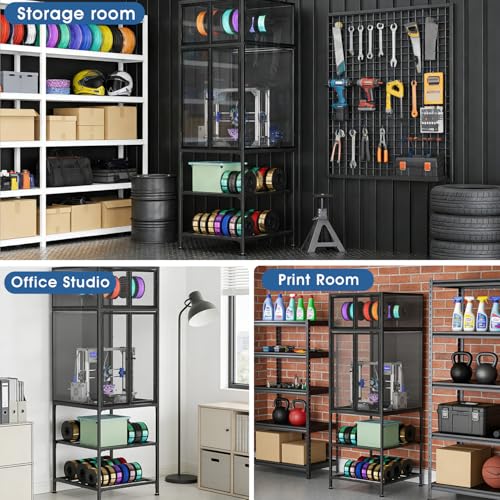


As an Amazon Associate we earn from qualifying purchases. Product prices and availability are accurate as of the date/time indicated.
Crafit 3D Printer Cabinet with 48 Spools Filament Storage Rack, 3D Printer Enclosure with Ventilation, Thermo-Hygrometer and LED Light, Heat-Resistant, Dustproof and Noise-Reduction Design, Upgraded


As an Amazon Associate we earn from qualifying purchases. Product prices and availability are accurate as of the date/time indicated.
Prices shown are approximate and for reference only. Prices change often, so please check the current price on Amazon before you buy.
Best 3D Printer Enclosure for Home Offices Reviewed for 2026
1. Creality Ender Enclosure: Best Overall 3D Printer Enclosure for Home Offices
The Creality Ender Enclosure is our top pick for most home offices because it is inexpensive, easy to set up, and designed for Creality Ender printers, which are among the most popular home printers. Its 28.7 x 25.6 x 21.6 inch size fits an Ender-3 and similar printers in many listings, its fireproof fabric helps keep temperature stable, and its front window lets you watch prints without opening the enclosure.
For a home office, the Ender Enclosure is practical because it reduces noise, it keeps drafts away from prints, and it is light enough to move. The main trade-off is that it is a soft fabric enclosure, so it is not as rigid as a hard acrylic enclosure, and it does not have built-in ventilation or a filter, although you can add a fan in many listings.
At a typical price in the $60 to $80 range, it is a very good value for a home office enclosure. Choose it if you own a Creality Ender printer, you want a simple enclosure for a home office, and you do not need a premium hard enclosure. Check printer compatibility before you buy.
2. Comgrow 3D Printer Enclosure: Best Comgrow Enclosure for Home Offices
The Comgrow 3D Printer Enclosure is a 29.5 x 25.6 x 21.6 inch fabric enclosure, priced in the $70 to $90 range, with a similar design to the Creality enclosure but with a slightly larger size and a different frame. Its fireproof fabric, front window, and easy setup make it a good choice for home offices, especially if you own a Comgrow or a similar printer.
For a home office, the Comgrow enclosure is useful because it is affordable, it is easy to fold and store when not in use, and it helps keep prints warm. The trade-off is that it is also a soft enclosure, so it is not as durable as a hard enclosure, and it does not have active ventilation.
Choose it if you want a Comgrow enclosure, you have a medium printer, and you want a low-cost enclosure for a home office. It is a strong alternative to the Creality enclosure.
3. Wham Bam HotBox Mega Enclosure: Best Premium Enclosure for Home Offices
The Wham Bam HotBox Mega is a premium 25 x 25 x 25 inch enclosure, priced in the $250 to $300 range, with a fabric and frame design that is more rigid than a basic fabric enclosure. Its design includes a temperature control system in many listings, a fan, and a filter, which helps control temperature and reduce smell in a home office. It is designed for printers up to a certain size, so check compatibility.
For a home office, the HotBox Mega is practical because its active heating and ventilation help you print ABS and other materials that need a warm, stable environment, and its filter helps reduce odour. The trade-off is price: at $250 to $300 it costs much more than a basic fabric enclosure, although its features justify the price for serious users.
Choose it if you want a premium enclosure, you print with ABS or other high-temperature materials, and you want temperature control and filtration in a home office. It is a good choice for a dedicated home office printer.
4. YOOPAI 3D Printer Enclosure: Best YOOPAI Enclosure for Home Offices
The YOOPAI 3D Printer Enclosure is a 29.5 x 25.6 x 21.6 inch fabric enclosure, priced in the $80 to $100 range, with fireproof fabric, a front window, and a tool pocket in many listings. Its design is similar to the Creality and Comgrow enclosures, but it has a slightly different frame and a more premium fabric in some listings.
For a home office, the YOOPAI enclosure is useful because it is easy to set up, it is affordable, and it helps keep prints stable. The trade-off is that it is a soft enclosure, so it is not as rigid as a hard enclosure, and it does not have built-in ventilation.
Choose it if you want a YOOPAI enclosure, you have a medium printer, and you want a simple enclosure for a home office. It is a good choice for a first enclosure.
5. 3D UP Fitters Enclosure Kit: Best Hard Enclosure for Home Offices
The 3D UP Fitters Enclosure Kit is a hard acrylic panel enclosure, 24 x 24 x 30 inches in many listings, priced in the $150 to $200 range. Its acrylic panels are clear, so you can watch prints, and its frame is rigid, so it is more durable than a fabric enclosure. It is a kit, so you assemble it yourself, and you can customise it with fans and filters in many listings.
For a home office, the 3D UP Fitters kit is practical because its hard panels reduce noise better than fabric, its clear panels let you monitor prints, and its rigid design is more professional for an office. The trade-off is assembly time and price: it takes longer to build than a fabric enclosure, and it costs more.
Choose it if you want a hard enclosure, you have a home office where appearance matters, and you are comfortable assembling a kit. It is a good choice for a permanent home office setup.
6. Sovol 3D Printer Enclosure: Best Sovol Enclosure for Home Offices
The Sovol 3D Printer Enclosure is a 28.7 x 25.6 x 21.6 inch fabric enclosure, priced in the $70 to $90 range, designed for Sovol printers and similar models. Its fireproof fabric, front window, and easy setup make it a good choice for a home office, especially if you own a Sovol printer.
For a home office, the Sovol enclosure is useful because it is affordable, it is easy to use, and it helps keep prints warm and stable. The trade-off is that it is a soft enclosure, so it is not as rigid as a hard enclosure.
Choose it if you own a Sovol printer, you want a low-cost enclosure, and you do not need a premium hard enclosure. It is a good value for a Sovol user.
Buying Guide: How to Choose the Best 3D Printer Enclosure for Home Offices
The best 3D printer enclosure for home offices for you depends on your printer size, your materials, and your office space. Start with size and compatibility, then compare material, ventilation, and price. An enclosure that fits your printer, keeps temperature stable, and reduces noise is better than an enclosure with the most features that does not fit your printer or your desk.
Size and Compatibility: Measure Your Printer Before You Buy
Size is the most important factor for a 3D printer enclosure, because an enclosure that is too small will not fit your printer, and an enclosure that is too large will take up unnecessary space in a home office. Measure your printer’s width, depth, and height, including any spool holder on top, and compare it to the enclosure’s internal size in the listing. All the enclosures in this guide fit printers around 28 inches wide, which is enough for an Ender-3 and similar models, but check your exact printer before you buy.
For most home offices, a fabric enclosure around 28 x 25 x 21 inches is a good balance. Choose a larger enclosure only if you have a large printer, and choose a smaller enclosure only if you have a small printer and limited desk space. Always check printer compatibility in the listing.
Material, Temperature, and Ventilation for Home Offices
Material matters for an enclosure, because it determines how well it keeps temperature stable, how much noise it reduces, and how safe it is. A fireproof fabric enclosure, like the Creality, Comgrow, YOOPAI, and Sovol models, is light, easy to set up, and good for PLA and PETG, which do not need very high temperatures. A hard acrylic enclosure, like the 3D UP Fitters kit, is more rigid, reduces noise better, and looks more professional, but it costs more. A premium enclosure with heating and filtration, like the Wham Bam HotBox Mega, is best for ABS and other materials that need a warm, stable environment and odour control.
Ventilation matters in a home office, because 3D printing can produce fumes, especially with ABS and resin. Use an enclosure with a fan or a filter if you print with ABS, ventilate the room well, and do not print resin in a closed room without ventilation. Check printer compatibility, use resin in a well-ventilated area, wear gloves, and follow the manufacturer’s instructions.
Noise, Safety, and Home Office Use
Noise matters in a home office, because a 3D printer can be loud, especially at night or during calls. An enclosure reduces noise by 5 to 10 decibels in many listings, which is enough to make a printer less distracting, although it will not make it silent. A hard enclosure reduces noise more than a fabric enclosure, so choose a hard enclosure if noise is a major concern.
For safety, keep the enclosure away from flammable materials, do not leave a printer running unattended for long periods without a smoke detector nearby, and ventilate the room well. Supervise students, check filament and resin compatibility, and follow the manufacturer’s instructions. Do not place an enclosure near a curtain or a paper stack, and do not block ventilation holes.
Price, Brand, and What You Actually Need
Price depends on size, material, and features. An enclosure in the $60 to $100 range, like the Creality, Comgrow, YOOPAI, and Sovol models, is a good starting point for most home offices. An enclosure in the $150 to $200 range, like the 3D UP Fitters kit, is a good balance if you want a hard enclosure. An enclosure in the $250 to $300 range, like the Wham Bam HotBox Mega, is best if you want temperature control and filtration.
Brand also matters. An enclosure from a trusted brand in this guide, like Creality, Comgrow, Wham Bam, YOOPAI, 3D UP Fitters, and Sovol, will be more reliable than an unbranded enclosure with similar specifications on paper. For most home offices, the Creality Ender Enclosure is the best value for a simple fabric enclosure, the 3D UP Fitters kit is the best choice for a hard enclosure, and the Wham Bam HotBox Mega is the best choice for a premium enclosure with temperature control. Do not buy an enclosure based on price alone. An enclosure that fits your printer, keeps temperature stable, and reduces noise is worth the investment.
Best 3D Printer Enclosure for Home Offices: FAQ
What is the best 3D printer enclosure for home offices?
For most home offices, the Creality Ender Enclosure is the best overall 3D printer enclosure because it offers a 28.7 x 25.6 x 21.6 inch size, fireproof fabric, and easy setup at a typical price in the $60 to $80 range. If you want a hard enclosure, the 3D UP Fitters Enclosure Kit is a good choice at $150 to $200. If you want a premium enclosure with temperature control, the Wham Bam HotBox Mega is a practical option at $250 to $300. If you want a low-cost enclosure, the Comgrow 3D Printer Enclosure is a good fit at $70 to $90.
Do I need an enclosure for a 3D printer in a home office?
Do you need an enclosure for a 3D printer in a home office depends on your materials and your office, but in general, an enclosure helps keep prints warm and stable, reduces noise and smell, and protects prints from drafts. For best results, use an enclosure if you print with ABS, if your office is drafty, or if you want to reduce noise during calls.
How do I ventilate a 3D printer enclosure in a home office?
How you ventilate a 3D printer enclosure in a home office is to use a fan or a filter if your enclosure has one, open a window, and use a room fan to move air. For best results, ventilate the room well, especially when printing with ABS or resin, and do not print resin in a closed room without ventilation.
How do I choose a 3D printer enclosure for home offices?
Choose a 3D printer enclosure for home offices by starting with size and compatibility, then checking material, ventilation, and price. Pick an enclosure that fits your printer, keeps temperature stable, and reduces noise. Always check printer compatibility, ventilate well, and follow the manufacturer’s instructions.
FAQ
What is the best 3D printer enclosure for home offices?
Do I need an enclosure for a 3D printer in a home office?
How do I ventilate a 3D printer enclosure in a home office?
How do I choose a 3D printer enclosure for home offices?
Related guides
- Best Printer for Windows Compatibility Guide in 2026: 7 Steps to Choose a Printer That Works With Windows 11, With a WHQL Driver, USB, and WiFi, for a PC, Without a Printer That Needs a Driver That Does Not Exist, or a Printer That Drops WiFi
- Wired Backhaul vs Wireless Backhaul for Mesh in 2026: Wired Backhaul vs Wireless Backhaul for Mesh
- Best NAS for Home Video Streaming: 6 Best NAS for Home Video Streaming Picks in 2026
- Best SD Card vs USB Drive for Printer Transfers: 6 Best SD Card vs USB Drive for Printer Transfers Picks in 2026
More from Amazon
Programs that pair well with the guide above. Offers and eligibility are set by Amazon and may change.
Free shipping on eligible items, Prime Video and more. Eligible new members can start with a free trial.
Start a Prime free trialAd-free music streaming. Eligible new subscribers can start with a free trial.
Try Music Unlimited freeA Prime membership for ages 18-24 with a trial period. Eligibility is set by Amazon.
See Prime for Young AdultsAudiobooks and podcasts to listen to on the go. Eligible new members can start with a free trial.
Try Audible freeAs an Amazon Associate we earn from qualifying purchases.








Write Your Review
No reviews yet. Be the first to share your experience!