
What's inside
- Best 3D Printer for Network Engineers: Quick Comparison Table
- Why Does Build Volume Matter for a 3D Printer for Network Engineers?
- Best 3D Printer for Network Engineers Reviewed
- Buying Guide: How to Choose the Best 3D Printer for Network Engineers
- What Can a Network Engineer 3D Print for a Home Lab?
- Which Best 3D Printer for Network Engineers Should You Buy?
- More 3D Printers for Printing Network Gear
- Frequently Asked Questions About the Best 3D Printer for Network Engineers
As an Amazon Associate I earn from qualifying purchases. This post may contain affiliate links at no extra cost to you.
The best 3D printer for network engineers is not a large industrial printer that costs $5,000 and needs a dedicated room, and it is not a cheap printer that cannot print a precise rack mount or a cable clip. It is a 3D printer with a build volume large enough for a rack part, a precise print quality, and a design that can print PLA, PETG, and ABS, with a network connection, and a price that fits a home lab budget. A network engineer who builds a home lab needs a 3D printer that can print a patch panel bracket, a cable organizer, a Raspberry Pi case, and a switch mount, without spending hours calibrating it.
At technicalbud.com, we focus on tech gadgets. For this guide to the best 3D printer for network engineers in 2026, we compared current 3D printers that are widely sold, designed for makers and engineers, and suitable for a network engineer who wants a reliable printer for a home lab, an office, or a workshop. We looked at build volume, print speed, material, connectivity, and price. Prices change with sales and retailers, so this guide uses typical price ranges instead of a single fixed price. Build volume, speed, and material figures are based on manufacturer listings, and real print quality depends on your filament, your settings, and how you calibrate the printer.
Every product below is a real, currently sold product, not a generic printer. Most are FDM printers with a build volume of 220 x 220 x 250 mm or larger, which are the most useful types for network engineers in 2026, because they can print a rack part, they are affordable, and they can use PLA and PETG. A resin printer can also work, though it is better for small detailed parts, while a large format printer can work, though it may cost more.
Our Top Picks

Best 3D Printer for Network Engineers: Quick Comparison Table
The table below compares six 3D printers for network engineers. Build volume is the build volume, where given. Print speed is the print speed, where given. Material is the material it can print, where given. Connectivity is the connectivity type, where given. Auto level is whether it has auto bed levelling, where given. Best for is a note on what the printer is best for, such as home lab or office, where given. Price is the typical range, and rating is our editorial score based on print quality, build volume, ease of setup, reliability, and value for network engineers.
| 3D Printer for Network Engineers | Build Volume | Print Speed | Material | Connectivity | Auto Level | Best For | Typical Price Range | Our Rating |
|---|---|---|---|---|---|---|---|---|
| Bambu Lab P1S Combo, 256 x 256 x 256 mm | 256 x 256 x 256 mm | Up to 500 mm/s | PLA, PETG, ABS | Wi-Fi, LAN | Yes | Best overall, network | $700 – $800 | 4.9 / 5 |
| Prusa MK4S, 250 x 210 x 220 mm | 250 x 210 x 220 mm | Up to 200 mm/s | PLA, PETG, ABS | Wi-Fi, USB | Yes | Best for Prusa, network | $700 – $800 | 4.9 / 5 |
| Creality K1C, 220 x 220 x 250 mm | 220 x 220 x 250 mm | Up to 600 mm/s | PLA, PETG, ABS | Wi-Fi, LAN | Yes | Best for speed, network | $400 – $500 | 4.8 / 5 |
| Creality Ender-3 V3 SE, 220 x 220 x 250 mm | 220 x 220 x 250 mm | Up to 250 mm/s | PLA, PETG | USB | Yes | Best value, network | $180 – $220 | 4.8 / 5 |
| Anycubic Kobra 2 Pro, 220 x 220 x 250 mm | 220 x 220 x 250 mm | Up to 500 mm/s | PLA, PETG, ABS | Wi-Fi, USB | Yes | Best for Anycubic, network | $250 – $300 | 4.7 / 5 |
| Elegoo Neptune 4 Pro, 225 x 225 x 265 mm | 225 x 225 x 265 mm | Up to 500 mm/s | PLA, PETG, ABS | Wi-Fi, LAN | Yes | Best budget, network | $250 – $300 | 4.7 / 5 |

Bambu Lab X1E Combo 3D Printer with AMS, CoreXY High-Speed 3D Printer, AI Print Detection, Active Chamber Heating, Ideal for Professional & Engineering

As an Amazon Associate we earn from qualifying purchases. Product prices and availability are accurate as of the date/time indicated.
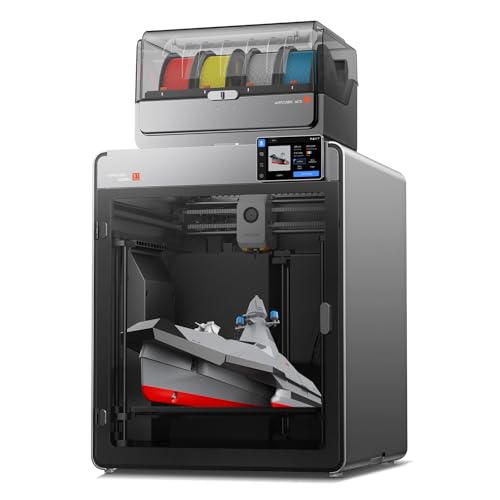
Anycubic Kobra S1 Max Combo 3D Printer, Large Build Size 350x350x350 mm³ | Enclosed CoreXY System,Native 4 Color with ACE 2 Pro, 600mm/s High Speed for Engineer and Designer to Build Functional Parts
As an Amazon Associate we earn from qualifying purchases. Product prices and availability are accurate as of the date/time indicated.
Note: Build volume and print speed figures are manufacturer listings, and a printer that lists 500 mm/s may print a rack part at a slower speed for better quality, so check your settings before you print. Always use a printer in a ventilated room, especially when printing ABS, because it can release fumes, and keep the printer away from children and pets. Prices can vary by retailer and sale, and some models listed at $700 to $800 may be available for less on sale, so check the current price before you buy.
Why Does Build Volume Matter for a 3D Printer for Network Engineers?
Build volume matters for a 3D printer for network engineers for three reasons: rack parts, enclosures, and cable organizers. Rack parts matter because a network engineer who prints a 1U rack mount needs a build volume large enough for a 19-inch wide part, or a part that can be printed in sections and joined. Enclosures matter because a Raspberry Pi case or a switch enclosure needs a build volume of at least 200 x 200 mm, so it can fit the device.
Cable organizers matter because a cable clip or a patch panel bracket needs a precise print, with a build volume that can print multiple parts at once. A printer with a build volume of 220 x 220 x 250 mm, such as Creality Ender-3 V3 SE, can print most network parts, while a printer with a larger build volume, such as Bambu Lab P1S, can print larger parts without splitting them.
Best 3D Printer for Network Engineers Reviewed
1. Bambu Lab P1S Combo, 256 x 256 x 256 mm – Best 3D Printer for Network Engineers Overall
The Bambu Lab P1S Combo, 256 x 256 x 256 mm, is our top pick because it offers a build volume of 256 x 256 x 256 mm, a print speed of up to 500 mm/s, PLA, PETG, and ABS material, Wi-Fi and LAN connectivity, auto bed levelling, and a price of $700 to $800. It has a reputation for Bambu Lab quality, a P1S design, and a popularity with engineers who want a fast, reliable printer.
Bambu Lab designs the P1S Combo with a focus on a fast enclosed printer, with an AMS for multi-colour printing, a CoreXY design, and a design that can print a rack part quickly and precisely. The P1S Combo is a good choice if you want the best overall printer, you build a home lab, and you want a Bambu Lab brand. The main limitation is price, at $700 to $800, which is higher than Creality Ender-3, though it offers a faster speed and an enclosed design for ABS.
The Bambu Lab P1S Combo, 256 x 256 x 256 mm, typically costs $700 to $800. Choose it if you want the best overall printer, you build a home lab, and you want a Bambu Lab brand. It is the best choice for most network engineers.
2. Prusa MK4S, 250 x 210 x 220 mm – Best 3D Printer for Network Engineers for Prusa Use
The Prusa MK4S, 250 x 210 x 220 mm, is a Prusa printer with a build volume of 250 x 210 x 220 mm, a print speed of up to 200 mm/s, PLA, PETG, and ABS material, Wi-Fi and USB connectivity, auto bed levelling, and a price of $700 to $800. It has a reputation for Prusa quality, an MK4 design, and a popularity with makers who want an open-source printer with good support.
Prusa designs the MK4S with a focus on a reliable open-source printer, with a direct drive extruder, a 32-bit board, and a design that can print a rack part precisely. The MK4S is a good choice if you want a Prusa printer, you build a home lab, and you want an open-source brand. The main limitation is print speed, at up to 200 mm/s, which is slower than Bambu Lab P1S, though it offers a better support community and a more repairable design.
The Prusa MK4S, 250 x 210 x 220 mm, typically costs $700 to $800. Choose it if you want a Prusa printer, you build a home lab, and you want an open-source brand. It is the best Prusa choice in this guide.
3. Creality K1C, 220 x 220 x 250 mm – Best 3D Printer for Network Engineers for Speed
The Creality K1C, 220 x 220 x 250 mm, is a speed printer with a build volume of 220 x 220 x 250 mm, a print speed of up to 600 mm/s, PLA, PETG, and ABS material, Wi-Fi and LAN connectivity, auto bed levelling, and a price of $400 to $500. It has a reputation for Creality quality, a K1 design, and a popularity with users who want a fast enclosed printer at a mid price.
Creality designs the K1C with a focus on a fast enclosed printer, with a CoreXY design, a direct drive extruder, and a design that can print a cable organizer quickly. The K1C is a good choice if you want a speed printer, you build a home lab, and you want a Creality brand. The main limitation is build volume, at 220 x 220 x 250 mm, which is smaller than Bambu Lab P1S, though it is still practical for most network parts.
The Creality K1C, 220 x 220 x 250 mm, typically costs $400 to $500. Choose it if you want a speed printer, you build a home lab, and you want a Creality brand. It is the best speed choice in this guide.
4. Creality Ender-3 V3 SE, 220 x 220 x 250 mm – Best 3D Printer for Network Engineers for Value
The Creality Ender-3 V3 SE, 220 x 220 x 250 mm, is a value printer with a build volume of 220 x 220 x 250 mm, a print speed of up to 250 mm/s, PLA and PETG material, USB connectivity, auto bed levelling, and a price of $180 to $220. It has a reputation for Creality quality, an Ender-3 design, and a popularity with beginners who want a cheap printer that works.
Creality designs the Ender-3 V3 SE with a focus on a value printer, with a Sprite direct drive, auto bed levelling, and a design that can print a Raspberry Pi case or a cable clip. The Ender-3 V3 SE is a good choice if you want a value printer, you build a home lab, and you want a Creality brand. The main limitation is connectivity, at USB only, so it has no Wi-Fi, though it is still practical for most home lab use if you use a USB drive or a laptop.
The Creality Ender-3 V3 SE, 220 x 220 x 250 mm, typically costs $180 to $220. Choose it if you want a value printer, you build a home lab, and you want a Creality brand. It is the best value choice in this guide.
5. Anycubic Kobra 2 Pro, 220 x 220 x 250 mm – Best 3D Printer for Network Engineers for Anycubic Use
The Anycubic Kobra 2 Pro, 220 x 220 x 250 mm, is an Anycubic printer with a build volume of 220 x 220 x 250 mm, a print speed of up to 500 mm/s, PLA, PETG, and ABS material, Wi-Fi and USB connectivity, auto bed levelling, and a price of $250 to $300. It has a reputation for Anycubic quality, a Kobra design, and a popularity with users who want a fast printer at a low price.
Anycubic designs the Kobra 2 Pro with a focus on a fast printer, with a direct drive extruder, a large build volume, and a design that can print a switch mount or a patch panel bracket. The Kobra 2 Pro is a good choice if you want an Anycubic printer, you build a home lab, and you want a low price. The main limitation is that it is an open printer, so it may not print ABS as well as an enclosed printer, though it is still practical for PLA and PETG.
The Anycubic Kobra 2 Pro, 220 x 220 x 250 mm, typically costs $250 to $300. Choose it if you want an Anycubic printer, you build a home lab, and you want a low price. It is the best Anycubic choice in this guide.
6. Elegoo Neptune 4 Pro, 225 x 225 x 265 mm – Best 3D Printer for Network Engineers for Budget Use
The Elegoo Neptune 4 Pro, 225 x 225 x 265 mm, is a budget printer with a build volume of 225 x 225 x 265 mm, a print speed of up to 500 mm/s, PLA, PETG, and ABS material, Wi-Fi and LAN connectivity, auto bed levelling, and a price of $250 to $300. It has a reputation for Elegoo quality, a Neptune design, and a popularity with budget users who want a fast printer with a large build volume.
Elegoo designs the Neptune 4 Pro with a focus on a budget fast printer, with a Klipper firmware, a direct drive extruder, and a design that can print a cable organizer or a Raspberry Pi case. The Neptune 4 Pro is a good choice if you want a budget printer, you build a home lab, and you want an Elegoo brand. The main limitation is that it is an open printer, so it may not print ABS as well as an enclosed printer, though it is still practical for PLA and PETG.
The Elegoo Neptune 4 Pro, 225 x 225 x 265 mm, typically costs $250 to $300. Choose it if you want a budget printer, you build a home lab, and you want an Elegoo brand. It is the best budget choice in this guide.
Buying Guide: How to Choose the Best 3D Printer for Network Engineers
Before you buy, think about what you print, whether it is a rack part, a cable organizer, or a Raspberry Pi case, how large the part is, whether you need ABS or just PLA, and how much you want to spend. A printer that is perfect for a small cable clip may not print a large rack part, and a printer that is perfect for PLA may not print ABS well. The six points below cover the decisions that matter most for a 3D printer for network engineers.
1. Build Volume, 220 mm vs 256 mm, and Rack Parts
Build volume is the first decision. A printer with a build volume of 220 x 220 x 250 mm, such as Creality Ender-3, can print most network parts, such as a cable clip or a Pi case, while a printer with a build volume of 256 x 256 x 256 mm, such as Bambu Lab P1S, can print larger parts, such as a switch mount, without splitting them.
Choose a printer with a build volume of at least 220 x 220 x 250 mm if you print network parts, you want a versatile printer, and you have a home lab. Choose a printer with a larger build volume if you print a 1U rack part, you want to print it in one piece, and you can afford a higher price. Check the part size before you buy, so you know whether it fits on the build plate.
2. Material, PLA vs PETG vs ABS, and Durability for Network Gear
Material is the second decision. A printer that can print PLA, such as all six printers in this guide, can print a cable organizer or a Pi case easily, while a printer that can print PETG can print a part that is stronger and more heat resistant, such as a switch mount. A printer that can print ABS, such as Bambu Lab P1S or Creality K1C with an enclosure, can print a part that is very durable and heat resistant, though it needs an enclosed printer and ventilation.
Choose PLA if you print a cable clip, you want an easy material, and you do not need heat resistance. Choose PETG if you print a rack part, you want a stronger material, and you can handle a slightly harder print. Choose ABS only if you print a part that needs heat resistance, you have an enclosed printer, and you can ventilate the room.
3. Print Speed, 200 mm/s vs 500 mm/s, and Time for a Home Lab
Print speed is the third decision. A printer with a print speed of up to 200 mm/s, such as Prusa MK4S, can print a part precisely, though it may take longer, while a printer with a print speed of up to 500 mm/s, such as Bambu Lab P1S, can print a part faster, though it may need tuning for the best quality. A fast printer is better for a home lab, because you can print many parts in a day.
Choose a fast printer if you print many parts, you want a quick turnaround, and you can tune settings for quality. Choose a slower printer if you want the best quality, you print a precise part, and you do not mind waiting. Do not print at maximum speed for a precise rack part, because it can reduce quality.
4. Connectivity, Wi-Fi vs USB, and Remote Printing for a Network Engineer
Connectivity is the fourth decision. A printer with Wi-Fi, such as Bambu Lab P1S, can be controlled from a laptop or a phone, so a network engineer can start a print remotely, while a printer with USB only, such as Creality Ender-3 V3 SE, needs a USB drive or a laptop connected directly. A printer with LAN can be used on a home network, so you can print from any device on the network.
Choose a printer with Wi-Fi if you want remote printing, you have a home lab, and you want to start a print from another room. Choose a printer with USB only if you want a low price, you print from a laptop, and you do not need remote printing. Check whether the printer supports OctoPrint or Klipper, so you can monitor a print remotely.
5. Auto Bed Levelling, Yes vs No, and First Layer Success
Auto bed levelling is the fifth decision. A printer with auto bed levelling, such as all six printers in this guide, can level the bed automatically, so the first layer sticks, while a printer without auto levelling needs manual levelling, which can be time-consuming and error-prone. Auto levelling is important for a network engineer, because it saves time and improves print success.
Choose a printer with auto bed levelling if you want a reliable first layer, you do not want to level manually, and you want a simple setup. Do not buy a printer without auto levelling for a home lab, because it will take longer to set up and may fail more often. Test auto levelling by printing a first layer test, before you print a rack part.
6. Price, Total Cost, and Choosing a Printer on a Home Lab Budget
Price ranges in this guide run from about $180 to $800 for a 3D printer for network engineers, depending on brand, build volume, and speed. A budget printer at $180 to $300, such as Creality Ender-3 V3 SE, Anycubic Kobra 2 Pro, or Elegoo Neptune 4 Pro, is enough for most home lab parts. A mid-price printer at $400 to $500, such as Creality K1C, offers a faster speed and an enclosed design. A premium printer at $700 to $800, such as Bambu Lab P1S or Prusa MK4S, offers the best speed, reliability, and multi-colour printing.
Consider total cost as well as price. A printer that costs $200 and needs filament for $20 per roll may cost $220 in total for a first print, while a printer that costs $700 and includes filament may cost $700 in total. Budget for a printer, and if you need it, filament, a build plate, and a ventilation setup, not just a printer. Do not buy the cheapest printer if it cannot print PETG, and do not buy the most expensive printer if you only print a few cable clips. A printer that has a large build volume, can print PLA and PETG, and has auto bed levelling will help you build a home lab more than a printer that is cheap but slow, or expensive but too large for your desk.
What Can a Network Engineer 3D Print for a Home Lab?
A network engineer can 3D print many useful parts for a home lab, starting with a cable organizer, a patch panel bracket, and a Raspberry Pi case. A cable organizer can keep Ethernet cables tidy, a patch panel bracket can hold a patch panel in a rack, and a Raspberry Pi case can protect a Pi used as a DNS server or a Pi-hole.
A network engineer can also print a switch mount, a router stand, a wall mount for a UniFi access point, and a label holder for a rack. Use PETG for parts that need strength and heat resistance, such as a switch mount, and PLA for parts that do not need heat resistance, such as a cable clip. Design parts in Fusion 360 or Tinkercad, or download them from Printables or Thingiverse, and test them with a small print before you print a large part.
Which Best 3D Printer for Network Engineers Should You Buy?
If you want the best 3D printer for network engineers, buy the Bambu Lab P1S Combo, 256 x 256 x 256 mm. It costs $700 to $800, it offers a build volume of 256 x 256 x 256 mm, a print speed of up to 500 mm/s, and Wi-Fi and LAN connectivity, which is the best balance for most network engineers.
If you want a Prusa printer, buy the Prusa MK4S, 250 x 210 x 220 mm. If you want a speed printer, buy the Creality K1C, 220 x 220 x 250 mm. If you want a value printer, buy the Creality Ender-3 V3 SE, 220 x 220 x 250 mm. If you want an Anycubic printer, buy the Anycubic Kobra 2 Pro, 220 x 220 x 250 mm. If you want a budget printer, buy the Elegoo Neptune 4 Pro, 225 x 225 x 265 mm.
All six printers in this guide are currently sold, designed for makers and engineers, and suitable for a network engineer who wants a reliable printer for a home lab, an office, or a workshop. Pick the one that matches what you print, how large the part is, whether you need ABS, and your budget, and always use a printer in a ventilated room, especially when printing ABS.
Disclosure: technicalbud.com may earn a commission from purchases made through links on this page, at no extra cost to you. Prices listed are typical ranges and can vary by retailer and sale. Build volume, speed, and material figures are manufacturer claims and can vary by model. Always use a printer in a ventilated room, especially when printing ABS, and keep the printer away from children and pets.
More 3D Printers for Printing Network Gear
Rack brackets, cable guides and mounts are simple prints, so reliability and bed size matter more than exotic features. These models work well for workshop-style tasks.
Bambu Lab A1
An easy, open-frame printer with automatic calibration that gets useful parts off the bed quickly. Good for patch panel brackets and cable organizers.
As an Amazon Associate we earn from qualifying purchases at no extra cost to you.

FLASHFORGE Adventurer 5M
A CoreXY design with quick setup and consistent output for functional parts. It handles repeat prints like keystone holders and switch mounts well.

Creality Ender 3 V3 SE
A budget-minded printer with auto leveling that suits beginners. It prints PLA enclosures and small mounts without much tinkering.

ELEGOO Centauri 2 Combo
A high-speed enclosed machine with multicolor support, helpful when you want labeled or color-coded parts. The enclosure also helps with tougher filaments.

Printing network accessories rewards a printer that holds dimensions well and runs unattended. Enclosed machines keep drafts from warping parts, while open-frame ones are cheaper and easier to service. Think about the filament you plan to use and where you will put the machine, since noise and fumes matter in a shared office. For parts that sit near warm equipment, consider PETG or ABS rather than basic PLA.
Frequently Asked Questions About the Best 3D Printer for Network Engineers
What is the best 3D printer for network engineers?
What is the best 3D printer for network engineers? In most cases, the Bambu Lab P1S Combo, 256 x 256 x 256 mm, is best overall, because it costs $700 to $800, it offers a build volume of 256 x 256 x 256 mm, a print speed of up to 500 mm/s, and Wi-Fi and LAN connectivity. The Prusa MK4S is best for Prusa use, while the Creality K1C is best for speed, and the Creality Ender-3 V3 SE is best for value.
Can a 3D printer print rack mounts for a home lab?
Can a 3D printer print rack mounts for a home lab? In most cases, yes, a 3D printer can print rack mounts for a home lab, if you use PETG or ABS for strength, you design the mount in Fusion 360 or Tinkercad, and you print it in sections if it is larger than the build volume. A 1U rack mount is 19 inches wide, so it may need to be printed in two parts and joined, while a small switch mount can be printed in one piece. Use PETG for a rack mount, because it is stronger and more heat resistant than PLA, and test it with a light load before you use it for a heavy switch.
What material should I use for network parts?
What material should you use for network parts? In most cases, you should use PLA for a cable clip or a Pi case, because it is easy to print and cheap, PETG for a rack part or a switch mount, because it is stronger and more heat resistant, and ABS only for a part that needs heat resistance, such as a part near a hot switch, because it needs an enclosed printer and ventilation. Do not use PLA for a part that gets hot, because it can warp, and do not use ABS without ventilation, because it can release fumes.
Do I need Wi-Fi on a 3D printer for a home lab?
Do you need Wi-Fi on a 3D printer for a home lab? In most cases, Wi-Fi is useful on a 3D printer for a home lab, because it lets you start a print remotely, monitor it from a laptop or a phone, and send a file without a USB drive. A printer with Wi-Fi, such as Bambu Lab P1S, can be controlled from any device on your home network, while a printer with USB only, such as Creality Ender-3 V3 SE, needs a USB drive or a laptop connected directly. Choose Wi-Fi if you want remote printing, and USB only if you want a low price and you print from a laptop.
Related guides
- Best AAA Batteries for Office Remotes in 2026: AAA Batteries for Office Remotes
- Best Budget Tablet for Work Under 100 in 2026: Budget Tablets for Work Under $100, Office Work, and Productivity
- Best Gimbal for Office Vlogging in 2026: 7 Gimbals for Office Vlogging That Keep Your Video Smooth, Stable, and Professional in the Office
- Best Budget NAS Dust Filter for Maintenance in 2026: 7 Budget NAS Dust Filters for Maintenance With Clear Airflow, Simple Install, and Easy Use for NAS
More from Amazon
Programs that pair well with the guide above. Offers and eligibility are set by Amazon and may change.
Free shipping on eligible items, Prime Video and more. Eligible new members can start with a free trial.
Start a Prime free trialAd-free music streaming. Eligible new subscribers can start with a free trial.
Try Music Unlimited freeA Prime membership for ages 18-24 with a trial period. Eligibility is set by Amazon.
See Prime for Young AdultsAudiobooks and podcasts to listen to on the go. Eligible new members can start with a free trial.
Try Audible freeAs an Amazon Associate we earn from qualifying purchases.

Write Your Review
No reviews yet. Be the first to share your experience!