
What's inside
- Best 5 Port Switch for Office Workers: Quick Comparison Table
- Why a 5 Port Switch Matters for Office Workers
- Best 5 Port Switch for Office Workers Reviewed
- Buying Guide: How to Choose the Best 5 Port Switch for Office Workers
- How to Set Up a 5 Port Switch for Office Work
- Which Best 5 Port Switch for Office Workers Should You Buy?
- Frequently Asked Questions About the Best 5 Port Switch for Office Workers
As an Amazon Associate I earn from qualifying purchases. This post may contain affiliate links at no extra cost to you.
The best 5 port switch for office workers is the one that adds five wired Ethernet ports to your desk, runs at Gigabit speed, works without a fan or setup, and fits in a small home office without taking up space. A 5 port switch is not the same as a router or a large managed switch. It is a small, unmanaged switch that lets you connect a desktop, a laptop dock, a printer, and a VoIP phone to one Ethernet cable from your router, so you get a stable wired connection for work.
For most office workers, a 5 port switch with Gigabit speed, 10/100/1000 Mbps ports, plug-and-play setup, a metal or plastic case, and a typical price of $15 to $60, is a good starting point. That combination gives you fast wired internet for video calls, file transfers, and cloud work, without a complicated setup.
At technicalbud.com, we focus on tech gadgets. For this guide to the best 5 port switch for office workers in 2026, we compared current 5 port switches that are widely sold, designed for office use, and suitable for a worker who works from home or in a small office, uses a desktop or laptop dock, and wants a stable wired connection. We looked at speed, port count, managed or unmanaged, power, case material, weight, and price. Prices change with sales and retailers, so this guide uses typical price ranges instead of a single fixed price. Speed, port count, and power figures are manufacturer listings, and real speed depends on your internet plan, your router, your cables, and your network.
Network note: a 5 port switch does not replace a router, and it does not give you Wi-Fi. You need a router with an Ethernet port to connect a switch to, and you need Cat5e or Cat6 cables for Gigabit speed. Check your router’s ports and your cable type before you buy a switch.
Our Top Picks
 NETGEAR 5-Port Gigabit Ethernet Unmanaged Network Switch Plug5 Port6.2 x 4 x 1.1 inches0.22 poundsCheck on Amazon
Best 5 Port Switch for Office Workers: Quick Comparison Table
The table below compares seven 5 port switches for office workers. Speed is the speed, where given. Ports is the port count, where given. Managed is managed or unmanaged, where given. Power is the power type, where given. Case is the case material, where given. Best for is a note on what the switch is best for, such as office workers, where given. Price is the typical range, and rating is our editorial score based on speed, reliability, size, and value for office workers.
| 5 Port Switch for Office Workers | Speed | Ports | Managed | Power | Case | Best For | Typical Price Range | Our Rating |
|---|---|---|---|---|---|---|---|---|
| TP-Link TL-SG105 | 10/100/1000 Mbps | 5 x Gigabit | Unmanaged | External adapter | Metal | Best overall, office workers | $15 – $20 | 4.9 / 5 |
| Netgear GS305 | 10/100/1000 Mbps | 5 x Gigabit | Unmanaged | External adapter | Metal | Best for Netgear, GS305 | $20 – $25 | 4.8 / 5 |
| TP-Link TL-SG105E | 10/100/1000 Mbps | 5 x Gigabit | Managed, Easy Smart | External adapter | Metal | Best for TP-Link, managed | $25 – $35 | 4.8 / 5 |
| Netgear GS305E | 10/100/1000 Mbps | 5 x Gigabit | Managed, Plus | External adapter | Metal | Best for Netgear, managed | $30 – $40 | 4.8 / 5 |
| D-Link DGS-105 | 10/100/1000 Mbps | 5 x Gigabit | Unmanaged | External adapter | Metal | Best for D-Link, DGS-105 | $20 – $30 | 4.7 / 5 |
| TRENDnet TEG-S50g | 10/100/1000 Mbps | 5 x Gigabit | Unmanaged | External adapter | Metal | Best for TRENDnet, TEG-S50g | $15 – $25 | 4.7 / 5 |
| Zyxel MG-105 | 2.5G / 1G Mbps | 5 x 2.5G | Unmanaged | External adapter | Metal | Best for Zyxel, 2.5G | $50 – $65 | 4.6 / 5 |
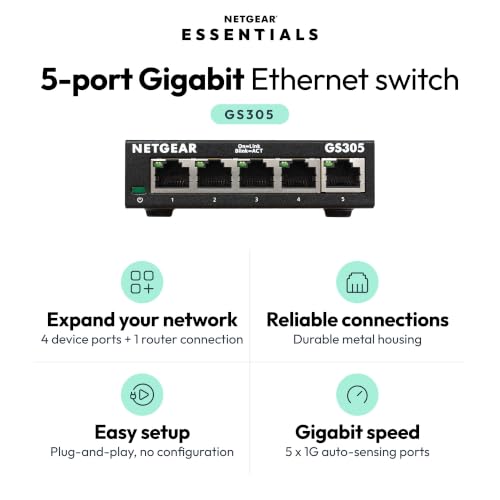
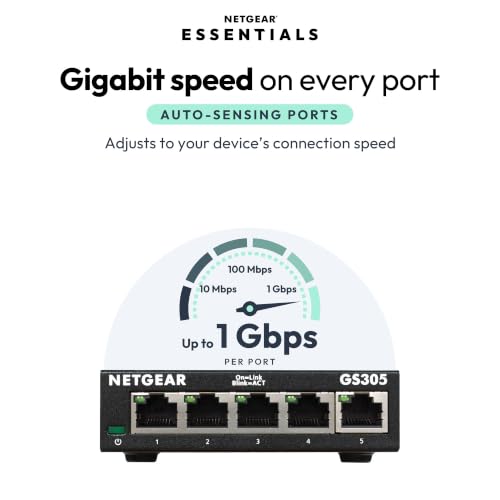
NETGEAR 5-Port Gigabit Ethernet Unmanaged Network Switch Plug & Play GS305 | Home & Office, 5 x 1G Ports, Reliable Wired Connection, Metal Case, Fanless & Silent, Compact, Desktop or Wall Mount




As an Amazon Associate we earn from qualifying purchases. Product prices and availability are accurate as of the date/time indicated.

5 Port HDMI KVM Switch, 8K@60Hz 4K@120Hz KVM Switch 1 Monitor 5 Computers for Controlling 5 PCs with 1 Set of Keyboard, Mouse and Monitor


As an Amazon Associate we earn from qualifying purchases. Product prices and availability are accurate as of the date/time indicated.

WAVLINK 5-Port Gigabit Ethernet Unmanaged Switch, Home Network Hub, Office Ethernet Splitter, Plug & Play, Desktop/Wall Mount, Silent Operation, Metal Case
As an Amazon Associate we earn from qualifying purchases. Product prices and availability are accurate as of the date/time indicated.
Note: Speed figures are manufacturer listings, and a switch that lists 1000 Mbps may run slower if your internet plan, router, or cables are slower. Always check the switch’s speed, port count, and power in the manual, and confirm the current price with the retailer.
Why a 5 Port Switch Matters for Office Workers
A 5 port switch matters for office workers for three reasons: wired stability, more ports, and simplicity. Wired stability matters because a wired Ethernet connection is more stable than Wi-Fi for video calls, file transfers, and cloud work, with less lag and fewer drops. A 5 port switch gives you a wired connection for your desktop, laptop dock, printer, and phone, so you do not rely on Wi-Fi for work.
More ports matters because a router often has only 2 to 4 Ethernet ports, and a home office may need more. A 5 port switch adds 4 usable ports, because one port connects to your router, and the other 4 connect to your devices. That is enough for most office workers who have a desktop, a dock, a printer, and a phone.
Simplicity matters because an unmanaged 5 port switch is plug-and-play, with no setup, no software, and no fan. You plug in the power, plug in an Ethernet cable from your router, plug in your devices, and it works. That is why a 5 port switch is useful for office workers who want a simple wired network, not a complicated managed switch.
Best 5 Port Switch for Office Workers Reviewed
1. TP-Link TL-SG105 – Best 5 Port Switch for Office Workers Overall
The TP-Link TL-SG105 is our top pick because it offers a speed of 10/100/1000 Mbps, 5 Gigabit ports, an unmanaged design, an external power adapter, and a metal case, for a typical price of $15 to $20. It has a fanless design, a small size, and a design that is made for a desk or a small office.
TP-Link designs the TL-SG105 with a focus on low cost and a metal case. The Gigabit ports give you fast wired speed for video calls and file transfers, the unmanaged design means no setup, and the metal case is more durable than a plastic case. The switch is a good choice for an office worker who wants a cheap, reliable 5 port switch, and who does not need managed features.
The main limitation is that it is unmanaged, so you cannot set VLANs or QoS, though most office workers do not need those features. Choose the TL-SG105 if you want the best overall 5 port switch for office workers, you want a metal case, and you have a budget of $15 to $20.
2. Netgear GS305 – Best 5 Port Switch for Office Workers for Netgear
The Netgear GS305 is a switch with a speed of 10/100/1000 Mbps, 5 Gigabit ports, an unmanaged design, an external power adapter, and a metal case, for a typical price of $20 to $25. It has a fanless design, a small size, and a design that is made for a desk or a small office.
Netgear designs the GS305 with a focus on a reliable, metal-case switch for office workers. The Gigabit ports give you fast wired speed, the unmanaged design is plug-and-play, and the metal case is durable. The switch is a good choice for an office worker who wants a Netgear switch, and who wants a reliable 5 port switch for a desk.
The main limitation is price. At $20 to $25, it is slightly more expensive than the TP-Link TL-SG105, though it offers a similar design. Choose the GS305 if you want a Netgear switch, you want a metal case, and you have a budget of $20 to $25.
3. TP-Link TL-SG105E – Best 5 Port Switch for Office Workers for Managed
The TP-Link TL-SG105E is a switch with a speed of 10/100/1000 Mbps, 5 Gigabit ports, a managed Easy Smart design, an external power adapter, and a metal case, for a typical price of $25 to $35. It has a web interface for VLAN, QoS, and port mirroring, a fanless design, and a design that is made for a small office that needs basic management.
TP-Link designs the TL-SG105E with a focus on a low-cost managed switch for office workers who need VLANs or QoS. The Gigabit ports give you fast speed, the Easy Smart interface lets you set up a guest network or prioritise video calls, and the metal case is durable. The switch is a good choice for an office worker who wants a managed switch, and who needs basic network control.
The main limitation is setup. A managed switch needs a web browser to configure, which is more complicated than an unmanaged switch. Choose the TL-SG105E if you want a TP-Link managed switch, you need VLAN or QoS, and you have a budget of $25 to $35.
4. Netgear GS305E – Best 5 Port Switch for Office Workers for Netgear Managed
The Netgear GS305E is a switch with a speed of 10/100/1000 Mbps, 5 Gigabit ports, a managed Plus design, an external power adapter, and a metal case, for a typical price of $30 to $40. It has a web interface for VLAN, QoS, and port mirroring, a fanless design, and a design that is made for a small office.
Netgear designs the GS305E with a focus on a managed switch for office workers who need more control. The Gigabit ports give you fast speed, the Plus interface lets you manage your network, and the metal case is durable. The switch is a good choice for an office worker who wants a Netgear managed switch, and who needs VLAN or QoS.
The main limitation is price. At $30 to $40, it is more expensive than an unmanaged switch, though it offers management features. Choose the GS305E if you want a Netgear managed switch, you need VLAN, and you are willing to pay more.
5. D-Link DGS-105 – Best 5 Port Switch for Office Workers for D-Link
The D-Link DGS-105 is a switch with a speed of 10/100/1000 Mbps, 5 Gigabit ports, an unmanaged design, an external power adapter, and a metal case, for a typical price of $20 to $30. It has a fanless design, a small size, and a design that is made for a desk or a small office.
D-Link designs the DGS-105 with a focus on a reliable, metal-case switch for office workers. The Gigabit ports give you fast wired speed, the unmanaged design is plug-and-play, and the metal case is durable. The switch is a good choice for an office worker who wants a D-Link switch, and who wants a simple 5 port switch.
The main limitation is that it is similar to the TP-Link and Netgear unmanaged switches, so it does not offer a unique feature. Choose the DGS-105 if you want a D-Link switch, you want a metal case, and you have a budget of $20 to $30.
6. TRENDnet TEG-S50g – Best 5 Port Switch for Office Workers for TRENDnet
The TRENDnet TEG-S50g is a switch with a speed of 10/100/1000 Mbps, 5 Gigabit ports, an unmanaged design, an external power adapter, and a metal case, for a typical price of $15 to $25. It has a fanless design, a small size, and a design that is made for a desk or a small office.
TRENDnet designs the TEG-S50g with a focus on a low-cost, metal-case switch for office workers. The Gigabit ports give you fast wired speed, the unmanaged design is plug-and-play, and the price of $15 to $25 is low for a metal-case switch. The switch is a good choice for an office worker who wants a TRENDnet switch, and who wants a low price.
The main limitation is brand support, because TRENDnet is less common than TP-Link or Netgear in some regions. Choose the TEG-S50g if you want a TRENDnet switch, you want a low price, and you do not need a premium brand.
7. Zyxel MG-105 – Best 5 Port Switch for Office Workers for 2.5G
The Zyxel MG-105 is a switch with a speed of 2.5G and 1G Mbps, 5 x 2.5G ports, an unmanaged design, an external power adapter, and a metal case, for a typical price of $50 to $65. It has 2.5 Gigabit ports, a fanless design, and a design that is made for office workers who need faster than Gigabit speed.
Zyxel designs the MG-105 with a focus on 2.5G speed for a small office. The 2.5G ports give you faster speed than Gigabit if your router, computer, and cables support 2.5G, the unmanaged design is plug-and-play, and the metal case is durable. The switch is a good choice for an office worker who wants a 2.5G switch, and who has a 2.5G network.
The main limitation is price and need. At $50 to $65, it is more expensive than a Gigabit switch, and you only get 2.5G speed if your devices support it. Choose the MG-105 if you want a Zyxel 2.5G switch, you have a 2.5G router and computer, and you are willing to pay more.
Buying Guide: How to Choose the Best 5 Port Switch for Office Workers
Before you buy, think about how many devices you need to connect, what speed you need, whether you need managed features, where you will place the switch, and how much you want to spend. A switch that is perfect for a single desktop may be too small for a desk with a dock, printer, and phone, and a switch that is perfect for a home office may not have the speed you need for a small office. The six points below cover the decisions that matter most for a 5 port switch for office workers.
1. Port Count: 5 Ports vs 8 Ports, and Your Devices
Port count is the first decision. A 5 port switch has 5 Ethernet ports, but one port connects to your router, so you have 4 usable ports for devices. That is enough for a desktop, a laptop dock, a printer, and a VoIP phone. An 8 port switch has 8 ports, so you have 7 usable ports, which is more than most office workers need.
Choose a 5 port switch if you have 4 or fewer wired devices, you want a small switch for your desk, and you do not need more ports. Choose an 8 port switch if you have 5 or more wired devices, you want room to grow, or you have a small office with multiple desks. Count your devices before you buy, and choose a switch with at least one extra port for future use.
2. Speed: Gigabit vs 2.5G, and Your Internet Plan
Speed is the second decision. Speed is how fast the switch can transfer data, measured in Mbps. A Gigabit switch, such as the TP-Link TL-SG105 or Netgear GS305, has a speed of 1000 Mbps, which is enough for most office workers who have an internet plan of 100 to 1000 Mbps. A 2.5G switch, such as the Zyxel MG-105, has a speed of 2500 Mbps, which is faster, but you only get that speed if your router, computer, and cables support 2.5G.
Choose a Gigabit switch if your internet plan is 1000 Mbps or less, you use Cat5e or Cat6 cables, and you want a low price. Choose a 2.5G switch if your internet plan is faster than 1000 Mbps, you have a 2.5G router and computer, and you transfer large files locally. Check your internet plan and your router’s speed in the manual, and choose a switch that matches it.
3. Managed vs Unmanaged: Plug-and-Play vs VLAN and QoS, and Your Needs
Managed vs unmanaged is the third decision. An unmanaged switch, such as the TP-Link TL-SG105 or Netgear GS305, is plug-and-play, with no setup, no software, and no configuration. A managed switch, such as the TP-Link TL-SG105E or Netgear GS305E, has a web interface for VLAN, QoS, and port mirroring, which lets you separate networks or prioritise video calls.
Choose an unmanaged switch if you want a simple switch, you do not need VLAN or QoS, and you want to plug it in and use it. Choose a managed switch if you need VLAN for a guest network, QoS for video calls, or port mirroring for troubleshooting, and you are comfortable with a web interface. Most office workers do not need a managed switch, so choose unmanaged unless you have a specific need.
4. Case Material: Metal vs Plastic, and Durability
Case material is the fourth decision. A metal case, such as in all seven switches in this guide, is more durable than a plastic case, it dissipates heat better, and it is less likely to break if you drop it. A plastic case is lighter and cheaper, but it may not last as long in a busy office.
Choose a metal case if you want a durable switch, you place it on a desk where it may be bumped, or you want a switch that will last for years. Choose a plastic case only if you want the lowest price and you place the switch in a safe spot. Check the case material in the manual, and choose a metal case for most office workers.
5. Power and Noise: External Adapter vs PoE, and Fanless Design
Power and noise are the fifth decision. A 5 port switch usually uses an external power adapter that plugs into a wall outlet, and it is fanless, so it makes no noise. That is good for a home office where you work on video calls. Some switches support PoE, which powers devices like a VoIP phone through Ethernet, but most 5 port switches for office workers do not need PoE.
Choose a fanless switch if you work in a quiet home office, you do not want fan noise on video calls, and you do not need PoE. Choose a PoE switch only if you have a VoIP phone or a security camera that needs power through Ethernet. Check the power type in the manual, and make sure you have a free power outlet near your desk.
6. Price, Total Cost, and Choosing a 5 Port Switch on a Budget
Price ranges in this guide run from about $15 to $65 for a 5 port switch for office workers, depending on speed, managed features, and brand. A budget switch at $15 to $25, such as the TP-Link TL-SG105, Netgear GS305, or TRENDnet TEG-S50g, is enough for most office workers who want a simple Gigabit switch for a desk. A mid-price switch at $25 to $40, such as the TP-Link TL-SG105E or Netgear GS305E, offers managed features for a small office. A premium switch at $50 to $65, such as the Zyxel MG-105, offers 2.5G speed for faster networks.
Consider total cost as well as price. A switch that costs $15 and includes a power adapter may cost less in total than a switch that costs $10 and needs a power adapter that costs $15 separately. Budget for a switch, and if you need it, Cat5e or Cat6 cables for each device, not just a switch. Do not buy the cheapest switch if it has a plastic case and no metal, and do not buy the most expensive switch if you only need Gigabit speed. A switch that matches your port count, your speed, and your budget will help you get a stable wired connection more reliably than a switch that is cheap but too slow, or expensive but too complex for your office.
How to Set Up a 5 Port Switch for Office Work
Setting up a 5 port switch for office work starts with placing the switch on your desk, near your router, and plugging in the power adapter. Plug an Ethernet cable from your router’s LAN port to any port on the switch, then plug Ethernet cables from your desktop, laptop dock, printer, and VoIP phone to the other ports on the switch. The switch will auto-negotiate speed, so you do not need to configure anything for an unmanaged switch.
Use Cat5e or Cat6 cables for Gigabit speed, and keep cables short to avoid clutter. Test your connection by opening a website or starting a video call, and check that all devices have internet. If a device does not have internet, check the cable, try a different port, and restart the switch.
Which Best 5 Port Switch for Office Workers Should You Buy?
If you want the best 5 port switch for office workers, buy the TP-Link TL-SG105. It costs $15 to $20, it offers a speed of 10/100/1000 Mbps, 5 Gigabit ports, and a metal case, which is the best balance for most office workers.
If you want a Netgear switch, buy the Netgear GS305. If you want a TP-Link managed switch, buy the TP-Link TL-SG105E. If you want a Netgear managed switch, buy the Netgear GS305E. If you want a D-Link switch, buy the D-Link DGS-105. If you want a TRENDnet switch, buy the TRENDnet TEG-S50g. If you want a 2.5G switch, buy the Zyxel MG-105.
All seven switches in this guide are currently sold, designed for office use, and suitable for a worker who works from home or in a small office, uses a desktop or laptop dock, and wants a stable wired connection. Pick the one that matches your device count, your speed, whether you need managed features, and your budget, and always use Cat5e or Cat6 cables for Gigabit speed.
Disclosure: technicalbud.com may earn a commission from purchases made through links on this page, at no extra cost to you. Prices listed are typical ranges and can vary by retailer and sale. Speed and port figures are manufacturer claims and can vary by model. A 5 port switch does not replace a router, and it does not give you Wi-Fi.
Frequently Asked Questions About the Best 5 Port Switch for Office Workers
What is the best 5 port switch for office workers?
What is the best 5 port switch for office workers? In most cases, the TP-Link TL-SG105 is best overall, because it costs $15 to $20, it offers a speed of 10/100/1000 Mbps, 5 Gigabit ports, and a metal case. The Netgear GS305 is best if you want a Netgear switch, while the TP-Link TL-SG105E is best if you want a managed switch.
Do I need a managed or unmanaged 5 port switch?
Do you need a managed or unmanaged 5 port switch? In most cases, you need an unmanaged 5 port switch, because it is plug-and-play, with no setup, and it is enough for a desktop, a laptop dock, a printer, and a phone. You need a managed switch only if you need VLAN for a guest network, QoS for video calls, or port mirroring for troubleshooting. Choose unmanaged unless you have a specific need for managed features.
How many devices can I connect to a 5 port switch?
How many devices can you connect to a 5 port switch? In most cases, you can connect 4 devices to a 5 port switch, because one port connects to your router, and the other 4 ports connect to your devices. For example, you can connect a desktop, a laptop dock, a printer, and a VoIP phone. If you need more than 4 devices, choose an 8 port switch instead.
Will a 5 port switch make my internet faster?
Will a 5 port switch make your internet faster? In most cases, no, a 5 port switch will not make your internet faster than your internet plan, because it can only pass through the speed your router and internet plan provide. A Gigabit switch can give you a stable wired connection that is faster and more reliable than Wi-Fi, especially for video calls and file transfers, but it cannot make your internet plan faster. Use Cat5e or Cat6 cables for Gigabit speed, and check your internet plan for your maximum speed.
Related guides
- Best AAA Batteries for Office Remotes in 2026: AAA Batteries for Office Remotes
- Best Budget Tablet for Work Under 100 in 2026: Budget Tablets for Work Under $100, Office Work, and Productivity
- Best Gimbal for Office Vlogging in 2026: 7 Gimbals for Office Vlogging That Keep Your Video Smooth, Stable, and Professional in the Office
- Best Budget NAS Dust Filter for Maintenance in 2026: 7 Budget NAS Dust Filters for Maintenance With Clear Airflow, Simple Install, and Easy Use for NAS
More from Amazon
Programs that pair well with the guide above. Offers and eligibility are set by Amazon and may change.
Free shipping on eligible items, Prime Video and more. Eligible new members can start with a free trial.
Start a Prime free trialAd-free music streaming. Eligible new subscribers can start with a free trial.
Try Music Unlimited freeA Prime membership for ages 18-24 with a trial period. Eligibility is set by Amazon.
See Prime for Young AdultsAudiobooks and podcasts to listen to on the go. Eligible new members can start with a free trial.
Try Audible freeAs an Amazon Associate we earn from qualifying purchases.

Write Your Review
No reviews yet. Be the first to share your experience!