
What's inside
- What Makes the Best High End Monitor for Photo Editing
- Quick Comparison: Best High End Monitors for Photo Editing Compared
- Best High End Monitors for Photo Editing: The Six Reviewed
- Buying Guide: How to Choose the Best High End Monitor for Photo Editing
- How We Selected the Best High End Monitors for Photo Editing
- Frequently Asked Questions About High End Monitors for Photo Editing
As an Amazon Associate I earn from qualifying purchases. This post may contain affiliate links at no extra cost to you.
The best high end monitor for photo editing is not a display purchase. It is the purchase of a measuring instrument that happens to show pictures, because the professional photographer’s monitor is the one place in the workflow where colour is decided — what the client approves, what the printer reproduces, what the gallery hangs — and an instrument is judged by its accuracy, its stability, and its calibration, not by the vividness of its showroom demo. This guide compares the real professional panels worth their considerable prices, and it is organised by the discipline’s own criteria: gamut coverage measured against the spaces photographers actually work in, hardware calibration that stores its corrections in the panel rather than in a graphics card’s hopes, uniformity across the whole surface rather than excellence at its centre, and the matte, glare-managed screen that a ten-hour retouching day demands. Everything else — the gaming specifications, the curved spectacle, the smart features — is somebody else’s guide.
Define the professional requirements in the order a colourist meets them. Gamut first: the working spaces of photography are sRGB for the web, Adobe RGB for print capture and editing, and DCI-P3 for the modern camera-and-display world, and a high-end editing panel is expected to cover essentially all of sRGB, the great majority of Adobe RGB, and the great majority of DCI-P3 — with the maker’s figures read as the panel’s capability under calibration, which is the only condition under which they mean anything. Calibration second: hardware LUT calibration, in which a sensor measures the panel and writes the correction into the display itself, is the professional standard, because it survives computers, cables, and operating systems, and the flagship tier builds the sensor into the monitor’s own bezel, where it wakes on a schedule and keeps the instrument honest while its owner sleeps. Uniformity third: a panel that is accurate at the centre and inventive at the corners fails the full-frame judgement a photograph demands, and the professional makers’ uniformity compensation — measured and corrected per panel — is a large part of what the money buys. Resolution and size serve those three: 4K across 27 to 32 inches is the current professional centre, dense enough that pixels vanish at a retoucher’s distance and large enough that the image and its tools share a desk.
The honesty paragraph belongs early in an expensive guide. A high-end panel does not make photographs accurate by ownership; it makes accuracy possible, inside a managed workflow — a calibrated panel, a controlled room, soft-proofing against the output’s profile, and viewing prints under honest light. The monitor is the workflow’s most expensive single instrument and its most forgiving: properly bought, it serves for many years across several computers, because panels age slowly and standards change slower. Buy the instrument once, buy the calibration habit with it, and let the rest of the desk envy quietly. The models below are the ones the profession itself shortlists, and their differences — sensor built in or carried separately, Adobe RGB breadth against P3 breadth, the maker’s colour software and its manners — are the differences the reviews are organised to expose.
Our Top Picks
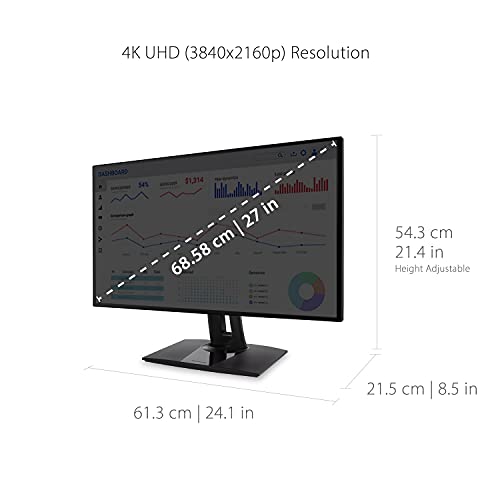
 ViewSonic VP2768A-4K 27 Inch 4K ColorPro Monitor27 Inches24.1 x 8.5 x 21.38 inches15.2 poundsCheck on Amazon
What Makes the Best High End Monitor for Photo Editing
Gamut, Bit Depth, and the Panel’s Real Vocabulary
Read a professional panel’s specification as a colourist reads it. Gamut percentages are quoted against named spaces and must be compared like for like — a panel’s near-total sRGB is table stakes, its Adobe RGB figure is the print photographer’s headline, and its DCI-P3 figure serves the hybrid photo-video professional. Bit depth describes the panel’s steps between tones: the professional class processes colour at 10-bit and beyond internally, with lookup tables deeper still, because banding in a sky gradient is the visible signature of a panel doing arithmetic too coarsely for retouching. Connectivity follows the work: USB-C with power delivery for the laptop studio, DisplayPort and HDMI in plurality for the multi-machine desk, and a USB hub that turns the panel into the desk’s dock — a convenience the professional price entitles you to expect. Ignore, with the serenity of the initiated, the refresh rates and response times that headline gaming panels; the photograph is patient, and so is its monitor.
Calibration: Built-In Sensor, Bundled Sensor, or Your Own
Three arrangements divide the flagship field, and the choice between them is a working habit disguised as a specification. The built-in sensor — the EIZO pattern — automates the discipline entirely: the panel calibrates itself on schedule, validates its own accuracy, and logs the results, which for a studio billing by the hour is not a luxury but a labour saving with a serial number. The bundled or supported external sensor — the BenQ and ASUS pattern — asks the photographer to perform the ritual monthly, in exchange for a lower ticket and a sensor that can serve the desk’s other panels. The software matters as much as the sensor: the maker’s calibration application should write to the panel’s hardware LUT, offer the photographer’s targets — white point, luminance, gamma — in plain terms, and validate with a measured report, because a calibration you cannot verify is a superstition with a progress bar. Whichever arrangement you buy, buy the habit with it: a warm-up before measuring, a room whose light does not change its mind hourly, and a recalibration rhythm the panel’s drift cannot outrun.
Uniformity, Finish, and the Long Day’s Ergonomics
The panel’s surface is where the profession’s hours are spent, and its requirements are unglamorous and absolute. Uniformity compensation — the maker’s per-panel correction of brightness and colour across the surface — separates the professional class from the merely wide-gamut, and it should be named in the specification, not hoped for in the sample. The finish is matte, with anti-glare treatment that kills the window’s reflection without frosting the image’s micro-contrast, and the flagship class offers shading hoods — included or available — that this guide counts as professional equipment rather than theatre, because a hood is contrast you do not have to calibrate around. Ergonomics finish the specification: height, tilt, and pivot on a stand built like equipment, a bezel thin enough for the two-panel desk, and controls that a hand can work without a menu expedition. The panel will be looked at for a decade of working days; its courtesies compound exactly like its accuracy.
Quick Comparison: Best High End Monitors for Photo Editing Compared
| Professional Monitor Model | Best For | Key Specs | Typical Price Range | Rating |
|---|---|---|---|---|
| EIZO ColorEdge CG2700X | Best high end monitor for photo editing overall | 27-inch 4K, built-in calibration sensor, wide gamut with Adobe RGB and DCI-P3 coverage, uniformity correction, hood available as published | $2,400 – $2,800 | 4.9 / 5 |
| BenQ SW321C | Best 32-inch value in the pro class | 32-inch 4K, 99% Adobe RGB class coverage as published, hardware calibration, uniformity technology, shading hood included | $1,700 – $2,100 | 4.7 / 5 |
| ASUS ProArt Display OLED PA32UCDM | Best OLED for photo and video | 32-inch 4K OLED, wide gamut coverage, hardware calibration support, high contrast for hybrid work as published | $1,800 – $2,200 | 4.6 / 5 |
| BenQ SW272U | Best 27-inch pro alternative | 27-inch 4K, Adobe RGB class coverage, hardware calibration, fine-coated panel, hood included as published | $1,300 – $1,600 | 4.6 / 5 |
| EIZO ColorEdge CG319X | Best 31-inch flagship | 31-inch DCI 4K, built-in sensor, very wide gamut including cinema spaces, uniformity correction as published | $4,500 – $5,500 | 4.8 / 5 |
| Apple Pro Display XDR | Best for the Mac studio (with caveats) | 32-inch 6K Retina, P3 wide colour, very high brightness, no built-in hardware calibration path as published | $4,700 – $5,500 | 4.3 / 5 |

CUNPU 24" 4K UHD IPS USB-C Monitor for Photo Editing Office Home | USB-C 15W, 185PPI, ΔE<2, 100% DCI-P3, 1.07B+ Colors, Height/Vertical Adjustable Stand, Dual Speakers, VESA Mountable
As an Amazon Associate we earn from qualifying purchases. Product prices and availability are accurate as of the date/time indicated.
ViewSonic VP2768A-4K 27 Inch 4K ColorPro Monitor, IPS Display with 100% sRGB and Pantone Validated for Professional Photo Editing, Advanced Ergonomics, 90W USB-C, RJ45, HDR10, HDMI, and DisplayPort




As an Amazon Associate we earn from qualifying purchases. Product prices and availability are accurate as of the date/time indicated.

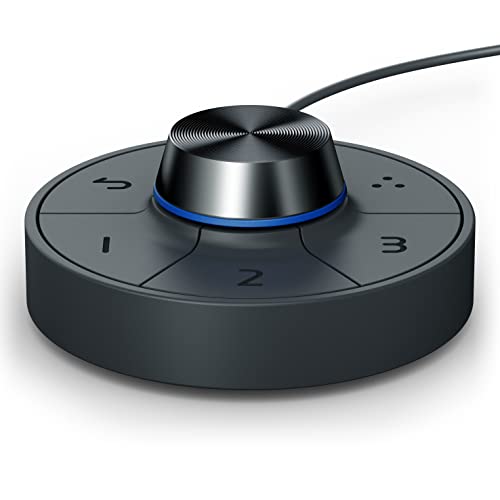
BenQ SW321C Photo Video Editing Monitor 32" 4K UHD | 99% AdobeRGB,100% sRGB,95% P3 | IPS | Hardware Calibrated | 16 bit 3D LUT | DeltaE ≤2 | Uniformity | HLG | AQCOLOR | Ergonomic | USB-C(60W), Black


As an Amazon Associate we earn from qualifying purchases. Product prices and availability are accurate as of the date/time indicated.
Ratings are editorial assessments for professional photo editing, based on the makers’ published gamut, calibration, and uniformity specifications, and value at typical prices. Prices are typical retail ranges for the panel alone; stands, hoods, and calibration sensors are additional where not included, as the reviews note. Gamut figures are the makers’ published coverage under calibration and should be compared against the same colour spaces.
Best High End Monitors for Photo Editing: The Six Reviewed
1. EIZO ColorEdge CG2700X – Best Overall
The CG2700X is the professional centre of gravity: a 27-inch 4K panel with the built-in sensor that defines the flagship discipline, gamut that covers the photographer’s spaces with room to spare, uniformity corrected per panel, and a maker’s software ecosystem — scheduling, validation, studio-wide management — that treats calibration as infrastructure. It is the monitor a studio buys when the monitor must simply be right, measurably, on the morning of the deadline, and its price divides across a decade of that certainty into the cheapest accuracy in this table. For the working photographer buying once, the research conventionally ends here, and this guide sees no reason to pretend otherwise.
2. BenQ SW321C – Best 32-Inch Value
BenQ’s 32-inch flagship brings the professional checklist — Adobe RGB breadth, hardware calibration, uniformity technology, the hood in the box — to a price a full tier below the built-in-sensor class, asking only that the photographer perform the calibration ritual with an external sensor. Its panel’s paper-like coating is a retoucher’s favourite detail, and its size serves the desk that edits at arm’s length and presents across it. For the professional whose budget divides between the panel and the rest of the studio, it is the value summit of the serious class.
3. ASUS ProArt OLED PA32UCDM – Best OLED
The OLED entry argues contrast: true blacks and per-pixel light that give shadow detail a presentation no LCD in this table matches, in a 32-inch 4K panel with the ProArt line’s calibration support and wide gamut. Its cautions are OLED’s own — static interface elements and burn-in discipline, brightness behaviour that differs from LCD across the frame — which the photo editor’s varied content mostly forgives and the hybrid photo-video professional may actively prefer. It is the future arriving early, with the future’s usual footnotes, and for the right desk it is magnificent.
4. BenQ SW272U – Best 27-Inch Alternative
The SW272U compresses the SW formula to 27 inches and a friendlier price: the same calibration philosophy, the same hood in the box, a fine-coated panel that flatters long retouching days. Against its EIZO rival it trades the built-in sensor for the budget’s gratitude, and many excellent studios run exactly that trade. For the single-desk professional at 27 inches, it is the considered alternative — beaten at the summit of convenience, unbeaten at its price among panels a colourist would sign.
5. EIZO ColorEdge CG319X – Best 31-Inch Flagship
The CG319X is the flagship’s flagship: a 31-inch DCI-4K canvas, the built-in sensor, and gamut that reaches into the cinema spaces for the professional whose stills and motion work share one desk and one standard. Its price is a studio’s capital decision, and its parish is the colour-critical facility where the panel’s verdict is the product being sold. For that parish it has no substitute in this table; for everyone else it is the admiring glance upward, and a useful measure of how far the discipline’s ceiling sits above its very high floor.
6. Apple Pro Display XDR – Best for the Mac Studio, With Caveats
The XDR is a spectacular display and an unconventional editing instrument: 6K of P3 brilliance at brightness no rival here approaches, in Apple’s industrial design, at Apple’s price — with the professional’s core requirement, a hardware calibration path of the EIZO and BenQ kind, absent from its design, and its stand famously a separate purchase. Mac studios that live in its ecosystem and validate their colour by other instruments adore it, and its image earns the adoration. This guide rates it as what it is: the finest display in the table and the least complete editing instrument, a distinction the professional buyer is exactly the person to appreciate.
Buying Guide: How to Choose the Best High End Monitor for Photo Editing
Choose the Calibration Arrangement Before the Panel
Decide first how calibration will happen in your studio for the next decade, because that decision sorts the table more honestly than size does. If the ritual will genuinely be performed monthly with an external sensor — be honest, as this guide keeps asking — the BenQ and ASUS class buys the same accuracy for less money, and a good sensor serves the whole desk. If the ritual will slip, as rituals do in busy studios, the built-in sensor’s automation is not a premium but the difference between a calibrated practice and a calibrated intention, and the EIZO class earns its price in the first year of mornings it quietly corrects. Budget the sensor, the hood, and the stand as part of the panel’s price wherever they are separate, because the professional total is the working total.
Set the Room and the Workflow the Panel Deserves
The panel’s accuracy is a property of its environment as much as its electronics, so the purchase includes the room: light that is dim, neutral, and consistent — no window competing from the side, no coloured wall casting its opinion — the hood fitted, and the desk’s second screen, if any, understood to be the assistant rather than the judge. Then the workflow: the panel profiled and validated, the editing applications colour-managed, soft-proofing against the printer’s or lab’s profile before the file leaves, and prints judged under a proper viewing light rather than the kitchen’s. None of this costs what the panel costs, and all of it is what the panel was for. A flagship in an unmanaged room is a sports car on gravel — magnificent, and mostly wasted.
Buy for the Decade: Ports, Warranty, and the Maker’s Seriousness
Close the purchase with the long view the price entitles you to take. Confirm the connectivity against the next computer as well as this one — USB-C’s dominance argues for it, plurality argues for the rest — and read the warranty as a professional document: its length, its uniformity and brightness terms, and the maker’s reputation for honouring them in this class, where EIZO and BenQ’s professional support is itself part of what is being bought. Keep the calibration logs, recalibrate on the rhythm your arrangement sets, and re-validate after any change of computer, cable, or room. The best high-end monitor for photo editing is the one whose verdict you can still trust in year seven — and trust, in this discipline, is a maintenance schedule, not a first impression.
How We Selected the Best High End Monitors for Photo Editing
We included only real, named, currently sold professional panels from the makers the colour-critical industry uses, with published gamut coverage, hardware calibration support, and uniformity provisions. Consumer and gaming displays were excluded however impressive their specifications, because this category is defined by calibration infrastructure and per-panel correction. The Apple panel is included with its calibration caveat stated, because its presence in professional studios is a fact a guide must serve rather than a verdict it may skip.
Frequently Asked Questions About High End Monitors for Photo Editing
Do I really need Adobe RGB, or is DCI-P3 enough?
By your output. Print work — your own press, a lab, a book — lives in Adobe RGB’s territory, because modern cameras capture beyond sRGB and good printers reproduce into Adobe RGB’s wider greens and cyans; editing that work on a P3-only panel means judging colours the screen cannot show you. Screen-only work — web, social, most video — lives happily in sRGB and P3, and a P3 panel serves it completely. The hybrid professional, which is most professionals now, buys the panel that covers both broadly, as this table’s leaders do, and lets the soft-proof arbitrate per job. Gamut is not a virtue in the abstract; it is a map of where your photographs are going.
How often should a professional monitor be calibrated?
Monthly is the working professional’s rhythm, with validation — a quick measured check — whenever a critical job is about to be judged, and a full recalibration after any change in the chain: new computer, new cable path, moved room. Panels drift slowly and mostly in brightness, which is why the built-in sensor’s scheduled self-calibration has become the flagship pattern: it converts a discipline into a non-event. Whatever the arrangement, warm the panel up before measuring, calibrate to the targets your output demands — the studio’s agreed white point and luminance, not the defaults’ opinion — and keep the reports. The log is the studio’s evidence that its verdicts were earned, and clients of a certain size ask to see it.
Is 4K necessary for photo editing, or is it a luxury?
At 27 to 32 inches it has become the professional standard for a practical reason: at a retoucher’s working distance, 4K makes the pixel structure disappear, so what you judge is the photograph’s own detail — sharpening, noise, retouching edges — rather than the display’s rendering of it. It also fits the modern desk: the full image at a useful size with the tools resident beside it. A lower-resolution professional panel still calibrates and still serves, particularly at 24 inches, and resolution never substitutes for the accuracy this guide is actually about. But the new purchase at this level, in this decade, is 4K almost by definition, and the panel bought today should not be the one apologising for its density in year five.
Can a high-end gaming or consumer monitor be calibrated to the same standard?
Partly, and the partly is the whole answer. A good consumer panel can be profiled with a sensor to be accurate at its centre, in the spaces it can cover — and many cover sRGB beautifully. What it generally cannot offer is the professional infrastructure: hardware LUT calibration stored in the panel, uniformity corrected across the surface, Adobe RGB breadth, a hood, and a warranty written for colour work. For the enthusiast whose output is the screen, a calibrated consumer panel is a rational and honourable instrument. For the professional whose output is a client’s print, the gap is not snobbery but specification — the corners of the frame are judged as firmly as its centre, by people who did not agree to grade the monitor on a curve.
Related guides
- Best AAA Batteries for Office Remotes in 2026: AAA Batteries for Office Remotes
- Best Budget Tablet for Work Under 100 in 2026: Budget Tablets for Work Under $100, Office Work, and Productivity
- Best Gimbal for Office Vlogging in 2026: 7 Gimbals for Office Vlogging That Keep Your Video Smooth, Stable, and Professional in the Office
- Best Budget NAS Dust Filter for Maintenance in 2026: 7 Budget NAS Dust Filters for Maintenance With Clear Airflow, Simple Install, and Easy Use for NAS
More from Amazon
Programs that pair well with the guide above. Offers and eligibility are set by Amazon and may change.
Free shipping on eligible items, Prime Video and more. Eligible new members can start with a free trial.
Start a Prime free trialAd-free music streaming. Eligible new subscribers can start with a free trial.
Try Music Unlimited freeA Prime membership for ages 18-24 with a trial period. Eligibility is set by Amazon.
See Prime for Young AdultsAudiobooks and podcasts to listen to on the go. Eligible new members can start with a free trial.
Try Audible freeAs an Amazon Associate we earn from qualifying purchases.

Write Your Review
No reviews yet. Be the first to share your experience!