
What's inside
- Why a Budget Gaming Mouse for Gamers Can Be Good
- Best Budget Gaming Mouse for Gamers: DPI, Weight and Sensor
- Best Budget Gaming Mouse for Gamers Comparison Table
- Top Budget Gaming Mice for Gamers Reviewed
- Buying Guide: How to Choose the Best Budget Gaming Mouse for Gamers
- How to Set Up a Budget Gaming Mouse for Gamers
- Frequently Asked Questions
As an Amazon Associate I earn from qualifying purchases. This post may contain affiliate links at no extra cost to you.
Finding the best budget gaming mouse for gamers is about choosing a mouse that is accurate, with a design that is a high DPI sensor, and with a mouse that is comfortable, with a design that is a ergonomic, for long gaming sessions, with a design that is a hours, and with a mouse that is durable, with a design that is a click, for millions of clicks, with a design that is a switch, and with a mouse that is affordable, with a design that is a budget, for a gamer who wants performance, with a design that is a competitive, without paying, with a design that is a premium, for a high-end mouse, with a design that is a $100, in 2026. A good budget gaming mouse should have a DPI, with a design that is a 8000 or more, and with a mouse that has a polling rate, with a design that is a 1000Hz, and with a mouse that is lightweight, with a design that is a 60 to 100 grams, for a gamer who plays, with a design that is a FPS, and with a mouse that is a comfortable, for a hand, with a design that is a palm, claw, or fingertip, grip.
This guide explains what to look for in a budget gaming mouse for gamers, how to compare DPI, weight, sensor, and buttons, and which models work well in 2026. We focus on practical use for gamers who play on PC, with a mouse that is used for a shooter, a MOBA, or a story game, and with a design that is suitable for a beginner and for an experienced gamer. Whether you play competitive shooters, casual games, or MMOs, the same principles apply: choose a mouse that is accurate, with a design that is a sensor, and with a mouse that is comfortable, with a design that is a shape, for your hand.
Our Top Picks
Why a Budget Gaming Mouse for Gamers Can Be Good
A budget gaming mouse for gamers can be good because a mouse with a sensor, with a design that is a optical, that is accurate, with a design that is a tracking, does not need to cost, with a design that is a premium, $100, with a design that is a high-end, and with a mouse such as the Logitech G502 HERO, is a good choice, because it has a HERO sensor, with a design that is a 25600 DPI, and with a mouse that is a popular, with a design that is a gaming, for a price, with a design that is a $30 to $40, and with a mouse that is a value, with a design that is a budget, for a gamer, with a design that is a competitive, and with a mouse that is a cheap, with a design that is a affordable, being a good choice, because it performs, with a design that is a smooth, like a premium mouse, with a design that is a $80, and with a mouse that is a budget, with a design that is a best, for a student, with a design that is a gamer, in 2026.
A budget gaming mouse for gamers also matters because it lets you spend, with a design that is a budget, more on your PC, with a design that is a GPU, or your monitor, with a design that is a 144Hz, and with a mouse that is a $20 to $40, being a good choice, because it is enough, with a design that is a performance, for most games, with a design that is a casual and competitive, and with a mouse that is a Razer DeathAdder Essential, with a design that is a 6400 DPI, being a good example, because it has a comfortable shape, with a design that is a ergonomic, and with a mouse that is a simple, with a design that is a reliable, for a gamer, with a design that is a beginner, and with a mouse that is a budget, with a design that is a best, for a first gaming mouse, with a design that is a PC, in 2026.
Best Budget Gaming Mouse for Gamers: DPI, Weight and Sensor
DPI matters most for a budget gaming mouse for gamers, because it determines how sensitive, with a design that is a tracking, your mouse is, with a design that is a movement, for a game, with a design that is a FPS. A mouse with a DPI of 8000 or more, such as the Logitech G305, is a good choice, because it is sensitive, with a design that is a fast, and with a mouse that lets you adjust, with a design that is a DPI button, your sensitivity, with a design that is a low for aiming, and high for turning, and with a mouse that is a 25600 DPI, with a design that is a HERO, being even better, with a design that is a premium, although most gamers, with a design that is a competitive, use a DPI of 400 to 1600, with a design that is a low, for a shooter, with a design that is a precise, and with a mouse that is a budget, with a design that is a best, for a gamer, with a design that is a FPS, in 2026.
Weight also matters, because a mouse that weighs 60 to 80 grams, with a design that is a light, is a good choice, because it is easy to move, with a design that is a flick, for a competitive shooter, with a design that is a fast, while a mouse that weighs 100 to 120 grams, with a design that is a heavy, is also good, with a design that is a stable, for a gamer who likes a heavier mouse, with a design that is a control, and with a mouse that is a HyperX Pulsefire Haste, with a design that is a 59 grams, being a good choice, because it is ultralight, with a design that is a honeycomb, and with a mouse that is a budget, with a design that is a $40 to $50, for a gamer who wants a light mouse, with a design that is a competitive, and with a mouse that is a comfortable, for a hand, with a design that is a claw, grip, in 2026.
Best Budget Gaming Mouse for Gamers Comparison Table
| Model | DPI | Weight | Connection | Buttons | Typical Price Range | Rating |
|---|---|---|---|---|---|---|
| Logitech G502 HERO | Up to 25600 DPI | About 121 g | Wired USB | 11 | $30-$40 | 4.8/5 |
| Razer DeathAdder Essential | Up to 6400 DPI | About 96 g | Wired USB | 5 | $20-$30 | 4.7/5 |
| Logitech G305 Lightspeed | Up to 12000 DPI | About 99 g | Wireless, Lightspeed | 6 | $35-$45 | 4.8/5 |
| SteelSeries Rival 3 | Up to 8500 DPI | About 77 g | Wired USB | 6 | $30-$40 | 4.7/5 |
| HyperX Pulsefire Haste | Up to 16000 DPI | About 59 g | Wired USB | 6 | $40-$50 | 4.8/5 |
| Corsair Harpoon RGB Wireless | Up to 10000 DPI | About 99 g | Wireless, Bluetooth | 6 | $40-$50 | 4.7/5 |

Logitech G305 LIGHTSPEED Wireless Gaming Mouse, Hero 12K Sensor - Black | 12,000 DPI, lightweight, 6 programmable buttons, 250h battery life, on-board memory, PC/Mac, lightweight gaming mouse
As an Amazon Associate we earn from qualifying purchases. Product prices and availability are accurate as of the date/time indicated.

Razer DeathAdder Essential Ergonomic Wired Gaming Mouse, Black | 6400 DPI Optical Sensor, 5 Programmable Buttons, Rubber Side Grips, Mechanical Mouse Switches
As an Amazon Associate we earn from qualifying purchases. Product prices and availability are accurate as of the date/time indicated.
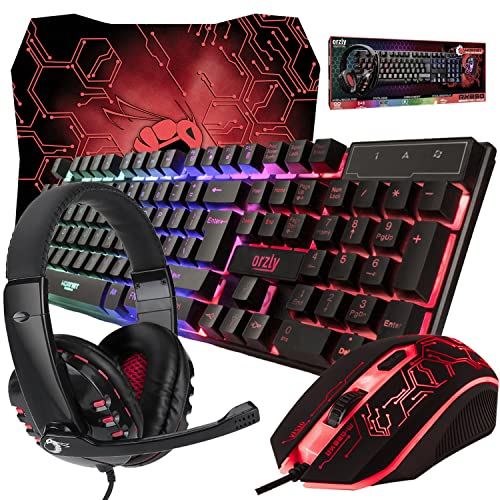
Gaming Keyboard and Mouse and Mouse pad and Gaming Headset, Wired LED RGB Backlight Bundle for PC Gamers and Xbox and PS4 Users - 4 in 1 Edition Hornet RX-250


As an Amazon Associate we earn from qualifying purchases. Product prices and availability are accurate as of the date/time indicated.
Top Budget Gaming Mice for Gamers Reviewed
Logitech G502 HERO
The Logitech G502 HERO is a mouse with a DPI of up to 25600, a weight of about 121 grams, a connection of wired USB, buttons of 11, and a price of $30 to $40. It has a design that is known for Logitech quality, with a mouse that is popular, and with a design that is a HERO sensor. It is a good choice if you want the best budget gaming mouse for gamers, with a design that is a good balance, and with a mouse that is ideal for a gamer who wants many buttons.
Razer DeathAdder Essential
The Razer DeathAdder Essential is a mouse with a DPI of up to 6400, a weight of about 96 grams, a connection of wired USB, buttons of 5, and a price of $20 to $30. It has a design that is known for Razer quality, with a mouse that is ergonomic, and with a design that is a classic. It is a good choice if you want a budget gaming mouse for gamers that is the cheapest, with a design that is good and with a mouse that is ideal for a first gaming mouse.
Logitech G305 Lightspeed
The Logitech G305 Lightspeed is a mouse with a DPI of up to 12000, a weight of about 99 grams, a connection of wireless Lightspeed, buttons of 6, and a price of $35 to $45. It has a design that is known for Logitech quality, with a mouse that is wireless, and with a design that is a HERO sensor. It is a good choice if you want a budget gaming mouse for gamers that is wireless, with a design that is good and with a mouse that is ideal for a gamer who hates cables.
SteelSeries Rival 3
The SteelSeries Rival 3 is a mouse with a DPI of up to 8500, a weight of about 77 grams, a connection of wired USB, buttons of 6, and a price of $30 to $40. It has a design that is known for SteelSeries quality, with a mouse that is light, and with a design that is a TrueMove Core sensor. It is a good choice if you want a budget gaming mouse for gamers that is lightweight, with a design that is good and with a mouse that is ideal for a FPS gamer.
HyperX Pulsefire Haste
The HyperX Pulsefire Haste is a mouse with a DPI of up to 16000, a weight of about 59 grams, a connection of wired USB, buttons of 6, and a price of $40 to $50. It has a design that is known for HyperX quality, with a mouse that is ultralight, and with a design that is a honeycomb. It is a good choice if you want a budget gaming mouse for gamers that is the lightest, with a design that is good and with a mouse that is ideal for a competitive gamer.
Corsair Harpoon RGB Wireless
The Corsair Harpoon RGB Wireless is a mouse with a DPI of up to 10000, a weight of about 99 grams, a connection of wireless and Bluetooth, buttons of 6, and a price of $40 to $50. It has a design that is known for Corsair quality, with a mouse that is wireless, and with a design that is a RGB. It is a good choice if you want a budget gaming mouse for gamers that is wireless and RGB, with a design that is good and with a mouse that is ideal for a gamer who wants a versatile mouse.
Buying Guide: How to Choose the Best Budget Gaming Mouse for Gamers
Start with your grip, your hand, and your games. Look for a mouse that fits your grip, because a palm grip, with a design that is a full hand, is a good choice for a large mouse, with a design that is a Logitech G502, and with a mouse that is a comfortable, with a design that is a ergonomic, for a long session, with a design that is a hours, while a claw grip, with a design that is a arched, is better for a medium mouse, with a design that is a SteelSeries Rival 3, and with a mouse that is a light, with a design that is a 77 grams, for a FPS, with a design that is a fast, and with a mouse that is a fingertip grip, with a design that is a tips, being best for a small mouse, with a design that is a HyperX Pulsefire Haste, and with a mouse that is a ultralight, with a design that is a 59 grams, for a gamer who wants a fast flick, with a design that is a competitive, and with a mouse that is a shape, with a design that is a best, for your hand, with a design that is a size, and with a mouse that is a comfortable, for a gamer, with a design that is a long, in 2026.
Next, check sensor, DPI, and your polling rate. Look for a mouse with an optical sensor, because it is accurate, with a design that is a tracking, and with a mouse that has no acceleration, with a design that is a clean, and with a mouse that is a HERO or TrueMove, with a design that is a premium, being a good choice, because it is reliable, with a design that is a sensor, for a competitive game, with a design that is a shooter, while a mouse with a DPI of 8000 or more, with a design that is a high, is also good, with a design that is a sensitive, although most gamers, with a design that is a competitive, use a DPI of 400 to 1600, with a design that is a low, for a precise aim, with a design that is a FPS, and with a mouse that has a polling rate of 1000Hz, with a design that is a 1ms, being a good choice, because it is responsive, with a design that is a fast, for a game, with a design that is a competitive, and with a mouse that is a budget, with a design that is a best, for a gamer, with a design that is a PC, in 2026.
Check wired vs wireless, battery, and your desk. Look for a wired mouse, because it is cheaper, with a design that is a $20 to $40, and with a mouse that has no battery, with a design that is a always ready, and with a mouse that is a Logitech G502, with a design that is a wired, being a good choice, because it is reliable, with a design that is a stable, for a competitive game, with a design that is a shooter, while a wireless mouse, such as the Logitech G305, is also good, with a design that is a Lightspeed, because it has low latency, with a design that is a 1ms, and with a mouse that is a wireless, with a design that is a freedom, for a desk, with a design that is a clean, and with a mouse that is a battery, with a design that is a AA, lasting, with a design that is a 250 hours, for a G305, with a design that is a long, and with a mouse that is a wireless, with a design that is a best, for a gamer who hates cables, with a design that is a desk, in 2026.
Consider your buttons, your RGB, and your budget. If you play MMOs, a mouse with many buttons, such as the Logitech G502 with 11 buttons, is a good choice, because it lets you bind, with a design that is a spell, your abilities, with a design that is a key, to your mouse, with a design that is a thumb, while a mouse with 5 to 6 buttons, such as the Razer DeathAdder, is a good choice, because it is simple, with a design that is a clean, for a FPS, with a design that is a shooter, and with a mouse that is a RGB, with a design that is a light, being a bonus, with a design that is a aesthetic, for a gamer who wants a colourful desk, with a design that is a setup, and with a mouse that is a budget, with a design that is a best, for a gamer, with a design that is a PC, in 2026.
Finally, set a realistic budget. Budget gaming mice for gamers typically cost $20 to $50, depending on sensor and wireless. A mouse from $20 to $30, such as the Razer DeathAdder Essential, offers a good way to start, with a design that is affordable. A mouse from $30 to $45, such as the Logitech G502, Logitech G305, or SteelSeries Rival 3, offers a better mouse, with a design that is a sensor, and with a mouse that is worth it if you game regularly. A mouse from $40 to $50, such as the HyperX Pulsefire Haste or Corsair Harpoon, offers the best mouse, with a design that is a light or wireless, and with a mouse that is worth it if you want a premium feature, with a design that is a ultralight, for a budget. Do not buy a mouse based only on DPI. Choose one that fits your hand, with a design that is a shape, and with a mouse that has a good sensor, so your games are accurate.
How to Set Up a Budget Gaming Mouse for Gamers
To set up a budget gaming mouse for gamers, first plug your mouse, with a design that is a USB, into your PC, with a design that is a port, and download your mouse software, with a design that is a Logitech G Hub or Razer Synapse, and set your DPI, with a design that is a 800, to a low setting, with a design that is a precise, for a FPS, with a design that is a shooter, and set your polling rate, with a design that is a 1000Hz, to the highest, with a design that is a responsive, for a game, with a design that is a competitive, and adjust your buttons, with a design that is a bind, for your game, with a design that is a MMO, and test your mouse, with a design that is a aim trainer, in a game, with a design that is a practice, and adjust, with a design that is a sensitivity, until it feels, with a design that is a comfortable, for your hand, with a design that is a grip, and with a mouse that is a budget, with a design that is a best, for a gamer, with a design that is a PC, in 2026, and with a mouse that is a set up, with a design that is a correct, for a competitive, with a design that is a shooter, and with a mouse that is a accurate, for a game, with a design that is a FPS.
Frequently Asked Questions
What DPI should I use for gaming?
What DPI you should use for gaming depends on your game, with a DPI of 400 to 800 being a good choice, because it is precise, with a design that is a low, for a FPS, with a design that is a shooter, and with a mouse that is a Logitech G502, with a design that is a 25600 DPI, letting you set, with a design that is a low, your DPI, with a design that is a 800, for a competitive game, with a design that is a precise, while a DPI of 1600, with a design that is a medium, is also good, with a design that is a versatile, for a MOBA, with a design that is a fast, and with a mouse that is a budget, with a design that is a best, for a gamer, with a design that is a PC, in 2026, and with a DPI that is a high, with a design that is a 3200, being less precise, with a design that is a trade-off, for a FPS, with a design that is a shooter, and with a mouse that is a low DPI, with a design that is a best, for a competitive, with a design that is a aim, in a game, with a design that is a FPS.
Is a wired or wireless mouse better for gaming?
Is a wired or wireless mouse better for gaming, a wired mouse is slightly better, with a design that is a stable, because it has no battery, with a design that is a always ready, and no latency, with a design that is a 0ms, although a modern wireless mouse, such as the Logitech G305, is also good, with a design that is a Lightspeed, because it has a latency of 1ms, with a design that is a low, and with a mouse that is a wireless, with a design that is a freedom, for a desk, with a design that is a clean, and with a mouse that is a wired, with a design that is a best, for a competitive gamer, with a design that is a shooter, who wants the lowest latency, with a design that is a 0ms, and with a mouse that is a wireless, with a design that is a best, for a casual gamer, with a design that is a PC, who wants a clean desk, with a design that is a setup, in 2026, and with a mouse that is a budget, with a design that is a $35 to $45, for a wireless, with a design that is a Logitech G305, and with a mouse that is a wired, with a design that is a $30 to $40, for a Logitech G502, in 2026.
How much should I spend on a gaming mouse?
How much you should spend on a gaming mouse depends on your budget, with a mouse from $20 to $50 being enough, with a design that is a budget, for most gamers, with a design that is a PC, and with a mouse such as the Razer DeathAdder Essential, with a price of $20 to $30, being a good choice, because it is affordable, with a design that is a comfortable, and with a mouse that is a $30 to $40, such as the Logitech G502, being a better choice, because it has a better sensor, with a design that is a HERO, and with a mouse that is a $40 to $50, such as the HyperX Pulsefire Haste, being a best choice, because it is ultralight, with a design that is a 59 grams, and with a mouse that is a budget, with a design that is a best, for a gamer, with a design that is a competitive, in 2026, and with a mouse that is a premium, with a design that is a $80, being less necessary, with a design that is a trade-off, for a budget gamer, with a design that is a PC, who wants a good sensor, with a design that is a optical, for a game, with a design that is a FPS.
What is the best gaming mouse for small hands?
What is the best gaming mouse for small hands is a mouse such as the HyperX Pulsefire Haste or SteelSeries Rival 3, with a price of $30 to $50, and with a mouse that is light, with a design that is a 59 to 77 grams, and with a mouse that is a small, with a design that is a compact, and with a mouse that is a good choice, because it fits, with a design that is a comfortable, a small hand, with a design that is a fingertip, and with a mouse that is a Logitech G502, with a design that is a large, being less ideal, with a design that is a trade-off, for a small hand, with a design that is a palm, and with a mouse that is a budget, with a design that is a best, for a gamer with small hands, with a design that is a claw, in 2026, and with a mouse that is a HyperX, with a design that is a ultralight, being a good choice, because it is easy to move, with a design that is a flick, for a FPS, with a design that is a shooter, and with a mouse that is a comfortable, for a small hand, with a design that is a gamer, in 2026.
Related guides
- Best AAA Batteries for Office Remotes in 2026: AAA Batteries for Office Remotes
- Best Budget Tablet for Work Under 100 in 2026: Budget Tablets for Work Under $100, Office Work, and Productivity
- Best Gimbal for Office Vlogging in 2026: 7 Gimbals for Office Vlogging That Keep Your Video Smooth, Stable, and Professional in the Office
- Best Budget NAS Dust Filter for Maintenance in 2026: 7 Budget NAS Dust Filters for Maintenance With Clear Airflow, Simple Install, and Easy Use for NAS
More from Amazon
Programs that pair well with the guide above. Offers and eligibility are set by Amazon and may change.
Free shipping on eligible items, Prime Video and more. Eligible new members can start with a free trial.
Start a Prime free trialAd-free music streaming. Eligible new subscribers can start with a free trial.
Try Music Unlimited freeA Prime membership for ages 18-24 with a trial period. Eligibility is set by Amazon.
See Prime for Young AdultsAudiobooks and podcasts to listen to on the go. Eligible new members can start with a free trial.
Try Audible freeAs an Amazon Associate we earn from qualifying purchases.

Write Your Review
No reviews yet. Be the first to share your experience!