
What's inside
- Why a Tablet Stand Matters for Your Desk
- Best Budget Tablet Stand for Desk: Fixed vs Adjustable
- Best Budget Tablet Stand for Desk Comparison Table
- Top Budget Tablet Stands for Desk Reviewed
- Buying Guide: How to Choose the Best Budget Tablet Stand for Desk
- How to Use a Tablet Stand on Your Desk
- Frequently Asked Questions
As an Amazon Associate I earn from qualifying purchases. This post may contain affiliate links at no extra cost to you.
Finding the best budget tablet stand for desk is about choosing a stand that holds your tablet at a comfortable angle for reading, watching videos, or video calls, without costing a lot or taking up too much desk space. A tablet stand is a simple accessory, but it can make a big difference to your comfort, your posture, and your productivity, especially if you use a tablet for work, for study, or for entertainment at your desk.
This guide explains what to look for in a budget tablet stand for desk, how to compare adjustability, stability, and compatibility, and which models work well in 2026. We focus on practical use for people who use an iPad, a Samsung Galaxy Tab, or a Microsoft Surface at a desk, and who want a stand that is affordable, durable, and easy to use. Whether you use a tablet for Zoom calls, for reading, or for a second screen, the same principles apply: choose a stand that is stable, adjustable, and fits your tablet.
Our Top Picks
Why a Tablet Stand Matters for Your Desk
A tablet stand matters for your desk because it raises your tablet to eye level, which reduces neck strain and improves your posture. Without a stand, you need to hold your tablet in your hands, or prop it against a book, which is uncomfortable and unstable. A stand lets you use your tablet hands-free, with a keyboard, a stylus, or a mouse, and it keeps your desk tidy.
A tablet stand also helps with video calls, because it holds your tablet steady at a good angle, so your face is centred in the frame, and it helps with watching videos, because it holds your tablet at a comfortable viewing angle. A good budget tablet stand should be stable, with a non-slip base, and it should be adjustable, so you can change the angle for different tasks. It should also be compatible with your tablet, with or without a case.
Best Budget Tablet Stand for Desk: Fixed vs Adjustable
A fixed tablet stand is a stand with a set angle, usually about 60 to 75 degrees, that is simple, stable, and affordable. It is a good choice if you use your tablet mainly for watching videos or for video calls, and you do not need to change the angle often. A fixed stand is usually made from aluminium, with a simple, minimalist design, and it is easy to use.
An adjustable tablet stand is a stand that lets you change the angle, usually from 30 to 80 degrees, and sometimes the height, so you can use it for reading, drawing, typing, or watching videos. It is a good choice if you use your tablet for different tasks, and if you want a stand that is versatile. An adjustable stand is usually more expensive than a fixed stand, but it is still affordable, usually $15 to $30, and it offers more flexibility.
Best Budget Tablet Stand for Desk Comparison Table
| Model | Material | Compatibility | Adjustable Angle | Weight | Typical Price Range | Rating |
|---|---|---|---|---|---|---|
| Lamicall Tablet Stand | Aluminium | 4-13 in tablets | Fixed, about 65 degrees | About 0.6 lbs | $15-$20 | 4.8/5 |
| UGREEN Tablet Stand Holder | Aluminium | 4-12.9 in tablets | Adjustable, 30-80 degrees | About 0.7 lbs | $15-$25 | 4.7/5 |
| OMOTON Tablet Stand Adjustable | Aluminium | 4-13 in tablets | Adjustable, 30-80 degrees | About 0.6 lbs | $12-$18 | 4.7/5 |
| AboveTEK Aluminum Tablet Stand | Aluminium | 4-13 in tablets | Adjustable, 30-70 degrees | About 0.8 lbs | $20-$30 | 4.6/5 |
| Lisen Tablet Stand Foldable | Aluminium | 4-13 in tablets | Adjustable, 30-85 degrees | About 0.5 lbs | $12-$18 | 4.6/5 |
| Nulaxy C3 Tablet Stand | Aluminium | 4-13 in tablets | Adjustable, 30-80 degrees | About 0.6 lbs | $15-$20 | 4.6/5 |
Prices shown are approximate and for reference only. Prices change often, so please check the current price on Amazon before you buy.

LISEN iPad Stand Tablet Holder for Desk, iPad Holder Accessories Foldable | iPad Accessories for Apple, Office Desk Accessories Home Essentials, Kindle Stand Gifts for Men, Portable Monitor Stand
As an Amazon Associate we earn from qualifying purchases. Product prices and availability are accurate as of the date/time indicated.
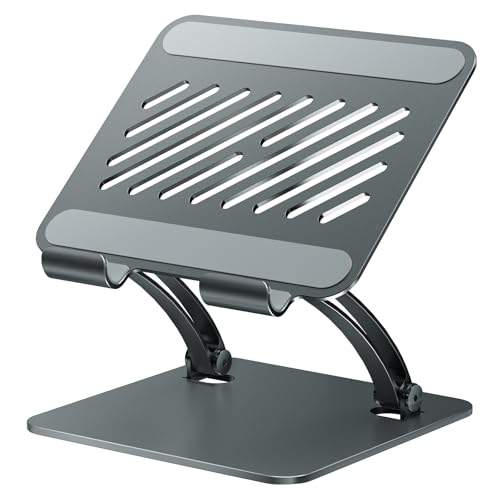
tounee Tablet Holder Stand, Dual Rod Adjustable Aluminum Desktop Stand, Compatible with 4.7-16.9" iPads, Surface Tablets, Portable Monitors, Kindle & More (Gray)
As an Amazon Associate we earn from qualifying purchases. Product prices and availability are accurate as of the date/time indicated.
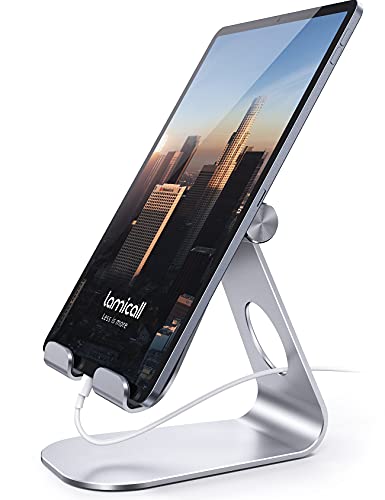
Lamicall iPad Stand Adjustable Tablet Holder, Sturdy Aluminum, Multi-Angle | Dock Stand for 4-13" iPad Pro Air Mini Kindle Tab Switch, All Aluminum Metal, Multi-Angle, Sturdy, Office Desk Accessories
As an Amazon Associate we earn from qualifying purchases. Product prices and availability are accurate as of the date/time indicated.
Top Budget Tablet Stands for Desk Reviewed
Lamicall Tablet Stand
The Lamicall Tablet Stand is a fixed aluminium stand for tablets from 4 to 13 inches, with a fixed angle of about 65 degrees, and a weight of about 0.6 pounds. It has a simple, minimalist design, with a non-slip base and a hook that holds your tablet securely. It is a good choice if you want a reliable, affordable tablet stand for your desk, with a stable design and a clean look. It is popular with iPad users who want a stand that just works.
UGREEN Tablet Stand Holder
The UGREEN Tablet Stand Holder is an adjustable aluminium stand for tablets from 4 to 12.9 inches, with an adjustable angle from 30 to 80 degrees, and a weight of about 0.7 pounds. It has a sturdy, foldable design, with a non-slip base, and it is a good choice if you want a versatile, adjustable stand for your desk, with a good balance of stability and flexibility. It is a practical option for users who use a tablet for different tasks.
OMOTON Tablet Stand Adjustable
The OMOTON Tablet Stand Adjustable is an adjustable aluminium stand for tablets from 4 to 13 inches, with an adjustable angle from 30 to 80 degrees, and a weight of about 0.6 pounds. It has a simple, durable design, with a non-slip base, and it is a good choice if you want a cheap, reliable adjustable stand for your desk. It is popular with students and with home office workers who want a stand that is easy to use and easy to store.
AboveTEK Aluminum Tablet Stand
The AboveTEK Aluminum Tablet Stand is an adjustable aluminium stand for tablets from 4 to 13 inches, with an adjustable angle from 30 to 70 degrees, and a weight of about 0.8 pounds. It has a sturdy, heavy base, with a non-slip design, and it is a good choice if you want a stable, premium-feeling stand for your desk, with a good weight that prevents tipping. It is a practical option for users who want a stand that is very stable.
Lisen Tablet Stand Foldable
The Lisen Tablet Stand Foldable is an adjustable aluminium stand for tablets from 4 to 13 inches, with an adjustable angle from 30 to 85 degrees, and a weight of about 0.5 pounds. It has a foldable design, so it is easy to carry in a bag, and it is a good choice if you want a portable, adjustable stand for your desk and for travel. It is a practical option for students who move between a desk, a library, and a classroom.
Nulaxy C3 Tablet Stand
The Nulaxy C3 Tablet Stand is an adjustable aluminium stand for tablets from 4 to 13 inches, with an adjustable angle from 30 to 80 degrees, and a weight of about 0.6 pounds. It has a simple, durable design, with a non-slip base, and it is a good choice if you want an affordable, reliable adjustable stand for your desk. It is popular with users who want a stand that is easy to use and easy to adjust.
Buying Guide: How to Choose the Best Budget Tablet Stand for Desk
Start with compatibility and size. Check the size of your tablet, including whether it has a case, and choose a stand that fits it. Most budget tablet stands fit tablets from 4 to 13 inches, which covers iPad, iPad Air, iPad Pro 11 and 12.9, Samsung Galaxy Tab, and Microsoft Surface. A stand with a wide hook, about 0.5 inches, is better if you use a thick case, while a stand with a narrow hook is better if you use a tablet without a case. Measure your tablet with its case before you buy a stand.
Next, check adjustability and angle. Look for a stand with an adjustable angle from 30 to 80 degrees, so you can use it for reading at a low angle, for typing at a medium angle, and for watching videos at a high angle. A stand with a fixed angle of about 65 degrees is a good choice if you mainly watch videos or make video calls, but it is less versatile. A stand that also adjusts height is useful, because it raises your tablet to eye level, but it is usually more expensive. Choose a stand that matches how you use your tablet most.
Check stability and material. Look for a stand made from aluminium, with a heavy base and a non-slip pad, so it does not tip over when you tap your tablet. A stand that weighs at least 0.5 pounds is usually stable enough for a tablet, while a stand that is too light may tip over. A stand with a rubber pad on the base and on the hook prevents scratches and keeps your tablet in place. Avoid a stand made from thin plastic, because it can bend or break with a heavy tablet.
Consider portability and desk space. A stand that folds flat is a good choice if you travel or if you have a small desk, because it takes up less space when not in use. A stand that is fixed and heavy is better if you leave it on your desk all the time, because it is more stable. Check the footprint of the stand, usually about 5 by 6 inches, and make sure it fits on your desk with your keyboard, mouse, and other accessories. A stand with a cable hole is useful, because it lets you charge your tablet while it is on the stand.
Finally, set a realistic budget. Budget tablet stands for desk typically cost $12 to $30, depending on brand and features. A fixed stand from $15 to $20, such as the Lamicall, offers excellent value for a simple, stable stand. An adjustable stand from $12 to $25, such as the OMOTON, UGREEN, Lisen, or Nulaxy, offers the best balance of price and versatility. A premium adjustable stand from $20 to $30, such as the AboveTEK, is worth it if you want a heavier, more stable stand. Do not buy a stand based only on price. Choose one that fits your tablet, is stable, and adjusts to the angle you need.
How to Use a Tablet Stand on Your Desk
Place the stand on a flat, stable surface on your desk, with the hook facing you, and place your tablet in the stand, with the bottom edge in the hook. Adjust the angle so your tablet is at eye level, about an arm’s length away, and plug in a charging cable if needed. Use a Bluetooth keyboard and mouse for typing, or a stylus for drawing, and take breaks every 30 to 60 minutes to stretch your neck and shoulders. Clean the stand regularly with a damp cloth, and keep it away from water.
Frequently Asked Questions
What is the best tablet stand for an iPad?
For an iPad, the Lamicall Tablet Stand is a good choice if you want a simple, stable stand, while the UGREEN Tablet Stand is a better choice if you want an adjustable stand. Both stands fit iPad, iPad Air, and iPad Pro 11 and 12.9, with or without a case, and both are made from aluminium with a non-slip base. Choose a fixed stand if you mainly watch videos, and an adjustable stand if you use your iPad for different tasks, such as reading, drawing, and video calls.
Can I use a tablet stand with a case on?
Yes, you can use a tablet stand with a case on, as long as the stand’s hook is wide enough to fit your tablet with its case. Most budget tablet stands have a hook that is about 0.5 inches wide, which fits most cases, including Apple Smart Folio and Samsung Book Cover. A thick, rugged case may not fit in a stand with a narrow hook, so check the hook width before you buy a stand. If your case is very thick, choose a stand with an adjustable hook or a wider base.
How do I stop my tablet stand from tipping over?
To stop your tablet stand from tipping over, choose a stand made from aluminium, with a heavy base and a non-slip pad, and place it on a flat, stable surface. Make sure your tablet is centred in the stand, with the bottom edge in the hook, and do not tap the top of your tablet too hard. A stand with a wider base is more stable than a stand with a narrow base, and a stand that weighs at least 0.5 pounds is usually stable enough for a tablet. Avoid a stand made from thin plastic, because it can bend and tip over.
Is a tablet stand good for video calls?
Yes, a tablet stand is good for video calls, because it holds your tablet steady at eye level, so your face is centred in the frame, and it lets you use your hands for notes or for a keyboard. A stand with an adjustable angle is best for video calls, because you can adjust it so your camera is at eye level, not looking up at your chin. Place your tablet about an arm’s length away, with good lighting in front of you, and test your angle before a call. A stand is much better than holding your tablet or propping it against a book for video calls.
Related guides
- Best Console Mouse for Office Gamers in 2026: Best Console Mouse for Office Gamers
- Best Durable Network Switch Long Term in 2026: Best Durable Network Switch Long Term, Durable Network Switches, and Best Long Term Switches
- Best Wireless Charger vs Cable Charger for Office Desks in 2026: 6 Best Wireless Charger vs Cable Charger for Office Desks Picks, Chargers, and Easy Use
- Best Durable Office Headset Long Use in 2026: Jabra Evolve2, Poly Voyager, Logitech Zone, EPOS, and Yealink Compared for Replaceable Ear Cushions, Boom Arms That Survive, All-Day Comfort, and a Headset That Is Still Working in Year Four
More from Amazon
Programs that pair well with the guide above. Offers and eligibility are set by Amazon and may change.
Free shipping on eligible items, Prime Video and more. Eligible new members can start with a free trial.
Start a Prime free trialAd-free music streaming. Eligible new subscribers can start with a free trial.
Try Music Unlimited freeA Prime membership for ages 18-24 with a trial period. Eligibility is set by Amazon.
See Prime for Young AdultsAudiobooks and podcasts to listen to on the go. Eligible new members can start with a free trial.
Try Audible freeAs an Amazon Associate we earn from qualifying purchases.

Write Your Review
No reviews yet. Be the first to share your experience!