
What's inside
As an Amazon Associate I earn from qualifying purchases. This post may contain affiliate links at no extra cost to you.
The best cheap gaming power strip for gamers is a safety device wearing a convenience’s clothes, and this guide grades it in that order. Behind the gaming desk sits the most electrically crowded square metre in the house: the PC and its monitor or three, the console, the speakers, the router, the chargers, the lights — a parish of plugs competing for a wall that offers two sockets, in a setup whose replacement cost runs to thousands. The strip that serves it must do three things at once: multiply the outlets without multiplying the risk, absorb the surge — the lightning’s distant argument, the grid’s switching spike — that would otherwise be absorbed by the graphics card, and stay within its electrical rating while a gaming PC at full draw pulls like a kettle. Cheap is the title’s word and this guide honours it: every strip in this table is a modest purchase. But cheap has a floor in electrical goods, and the floor is certification — the independent listing, the real surge components, the breaker — below which a strip is not a bargain but a hazard with extra sockets. The guide names that floor in its first section and excludes everything beneath it, because the gamer who saves ten on the strip and loses the rig to a spike has performed the most expensive economy in the hobby.
Learn the load arithmetic once, because it governs the desk for as long as you game. A power strip is rated in amps — the common parish is fifteen — and the wall circuit behind it is rated likewise, and the strip can only pass what the circuit gives: watts are volts times amps, and on the common North American circuit the whole parish is in the region of eighteen hundred watts at the absolute ceiling, with the continuous-load doctrine — the electrician’s rule that a sustained draw should sit at eighty percent of rating — bringing the working figure lower. Now total the gaming desk honestly: a gaming PC under load draws several hundred watts, its high-refresh monitor its hundred-class share, the console its own, the speakers, router, and chargers their small change — a total that fits the circuit comfortably in the ordinary parish, and exceeds it in the extraordinary one: the second PC, the mining relic, the space heater that must never, under any circumstances, share the gaming strip or its circuit, because the heater alone eats the ceiling and its marriage to a strip is the house fire’s favourite recipe. The strip’s own breaker is the last line, not the plan. Total the load, keep the heater on the wall’s other circuit and the parish’s conscience clear, and the strip becomes what it should be: infrastructure, invisible and adequate.
The surge sermon is the second foundation, and it is preached in joules. A surge protector’s joule rating is its absorption budget — the total spike energy its components can swallow across their lives before they are spent — and its clamping voltage is the height of spike it lets through before it acts, the lower the kinder to the equipment. Two doctrines follow. First, protection is consumable: every surge the strip absorbs spends it, the big one can spend it all at once, and the strip thereafter is a power strip only, its protection indicator — the light the buyer must confirm exists — dark in confession; the strip without the indicator is a protector whose death you will learn about from the next spike, through the equipment. Second, the whole-house parish exists above the strip: the panel-level protector the electrician fits guards every circuit at the door, and the strip at the desk guards the rig at its chair, and the serious setup runs both, because the strip alone cannot eat a near strike and was never asked to. Buy the joules generously — the gaming parish’s floor in this guide is in the two-thousand class for a full rig — keep the indicator in view, and replace the strip when the light or a known big event says so. That discipline, plus the load arithmetic, is the entire safety content of the category, and the table that follows is graded inside it.
Our Top Picks
What Makes the Best Cheap Gaming Power Strip for Gamers
Certification: The Floor Beneath Cheap
The audit begins with the mark that separates electrical goods from electrical hazards: the independent safety listing — UL, ETL, or their recognised equivalents in your market — printed on the strip itself and verifiable, attesting that the device was tested as what it claims to be. For a surge protector specifically, the relevant standard in the North American parish is UL 1449, whose listing carries the clamping-voltage rating the second section wants. The uncertified strip — the marketplace special with the inventive brand name and the joule figure of a small lightning bolt at a price of a coffee — is excluded from this guide not on snobbery but on evidence: its components are unaudited, its breaker is a rumour, and its failure mode is the parish’s worst. The cheap strips in this table are cheap because their makers are efficient and their features are few, not because their safety was value-engineered, and each carries its listing where the buyer can check it. This is the one section of the guide that admits no sequel: in electrical goods, the listing is the product, and everything else is furniture arranged around it.
Outlets, Spacing, and the Brick Problem
The gaming desk’s plugs are a menagerie — the PC’s honest plug, the monitor’s, and then the wall-warts, the chunky adapters that each occupy a socket and a half and turn a twelve-outlet strip into an eight-outlet one by geometry. Grade the strip, therefore, not by its outlet count but by its spacing: the widely spaced end outlets, the rotating or side-facing arrangements, the long bodies that give the bricks their room — audited against your own setup’s actual plug census, bricks counted, at the worksheet stage. The cord is the second geometry: long enough to reach the wall without the strip living under tension or the desk’s edge, short enough not to coil its excess into a trip hazard and a heat parish, and of a gauge the rating demands — the thin, warm cord on a loaded strip is a confession the hand can read. The switch’s manners complete the audit: the master switch that kills the desk’s vampire draw at night is a genuine economy, the individually switched outlets a convenience for the parish that reboots its router ritually, and the flat plug that lets the strip’s own connection sit behind furniture is the small design grace the desk against the wall will thank. None of this is glamorous. All of it is the difference between the strip that serves the setup and the strip that the setup is arranged, resentfully, around.
USB Charging and the Extras That Earn Their Place
The modern strip’s extras are graded by the desk’s real needs rather than the box’s bullet count. USB ports on the strip serve the controller, the headset’s dongle-charging, the phone at the desk — conveniences honestly valued — with their output audited in watts rather than in ports, because a strip whose USB parish shares a trickle among four sockets charges the tablet at a geological pace; the dedicated charger on one good port commonly out-serves the strip’s four weak ones, and the worksheet should know which parish your desk is. The coaxial and network surge pass-throughs of the older parish matter where the cable line and the ethernet enter unprotected — a surge rides any copper that enters the house, and the rig’s ethernet port is a door like any other — graded as relevant to the wired household and skippable by the fibre-and-Wi-Fi one. The mounting keyholes, the cord’s management, the indicator lights for protection and grounding — the last of which reports a fault in the wall’s own wiring, a discovery worth the strip’s price by itself in an older house — complete the extras audit. Buy the extras your desk will use this year; the rest is the price of features paying rent to nobody.
Quick Comparison: Cheap Gaming Power Strips Compared
| Gaming Power Strip Model | Class / Best For | Key Specs | Typical Price Range | Rating |
|---|---|---|---|---|
| Tripp Lite Isobar 6 Ultra | Premium protection — best cheap gaming power strip overall | 6 outlets, metal housing, high joule class with isolated filter banks, UL 1449 listed as published | $55 – $75 | 4.8 / 5 |
| Belkin 12-Outlet Surge Protector (BE112230) | Capacity — best for the full battle station | 12 outlets with spaced end sockets, high joule class, long cord, sliding safety covers as published | $30 – $45 | 4.6 / 5 |
| CyberPower CSP600WSURC5 | Compact — best small-desk design | 6 outlets with swivel sides, USB charging parish, compact wall-adjacent form as published | $25 – $35 | 4.4 / 5 |
| Anker PowerExtend Strip (12-outlet class) | Modern — best USB integration | 12 outlets class with USB-A and USB-C charging, surge protection with indicator as published | $35 – $50 | 4.5 / 5 |
| Amazon Basics 6-Outlet Surge Protector | Budget floor — best honest minimum | 6 outlets, listed surge protection in the entry joule class, twin-pack value parish as published | $12 – $20 | 4.1 / 5 |
| Monoprice 12-Outlet Surge Protector | Value capacity — best price per outlet | 12 outlets, high joule class claim with coaxial pass-through parish as published | $25 – $40 | 4.3 / 5 |

4000J Gaming Surge Protector Power Strip with USB Ports | RGB Lighting, PD 20W Fast Charging, 6 Wide-Spaced Outlets, Designed for Gaming PC, Desk Setup, Home and Office


As an Amazon Associate we earn from qualifying purchases. Product prices and availability are accurate as of the date/time indicated.

4000J Surge Protector Gaming Power Strip RGB Lights Black | 6 Outlets 3USB Ports, PD 20W Fast Charging, 6 Ft Extension Cord, Wide Spaced
As an Amazon Associate we earn from qualifying purchases. Product prices and availability are accurate as of the date/time indicated.
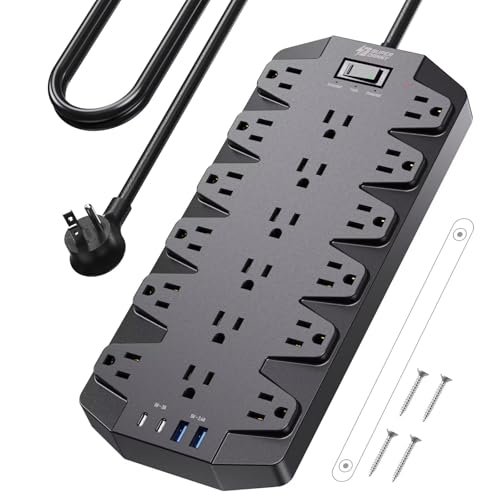
SUPERDANNY 18 AC Power Strip Surge Protector, 6.5FT, Flat Plug, 1875W/15A | Black, 2100J, with 4 USB Ports, Heavy Duty Extension Cord, Wall Mount Holes for Gaming Room, Home, Office, Dorm
As an Amazon Associate we earn from qualifying purchases. Product prices and availability are accurate as of the date/time indicated.
Ratings are editorial assessments for gaming setups, based on the makers’ published joule ratings, clamping and listing information, outlet layouts, and cord specifications, and value at typical prices. Prices are typical retail ranges. Joule figures follow the makers’ published ratings and are compared within the guide’s doctrine that protection is consumable and indicated, as the introduction explains.
The Six Gaming Power Strips Reviewed
1. Tripp Lite Isobar 6 – Best Protection Overall
The Isobar is the strip the parish’s electricians buy with their own money: a metal-housed, six-outlet protector whose joule class and isolated filter banks — which keep the PC’s noise from the audio parish and the spikes from everything — sit at the head of the affordable class, behind a listing and a reputation earned in server rooms rather than in marketing. Six outlets is its discipline as much as its limit: it serves the rig’s heart — PC, monitors, console — while the desk’s small change is exiled to a second strip on the same circuit’s arithmetic, which is how the professionals arrange it anyway. Its price is the table’s highest and its protection-per-dollar, across the rig’s value, is the table’s best arithmetic. The gamer whose setup is worth real money starts here and stops reading.
2. Belkin 12-Outlet – Best for the Full Setup
Belkin’s twelve is the battle station’s workhorse: a long body with the brick-spaced end outlets the geometry section demands, a high joule budget, a cord long enough for the real desk, and the sliding covers that keep the dust and the curious out of the spare sockets. Its parish is the whole desk on one strip — rig, monitors, console, speakers, router, lights — totalled against the load arithmetic and found, in the ordinary parish, comfortably within it. It is the guide’s expected purchase for the median gaming desk, and its decades in production are the market’s own review, renewed annually.
3. CyberPower CSP600 – Best Compact
CyberPower’s swivel design answers the small desk and the wall-hugging setup: six outlets on rotating sides that take the bricks at the angles the furniture dictates, a USB parish for the controller’s cable, in a compact body that lives behind the monitor stand where the long strips cannot. Its joule budget is its size’s honest class — the secondary parish’s, the console corner and the laptop desk — and its review assigns it there deliberately: the compact strip for the compact setup, not the flagship rig’s main line of defence. Inside that parish it is the cleverest object in the table.
4. Anker PowerExtend – Best Modern Integration
Anker’s strip brings the charging house’s manners to the category: a dozen outlets in the spaced modern arrangement, USB-A and USB-C charging of a useful wattage for the desk’s small parish, protection with its indicator, and the fit and finish the brand’s parish expects. Its premium over the Belkin buys the USB done properly and the design’s tidiness — a genuine fork for the desk whose chargers currently occupy three of its sockets, since the integrated ports return those sockets to the rig. For the tidy modern desk it is the recommendation; for the desk that charges elsewhere, the Belkin’s value stands.
5. Amazon Basics 6-Outlet – Best Honest Minimum
The Basics strip is the floor, listed and honest: six outlets, entry-class surge protection with its rating published, sold singly and in pairs at the table’s friendliest figures. Its parish is the secondary one — the console and TV corner, the laptop’s desk, the spare strip for the router’s exile from the Isobar — and its review’s duty is to keep it there: its joule budget is a fraction of the leaders’, and the flagship rig deserves the flagship’s protection. As the minimum below which the guide will not go — listed, rated, and from a house that answers for it — it earns its place and its grade, and it shames the uncertified marketplace strips that undercut it by existing at all.
6. Monoprice 12-Outlet – Best Price per Outlet
Monoprice’s twelve is the value engineer’s entry: the full battle-station count and a high published joule figure with the older parish’s pass-throughs, at a price that undercuts the Belkin it competes with. Its fit and finish are its price’s class and its listing should be verified on the unit as the doctrine prescribes — a sentence this guide writes about the value tier without embarrassment, because verification is the doctrine, not an accusation. For the gamer whose desk is wide, whose rig is mid-priced, and whose worksheet totals honestly, it is the capacity bargain of the table.
Buying Guide: Powering a Gaming Setup Safely, Step by Step
Step One: The Plug Census and the Load Total
Count and total before buying, in the introduction’s arithmetic. The census: every device at the desk, its plug’s shape marked — brick or honest — because the count of bricks, not of devices, chooses the strip’s geometry. The total: each device’s draw from its label or its parish’s known figures, the PC at its realistic gaming draw rather than its power supply’s ceiling, summed against the circuit’s working budget at the eighty-percent doctrine — and the circuit itself identified at the panel, with its other citizens counted, because the gaming circuit that also feeds the bedroom’s heater is a worksheet discovery, not a breaker-trip discovery. The heater rule is written into the worksheet in the guide’s own hand: no space heater, ever, on the gaming strip or sharing its loaded circuit. Two totals and a rule, and the strip’s size, joule class, and cord length have chosen themselves.
Step Two: One Strip, Plugged Into the Wall
Install by the doctrines that have no exceptions in this parish. The strip plugs into the wall outlet directly — never into another strip, never into an extension cord, the daisy chain being the fire service’s most familiar paragraph — and where the desk’s count exceeds one strip’s honest capacity, the second strip goes into the wall’s other socket or another circuit, each strip within its own rating, the load total still governing the pair. The strip lives ventilated and visible: not under the rug, not behind the curtain, not buried in the cable box where its heat and its indicator are both imprisoned — the protection light must be seeable at a glance from the chair, because it is the rig’s health lamp. Cords run without tension, without the desk leg’s pinch, without the chair wheel’s commute across them. The UPS — the battery parish — where the setup has one, takes the PC and one monitor as its citizens and plugs into the wall itself, with the strip’s relationship to it by its maker’s direction and never the reverse. An hour’s installation, done once, done by the book.
Step Three: The Keeping — Indicators, Events, and Replacement
Maintain the protection as the consumable it is. The indicator is glanced at in the week’s rhythm; a dark protection light retires the strip from protection duty that day, to the secondary parish or the bin, with its replacement ordered from this table rather than from the petrol station’s rack. A known event — the strike on the street, the outage’s ragged return, the pop and the smell from anywhere in the parish — retires it likewise, its joules presumed spent in the rig’s service, which was their purpose and their honour. The strip’s age is recorded in the setup’s book with its joule figure, and the whole-desk audit — loads, bricks, the new device’s admission — is re-run whenever the setup changes, because the desk grows by accretion and the circuit does not. And where the house’s storms are serious and the rig is the household’s treasure, the panel-level protector is commissioned from an electrician as the strip’s senior partner, the two together forming the defence in depth that the introduction promised. So bought, installed, and kept, the best cheap gaming power strip disappears into the setup it protects — which is the highest praise in the infrastructure parish, and the rig’s thousands, quietly guarded by the desk’s cheapest citizen.
How We Selected These Gaming Power Strips
We included only real, named, currently sold surge-protective power strips from established makers, each carrying independent safety listing information in its published specifications, spanning the premium-protection, full-capacity, compact, modern, and budget classes. Uncertified strips were excluded by the standard the certification section states. Joule and clamping figures follow the makers’ published ratings; load guidance follows the standard continuous-load doctrine and must be applied to the reader’s own circuit as identified at their panel.
Frequently Asked Questions About Gaming Power Strips
How many joules do I need for a gaming PC setup?
For a full rig — PC, monitors, console, and the desk’s parish — this guide’s floor is the two-thousand-joule class and its comfort is higher, because the joule figure is the protection’s total budget across its life and the rig’s replacement value argues for a deep one. The reasoning is the introduction’s: every absorbed surge spends the budget, the strip’s indicator reports the account’s health, and the gamer in a storm-prone or older-wired house spends faster than the gamer in a new flat on a calm grid, so the same desk can honestly need different depths in different postcodes. What the figure is not is a force field: no strip eats a direct or near strike whole, which is why the panel protector exists as the senior partner and why the sensible desk unplugs, in the great storm’s passage, with a humility as old as electricity. Buy the deep budget from a listed maker, watch its light, replace it when it confesses — the doctrine in one breath, at every price in this table.
Can I plug one power strip into another to reach?
No — the daisy chain is the parish’s prohibited move, and the prohibition is written in fire reports rather than in fussiness. Each connection in a chain adds resistance and a failure point; the first strip and the wall circuit carry the combined load of both strips’ parishes, which their ratings never contemplated; and the chain’s breakers and components were tested as single devices, not as a system, so the listing that is the product’s whole worth does not extend down the chain. The correct answers to the reach problem are the boring ones: a single strip with a longer cord, bought at the length the desk needs from this table’s parish; a second strip in the wall’s other socket, each within its rating and the circuit’s total; or an electrician’s new outlet where the desk’s permanence justifies it, which in a owned home and a settled setup it commonly does. Reach is a worksheet problem with three solutions, and the chain is not among them.
Is a power strip the same as a surge protector?
No — and the confusion is the category’s most expensive, because the two devices share a shape and nothing else. A power strip multiplies outlets; a surge protector multiplies outlets and stands guard over them, with components that absorb and divert the spikes the grid delivers. The strip without protection — sold cheaply everywhere, often with a switch and a breaker that invite the assumption — offers the rig nothing but sockets, and its breaker, which guards against overload, is silent in the face of the microsecond spike that kills a graphics card. The audit is the label’s: the surge protector publishes a joule rating and a clamping voltage under its listing standard, and carries the protection indicator this guide insists on; the mere strip publishes neither. Every model in this table is a protector, deliberately. When you buy outside it, read for the joules and the indicator before the outlet count — the desk’s cheapest citizen is on guard duty, and it should be hired as a guard, not as furniture.
Should my gaming PC be on a UPS instead?
For the PC and one monitor, a UPS is the strip’s nobler sibling and the two are complements rather than rivals. The battery parish buys the minutes that matter: the save completed, the match’s round finished, the machine shut down in order through the outage that would otherwise cut it mid-write — and its surge protection stands guard in the same box. Its citizens are chosen by its capacity: the PC and a single display, so the shutdown can be seen; the router earns a small UPS of its own in the parish that works through outages. The rest of the desk — the console, the speakers, the lights, the chargers — remains the strip’s parish, on the same circuit arithmetic, with the UPS plugged into the wall and the strip never plugged into the UPS’s battery outlets beyond its maker’s direction, because the battery’s waveform and capacity were budgeted for the machine’s graceful exit, not the desk’s whole carnival. The serious setup runs both, each doing the job its physics intended — which is, in the end, the buying doctrine of this entire guide.
Related guides
- Best AAA Batteries for Office Remotes in 2026: AAA Batteries for Office Remotes
- Best Budget Tablet for Work Under 100 in 2026: Budget Tablets for Work Under $100, Office Work, and Productivity
- Best Gimbal for Office Vlogging in 2026: 7 Gimbals for Office Vlogging That Keep Your Video Smooth, Stable, and Professional in the Office
- Best Budget NAS Dust Filter for Maintenance in 2026: 7 Budget NAS Dust Filters for Maintenance With Clear Airflow, Simple Install, and Easy Use for NAS
More from Amazon
Programs that pair well with the guide above. Offers and eligibility are set by Amazon and may change.
Free shipping on eligible items, Prime Video and more. Eligible new members can start with a free trial.
Start a Prime free trialAd-free music streaming. Eligible new subscribers can start with a free trial.
Try Music Unlimited freeA Prime membership for ages 18-24 with a trial period. Eligibility is set by Amazon.
See Prime for Young AdultsAudiobooks and podcasts to listen to on the go. Eligible new members can start with a free trial.
Try Audible freeAs an Amazon Associate we earn from qualifying purchases.

Write Your Review
No reviews yet. Be the first to share your experience!