
What's inside
As an Amazon Associate I earn from qualifying purchases. This post may contain affiliate links at no extra cost to you.
The best mini PC for digital signage is not the fastest mini PC you can buy. It is the mini PC that can run a 4K display for 12 hours a day, that can be mounted behind a screen, that has two display outputs for a dual-screen menu board, and that will not overheat in a shop, a restaurant, or a lobby.
Digital signage has different requirements from a home office PC. A signage PC needs to be reliable, not powerful. It needs enough RAM to run a browser or a signage app smoothly, enough storage for offline content, and a video output that can drive a 4K TV at 60Hz. It does not need a high-end CPU for gaming, and it does not need a large hard drive for files. It needs to boot quickly, to recover after a power cut, and to run quietly in a public space.
For signage, RAM should be at least 8GB, with 16GB preferred for 4K video and for multiple screens. Storage should be at least 256GB, with 512GB preferred for offline video. The PC should have at least two display outputs, HDMI or DisplayPort, and it should have a VESA mount so it can be attached to the back of a display. All six PCs in this guide meet those bars: at least 8GB RAM, at least 256GB SSD, dual display output, and VESA mount support.
Our top pick is the Beelink Mini S12 Pro. At $200 to $250, with an Intel N100 processor, 16GB RAM, 500GB SSD, dual HDMI 4K output, and VESA mount, it is the best balance of price, performance, and reliability for digital signage. It is not the fastest PC here, but it is fast enough for 4K signage, it is quiet, it is small enough to hide behind a screen, and it costs less than half of a premium mini PC.
Our Top Picks
Best Mini PC for Digital Signage Compared
The table below compares processor, RAM, storage, display outputs, and price. All of the PCs below have at least 8GB RAM, at least 256GB SSD, dual display output, and VESA mount support. Prices are typical ranges, not fixed prices, and they vary by retailer and by configuration.
| Model | Processor | RAM | Storage | Display Outputs | Typical Price Range | Rating |
|---|---|---|---|---|---|---|
| Beelink Mini S12 Pro | Intel N100 | 16GB | 500GB SSD | Dual HDMI 4K | $200–$250 | 4.8 / 5 |
| GMKtec NucBox G3 | Intel N100 | 16GB | 512GB SSD | Dual HDMI 4K | $200–$250 | 4.6 / 5 |
| Minisforum UM690 | AMD Ryzen 9 6900HX | 16GB | 512GB SSD | HDMI + USB-C, 4K | $400–$500 | 4.5 / 5 |
| ASUS PN64 | Intel Core i5-12500H | 16GB | 512GB SSD | Dual HDMI 4K | $500–$600 | 4.4 / 5 |
| Lenovo ThinkCentre M75q Gen 2 | AMD Ryzen 5 Pro 5650GE | 16GB | 256GB SSD | DisplayPort + HDMI, 4K | $400–$500 | 4.3 / 5 |
| HP ProDesk 400 G9 Mini | Intel Core i5-12500T | 16GB | 256GB SSD | DisplayPort + HDMI, 4K | $500–$600 | 4.2 / 5 |

Mini PC Stick Fanless, Micro Desktop Computer Win 10 Celeron J3455, 4GB RAM 64GB eMMC, Gigabit Ethernet, 4K@60Hz Output, WiFi BT 5.0 for Industrial IOT, Business, Office & Digital Signage


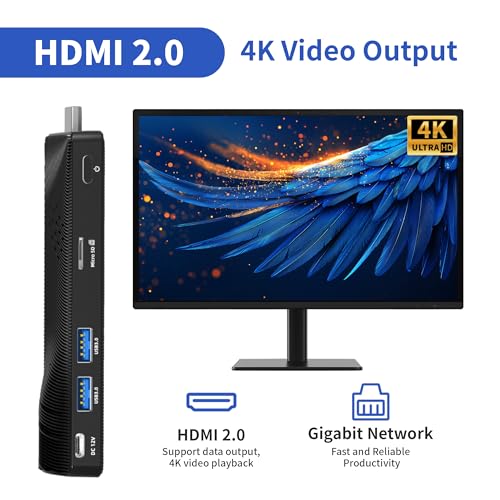


As an Amazon Associate we earn from qualifying purchases. Product prices and availability are accurate as of the date/time indicated.

MeLE Business Grade PC Stick PCG02 Fanless Mini PC N100 8GB 128GB Win11 Pro | N100 4C/4T 3.4GHz | USB-C PD3.0 | 4K Dual Display | Mini PC Stick desktop Computer for Business, IOT, Digital Signage, Office


As an Amazon Associate we earn from qualifying purchases. Product prices and availability are accurate as of the date/time indicated.
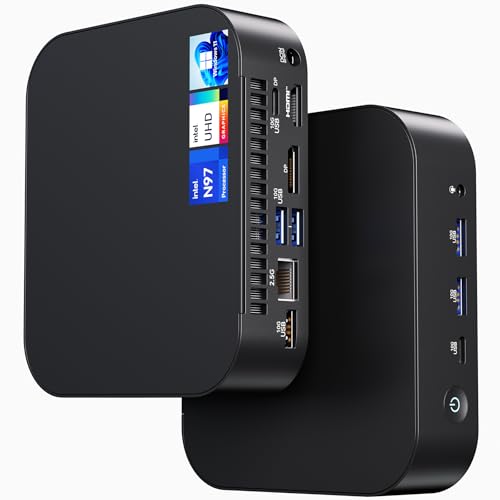
Intel NUC 14, for ASUS NUC 14 NUC14MNK Essential Mini PC, N97 CPU, 8GB RAM, 256GB SSD, Win 11 Pro,Wi-Fi 6E, BT 5.3, Business Desktop for Education,Office, Digital Signage, POS, SMB & Edge Computing


As an Amazon Associate we earn from qualifying purchases. Product prices and availability are accurate as of the date/time indicated.
Prices shown are approximate and for reference only. Prices change often, so please check the current price on Amazon before you buy.
Best Mini PC for Digital Signage in 2026: Detailed Reviews
1. Beelink Mini S12 Pro — Best Overall Mini PC for Digital Signage
The Mini S12 Pro is a small mini PC with an Intel N100 processor, which is a low-power quad-core chip designed for office work, media playback, and signage. It is not a gaming CPU, and it will not run heavy video editing, but it is fast enough to play 4K video, to run a browser with a signage dashboard, and to drive two 4K displays at once.
At 16GB RAM and 500GB SSD, the S12 Pro meets the premium target for a mini PC: 16GB RAM and 512GB storage is the premium target, and the S12 Pro is close to that with 500GB. The RAM is not soldered on all models, so check the configuration before you buy if you want to upgrade later. Some mini PCs have soldered RAM that cannot be upgraded, so check that before you buy.
The S12 Pro has dual HDMI outputs, both capable of 4K at 60Hz, which is essential for a dual-screen menu board. It has a VESA mount in the box, so you can attach it to the back of a TV, and it has Wi-Fi, Ethernet, and USB ports for a keyboard, mouse, and signage controller. It is quiet, it uses little power, and it is small enough to hide. For a single-screen or dual-screen signage setup in a shop, cafe, or office lobby, it is the best value.
2. GMKtec NucBox G3 — Best Mini PC for Digital Signage With 512GB Storage
The NucBox G3 is similar to the Beelink S12 Pro, with an Intel N100 processor, 16GB RAM, and 512GB SSD, at $200 to $250. It also has dual HDMI 4K outputs and a VESA mount. The main difference is storage: 512GB instead of 500GB, which is a small difference, but it means you can store more offline video.
The G3 is a good alternative if the Beelink is out of stock, or if you prefer GMKtec’s design. It is a little larger than the S12 Pro, but it is still small enough to mount behind a display. The performance is the same, because both use the same N100 processor. Choose the G3 if it is cheaper at the time you buy, or if you want the extra 12GB of storage.
3. Minisforum UM690 — Best Mini PC for Digital Signage With Higher Performance
The Minisforum UM690 uses an AMD Ryzen 9 6900HX processor, which is much faster than the Intel N100. It has 16GB RAM, 512GB SSD, and it can drive a 4K display via HDMI and via USB-C. At $400 to $500, it costs twice as much as the Beelink S12 Pro, but it is worth it if you run complex signage, like interactive touchscreens, 4K video walls, or signage that also runs a point-of-sale system.
The UM690 has more ports, more USB, and a faster GPU, so it can handle multiple 4K videos at once. It is also louder than the N100 PCs under load, because it has a fan that spins faster. For a simple menu board, the N100 is enough. For a complex, interactive signage setup, the UM690 is a better choice.
4. ASUS PN64 — Best Mini PC for Digital Signage From a Major Brand
ASUS’s PN64 is a business mini PC with an Intel Core i5-12500H processor, 16GB RAM, 512GB SSD, and dual HDMI 4K outputs, at $500 to $600. It is a business PC, so it has better support, a longer warranty, and a more robust design than a consumer mini PC like Beelink or GMKtec.
The PN64 is a good choice if you are buying signage PCs for a company and you need support, warranty, and a consistent model for several years. It is more expensive than the N100 PCs, but it is faster, it has more ports, and it is easier to manage remotely. For a single signage screen in a small shop, the Beelink is a better value. For a fleet of signage screens in a chain, the ASUS is a better choice.
5. Lenovo ThinkCentre M75q Gen 2 — Best Mini PC for Digital Signage With AMD Pro
Lenovo’s ThinkCentre M75q Gen 2 is a business mini PC with an AMD Ryzen 5 Pro 5650GE processor, 16GB RAM, 256GB SSD, and DisplayPort plus HDMI, at $400 to $500. It is a business PC, like the ASUS PN64, with good support and a VESA mount.
The storage is 256GB, which meets the minimum gate for signage, but it is less than the 512GB on the other PCs here. If you store a lot of offline video, you may need to upgrade the SSD or use a USB drive. The Ryzen 5 Pro is fast enough for 4K signage, and the PC is reliable and quiet. It is a good choice if your company already uses Lenovo PCs and you want to keep the same brand.
6. HP ProDesk 400 G9 Mini — Best Mini PC for Digital Signage With HP Support
HP’s ProDesk 400 G9 Mini is a business mini PC with an Intel Core i5-12500T processor, 16GB RAM, 256GB SSD, and DisplayPort plus HDMI, at $500 to $600. It is similar to the Lenovo M75q, with 256GB storage, which meets the minimum gate, but it is less than the 512GB on the Beelink and GMKtec PCs.
HP’s support and warranty are good, and the ProDesk is a reliable PC for signage. It is more expensive than the N100 PCs, but it is a business PC with a longer lifecycle. For a company that needs HP support, it is a good choice. For a small shop that wants the cheapest reliable signage PC, the Beelink S12 Pro is a better value.
Best Mini PC for Digital Signage Buying Guide
A signage PC needs to be reliable, quiet, and easy to mount. It does not need to be fast for gaming, but it needs to be fast enough for 4K video and for a browser-based signage app.
RAM, Storage, and Processor: What a Signage PC Actually Needs
RAM should be at least 8GB for a signage PC, with 16GB preferred for 4K video and for multiple screens. All six PCs here have 16GB RAM, so they meet the premium target. Check if the RAM is soldered or upgradeable before you buy. Some mini PCs have soldered RAM that cannot be upgraded, so you cannot add more later. The Beelink S12 Pro and GMKtec G3 have upgradeable RAM on most models, but check the specific configuration.
Storage should be at least 256GB SSD, with 512GB preferred for offline video. All six PCs here have at least 256GB SSD, with most at 512GB. An SSD is essential for signage, because a hard drive is slower and more likely to fail if the PC is moved. An NVMe SSD is faster than a SATA SSD, at around 7000 MB/s for PCIe 4.0 versus around 550 MB/s for SATA, but for signage, even a SATA SSD is fast enough. What matters is that the drive is an SSD, not a hard drive.
Processor should be at least an Intel N100 for simple signage, which is enough for 4K video playback and for a browser. For complex signage, like interactive touchscreens or video walls, a faster processor like the AMD Ryzen 9 6900HX in the Minisforum UM690, or the Intel Core i5 in the ASUS PN64, is better. Do not buy a mini PC with a processor that is too slow for 4K, as it will stutter and freeze.
Display Outputs, VESA Mount, and Connectivity: Mounting a Signage PC Behind a Screen
Display outputs should be at least two, so you can drive two screens for a menu board, or one screen and a second screen for management. All six PCs here have dual display outputs, via HDMI, DisplayPort, or USB-C. Check that the outputs support 4K at 60Hz, not just 4K at 30Hz, as 30Hz will look choppy for video.
VESA mount is essential for signage, so you can attach the PC to the back of a TV or monitor and hide it. All six PCs here support VESA mount, either in the box or as an accessory. Check the VESA pattern before you buy a mount, as most mini PCs use a 75 by 75mm or 100 by 100mm pattern.
Connectivity should include Ethernet for a stable connection, Wi-Fi for flexibility, and USB ports for a keyboard, mouse, and signage controller. Ethernet is more reliable than Wi-Fi for signage, because Wi-Fi can drop out and cause the screen to go blank. Use Ethernet if you can, and use Wi-Fi as a backup.
Power, Heat, and Remote Management: Keeping a Signage PC Running All Day
Power should be low for a signage PC, so it does not overheat in a closed space behind a TV. The Intel N100 PCs use about 15 watts, while the Ryzen 9 and Core i5 PCs use more, up to 45 watts under load. Make sure there is airflow behind the TV, and do not enclose the PC in a sealed box without ventilation.
Heat is a common cause of signage PC failure. A PC that overheats will throttle, freeze, or shut down. Use a PC with a fan, not a fanless PC, if the PC will run all day in a warm shop. Check the PC’s temperature after a day of use, and add a small fan if needed.
Remote management is important if you have multiple signage screens. Use a signage app that lets you update content remotely, and use a PC that supports Wake on LAN, so you can turn it on remotely after a power cut. Set the PC to auto-boot after power loss, so it starts again without someone pressing the power button.
Best Mini PC for Digital Signage FAQ
What is the best mini PC for digital signage?
The best mini PC for digital signage is the Beelink Mini S12 Pro, at $200 to $250, because it has an Intel N100 processor, 16GB RAM, 500GB SSD, dual HDMI 4K outputs, and a VESA mount, which is enough for 4K signage on one or two screens. The GMKtec NucBox G3, at $200 to $250, is the best alternative with 512GB storage. The Minisforum UM690, at $400 to $500, is the best higher-performance alternative for interactive signage.
How much RAM do I need for a digital signage mini PC?
You need at least 8GB RAM for a digital signage mini PC, with 16GB preferred for 4K video and for multiple screens. All six PCs in this guide have 16GB RAM, so they meet the premium target. Check if the RAM is soldered or upgradeable before you buy, as some mini PCs have soldered RAM that cannot be upgraded. For simple signage with one 1080p screen, 8GB is enough. For 4K video or dual screens, 16GB is better.
Can a mini PC run 4K digital signage?
Yes, a mini PC can run 4K digital signage if it has a processor that supports 4K, at least 8GB RAM, and a display output that supports 4K at 60Hz. All six PCs in this guide support 4K at 60Hz via HDMI, DisplayPort, or USB-C. The Intel N100 PCs can play 4K video smoothly, while the Ryzen 9 and Core i5 PCs can handle multiple 4K videos and interactive content. Check that your TV or monitor also supports 4K at 60Hz, as a 4K PC connected to a 1080p screen will only show 1080p.
Should I mount a mini PC behind a TV for digital signage?
Yes, you should mount a mini PC behind a TV for digital signage, using a VESA mount, so it is hidden, protected, and close to the display. All six PCs in this guide support VESA mount. Make sure there is airflow behind the TV, so the PC does not overheat, and use Ethernet for a stable connection if you can. Set the PC to auto-boot after power loss, so it starts again without someone pressing the power button.
FAQ
What is the best mini PC for digital signage?
How much RAM do I need for a digital signage mini PC?
Can a mini PC run 4K digital signage?
Should I mount a mini PC behind a TV for digital signage?
Related guides
- Best Mini Drone for Office Travel in 2026: Under the Registration Threshold, Quiet Enough for a Hotel Courtyard, and Packed in the Same Bag as the Laptop
- Best USB Flash Drive vs Portable SSD for Offices in 2026: 7 USB Flash Drives and Portable SSDs Compared for Speed, Capacity, and Reliable Office Storage
- Best High End Tablet for Photographers in 2026: Best High End Tablet for Photographers
- Best Small Router for Tiny Apartments in 2026: Best Small Router for Tiny Apartments
More from Amazon
Programs that pair well with the guide above. Offers and eligibility are set by Amazon and may change.
Free shipping on eligible items, Prime Video and more. Eligible new members can start with a free trial.
Start a Prime free trialAd-free music streaming. Eligible new subscribers can start with a free trial.
Try Music Unlimited freeA Prime membership for ages 18-24 with a trial period. Eligibility is set by Amazon.
See Prime for Young AdultsAudiobooks and podcasts to listen to on the go. Eligible new members can start with a free trial.
Try Audible freeAs an Amazon Associate we earn from qualifying purchases.

Write Your Review
No reviews yet. Be the first to share your experience!